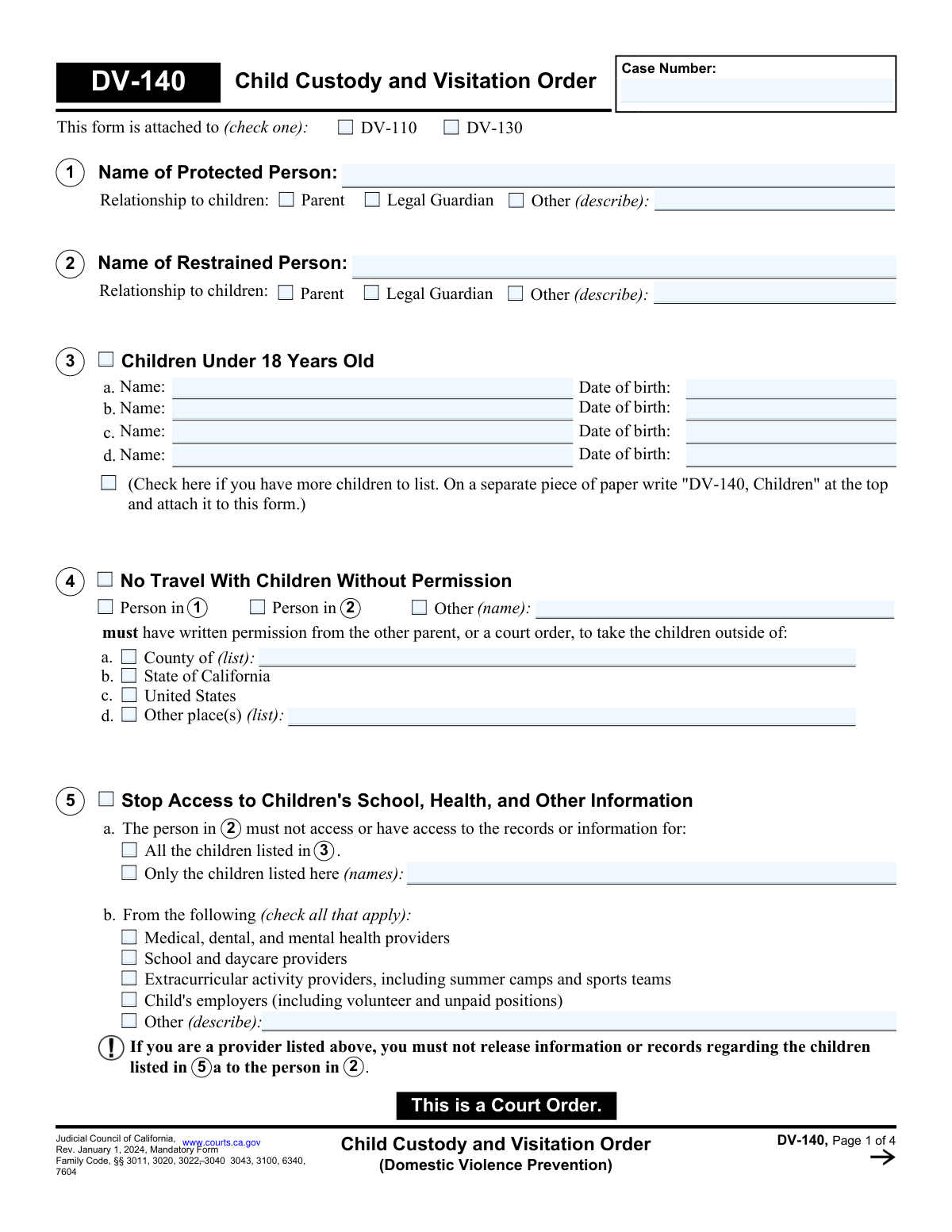
Yes! You can use AI to fill out Form DV-140, Child Custody and Visitation Order (Domestic Violence Prevention)
Form DV-140, the Child Custody and Visitation Order, is a mandatory Judicial Council of California form used in domestic violence prevention cases to establish legally binding orders for child custody and visitation. It specifies legal and physical custody, visitation schedules (including supervised or unsupervised visits), and restrictions on travel or access to children's information. Today, this form can be filled out quickly and accurately using AI-powered services like Instafill.ai, which can also convert non-fillable PDF versions into interactive fillable forms.
Our AI automatically handles information lookup, data retrieval, formatting, and form filling.
It takes less than a minute to fill out DV-140 using our AI form filling.
Securely upload your data. Information is encrypted in transit and deleted immediately after the form is filled out.
Form specifications
| Form name: | Form DV-140, Child Custody and Visitation Order (Domestic Violence Prevention) |
| Number of fields: | 170 |
| Number of pages: | 4 |
| Language: | English |
More forms in Child custody forms
Instafill Demo: How to fill out PDF forms in seconds with AI
How to Fill Out DV-140 Online for Free in 2026
Are you looking to fill out a DV-140 form online quickly and accurately? Instafill.ai offers the #1 AI-powered PDF filling software of 2026, allowing you to complete your DV-140 form in just 37 seconds or less.
Follow these steps to fill out your DV-140 form online using Instafill.ai:
- 1 Navigate to an AI-powered form-filling service like Instafill.ai and upload or select the DV-140 form.
- 2 Provide the case number and the full names and relationships of the protected and restrained persons.
- 3 Enter the names and birth dates for all children under 18 who are subject to the order.
- 4 Specify the requested orders for legal custody (decision-making) and physical custody (where the child lives), indicating if it's sole or joint.
- 5 Detail the visitation plan, including whether visits are supervised or unsupervised, the schedule, and arrangements for child exchanges.
- 6 Indicate any other requested orders, such as travel restrictions or limitations on accessing the children's school or health records.
- 7 Review the completed form for accuracy, then download, print, and file it with the court as required.
Our AI-powered system ensures each field is filled out correctly, reducing errors and saving you time.
Why Choose Instafill.ai for Your Fillable DV-140 Form?
Speed
Complete your DV-140 in as little as 37 seconds.
Up-to-Date
Always use the latest 2026 DV-140 form version.
Cost-effective
No need to hire expensive lawyers.
Accuracy
Our AI performs 10 compliance checks to ensure your form is error-free.
Security
Your personal information is protected with bank-level encryption.
Frequently Asked Questions About Form DV-140
Form DV-140, the Child Custody and Visitation Order, is a mandatory California court form used to establish custody and visitation rules in a domestic violence case. It is not a standalone document and must be attached to either a Temporary Restraining Order (DV-110) or a Restraining Order After Hearing (DV-130).
The 'Protected Person' (item 1) is the individual seeking protection from domestic violence, who is also a parent or guardian of the children. The 'Restrained Person' (item 2) is the person whose actions are being restricted by the court order.
Legal custody (7a) refers to the right to make important decisions about a child's health, education, and welfare. Physical custody (7b) determines where the child lives on a regular basis.
Yes, in Section 4, you can ask the court to order that a parent must get written permission from the other parent or a court order before taking the children outside of a specific county, the state of California, or the United States.
Supervised visitation means that a parent's time with their children must be monitored by another adult, who can be a professional provider or a nonprofessional person approved by the court. This is ordered to ensure the children's safety during visits.
If you need to list more than four children, check the box in Section 3. Then, on a separate piece of paper, write 'DV-140, Children' at the top, list the additional children's names and birthdates, and attach it to the form.
Yes, Section 5 of the form allows you to ask the judge to block the restrained person's access to the children's school, medical, dental, and other important records and information.
An order for no visitation on a temporary restraining order (attached to form DV-110) is not permanent; it is only in effect until your court hearing. You must attend your court hearing to present your case if you want the judge to consider allowing visitation.
Violating a court order, including the custody and visitation terms on Form DV-140, is a serious offense. The person who violates the order may be subject to civil or criminal penalties, including fines and jail time.
Section 12 provides a detailed, day-by-day schedule for visitation, including start and end times, who is responsible for transportation, and the location for drop-offs and pick-ups. This ensures all parties have a clear understanding of the court-ordered visitation plan.
Yes, services like Instafill.ai use AI to help you accurately auto-fill form fields, which can save time and reduce errors. This is especially helpful for complex legal forms with many repeating details.
You can upload the DV-140 PDF to the Instafill.ai platform. The service will make the document interactive, and its AI can help you populate the fields with your information before you print or save the completed form.
If you have a flat, non-fillable PDF, you can use a service like Instafill.ai. It can convert non-fillable PDFs into interactive, fillable forms that you can easily complete on your computer.
Compliance DV-140
Validation Checks by Instafill.ai
1
Exclusive Attached Form Selection
This validation ensures that exactly one checkbox is selected under the 'This form is attached to' section, either DV-110 or DV-130. This is critical because the context of the order (temporary vs. permanent) depends on which form it accompanies. If zero or both are checked, the submission should be flagged for manual review to clarify the order's legal basis.
2
Child Age Verification
This check validates that the 'Date of birth' for each child listed in Section 3 corresponds to an age of less than 18 years. The DV-140 form is specifically for orders concerning minor children. If a date of birth indicates an individual is 18 or older, an error should be triggered as the court's jurisdiction under these statutes may not apply.
3
Mutually Exclusive Visitation Orders
This validation enforces logical consistency between visitation sections. If Section 8 ('must have no visitation') is checked, then Sections 9 ('Supervised Visitation'), 11 ('Visits With No Supervision'), and 12 ('Visitation Schedule') must be disabled or cleared. Granting visitation in one section while completely denying it in another creates a legally unenforceable and contradictory order.
4
Supervised Fee Percentage Summation
For Sections 9 (Supervised Visitation) and 10 (Supervised Exchanges), if a 'Professional' supervisor is selected, this check ensures the fee percentages assigned to 'Person in 1', 'Person in 2', and 'Other' sum to exactly 100%. This prevents financial ambiguity and future disputes over payment responsibility. A failure would prompt the user to correct the percentages before submission.
5
Conditional Requirement for 'Other' Descriptions
This check applies to multiple sections (e.g., 1, 2, 7, 9, 10, 12, 14) where an 'Other (describe)' option exists. If the 'Other' checkbox is selected, the corresponding text field must be populated with a description. This ensures that orders are not left vague and that all necessary details for an alternative arrangement are captured, preventing ambiguity and enforcement issues.
6
Case Number Consistency Across Pages
This validation verifies that the 'Case Number' field, which appears on every page of the form, is not only present but also contains the exact same value on all pages. This is crucial for ensuring all pages are correctly associated with the same legal case when filed and processed. A mismatch could lead to pages being lost or filed incorrectly.
7
Judicial Justification for Custody to Restrained Person
This check ensures that if 'Sole to Person in 2' or 'Jointly' custody is granted in Section 7a or 7b, then the judge's reasoning in Section 7c is completed. California law requires the court to state its reasons for granting custody to a restrained person in a domestic violence case. Failure to provide this justification could invalidate the custody order.
8
Visitation Schedule Time Logic
In the 'Visitation Schedule' (Section 12), for any day where both a 'Start' and 'End' time are entered, this validation confirms the 'End' time is chronologically later than the 'Start' time. This prevents illogical or impossible schedules from being entered. An error would require the user to correct the times to create a valid interval.
9
Child Name Cross-Reference for Access Restriction
If 'Only the children listed here' is selected in Section 5a (Stop Access to Information), this check verifies that the names entered in the text box are a valid subset of the children's names listed in Section 3. This prevents orders from being issued against children not party to the action or due to typographical errors. An unrecognized name would trigger a warning.
10
Travel Restriction Completeness
This validation ensures that if Section 4 ('No Travel With Children') is activated, the order is complete and enforceable. It checks that at least one person to be restricted ('Person in 1', 'Person in 2', or 'Other') is selected AND at least one geographical boundary ('County', 'State', 'US', or 'Other') is specified. An incomplete selection would render the restriction void.
11
Unsupervised Visitation Justification Requirement
This check confirms that if Section 11 ('Visits With No Supervision') is used to grant unsupervised visits to 'Person in 2', the judge's reasoning in 11a is provided. Given the context of a domestic violence prevention order, granting unsupervised contact is a significant decision that requires explicit justification on the record. The absence of a reason would flag the form for review.
12
Habitual Residence Selection Completeness
This validation ensures that in Section 14, exactly one option for the 'Country of Habitual Residence' is selected. Furthermore, if the 'Other (specify)' option is chosen, the corresponding text field must contain a country name. This information is vital for determining international custody jurisdiction under the UCCJEA and Hague Convention.
13
Visitation Schedule Frequency and Start Date
This check validates that in Section 12, a frequency ('Every week', 'Every other week', or 'Other') is selected and that the 'Start date for visits' is a valid, future-oriented date. An order cannot be implemented without a clear frequency and start date. The start date should not be in the past, as this would be illogical.
14
Supervised Visitation Schedule Specificity
In Section 9c, this check ensures that if a schedule option is chosen, its required parameters are filled. If 'Once a week' or 'Twice a week' is checked, the 'number of hours' field must contain a positive number. If 'Other schedule (describe)' is checked, the description field must not be empty, ensuring the visitation terms are clearly defined.
Common Mistakes in Completing DV-140
People often fill in the case number on the first page but forget it on subsequent pages, or they enter it incorrectly. This happens due to oversight when dealing with multi-page documents. An incorrect or missing case number can cause the court clerk to reject the filing or misfile the document, leading to significant delays and impacting the enforceability of the order. To avoid this, carefully enter the exact case number in the designated field at the top of every single page before submission.
In Section 12, filers often use vague terms like 'alternating weekends' without specifying exact start/end times, pickup/drop-off locations, or who is responsible for transportation. This ambiguity creates confusion and is a primary source of future conflict, often requiring parties to return to court for clarification. To prevent this, clearly define every detail: day, start time (e.g., 'Friday at 6:00 PM'), end time (e.g., 'Sunday at 6:00 PM'), exact exchange locations, and the person responsible for transport. An AI-powered tool like Instafill.ai can help by prompting for all necessary details to ensure the schedule is complete and enforceable.
The form uses 'Person in 1' (Protected Person) and 'Person in 2' (Restrained Person) as shorthand, which can be confusing. Filers may accidentally check the wrong box in critical sections like Custody (7) or Visitation (9, 11), resulting in an order that grants rights to the wrong person. This error can render the order nonsensical and require an emergency court hearing to correct. Always double-check that 'Person in 1' and 'Person in 2' correspond to the names listed in Sections 1 and 2 on the first page.
When filling out Section 9 for supervised visitation, people frequently check the box but fail to provide crucial details, such as who the supervisor will be or how a professional's fees will be split. An order for supervised visitation is unenforceable without a designated supervisor and a clear plan for payment, rendering the request ineffective. To avoid this, ensure you specify the supervisor type (nonprofessional or professional), provide their name if known, and clearly allocate payment percentages so they total 100%.
A common error is to select conflicting options, such as checking the box for 'No visitation' in Section 8 while also filling out a detailed visitation schedule in Section 12. This logical contradiction makes it impossible for the judge to know the filer's true intent, which can lead to an unintended order or a delay in the ruling. Carefully review the entire form to ensure your selections are consistent. AI form-filling tools like Instafill.ai can help prevent these mistakes by flagging contradictory inputs before submission.
Many sections on the form, such as relationship to children (1, 2) or custody arrangements (7), have an 'Other (describe)' option. Filers often check the 'Other' box but forget to write in the required explanation. This leaves the court with incomplete information, making that part of the order vague and potentially unenforceable. If you select any 'Other' option, you must provide a clear and concise description to ensure the court understands your specific request.
The form only has space to list four children in Section 3. If there are more, filers are instructed to check a box and attach a separate page, but they often forget to do one or both of these steps. This can result in the custody and visitation order not applying to all of the children involved, creating a serious legal gap. If you have more than four children, you must check the box in Section 3 and attach a separate sheet of paper clearly labeled 'DV-140, Children' with the additional children's full names and dates of birth.
In Section 4, a person might check a box to restrict travel outside a county or the state but fail to check who the restriction applies to ('Person in 1,' 'Person in 2,' or 'Other'). This omission makes the order unenforceable, as it doesn't specify which parent is bound by the travel limitation. To create a valid order, you must select both the geographic boundary (e.g., 'State of California') and the person who is being restricted from traveling with the children without permission.
In Sections 9 (Supervised Visitation) and 10 (Supervised Exchanges), the form requires allocating payment responsibility by percentage. A frequent mistake is entering percentages for Person 1, Person 2, and/or 'Other' that do not add up to exactly 100%. This creates an ambiguous payment order and can prevent supervised services from starting. Always double-check your math to ensure the fee percentages sum to 100%. Using a tool like Instafill.ai can help by automatically validating such calculations.
Section 5 allows a party to stop the restrained person from accessing a child's records. However, filers sometimes check the main box for Section 5 but then fail to specify whether the block applies to 'All the children listed in 3' or only specific children. This ambiguity can lead to providers being unsure of their legal obligation to withhold or release information. To avoid this, you must clearly select either the 'All children' option or the 'Only the children listed here' option and name them if necessary.
Saved over 80 hours a year
“I was never sure if my IRS forms like W-9 were filled correctly. Now, I can complete the forms accurately without any external help.”
Kevin Martin Green
Your data stays secure with advanced protection from Instafill and our subprocessors

Robust compliance program
Transparent business model
You’re not the product. You always know where your data is and what it is processed for.
ISO 27001, HIPAA, and GDPR
Our subprocesses adhere to multiple compliance standards, including but not limited to ISO 27001, HIPAA, and GDPR.
Security & privacy by design
We consider security and privacy from the initial design phase of any new service or functionality. It’s not an afterthought, it’s built-in, including support for two-factor authentication (2FA) to further protect your account.
Fill out DV-140 with Instafill.ai
Worried about filling PDFs wrong? Instafill securely fills form-dv-140-child-custody-and-visitation-order-domestic-violence-prevention forms, ensuring each field is accurate.