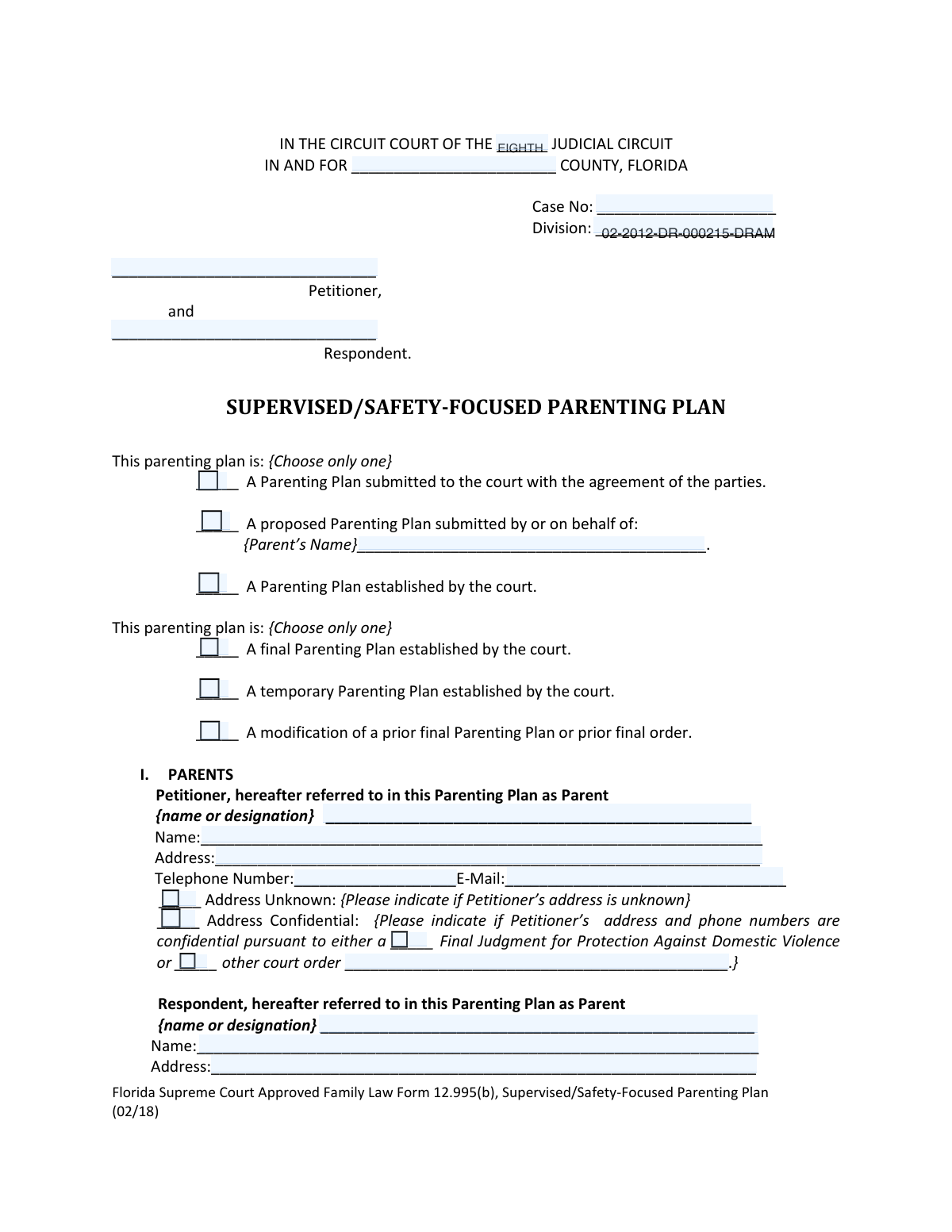
Yes! You can use AI to fill out Form 12.995(c), Safety-Focused Parenting Plan

Form 12.995(c) is a comprehensive legal document used in Florida family courts to establish a detailed parenting plan when there are concerns about a child's safety, such as domestic violence or substance abuse. It specifies parental responsibilities, decision-making authority, and a structured time-sharing schedule, which may include provisions for supervised or restricted visitation to protect the child. Today this form can be filled out quickly and accurately using AI-powered services like Instafill.ai, which can also convert non-fillable PDF versions into interactive fillable forms.
Our AI automatically handles information lookup, data retrieval, formatting, and form filling.
It takes less than a minute to fill out Form 12.995(c) using our AI form filling.
Securely upload your data. Information is encrypted in transit and deleted immediately after the form is filled out.

Form specifications

Form name: Form 12.995(c), Safety-Focused Parenting Plan
Number of pages: 14
Language: English
Categories: AFE forms
main-image

Instafill Demo: How to fill out PDF forms in seconds with AI

How to Fill Out Form 12.995(c) Online for Free in 2026

Are you looking to fill out a FORM 12.995(C) form online quickly and accurately? Instafill.ai offers the #1 AI-powered PDF filling software of 2026, allowing you to complete your FORM 12.995(C) form in just 37 seconds or less.
Follow these steps to fill out your FORM 12.995(C) form online using Instafill.ai:
  1. 1 Navigate to Instafill.ai and upload or select the Florida Safety-Focused Parenting Plan, Form 12.995(c).
  2. 2 Enter the court case information, including the judicial circuit, county, case number, and division.
  3. 3 Provide the full names and contact details for the petitioner and respondent, marking any requests for confidentiality.
  4. 4 List the names and birth dates of all children subject to the parenting plan.
  5. 5 Define the parental responsibility structure, choosing between sole or shared responsibility and allocating decision-making authority for education, healthcare, and other activities.
  6. 6 Detail the specific time-sharing schedule, including any requirements for supervision, restrictions on contact, transportation arrangements, and communication protocols.
  7. 7 Review all sections for accuracy, then have both parties (or as directed by the court) sign and date the document before filing it with the court.

Our AI-powered system ensures each field is filled out correctly, reducing errors and saving you time.

Why Choose Instafill.ai for Your Fillable Form 12.995(c) Form?

Speed

Complete your Form 12.995(c) in as little as 37 seconds.

Up-to-Date

Always use the latest 2026 Form 12.995(c) form version.

Cost-effective

No need to hire expensive lawyers.

Accuracy

Our AI performs 10 compliance checks to ensure your form is error-free.

Security

Your personal information is protected with bank-level encryption.

Frequently Asked Questions About Form Form 12.995(c)

This form is used to create a detailed plan for parental responsibility, time-sharing, and communication regarding children in a Florida family law case, with a special focus on ensuring the children's safety. It can be submitted as a proposal, an agreement between parents, or as a final court order.

This form must be completed by parents (the Petitioner and Respondent) involved in a Florida court case concerning child custody and time-sharing, such as a divorce or paternity action.

You will need your court case number, the full legal names and dates of birth for your children, and the full legal names and contact information for both parents. Be prepared to make decisions about time-sharing, communication, and safety provisions.

In the contact information section for each parent, check the box for 'Address Confidential.' You must then indicate if the confidentiality is based on a Final Judgment for Protection Against Domestic Violence or another court order.

Sole Parental Responsibility means one parent makes all major decisions for the child. Shared Parental Responsibility requires both parents to confer on major decisions, and the plan specifies who has ultimate authority if they cannot agree.

If you have a joint agreement, you should check the box at the top of the form that says 'A Parenting Plan submitted to the court with the agreement of the parties.'

Supervised Time-Sharing means that one parent's time with the child must occur in the presence of an approved third party, a professional supervisor, or at a designated facility. The plan specifies who the supervisor is, where visits occur, and who pays for any costs.

If you have more than four children, you will need to attach an additional page listing the names and dates of birth for the other children. Clearly label the attachment as an addendum to Section II of the form.

Yes, under the 'CHILD(REN)’S SAFETY' section, you can check a box and list the names of any person(s) who present a danger and are not to be present during time-sharing.

This section must be completed if someone who is not an attorney helped you fill out the form. You must provide the name and business information of the person or service that provided the assistance.

After completing and signing the form, you must file it with the clerk of the court in the county where your case is located. Be sure to serve a copy on the other party or their attorney.

Yes, services like Instafill.ai use AI to help you accurately auto-fill form fields with your information, which can save time and reduce errors.

You can upload the Parenting Plan form to the Instafill.ai platform, and its AI will identify the fields and help you fill them in with your saved personal information, making the process faster and more efficient.

You can use a service like Instafill.ai, which can convert flat, non-fillable PDFs into interactive, fillable forms that you can complete easily on your computer.

Compliance Form 12.995(c)
Validation Checks by Instafill.ai

1
Exclusive Plan Submission Type Selection
Validates that only one of the primary plan submission options ('agreed plan', 'proposed plan', or 'court-established plan') is selected. These options are mutually exclusive, and selecting more than one creates a logical contradiction about the plan's origin and legal standing. If validation fails, the user must be prompted to select only one submission type to ensure clarity.
2
Proposed Plan Parent Name Requirement
Ensures that if the 'A proposed Parenting Plan submitted by or on behalf of' option is checked, the corresponding 'Proposed Parent's Name' field is filled. This is crucial for identifying which parent is proposing the specific terms of the plan. Failure to provide the name makes the submission ambiguous and legally incomplete, likely leading to rejection.
3
Exclusive Court Plan Status Selection
Checks that if 'A Parenting Plan established by the court' is selected, only one of the subsequent status options ('final', 'temporary', or 'modification') is also chosen. A plan cannot simultaneously be final and temporary. This validation prevents contradictory information about the legal status of the court-ordered plan.
4
Petitioner Name Consistency Across Sections
Verifies that the 'Petitioner full name' in the contact section exactly matches the 'Petitioner name' provided in the main 'Parties' section. Consistent naming is essential for legal document integrity and to avoid any confusion about the identity of the parties. A mismatch could lead to the document being rejected by the court clerk.
5
Address Confidentiality Justification
Confirms that if the 'Address Confidential' box is checked for either parent, a reason is provided by selecting either 'Final Judgment for Protection Against Domestic Violence' or 'Other court order'. A claim of confidentiality must be legally substantiated to be honored by the court. Without a specified reason, the request to seal contact information is invalid.
6
Detail Requirement for 'Other Court Order' Confidentiality
Validates that if the 'Other court order' checkbox is selected as the basis for confidentiality, the corresponding details field is filled with specific information about that order. This detail is necessary for the court to locate and verify the legal basis for the confidentiality claim. An empty field would render the claim unsubstantiated and unenforceable.
7
Mutually Exclusive Address Status Check
Ensures that for a given parent, the 'Address Unknown' and 'Address Confidential' checkboxes are not selected simultaneously. A party cannot claim an address is confidential if its location is unknown. This check prevents logically impossible entries and ensures the data submitted is coherent.
8
Child Information Completeness and Validity
Checks that at least one child is listed in the 'CHILDREN' section and that each listed child entry contains both a full name and a valid date of birth in MM/DD/YYYY format. A parenting plan is void without identifying the child(ren) it applies to, and the date of birth must be a valid, past date to be legally sound.
9
Exclusive Parental Responsibility Choice
Verifies that only one of the two main parental responsibility options ('Sole Parental Responsibility' or 'Shared Parental Responsibility') is selected, as indicated by the form's '{Choose only one}' instruction. This is a fundamental decision in the parenting plan, and selecting both or neither creates a critical ambiguity that makes the plan unenforceable.
10
Sole Responsibility Parent Designation
Ensures that if 'Sole Parental Responsibility' is selected, the 'Parent name or designation' field is filled in with the name of the parent who will hold that responsibility. It is critical to specify which parent is being granted sole authority for major decisions. Failure to do so makes the entire section legally void for vagueness.
11
Valid Phone Number Format
Validates that the 'Petitioner telephone number' and 'Respondent telephone number' fields, if provided, adhere to a standard phone number format (e.g., 10 digits, possibly with parentheses or hyphens). This ensures that the contact information is usable for court and inter-party communication. An improperly formatted number could prevent essential contact and violate notification requirements.
12
Valid Email Address Format
Checks that any provided email address fields contain a string that follows the standard email format (e.g., [email protected]). Correctly formatted email addresses are crucial for official electronic notifications and communications as specified in the plan. An invalid format would lead to failed communication and potential legal issues.
13
Supervised Time-Sharing Parent Specification
Confirms that if 'Supervised Time-Sharing' is selected, the name of the parent whose time is being supervised is entered in the corresponding field. It is essential to clearly identify which parent the supervision restriction applies to. Without this specification, the time-sharing arrangement is ambiguous and unenforceable.
14
Restricted Time-Sharing Explanation Requirement
Validates that if 'Restricted Time-Sharing' is checked, the text field explaining the specific restrictions is filled out. The nature of the restrictions must be clearly defined to be legally binding and understood by both parties and the court. An empty explanation field makes the restriction void for lack of specificity.
15
Signature Date Validity
Ensures that the 'Date of Petition' fields for both the Petitioner and Respondent contain a valid calendar date that is not in the future. This date is legally significant as it marks when the party attested to the contents of the plan. An invalid or future date could call the document's authenticity and timing into question.

Common Mistakes in Completing Form 12.995(c)

Inconsistent Case and County Information

Filers often enter the wrong Judicial Circuit or County, or they enter a Case Number that does not match the court's official record. This happens due to typographical errors or confusion between different legal matters. An incorrect case identifier can lead to the document being rejected by the clerk or filed in the wrong case, causing significant delays and legal complications. Always double-check these numbers against official court documents before submitting.

Contradictory Plan Status Selection

A common error is checking multiple, mutually exclusive boxes for the plan's status, such as selecting both 'A final Parenting Plan' and 'A temporary Parenting Plan'. This mistake stems from not carefully reading the options and creates a logical contradiction that makes the court's intent unclear. This will require clarification and can delay the order; you must select only one option that accurately reflects the current stage of the parenting plan. Using a tool like Instafill.ai can help by flagging such logical inconsistencies.

Incomplete Confidentiality Justification

Users frequently check the 'Address Confidential' box but fail to complete the required follow-up sections specifying the legal basis, such as a 'Final Judgment for Protection Against Domestic Violence' or 'Other court order'. Without this justification, the request for confidentiality is invalid and may be ignored, potentially exposing sensitive contact information. To avoid this, ensure that if you request confidentiality, you also check the appropriate sub-option and provide the case number or order details as required.

Conflicting Parental Responsibility Choices

People often mistakenly select both 'Sole Parental Responsibility' and 'Shared Parental Responsibility' in Section IV. These are mutually exclusive legal standards, and selecting both creates a critical ambiguity that makes the plan legally unenforceable. This error requires the form to be amended and refiled, delaying the case. You must choose only one option that reflects the intended custody arrangement.

Inconsistent Naming of Parties

Throughout the form, a parent might be referred to as 'Petitioner,' 'Mother,' and by their full name in different sections. This inconsistency creates confusion and ambiguity, which can lead to disputes over interpretation later. It is crucial to use the same designation (e.g., 'Petitioner' or 'Mother') consistently for each parent in every field where their name or designation is requested. AI-powered tools like Instafill.ai can help maintain consistency by auto-filling party names uniformly across the document.

Vague or Missing 'Other' Explanations

Many sections include an 'Other' checkbox with a space for explanation, such as for communication methods or safety provisions. A frequent mistake is to check 'Other' but then leave the explanation blank or provide a vague, unenforceable description. This renders the provision meaningless and can lead to future conflict. If you select 'Other,' you must provide a clear, specific, and detailed explanation of the intended arrangement.

Forgetting to Designate a Parent for Specific Responsibilities

The form contains numerous fields requiring a specific parent to be named, such as who has ultimate decision-making authority for an activity, who pays for supervision, or whose address is used for school registration. Filers often overlook these fields, leaving them blank. This omission creates an incomplete and unenforceable plan, guaranteeing future disputes. Carefully review each page to ensure a parent is explicitly designated for every required responsibility.

Ambiguous Time-Sharing and Supervision Details

When selecting 'Supervised' or 'Restricted' time-sharing, users often fail to provide the necessary details, such as the supervisor's name, the specific location, or the exact nature of the restrictions. A plan that says 'time-sharing will be supervised' without these details is too vague for a court to enforce. To create a valid plan, you must clearly define all parameters of the time-sharing arrangement to avoid future disagreements and court actions.

Mishandling Plan Submission Type

In the 'Plan Submission Options' section, filers may incorrectly check both 'A Parenting Plan submitted with the agreement of the parties' and 'A proposed Parenting Plan submitted by...'. This creates confusion as to whether the plan is a joint agreement or a proposal from one side. This error can cause the clerk to question the filing's nature, leading to processing delays. You must select only the single option that accurately describes how the plan is being submitted to the court.

Missing or Inaccurate Child Information

Omitting a child's full legal name or entering an incorrect date of birth in Section II is a critical error. This can happen due to oversight or simple data entry mistakes. An error in this section can call the entire plan's applicability to a specific child into question and may require a formal amendment to correct. For forms that are only available as flat PDFs, a tool like Instafill.ai can convert them into fillable versions, making it easier to enter and review such crucial data accurately.
Saved over 80 hours a year

“I was never sure if my IRS forms like W-9 were filled correctly. Now, I can complete the forms accurately without any external help.”

Kevin Martin Green

Your data stays secure with advanced protection from Instafill and our subprocessors

Robust compliance program

Transparent business model

You’re not the product. You always know where your data is and what it is processed for.

ISO 27001, HIPAA, and GDPR

Our subprocesses adhere to multiple compliance standards, including but not limited to ISO 27001, HIPAA, and GDPR.

Security & privacy by design

We consider security and privacy from the initial design phase of any new service or functionality. It’s not an afterthought, it’s built-in, including support for two-factor authentication (2FA) to further protect your account.

Fill out Form 12.995(c) with Instafill.ai

Worried about filling PDFs wrong? Instafill securely fills form-12995c-safety-focused-parenting-plan forms, ensuring each field is accurate.