Yes! You can use AI to fill out Form DV-105, Request for Child Custody and Visitation Orders (Domestic Violence Prevention)
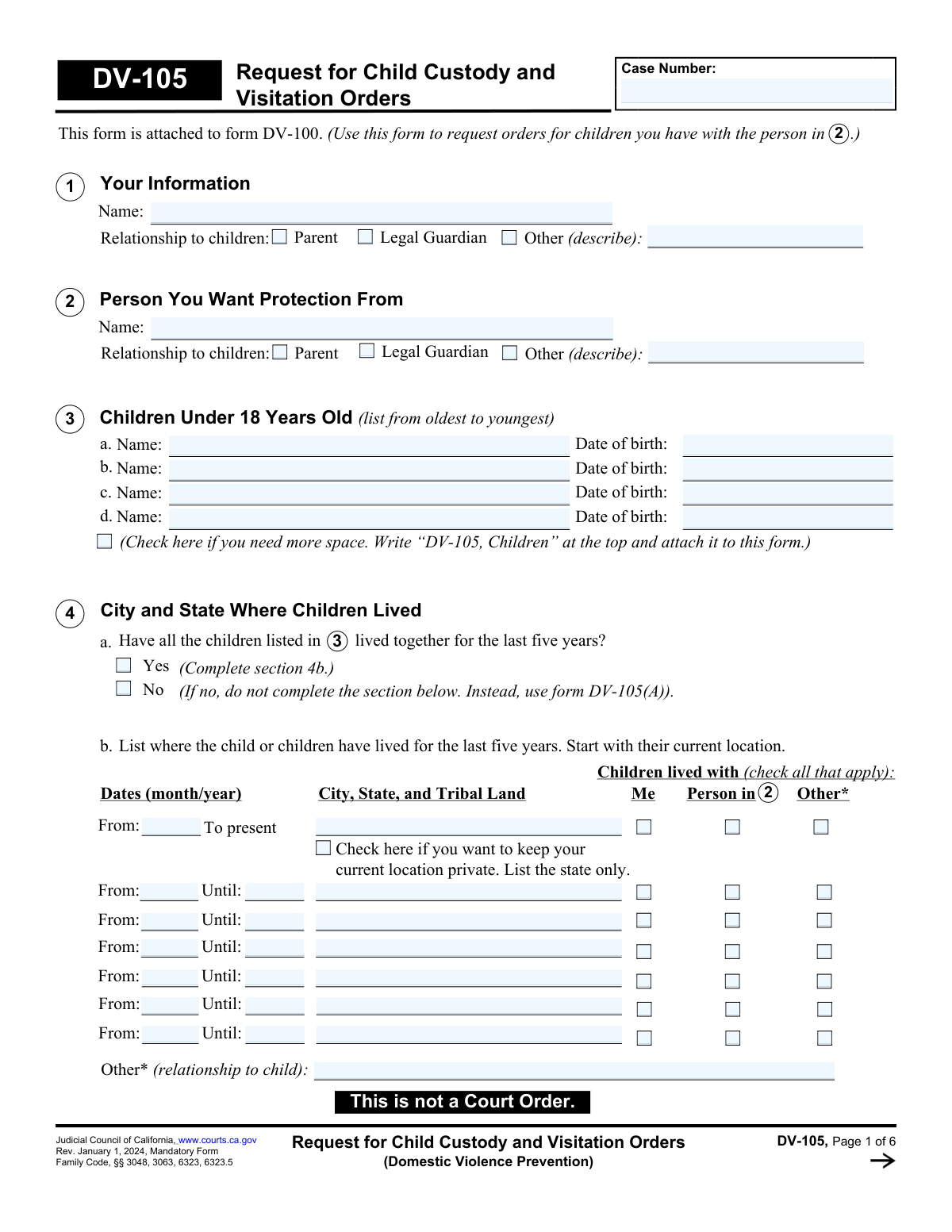
Form DV-105, Request for Child Custody and Visitation Orders, is a legal document filed in California courts as an attachment to Form DV-100. It is used by a party in a domestic violence case to ask the judge for specific orders regarding legal and physical custody, as well as a detailed visitation (parenting time) schedule for the children they share with the person they are seeking protection from. This form is crucial for establishing temporary orders to ensure the children's safety and well-being. Today, this form can be filled out quickly and accurately using AI-powered services like Instafill.ai, which can also convert non-fillable PDF versions into interactive fillable forms.
Our AI automatically handles information lookup, data retrieval, formatting, and form filling.
It takes less than a minute to fill out DV-105 using our AI form filling.
Securely upload your data. Information is encrypted in transit and deleted immediately after the form is filled out.
Form specifications
| Form name: | Form DV-105, Request for Child Custody and Visitation Orders (Domestic Violence Prevention) |
| Number of fields: | 251 |
| Number of pages: | 6 |
| Language: | English |
More forms in Child custody forms
Instafill Demo: How to fill out PDF forms in seconds with AI
How to Fill Out DV-105 Online for Free in 2026
Are you looking to fill out a DV-105 form online quickly and accurately? Instafill.ai offers the #1 AI-powered PDF filling software of 2026, allowing you to complete your DV-105 form in just 37 seconds or less.
Follow these steps to fill out your DV-105 form online using Instafill.ai:
- 1 Navigate to Instafill.ai and upload the DV-105 form or select it from the template library.
- 2 Provide your personal information, your relationship to the children, and the information for the person you want protection from.
- 3 Enter the names and birth dates of all children under 18 involved in the case, and detail their residency history for the past five years.
- 4 Disclose any other court cases involving the children and specify your requests for legal and physical custody (sole, joint, or other).
- 5 Indicate whether you want the other parent to have visitation and, if so, whether it should be supervised or unsupervised, proposing a detailed schedule.
- 6 Answer questions regarding potential child abduction risks, travel restrictions, and access to the children's records to ensure their protection.
- 7 Review all the information populated by the AI for accuracy, then save, print, and file the completed form with the court as part of your domestic violence restraining order request.
Our AI-powered system ensures each field is filled out correctly, reducing errors and saving you time.
Why Choose Instafill.ai for Your Fillable DV-105 Form?
Speed
Complete your DV-105 in as little as 37 seconds.
Up-to-Date
Always use the latest 2026 DV-105 form version.
Cost-effective
No need to hire expensive lawyers.
Accuracy
Our AI performs 10 compliance checks to ensure your form is error-free.
Security
Your personal information is protected with bank-level encryption.
Frequently Asked Questions About Form DV-105
Form DV-105 is used to ask a California court for temporary child custody and visitation orders as part of a domestic violence restraining order case. It must be attached to Form DV-100, the main request for a restraining order.
You need to fill out this form if you are requesting a domestic violence restraining order and you have children under 18 with the person you are seeking protection from. It allows you to specify the custody and visitation arrangements you want the judge to order.
Legal custody refers to who makes major decisions about the child's health, education, and welfare. Physical custody determines who the child lives with on a regular basis. You can request sole custody (one parent) or joint custody (shared) for both.
If your children have not lived together for the entire last five years, you must check 'No' in section 4a. You will then need to use and attach Form DV-105(A) to provide the separate residency history for each child.
In Section 4b, when listing your children's current residence, you can check the box to keep your location private. If you select this option, you only need to list the state, not your full city and street address.
If you believe the other parent might kidnap your children, you must check 'Yes' in Section 8. You are then required to complete and attach Form DV-108, 'Request for Orders to Prevent Child Abduction,' to ask for specific protective orders.
Supervised visitation means the other parent's time with the children is monitored by a neutral third party for safety. You can request a nonprofessional supervisor, like a trusted relative, or a paid professional supervisor.
You must disclose any existing custody or visitation orders in Section 5b. You should attach a copy of the order if you have one and explain why you are asking the judge to change it.
No. If you check the box in Section 10 to request that the other parent have no visits with the children, the form instructs you to stop there. You do not need to complete the detailed visitation schedule sections.
After filing this form with the court, a judge will review your request for temporary orders, which last until your court hearing in about three weeks. At the hearing, the judge can change or extend the orders.
Yes, services like Instafill.ai use AI to help you accurately auto-fill form fields, which saves time and helps prevent common errors. This can be particularly useful for complex legal documents like the DV-105.
You can use a service like Instafill.ai to complete this form through a user-friendly online interface. The platform guides you through each section to ensure you fill it out correctly before printing.
If you have a non-fillable or 'flat' PDF, you can upload it to a service like Instafill.ai. Their technology converts static forms into interactive, fillable versions that you can easily complete on your computer.
Compliance DV-105
Validation Checks by Instafill.ai
1
Child's Age Verification
This check validates that the 'Date of birth' entered for each child in Section 3 is a valid date and calculates the child's age to confirm they are under 18. This is critical because the form and its orders only apply to minor children. If the date is invalid or the person is 18 or older, the entry will be rejected, as the court lacks jurisdiction for custody orders under this process.
2
Conditional Relationship Description
Verifies that if the 'Other (describe)' checkbox is selected in Section 1 or Section 2, the corresponding text field for describing the relationship is not empty. This ensures that when a non-standard relationship is indicated, it is properly defined for the court's understanding. A failure would prompt the user to provide the specific relationship, preventing ambiguity in the legal filing.
3
At Least One Child Required
Ensures that the name and date of birth for at least one child (the first entry in Section 3) are provided. This form's purpose is to request custody and visitation orders for children, making this information fundamental for the request to be valid. If no child is listed, the form submission would be blocked as it has no legal subject.
4
Residency History Logic
This check enforces the conditional logic in Section 4. If the user answers 'Yes' to 4a, it validates that at least the first row of the residency history in 4b is completed. This ensures the form provides the necessary jurisdictional information about the children's home state for the last five years, which is a legal requirement. Failure to provide this information when required would halt submission.
5
Contiguous 5-Year Residency History
Validates that the date ranges provided in Section 4b are contiguous and cover the last five years, starting with the current residence ('To present'). The 'Until' date of one entry should logically precede the 'From' date of the next. This is crucial for establishing the child's 'home state' under the Uniform Child Custody Jurisdiction and Enforcement Act (UCCJEA). Gaps or inconsistencies would trigger an error.
6
Conditional Court Case Details
If the user answers 'Yes' to question 5a, this check ensures that at least one case type checkbox is selected and the corresponding details field (location, year, case number) is filled. This prevents a vague 'Yes' answer without the specific information the court needs to identify related cases. An error would be shown if 'Yes' is checked but no case details are provided.
7
Current Order Change Justification
When a user indicates 'Yes' in question 5b that a current custody order exists, this validation confirms that both the description of the existing order and the reason for the requested change are filled out. This information is mandatory for a judge to consider modifying a prior court order. If these fields are empty, the user will be prompted to complete them.
8
Abduction Prevention Form Cross-Reference
If 'Yes' is checked in Section 8, indicating a belief that the other person might abduct the children, this validation checks if form DV-108 is included in the submission packet. This is a critical safety and legal check, as specific orders to prevent abduction require the separate, detailed DV-108 form. A warning or hard stop would inform the user of this requirement.
9
Custody Request Completeness
This check ensures that if 'Yes' is selected in Section 9 to request custody orders, the user has made a selection for both 'Legal Custody' and 'Physical Custody'. An incomplete request is ambiguous and cannot be ordered by a judge. The system would flag this section as incomplete if either custody type is left unanswered.
10
Visitation Logic Path Enforcement
Validates the branching logic starting at Section 10. If 'Yes' is checked for visits, it ensures Section 11 is answered. It then verifies that EITHER Section 12 (for supervised visits) OR Section 13 (for unsupervised visits) is completed, but not both, based on the answer to Section 11. This prevents contradictory or incomplete visitation requests.
11
Professional Fee Percentage Sum
In Sections 12 and 13, if a professional supervisor is selected, this validation ensures the fee percentage fields are filled with numbers and that their total sum is exactly 100%. This prevents ambiguity regarding financial responsibility for professional services. If the sum is not 100, an error message will require the user to correct the allocation.
12
Record Access Restriction Specificity
If 'No' is selected in Section 7 to deny access to children's records, this check verifies that the user has specified which children are affected (all or specific names) and has checked at least one type of record to restrict. This ensures the requested order is clear, specific, and legally enforceable. An error will occur if the request is left general after selecting 'No'.
13
Schedule Time Logic
For the visit schedule charts in Sections 12 and 13, this validation checks that for any day where both a 'Start' and 'End' time are entered, the 'End' time is chronologically after the 'Start' time. This prevents the creation of a logically impossible schedule. An error would highlight the inconsistent time entry for correction.
14
Party Identification Requirement
This validation ensures that the 'Name' fields in both Section 1 ('Your Information') and Section 2 ('Person You Want Protection From') are completed. These fields identify the primary parties of the legal action and are the most fundamental pieces of information on the form. The form cannot be processed without identifying both the filer and the respondent.
Common Mistakes in Completing DV-105
In Section 4b, filers are required to list every place the children have lived for the past five years without any gaps. People often provide an incomplete history or leave gaps between dates, which can cause the court to question jurisdiction or delay the case. To avoid this, gather all addresses and dates beforehand, starting with the most recent and working backward to ensure the five-year period is fully covered. An AI-powered tool like Instafill.ai can help by flagging date gaps and ensuring the timeline is continuous before submission.
The form explicitly requires attaching other forms based on certain answers, such as attaching form DV-108 if you check 'Yes' for abduction risk in Section 8. A common and critical error is checking the box but forgetting to complete and attach the corresponding form. This makes the request legally insufficient and the judge cannot grant the specific order, weakening your case. Always double-check instructions in parentheses, as they often indicate a required attachment.
The form has a specific flow for visitation requests (Sections 10-13). A frequent mistake is filling out sections that should be skipped, such as detailing a supervised visit schedule (Section 12) and an unsupervised one (Section 13). This creates confusion about what is actually being requested. You must choose one path: no visits, supervised visits, or unsupervised visits, and only complete the corresponding sections as directed.
In Sections 12 and 13, filers often use ambiguous terms like 'reasonable visitation' or 'alternating weekends' without defining specific days, times, exchange locations, or transportation responsibilities. A judge needs a clear, detailed plan to issue an enforceable order. An unclear request may be denied or result in an order that doesn't work for your family. Be explicit: 'Every other Saturday from 10:00 a.m. to 6:00 p.m., with pickup and drop-off at the public library.'
In Section 5, filers must disclose all other court cases involving the children, including divorce, guardianship, or juvenile cases. People sometimes forget cases or believe they are irrelevant, but omitting them can be viewed by the court as a lack of candor, damaging credibility. This can lead to delays while the court gathers the missing information. It is crucial to list every known case, even if you don't have the case number.
In Section 9, people often confuse 'legal custody' (decision-making) with 'physical custody' (where the child lives), or misunderstand the difference between 'sole' and 'joint'. This can lead to requesting an arrangement that doesn't match their true intentions, potentially resulting in an undesirable court order. Before filling out this section, carefully read the definitions provided on the form to ensure your request for sole or joint, legal or physical custody accurately reflects your desired outcome.
Each page of this multi-page form has a field for the 'Case Number' at the top. It is a very common oversight to only fill it in on the first page. If pages become separated during processing, they can be lost or misfiled without this identifier, potentially invalidating parts of your request. Ensure the case number is written clearly and accurately on every single page before submission. AI form-fillers like Instafill.ai can automatically populate the case number across all pages to prevent this error.
When requesting supervised visits (Section 12) or supervised exchanges (Section 13), filers often fail to provide details about who would supervise or how professional fees would be paid. Simply requesting supervision without a proposed plan is an incomplete request. The court needs to know if you have a trusted nonprofessional in mind or, if using a professional, how the cost (which can be significant) should be allocated between the parties. Leaving this blank forces the judge to guess or deny the request for lack of detail.
In a domestic violence context, safety is paramount. Section 4b provides a checkbox to 'keep your current location private' and list only the state. Many filers, in their haste or distress, overlook this critical option. Failing to check this box means your full city and state of residence will be listed on a document served to the other party, potentially compromising your safety. Always use this option if you have safety concerns. If the form is a non-fillable PDF, a tool like Instafill.ai can convert it to a fillable version, making it easier to see and select such crucial options.
Questions like 4a ('Have all the children lived together for the last five years?') are foundational and determine which other forms or sections you must complete. Answering 'No' to 4a requires you to stop and use form DV-105(A) instead. People often answer incorrectly or ignore the instruction, leading them to fill out the wrong sections or use the wrong form entirely, which can cause their entire filing to be rejected and require them to start over.
Saved over 80 hours a year
“I was never sure if my IRS forms like W-9 were filled correctly. Now, I can complete the forms accurately without any external help.”
Kevin Martin Green
Your data stays secure with advanced protection from Instafill and our subprocessors

Robust compliance program
Transparent business model
You’re not the product. You always know where your data is and what it is processed for.
ISO 27001, HIPAA, and GDPR
Our subprocesses adhere to multiple compliance standards, including but not limited to ISO 27001, HIPAA, and GDPR.
Security & privacy by design
We consider security and privacy from the initial design phase of any new service or functionality. It’s not an afterthought, it’s built-in, including support for two-factor authentication (2FA) to further protect your account.
Fill out DV-105 with Instafill.ai
Worried about filling PDFs wrong? Instafill securely fills form-dv-105-request-for-child-custody-and-visitation-orders-domestic-violence-prevention forms, ensuring each field is accurate.