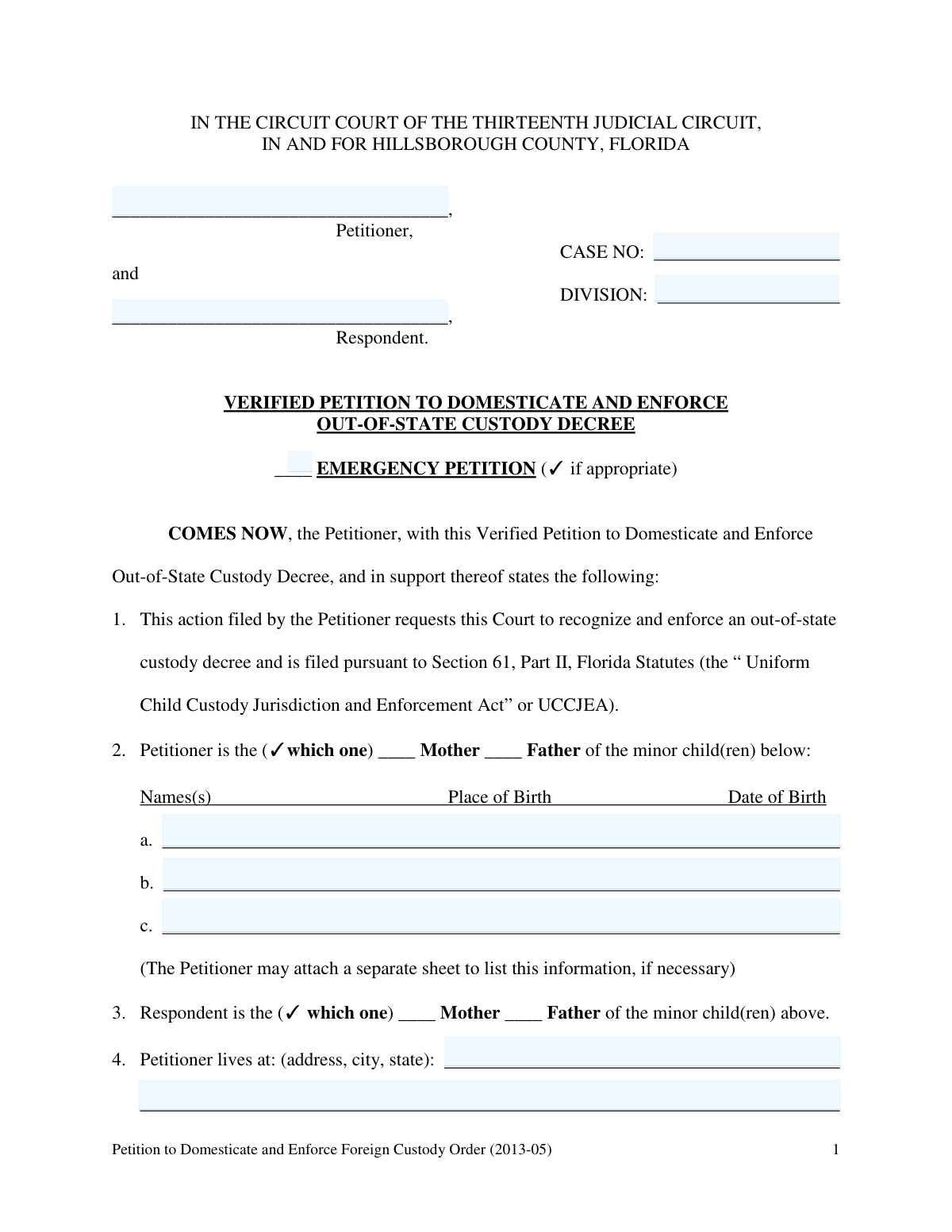
Yes! You can use AI to fill out Florida Supreme Court Approved Family Law Form 12.941(a), Petition for Enforcement of Out-of-State Custody Decree and for Order to Pick Up Minor Child(ren)

This form, the Petition for Enforcement of Out-of-State Custody Decree, is a crucial legal document for a parent seeking to have a Florida court recognize and enforce a child custody order from another state. It is filed under the Uniform Child Custody Jurisdiction and Enforcement Act (UCCJEA) when a child has been wrongfully retained or when a parent is violating the terms of an existing order, and it can be filed as an emergency. Today, this complex form can be filled out quickly and accurately using AI-powered services like Instafill.ai, which can also convert non-fillable PDF versions into interactive fillable forms.
Our AI automatically handles information lookup, data retrieval, formatting, and form filling.
It takes less than a minute to fill out Form 12.941(a) using our AI form filling.
Securely upload your data. Information is encrypted in transit and deleted immediately after the form is filled out.

Form specifications

Form name: Florida Supreme Court Approved Family Law Form 12.941(a), Petition for Enforcement of Out-of-State Custody Decree and for Order to Pick Up Minor Child(ren)
Number of fields: 126
Number of pages: 7
Language: English
Categories: court forms, family law forms, family petition forms, law enforcement forms, NJ state forms, PA state forms, UK court forms
main-image

Instafill Demo: How to fill out PDF forms in seconds with AI

How to Fill Out Form 12.941(a) Online for Free in 2026

Are you looking to fill out a FORM 12.941(A) form online quickly and accurately? Instafill.ai offers the #1 AI-powered PDF filling software of 2026, allowing you to complete your FORM 12.941(A) form in just 37 seconds or less.
Follow these steps to fill out your FORM 12.941(A) form online using Instafill.ai:
  1. 1 Navigate to Instafill.ai and upload or select Form 12.941(a) to begin.
  2. 2 Provide the case caption information, including the names of the petitioner and respondent, and the court case number if available.
  3. 3 Enter detailed information about the minor child(ren), including their personal details and the specifics of the out-of-state custody decree you wish to enforce.
  4. 4 Complete the required UCCJEA information, detailing the child(ren)'s address history for the past five years and disclosing any other custody proceedings.
  5. 5 Indicate the specific relief you are requesting, such as whether this is an emergency petition, if you need an order for law enforcement to pick up the child, and reimbursement of fees.
  6. 6 Carefully review all the information automatically populated by the AI to ensure accuracy and completeness before finalizing the document.
  7. 7 Sign the petition in the presence of a notary public, as required, and file it with the appropriate Florida circuit court.

Our AI-powered system ensures each field is filled out correctly, reducing errors and saving you time.

Why Choose Instafill.ai for Your Fillable Form 12.941(a) Form?

Speed

Complete your Form 12.941(a) in as little as 37 seconds.

Up-to-Date

Always use the latest 2026 Form 12.941(a) form version.

Cost-effective

No need to hire expensive lawyers.

Accuracy

Our AI performs 10 compliance checks to ensure your form is error-free.

Security

Your personal information is protected with bank-level encryption.

Frequently Asked Questions About Form Form 12.941(a)

This form is a petition used to ask a court to recognize and enforce a child custody or visitation order that was issued by a court in another state. It is intended for situations where one party is not complying with an existing out-of-state custody decree.

The 'Petitioner' is the person filing the form to enforce the custody order, typically the parent who was granted custody or visitation rights. The 'Respondent' is the other parent or party involved in the original custody case who is allegedly violating the order.

You should only file an emergency petition if the child is in immediate danger of abuse or neglect, or if the child has been improperly removed from your custody in violation of the court order. You will be required to provide a detailed explanation of the emergency circumstances.

You must attach a certified copy of the out-of-state custody decree or order that you are asking the court to enforce. Be sure to have this document ready before you file.

This information is crucial for the court to determine if it has the legal authority, or jurisdiction, to handle your case. A child's recent living history is a key factor in establishing proper jurisdiction for custody matters.

If you have more than three children covered by the same custody order, you should attach a separate sheet with the required information for the additional children. Be sure to label the attachment clearly and reference it on the main form.

In this section, clearly and concisely state how the other party has violated the custody order. For example, you could write that the respondent failed to return the child after a scheduled visit or moved with the child without permission.

You must provide the most recent address you know for the respondent, as the court needs it to notify them of the case. If you cannot locate them, you may need to follow specific court rules for service, and consulting with an attorney is highly recommended.

Yes, the form includes a notary acknowledgment section. You must sign the form in the presence of a Notary Public, who will then complete their portion to verify your identity and signature.

For emergency petitions, you can ask the court to act immediately, sometimes without giving prior notice to the respondent, to ensure the child's safety. Non-emergency petitions follow a standard court process for enforcement.

Yes, services like Instafill.ai use AI to help you accurately auto-fill form fields based on your information. This can save you time, reduce errors, and make the process of completing complex legal forms much simpler.

Simply upload the form's PDF to the Instafill.ai platform. The AI will identify all the fields, and you can answer simple questions in an easy-to-use interface to have your information automatically and accurately placed into the form.

Services like Instafill.ai can convert non-fillable PDFs into interactive, fillable forms. This allows you to easily type your information directly into the fields online before printing the completed document for submission.

You might request this if you have a credible fear that giving notice would cause the respondent to harm the child, hide them, or flee the jurisdiction before the court can issue an order. You must provide a compelling reason for the court to grant this.

Compliance Form 12.941(a)
Validation Checks by Instafill.ai

1
Validates Minor Child's Date of Birth
This check ensures that the 'Date of Birth' entered for each minor child is a valid calendar date and occurs before the current date. It is crucial for verifying the child's age and confirming their minor status, which is fundamental to the court's jurisdiction. An invalid or future date would lead to form rejection and processing delays.
2
Ensures Exclusive Petitioner Relationship Selection
This validation confirms that for the 'Petitioner Relationship to Minor Children', only one of the 'Mother' or 'Father' checkboxes is selected. A petitioner cannot logically be both the mother and the father of the same children. If both are checked, it indicates a data entry error that must be corrected to ensure the legal accuracy of the petition.
3
Requires Emergency Petition Explanation
This check verifies that if the 'Is an emergency petition' box is checked, the 'Emergency Petition Explanation' text field is not empty. Courts require a detailed justification to grant an emergency hearing, as it bypasses standard timelines. Failure to provide an explanation will result in the emergency request being denied, and the petition will be treated as a standard filing.
4
Requires 'No Notice' Justification
This validation ensures that if the petitioner indicates this is an emergency petition AND requests that no notice be given to the respondent, the 'No Notice Explanation' field must be completed. Waiving a party's right to notice is an extraordinary measure that requires a compelling reason, such as risk of flight or harm to the child. Without this explanation, the court cannot grant the request.
5
Validates Completeness of Prior Proceeding Details
This check confirms that if the 'Has participated' box is checked for 'Other Custody Proceeding Participation', then the corresponding details (Child Name, Type of Proceeding, Case Number, etc.) are filled out. This information is legally required to inform the court of any related legal history that could impact the current case. An incomplete section would render the filing deficient.
6
Ensures Details for Other Persons Claiming Custody are Provided
This validation ensures that if the petitioner checks 'Knows of' for 'Knowledge of Other Person Claiming Custody/Visitation', the details for that person (name and address) must be provided. The court must be aware of all parties who may have a legal claim to the child to ensure they are properly notified. Failure to provide this information can lead to future legal challenges and delays.
7
Verifies Chronology of Child Address History Dates
This check validates that for each entry in the 'Child Address History', the 'from' date is chronologically before the 'to' date. This ensures the timeline of the child's residency for the past five years is logical and accurate. This history is critical for establishing the court's jurisdiction, and incorrect dates could jeopardize the case.
8
Validates Notary Identification Details
This check ensures that if the 'Produced identification' box is checked in the notary section, the 'Type of Identification Produced' field must be filled in. This is a standard requirement for notarization to confirm that the signer's identity was properly verified. An omission here could invalidate the notarization and, consequently, the entire legal document.
9
Enforces Mutually Exclusive Participation Status
This validation ensures that for 'Other Custody Proceeding Participation', a user can only select either 'Has participated' or 'Has not participated', but not both. These are mutually exclusive options, and selecting both creates a logical contradiction. The form should prevent this error to maintain the integrity and clarity of the petitioner's declaration.
10
Checks for Consistent Emergency Petition Status
This check verifies that the selection in the initial 'Emergency Petition Selection' checkbox is consistent with the selection in the 'Emergency Petition Status (Is / Is Not)' section. Contradictory information about the petition's emergency status would create confusion and could lead to incorrect processing by the court clerk. The validation ensures the petitioner's intent is clear throughout the form.
11
Requires Description for 'Other' Requested Relief
This validation confirms that if the 'Other' checkbox is selected under 'Requested Relief (General)', the corresponding 'Other Requested Relief' text field is not left blank. The court cannot act on a vague request for relief. The petitioner must specify exactly what they are asking the court to do for the request to be considered.
12
Mandates Completion of Case Caption Fields
This check ensures that the 'Petitioner Name', 'Respondent Name', and 'Case Number' fields in the form's caption are all completed. These fields are the primary identifiers for the legal case and the parties involved. A submission without this core information is fundamentally incomplete and cannot be filed or processed by the court system.

Common Mistakes in Completing Form 12.941(a)

Incomplete or Inaccurate Case Caption

Users often enter an incorrect case number, misspell party names, or leave the Division field blank. This happens due to simple typos or not having the correct court documents on hand. An inaccurate caption can lead to the clerk's office rejecting the filing or misfiling the document, causing significant delays in the legal process. To avoid this, double-check the case number and names against official court records before submission.

Failing to Detail Child Address History

The form requires a complete five-year address history for the minor child(ren), including dates, addresses, and the custodian at each location. People frequently leave gaps in the timeline or provide incomplete addresses. This information is critical for establishing the court's jurisdiction under the UCCJEA, and omissions can lead to jurisdictional challenges and dismissal of the petition. Carefully reconstruct the timeline and ensure there are no unexplained gaps.

Contradictory or Incomplete Conditional Responses

The form contains several questions with conditional follow-ups (e.g., Questions 9, 10, 11). A common mistake is to check a box like 'Has participated' in other proceedings but then fail to provide the required details of that proceeding. This renders the response incomplete and can cause the court to issue a request for more information, delaying the case. Always ensure that if you check a box that requires further explanation, you fill out the corresponding detail section completely.

Insufficient Justification for an Emergency Petition

When filing on an emergency basis, petitioners often provide vague, emotional, or conclusory statements instead of specific, factual details about the immediate danger or improper removal of the child. A judge needs concrete facts (what, when, where, who) to justify granting emergency relief without notice. Lacking this detail will likely result in the denial of the emergency request, forcing the petition to proceed on a much slower, non-emergency track.

Incorrectly Requesting Relief

This form has separate sections for relief requested in non-emergency versus emergency petitions. A frequent error is checking boxes in the wrong section or checking boxes that contradict the nature of the petition. This creates ambiguity for the judge regarding the petitioner's requests. To prevent this, carefully read the headings for each 'Requested Relief' section and only check the boxes that apply to your specific filing type (emergency or non-emergency).

Omitting Details of Out-of-State Orders

When asking a court to enforce an order from another state, it is crucial to provide the exact date the order was entered, the court that issued it (including county and state), and the case number. People often forget to attach the order or fail to transcribe this information accurately onto the petition. Without these details, the court cannot verify or enforce the foreign decree, making the entire petition ineffective.

Using Informal Names Instead of Full Legal Names

The form specifies 'full legal name' for the petitioner, respondent, and minor children, but individuals often use nicknames or shortened names out of habit. This can create identity discrepancies and legal ambiguities, potentially leading to the rejection of the form or challenges to the validity of any resulting court order. Always use the full legal names as they appear on birth certificates, driver's licenses, and prior court orders. AI-powered tools like Instafill.ai can help by saving and consistently applying the correct legal names across all relevant fields.

Incomplete Respondent Address Information

Providing a complete and current address for the respondent is essential for legal service of process, which is a constitutional requirement. Mistakes include omitting an apartment number, using an old address, or providing only a P.O. Box when a physical address is needed. An incorrect address will prevent the respondent from being properly notified of the lawsuit, bringing the case to a halt until service can be completed, which can take weeks or months.

Improper or Premature Signature and Notarization

Petitioners sometimes sign the document before they are in the physical presence of a notary public, which invalidates the oath and the notarization. The purpose of the notary acknowledgment is for the notary to witness the signature and verify the signer's identity. Signing the form beforehand or having a notary who improperly fills out the acknowledgment section can lead to the court rejecting the sworn petition. Always wait to sign the document in front of the notary.

Failing to Provide Complete Child Descriptor Information

In custody cases, especially those involving potential enforcement or recovery of a child, the physical description fields (hair/eye color, height, weight, distinguishing characteristics) are vital for identification. People may rush through this section or leave it blank, viewing it as secondary. However, this information is critical for law enforcement if a warrant to pick up the child is issued. Ensure all physical descriptors are filled out accurately and completely for each child.

Confusing Petitioner and Respondent Roles

Throughout a complex legal form, it can be easy to mix up the 'Petitioner' (the person filing the case) and the 'Respondent' (the person responding to it). This mistake often occurs in sections where the user must identify each party's relationship to the children. Incorrectly identifying the parties can cause profound confusion and may require filing an amended petition to correct the record. Using a tool like Instafill.ai can help prevent this by pre-filling forms and consistently assigning the correct party to each field, especially if the form is a non-fillable PDF that the tool can convert.
Saved over 80 hours a year

“I was never sure if my IRS forms like W-9 were filled correctly. Now, I can complete the forms accurately without any external help.”

Kevin Martin Green

Your data stays secure with advanced protection from Instafill and our subprocessors

Robust compliance program

Transparent business model

You’re not the product. You always know where your data is and what it is processed for.

ISO 27001, HIPAA, and GDPR

Our subprocesses adhere to multiple compliance standards, including but not limited to ISO 27001, HIPAA, and GDPR.

Security & privacy by design

We consider security and privacy from the initial design phase of any new service or functionality. It’s not an afterthought, it’s built-in, including support for two-factor authentication (2FA) to further protect your account.

Fill out Form 12.941(a) with Instafill.ai

Worried about filling PDFs wrong? Instafill securely fills florida-supreme-court-approved-family-law-form-12941a-petition-for-enforcement-of-out-of-state-custody-decree-and-for forms, ensuring each field is accurate.