Yes! You can use AI to fill out Form FL-105/GC-120, Declaration Under Uniform Child Custody Jurisdiction and Enforcement Act (UCCJEA)
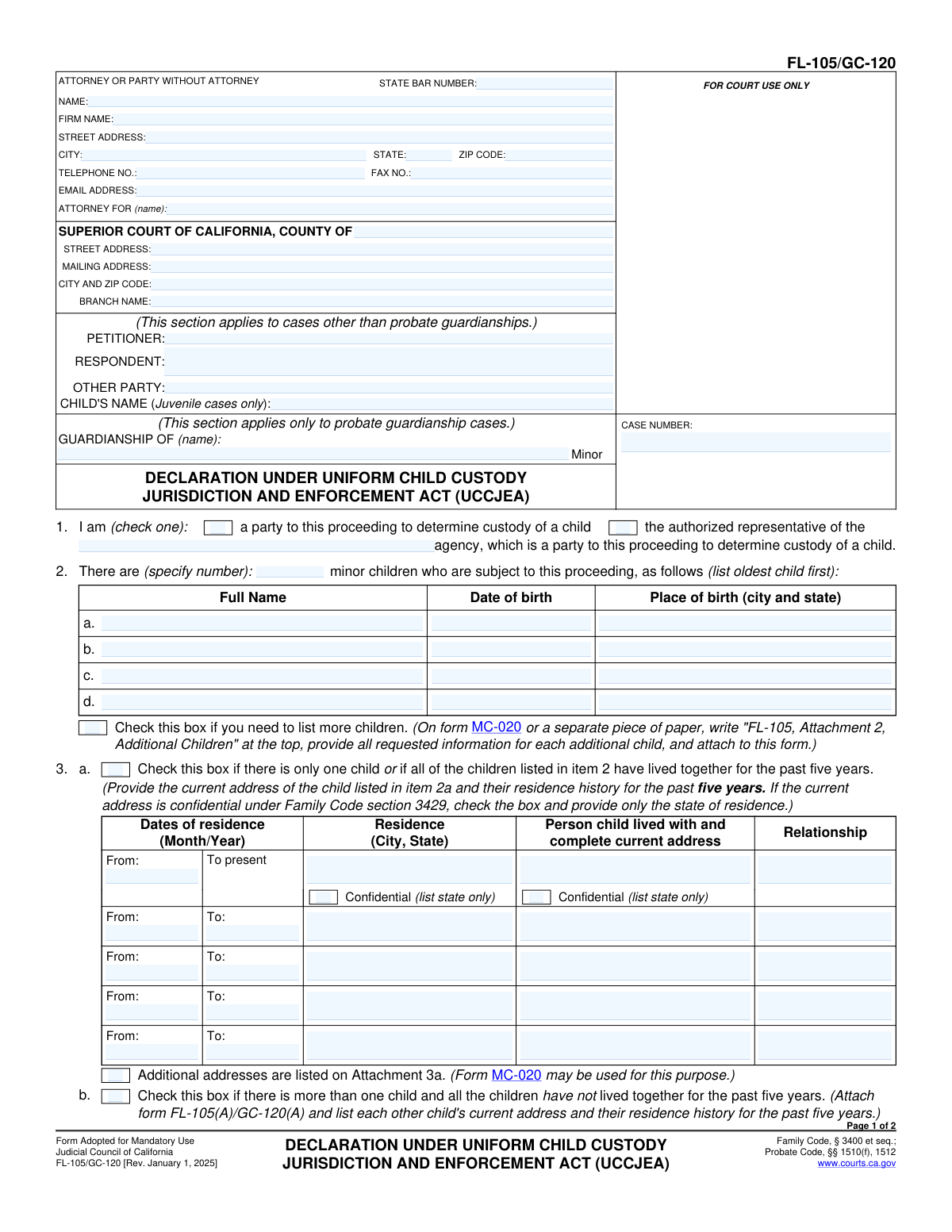
Form FL-105/GC-120 is a mandatory California Judicial Council form used in legal proceedings involving child custody, such as divorce, legal separation, or guardianship. It provides the court with essential information about a child's residence history for the past five years and details any other custody proceedings in any state, which is crucial for determining the proper court jurisdiction under the Uniform Child Custody Jurisdiction and Enforcement Act (UCCJEA). Today, this form can be filled out quickly and accurately using AI-powered services like Instafill.ai, which can also convert non-fillable PDF versions into interactive fillable forms.
FL-105/GC-120 is part of the
child custody forms category on Instafill.
Rather not fill this in by hand? Instafill is an online form filler that completes PDF forms automatically — upload the blank form, answer a few questions, and the AI fills every field.
Form specifications
| Form name: | Form FL-105/GC-120, Declaration Under Uniform Child Custody Jurisdiction and Enforcement Act (UCCJEA) |
| Number of pages: | 1 |
| Field instructions: | FL-105/GC-120 Instructions |
| Filled form examples: | FL-105/GC-120 Examples |
| Language: | English |
Our AI automatically handles information lookup, data retrieval, formatting, and form filling.
It takes less than a minute to fill out FL-105/GC-120 using our AI form filling.
Securely upload your data. Information is encrypted in transit and deleted immediately after the form is filled out.
Instafill Demo: How to fill out PDF forms in seconds with AI
How to Fill Out FL-105/GC-120 Online for Free in 2026
Are you looking to fill out a FL-105/GC-120 form online quickly and accurately? Instafill.ai offers the #1 AI-powered PDF filling software of 2026, allowing you to complete your FL-105/GC-120 form in just 37 seconds or less.
Follow these steps to fill out your FL-105/GC-120 form online using Instafill.ai:
- 1 Navigate to Instafill.ai and upload Form FL-105/GC-120 or select it from the form library.
- 2 Provide your personal details, attorney information (if applicable), and the specific court and case information in the header section.
- 3 List the full name, date of birth, and place of birth for each minor child subject to the proceeding.
- 4 Detail the residence history for each child over the past five years, including dates, addresses, and the names of the people they lived with.
- 5 Disclose any information about other court cases or custody proceedings concerning the children, including family law, probate, juvenile, or domestic violence restraining order cases.
- 6 Identify any individuals not party to the case who have or claim to have custody or visitation rights with the children.
- 7 Review all the information populated by the AI for accuracy, then electronically sign and date the declaration under penalty of perjury.
Our AI-powered system ensures each field is filled out correctly, reducing errors and saving you time.
Why Choose Instafill.ai for Your Fillable FL-105/GC-120 Form?
Speed
Complete your FL-105/GC-120 in as little as 37 seconds.
Up-to-Date
Always use the latest 2026 FL-105/GC-120 form version.
Cost-effective
No need to hire expensive lawyers.
Accuracy
Our AI performs 10 compliance checks to ensure your form is error-free.
Security
Your personal information is protected with bank-level encryption.
Frequently Asked Questions About FL-105/GC-120
This form provides the court with essential information about the children in your custody case, including where they have lived for the past five years. It helps the court decide if it has the legal authority, or jurisdiction, to make orders about your children.
Every party in a court case involving child custody, such as a divorce, parentage action, or probate guardianship, must complete and file their own separate UCCJEA Declaration.
You must provide a five-year history of every place the child has lived, starting with their current residence. For each location, you need to list the dates, the city and state, and the name and relationship of the person the child lived with.
If your children have not lived together for the entire past five years, you must check the box in Item 3b. You will then need to attach form FL-105(A)/GC-120(A) to provide the separate five-year residence history for each child.
If your address is confidential due to safety concerns or a protective order, you can check the 'Confidential' box in Item 3. You will only need to provide the state where the child lives, not the full street address.
In Item 4, you must disclose any other court case concerning the child's custody, such as family, juvenile, or adoption proceedings, from any state. You should provide the case number and court information, and attach copies of any court orders if you have them.
Yes, in Item 5, you must report any active domestic violence restraining or protective orders involving you, the child, or the other party. Provide the case number and expiration date, and attach a copy of the order if possible.
This is a legal requirement stating that after you file this form, you must notify the court if you learn any new information about other custody proceedings in any court that involve your child.
In Item 6, you must list the name and address of any person not officially a party to the case who has physical custody of the child or claims custody or visitation rights.
You must file the signed, original form with the court clerk at the Superior Court where your case is filed. You also need to ensure a copy is served on the other party or their attorney.
Yes, services like Instafill.ai use AI to help you accurately auto-fill form fields, which can save time and reduce errors. The AI can pull information from your case file or previous documents to populate the form.
Simply upload the FL-105/GC-120 form to the Instafill.ai platform. The service will make the form fillable and guide you through the questions, using AI to suggest information and ensure all required fields are completed correctly.
If you have a non-fillable or 'flat' PDF, you can upload it to a service like Instafill.ai. Their technology can convert the static form into an interactive, fillable version that you can complete easily on your computer.
The form instructs you to use an attachment if you need more space. You can use a separate piece of paper, label it clearly (e.g., 'FL-105, Attachment 2'), include the case information, and attach it to your declaration.
Compliance FL-105/GC-120
Validation Checks by Instafill.ai
1
Declarant Status Selection
Validates that in section 1, the user has selected exactly one checkbox, indicating whether they are a party to the proceeding or an authorized representative of an agency. This is a mandatory field to establish the declarant's standing. If no selection is made, the form is incomplete and cannot be processed.
2
Child Count Consistency
Ensures the number entered in the first sentence of section 2 matches the actual number of children listed in the table below (2a, 2b, 2c, etc.). This check prevents discrepancies between the stated number of children and the detailed information provided. A mismatch could lead to confusion and legal challenges regarding which children are subject to the proceeding.
3
Child's Age Verification
Validates that the 'Date of birth' provided for each child in section 2 results in an age of less than 18 years at the time of form submission. The UCCJEA applies specifically to minor children. This check confirms the court's jurisdiction under this act and prevents the inclusion of individuals who are legally adults.
4
Child Information Completeness
Verifies that for every child listed in section 2, all required fields ('Full Name', 'Date of birth', 'Place of birth') are filled out. Incomplete information for any child can delay proceedings, as the court requires full identification for all minors involved. This validation ensures each child's record is complete before submission.
5
Residence History Logic
Checks the logical consistency of selections in section 3. If the number of children in section 2 is one, box 3a must be checked. If the number of children is greater than one, either box 3a (if they lived together) or 3b (if they did not) must be checked, but not both. This ensures the correct residence history path is followed based on the case's specific circumstances.
6
Five-Year Residence Chronology
Validates the residence history provided in section 3a. It checks that the date ranges are sequential, do not have significant gaps, and collectively cover the last five years. It also ensures that for each entry, the 'From' date is chronologically before the 'To' date. This is critical for the court to establish the child's 'home state' and determine jurisdiction.
7
Conditional Other Case Details
Ensures that if 'Yes' is checked in section 4 regarding other court cases, at least one row of case details is provided. Conversely, if 'No' is checked, the detail fields should be empty or disabled. This validation enforces the requirement to provide necessary context for any related legal proceedings, which is crucial for jurisdictional decisions.
8
Protective Order Expiration Date
Validates that any date entered in the 'Orders expire (date)' column of section 5 is a valid date format. It should also check that the expiration date is in the future, as the form states the orders 'are now in effect'. This information is vital for the court to be aware of existing safety orders that may impact custody and visitation arrangements.
9
Conditional Other Custody Claims
Verifies that if 'Yes' is checked in section 6, the name, address, and claim type for at least one person are provided in the subsections (6a, 6b, or 6c). The UCCJEA requires notice to be given to any person claiming custody or visitation rights. Failure to provide this information when it exists can lead to future legal challenges and potential invalidation of court orders.
10
Custody Claim Type Selection
For each person listed in section 6, this check ensures that at least one of the three checkboxes ('Has physical custody', 'Claims custody rights', 'Claims visitation rights') is selected. This clarifies the nature of the third party's claim for the court. Without this specific information, the court cannot properly assess the third party's potential rights and role in the proceeding.
11
Attachment Count Consistency
Validates that the 'Number of pages attached' in section 7 is greater than zero if any of the attachment checkboxes or instructions on the form have been used (e.g., 'list more children' in section 2, 'Attachment 3a', or attaching FL-105(A) per section 3b). This serves as a cross-check to ensure that all mentioned attachments are accounted for. An incorrect count could result in the clerk rejecting the filing or the court overlooking critical information.
12
Declaration Date Validity
Ensures the 'Date' field next to the declarant's signature is a valid, non-future date. The date of declaration is legally significant as it attests to the truthfulness of the information as of that day. A future or invalid date would render the declaration legally defective and could cause the form to be rejected.
13
Case Number Format
Validates that the 'CASE NUMBER' field at the top of the form is not empty and, if possible, conforms to the standard format for the specified court county. The case number is the primary identifier for the legal action and is essential for correctly filing and retrieving the document. An absent or malformed case number will cause the document to be rejected by the court clerk.
Common Mistakes in Completing FL-105/GC-120
In Item 3, filers often fail to provide a continuous, uninterrupted five-year address history for each child, leaving gaps between dates. The court requires a complete timeline to establish jurisdiction. Any gaps can lead to the form being rejected, causing significant delays in the case. To avoid this, carefully list every residence in chronological order, ensuring the 'From' date of a new residence immediately follows the 'To' date of the previous one, with no time unaccounted for.
In Item 4, individuals frequently forget or neglect to list all prior or ongoing court cases concerning the children, including family law, juvenile dependency, guardianship, or adoption proceedings. This omission can be seen as a misrepresentation to the court and can negatively impact the filer's credibility. It is crucial to disclose every case, even if it was brief or dismissed, and provide all requested details like the case number and court location. AI-powered tools like Instafill.ai can help store and recall this information for future filings.
The most critical and surprisingly common mistake is failing to sign and date the declaration at the bottom of page 2. An unsigned or undated form is legally invalid and will be immediately rejected by the court clerk, halting all progress on the case. Always double-check that you have physically or electronically signed and dated the form before submitting it. This simple oversight is the number one cause of preventable filing rejections.
The form's header has separate sections for standard family law cases ('PETITIONER'/'RESPONDENT') and probate cases ('GUARDIANSHIP OF'). People often get confused and fill out the wrong section or both. This creates ambiguity and can lead to the document being filed incorrectly. Carefully identify the type of case you are in and only complete the relevant section for the case name.
When completing the residence history in Item 3, filers must list the 'Person child lived with and complete current address.' A common error is to only write the person's name (e.g., 'Jane Doe') without their full current address. The court requires this address to potentially contact the person for verification. Leaving this information out renders the entry incomplete and can cause the form to be returned for correction.
The form requires specific attachments for certain situations, such as Form FL-105(A) for children with different residence histories (Item 3b) or labeled attachments for additional children (Item 2). People often submit information on a plain piece of paper without the required heading or fail to use the correct supplemental form. This can result in the attached information being disregarded or the entire filing being rejected for not conforming to the rules. Always use the specified form and label any attachments exactly as instructed.
In Item 3, filers sometimes check the 'Confidential' box for a child's address simply because they desire privacy, not because they meet the legal standard under Family Code section 3429, which is typically related to domestic violence or other safety concerns. Improperly claiming confidentiality can lead to judicial scrutiny or requests for justification. This box should only be checked when there is a genuine, legally recognized reason to protect the address information.
People often make simple data entry errors in Item 2, such as forgetting a child's date of birth, omitting the place of birth, or ignoring the instruction to list the oldest child first. While seemingly minor, this incomplete or improperly ordered information slows down court processing as clerks may need to request clarification. Using a tool like Instafill.ai can help prevent these errors by validating that all required fields are filled out correctly before submission.
In Item 6, when disclosing other people who have or claim custody/visitation rights, filers often provide a name but neglect to include a complete address. The question is also broadly about anyone who 'claims' rights, not just those with court orders. Omitting the address or failing to list a grandparent who acts as a primary caregiver, for example, makes the declaration incomplete and prevents the court from providing proper notice to all interested parties.
Judicial Council forms are updated periodically, as indicated by the revision date in the footer (e.g., '[Rev. January 1, 2025]'). Submitting an obsolete version of the FL-105/GC-120 is a common reason for administrative rejection by the court clerk. Always ensure you are using the most current version available from the official court website. This avoids unnecessary delays and ensures compliance with the latest legal requirements.
Many court forms are only available as non-fillable PDFs, forcing users to print and complete them by hand. This often results in illegible handwriting for names, dates, and addresses, which can lead to data entry errors by court staff or outright rejection of the form. To avoid this, use block capital letters or utilize a service like Instafill.ai, which can convert a flat PDF into a fillable form, allowing you to type your information clearly and professionally.
Saved over 80 hours a year
“I was never sure if my IRS forms like W-9 were filled correctly. Now, I can complete the forms accurately without any external help.”
Kevin Martin Green
Your data stays secure with advanced protection from Instafill and our subprocessors




Robust compliance program
Transparent business model
You’re not the product. You always know where your data is and what it is processed for.
ISO 27001, HIPAA, and GDPR
Our subprocesses adhere to multiple compliance standards, including but not limited to ISO 27001, HIPAA, and GDPR.
Security & privacy by design
We consider security and privacy from the initial design phase of any new service or functionality. It’s not an afterthought, it’s built-in, including support for two-factor authentication (2FA) to further protect your account.
Fill out FL-105/GC-120 with Instafill.ai
Worried about filling PDFs wrong? Instafill securely fills form-fl-105gc-120-declaration-under-uniform-child-custody-jurisdiction-and-enforcement-act-uccjea forms, ensuring each field is accurate.
