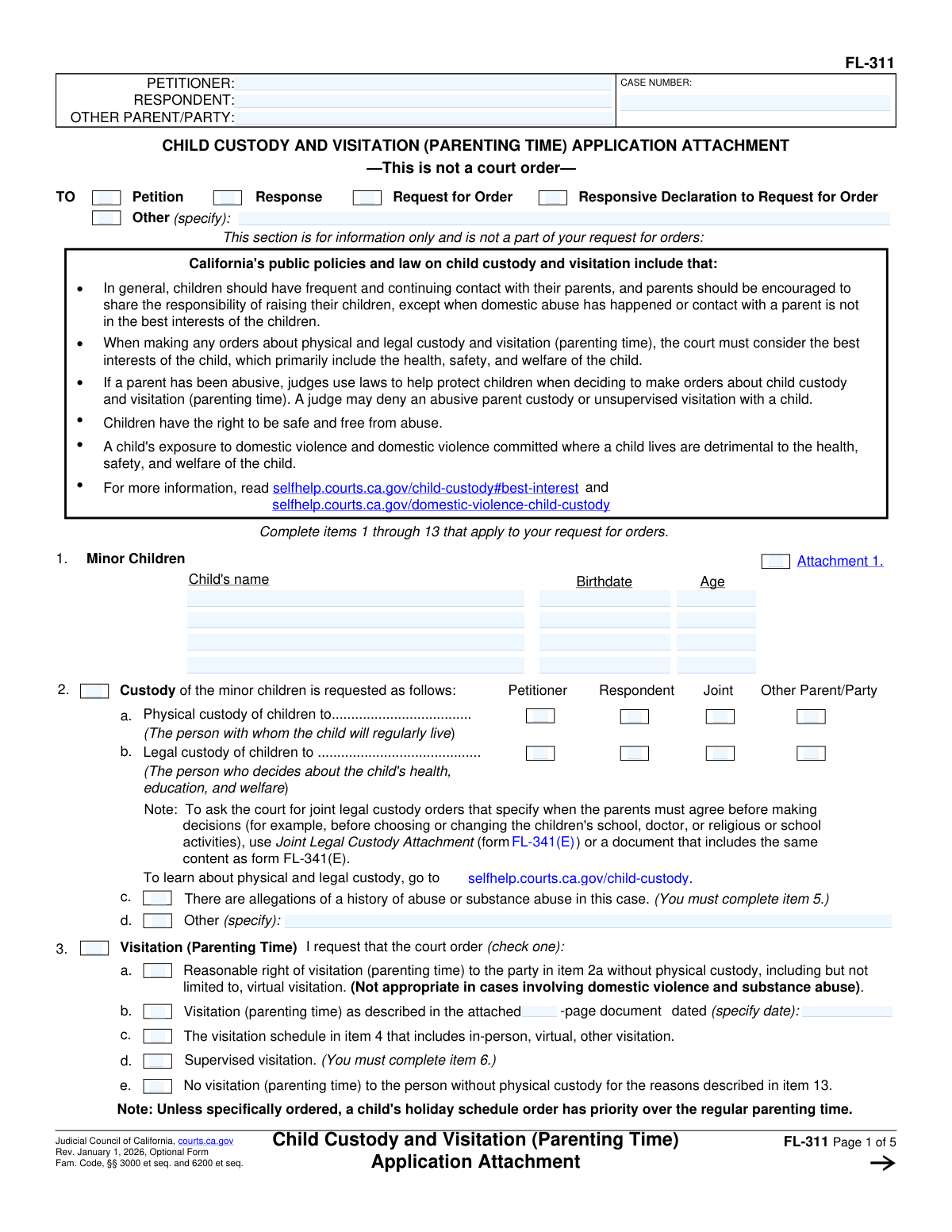
Yes! You can use AI to fill out Form FL-341(E), Child Custody and Visitation (Parenting Time) Application Attachment
Form FL-341(E), the Child Custody and Visitation Application Attachment, is a crucial legal document filed in California courts to propose specific orders for child custody and parenting time. It allows parents to detail their requests for legal and physical custody, create a comprehensive visitation schedule, and address special circumstances like supervised visits or travel restrictions. Completing this detailed form accurately is vital for presenting a clear plan to the court. Today, this form can be filled out quickly and accurately using AI-powered services like Instafill.ai, which can also convert non-fillable PDF versions into interactive fillable forms.
Our AI automatically handles information lookup, data retrieval, formatting, and form filling.
It takes less than a minute to fill out FL-341(E) using our AI form filling.
Securely upload your data. Information is encrypted in transit and deleted immediately after the form is filled out.
Form specifications
| Form name: | Form FL-341(E), Child Custody and Visitation (Parenting Time) Application Attachment |
| Number of fields: | 271 |
| Number of pages: | 5 |
| Language: | English |
| Categories: | ACH forms |
Instafill Demo: How to fill out PDF forms in seconds with AI
How to Fill Out FL-341(E) Online for Free in 2026
Are you looking to fill out a FL-341(E) form online quickly and accurately? Instafill.ai offers the #1 AI-powered PDF filling software of 2026, allowing you to complete your FL-341(E) form in just 37 seconds or less.
Follow these steps to fill out your FL-341(E) form online using Instafill.ai:
- 1 Navigate to an AI-powered service like Instafill.ai and upload or select Form FL-341(E).
- 2 Provide the case header information, including the names of the petitioner, respondent, other parties, and the court case number.
- 3 Enter the full name and birthdate for each minor child involved in the custody and visitation request.
- 4 In Section 2, specify your request for legal and physical custody by selecting the appropriate options (e.g., joint, sole to petitioner/respondent).
- 5 Detail the proposed visitation (parenting time) schedule in Sections 3 and 4, selecting options for weekends, weekdays, holidays, and virtual visitation as needed.
- 6 Address any special circumstances, such as allegations of abuse (Section 5), requests for supervised visitation (Section 6), or travel restrictions (Section 8).
- 7 Review the entire form generated by the AI for accuracy, then download the completed document to be printed, signed, and filed with the court as part of your petition or response.
Our AI-powered system ensures each field is filled out correctly, reducing errors and saving you time.
Why Choose Instafill.ai for Your Fillable FL-341(E) Form?
Speed
Complete your FL-341(E) in as little as 37 seconds.
Up-to-Date
Always use the latest 2026 FL-341(E) form version.
Cost-effective
No need to hire expensive lawyers.
Accuracy
Our AI performs 10 compliance checks to ensure your form is error-free.
Security
Your personal information is protected with bank-level encryption.
Frequently Asked Questions About Form FL-341(E)
This form is used to ask the court for specific orders regarding child custody and parenting time (visitation). It serves as a detailed attachment to a primary court document, such as a Petition, Response, or Request for Order.
Any party in a family law case, such as a petitioner or respondent, who wants to establish or change a court order for child custody or visitation for their minor children should complete this form.
Physical custody determines the parent with whom the child will regularly live. Legal custody grants a parent the authority to make important decisions about the child's health, education, and welfare.
You must enter the Petitioner's name, Respondent's name, and the court Case Number exactly as they appear on your official court documents to ensure your filing is correctly identified.
For complex schedules, you can check the box in Section 3 for 'Visitation as described in attached document.' This allows you to write or type your detailed parenting plan on a separate page and attach it to this form.
The form provides space for up to four children. If you have more, you must create an attachment listing the full name, age, and birthdate for each additional child and submit it with the form.
In Section 2, check the box for 'Allegations of abuse or substance abuse.' This directs you to complete Section 5, where you can explain your concerns and request specific orders, such as supervised visitation.
Supervised visitation requires a neutral third person to be present during a parent's time with the child. To request it, check the 'Supervised visitation' box in Section 3 and provide details in Section 6, including who the supervisor will be and who will pay for the service.
Section 7, 'Transportation for visitation,' allows you to name the person who will provide transportation to and from visits. You can also specify the address for exchanges and other drop-off/pickup arrangements.
Yes, in Section 8, 'Travel with children,' you can ask the court to restrict the child's travel. For serious concerns, you can use Section 9, 'Child abduction prevention,' to request orders using the attached form FL-312.
If you have a non-fillable or 'flat' PDF, you can use a service like Instafill.ai. It can convert the document into an interactive, fillable form that you can easily complete on your computer.
Yes, services like Instafill.ai use AI to auto-fill form fields accurately and save time. This is especially helpful for entering repetitive information like names, addresses, and case numbers across multiple pages.
To fill out the form online, you can upload the PDF to a platform like Instafill.ai. The service will make the fields interactive, allowing you to type your information, save your progress, and print the completed form.
Compliance FL-341(E)
Validation Checks by Instafill.ai
1
Case Number Consistency and Presence
This check verifies that the 'Case Number' field is filled in the form's header and that the value is consistent wherever it is repeated, such as in the 'Party and Case Information' section. This is crucial for ensuring the document is correctly filed and associated with the right legal matter. A mismatch or missing number could lead to rejection by the court clerk or significant processing delays.
2
Child's Age and Birthdate Coherence
This validation cross-references the 'Child's birthdate' with the 'Child's age' for each minor child listed. The system calculates the age based on the birthdate and flags a discrepancy if it does not match the entered age. This prevents data entry errors that could affect eligibility for certain provisions or create confusion in the court record. If the dates are inconsistent, the user will be prompted to correct either the age or the birthdate.
3
Conditional Requirement for 'Other (specify)' Fields
This check ensures that whenever an 'Other' checkbox is selected, the adjacent 'specify' text field is not left empty. This applies to multiple sections, including 'Document type', 'Custody', and 'Travel with children'. This validation is important because selecting 'Other' without providing a description makes the selection meaningless and the form incomplete, requiring clarification later. Failure to specify will result in an error prompting the user to provide the required details.
4
Mutually Exclusive Custody Selection
This validation enforces the rule that for both 'Physical custody' and 'Legal custody', the user can select either 'Joint' custody OR a single party ('Petitioner', 'Respondent', 'Other'), but not a combination of both. For example, selecting both 'Joint' and 'Petitioner' for physical custody is a logical contradiction. This check prevents ambiguous or legally invalid custody requests, ensuring the filer's intent is clear. An error would require the user to make a valid selection.
5
Child Information Dependency Chain
This check validates that if a 'Child's full name' is entered for any of the minor child slots, the corresponding 'Child's birthdate' field must also be completed. The form's logic indicates that a child's record is incomplete without this critical piece of identifying information. This ensures that every child listed on the form has a complete basic record for the court's consideration.
6
Visitation Schedule Chronology
For each weekend or weekday visitation schedule defined, this validation ensures that the specified end date and time are chronologically after the start date and time. This prevents the creation of impossible schedules, such as a visit ending before it begins. Maintaining logical timeframes is essential for creating an enforceable court order. If an end time precedes a start time, the system will flag the entry as invalid.
7
Exclusive Time Specification (AM/PM/School)
For any visitation time entry (e.g., '1st weekend - start time'), this check ensures that only one time designator is selected from the available options: 'a.m.', 'p.m.', 'start of school', or 'after school'. Selecting multiple options for a single time point creates ambiguity. This validation guarantees that each start and end time is defined precisely and without contradiction.
8
Conditional Attachment Page Count
This validation is triggered if the 'Visitation as described in attached document' checkbox is selected in Section 3. It verifies that the 'Attached document page count' field contains a positive integer (e.g., '1' or greater). This ensures that a reference to an attachment is accompanied by a valid page count, confirming the attachment's existence and scope. Leaving the page count blank or zero would result in an error.
9
Abuse Allegation Cross-Section Completion
This check creates a dependency between Section 2 and Section 5. If the user checks the box for 'Allegations of abuse or substance abuse' in Section 2, this validation ensures that the corresponding Section 5 ('Child custody and visitation when there are allegations of a history of abuse...') is also filled out. This is a critical safety and legal requirement, as such allegations mandate specific considerations by the court. Failure to complete Section 5 would halt submission until the required information is provided.
10
Conditional Payment for Professional Supervisor
In the 'Supervised visitation' section, if the user checks 'The person or agency is a professional provider', this validation ensures that at least one party ('petitioner', 'respondent', or 'other parent/party') is selected to pay for the service. A professional provider requires payment, and the court needs to know who is being requested to bear the cost. An error will be shown if a professional is selected but no payment responsibility is assigned.
11
Completeness of Core Party Information
This validation ensures that the 'Petitioner name', 'Respondent name', and 'Case number' fields in the main header are not empty. These fields are the most fundamental identifiers for the entire legal document. Without this information, the form cannot be correctly processed, filed, or associated with the parties involved. The form would be considered incomplete and invalid if these fields are blank.
12
Logical Dependency for Visitation Options
This check confirms that if the primary 'Visitation (Parenting Time) — request court order' checkbox in Section 3 is not checked, then none of the specific visitation options below it (e.g., 'Supervised visitation', 'Reasonable right of visitation') can be selected. This prevents contradictory requests where a user indicates they are not requesting a visitation order but then fills out details for one. If the main box is unchecked, any selections in the sub-options will be flagged as an error.
13
Fifth Weekend Alternation Party Selection
This validation applies if the 'Parties will alternate the fifth weekends' checkbox is selected. It ensures that the user also selects exactly one party ('Petitioner', 'Respondent', or 'Other parent/party') who will have the initial fifth weekend. The alternation plan is incomplete without defining a starting point. The system will prompt the user to select a party before the form can be considered complete.
14
Required Specification for Travel Restrictions
This check is for the 'Travel with children' section. If the user checks the box for 'the following counties' or 'other places', the validation ensures the corresponding '(specify)' text field is filled in with the names of the locations. Checking the box without providing the list of places makes the request unenforceable and vague. The system will require the user to provide the specific counties or places.
Common Mistakes in Completing FL-341(E)
Filers often use nicknames, abbreviations, or slightly different spellings for petitioner/respondent names than what is on the official court record, or they may transpose digits in the case number. This happens due to haste or not having official documents handy for reference. Inconsistent information can lead to the court clerk rejecting the filing, causing significant delays and requiring the form to be resubmitted correctly. To avoid this, always copy the full legal names and the case number exactly as they appear on previous court documents, double-checking every character for accuracy.
In Section 2, a frequent error is checking multiple conflicting boxes, such as requesting both 'Joint' physical custody and 'Petitioner' sole physical custody simultaneously. This confusion often stems from not fully understanding the legal distinction between joint and sole custody. Such errors make the request unclear to the court, potentially leading to an order that doesn't reflect the filer's intent or requiring a court hearing just to clarify, which delays the entire process. Before filling, understand the difference between physical (where the child lives) and legal (who makes decisions) custody, and select only one option for each type.
The visitation schedule section is highly detailed, and a common error is to check a box for a specific schedule (e.g., '1st weekend') but fail to fill in the specific start/end times and a.m./p.m. designations. This creates an unenforceable and ambiguous schedule that will inevitably lead to conflict between the parents. The court cannot sign an order that says 'visitation on the first weekend from [blank] to [blank].' To prevent this, meticulously fill out every corresponding time, date, and a.m./p.m. field for any schedule option you select.
The form has several conditional requirements, such as 'If you check this box, you must also complete item X.' For example, checking the box for 'Allegations of abuse' requires completing item 5, and requesting 'Supervised visitation' requires completing item 6. Overlooking these instructions is common in such a complex form. This failure can result in the court disregarding the request for supervised visitation or other protective orders because the necessary details and justifications are missing. Carefully read all instructions next to checkboxes to ensure you complete all related sections.
Section 7 of the form deals with the practical logistics of transporting children for visitation and the location of exchanges, which many filers leave blank, assuming the parents will 'figure it out.' This is a major source of future conflict and can lead to arguments, police calls, and emergency court filings. A court order that lacks these specifics is difficult to enforce. To create a durable and conflict-free parenting plan, clearly specify who is responsible for transportation and the exact, neutral location for all exchanges.
Many sections of the form have an 'Other (specify)' option, and filers frequently check the 'Other' box but forget to write in the required explanation in the adjacent text field. This leaves the court guessing about the filer's intentions, rendering that part of the request invalid and unenforceable. An incomplete 'Other' request will be ignored by the court, potentially omitting a critical part of your proposed order. Always double-check that any 'Other' box you tick is accompanied by a clear, concise explanation in the space provided.
The form offers multiple ways to define a schedule (e.g., specific weekends 1-5, alternate weekends, weekdays). A common mistake is to select multiple options that conflict or overlap, such as checking 'Alternate weekends' and also checking '2nd' and '4th' weekends. This creates a schedule that is impossible to interpret. The court will likely reject such a proposal and may order a default schedule that neither parent wants. Choose only one primary schedule structure and use the 'Other' section for any unique additions, ensuring there are no contradictions.
The form allows filers to describe visitation schedules or other provisions in an attached document. People often check a box like 'Visitation as described in attached document' but forget to physically attach the document, or they attach it without checking the corresponding box on the form. This results in an incomplete filing, as the court cannot rule on a schedule it doesn't have. Always ensure that if you reference an attachment, you check the box, label the attachment clearly (e.g., 'Attachment 4a'), and include it with your submission.
Filers sometimes enter the child's age at the time of a past event or simply miscalculate it based on the birthdate provided, creating a data inconsistency on a legal document. While seemingly minor, this discrepancy can raise questions about the accuracy of the entire filing and may require correction. To avoid this, simply enter the full, correct birthdate and leave the age field blank if unsure, or carefully calculate the child's current age as of the signing date. AI-powered form fillers like Instafill.ai can automatically calculate the age based on the birthdate, preventing this common error.
At the top of the form, the filer must check a box indicating what main document this attachment is for (e.g., Petition, Response, Request for Order). People who are self-represented may not know which primary document they are filing and select the wrong one. This can cause confusion in the clerk's office and lead to the attachment being filed incorrectly with the case or rejected outright. It is crucial to identify whether you are initiating a case (Petition), responding to one (Response), or asking for a change (Request for Order) and check the corresponding box.
Saved over 80 hours a year
“I was never sure if my IRS forms like W-9 were filled correctly. Now, I can complete the forms accurately without any external help.”
Kevin Martin Green
Your data stays secure with advanced protection from Instafill and our subprocessors

Robust compliance program
Transparent business model
You’re not the product. You always know where your data is and what it is processed for.
ISO 27001, HIPAA, and GDPR
Our subprocesses adhere to multiple compliance standards, including but not limited to ISO 27001, HIPAA, and GDPR.
Security & privacy by design
We consider security and privacy from the initial design phase of any new service or functionality. It’s not an afterthought, it’s built-in, including support for two-factor authentication (2FA) to further protect your account.
Fill out FL-341(E) with Instafill.ai
Worried about filling PDFs wrong? Instafill securely fills form-fl-341e-child-custody-and-visitation-parenting-time-application-attachment forms, ensuring each field is accurate.