Yes! You can use AI to fill out ACH Funding Authorization Form
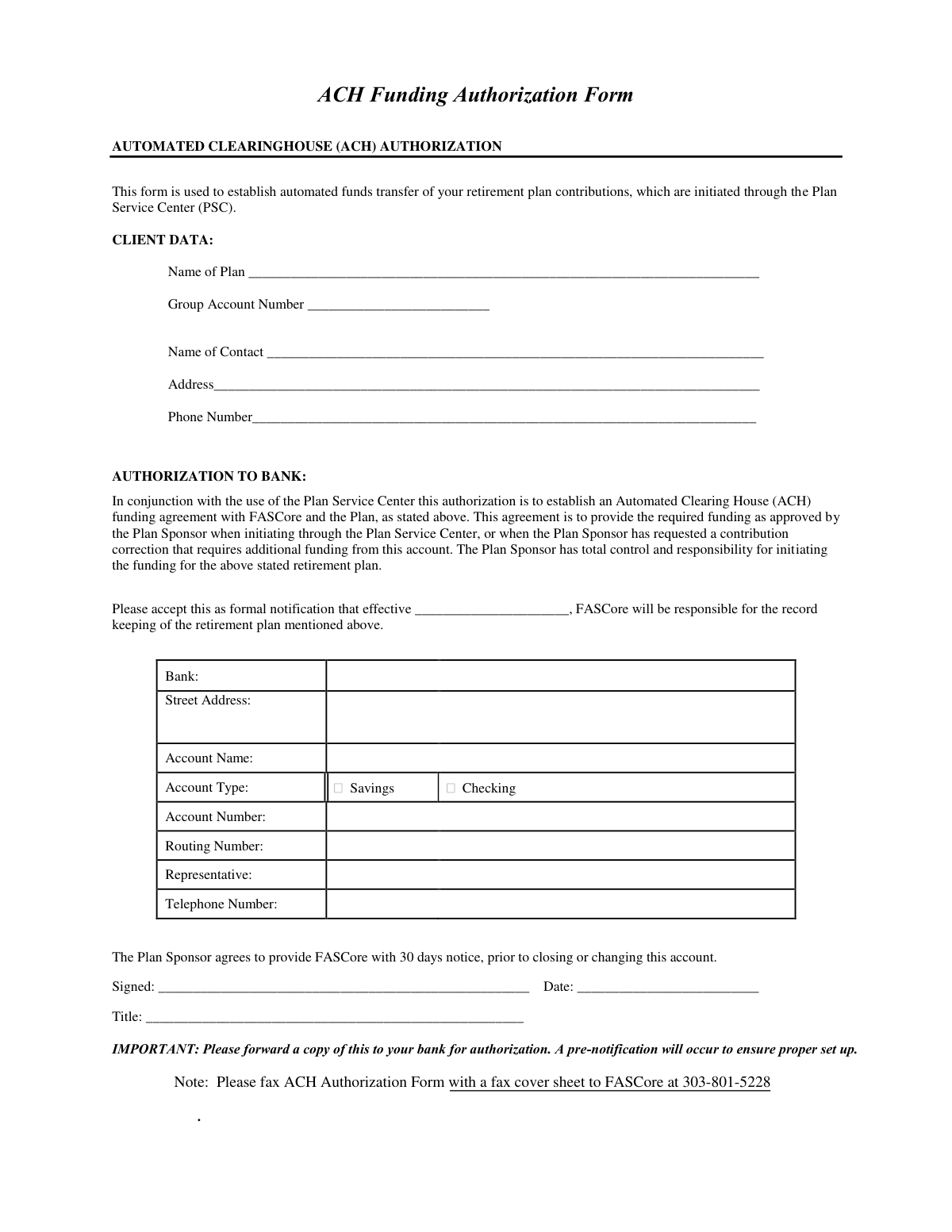
This form establishes an agreement for automated clearinghouse (ACH) debits from a specified bank account to fund a company's retirement plan contributions. It authorizes FASCore, on behalf of MetLife, to withdraw funds as initiated by the Plan Sponsor through the Plan Service Center. Today, this form can be filled out quickly and accurately using AI-powered services like Instafill.ai, which can also convert non-fillable PDF versions into interactive fillable forms.
MetLife ACH Funding Authorization is part of the
VA forms, HR forms, ACH forms and ACH authorization forms categories on Instafill.
Rather not fill this in by hand? Instafill is an online form filler that completes PDF forms automatically — upload the blank form, answer a few questions, and the AI fills every field.
Form specifications
| Form name: | ACH Funding Authorization Form |
| Number of pages: | 1 |
| Language: | English |
Our AI automatically handles information lookup, data retrieval, formatting, and form filling.
It takes less than a minute to fill out MetLife ACH Funding Authorization using our AI form filling.
Securely upload your data. Information is encrypted in transit and deleted immediately after the form is filled out.
Instafill Demo: How to fill out PDF forms in seconds with AI
How to Fill Out MetLife ACH Funding Authorization Online for Free in 2026
Are you looking to fill out a METLIFE ACH FUNDING AUTHORIZATION form online quickly and accurately? Instafill.ai offers the #1 AI-powered PDF filling software of 2026, allowing you to complete your METLIFE ACH FUNDING AUTHORIZATION form in just 37 seconds or less.
Follow these steps to fill out your METLIFE ACH FUNDING AUTHORIZATION form online using Instafill.ai:
- 1 Navigate to Instafill.ai and upload the ACH Funding Authorization Form or select it from their template library.
- 2 Use the AI assistant to fill in the 'Client Data' section, including the Plan Name, Group Account Number, and contact details.
- 3 Proceed to the 'Authorization to Bank' section and provide the name and address of your financial institution.
- 4 Enter the specific bank account details, including the Account Name, Account Type (Savings or Checking), Account Number, and Routing Number.
- 5 Input the name and telephone number of your bank representative, if available.
- 6 The authorized Plan Sponsor representative must digitally sign, date, and enter their title in the designated fields.
- 7 Review all the information for accuracy before downloading the completed form to forward a copy to your bank as required.
Our AI-powered system ensures each field is filled out correctly, reducing errors and saving you time.
Why Choose Instafill.ai for Your Fillable MetLife ACH Funding Authorization Form?
Speed
Complete your MetLife ACH Funding Authorization in as little as 37 seconds.
Up-to-Date
Always use the latest 2026 MetLife ACH Funding Authorization form version.
Cost-effective
No need to hire expensive lawyers.
Accuracy
Our AI performs 10 compliance checks to ensure your form is error-free.
Security
Your personal information is protected with bank-level encryption.
Frequently Asked Questions About MetLife ACH Funding Authorization
This form is used to authorize MetLife's record keeper, FASCore, to automatically withdraw funds from your company's bank account to fund your retirement plan contributions.
The Plan Sponsor or an authorized representative of the company offering the retirement plan should complete this form to establish the automated funding agreement.
You will need your Plan Name, Group Account Number, and the details of the business bank account you'll be using, including the account and routing numbers.
Your Group Account Number is the unique identifier for your retirement plan. It can typically be found on your plan statements or other official documents provided by MetLife.
The Plan Service Center (PSC) is the online portal or system through which you, the Plan Sponsor, will initiate the funding for your retirement plan contributions.
After submission, a 'pre-notification' test transaction will be sent to your bank to verify the account details are correct before any actual funds are transferred.
Yes, the form instructions state that you must forward a copy to your bank for their authorization and to ensure they are aware of this ACH agreement.
You must provide FASCore with 30 days' notice before changing or closing the account. You will likely need to submit a new, updated ACH Funding Authorization form.
Yes, the form provides an option to select either a checking or a savings account as the source for the automated funds transfer.
The process, including the pre-notification test to your bank, typically takes several business days. You should wait for confirmation before initiating your first contribution.
Although not explicitly required on the form, attaching a voided check is a common practice that helps verify the accuracy of your account and routing numbers and can prevent delays.
Yes, services like Instafill.ai use AI to accurately auto-fill form fields from your saved information, which can save you time and help prevent errors.
Simply upload the PDF form to the Instafill.ai platform. You can then type your information directly into the fields or use the AI auto-fill feature to complete it in seconds.
If you have a non-fillable or 'flat' PDF, you can use a service like Instafill.ai to instantly convert it into an interactive, fillable form that you can complete on your computer.
Compliance MetLife ACH Funding Authorization
Validation Checks by Instafill.ai
1
Group Account Number Presence and Format
This check verifies that the 'Group Account Number' field is not empty and conforms to the expected format (e.g., alphanumeric, specific length). This number is a primary identifier for the client's plan within the system. A missing or incorrectly formatted number will prevent the system from locating the correct plan, halting the ACH setup process entirely.
2
Client Contact Phone Number Format
Validates that the 'Phone Number' in the Client Data section is present and follows a standard North American phone number format (e.g., XXX-XXX-XXXX). This ensures that the plan service center can reach the designated contact person if there are any questions or issues with the form or subsequent transactions. An invalid number would hinder communication and delay problem resolution.
3
Valid and Future-Dated Effective Date
This check ensures the 'effective' date is provided in a valid date format (e.g., MM/DD/YYYY) and is not a date in the past. This date specifies when the ACH authorization begins. An invalid or past date could cause immediate processing errors or confusion about when the agreement starts, potentially leading to missed or premature fund transfers.
4
Bank Account Type Selection
Verifies that either 'Savings' or 'Checking' has been selected for the 'Account Type'. This information is required by the Automated Clearing House (ACH) network to correctly process the transaction from the specified bank account. Failure to specify the account type will result in the transaction being rejected by the bank.
5
Bank Account Number Format
Validates that the 'Account Number' is provided and consists only of digits, typically within a standard length range (e.g., 4 to 17 digits). This number is essential for identifying the specific account to be debited. An incorrect, missing, or non-numeric account number will cause the ACH transaction to fail.
6
ABA Routing Number Validation
Confirms the 'Routing Number' is exactly nine digits long and passes the ABA routing number checksum algorithm. This number identifies the specific financial institution for the ACH debit. An invalid routing number is one of the most common reasons for ACH transaction failure, so this check is critical to prevent rejections and delays.
7
Routing Number and Bank Name Cross-Reference
Performs a logical check to ensure the provided 'Routing Number' corresponds to the 'Bank' name listed, often by checking against an external database. This cross-reference helps catch data entry errors where the name and number might be for two different institutions. A mismatch would lead to a failed transaction and require manual correction.
8
Authorization Signature Presence
Verifies that the 'Signed' field contains a signature, which constitutes the legal authorization for the ACH agreement. For digital submissions, this checks for a valid digital signature or equivalent. Without a signature, the form is not legally binding, and no funds can be transferred, invalidating the entire request.
9
Signature Date Validity and Presence
Ensures the 'Date' field next to the signature is filled with a valid date that is not in the future. This date establishes when the authorization was legally executed by the plan sponsor. A missing, future, or invalid date can create legal and compliance issues regarding the validity of the authorization.
10
Signatory Title Completeness
Confirms that the 'Title' of the person signing the form is provided. This is important to verify that the individual has the authority to authorize financial transactions on behalf of the Plan Sponsor. A missing title may require follow-up to confirm authorization, delaying the setup process.
11
Logical Date Consistency Check
Performs a logical comparison to ensure the Signature 'Date' is on or before the 'effective' date of the ACH agreement. It is illogical to authorize an agreement to start on a date before the authorization itself was signed. This check prevents logical inconsistencies that could cause confusion or processing errors.
12
Plan Name Completeness
Ensures the 'Name of Plan' field is filled out, as it is a critical identifier for the retirement plan being linked to the ACH authorization. Without the plan name, the authorization cannot be correctly associated with the client's account. This could lead to significant processing delays or incorrect fund allocation.
Common Mistakes in Completing MetLife ACH Funding Authorization
This is one of the most frequent and critical errors. People often mistype these long strings of numbers or accidentally swap the routing and account number fields. A single incorrect digit will cause the ACH transaction to fail, leading to funding delays, potential late fees, and the need to resubmit the form. To avoid this, carefully double-check the numbers against a voided check or an official bank statement.
The 'Account Name' must be the exact legal name of the entity as it appears on the bank statement, not a DBA ('doing business as') or an abbreviated company name. A mismatch will cause the ACH pre-notification to fail, as banks require an exact match for verification. This error significantly delays the setup process and requires resubmission. Always copy the name precisely from an official bank document.
Filers may enter their company name or a generic term like '401k Plan' instead of the official, legal name of the retirement plan. This ambiguity can lead to confusion and delays in linking the ACH authorization to the correct account at the service center. To prevent this, refer to your plan adoption agreement or other official plan documents for the exact plan name required.
The Group Account Number is a key identifier for MetLife/FASCore to link the funding to the correct plan. People often leave this blank if they don't know it, or they make a typo. An incorrect or missing number will halt the process entirely, as the service center cannot identify which plan to fund. This number can typically be found on plan statements or by contacting the plan administrator.
An unsigned form is invalid and will be immediately rejected. Furthermore, the person signing must have the legal authority to authorize financial transactions for the plan sponsor (e.g., CFO, President, Owner). A signature from an unauthorized employee will also invalidate the agreement, causing significant processing delays and requiring a new, correctly signed form.
The form explicitly states, 'Please forward a copy of this to your bank for authorization.' Many people complete the form, send it to MetLife/FASCore, and forget this crucial step. Failure to notify the bank can result in the bank rejecting the ACH debits, leading to failed contributions and potential compliance issues for the plan.
The effective date tells FASCore when they can begin initiating ACH transfers. Leaving this field blank creates ambiguity and will likely cause the form to be returned for completion. This simple omission delays the entire setup of automated funding. Always enter a clear, future date to indicate when the authorization should begin.
Since this is a non-fillable PDF, many people print it and fill it out by hand. Poor or illegible handwriting, especially for critical fields like account numbers and names, is a common cause of data entry errors on the receiving end. This can lead to failed transactions and require you to submit the form all over again. To avoid this, print clearly in block letters or use a tool like Instafill.ai, which can convert flat PDFs into digitally fillable forms for clean, legible text.
Banks sometimes use different routing numbers for different types of transactions (e.g., ACH/electronic payments vs. wire transfers). Using the routing number for a wire transfer on this ACH authorization form will cause the transaction to fail. Always use the ACH or electronic routing number, which can be found on a check or by contacting your bank directly.
The 'Name of Contact' and 'Phone Number' in the Client Data section are essential if the service center needs to resolve an issue with the form. Using an outdated contact person who has left the company or an incorrect phone number means they cannot reach anyone to fix problems quickly. This turns a minor clarification into a major delay, often requiring the form to be mailed back. Always provide the details for the current, primary contact responsible for the plan's administration.
Saved over 80 hours a year
“I was never sure if my IRS forms like W-9 were filled correctly. Now, I can complete the forms accurately without any external help.”
Kevin Martin Green
Your data stays secure with advanced protection from Instafill and our subprocessors




Robust compliance program
Transparent business model
You’re not the product. You always know where your data is and what it is processed for.
ISO 27001, HIPAA, and GDPR
Our subprocesses adhere to multiple compliance standards, including but not limited to ISO 27001, HIPAA, and GDPR.
Security & privacy by design
We consider security and privacy from the initial design phase of any new service or functionality. It’s not an afterthought, it’s built-in, including support for two-factor authentication (2FA) to further protect your account.
Fill out MetLife ACH Funding Authorization with Instafill.ai
Worried about filling PDFs wrong? Instafill securely fills ach-funding-authorization-form forms, ensuring each field is accurate.
