Yes! You can use AI to fill out Principal Financial Group Notice of Data Breach
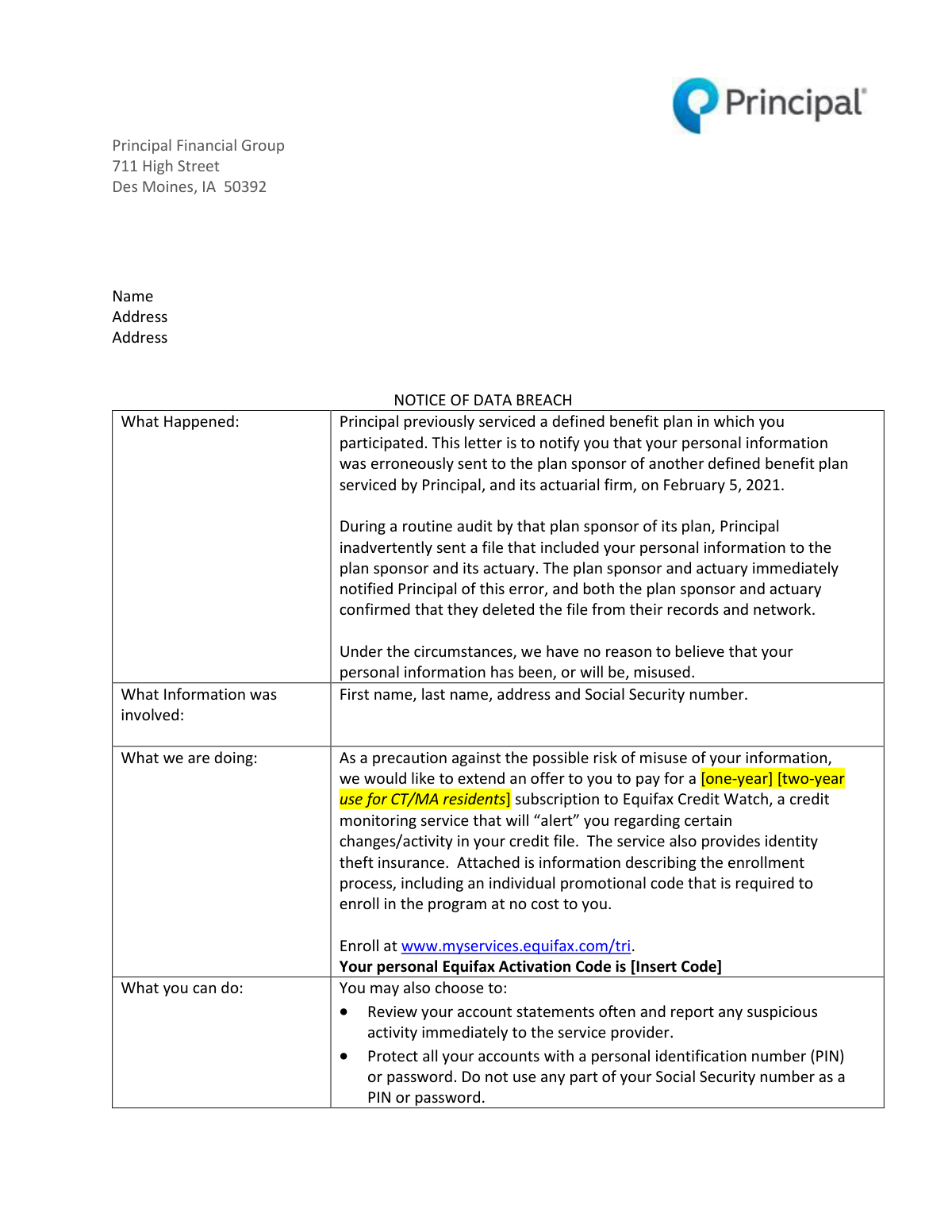
The Principal Financial Group Notice of Data Breach is a letter sent to individuals whose personal information, including name, address, and Social Security number, was inadvertently disclosed. The notice explains the incident and offers complimentary enrollment in the Equifax Credit Watch credit monitoring service to help protect against identity theft. Today, the enrollment process described in this notice can be completed quickly and accurately using AI-powered services like Instafill.ai, which can also extract key details like activation codes from non-fillable PDF versions.
Principal Data Breach Notice is part of the
financial forms, ACH forms, Principal forms and Principal Financial forms categories on Instafill.
Rather not fill this in by hand? Instafill is an online form filler that completes PDF forms automatically — upload the blank form, answer a few questions, and the AI fills every field.
Form specifications
| Form name: | Principal Financial Group Notice of Data Breach |
| Number of pages: | 1 |
| Language: | English |
Our AI automatically handles information lookup, data retrieval, formatting, and form filling.
It takes less than a minute to fill out Principal Data Breach Notice using our AI form filling.
Securely upload your data. Information is encrypted in transit and deleted immediately after the form is filled out.
Instafill Demo: How to fill out PDF forms in seconds with AI
How to Fill Out Principal Data Breach Notice Online for Free in 2026
Are you looking to fill out a PRINCIPAL DATA BREACH NOTICE form online quickly and accurately? Instafill.ai offers the #1 AI-powered PDF filling software of 2026, allowing you to complete your PRINCIPAL DATA BREACH NOTICE form in just 37 seconds or less.
Follow these steps to fill out your PRINCIPAL DATA BREACH NOTICE form online using Instafill.ai:
- 1 Navigate to Instafill.ai and upload or select the Principal Financial Group Notice of Data Breach document.
- 2 Allow the AI to scan the document and automatically extract the Equifax enrollment link and your unique activation code.
- 3 Follow the AI's guidance to the enrollment website, where it will help pre-fill your personal information such as name, address, date of birth, and Social Security Number.
- 4 Use the tool to help create a secure username and password for your Equifax account and accept the terms of use.
- 5 Review the pre-filled information for accuracy and answer the security questions required to verify your identity.
- 6 Submit the enrollment form and allow the AI to save a digital copy of your order confirmation for your records.
Our AI-powered system ensures each field is filled out correctly, reducing errors and saving you time.
Why Choose Instafill.ai for Your Fillable Principal Data Breach Notice Form?
Speed
Complete your Principal Data Breach Notice in as little as 37 seconds.
Up-to-Date
Always use the latest 2026 Principal Data Breach Notice form version.
Cost-effective
No need to hire expensive lawyers.
Accuracy
Our AI performs 10 compliance checks to ensure your form is error-free.
Security
Your personal information is protected with bank-level encryption.
Frequently Asked Questions About Principal Data Breach Notice
You received this notice because you participated in a defined benefit plan serviced by Principal, and your personal information was accidentally sent to an unauthorized third party on February 5, 2021. Principal is informing you of the incident and providing resources to help protect your information.
The information involved in the breach includes your first name, last name, address, and Social Security number.
Principal is offering you a complimentary subscription to Equifax Credit Watch, a credit monitoring service that includes identity theft insurance. The subscription is free for one year, or two years for residents of Connecticut and Massachusetts.
You can enroll online at www.myservices.equifax.com/tri or by calling 1-866-937-8432. You will need the unique Equifax Activation Code provided in your notice letter to complete the enrollment.
You will need your unique Activation Code from the letter, as well as personal details like your full name, address, date of birth, and Social Security Number to verify your identity.
No. The notice states that the recipient of the file immediately notified Principal of the error and confirmed they deleted it, so there is no reason to believe your information has been or will be misused.
If you have questions about the breach notice, you can contact the Principal® Participant Contact Center at 800-547-7754.
A fraud alert encourages lenders to verify your identity before extending credit, while a security freeze restricts access to your credit report entirely. The notice provides detailed instructions on how to place either one on your credit file.
You should contact the Principal® Participant Contact Center at 800-547-7754 to inquire about getting a replacement for your lost activation code.
Yes, services like Instafill.ai use AI to help you accurately auto-fill the required fields on the Equifax enrollment website, saving you time and reducing potential errors.
Simply upload a scan or photo of your notice to Instafill.ai. Its AI will extract the necessary information, including your activation code, to help you complete the online enrollment form quickly and accurately.
You can use a service like Instafill.ai, which can convert flat, non-fillable PDFs into interactive forms. This allows you to easily copy information like your activation code for the online enrollment process.
You should review your account statements regularly, use strong and unique passwords for online accounts, and consider placing a fraud alert or security freeze on your credit file.
Compliance Principal Data Breach Notice
Validation Checks by Instafill.ai
1
Activation Code Validity and Uniqueness
This check verifies that the submitted Activation Code exists within the system's database of valid codes and has not been previously used for enrollment. It is crucial for ensuring that only individuals affected by the data breach can access the complimentary service. If the code is invalid or already redeemed, the user will be blocked from proceeding and shown an error message.
2
Social Security Number Format and Structure
This validation ensures the Social Security Number (SSN) is entered in a valid 9-digit format (XXXXXXXXX or XXX-XX-XXXX) and contains only numeric characters. It also checks against known invalid SSN patterns, such as those with an area number of '000' or '666'. This is critical for accurate identity verification with credit bureaus and prevents the submission of clearly erroneous data.
3
Date of Birth Age Requirement
This check validates that the user's entered Date of Birth corresponds to an age of 18 years or older. This is a legal and contractual requirement, as credit monitoring services and identity theft insurance are typically only available to legal adults. If the user is under 18, the form submission will be rejected with an explanation regarding the age minimum.
4
Address Component Completeness
This validation ensures that all essential parts of the home address are filled out, including the street address, city, state, and ZIP code. A complete address is necessary for identity verification and for mailing physical documents if the user opts for US Mail delivery. An incomplete submission would prevent successful enrollment and require the user to correct the missing information.
5
ZIP Code and State Consistency
This check cross-references the entered ZIP code against the selected state to ensure they are a valid combination according to postal service data. This helps prevent typos and ensures the address is legitimate and deliverable. If a mismatch is found, the system will prompt the user to review and correct their city, state, or ZIP code information before continuing.
6
Full Name Requirement
This validation confirms that both the first name and last name fields are populated. A full name is a fundamental piece of personally identifiable information required by Equifax to locate the correct credit file. Failure to provide a full name would result in an immediate rejection of the form, as identity cannot be verified without it.
7
US Telephone Number Format
This check ensures the telephone number field contains a valid 10-digit US phone number, stripping any common formatting like parentheses or hyphens for validation. A valid phone number is important for multi-factor authentication, customer service contact, and identity verification. An invalid format will trigger an error, asking the user to enter a valid 10-digit phone number.
8
Email Address Syntax Validation
This validation verifies that the provided email address follows the standard '[email protected]' format. It checks for the presence of an '@' symbol and a period in the domain part. This is essential for creating the online account, sending credit monitoring alerts, and providing a username for future logins.
9
Password Complexity Enforcement
This check enforces a set of rules to ensure the user creates a strong password for their new account. These rules typically include a minimum length, and a requirement for a mix of uppercase letters, lowercase letters, numbers, and special characters. This is a critical security measure to protect the user's sensitive credit information from unauthorized access.
10
Password Confirmation Match
This validation compares the 'Password' and 'Confirm Password' fields to ensure they are identical. This check helps prevent users from accidentally creating a password with a typo, which could lock them out of their account immediately after creation. If the fields do not match, an error is displayed, and the user must re-enter their password.
11
Terms of Use Acceptance
This check ensures that the checkbox for accepting the 'Terms of Use' has been ticked before the form can be submitted. This is a legal requirement to confirm that the user has read and agreed to the conditions of the service provided by Equifax. The submission button will remain disabled until the user explicitly provides their consent by checking the box.
12
Username Uniqueness Check
This validation queries the database in real-time to ensure the user's chosen username is not already in use by another account holder. Every username must be unique to serve as a distinct identifier for logging into the service. If the username is already taken, the user will be prompted to choose a different one.
13
Social Security Number Completeness
This validation ensures the Social Security Number field is not left empty. The SSN is the primary identifier used by credit bureaus to locate an individual's credit file, making it the most critical piece of information for this service. The form cannot be submitted without this information, and the user will be prompted to fill in the required field.
14
Date of Birth Format and Validity
This check verifies that the Date of Birth is entered in a valid date format (e.g., MM/DD/YYYY) and represents a real calendar date (e.g., not 02/30/2000). It also ensures the date is logically possible, meaning it must be in the past. This prevents data entry errors and ensures the information sent for identity verification is correctly structured.
Common Mistakes in Completing Principal Data Breach Notice
The enrollment process for credit monitoring requires a unique activation code provided in the notice. Users often mistype this code, especially with characters that look similar (e.g., 'O' and '0', 'I' and '1'), which immediately prevents them from accessing the service. To avoid this, carefully copy the code or use a tool that can scan and input it, and double-check the entry before submitting.
A typographical error when entering a Social Security Number (SSN) is a frequent and critical mistake. Since the SSN is the primary identifier for credit files, even a single wrong digit will cause the identity verification process to fail, preventing enrollment in the monitoring service. Using an AI-powered form filler like Instafill.ai can help prevent this by securely storing and accurately populating sensitive information, reducing the risk of manual typos.
When registering, individuals may enter their current address, which might not match the address on file with the credit bureaus, especially after a recent move. This discrepancy can lead to a failure in the identity verification step, delaying or preventing the setup of protective services. It's crucial to use the address most likely associated with your financial history or be prepared to provide previous addresses as requested.
People often use variations of their name, such as nicknames (e.g., 'Jim' for 'James') or omitting a middle initial or suffix (Jr., III). However, credit bureau systems require an exact match to the full legal name on file. Using an inconsistent name will likely result in a failed identity match and prevent successful enrollment or a security freeze request.
The document explains that a security freeze must be requested separately from Equifax, Experian, and TransUnion. A common misunderstanding is that contacting one bureau is sufficient to protect your credit file everywhere. This mistake leaves your credit reports at the other two agencies vulnerable, defeating the purpose of a comprehensive freeze.
The mail-in security freeze request requires multiple documents, including proof of address, a copy of a government ID, and payment. Forgetting to include even one of these required items will result in the credit bureau rejecting the request, significantly delaying the placement of the freeze. To avoid this, create a checklist from the instructions and verify every item is in the envelope before mailing.
The online enrollment process includes security questions based on your credit history (e.g., past addresses, loan amounts). Individuals may answer incorrectly because they forget details of old accounts or get confused by the options provided. Failing this step can lock you out of the online enrollment process, forcing you to use the slower mail or phone options.
Perhaps the most significant mistake is receiving a data breach notice and failing to take any protective action out of confusion, procrastination, or underestimation of the risk. This leaves your personal information, including your SSN, completely unprotected and vulnerable to misuse. It is crucial to act promptly by at least enrolling in the free credit monitoring service offered.
When mailing a security freeze request, the instructions require a 'legible photocopy' of a government-issued ID. Submitting a copy that is too dark, blurry, or has clipped edges will make it impossible for the bureau to verify your identity, leading to a rejected request. Always check the final copy for clarity before sending it.
The security freeze application requires listing all addresses from the past five years if you have moved. People often forget this step or fail to list all previous residences, which can cause a mismatch with the credit bureau's records. This omission can delay processing or lead to rejection of the security freeze request.
Saved over 80 hours a year
“I was never sure if my IRS forms like W-9 were filled correctly. Now, I can complete the forms accurately without any external help.”
Kevin Martin Green
Your data stays secure with advanced protection from Instafill and our subprocessors




Robust compliance program
Transparent business model
You’re not the product. You always know where your data is and what it is processed for.
ISO 27001, HIPAA, and GDPR
Our subprocesses adhere to multiple compliance standards, including but not limited to ISO 27001, HIPAA, and GDPR.
Security & privacy by design
We consider security and privacy from the initial design phase of any new service or functionality. It’s not an afterthought, it’s built-in, including support for two-factor authentication (2FA) to further protect your account.
Fill out Principal Data Breach Notice with Instafill.ai
Worried about filling PDFs wrong? Instafill securely fills principal-financial-group-notice-of-data-breach forms, ensuring each field is accurate.
