Yes! You can use AI to fill out ACH Authorization Agreement (FRM-ACH-02-20)
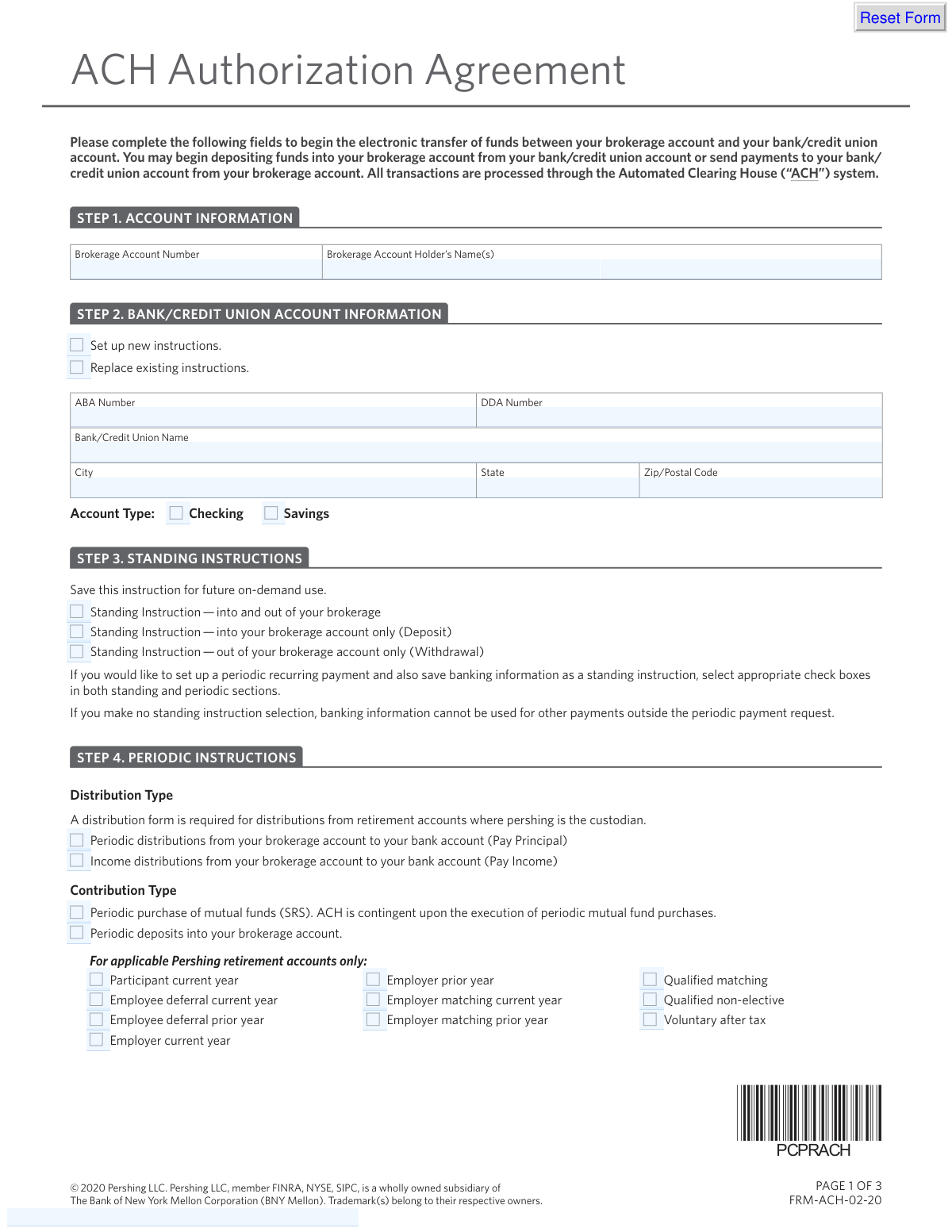
The ACH Authorization Agreement is a document that grants Pershing LLC permission to initiate credit and debit entries between your brokerage account and a designated bank account via the Automated Clearing House (ACH) system. It is used to set up standing instructions for future transfers or periodic, recurring payments and deposits. Today, this form can be filled out quickly and accurately using AI-powered services like Instafill.ai, which can also convert non-fillable PDF versions into interactive fillable forms.
FRM-ACH-02-20 is part of the
authorization forms, ACH forms, ACH authorization forms, payment authorization forms and direct deposit forms categories on Instafill.
Rather not fill this in by hand? Instafill is an online form filler that completes PDF forms automatically — upload the blank form, answer a few questions, and the AI fills every field.
Form specifications
| Form name: | ACH Authorization Agreement (FRM-ACH-02-20) |
| Number of pages: | 1 |
| Language: | English |
Our AI automatically handles information lookup, data retrieval, formatting, and form filling.
It takes less than a minute to fill out FRM-ACH-02-20 using our AI form filling.
Securely upload your data. Information is encrypted in transit and deleted immediately after the form is filled out.
Instafill Demo: How to fill out PDF forms in seconds with AI
How to Fill Out FRM-ACH-02-20 Online for Free in 2026
Are you looking to fill out a FRM-ACH-02-20 form online quickly and accurately? Instafill.ai offers the #1 AI-powered PDF filling software of 2026, allowing you to complete your FRM-ACH-02-20 form in just 37 seconds or less.
Follow these steps to fill out your FRM-ACH-02-20 form online using Instafill.ai:
- 1 Navigate to Instafill.ai and upload or select the ACH Authorization Agreement form.
- 2 Enter your brokerage account number and the account holder's name(s) in the 'Account Information' section.
- 3 Provide your bank or credit union details, including the ABA/routing number, account number, and account type (checking or savings).
- 4 Specify your transfer instructions, choosing between standing instructions for on-demand use or setting up periodic, recurring transfers with a specific frequency and amount.
- 5 Attach a voided check or an equivalent document like a bank letter or MICR-encoded deposit slip to verify your bank account information.
- 6 Carefully review all the information you have provided for accuracy, then electronically sign and date the agreement in the 'Signature' section.
- 7 Download, print, or submit your completed and signed form as directed by your financial advisor or institution.
Our AI-powered system ensures each field is filled out correctly, reducing errors and saving you time.
Why Choose Instafill.ai for Your Fillable FRM-ACH-02-20 Form?
Speed
Complete your FRM-ACH-02-20 in as little as 37 seconds.
Up-to-Date
Always use the latest 2026 FRM-ACH-02-20 form version.
Cost-effective
No need to hire expensive lawyers.
Accuracy
Our AI performs 10 compliance checks to ensure your form is error-free.
Security
Your personal information is protected with bank-level encryption.
Frequently Asked Questions About FRM-ACH-02-20
This form authorizes Pershing LLC to set up electronic fund transfers between your brokerage account and your bank or credit union account through the Automated Clearing House (ACH) system.
You should fill out this form if you want to enable electronic deposits into your brokerage account from your bank, or withdrawals from your brokerage account to your bank.
You will need your brokerage account number, your bank account details (including ABA/routing and account numbers), and a voided check or equivalent bank document.
Instead of a voided check, you can attach a MICR-encoded deposit slip, a recent bank statement with the full account details, or a signed letter from your bank confirming the account information. Starter checks are not accepted.
The ABA number is your bank's 9-digit routing number, and the DDA number is your specific account number. Both can be found at the bottom of a check or by contacting your bank directly.
Standing Instructions (Step 3) save your bank information for future one-time transfers you initiate on demand. Periodic Instructions (Step 4) set up automatic, recurring transfers for a specific amount and frequency.
Yes, to do this you must select the appropriate options in both the 'Standing Instructions' section (Step 3) and the 'Periodic Instructions' section (Step 4).
All account holders listed on the brokerage account must print their name, sign, and date the form to provide their authorization.
Yes, for business and trust accounts, you must also submit supporting documents that confirm who has signature authority for both the brokerage account and the bank account.
You should submit the completed and signed form, along with any required attachments like a voided check, to your financial advisor or the institution that services your Pershing account.
Yes, services like Instafill.ai use AI to accurately auto-fill form fields from your saved profile, which saves time and helps prevent errors.
You can use a service like Instafill.ai to upload the PDF. It will become an interactive, fillable form that you can complete and sign electronically from any device.
If your PDF is not fillable, you can use a tool like Instafill.ai. It can convert flat, non-interactive PDFs into fillable forms, allowing you to easily type your information.
Compliance FRM-ACH-02-20
Validation Checks by Instafill.ai
1
Validates ABA Routing Number Format and Existence
This check ensures the ABA Number in Step 2 is exactly 9 digits long and is a valid, active routing number in the Federal Reserve's E-Payments Routing Directory. This is critical for correctly routing the electronic transaction to the right financial institution. If the number is invalid, the transaction will fail, leading to delays and potential fees.
2
Ensures Brokerage Account Number is Provided
This validation confirms that the 'Brokerage Account Number' field in Step 1 is not empty. This number is the primary identifier linking the ACH authorization to the correct brokerage account at Pershing. Without it, the system cannot identify which account to credit or debit, and the entire setup request must be rejected.
3
Verifies Consistency Between Account Holder and Signatory Names
This check compares the 'Brokerage Account Holder’s Name(s)' from Step 1 against the 'Print Name' fields in the signature section (Step 5). The names must match to confirm that the person authorizing the transfers is an actual owner of the brokerage account. A mismatch indicates a potential unauthorized request and must be flagged for manual review or rejection.
4
Checks for Required Document Attachment
This validation verifies that a file has been attached to the form submission, as required by the 'Voided Check' section. The form requires a voided check, bank statement, or bank letter to prove ownership of the bank account. A submission without an attachment is incomplete and cannot be processed, as the bank account details cannot be independently verified.
5
Validates Conditional Requirement for Periodic Amount
This check enforces the rule that the 'Dollar Amount' field in Step 4 must contain a positive number if 'Periodic deposits' or 'Pay Principal' is selected. Conversely, it ensures the amount is left blank if 'Pay Income' is selected. This prevents ambiguity in payment instructions and ensures the transaction is processed for the correct amount as intended by the user.
6
Ensures Periodic Instruction Start Date is in the Future
This validation confirms that the 'Start Date' for periodic instructions in Step 4 is a valid date that occurs after the submission date. A past or current date is invalid as it does not allow for the necessary processing time to set up the recurring transfer. An invalid date would cause the first payment to be missed and requires user correction.
7
Confirms Selection of Bank Account Type
This check ensures that one of the 'Account Type' options ('Checking' or 'Savings') in Step 2 has been selected. The ACH system requires this information to process transactions correctly, as the protocols can differ slightly between checking and savings accounts. Failure to specify the account type will result in an incomplete application and rejection.
8
Verifies Completeness of Periodic Instructions
If any periodic instruction is selected in Step 4, this validation ensures that the 'Frequency', 'Start Date', and 'Amount' (where applicable) fields are all filled out. A partial periodic instruction is ambiguous and cannot be executed by the system. This check prevents the creation of incomplete or failed recurring payment schedules.
9
Cross-Validates Form Data with Attachment Data
This check compares the ABA Number and DDA (bank account) Number entered in Step 2 with the corresponding numbers extracted via OCR from the attached voided check or bank statement. This is a critical anti-fraud and error-prevention measure, ensuring the typed information is accurate and matches the official bank document. Discrepancies must be resolved before the ACH link can be established.
10
Requires at Least One Complete Signature Block
This validation ensures that at least one signature block in Step 5 is fully completed with a signature, printed name, and date. The ACH authorization is a legal agreement, and a signature is required to make it binding. An unsigned form is invalid and cannot be acted upon.
11
Ensures an Instruction Type is Selected
This check verifies that the user has selected an instruction in either Step 3 (Standing Instructions) or Step 4 (Periodic Instructions). The purpose of the form is to authorize future transfers, so a submission without any instructions on how to use the bank details is incomplete. The form must be rejected if no instruction is provided.
12
Validates Retirement Account Contribution Specificity
If the brokerage account is a retirement account and a 'Contribution Type' is chosen in Step 4, this check ensures a specific contribution reason (e.g., 'Employee deferral current year') is also selected. This is vital for correct tax reporting and adherence to annual contribution limits for retirement plans. Failure to specify the reason would lead to compliance and accounting issues.
Common Mistakes in Completing FRM-ACH-02-20
Users often mistakenly enter their bank account number (DDA) in the ABA routing number field and vice versa. This happens due to rushing or not carefully reading the field labels, which can cause the ACH transfer to fail completely. To avoid this, carefully compare the numbers on your voided check with the corresponding fields on the form, noting the ABA/routing number is the 9-digit number. AI-powered form filling tools like Instafill.ai can help prevent this by validating the 9-digit format of the ABA number.
The names listed in Step 1 must exactly match the official title of the brokerage account, including all joint owners. People often forget to list a second owner or use a nickname instead of their full legal name. Any discrepancy can lead to the form being rejected for security reasons, as the authorization won't match the account ownership. Always reference a recent brokerage account statement to ensure the names are listed precisely as they appear.
For joint brokerage accounts, all account holders listed in Step 1 must sign the form in Step 5. It's a common oversight for only one person to sign, assuming it's sufficient. An incomplete set of signatures invalidates the authorization, causing the form to be rejected and requiring it to be resubmitted. To prevent this, ensure every individual owner of the brokerage account provides their signature, printed name, and the date.
The form explicitly prohibits using starter checks or checks with numbers below 100, yet many people attach them anyway. These checks often lack pre-printed name and address information, making them unsuitable for verification and leading to immediate rejection of the application. Always use a permanent, numbered check or provide one of the approved alternatives like a MICR-encoded deposit slip or a formal letter from your bank.
Users often set up a recurring payment in Step 4 but fail to also select a 'Standing Instruction' in Step 3. They mistakenly believe setting up a periodic payment automatically saves the bank information for future one-time transfers, leading to frustration later. To avoid this, if you want to both set up a recurring transfer AND save the bank details for future use, you must check the appropriate boxes in both Step 3 and Step 4.
In Step 4, people frequently confuse 'Semi-monthly' (twice a month) with 'Bi-monthly' (every other month). This simple misunderstanding can lead to funds being transferred at the wrong interval, potentially causing overdrafts or missed investment opportunities. Before selecting a frequency, carefully read the definition provided on the form to ensure your periodic transfers occur as intended.
In Step 2, filers sometimes forget to check the box indicating whether the bank account is 'Checking' or 'Savings'. This information is essential for the ACH system to correctly process the transaction and its omission can lead to processing delays or transaction failure. Since this form is a non-fillable PDF, tools like Instafill.ai can convert it into an interactive, fillable version, making it easier to spot and complete required fields like checkboxes.
When a voided check is unavailable, users often provide incomplete alternatives, such as a bank statement where the full account number is redacted. This incomplete information cannot be used for verification and will cause the form to be rejected. If not using a voided check, ensure your alternative document clearly shows the full bank name, full account holder name(s), and the complete, unredacted account and routing numbers.
For business or trust accounts, the form requires separate documentation confirming who has the authority to sign for both the brokerage and bank accounts. This is a critical compliance step that is often overlooked by filers used to personal accounts. Failure to include these supporting documents (like a trust agreement or corporate resolution) will halt the setup process. Always gather and attach the required signature authority paperwork when setting up ACH for any non-individual account.
A simple typo in the Brokerage Account Number in Step 1 is a frequent and fundamental error. An incorrect number means the authorization cannot be linked to the intended account, stopping the entire process and requiring a full resubmission. To prevent this, carefully copy the number from an official account statement and double-check it for accuracy before submitting. AI-powered tools like Instafill.ai can help by automatically and accurately populating this information from saved profiles.
Saved over 80 hours a year
“I was never sure if my IRS forms like W-9 were filled correctly. Now, I can complete the forms accurately without any external help.”
Kevin Martin Green
Your data stays secure with advanced protection from Instafill and our subprocessors




Robust compliance program
Transparent business model
You’re not the product. You always know where your data is and what it is processed for.
ISO 27001, HIPAA, and GDPR
Our subprocesses adhere to multiple compliance standards, including but not limited to ISO 27001, HIPAA, and GDPR.
Security & privacy by design
We consider security and privacy from the initial design phase of any new service or functionality. It’s not an afterthought, it’s built-in, including support for two-factor authentication (2FA) to further protect your account.
Fill out FRM-ACH-02-20 with Instafill.ai
Worried about filling PDFs wrong? Instafill securely fills ach-authorization-agreement-frm-ach-02-20 forms, ensuring each field is accurate.
