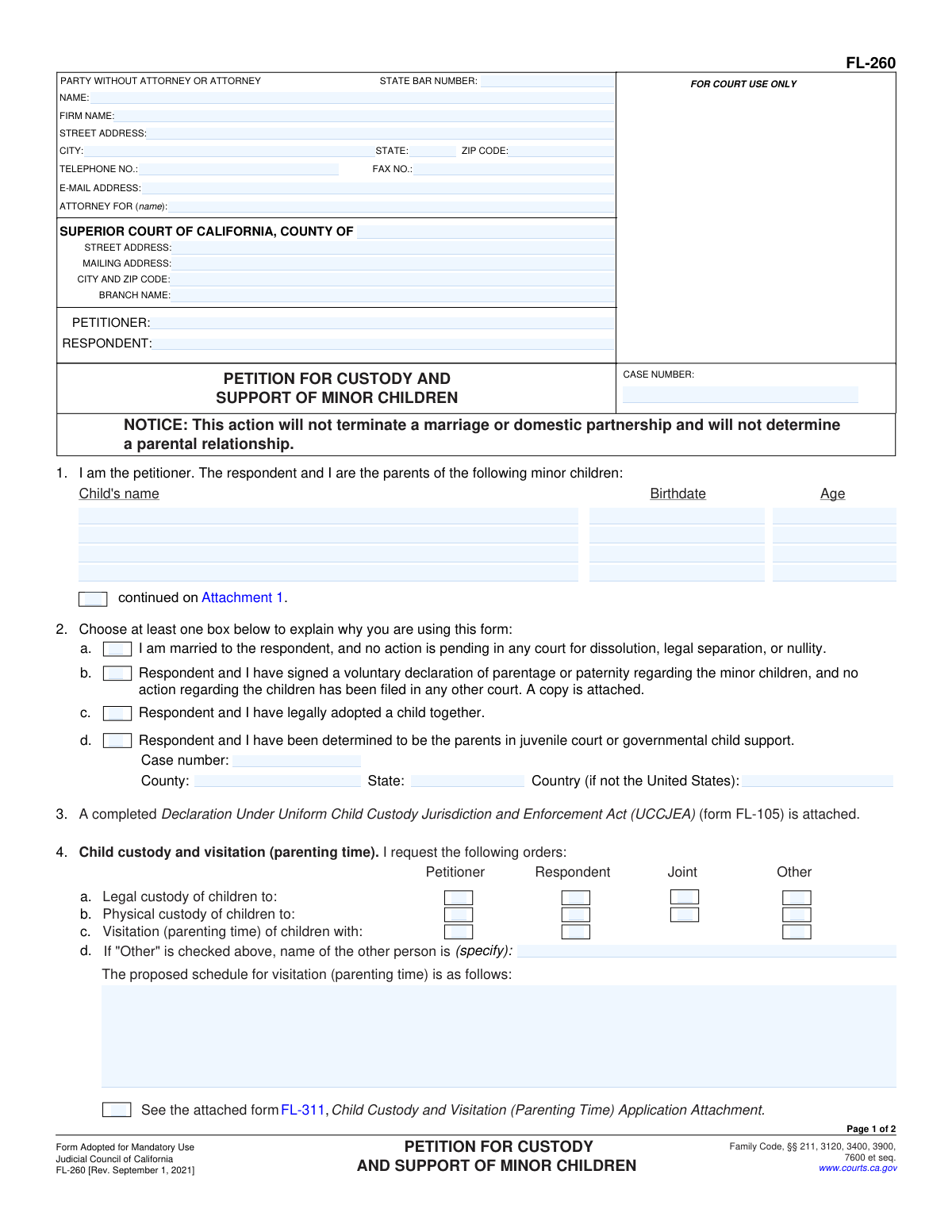
Yes! You can use AI to fill out Form FL-260, Petition for Custody and Support of Minor Children
Form FL-260, the Petition for Custody and Support of Minor Children, is a legal document filed in a California Superior Court to establish court orders for child custody, visitation (parenting time), and child support. It is typically used by parents who are not married or who are married but are not filing for divorce, legal separation, or nullity. Today, this form can be filled out quickly and accurately using AI-powered services like Instafill.ai, which can also convert non-fillable PDF versions into interactive fillable forms.
FL-260 is part of the
California court forms, child custody forms, family court forms, family law forms and family petition forms categories on Instafill.
Our AI automatically handles information lookup, data retrieval, formatting, and form filling.
It takes less than a minute to fill out FL-260 using our AI form filling.
Securely upload your data. Information is encrypted in transit and deleted immediately after the form is filled out.
Form specifications
| Form name: | Form FL-260, Petition for Custody and Support of Minor Children |
| Number of fields: | 90 |
| Number of pages: | 1 |
| Language: | English |
Instafill Demo: How to fill out PDF forms in seconds with AI
How to Fill Out FL-260 Online for Free in 2026
Are you looking to fill out a FL-260 form online quickly and accurately? Instafill.ai offers the #1 AI-powered PDF filling software of 2026, allowing you to complete your FL-260 form in just 37 seconds or less.
Follow these steps to fill out your FL-260 form online using Instafill.ai:
- 1 Navigate to Instafill.ai and upload or select the FL-260 Petition for Custody and Support of Minor Children form.
- 2 Enter your personal information, the respondent's information, and the details of the Superior Court where you are filing the petition.
- 3 List the full name and birthdate of each minor child involved in the case.
- 4 Indicate the legal basis for filing the petition, such as being married without a pending dissolution case or having a signed voluntary declaration of parentage.
- 5 Specify your requests for legal and physical custody (sole, joint, or other) and outline the proposed visitation or parenting time schedule.
- 6 Address requests for child support and the payment of attorney's fees and court costs.
- 7 Carefully review all the information entered by the AI for accuracy, then electronically sign and date the petition before downloading it for filing with the court.
Our AI-powered system ensures each field is filled out correctly, reducing errors and saving you time.
Why Choose Instafill.ai for Your Fillable FL-260 Form?
Speed
Complete your FL-260 in as little as 37 seconds.
Up-to-Date
Always use the latest 2026 FL-260 form version.
Cost-effective
No need to hire expensive lawyers.
Accuracy
Our AI performs 10 compliance checks to ensure your form is error-free.
Security
Your personal information is protected with bank-level encryption.
Frequently Asked Questions About Form FL-260
This form is used to ask a California court to make initial orders for child custody, visitation (parenting time), and child support for your minor children. It is used when you are not filing for divorce, legal separation, or nullity.
You should file this form if you are a parent and need court orders for your children, but you are not ending a marriage or domestic partnership. This includes married parents living separately or unmarried parents who have legally established parentage.
No, this form does not start a divorce or terminate a marriage. It is specifically for cases where parents need custody and support orders independent of a dissolution, legal separation, or nullity action.
You must also file a Declaration Under Uniform Child Custody Jurisdiction and Enforcement Act (UCCJEA) (Form FL-105) and a Summons (Form FL-210). You will also need to provide the other parent with a blank Response to Petition for Custody and Support of Minor Children (Form FL-270).
Legal custody refers to the right and responsibility to make important decisions about your children's health, education, and welfare. Physical custody refers to which parent the children will live with.
The UCCJEA declaration is mandatory and provides the court with information about where your children have lived for the past five years. This helps the court confirm it has the proper authority (jurisdiction) to make custody orders for your children.
In Section 4, you can outline your proposed schedule. For detailed schedules, it is common to check the box for an attachment and use the Child Custody and Visitation (Parenting Time) Application Attachment (Form FL-311).
After filing, you must formally notify the other parent (the Respondent) by having them 'served' with copies of the filed Petition, a Summons, and a blank Response form. The Respondent then has a specific amount of time to file a response with the court.
The court uses a statewide formula that considers several factors, primarily the income of both parents and the amount of time each parent spends with the children. You must provide the court with information about your income.
This refers to the Standard Family Law Restraining Orders found on the back of the Summons (Form FL-210). These orders automatically go into effect for the petitioner upon filing and for the respondent upon being served, preventing actions like taking the children out of state without consent.
Yes, you can use this form if you are unmarried parents. You would typically check box 2b, indicating that you have signed a voluntary declaration of parentage establishing who the legal parents are.
Yes, services like Instafill.ai use AI to auto-fill form fields accurately and save time. This can help you complete the petition more efficiently and with fewer errors.
You can upload the PDF of Form FL-260 to the Instafill.ai platform. It will make the form interactive, allowing you to easily type your information into the correct fields and then download the completed document.
If you have a non-fillable or 'flat' PDF, you can use a service like Instafill.ai. It can convert the document into an interactive, fillable form that you can complete on your computer.
Compliance FL-260
Validation Checks by Instafill.ai
1
Petitioner and Respondent Name Completeness
This check ensures that the full names for both the 'PETITIONER' and 'RESPONDENT' are entered in the header section of the form. These fields are critical for identifying the primary parties in the legal action. A failure to provide both names would render the petition legally insufficient and would prevent the case from being properly filed and served.
2
Minimum Child Information Requirement
Validates that at least one minor child, including their name, birthdate, and age, is listed in Section 1. A petition for custody and support is meaningless without identifying the child or children it concerns. If no child is listed, the form cannot be submitted as its primary purpose is unfulfilled.
3
Child's Birthdate Validity and Chronology
This check verifies that each 'Birthdate' entered in Section 1 is a valid calendar date and occurs in the past, prior to the submission date. This is important for establishing the child's minority status and for calculating support. An invalid or future date would lead to incorrect age calculations and potential rejection by the court.
4
Child's Age Verification
Ensures the 'Age' provided for each child in Section 1 is a positive integer less than 18 and accurately corresponds to the provided 'Birthdate'. This confirms the child is a minor, which is a prerequisite for this petition. A mismatch between the birthdate and age indicates a data entry error that must be corrected for legal accuracy.
5
Basis for Petition Selection
This validation confirms that at least one of the checkboxes in Section 2 (a, b, c, or d) has been selected. This selection is mandatory as it establishes the legal grounds and jurisdiction for the court to hear the case. Without this information, the court cannot determine if the petition is appropriate, and the filing will be rejected.
6
Conditional Requirement for Prior Case Information
If checkbox 2d is selected, indicating a prior parentage determination, this check ensures the corresponding 'Case number', 'County', and 'State' fields are filled out. This information is essential for the court to locate and reference the previous legal action. Failure to provide these details when 2d is checked will result in an incomplete and potentially un-linkable petition.
7
UCCJEA Declaration Attachment Confirmation
Verifies that the checkbox in Section 3 is marked, confirming that the mandatory 'Declaration Under Uniform Child Custody Jurisdiction and Enforcement Act (UCCJEA)' (form FL-105) is attached. This form is required by law to prevent conflicting custody orders across different states or jurisdictions. The petition is considered incomplete and cannot proceed without this declaration.
8
Legal Custody Request Selection
Ensures that at least one option ('Petitioner', 'Respondent', 'Joint', or 'Other') is selected for 'Legal custody' in Section 4a. The petitioner must clearly state their request regarding who makes decisions about the children's health, education, and welfare. Omitting this selection leaves the court without a clear request to rule on.
9
Physical Custody Request Selection
Validates that at least one option ('Petitioner', 'Respondent', 'Joint', or 'Other') is selected for 'Physical custody' in Section 4b. This request specifies where the children will live primarily. Failing to make a selection creates ambiguity and prevents the court from making a necessary order regarding the children's residence.
10
Conditional Name for 'Other' Custody
If 'Other' is checked for either Legal Custody (4a) or Physical Custody (4b), this check ensures that the name of the other person is specified in the corresponding field in 4d. The court must know the identity of any third party being proposed for custody. The petition is incomplete if 'Other' is selected without specifying who that person is.
11
Mutually Exclusive Attorney Fee Selection
This check ensures that the petitioner selects only one option regarding attorney's fees in Section 5. The user can either select who will pay (5a) or that each party will pay their own (5b), but not both. Selecting conflicting options makes the request unclear and requires correction before the court can consider the issue of fees.
12
Signature Date Presence and Validity
Verifies that the 'Date' field in the signature block is filled with a valid calendar date that is not in the future. The signature date attests to when the petitioner declared the information to be true and correct under penalty of perjury. An absent or future date invalidates the declaration and will cause the document to be rejected.
13
Petitioner Name Consistency Check
This validation compares the typed or printed name under the signature line with the 'PETITIONER' name entered in the form's header. The names must match to ensure the person signing the petition is the same person who is initiating the legal action. A mismatch could indicate a serious error or fraud, leading to rejection of the filing.
14
State Bar Number Format
If a 'STATE BAR NUMBER' is entered in the attorney information section, this check validates that it contains only numerical digits. State Bar numbers follow a specific format, and entering non-numeric characters indicates a data entry error. This ensures the attorney of record can be correctly identified in the court's system.
Common Mistakes in Completing FL-260
Item 3 explicitly requires the petitioner to attach a completed Declaration Under Uniform Child Custody Jurisdiction and Enforcement Act (UCCJEA) (form FL-105). This form is mandatory in all California custody cases to establish the court's jurisdiction over the children. Forgetting to include this form is one of the most common reasons for a court clerk to reject the entire filing, causing significant delays and requiring the petitioner to refile everything.
In section 4, petitioners often check boxes for 'Joint' custody but fail to provide a specific, detailed schedule for visitation (parenting time). A vague request like 'reasonable visitation' is unenforceable and forces the court to guess at the parents' intent. This leads to future conflict and requires additional court hearings to clarify the schedule. To avoid this, provide a clear, day-by-day schedule, including holidays and vacations, either in the space provided or on the required attachment (form FL-341).
Several sections of the petition, such as 2.b (Voluntary Declaration of Parentage) and 4.e-h (requests for specific orders), require attaching other forms or documents. Petitioners frequently check these boxes to make a request but forget to find, complete, and attach the corresponding paperwork. This results in those specific requests being ignored or denied, and the court cannot make the orders you want without the proper supporting declarations and forms.
Individuals representing themselves (pro se) often get confused by the top section. They may leave the 'ATTORNEY FOR' field blank or write 'Self' instead of their own name as required. Additionally, entering the wrong court address or branch name can lead to the petition being filed in the wrong courthouse, causing major procedural delays. Double-check the correct Superior Court location and details for your county before filing.
In section 1, it is critical that every minor child of the relationship is listed with their full legal name and correct birthdate. People sometimes use nicknames, misspell names, or enter the wrong date of birth, which can create serious legal issues. The court's orders for custody and support will only apply to the children listed, so any omission or error could exclude a child from the court order, requiring a lengthy amendment process.
An unsigned or undated petition is legally invalid and will be rejected immediately by the court clerk. This mistake often happens due to stress or oversight when managing multiple documents. The petitioner must physically sign on the signature line under penalty of perjury; typing your name in the signature field is not sufficient. This simple error will halt the entire legal process until a properly signed form is submitted.
Section 2 establishes the legal grounds for the court to hear the case, and selecting the wrong option can lead to dismissal. For example, a petitioner might check 2.a (married) when they were never married but have a voluntary declaration of parentage (2.b). This kind of error invalidates the basis of the petition and forces the petitioner to start over. Carefully read each option and select the one that accurately reflects your relationship status with the respondent.
The 'Petitioner' is the person who files the case, and the 'Respondent' is the other parent. Accidentally swapping these names throughout the form is a frequent data entry error that causes significant confusion for the court and the other party. This can lead to defective service and may require filing an amended petition to correct the record. To prevent this, confirm your role as the Petitioner and consistently use your name in all 'Petitioner' fields.
The form has limited space, such as the four slots for children in section 1 or the small text boxes for visitation details. When more space is needed, the petitioner must check the 'continued on' box and use an attachment (like form MC-025). Many people try to squeeze information into the margins or simply omit it, which can result in incomplete orders. AI-powered tools like Instafill.ai can help by automatically generating necessary attachments when your information exceeds the provided space.
In section 5, a self-represented petitioner may be confused about how to handle the request for attorney's fees. They might incorrectly request that the respondent pay their fees, even though they don't have an attorney, or check contradictory boxes. This creates ambiguity in the petition. If you do not have an attorney, it is often best to leave this section blank or consult with a legal professional on the proper way to request fees you may incur.
Saved over 80 hours a year
“I was never sure if my IRS forms like W-9 were filled correctly. Now, I can complete the forms accurately without any external help.”
Kevin Martin Green
Your data stays secure with advanced protection from Instafill and our subprocessors

Robust compliance program
Transparent business model
You’re not the product. You always know where your data is and what it is processed for.
ISO 27001, HIPAA, and GDPR
Our subprocesses adhere to multiple compliance standards, including but not limited to ISO 27001, HIPAA, and GDPR.
Security & privacy by design
We consider security and privacy from the initial design phase of any new service or functionality. It’s not an afterthought, it’s built-in, including support for two-factor authentication (2FA) to further protect your account.
Fill out FL-260 with Instafill.ai
Worried about filling PDFs wrong? Instafill securely fills form-fl-260-petition-for-custody-and-support-of-minor-children forms, ensuring each field is accurate.