Yes! You can use AI to fill out Form FL-120, Response—Marriage/Domestic Partnership (Family Law)
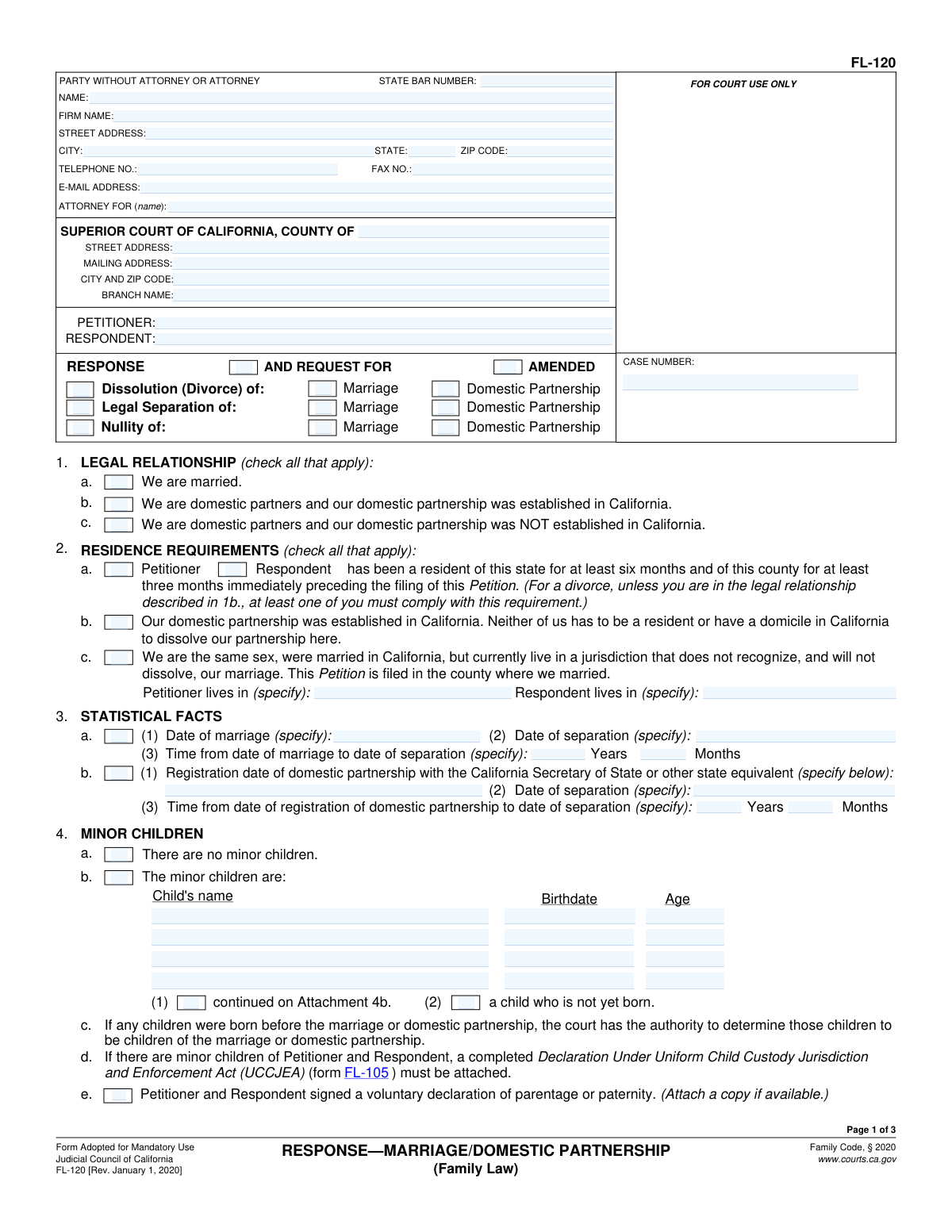
Form FL-120, Response—Marriage/Domestic Partnership, is a mandatory California Judicial Council form used by a respondent in a family law case. It serves as the official answer to a petition for dissolution, legal separation, or nullity, allowing the respondent to state their agreement or disagreement with the petitioner's requests regarding child custody, support, property division, and other matters. Today, this form can be filled out quickly and accurately using AI-powered services like Instafill.ai, which can also convert non-fillable PDF versions into interactive fillable forms.
FL-120 is part of the
family law forms, domestic partnership forms, partnership forms and marriage forms categories on Instafill.
Rather not fill this in by hand? Instafill is an online form filler that completes PDF forms automatically — upload the blank form, answer a few questions, and the AI fills every field.
Form specifications
| Form name: | Form FL-120, Response—Marriage/Domestic Partnership (Family Law) |
| Number of pages: | 1 |
| Field instructions: | FL-120 Instructions |
| Filled form examples: | FL-120 Examples |
| Language: | English |
Our AI automatically handles information lookup, data retrieval, formatting, and form filling.
It takes less than a minute to fill out FL-120 using our AI form filling.
Securely upload your data. Information is encrypted in transit and deleted immediately after the form is filled out.
Instafill Demo: How to fill out PDF forms in seconds with AI
How to Fill Out FL-120 Online for Free in 2026
Are you looking to fill out a FL-120 form online quickly and accurately? Instafill.ai offers the #1 AI-powered PDF filling software of 2026, allowing you to complete your FL-120 form in just 37 seconds or less.
Follow these steps to fill out your FL-120 form online using Instafill.ai:
- 1 Navigate to Instafill.ai and upload or select Form FL-120, Response—Marriage/Domestic Partnership.
- 2 Provide the court and case information, including the county, case number, and the names of the petitioner and respondent.
- 3 Complete the sections regarding your legal relationship, residence requirements, and statistical facts like the dates of marriage and separation.
- 4 Address the sections concerning minor children, child custody, visitation, and support. If you have children, you will also need to attach a UCCJEA form.
- 5 State your response to the legal grounds for the action and make your requests regarding spousal or domestic partner support.
- 6 Detail your claims about separate and community property, either by listing them directly on the form or by referencing an attached Property Declaration.
- 7 Carefully review all the information you've entered, then e-sign the declaration. Download the completed form to file with the court and serve on the petitioner.
Our AI-powered system ensures each field is filled out correctly, reducing errors and saving you time.
Why Choose Instafill.ai for Your Fillable FL-120 Form?
Speed
Complete your FL-120 in as little as 37 seconds.
Up-to-Date
Always use the latest 2026 FL-120 form version.
Cost-effective
No need to hire expensive lawyers.
Accuracy
Our AI performs 10 compliance checks to ensure your form is error-free.
Security
Your personal information is protected with bank-level encryption.
Frequently Asked Questions About FL-120
This form is your formal legal response to a petition for divorce, legal separation, or nullity of a marriage or domestic partnership. It allows you to tell the court whether you agree or disagree with what your spouse/partner has requested and to make your own requests.
This form must be filled out by the 'Respondent,' who is the person that was served with the initial court papers (the Petition) for divorce, legal separation, or nullity.
Yes, if you and the Petitioner have minor children together, you must also complete and attach the Declaration Under Uniform Child Custody Jurisdiction and Enforcement Act (UCCJEA), form FL-105.
For a divorce, one of the spouses must have lived in California for the last six months and in the county where the case is filed for the last three months. This requirement does not apply to legal separations or to dissolving a California-registered domestic partnership.
No. In Section 5, you can state whether you agree or disagree with the grounds listed in the petition. For example, you can state that you agree the marriage should end due to 'irreconcilable differences'.
This means you are asking the court to not make a final decision on spousal support now, but to keep the option open for either party to request it at a later date. It prevents the court from permanently terminating its ability to award support.
You can list assets and debts in Sections 9 and 10, or if you have a long list, you can check the box indicating you are attaching a separate Property Declaration (form FL-160).
Yes, in Section 11, 'Other Requests,' you can check a box and write in the former name you wish to have restored once the divorce is final.
You must file the original signed form with the court clerk and serve a copy on the Petitioner or their attorney. You will also need to file a Proof of Service form with the court.
Yes, in Section 11, you can request that the court order the Petitioner to contribute to or pay for your attorney's fees and costs. The court will consider both parties' financial circumstances when making a decision.
Yes, services like Instafill.ai use AI to help you accurately auto-fill form fields with your personal information, which can save time and help prevent common errors.
Simply upload the FL-120 PDF to the Instafill.ai platform. The service will make the document interactive, allowing you to easily type your information into the correct fields and navigate the form.
You can use a service like Instafill.ai, which is designed to convert flat, non-fillable PDFs into interactive, fillable forms. Just upload the document, and the platform will make it possible to type your answers directly onto the form.
Compliance FL-120
Validation Checks by Instafill.ai
1
Case Number Presence and Format
This check ensures that the 'CASE NUMBER' field is not empty. The case number is a critical identifier for filing and tracking the legal document within the court system. If the case number is missing or in an incorrect format, the document could be rejected by the court clerk, causing significant delays in the legal process.
2
Legal Relationship Selection
Validates that at least one checkbox under section 1, 'LEGAL RELATIONSHIP', is selected (e.g., 'We are married.'). This information is fundamental to establishing the court's jurisdiction and the type of case being filed. Failure to specify the legal relationship makes the response ambiguous and legally insufficient.
3
Separation Date After Marriage/Registration Date
This validation performs a logical check to ensure the 'Date of separation' in section 3 is on or after the 'Date of marriage' or 'Date of registration of domestic partnership'. A separation date cannot precede the start of the legal relationship. An invalid sequence of dates would indicate a data entry error and could invalidate the statistical facts required by the court.
4
Mutually Exclusive Children Status
Ensures that the user does not select both '4a. There are no minor children' and '4b. The minor children are:' simultaneously. These two options are mutually exclusive and selecting both creates a logical contradiction. The system should require the user to choose one or the other to provide clear information about the presence of minor children.
5
Child Information Completeness
If checkbox '4b' is selected, indicating the presence of minor children, this check validates that the name and birthdate for at least one child have been entered. This information is essential for all subsequent orders related to custody, visitation, and support. An incomplete list prevents the court from addressing the needs of all children involved.
6
UCCJEA Attachment Requirement
This validation checks if minor children are listed in section 4b and, if so, confirms that the user has acknowledged the requirement to attach a completed 'Declaration Under Uniform Child Custody Jurisdiction and Enforcement Act (UCCJEA)' form. This form is mandatory when children are involved to establish jurisdiction for custody orders. The validation prevents filings that would be immediately rejected for incompleteness.
7
Legal Grounds Completeness
Validates that in section 5, 'LEGAL GROUNDS', a primary request (e.g., Divorce, Nullity, Legal Separation) and a specific reason within that request (e.g., irreconcilable differences) are both selected. A partial or missing selection fails to state the legal basis for the response. This check ensures the respondent's legal position is clearly and completely stated.
8
Child Custody Selections for Minors
If minor children are listed (section 4b is checked), this validation ensures that a choice has been made for both '6a. Legal custody' and '6b. Physical custody'. Failing to request a specific custody arrangement leaves the children's status ambiguous. This check ensures the respondent's requests regarding custody are explicitly stated for the court's consideration.
9
Spousal Support Party Selection
This check verifies that if a spousal support option is selected in section 8 (e.g., '8a. Spousal or domestic partner support payable to'), the corresponding party ('Petitioner' or 'Respondent') is also selected. Without specifying the party, the request is incomplete and cannot be acted upon by the court. This ensures the request is unambiguous.
10
Required Specification for 'Other'
This validation scans multiple sections (e.g., 8d, 11c) for any checked 'Other (specify)' box. If such a box is checked, it ensures the corresponding text field is not empty. This prevents incomplete requests where the user indicates a non-standard request but fails to provide the necessary details for the court to understand and rule on it.
11
Name Restoration Completeness
If checkbox '11b. Respondent's former name be restored to' is checked, this validation ensures that the text field specifying the former name is filled out. A request to restore a name is not actionable without the actual name being provided. This check prevents incomplete and unenforceable requests from being submitted.
12
State Bar Number Format
If the 'ATTORNEY FOR' section is completed, this check validates that the 'STATE BAR NUMBER' field contains a numeric value. This number is used to verify the attorney's credentials and good standing with the State Bar. An invalid or missing number can cause processing issues and questions about the legitimacy of the legal representation.
13
Residency Requirement for Divorce
This is a logical cross-field validation. If the case is a 'Dissolution (Divorce) of Marriage', it checks that the residency requirement in section '2a' has been checked, confirming that one party has been a resident of the state and county for the required period. This is a jurisdictional prerequisite for divorce in California, and failure to meet it can lead to the case being dismissed.
14
Signature Date Validity
This check ensures that the 'Date' field in the signature block is filled out with a valid date that is not in the future. The signature date attests to when the declaration was made under penalty of perjury. A missing, invalid, or future date can call the validity of the entire document into question and lead to its rejection.
Common Mistakes in Completing FL-120
People often forget to enter the case number or copy it incorrectly from the Petition. This happens due to oversight when rushing to complete the form. Without the correct case number, the court clerk cannot link your Response to the existing case, causing the filing to be rejected and leading to significant delays.
The form clearly states in Section 4 that if there are minor children, a completed Declaration Under Uniform Child Custody Jurisdiction and Enforcement Act (UCCJEA, form FL-105) must be attached. Filers often overlook this requirement, assuming the main form is sufficient. This is a critical error that will prevent the court from making any child custody orders and will halt progress in your case until the correct form is filed.
In Section 3, filers often input a simple physical separation date, like when one person moved out. However, the legal 'date of separation' is when there was a complete and final break in the marital relationship, which involves both physical separation and an intent to end the marriage. An incorrect date can have major financial consequences, as it determines the end of community property accumulation. It is crucial to use the exact same date as the Petitioner if you agree, or consult with an attorney if you disagree.
A frequent and serious mistake is checking the box to 'Terminate' the court's ability to award spousal support, believing it only applies for the present moment. This is a permanent waiver of your right to ever receive support in the future. If you are unsure, it is often safer to request that the court 'Reserve for future determination' the issue, which keeps your options open. Making the wrong choice can have irreversible financial consequences.
In Sections 9 and 10, people often check the box for 'There are no such assets or debts' to simplify the form, or they provide a vague, incomplete list. This can be interpreted as waiving your claim to unlisted separate or community property. To avoid this, you must meticulously list all assets and debts and check the box to attach a Property Declaration (form FL-160) for a complete and proper accounting.
To grant a divorce, the court must have jurisdiction, which partly depends on residency. In Section 2, people may not understand the rule requiring at least one party to be a resident of California for six months and the county for three months before the initial Petition was filed. Incorrectly checking these boxes can lead to the case being delayed or even dismissed for lack of jurisdiction. AI-powered tools like Instafill.ai can help validate that the correct jurisdictional boxes are checked based on your information.
It may seem obvious, but unsigned or undated forms are one of the most common reasons for rejection by the court clerk. An unsigned declaration under penalty of perjury is invalid and has no legal effect. Always double-check the last page to ensure you have provided a valid signature and the correct date before filing.
The person who filed the initial case is the 'Petitioner,' and the person filing this FL-120 form is the 'Respondent.' People sometimes get these roles confused and enter their own name in the Petitioner field. This creates confusion for the court and can cause processing delays and require amendments to fix the record. Carefully copy the party information exactly as it appears on the Petition you received.
If you wish to have your former name restored, you must make a specific request in Section 11b. Many people assume this happens automatically or forget to check the box and write in their former name. Overlooking this step means your name will not be changed as part of the divorce judgment, requiring you to file a separate petition with the court later, which costs additional time and money.
In Section 6, simply checking 'Joint' for legal and physical custody is not enough for the court to create a detailed order. The form directs you to attach other forms (like FL-311 or a parenting plan attachment) to specify the actual parenting time schedule. Failing to provide these specifics leaves critical decisions undecided and can result in the court making orders you do not agree with or delaying the case until a complete plan is submitted.
Saved over 80 hours a year
“I was never sure if my IRS forms like W-9 were filled correctly. Now, I can complete the forms accurately without any external help.”
Kevin Martin Green
Your data stays secure with advanced protection from Instafill and our subprocessors




Robust compliance program
Transparent business model
You’re not the product. You always know where your data is and what it is processed for.
ISO 27001, HIPAA, and GDPR
Our subprocesses adhere to multiple compliance standards, including but not limited to ISO 27001, HIPAA, and GDPR.
Security & privacy by design
We consider security and privacy from the initial design phase of any new service or functionality. It’s not an afterthought, it’s built-in, including support for two-factor authentication (2FA) to further protect your account.
Fill out FL-120 with Instafill.ai
Worried about filling PDFs wrong? Instafill securely fills form-fl-120-responsemarriagedomestic-partnership-family-law forms, ensuring each field is accurate.
