Yes! You can use AI to fill out Form FL-107, Petition—Marriage/Domestic Partnership
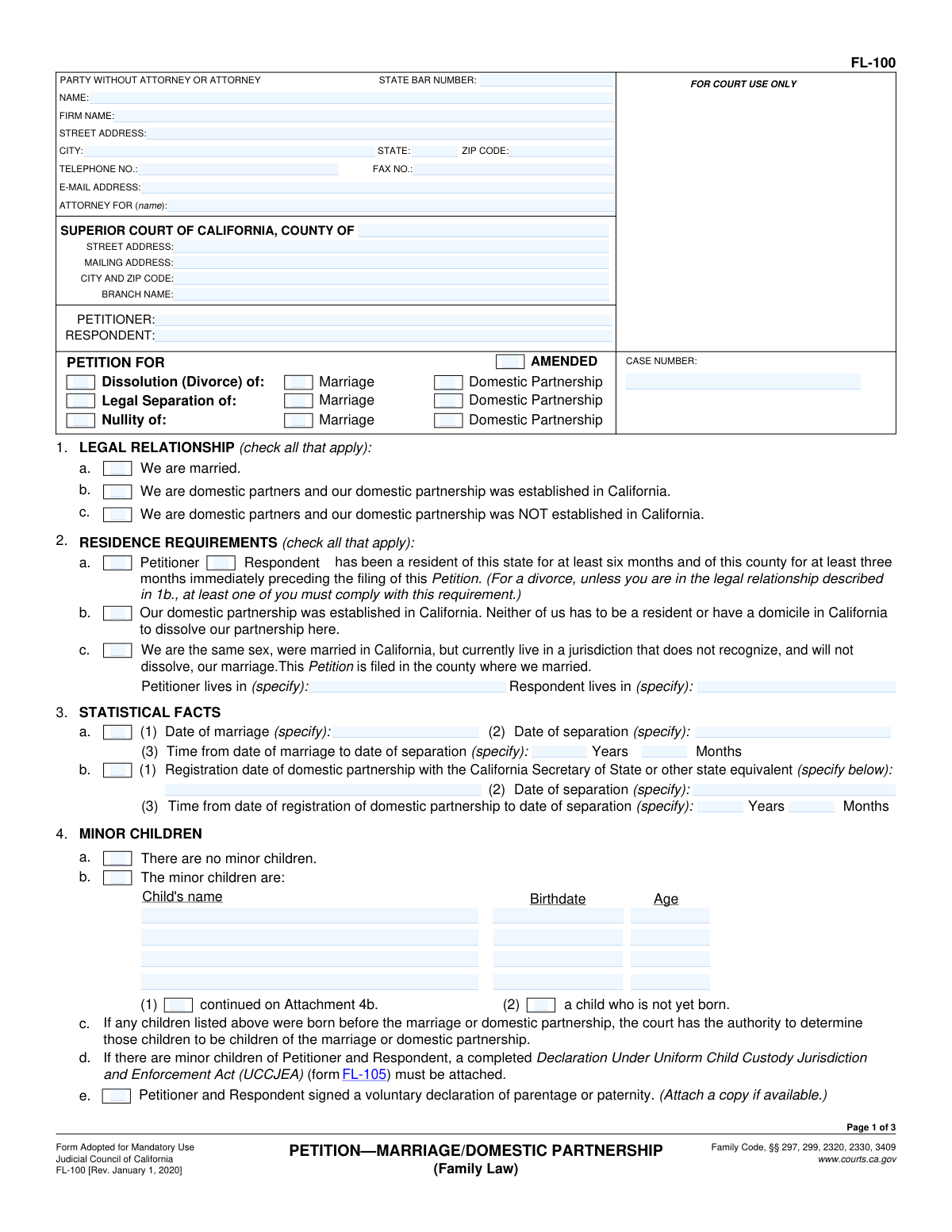
Form FL-107 (PetitionâMarriage/Domestic Partnership) is the primary pleading used in California Superior Court to open a case for dissolution (divorce), legal separation, or nullity (annulment) of a marriage or domestic partnership. It identifies the parties and court, states the legal relationship and residence basis for filing, and lists the relief requestedâsuch as child custody/visitation, child support, spousal or partner support, and property/debt issues (often with referenced attachments like FL-105 and FL-160). Because it frames what the court can order and what the other party must respond to, accuracy and completeness are important. Today, this form can be filled out quickly and accurately using AI-powered services like Instafill.ai, which can also convert non-fillable PDF versions into interactive fillable forms.
Our AI automatically handles information lookup, data retrieval, formatting, and form filling.
It takes less than a minute to fill out FL-107 using our AI form filling.
Securely upload your data. Information is encrypted in transit and deleted immediately after the form is filled out.
Form specifications
| Form name: | Form FL-107, Petition—Marriage/Domestic Partnership |
| Number of pages: | 3 |
| Language: | English |
| Categories: | California court forms, family law forms, divorce forms, legal separation forms |
Instafill Demo: filling out a legal form in seconds
How to Fill Out FL-107 Online for Free in 2026
Are you looking to fill out a FL-107 form online quickly and accurately? Instafill.ai offers the #1 AI-powered PDF filling software of 2026, allowing you to complete your FL-107 form in just 37 seconds or less.
Follow these steps to fill out your FL-107 form online using Instafill.ai:
- 1 Go to Instafill.ai and upload the FL-107 PDF (or search/select “FL-107 Petition—Marriage/Domestic Partnership” from the form library).
- 2 Enter case and court details: county, branch/courthouse address, and (if available) the case number; indicate if the petition is amended.
- 3 Provide party and attorney contact information: petitioner/respondent names, mailing address, phone/email, and attorney/firm and State Bar number if represented.
- 4 Choose the petition type and relationship: dissolution, legal separation, or nullity; specify marriage vs. domestic partnership and complete residence/jurisdiction selections.
- 5 Fill in statistical facts and children information: marriage/registration and separation dates, time calculations, and whether there are minor children (add children details and note any voluntary declaration of parentage/paternity if applicable).
- 6 Select requested orders and relief: legal grounds (irreconcilable differences, incapacity, nullity grounds), custody/visitation forms (e.g., FL-311/FL-312/FL-341 series), child support, spousal/partner support options, and property/separate property references (e.g., FL-160) and any attachments.
- 7 Have Instafill.ai validate required fields and consistency, then download/print the completed form for signature and file/serve it according to your county’s Superior Court procedures.
Our AI-powered system ensures each field is filled out correctly, reducing errors and saving you time.
Why Choose Instafill.ai for Your Fillable FL-107 Form?
Speed
Complete your FL-107 in as little as 37 seconds.
Up-to-Date
Always use the latest 2026 FL-107 form version.
Cost-effective
No need to hire expensive lawyers.
Accuracy
Our AI performs 10 compliance checks to ensure your form is error-free.
Security
Your personal information is protected with bank-level encryption.
Frequently Asked Questions About Form FL-107
This form is used to start (or amend) a California family law case involving dissolution (divorce), legal separation, or nullity (annulment) of a marriage or domestic partnership, and to request related orders (children, support, and property). It captures basic case information, relationship details, and the orders you want the court to make.
The Petitioner is the person who files the case first. The Respondent is the other spouse or domestic partner who is being served with the petition.
Check âDissolution (Divorce)â if you want to end the marriage/partnership. Check âLegal Separationâ if you want court orders but do not want to end the marriage/partnership, and check âNullityâ if you believe the marriage/partnership is void or voidable and want it declared invalid.
After selecting Dissolution/Legal Separation/Nullity, you must also check whether the case is for a Marriage or a Domestic Partnership. If itâs a domestic partnership, select whether it was established in California or not, because that can affect which rules apply.
Check âAmendedâ if you are filing a petition that changes or replaces information from a petition you already filed in the same case. If you are filing the case for the first time, leave it unchecked.
If the court has not assigned a case number yet, you typically leave the case number blank when you first file. Once the court assigns a number, use that exact number on all later filings (including attachments like FL-160).
You should provide the name (party or attorney), mailing address (street, city, state, ZIP), and a telephone number; email and fax are included if available. If you have an attorney, include the firm name and State Bar number.
Check the box for the Petitioner or Respondent if that person has lived in California for at least 6 months and in the filing county for at least 3 months immediately before filing. If youâre relying on a special rule (like certain domestic partnership or same-sex marriage situations), use the specific checkbox and provide the âlives in (specify)â location as requested.
Enter the date of marriage (or domestic partnership registration date) and the date of separation. Then calculate the time between those dates as full years plus remaining months (less than 12) and enter those values in the corresponding fields.
Check âThe minor children areâ and list each childâs full legal name, birthdate, and age in the child sections provided. If a child is not yet born, check the âminor child is not yet bornâ box, and if you need more space, check the box indicating the child information continues on Attachment 4b.
Check the box stating âThere are no minor children.â Do not complete the child listing, custody, or visitation request sections if they do not apply.
In the custody section, check the boxes for legal custody (petitioner/respondent/joint/other) and physical custody (petitioner/respondent/joint/other) that you are requesting. For visitation (parenting time), check who should have visitation and then select any supporting visitation schedule forms you are attaching (such as FL-311, FL-312, or FL-341 series) if applicable.
Check the âsupport payableâ option if you want the court to order support now and indicate whether itâs payable to Petitioner or Respondent. Check âreserve for future determinationâ if you want the court to decide later, or check âterminate the courtâs abilityâ if you want the court barred from awarding support (and specify whether that applies to support payable to Petitioner and/or Respondent).
If both Petitioner and Respondent signed a voluntary declaration of parentage or paternity, check the box and attach a copy if you have it available. If you donât have a copy, you can still indicate it was signed, but attaching documentation can help avoid delays.
YesâAI tools can help by extracting your information and accurately auto-filling the correct fields; services like Instafill.ai are designed to do this and save time. If your PDF is flat/non-fillable, Instafill.ai can convert it into an interactive fillable form and then populate the fields; generally you upload the PDF, answer a guided set of questions, review the filled form, and download it for filing.
Compliance FL-107
Validation Checks by Instafill.ai
1
Petition Type Selection Is Present and Mutually Exclusive
Validate that exactly one primary petition type is selected: Dissolution (Divorce) of, Nullity of, or Legal Separation of. These options represent different legal actions and should not be simultaneously selected because they drive different downstream requirements and court processing. If none or more than one is selected, the submission should be rejected and the filer prompted to choose a single petition type.
2
Relationship Subtype Required When Petition Type Is Selected
If Dissolution (Divorce) of is checked, require exactly one of DissolutionâMarriage or DissolutionâDomestic Partnership. Similarly, if Nullity of is checked, require exactly one of NullityâMarriage or NullityâDomestic Partnership; and if Legal Separation of is checked, require exactly one of Legal SeparationâMarriage or Legal SeparationâDomestic Partnership. This ensures the court can apply the correct statutory framework and required attachments. If the subtype is missing or both are selected, fail validation and request correction.
3
Legal Relationship Checkboxes Are Consistent and Not Contradictory
Validate that the legal relationship section is internally consistent: 'We are married' cannot be selected together with either domestic partnership option. Also ensure the two domestic partnership options (established in CA vs NOT established in CA) are not both selected. Contradictory relationship status can cause incorrect jurisdiction and form logic; if detected, block submission until a single consistent relationship status is provided.
4
Residence Requirement Satisfied by At Least One Valid Basis
Validate that at least one residence/jurisdiction basis is indicated: Petitioner residency, Respondent residency, domestic partnership established in California, or the special same-sex marriage-in-CA-but-not-recognized basis. This is critical because the court must have jurisdiction to grant the requested relief. If no basis is selected, fail validation and require the filer to select the applicable basis and provide any required supporting location fields.
5
Residence 'Lives In (Specify)' Required When Residency Box Is Not Checked
If Petitioner has been a resident of this state and county is not checked, require 'Petitioner lives in (specify)' to be completed when the filer is relying on an alternate jurisdiction basis that still needs location context. Likewise, if Respondent residency is not checked, require 'Respondent lives in (specify)' when relevant. Missing location details can prevent the court from confirming venue; if absent, flag the submission for completion.
6
Court Location Fields Complete and Properly Formatted
Validate that County, Branch name, and Street address for the Superior Court are present, and that 'City and ZIP code' contains a city plus a valid ZIP (5 digits or ZIP+4). Court address completeness is necessary for correct filing venue and service instructions. If any required court fields are missing or the city/ZIP format is invalid, reject the submission and request corrected court information.
7
Case Number Format and Consistency Across Sections
If a Case Number is provided, validate it matches the courtâs expected pattern (e.g., non-empty, reasonable length, allowed characters) and ensure the same value is used wherever 'Case Number/CASE NUMBER' appears (petition section and FL-160 section). Inconsistent case numbers can misfile documents or attach them to the wrong case. If mismatched or malformed, fail validation and require a single corrected case number.
8
Petitioner and Respondent Names Present and Not Identical
Require both Petitioner name and Respondent name to be completed with at least first and last name, and validate they are not identical after normalization (trim/case-insensitive). Accurate party identification is essential for docketing, service, and orders. If either name is missing or both names resolve to the same value, block submission and request correction.
9
Party/Attorney Contact Information Completeness and Conditional Requirements
Validate that 'Name (party or attorney)' is present, and that 'Attorney for (name)' is present and matches either Petitioner or Respondent when an attorney is being listed. If a State Bar Number is provided, require Firm Name (or confirm self-represented) and ensure the bar number is not blank/invalid. If these fields are inconsistent (e.g., bar number present but no attorney context), fail validation to prevent improper representation data.
10
Email, Telephone, Fax, and Mailing Address Format Validation
Validate email address syntax (single @, valid domain), telephone number format (10 digits with optional punctuation/country code), and fax number format if provided. Validate Street Address, City, State, and ZIP Code are present when any contact address is supplied, and that State is a valid US postal abbreviation or full state name. If any provided contact field fails format checks, return field-level errors and require correction before acceptance.
11
Marriage/Separation Dates Are Valid and Chronologically Consistent
If the case involves a marriage (married relationship or dissolution/legal separation/nullity of marriage), require Date of marriage and Date of separation where applicable and validate they are real calendar dates. Ensure Date of separation is not earlier than Date of marriage and not in the future (relative to filing date, if available). If invalid or inconsistent, fail validation because statistical facts and legal timelines depend on these dates.
12
Years/Months Between Marriage and Separation Match the Provided Dates
When Date of marriage and Date of separation are provided, validate that 'Years between marriage and separation' is a non-negative integer and 'Months between marriage and separation' is an integer from 0 to 11. Optionally compute the elapsed time and ensure the entered years/months are consistent with the dates (allowing a small tolerance if the form expects full years plus remaining months). If the values are out of range or inconsistent, flag for correction to avoid inaccurate statistical reporting.
13
Domestic Partnership Registration Dates and Duration Are Consistent
If a domestic partnership is involved and the registration-date checkbox is selected, require Domestic partnership registration date and Date of separation (from registration) and validate both as dates. Ensure separation is on/after registration and validate 'Time from registration to separationâYears' is non-negative and 'Months' is 0â11 and consistent with the dates. If any date/duration is missing or inconsistent, fail validation because the court relies on these facts for jurisdiction and case classification.
14
Minor Children Section Is Mutually Exclusive and Complete When Applicable
Validate that 'There are no minor children' and 'The minor children are' are not both selected, and that at least one is selected. If 'The minor children are' is selected, require at least one child entry with Name and Birthdate, and require Age for each listed child. If the section is contradictory or incomplete, reject submission because custody/support orders depend on accurate child data.
15
Minor Child Age/Birthdate Logical Validation (Under 18 and Non-Future Dates)
For each listed minor child, validate Birthdate is not in the future and that Age is a whole number within a reasonable range (e.g., 0â17 for minor children, unless the form allows 18+ dependents explicitly). Cross-check that the stated Age aligns with the Birthdate (within one year depending on whether birthday has occurred this year). If the child is marked 'not yet born,' require no Age and require a future or expected birthdate (or allow blank birthdate per system rules); otherwise fail validation to prevent contradictory child status.
16
Custody/Visitation Requests Require Minor Children and 'Other' Requires Specification
If any custody (6a/6b) or visitation (6c) option is selected, validate that the case indicates minor children are present. If 'Other' is selected for legal custody, physical custody, or visitation, require the adjacent specification text identifying the other person/entity. If these conditions are not met, fail validation because the court cannot issue child-related orders without children identified or without knowing who 'Other' refers to.
Common Mistakes in Completing FL-107
People often check multiple petition-type boxes or select the wrong one because the terms sound similar and the form asks for both the overall action (Dissolution/Nullity/Legal Separation) and the relationship type (Marriage/Domestic Partnership). This can cause the clerk to reject the filing or force you to amend and re-serve documents, delaying the case. Choose exactly one main petition type that matches what you are asking the court to do, then select the correct sub-box (Marriage or Domestic Partnership) only under that petition type. AI-powered tools like Instafill.ai can reduce this error by prompting the correct dependent selections and preventing incompatible box combinations.
Filers frequently misunderstand âAmendedâ and either check it for a first-time petition or forget to check it when they are changing a previously filed petition. This can create confusion in the court record, lead to processing delays, or require refiling with corrected captions and service. Only check âAmendedâ if you are formally replacing or changing information from a petition already filed in the same case, and ensure the case number and prior filing context match. Instafill.ai can help by flagging when a case number exists and asking whether this is a first filing or an amendment.
Many people donât have a case number yet (new filing) and mistakenly enter a placeholder, or they copy it incorrectly from a notice (missing letters, dashes, or leading zeros). An incorrect case number can misfile your documents under the wrong case or cause the clerk to reject the submission. If this is a new case, follow local court instructions (often leave it blank for the clerk to assign); if itâs an existing case, copy the case number exactly as it appears on court documents. Instafill.ai can validate common case-number patterns and help ensure consistent entry across all pages/attachments.
A very common issue is swapping roles (petitioner vs. respondent), using nicknames, omitting middle initials in one place but not another, or changing last names across FL-105/FL-160/attachments. Inconsistencies can trigger clerk rejections, service problems, and confusion about who is requesting which orders. Use full legal names exactly as they appear on prior filings and keep the same spelling and order everywhere the names appear (including âCase and Partiesâ sections on attachments). Instafill.ai can auto-populate names consistently across the entire packet to prevent mismatches.
People often check âWe are marriedâ and a domestic partnership option, or they choose the wrong domestic partnership jurisdiction because they confuse where they lived with where the partnership was registered. This can affect eligibility, required proofs, and which residence rules apply, potentially delaying the case or requiring corrections. Check only the one relationship status that is legally true, and for domestic partnerships, confirm whether it was established/registered in California or elsewhere. Instafill.ai can guide the correct selection by asking clarifying questions and preventing mutually exclusive choices.
Filers frequently check the standard 6-month/3-month residency boxes even when they donât qualify, or they forget special exceptions (e.g., domestic partnership established in CA; same-sex marriage in CA but now living where not recognized). Incorrect residency selections can lead to dismissal, a request for additional proof, or the need to refile in the correct county/state. Verify who meets the residency requirement (petitioner or respondent), and if using an exception, complete the âlives in (specify)â fields accurately with city/county. Instafill.ai can help by calculating eligibility based on dates/locations and prompting the correct residency pathway.
Common mistakes include using inconsistent date formats, entering a separation date earlier than the marriage/registration date, or miscalculating the âyearsâ and âmonthsâ between dates (especially when months must be less than 12). These errors can create credibility issues, trigger clerk questions, and cause delays when the court relies on statistical facts. Use a consistent date format (as your court expects), double-check chronology, and compute full years plus remaining months correctly. Instafill.ai can automatically compute the years/months from the entered dates and flag impossible timelines.
People often check âThere are no minor childrenâ out of habit, then also check âThe minor children areâ or fill in child details, creating an internal contradiction. This can lead to rejection, require an amended petition, or cause the court to miss that custody/support orders are needed. Choose one: either confirm there are no minor children of the relationship, or list each minor child with complete name, birthdate, and age. Instafill.ai can prevent this by enforcing conditional logic so child fields only appear when the correct checkbox is selected.
When children are involved, filers frequently omit a childâs middle/last name, enter an age that doesnât match the birthdate, forget to indicate an unborn child, or fail to check âcontinued on Attachment 4bâ when they run out of space. Missing or inconsistent child information can delay custody/support processing and may require supplemental filings (e.g., FL-105 and related schedules). Ensure each listed child has a full legal name, accurate birthdate, and age that matches, and use the correct attachment checkbox when additional space is needed. Instafill.ai can validate age vs. birthdate and remind you to add the right attachment when the number of children exceeds the formâs space.
Filers often check visitation or custody boxes but forget to indicate which detailed schedule form they are attaching (FL-311, FL-312, FL-341(C)/(D)/(E), or Attachment 6c(1)). Without the supporting schedule, the request can be too vague for the court to act on, leading to continuances or orders to provide more information. If you request visitation, select the specific form(s) that describe the parenting plan and attach them as required by your court. Instafill.ai can prompt the correct add-on forms based on the boxes you check and help ensure the packet is complete.
A frequent error is checking âterminate the courtâs ability to award supportâ while also requesting support, or selecting âreserve for future determinationâ without specifying whether it applies to petitioner or respondent. These contradictions can result in unclear requested relief and may require clarification at hearings or amended pleadings. Decide whether you are requesting an order now (8a), reserving the issue (8c), or terminating jurisdiction (8b), and then select the correct âpayable toâ party where required. Instafill.ai can detect conflicting selections and require completion of dependent âpayable toâ fields.
People commonly check âno separate assets or debtsâ and then also check boxes to confirm separate property via a Property Declaration or list items in the table, or they reference FL-160/Attachment 9b/10b without actually attaching it. This can cause the court to treat the property request as incomplete, delay judgment, or require additional disclosures. Only check the ânoneâ box if you truly have no separate property to confirm; otherwise, either attach the correct Property Declaration (e.g., FL-160) and reference it properly or list the items clearly with âconfirm toâ entries. Instafill.ai can help by ensuring the ânoneâ option disables item entry and by generating a checklist of required attachments when you reference them.
Saved over 80 hours a year
âI was never sure if my IRS forms like W-9 were filled correctly. Now, I can complete the forms accurately without any external help.â
Kevin Martin Green
Your data stays secure with advanced protection from Instafill and our subprocessors

Robust compliance program
Transparent business model
Youâre not the product. You always know where your data is and what it is processed for.
ISO 27001, HIPAA, and GDPR
Our subprocesses adhere to multiple compliance standards, including but not limited to ISO 27001, HIPAA, and GDPR.
Security & privacy by design
We consider security and privacy from the initial design phase of any new service or functionality. Itâs not an afterthought, itâs built-in, including support for two-factor authentication (2FA) to further protect your account.
Fill out FL-107 with Instafill.ai
Worried about filling PDFs wrong? Instafill securely fills form-fl-107-petitionmarriagedomestic-partnership forms, ensuring each field is accurate.