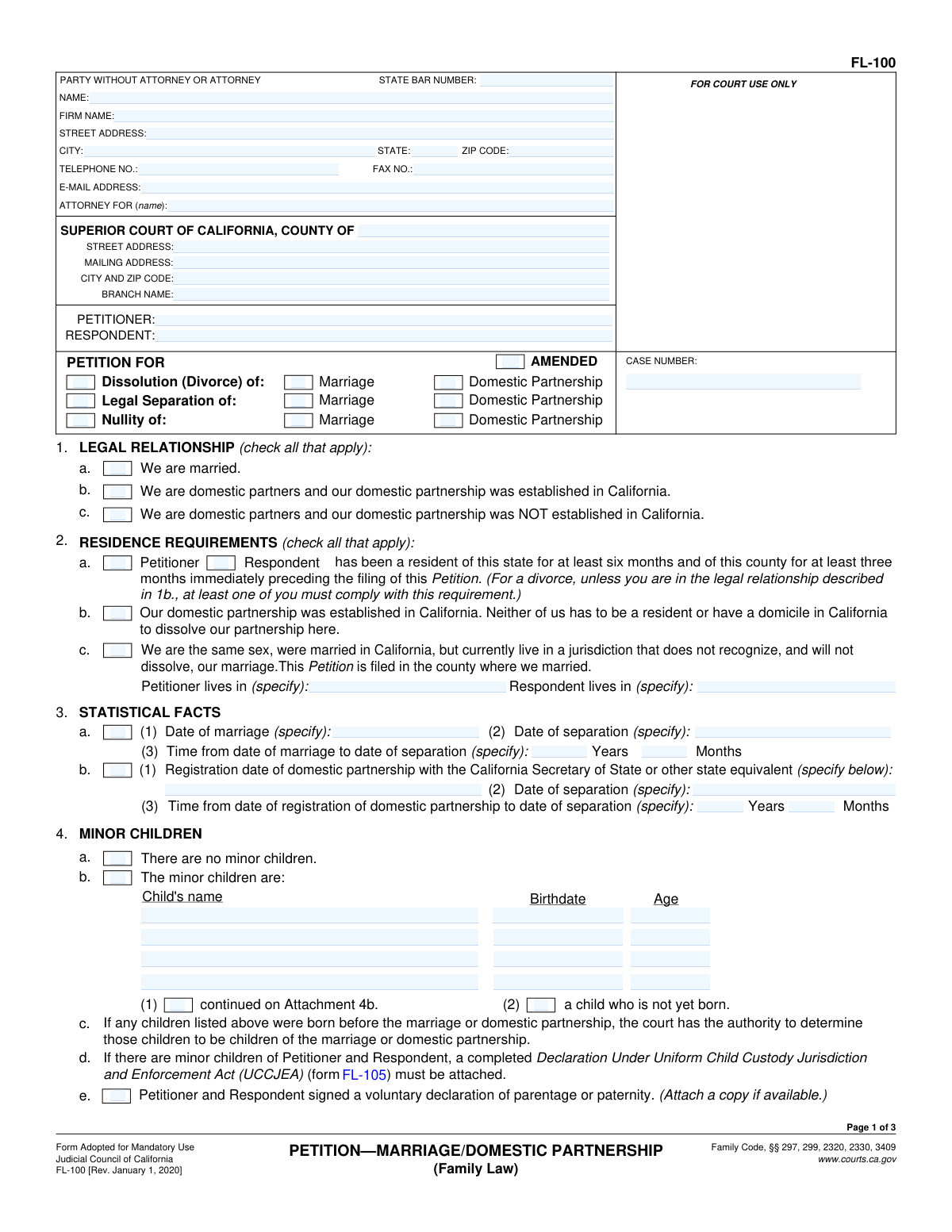
Fill out Form FL-100, Petition—Marriage/Domestic Partnership (Family Law) with Instafill.ai
Worried about filling PDFs wrong? Instafill securely fills FORM-FL-100-PETITIONMARRIAGEDOMESTIC-PARTNERSHIP-FAMILY-LAW forms, ensuring each field is accurate.
FL-100 is part of the
family law forms, domestic partnership forms, family petition forms, partnership forms and marriage forms categories on Instafill.
#1 AI PDF Filling Software of 2026
3 out of 4 customers say they prepare their FL-100 forms in 37 seconds or less
Secure platform for your PDF forms and personal information
| Form name: | Form FL-100, Petition—Marriage/Domestic Partnership (Family Law) |
| Number of fields: | 158 |
| Number of pages: | 3 |
| FCI: | Complex (64/100) |
Form Complexity Index
Complex
64 / 100
| Fillable fields | 158 |
| Pages | 3 |
| Fields per page | 53 |
| Sections | 41 |
| Conditional rules | — |
| Tables & lists | — |
| Instruction pages | — |
| Instafill Form ID | IF-FORM-FL-100-PETITIONMARRIAGEDOMESTIC-PARTNERSHIP-FAMILY-LAW |
FL-100 has a complex Form Complexity Index of 64/100. Instafill’s AI completes it accurately in under a minute.
Instafill Demo: How to fill out PDF forms in seconds with AI
Compliance FL-100
Validation Checks by Instafill.ai
1
Validates that exactly one primary case type is selected (Divorce, Legal Separation, or Nullity)
Checks that the filer selects one—and only one—of the primary petition types: Dissolution (Divorce), Legal Separation, or Nullity. Selecting multiple (or none) makes the requested relief ambiguous and can cause rejection or require amendment. If validation fails, the system should block submission and prompt the user to choose exactly one primary case type.
2
Validates that the relationship type is consistent with the selected case type (Marriage vs Domestic Partnership)
Ensures at least one legal relationship box is checked (married, domestic partnership established in CA, or domestic partnership not established in CA) and that it aligns with the petition’s subject (marriage and/or domestic partnership). This is important because the court’s jurisdiction and required dates differ depending on whether the parties are married or registered domestic partners. If inconsistent (e.g., only domestic partnership checked but marriage dates provided as the basis), the system should flag the mismatch and require correction.
3
Residence requirement eligibility check (standard residency vs exceptions)
Verifies that residency requirements are satisfied for a divorce unless an exception applies (e.g., CA domestic partnership dissolution exception or same-sex marriage non-recognition exception). If the standard residency path is used, at least one of Petitioner/Respondent residency boxes must be checked; if an exception is checked, the system should require the related supporting fields (e.g., where each party lives, county where married). If validation fails, the system should prevent filing because the court may lack jurisdiction.
4
Court venue fields completeness and format validation
Checks that Superior Court county is provided and that court location fields (branch name, street address, city/ZIP, mailing address) are complete when required by the filing workflow. Proper venue and court identification are necessary for routing and docketing. If missing or malformed (e.g., city without ZIP), the system should require completion before submission.
5
Party identification completeness (Petitioner and Respondent full legal names)
Ensures Petitioner Name and Respondent Name are both present and appear to be full names (not blank, not identical, not placeholders like 'N/A'). Correct party identification is essential for service, case indexing, and matching to existing records. If validation fails, the system should block submission and request corrected names.
6
Attorney vs self-represented consistency check (State Bar Number and attorney fields)
If a State Bar Number is provided, validates that attorney name and contact fields are also provided and that the bar number matches an expected pattern (typically 4–8 digits for CA). If no bar number is provided, the system should treat the filer as self-represented and avoid requiring firm fields unless entered. If inconsistent (e.g., bar number present but attorney name missing), the system should flag and require correction to avoid improper representation details.
7
Contact information format validation (email, phone, fax, state, ZIP)
Validates email address structure (e.g., local@domain), phone and fax numbers for allowable characters and minimum digit counts, state as a two-letter abbreviation, and ZIP as 5 digits (optionally ZIP+4). These fields are used for notices and communication and must be reliably formatted. If validation fails, the system should highlight the specific field and require a corrected format.
8
Marriage and separation date format and chronology validation
When the parties are married and marriage/separation dates are provided, validates that dates are real calendar dates and that separation date is not earlier than marriage date. Chronology matters for statutory timelines, property characterization, and support calculations. If invalid, the system should reject the date entry and require correction.
9
Domestic partnership registration and separation date validation
If a domestic partnership relationship is selected, validates that the registration date is provided (when required by the selected relationship option) and that the separation date is not earlier than the registration date. This ensures the court can determine the duration of the partnership and apply the correct legal framework. If validation fails, the system should prompt for missing dates or corrected chronology.
10
Duration fields consistency check (Years/Months vs provided dates)
Validates that the entered duration (Years Married and Months Married, and/or domestic partnership separation time years/months) matches the difference between the provided start and separation dates within an acceptable tolerance (e.g., off by at most 1 month due to rounding rules). Inconsistent durations can create statistical reporting errors and confusion in downstream calculations. If inconsistent, the system should request recalculation or auto-calculate and ask the user to confirm.
11
Minor children section mutual exclusivity and required child details
Ensures the filer does not select both 'There are no minor children' and 'The minor children are' at the same time, and that if minor children are indicated, at least one child record is completed. For each listed child, validates that name and birthdate are present and that age is a non-negative integer consistent with the birthdate. If validation fails, the system should block submission and require corrected child information.
12
UCCJEA attachment requirement check (FL-105) when minor children are present
If minor children are indicated, validates that a completed UCCJEA declaration (FL-105) is attached or otherwise included in the submission package. This is required for custody jurisdiction determinations and is commonly a filing prerequisite. If missing, the system should prevent submission and instruct the filer to attach FL-105.
13
Child custody/visitation orders require children and a custody selection
If any custody or visitation boxes are selected (legal custody, physical custody, visitation), validates that minor children are present and that at least one custody option is selected for legal and physical custody (Petitioner/Respondent/Joint/Other). This prevents requesting custody orders in cases with no children and avoids incomplete custody requests. If validation fails, the system should prompt the user to either add children details or clear custody/visitation requests and complete required selections.
14
Legal grounds selection validation (Divorce/Legal Separation vs Nullity grounds)
Ensures that if Divorce or Legal Separation is selected, exactly one ground is selected (irreconcilable differences or permanent legal incapacity), and that nullity grounds are not simultaneously selected unless the petition type is Nullity. If Nullity is selected, requires at least one applicable nullity ground (void or voidable) and prevents selecting divorce-only grounds as the basis. If validation fails, the system should require the filer to align grounds with the chosen case type.
15
Spousal/partner support request logical consistency (terminate vs pay vs reserve)
Validates that mutually exclusive support requests are not selected together (e.g., 'Terminate ability to award support to Petitioner' while also selecting 'Support payable to Petitioner'). Also checks that at least one target party is specified when a support action is requested (payable to or reserve for). If inconsistent, the system should flag the conflict and require the filer to choose a coherent support request.
16
Property declarations consistency (separate property and community property sections)
Ensures that 'No separate assets or debts' is not selected if separate property items are listed or if a Property Declaration (FL-160) is indicated for separate property confirmation. Similarly, ensures 'No community property assets or debts' is not selected if the filer requests determination of rights to community/quasi-community property and provides a list or references FL-160. If validation fails, the system should require the filer to either remove contradictory checkboxes or complete the referenced property declaration/attachments.
Common Mistakes in Completing FL-100
People often check multiple boxes or the wrong set of boxes under “Petition For” and “Legal Relationship” because the form lists marriage and domestic partnership options side-by-side. This can lead to the clerk rejecting the filing or the court processing the case under the wrong legal framework, causing delays and amended filings. Avoid this by selecting only the boxes that match your situation (e.g., divorce of marriage vs. dissolution of domestic partnership) and confirming whether you are seeking dissolution, legal separation, or nullity. AI-powered form filling tools like Instafill.ai can help prevent conflicting selections by validating that your checked boxes are logically consistent.
A very common error is failing to check whether the Petitioner or Respondent meets the 6-month California and 3-month county residency requirement, or incorrectly checking the domestic partnership/same-sex marriage exceptions. If residency is not properly established (or an exception is misapplied), the court may reject the petition or you may have to refile in the correct county/state. Avoid this by verifying dates of physical residence and selecting the correct box (2a, 2b, or 2c) that actually applies to your relationship and location. Instafill.ai can flag missing residency checkboxes and prompt for the required county/state details before submission.
People frequently enter a separation date that is earlier than the marriage/registration date, use an informal “trial separation” date without clarity, or forget to fill in the years/months duration fields consistently. Inconsistent dates can create credibility issues, complicate property characterization, and trigger clerk/court questions that slow the case. Avoid this by using the legally intended separation date (when you separated with intent not to resume the relationship) and ensuring the “Years” and “Months” fields match the dates entered. Instafill.ai can automatically calculate durations and validate that dates follow a logical timeline and correct format.
When parties have minor children, many filers check “The minor children are” but forget to attach the required UCCJEA declaration (FL-105) or leave it blank. Missing FL-105 commonly results in a rejected filing or the court refusing to make custody/visitation orders until it is provided. Avoid this by always preparing and attaching FL-105 whenever any minor child is listed, and ensuring the child information matches across forms. If you’re working from a flat, non-fillable PDF, Instafill.ai can convert it into a fillable version and help ensure required attachments like FL-105 are included.
Common mistakes include using nicknames instead of legal names, entering ages that don’t match birthdates, or using inconsistent date formats across children. These errors can cause confusion in custody/support processing and may require corrections or additional hearings. Avoid this by copying names exactly as on birth certificates and using a consistent date format (e.g., MM/DD/YYYY) while ensuring ages align with birthdates as of the filing date. Instafill.ai can standardize date formats and cross-check age vs. birthdate to reduce these avoidable inconsistencies.
Filers often check custody/visitation boxes (legal custody, physical custody, parenting time) but fail to indicate which detailed form is attached (FL-311, FL-312, FL-341(C)/(D)/(E), or Attachment 6c(1)). Without a detailed parenting plan, the court may not be able to issue clear orders, leading to continuances or requests for additional paperwork. Avoid this by attaching the appropriate custody/visitation schedule form and ensuring it matches what you checked on FL-100. Instafill.ai can prompt you to add the correct supporting form when custody/visitation boxes are selected.
People frequently check “terminate the court’s ability to award support” without realizing it can permanently waive future support, or they check multiple options that don’t make sense together (e.g., terminate and reserve). The consequence can be losing the ability to seek support later or creating ambiguity that requires amendment. Avoid this by deciding whether you want support now, want the issue reserved for later, or truly want the court’s power terminated—and select only the option that matches that intent. Instafill.ai can warn about conflicting support selections and help ensure the chosen option aligns with your stated goal.
A frequent issue is checking “There are no such assets or debts” for separate property (item 9) or community/quasi-community property (item 10) even when the parties have bank accounts, retirement plans, vehicles, credit cards, or other debts. This can lead to incomplete orders, later disputes, or the need to reopen property issues, which is costly and time-consuming. Avoid this by listing all known assets and debts or attaching the correct Property Declaration (FL-160) and/or Attachment 10b/9b as indicated. Instafill.ai can help by prompting for common asset/debt categories and ensuring the correct attachments are included when “listed in Property Declaration” is selected.
People often leave the attorney section partially filled (or fill it out when self-represented), omit the State Bar number, or enter inconsistent party names compared to other filings. These errors can cause clerk rejections, service problems, and confusion in case indexing. Avoid this by completing either the “Party without attorney” information accurately or the attorney block fully, and using full legal names consistently throughout the case. Instafill.ai can auto-format phone/ZIP/state abbreviations and reduce omissions by validating required identity fields.
The form notes that if a voluntary declaration of parentage/paternity was signed, a copy should be attached if available, but many filers overlook this instruction. Missing documentation can complicate parentage findings and delay custody/support orders, especially when a child was born before marriage/partnership. Avoid this by locating the declaration and attaching a copy, or noting its unavailability and being prepared to provide it later if requested. Instafill.ai can remind you to upload and attach supporting documents when you indicate a declaration exists.
A classic filing-stopper is forgetting to sign and date the petition, typing a name without an actual signature, or having the attorney sign when the petitioner’s signature is required (or vice versa). The court may reject the filing outright or require a corrected, re-filed petition. Avoid this by confirming the petitioner signs and dates in the correct signature block and that any attorney signature is completed only where applicable. Instafill.ai can flag missing signature/date fields before you print/file and help ensure the final output is complete and properly formatted.
Saved over 80 hours a year
“I was never sure if my IRS forms like W-9 were filled correctly. Now, I can complete the forms accurately without any external help.”
Kevin Martin Green
Your data stays secure with advanced protection from Instafill and our subprocessors




Robust compliance program
Transparent business model
You’re not the product. You always know where your data is and what it is processed for.
ISO 27001, HIPAA, and GDPR
Our subprocesses adhere to multiple compliance standards, including but not limited to ISO 27001, HIPAA, and GDPR.
Security & privacy by design
We consider security and privacy from the initial design phase of any new service or functionality. It’s not an afterthought, it’s built-in, including support for two-factor authentication (2FA) to further protect your account.
Fill out FL-100 with Instafill.ai
Worried about filling PDFs wrong? Instafill securely fills form-fl-100-petitionmarriagedomestic-partnership-family-law forms, ensuring each field is accurate.
