Yes! You can use AI to fill out Adoption Assistance Program Nonrecurring Adoption Expense Agreement and Claim
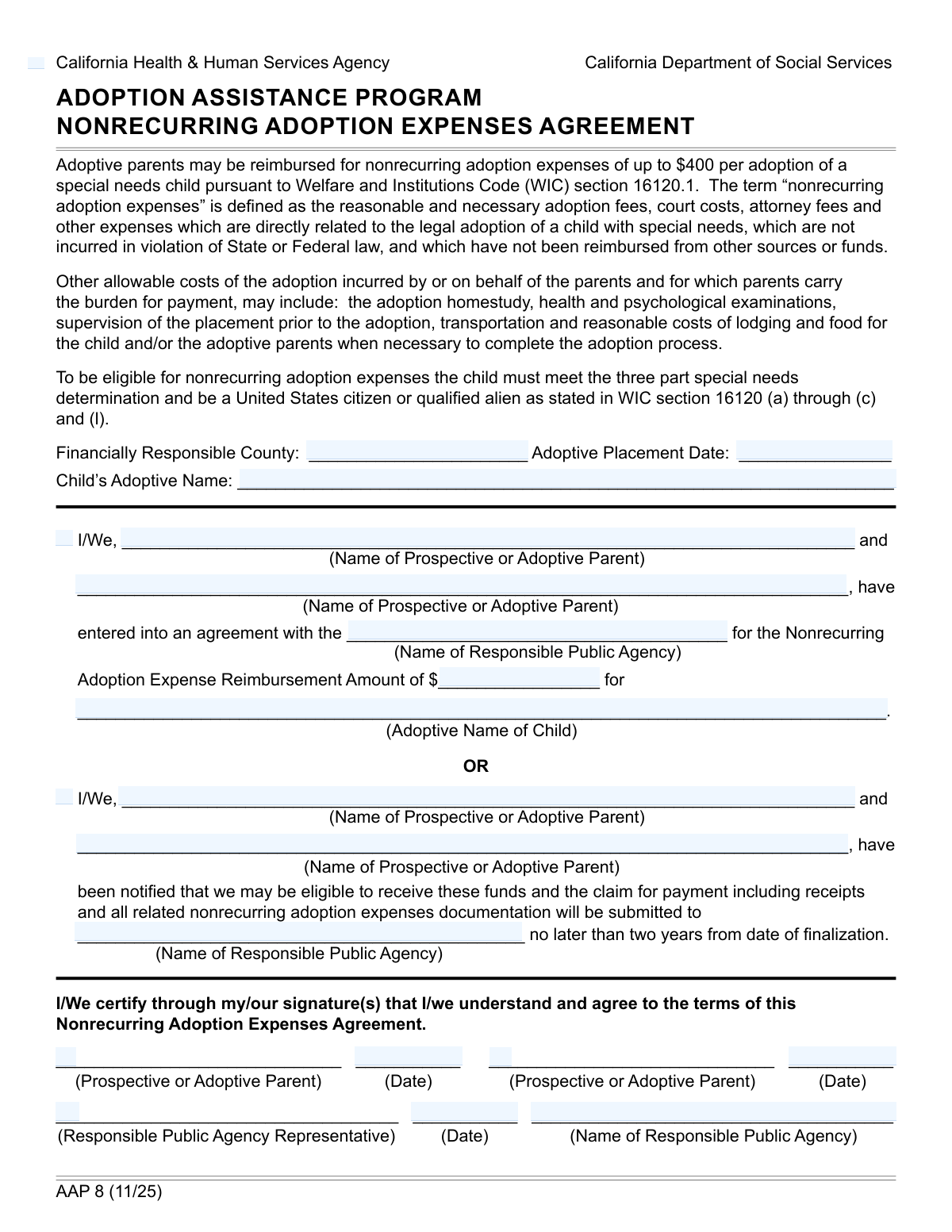
The AD 4320 form, officially the "Adoption Assistance Program Nonrecurring Adoption Expense Agreement and Claim," is a document used to formalize an agreement between adoptive parents and a public agency for the reimbursement of specific, one-time expenses related to the adoption of a child with special needs. This form is crucial for families seeking financial support for costs such as adoption fees, court costs, and attorney fees. Today, this form can be filled out quickly and accurately using AI-powered services like Instafill.ai, which can also convert non-fillable PDF versions into interactive fillable forms.
Our AI automatically handles information lookup, data retrieval, formatting, and form filling.
It takes less than a minute to fill out AD 4320 using our AI form filling.
Securely upload your data. Information is encrypted in transit and deleted immediately after the form is filled out.
Form specifications
| Form name: | Adoption Assistance Program Nonrecurring Adoption Expense Agreement and Claim |
| Number of fields: | 21 |
| Number of pages: | 1 |
| Language: | English |
| Categories: | adoption forms, VA claim forms |
Instafill Demo: How to fill out PDF forms in seconds with AI
How to Fill Out AD 4320 Online for Free in 2026
Are you looking to fill out a AD 4320 form online quickly and accurately? Instafill.ai offers the #1 AI-powered PDF filling software of 2026, allowing you to complete your AD 4320 form in just 37 seconds or less.
Follow these steps to fill out your AD 4320 form online using Instafill.ai:
- 1 Navigate to Instafill.ai and upload your AD 4320 form or select it from the platform's template library.
- 2 Provide the initial adoption case information, including the financially responsible county, adoptive placement date, and the child's full adoptive name.
- 3 Complete the 'Agreement Details' section by entering the names of the adoptive parents, the responsible public agency, and the total reimbursement amount.
- 4 Confirm your eligibility by checking the appropriate boxes and providing the names of the parents and the public agency in the 'Notification Details' section.
- 5 Electronically sign and date the form in the designated signature fields for the prospective or adoptive parents.
- 6 Review all the information populated by the AI for accuracy and completeness before downloading or submitting the form to the responsible public agency.
Our AI-powered system ensures each field is filled out correctly, reducing errors and saving you time.
Why Choose Instafill.ai for Your Fillable AD 4320 Form?
Speed
Complete your AD 4320 in as little as 37 seconds.
Up-to-Date
Always use the latest 2026 AD 4320 form version.
Cost-effective
No need to hire expensive lawyers.
Accuracy
Our AI performs 10 compliance checks to ensure your form is error-free.
Security
Your personal information is protected with bank-level encryption.
Frequently Asked Questions About Form AD 4320
This form is used to document an agreement between prospective or adoptive parents and a public agency for the reimbursement of nonrecurring adoption expenses. It serves as the official agreement or as a notification of eligibility for these funds.
Prospective or adoptive parents who have an agreement with a public agency to be reimbursed for one-time adoption costs must complete this form. A representative from the responsible public agency will also need to complete and sign their section.
These are one-time, reasonable, and necessary costs directly related to the legal adoption of a child. Examples include court costs, attorney fees, and other expenses not covered by other sources.
You will need the child's adoptive name, the adoptive placement date, the name of the responsible public agency, and the total reimbursement amount being claimed.
This is the county's public agency that is legally and financially responsible for the child's adoption case and the associated costs, including this reimbursement.
If you are a single parent, you only need to complete the information for 'Prospective or Adoptive Parent 1'. You can leave all fields related to a second parent blank.
The 'Agreement Details' section is filled out when you are formally entering into the reimbursement agreement. The 'Notification Details' section is used as an alternative if you are only being notified of your eligibility to claim payment later.
An authorized representative from the responsible public agency, such as a caseworker or program administrator, must sign the form to validate the agreement on behalf of the agency.
You should submit the completed and signed form directly to the 'Responsible Public Agency' that is listed in the agreement section for their records and processing.
Not necessarily, as the form can be completed by 'prospective' adoptive parents. The form establishes the agreement for reimbursement, which is typically paid after the adoption is finalized.
Yes, services like Instafill.ai use AI to help you accurately auto-fill form fields using your saved information, which saves time and helps prevent errors.
Simply upload the form to the Instafill.ai platform. Their service will make the form interactive, allowing you to easily type your information into the correct fields, save, and download the completed document.
You can use a service like Instafill.ai, which can convert flat, non-fillable PDFs into interactive forms. Just upload your file, and the platform will automatically make the fields editable for you.
Compliance AD 4320
Validation Checks by Instafill.ai
1
Adoptive Placement Date Validity
This check ensures that the 'Adoptive Placement Date' is a valid, correctly formatted date and is not set in the future. This is crucial for establishing the legal timeline of the adoption process. If the date is invalid or in the future, the form submission will be rejected, as it would represent a logically impossible scenario for a past or current event.
2
Child's Adoptive Name Consistency
This validation verifies that the 'Child's Adoptive Name' entered in the 'Adoption Case Information' section matches the 'Adoptive Name of Child' in the 'Agreement Details' section. Consistency is vital for legal and administrative accuracy, ensuring all parts of the form refer to the same individual. A mismatch would trigger an error, requiring the user to correct the name in one of the fields to ensure they are identical.
3
Mutually Exclusive Agreement and Notification Sections
This check enforces the rule that either the 'Agreement Details' section (triggered by 'Entered into Agreement') or the 'Notification Details' section (triggered by 'Notified of Eligibility') can be filled, but not both. This prevents contradictory or redundant information from being submitted. If fields from both sections are filled, the user will be prompted to clear one section completely before proceeding.
4
Completeness of Agreement Details
This validation ensures that if the 'Entered into Agreement' box is checked, all associated required fields ('Prospective or Adoptive Parent 1', 'Responsible Public Agency', 'Reimbursement Amount', 'Adoptive Name of Child') are filled out. This is a conditional completeness check to guarantee that all necessary information for an existing agreement is captured. Failure to complete these fields will prevent submission and highlight the missing information.
5
Reimbursement Amount Format
This check validates that the 'Reimbursement Amount' is a valid positive number, formatted as currency (e.g., 1500.00). It prevents non-numeric or negative values from being entered, which would be invalid for a financial reimbursement. An invalid entry would result in an error message asking the user to input a correct monetary value.
6
Conditional Requirement for Parent 2 Information
This validation ensures that if 'Prospective or Adoptive Parent 2' is named in the 'Agreement Details', then the 'Second Parent Signature' and 'Second Parent Signature Date' fields are also completed. This maintains the integrity of the form by requiring full information for all listed parties. If the second parent's signature or date is missing, the form will be flagged as incomplete.
7
Parent Signature Date Chronology
This check verifies that the 'First Parent Signature Date' is on or after the 'Adoptive Placement Date'. A signature cannot predate the event it is acknowledging. This logical check ensures the timeline of events is valid. If the signature date is before the placement date, an error will be displayed, requiring the user to correct the date.
8
Signature Date Sequence
This validation ensures that the 'Second Parent Signature Date' is not earlier than the 'First Parent Signature Date'. While they can be the same, the second signature should not predate the first. This maintains a logical sequence of signatures. An invalid date sequence would prompt the user to correct the 'Second Parent Signature Date'.
9
Agency Representative Date Logic
This check ensures the 'Agency Representative Date' is on or after both the 'First Parent Signature Date' and the 'Second Parent Signature Date' (if present). The agency representative's sign-off should be the final step in this part of the process, confirming the information provided by the parents. A date that precedes the parent signatures would be chronologically incorrect and block form submission.
10
Responsible Public Agency Name Consistency
This validation verifies that the name of the 'Responsible Public Agency' is consistent across all sections where it is entered ('Agreement Details', 'Notification Details', and 'Agency Representative Information'). Using the exact same legal name is critical for avoiding administrative confusion and ensuring the document is legally sound. A mismatch would trigger an error, requiring the user to standardize the agency name across all fields.
11
Financially Responsible County Completeness
This check ensures that the 'Financially Responsible County' field is not left empty. This information is fundamental for determining jurisdiction and financial obligations related to the adoption case. Submitting the form without this information would lead to processing delays or rejection, so the field is marked as mandatory.
12
Parent 2 Name Dependency
This validation ensures that the 'Prospective or Adoptive Parent 2' field can only be filled if the 'Prospective or Adoptive Parent 1' field is also filled. It is illogical to have a second parent listed without a primary parent. This prevents incomplete or nonsensical data entry. If a user tries to enter Parent 2's name first, they will be prompted to fill in Parent 1's name.
Common Mistakes in Completing AD 4320
The form asks for the same information, such as the child's name and the public agency's name, in multiple places. Applicants often enter slight variations, like using a middle initial in one field but not another, which causes data matching errors and processing delays. To avoid this, carefully review the entire form after completion to ensure all repeated information is identical. AI-powered tools like Instafill.ai can prevent this by auto-populating recurring fields with consistent data, and if the form is a non-fillable PDF, such tools can make it interactive and easier to complete accurately.
When asked for the 'Responsible Public Agency,' applicants frequently use common acronyms (e.g., 'DCFS') instead of the full legal name (e.g., 'Department of Children and Family Services'). This ambiguity can lead to misrouting the form or requiring clarification, delaying the reimbursement process. Always write out the full, official name of the agency as it appears on other legal documents to ensure clarity and proper processing.
Fields like 'Adoptive Placement Date' and signature dates are prone to formatting errors, such as using a two-digit year (MM/DD/YY) instead of a four-digit year (MM/DD/YYYY). This can create legal ambiguity and cause the form to be rejected by automated systems or clerks. Always use the four-digit year (YYYY) and the standard US format (MM/DD/YYYY) unless specified otherwise to prevent processing issues.
The 'Reimbursement Amount' field is intended for a numerical value only, but applicants often include currency symbols ($), commas, or cents. This can cause data entry errors on the agency's side or rejection by the system if it expects a pure number. Enter only the digits for the dollar amount (e.g., '1500' instead of '$1,500.00'). AI-powered form filling tools like Instafill.ai can help prevent these errors by automatically validating and formatting data correctly.
The form contains complex conditional logic, with the 'Notification Details' section intended to be filled only if the 'Agreement Details' section is left blank. Many users miss this instruction and fill out both sections, creating conflicting information that confuses reviewers and delays the application. Carefully read the instructions for each section and only complete the one that applies to your situation.
Forgetting to sign the form or enter the date next to the signature is one of the most common reasons for immediate rejection. An unsigned or undated form is not legally valid and cannot be processed, requiring you to resubmit the entire application. Always double-check that all required signature and date fields for the parent(s) are completed before submission.
The 'Agency Representative Information' section is reserved for the official from the public agency to complete and sign. Applicants sometimes mistakenly fill this section out themselves, which invalidates the form and requires it to be re-done from scratch. Leave any sections clearly marked for agency or official use completely blank.
Applicants may enter nicknames, initials, or omit middle names for the child or parents (e.g., 'Mike' instead of 'Michael James'). Since this is a legal document, full legal names as they appear on birth certificates or other official documents are required. Using incomplete names can lead to identity verification failures and significant delays. Using a tool like Instafill.ai can help by storing and consistently applying full legal names across all necessary documents.
The form has fields for a second parent that are conditional, which can be confusing. This leads to single parents filling them out by mistake or two-parent households forgetting to include the second parent's information and signature. If there are two adoptive parents, ensure all fields for 'Prospective or Adoptive Parent 2' are completed; if there is only one, leave these fields blank to avoid confusion.
Checkboxes like 'Entered into Agreement' and 'Notified of Eligibility' serve as crucial confirmations but are often overlooked. Leaving them blank can be interpreted as a 'No' answer or render the application incomplete, halting the reimbursement process. Read each statement next to a checkbox carefully and mark it if it applies to your situation to confirm your status.
Saved over 80 hours a year
“I was never sure if my IRS forms like W-9 were filled correctly. Now, I can complete the forms accurately without any external help.”
Kevin Martin Green
Your data stays secure with advanced protection from Instafill and our subprocessors

Robust compliance program
Transparent business model
You’re not the product. You always know where your data is and what it is processed for.
ISO 27001, HIPAA, and GDPR
Our subprocesses adhere to multiple compliance standards, including but not limited to ISO 27001, HIPAA, and GDPR.
Security & privacy by design
We consider security and privacy from the initial design phase of any new service or functionality. It’s not an afterthought, it’s built-in, including support for two-factor authentication (2FA) to further protect your account.
Fill out AD 4320 with Instafill.ai
Worried about filling PDFs wrong? Instafill securely fills adoption-assistance-program-nonrecurring-adoption-expense-agreement-and-claim forms, ensuring each field is accurate.