Yes! You can use AI to fill out Judicial Council of California Form ADOPT-210, Adoption Agreement

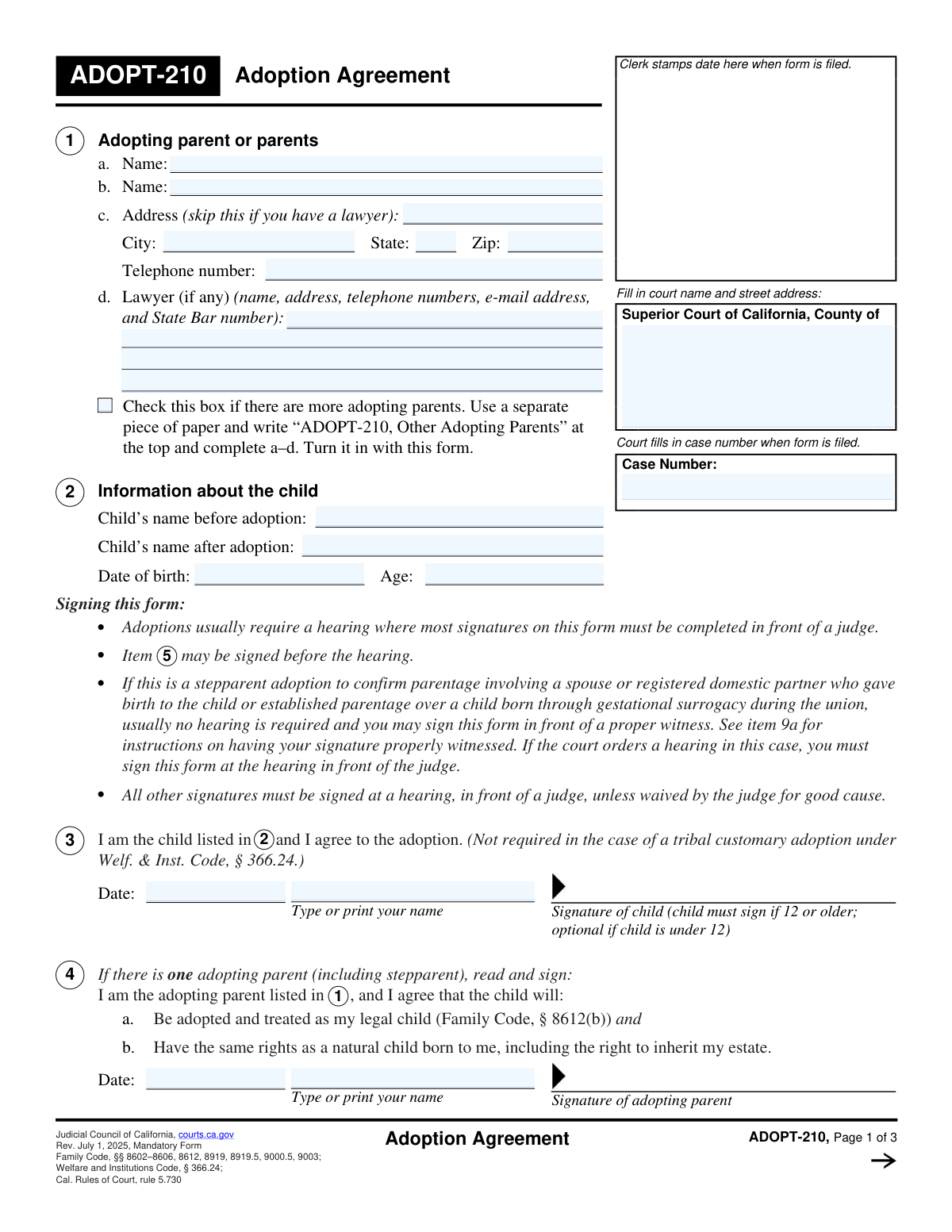
ADOPT-210, Adoption Agreement, is a mandatory California Judicial Council form used in adoption proceedings to record the adopting parent(s)’ agreement to adopt, the child’s consent when applicable (generally required if age 12 or older), and any required spouse/registered domestic partner or legal parent consents (such as in stepparent adoptions). It also documents how the agreement was executed—outside a hearing with a proper witness/notarization, at an in-person hearing, or acknowledged during a remote hearing—so the court can determine whether signature requirements were met. The form is important because it provides the court with standardized, legally required acknowledgments and signatures that support the adoption order and the child’s legal rights (including inheritance). Today, this form can be filled out quickly and accurately using AI-powered services like Instafill.ai, which can also convert non-fillable PDF versions into interactive fillable forms.
Our AI automatically handles information lookup, data retrieval, formatting, and form filling.
It takes less than a minute to fill out ADOPT-210 using our AI form filling.
Securely upload your data. Information is encrypted in transit and deleted immediately after the form is filled out.

Form specifications

Form name: Judicial Council of California Form ADOPT-210, Adoption Agreement
Number of pages: 3
Language: English
Categories: California court forms, Judicial Council forms, family law forms, adoption forms
main-image

Instafill Demo: filling out a legal form in seconds

How to Fill Out ADOPT-210 Online for Free in 2026

Are you looking to fill out a ADOPT-210 form online quickly and accurately? Instafill.ai offers the #1 AI-powered PDF filling software of 2026, allowing you to complete your ADOPT-210 form in just 37 seconds or less.
Follow these steps to fill out your ADOPT-210 form online using Instafill.ai:
  1. 1 Go to Instafill.ai, search for “ADOPT-210 Adoption Agreement” (or upload the PDF) and start a new form-filling session.
  2. 2 Enter the court filing information, including the Superior Court county, court address, and the case number (if already assigned).
  3. 3 Provide adopting parent information (names, address, phone, and attorney details if represented), and indicate if additional adopting parents will be attached on a separate sheet.
  4. 4 Complete the child information, including the child’s name before adoption, name after adoption, date of birth, and age.
  5. 5 Use Instafill.ai to select the correct signature sections to complete (single adopting parent vs. multiple adopting parents; spouse/registered domestic partner consent; stepparent legal parent consent; tribal customary adoption section if applicable).
  6. 6 Complete the execution section (Item 9) by choosing whether the form will be signed outside a hearing (and selecting the proper witness/notary options and witness details), at a hearing, or acknowledged during a remote hearing; then generate a clean, court-ready copy for signatures.
  7. 7 Download/print the finalized form, sign in the required manner (judge/witness/notary as applicable), attach any required acknowledgments or additional pages, and file it with the Superior Court as directed.

Our AI-powered system ensures each field is filled out correctly, reducing errors and saving you time.

Why Choose Instafill.ai for Your Fillable ADOPT-210 Form?

Speed

Complete your ADOPT-210 in as little as 37 seconds.

Up-to-Date

Always use the latest 2026 ADOPT-210 form version.

Cost-effective

No need to hire expensive lawyers.

Accuracy

Our AI performs 10 compliance checks to ensure your form is error-free.

Security

Your personal information is protected with bank-level encryption.

Frequently Asked Questions About Form ADOPT-210

ADOPT-210 is the California Judicial Council form used to document the required agreement/consent to an adoption by the adopting parent(s) and, when applicable, the child, spouse/registered domestic partner, or legal parent. It is typically filed in the adoption case and signed either at a hearing or in a properly witnessed setting when allowed.

The adopting parent(s) listed in item 1 must sign (item 4 for one parent or item 7 for multiple parents). Depending on the situation, the child (item 3), the adopting parent’s spouse/registered domestic partner (item 5), and/or the child’s legal parent in a stepparent adoption (item 6) may also need to sign.

The child must sign if the child is age 12 or older; it is optional if the child is under 12. The form notes the child’s signature is not required in a tribal customary adoption under Welfare & Institutions Code section 366.24.

You’ll need the court name and address, the case number, adopting parent(s) names and contact information (and attorney information if you have a lawyer), and the child’s name before and after adoption, date of birth, and age. If there are more adopting parents than the form allows, you must attach an additional page as instructed.

Item 2 asks for the child’s name before adoption and the child’s name after adoption. Use the child’s current legal name for “before” and the requested new legal name for “after,” consistent with your adoption paperwork.

If there is one adopting parent (including a stepparent), the adopting parent signs item 4. If there is more than one adopting parent, the adopting parents sign item 7 instead.

If the adopting parent is married and not separated, the spouse/registered domestic partner must sign the consent in item 5 (Family Code section 8603). The form states item 5 may be signed before the hearing.

In stepparent adoptions, if you are the child’s legal parent and you are the spouse/registered domestic partner of the adopting stepparent, you sign item 6 to agree to the adoption. This is separate from the adopting parent’s signature section.

Check the “more adopting parents” box and attach a separate sheet labeled exactly as the form instructs (for example, “ADOPT-210, Other Adopting Parents” for item 1 details, or “ADOPT-210, Item 7” for additional signatures). Include the required names, signatures, and dates on the attachment.

Usually, yes—most signatures must be completed at a hearing in front of a judge unless the judge waives it for good cause. The form also allows certain cases (such as some stepparent adoptions to confirm parentage or when appearance is waived) to be signed outside a hearing with a proper witness, as described in item 9.

Check item 9a and then indicate whether the form was signed in California (9a(1)) or outside California (9a(2)), and select the correct witness type. Complete the witness information in 9a(3) and attach any required notary acknowledgment or proof of notarization.

Item 9a(1) lists acceptable witnesses, such as a notary public (with acknowledgment attached), court clerk, probation officer, qualified court investigator, authorized representative of a licensed adoption agency, or county welfare department staff member. You must check the applicable witness type and provide the witness details.

Item 9a(2) allows a notary public (with acknowledgment attached), another person authorized to perform notarial acts (with proof attached), or an authorized representative of an adoption agency licensed in the state or country where the form was signed. Be sure to complete the location and witness information and attach the required proof.

Yes—AI tools can help you enter names, addresses, and other repeated case details consistently and reduce errors. Services like Instafill.ai can auto-fill form fields accurately and save time, but you should still review everything carefully before signing and filing.

You can upload ADOPT-210 to Instafill.ai, answer a guided set of questions, and have the system place your responses into the correct PDF fields for download and printing. If your copy is a flat/non-fillable PDF, Instafill.ai can convert it into an interactive fillable form so you can complete it electronically before printing for signatures.

Compliance ADOPT-210
Validation Checks by Instafill.ai

1
Court name and street address completeness and structure
Validates that the court filing section includes a non-empty Superior Court county name and a street address (not a P.O. Box only, unless explicitly allowed by the court). This is important because filings must be routed to the correct court location and department for processing. If missing or malformed, the submission should be rejected or flagged for correction before filing.
2
Case number required and conforms to county case-number format
Checks that the case number is present (when required for filing) and matches expected formatting rules (e.g., allowed characters, length, and common patterns used by California superior courts). Correct case numbers are essential to associate the agreement with the correct adoption case and avoid misfiling. If validation fails, the system should block submission or require confirmation and manual review.
3
Adopting parent name fields are complete and use full legal names
Ensures Adopting Parent 1 name is provided and that any additional adopting parent names entered are not initials-only or obviously incomplete (e.g., single letter, “N/A”). Full legal names are required for enforceability and accurate court records. If incomplete, the form should be returned for correction and not accepted as a final filing.
4
Adopting parent address required unless lawyer information is provided
Validates that the adopting parent address, city, state, and ZIP are completed when the filer indicates they do not have a lawyer, consistent with the form instruction to skip address only if represented. This matters because the court needs a service/mailing address for notices when there is no attorney of record. If the address is missing without attorney details, the submission should fail validation and prompt for the missing information.
5
State and ZIP code format validation for adopting parent address
Checks that the state is a valid US state/territory abbreviation (e.g., 'CA') and that the ZIP code is 5 digits (or optionally ZIP+4 if your system supports it). Proper formatting supports mail delivery and downstream integrations (case management, mailing labels). If invalid, the system should require correction before acceptance.
6
Adopting parent telephone number format validation
Validates that the telephone number contains a valid US phone format (10 digits, allowing punctuation like parentheses/dashes) and is not clearly invalid (e.g., all zeros). A valid phone number is important for court/agency contact if issues arise with signatures, hearing scheduling, or missing attachments. If invalid, the system should flag the field and require a corrected number or an explicit 'no phone' workflow if permitted.
7
Lawyer information integrity (email and State Bar number when attorney is listed)
If lawyer information is provided, checks that it includes at least the attorney name and a State Bar number in an acceptable numeric format, and that any email address is syntactically valid. This is important because attorney representation affects service, contact, and whether the adopting parent address may be omitted. If incomplete or malformed, the system should require correction or treat the filer as unrepresented and require the adopting parent address.
8
Child identity fields completeness and reasonableness
Ensures the child’s name before adoption, name after adoption, and date of birth are provided and not placeholders (e.g., 'unknown'). These fields are central to the adoption agreement and must match the case record to avoid identity errors. If missing or suspicious, the submission should be blocked or routed to manual review.
9
Child date of birth format and not-in-future validation
Validates that the child’s date of birth is a valid date (MM/DD/YYYY or accepted local format) and is not in the future. This prevents calculation errors and ensures the agreement pertains to an existing child. If invalid, the system should reject the submission and request a corrected date.
10
Child age matches date of birth (cross-field consistency)
Checks that the stated age is consistent with the date of birth as of the signing date or filing date (allowing a small tolerance if the birthday is near). This is important because signature requirements depend on whether the child is 12 or older. If inconsistent, the system should flag the discrepancy and require correction to prevent improper execution.
11
Child signature required when age is 12 or older (and optional otherwise)
If the child’s age is 12 or older, validates that the child signature date, printed name, and signature are present (unless the submission indicates a tribal customary adoption where the child agreement is not required). This is a statutory/required consent element in many adoptions and affects validity. If missing when required, the system should fail validation and prevent filing as complete.
12
Adopting parent signature set matches number of adopting parents selected
Validates that exactly one adopting parent signature block is completed for single-parent adoptions (Item 4) and that multiple adopting parent signatures are completed for multi-parent adoptions (Item 7), consistent with the names listed in Item 1 and any 'more adopting parents' indicator. This prevents incomplete consent by one of the adopting parents and ensures the correct section is used. If mismatched, the system should require the user to complete the correct signature section(s) or clarify the number of adopting parents.
13
Spouse/registered domestic partner consent required when adopting parent is married and not separated
If the submission indicates the adopting parent is married/partnered and not separated (or if spouse consent section is filled), validates that the spouse/partner printed name, signature, and date are present. This consent is required by statute in applicable cases and can invalidate the agreement if omitted. If required consent is missing, the system should block submission or flag for court review depending on local rules.
14
Stepparent adoption legal parent signature required when stepparent adoption is indicated
When the filing is identified as a stepparent adoption (or when Item 6 is used), validates that the legal parent printed name, signature, and date are completed. This ensures the legal parent consents to the stepparent adoption as required for that pathway. If missing, the system should reject the submission as incomplete for stepparent adoption processing.
15
Tribal customary adoption order date and attachment requirement
If the tribal customary adoption section (Item 8) is used, validates that the tribal customary adoption order date is provided and that the referenced order copy is attached (or an attachment indicator is present). This is necessary because the agreement references rights and duties stated in that order and the court must be able to verify it. If the date or attachment is missing, the system should fail validation and request the missing order documentation.
16
Execution method selection is mutually exclusive and drives witness/judge requirements
Validates that exactly one execution method is selected (outside hearing, at hearing, or remote hearing acknowledgment) and enforces the corresponding required fields. For outside-hearing execution, witness type and witness information must be completed; for at-hearing/remote, the judge/judicial officer date (and signature capture if applicable) must be present or reserved for court completion. If conflicting options are selected or required dependent fields are missing, the system should block submission and prompt the user to correct execution details.

Common Mistakes in Completing ADOPT-210

Leaving the court name/address blank or using the wrong county

People often assume the clerk will fill in the court information, or they copy the court’s mailing address instead of the required court name and street address for the filing location. This can delay filing, cause the document to be rejected, or route it to the wrong courthouse. Use the exact “Superior Court of California, County of ___” and the correct street address for the courthouse handling the adoption. AI-powered form filling tools like Instafill.ai can help by pulling the correct court formatting and reducing address-entry errors (and if you only have a flat PDF, Instafill.ai can convert it into a fillable version).

Missing or incorrect case number (or using a petition number from another case)

A very common error is leaving the case number blank, transposing digits, or entering a case number from a related matter (e.g., guardianship, dependency, or a different family case). The court may be unable to match the agreement to the correct file, which can lead to rejection or significant processing delays. Copy the case number exactly as it appears on the court’s notices and other filed adoption documents, including any prefixes. Instafill.ai can validate the case-number format and ensure the same case number is used consistently across all pages/fields.

Inconsistent adopting parent names across sections and signature blocks

Filers frequently enter a nickname in item 1 but sign a different legal name in items 4/7, or they list parents in a different order on later pages (“Adopting parent or parents” caption fields). Name mismatches can trigger clerk questions, require corrected filings, or create confusion about who is actually consenting. Use the adopting parent(s)’ full legal names exactly as they appear on identification and other adoption paperwork, and keep the same spelling/order everywhere. Instafill.ai can auto-populate repeated name fields to keep them identical throughout the form.

Providing an address when represented by counsel (or omitting it when self-represented)

Item 1(c) says to skip the address if you have a lawyer, but many people miss that instruction and either provide an address when they shouldn’t or leave it blank when they are self-represented. This can cause service/contact issues or require clarification about representation. If you have an attorney, follow the form’s instruction and focus on complete attorney details; if you do not, provide a complete residential mailing address, city, state, and ZIP. Instafill.ai can prompt the correct behavior based on whether lawyer information is entered.

Incomplete attorney information (missing State Bar number or contact details)

When a lawyer is involved, people often list only the attorney’s name and firm but omit the State Bar number, email, or full address/phone details requested in item 1(d). Incomplete counsel information can slow processing and create notice/service problems. Enter the attorney’s full name, firm, address, phone, email, and State Bar number exactly as provided by counsel. Instafill.ai can format multi-line attorney blocks and flag missing required elements like the Bar number.

Child’s name before/after adoption entered incorrectly or inconsistently

A frequent mistake is swapping the “before” and “after” names, using an informal name, or changing only part of the name (e.g., leaving out a middle name) without matching the intended legal change. This can lead to errors in the adoption order, amended birth certificate processing, and future identity/document issues. Enter the child’s full current legal name in “before adoption” and the exact full intended legal name in “after adoption,” matching the petition and proposed order. Instafill.ai can help by reusing the same child-name data across related forms and warning when fields don’t match.

Date of birth and age mismatches (wrong format or not updated)

People commonly enter the wrong DOB format, transpose month/day, or calculate the child’s age incorrectly (especially if the form is prepared weeks before filing). Inconsistencies can cause the clerk or judge to question the accuracy of the record and may require corrections. Use the child’s DOB exactly as on the birth certificate and compute age as of the signing date (or follow local court practice if instructed). Instafill.ai can standardize date formats and automatically calculate age from the DOB to prevent mismatches.

Missing required child signature when the child is 12 or older

Item 3 requires the child’s signature if the child is 12 or older (except certain tribal customary adoption situations), but filers often overlook this or assume a parent can sign for the child. Missing the child’s required consent can delay the hearing or require re-signing in court. Confirm the child’s age and ensure the child signs and dates item 3 when required, with their name printed as requested. Instafill.ai can flag when the entered age triggers a required child signature and prevent submission with that section incomplete.

Signing the wrong section for the number of adopting parents (item 4 vs. item 7)

When there are two adopting parents, people sometimes sign item 4 (meant for one adopting parent) instead of item 7, or they sign both in a way that creates confusion. This can result in an incomplete agreement or require the court to request a corrected form. Use item 4 only when there is one adopting parent; use item 7 when there is more than one adopting parent and ensure each adopting parent signs and dates their own line. Instafill.ai can guide users to the correct signature section based on how many adopting parents are entered.

Missing spouse/registered domestic partner consent when required (item 5)

If the adopting parent is married and not separated, the spouse/registered domestic partner’s consent is required, but many filers mistakenly skip item 5 or assume it doesn’t apply because the spouse is not adopting. Missing this consent can stop the adoption from moving forward until the form is corrected. Carefully determine marital/partnership status and separation status, and have the spouse/partner sign and date item 5 (it may be signed before the hearing). Instafill.ai can prompt for item 5 when marital status indicates it is required and help ensure the printed name/date/signature are all present.

Incorrect execution method and witness/notary details in item 9

Item 9 is often completed incorrectly—people check multiple execution options, select “signed outside of a hearing” without meeting the criteria, or fail to attach the required notary acknowledgment/proof of notarization. Errors here can invalidate signatures, force re-signing, or delay the court’s ability to accept the agreement. Check only one execution method (9a, 9b, or 9c), then complete the matching subparts (California vs. outside California) and provide full witness information and attachments when required. Instafill.ai can enforce mutually exclusive checkbox logic, ensure required witness fields are completed, and remind you to attach the correct notary documentation.
Saved over 80 hours a year

“I was never sure if my IRS forms like W-9 were filled correctly. Now, I can complete the forms accurately without any external help.”

Kevin Martin Green

Your data stays secure with advanced protection from Instafill and our subprocessors

Robust compliance program

Transparent business model

You’re not the product. You always know where your data is and what it is processed for.

ISO 27001, HIPAA, and GDPR

Our subprocesses adhere to multiple compliance standards, including but not limited to ISO 27001, HIPAA, and GDPR.

Security & privacy by design

We consider security and privacy from the initial design phase of any new service or functionality. It’s not an afterthought, it’s built-in, including support for two-factor authentication (2FA) to further protect your account.

Fill out ADOPT-210 with Instafill.ai

Worried about filling PDFs wrong? Instafill securely fills judicial-council-of-california-form-adopt-210-adoption-agreement-1 forms, ensuring each field is accurate.