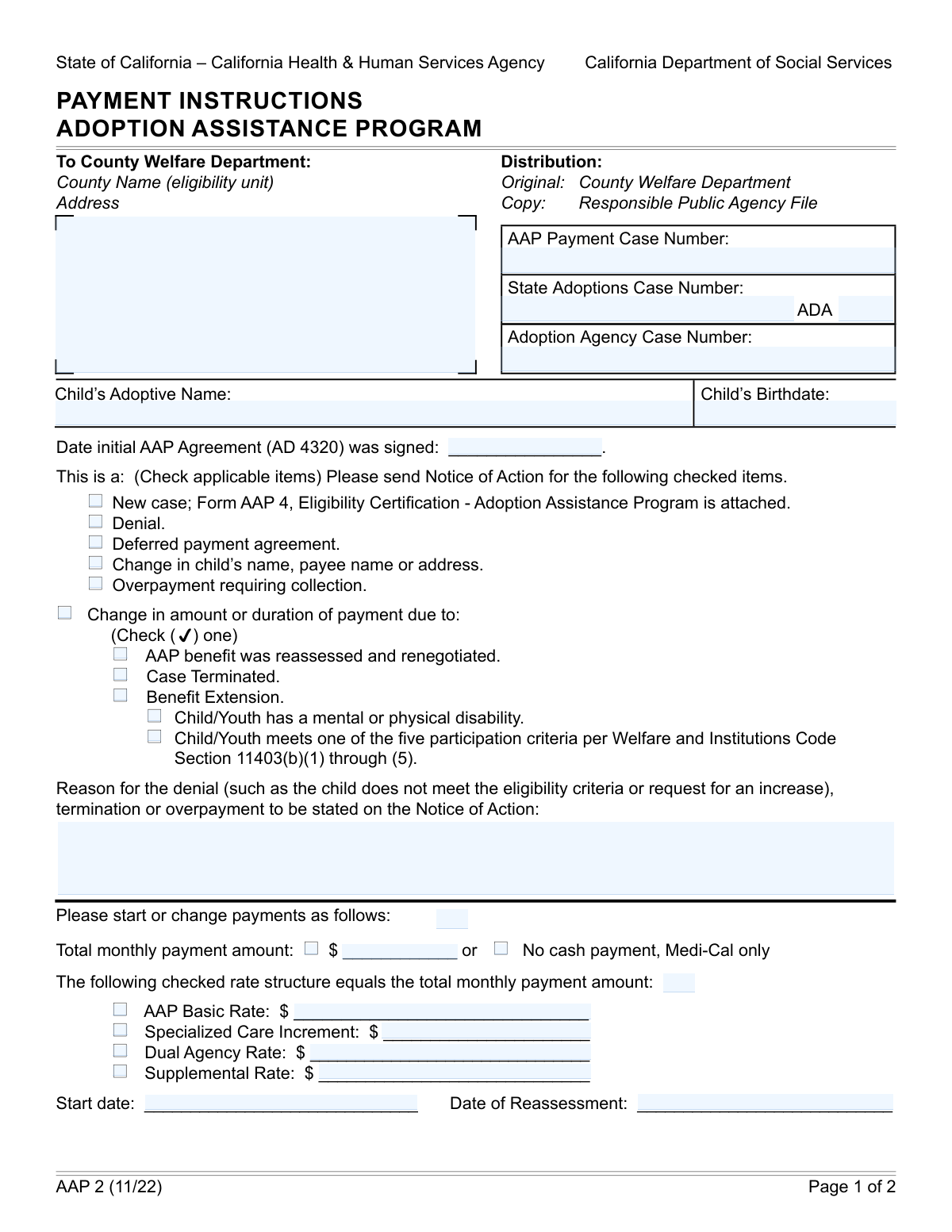
Yes! You can use AI to fill out Form AAP 3, Adoption Assistance Program (AAP) Notice of Action
Form AAP 3, the Adoption Assistance Program (AAP) Notice of Action, is a state-level document used by public agencies to formally communicate actions taken on an AAP case. It details critical information such as the approval of a new case, changes in payment amounts, reasons for denial or termination of benefits, and specifics about payment structures, ensuring families are officially informed of their benefit status. Today, this form can be filled out quickly and accurately using AI-powered services like Instafill.ai, which can also convert non-fillable PDF versions into interactive fillable forms.
Our AI automatically handles information lookup, data retrieval, formatting, and form filling.
It takes less than a minute to fill out AAP 3 using our AI form filling.
Securely upload your data. Information is encrypted in transit and deleted immediately after the form is filled out.
Form specifications
| Form name: | Form AAP 3, Adoption Assistance Program (AAP) Notice of Action |
| Number of fields: | 69 |
| Number of pages: | 2 |
| Language: | English |
| Categories: | adoption forms |
Instafill Demo: How to fill out PDF forms in seconds with AI
How to Fill Out AAP 3 Online for Free in 2026
Are you looking to fill out a AAP 3 form online quickly and accurately? Instafill.ai offers the #1 AI-powered PDF filling software of 2026, allowing you to complete your AAP 3 form in just 37 seconds or less.
Follow these steps to fill out your AAP 3 form online using Instafill.ai:
- 1 Navigate to Instafill.ai and upload your Form AAP 3, or select it from the template library.
- 2 Enter the child's information and all relevant case numbers, including the AAP Payment Case Number and State Adoptions Case Number.
- 3 In the 'Notice of Action Items' section, check the box that corresponds to the purpose of the notice, such as 'New Case', 'Change', or 'Denial'.
- 4 Complete the 'Payment Instruction' and 'Rate Structure Breakdown' sections, detailing the payment start date, total monthly amount, and all applicable rate components.
- 5 If the notice involves a change, denial, or termination, provide a clear reason and fill out any related sections, such as 'Out-of-Home Placement' or 'Wraparound Services' details.
- 6 Update the parent and child's address and contact information if there has been a change.
- 7 Review all entered information for accuracy before the authorized official signs and dates the form to finalize the notice.
Our AI-powered system ensures each field is filled out correctly, reducing errors and saving you time.
Why Choose Instafill.ai for Your Fillable AAP 3 Form?
Speed
Complete your AAP 3 in as little as 37 seconds.
Up-to-Date
Always use the latest 2026 AAP 3 form version.
Cost-effective
No need to hire expensive lawyers.
Accuracy
Our AI performs 10 compliance checks to ensure your form is error-free.
Security
Your personal information is protected with bank-level encryption.
Frequently Asked Questions About Form AAP 3
This form is a Notice of Action for the Adoption Assistance Program (AAP). It is used by a public agency to officially communicate decisions about AAP benefits, such as starting a new case, changing payment amounts, or terminating a case.
An authorized official from the responsible public agency, like the County Welfare Department, completes and signs this form. Adoptive parents typically receive the completed form as a notification of a decision regarding their case.
The AAP, State Adoptions, and agency case numbers can be found on previous correspondence related to the adoption and assistance benefits. If you cannot locate them, you should contact your caseworker for assistance.
This indicates that you and the agency have agreed to postpone the start of AAP cash payments, even though the child is eligible. You will likely receive Medi-Cal benefits, but cash assistance will begin at a later, agreed-upon date.
The 'Reason for Payment Change' section explains why the payment is being modified. Common reasons include a benefit reassessment, the child meeting new participation criteria, or a benefit extension.
The Specialized Care Increment (SCI) is an additional monthly payment for children with significant physical, mental, or emotional needs that require a level of care beyond what the basic AAP rate covers.
If your benefits are denied or terminated, the form must state a specific reason. You have the right to appeal this decision, and information about the appeals process is typically included with the Notice of Action.
The form specifies how payments will be distributed, which can be a single check to the facility, a single check to you to pay the facility, or two separate checks to both you and the facility. The specific amounts and dates for this arrangement will be listed.
You should report any changes to your agency caseworker, who will then use this form to update the system. They will check the 'Change in Child's/Payee's Name or Address' box and enter the new information to ensure records and payments are correct.
This means the agency has determined you received more AAP funds than you were entitled to. The form will state the reason, and the agency will provide separate instructions on how the overpaid amount will be collected.
Wraparound services are intensive, individualized services for children with complex needs. If a child is eligible, this form details how the service provider will be paid, whether directly by the agency, by the adoptive parent, or through a split payment.
Yes, services like Instafill.ai use AI to help auto-fill form fields accurately and save time. This is especially helpful for agency staff who process these forms frequently and need to ensure all information is entered correctly.
You can use a service like Instafill.ai to easily complete this form online. Simply upload the document, and the platform will make it fillable, allowing you to type information directly into the fields before printing or submitting.
If you have a non-fillable or 'flat' PDF, you can use a tool like Instafill.ai to convert it into an interactive, fillable form. This allows you to easily type in all the required information without needing to print and fill it out by hand.
Compliance AAP 3
Validation Checks by Instafill.ai
1
Child's Birthdate Format and Plausibility
This check validates that the 'Child's Birthdate' is a real date in a valid format (e.g., MM/DD/YYYY) and that the date is in the past, not the future. This is crucial for establishing the child's identity and eligibility for age-related benefits. If the date is invalid or in the future, the form submission will be rejected, as all subsequent calculations and eligibility determinations depend on an accurate birthdate.
2
Initial Agreement Date vs. Child's Birthdate Consistency
This validation ensures that the 'Initial AAP Agreement Date' occurs on or after the 'Child's Birthdate'. It is logically impossible for an adoption assistance agreement to be signed before the child is born. This check prevents data entry errors that could invalidate the entire agreement. A failure would trigger an error message requiring the user to correct one or both dates.
3
Conditional Requirement for Denial/Termination Reason
This check ensures that the 'Reason for Denial/Termination/Overpayment' text field is filled out if the 'Denial', 'Case Terminated', or 'Overpayment Requiring Collection' checkbox is selected. Providing a reason is a legal and procedural requirement for adverse actions, ensuring clarity for the recipient. If the condition is met but the reason is missing, the form cannot be submitted, preventing incomplete or non-compliant notices.
4
Payment Amount Calculation Consistency
This validation verifies that the 'Calculated Total Monthly Payment' field correctly equals the sum of all checked and filled rate component amounts ('AAP Basic Rate', 'Specialized Care Increment', 'Dual Agency Rate', 'Supplemental Rate'). This is a critical financial control to ensure payment accuracy and prevent miscalculations that could lead to underpayments or overpayments. A mismatch would halt submission and require the user to correct the amounts.
5
Mutually Exclusive Payment Instructions
This check ensures that a user cannot both enter a value in the 'Total Monthly Payment Amount' field and check the 'No cash payment, Medi-Cal only' box. These two options are mutually exclusive and selecting both creates a logical contradiction in payment instructions. If both are filled, the system will display an error and require the user to choose only one option to proceed.
6
Conditional Requirement for Rate Component Amounts
This validation ensures that if a checkbox for a specific rate component (e.g., 'Specialized Care Increment') is checked, its corresponding monetary amount field must contain a value. This prevents situations where a rate is included in the payment structure but its value is missing, leading to incorrect calculations. Failure to provide the amount will result in an error, prompting the user to either enter the amount or uncheck the box.
7
Exclusive Payment Choice for Out-of-Home Placement
This check validates that within the 'Out-of-Home Placement Details' section, only one of the three payment direction checkboxes ('One check to facility', 'One check to adoptive parent', 'Two checks to be issued') is selected. Selecting multiple options would create ambiguous and conflicting payment instructions. The system should enforce a radio-button-like behavior, and if a submission contains more than one selection, it must be rejected.
8
Sum of Split Payments for Out-of-Home Placement
This validation ensures that if 'Two checks to be issued' is selected for an out-of-home placement, the sum of 'Amount Paid to Facility' and 'Amount Paid to Adoptive Parent' equals the 'Total monthly payment amount'. This maintains financial integrity and ensures the entire payment is accounted for and correctly distributed. A discrepancy would trigger an error, forcing the user to reconcile the amounts before submission.
9
Conditional Requirement for Change in Name/Address Details
This check verifies that if the 'Change in Child's/Payee's Name or Address' checkbox is selected, the relevant address and name fields are filled out. This ensures that the system captures the necessary new information when a change is indicated. If the box is checked but the details are missing, the submission will be flagged as incomplete, preventing the update from being processed without the required data.
10
Conditional Requirement for Reassessment Date
This validation ensures that the 'Date of Reassessment' field is populated if the 'AAP benefit reassessed and renegotiated' checkbox is selected. The date is essential context for why the payment is changing and provides an audit trail for the reassessment event. If the checkbox is selected without a corresponding date, the form will be considered incomplete and rejected.
11
Phone Number Format Validation
This check validates that the 'Telephone Number' and 'Responsible Public Agency Telephone Number' fields adhere to a standard phone number format (e.g., 10 digits, with optional formatting like parentheses or hyphens). This ensures data quality and the ability to contact the parent or agency when necessary. An invalid format would prompt the user to correct the entry, preventing the storage of unusable contact information.
12
Notice of Action Item Completeness
This validation ensures that at least one checkbox from the 'Notice of Action Items' section (e.g., 'New Case', 'Denial', 'Change in Child's/Payee's Name or Address') is selected. The entire purpose of the form is to provide a notice of a specific action, so at least one must be chosen to define the submission's intent. If no action is selected, the form is considered incomplete and cannot be processed.
13
Wraparound Services Date Logic
This check ensures that for Wraparound Services, the 'Wraparound Service End Date' is on or after the 'Wraparound Service Start Date'. An end date that precedes a start date is a logical impossibility and indicates a data entry error. This validation prevents the creation of invalid service periods in the system. A failure would require the user to correct the dates before the form can be submitted.
14
Conditional Requirement for Out-of-Home Placement Details
This validation ensures that if the 'Child placed outside adoptive home' box is checked, the required sub-fields like 'Out-of-Home Placement Facility Name' and 'Address' are filled. This is necessary to process the placement correctly and direct payments if needed. Submitting the form with the box checked but without the facility details would result in an error, as the information is critical for case management.
Common Mistakes in Completing AAP 3
Users often mix up the AAP Payment, State Adoptions, ADA, and Adoption Agency case numbers, or transpose digits when entering them. This happens due to the similarity and quantity of required identification numbers. Incorrect case numbers lead to record-matching failures, significant processing delays, and potential rejection of the entire form until the correct information is provided.
A frequent error is checking a box like 'Denial' or 'Overpayment Requiring Collection' but failing to provide the mandatory explanation in the 'Reason for Denial/Termination/Overpayment' field. This creates an incomplete record that cannot be processed, as the justification for the action is missing. Always ensure that when you check a box, you complete all the additional fields that become required as a result.
The 'Calculated Total Monthly Payment' must be the exact sum of all amounts entered for the checked rate components (AAP Basic Rate, Specialized Care Increment, etc.). People often make simple addition errors or forget to include a checked component in their total. This discrepancy will cause the form to be flagged for review and correction, delaying the adjustment of payments.
The form has several sections, like 'Out-of-Home Placement Details' and 'Wraparound Services Details', that only need to be filled out if a specific condition is met. A common mistake is checking the initial box (e.g., 'Child placed outside adoptive home') but then neglecting to fill in the required facility name, address, and payment details. This leaves the agency without the necessary information to process the specific request, leading to follow-ups and delays.
In sections detailing payments for out-of-home placements or wraparound services, users must select one of three mutually exclusive options for payment distribution. Errors include checking multiple options (e.g., 'One check to facility' and 'Two checks to be issued') or selecting 'Two checks to be issued' but failing to specify both the amount paid to the provider/facility and the amount paid to the parent. This ambiguity prevents the finance department from issuing payments correctly.
When 'Two checks to be issued' is selected for either out-of-home placement or wraparound services, the sum of the 'Amount Paid to Facility/Provider' and 'Amount Paid to Adoptive Parent' must equal the 'Total Monthly Payment Amount'. Filers often miscalculate these split amounts, causing a financial discrepancy that must be resolved before any payments can be made. Double-checking this math is critical to avoid payment holds.
Users sometimes create a contradiction by entering a value in the 'Total Monthly Payment Amount' field while also checking the 'No cash payment, Medi-Cal only' box. These two fields are mutually exclusive and providing both creates confusion about the intended action. This requires the agency to contact the filer for clarification, delaying the processing of benefits.
Failing to provide a complete address for the County Welfare Department, a placement facility, or the adoptive parents is a frequent oversight. This can include missing a street name, city, zip code, or apartment number. Incomplete addresses can result in returned mail and missed critical notices regarding benefits, actions, or required follow-ups.
Submitting the form without the 'Authorized Official Signature' and date is a simple but critical error that completely invalidates the document. This often happens when filers are focused on the complex details within the form and forget the final step. An unsigned form cannot be legally processed and will be immediately returned for completion, halting all requested actions.
When the 'Change in Child's/Payee's Name or Address' box is checked, all corresponding address and name fields must be filled out. A common mistake is checking this box but only partially updating the information, such as providing a new address but not the parent's name. This can lead to confusion and errors in the system of record. AI-powered tools like Instafill.ai can help prevent these errors by highlighting required fields based on checkbox selections and validating data formats. If the form is a non-fillable PDF, Instafill.ai can also convert it into an interactive, fillable version.
Saved over 80 hours a year
“I was never sure if my IRS forms like W-9 were filled correctly. Now, I can complete the forms accurately without any external help.”
Kevin Martin Green
Your data stays secure with advanced protection from Instafill and our subprocessors

Robust compliance program
Transparent business model
You’re not the product. You always know where your data is and what it is processed for.
ISO 27001, HIPAA, and GDPR
Our subprocesses adhere to multiple compliance standards, including but not limited to ISO 27001, HIPAA, and GDPR.
Security & privacy by design
We consider security and privacy from the initial design phase of any new service or functionality. It’s not an afterthought, it’s built-in, including support for two-factor authentication (2FA) to further protect your account.
Fill out AAP 3 with Instafill.ai
Worried about filling PDFs wrong? Instafill securely fills form-aap-3-adoption-assistance-program-aap-notice-of-action forms, ensuring each field is accurate.