
Yes! You can use AI to fill out Declaration Confirming Parentage in Stepparent Adoption: Gestational Surrogacy
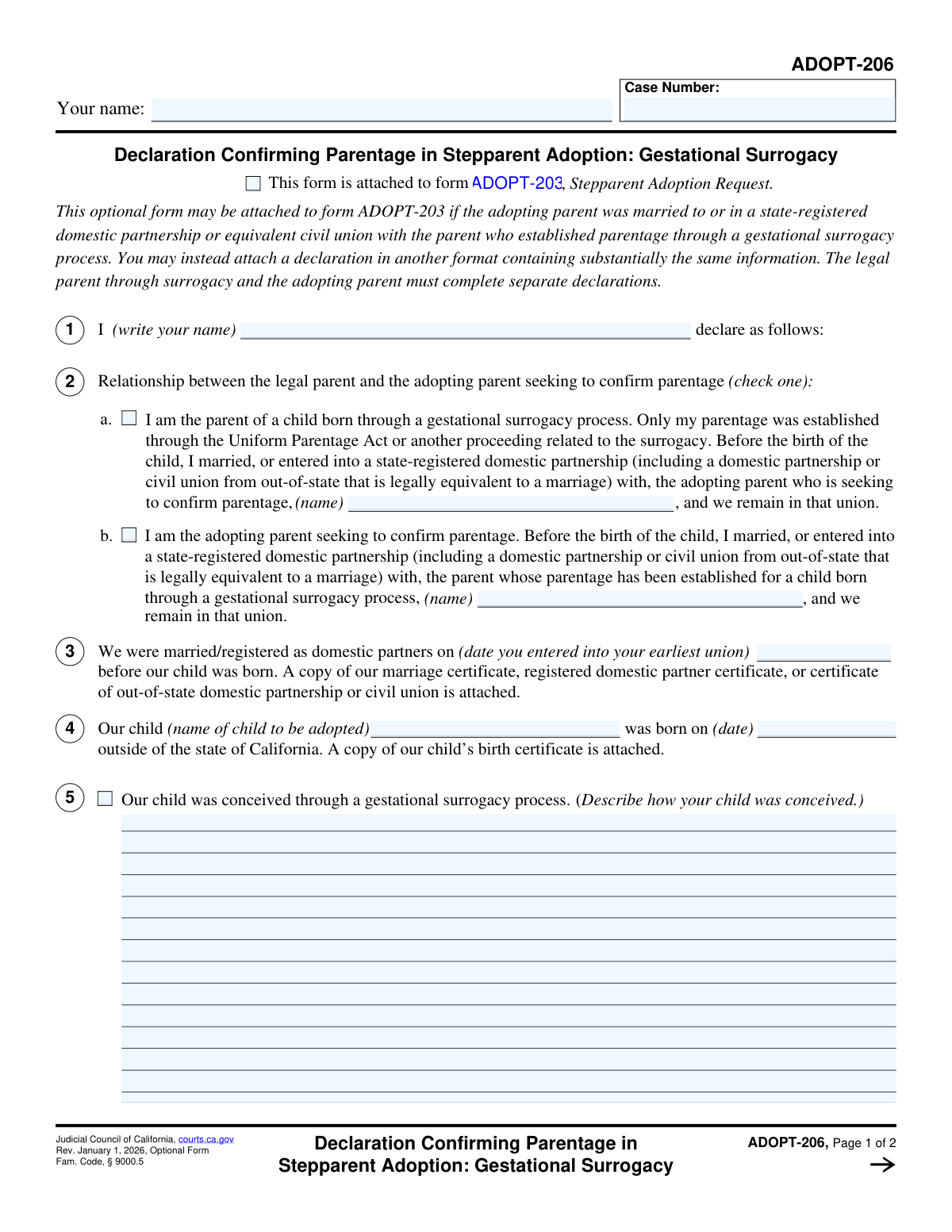
Don't type 23 fields by hand. Tell our AI about yourself, or upload a document you already have, and it fills every field in seconds. You check it, then download, print or sign.
The AI does the filling. You just check it.
No typing into boxes, nothing to install.
What this form asks for
The AI fills all of it, from your answers or your documents.
The AI checks your answers before you download
12 checks built for this form, so a wrong date or a missing answer is caught before anyone else sees it.
This check ensures that the name entered in 'Declarant's Name', 'Name for Declaration Statement', and 'Declarant's Printed Name' are identical. Consistency is critical for legal documents to unambiguously identify the declarant throughout the form. A mismatch could lead to the document being rejected for ambiguity, requiring resubmission.
This validation verifies that the 'Case Number' entered at the top of the form matches the 'Case Number' in the 'Case Identification' section. Since the case number is the primary identifier for the legal proceeding, any discrepancy could cause the document to be misfiled or lost. A failure would require the user to correct the numbers to ensure they are identical.
This check ensures that the user selects either the 'Legal Parent' checkbox or the 'Adopting Parent' checkbox, but not both. The declarant must be one or the other for the purposes of this specific form, and selecting both creates a logical contradiction. If both are checked, the form should display an error and require the user to select only one role.
This validation enforces that if the 'Legal Parent' box is checked, the 'Adopting Parent Name' must be filled, and if the 'Adopting Parent' box is checked, the 'Legal Parent Name' must be filled. This information is essential for identifying both parties involved in the stepparent adoption. A failure to provide the corresponding name results in an incomplete declaration and must be corrected before submission.
This check confirms the logical sequence of dates, ensuring the 'Child's Date of Birth' is on or after the 'Earliest Union Date', and the 'Declaration Date' is on or after the 'Child's Date of Birth'. This prevents the submission of chronologically impossible information that would undermine the document's credibility. An illogical sequence would trigger an error, forcing the user to correct the dates.
This validation verifies that the 'Declaration Date' is not a future date. A legal document cannot be signed and dated for a time that has not yet occurred, as this would invalidate the declaration. If a future date is entered, the system should reject it and prompt the user to enter the current or a past date.
And 6 more checks
- Child's Age Plausibility for Adoption
- Conditional Requirement for Other Parents Information
- Gestational Surrogacy Description Requirement
- Declarant Role Selection Requirement
- Full Legal Name Format
- Valid Date Format
Let AI fill out your ADOPT-203
No typing. Every field filled in seconds, checked, ready to sign.
How to Fill Out ADOPT-203 Online for Free in 2026
What the AI walks you through.
- Navigate to Instafill.ai and upload or select the ADOPT-203 form.
- Provide your personal details as the declarant and enter the official case number.
- Specify your role by checking whether you are the 'Legal Parent' or the 'Adopting Parent' and provide the other parent's name.
- Enter the child's full name, date of birth, and confirm that the child was conceived through a gestational surrogacy process.
- Disclose if there are any other potential parents and provide their information if applicable.
- Review all the information populated by the AI for accuracy, then enter the date and your printed name to finalize the declaration.
Common Mistakes in Completing ADOPT-203
The ones the AI is built to catch.
Inconsistent Declarant Name Across Fields
Confusing 'Legal Parent' and 'Adopting Parent' Roles
Incorrect or Missing Case Number
Failure to Disclose 'Other Potential Parents'
Providing an Insufficient 'Conception Description'
Using an Informal or Incomplete Child's Name
Forgetting the Declaration Date
Skipping Critical Confirmation Checkboxes
Inconsistent Data in Repeated Fields
Ambiguous 'Earliest Union Date'
Frequently Asked Questions About ADOPT-203
Is it really free for 7 days?
Can I fill other forms too?
How do I cancel?
How does the AI fill out ADOPT-203?
What happens to my information?
How complex is ADOPT-203 to fill out?
What is the purpose of the ADOPT-203 form?
Who needs to fill out this form?
Is this form filed on its own?
What information do I need before I start filling out this form?
In section 2, should I check 'Legal Parent' or 'Adopting Parent'?
What should I write for the 'Conception Description'?
What does 'Other Potential Parents' refer to?
What date should I enter for the 'Earliest Union Date'?
Where do I find the 'Case Number'?
Can I use an AI tool to help me fill out this form?
How can I fill out the ADOPT-203 form online?
The PDF version of this form I have is not fillable. What can I do?
Get your ADOPT-203 filled out by AI
$0 today. Cancel before Oct 30 and you pay nothing.
Other forms like this one
California court forms: Judicial Council of California Form SC-105, Request for Court Order and Answer (Small Claims), Judicial Council of California Form SC-120, Defendant’s Claim and ORDER to Go to Small Claims Court (Small Claims), Judicial Council of California Form SER-001, Request for Sheriff to Serve Court Papers, Judicial Council of California Form SER-001, Request for Sheriff to Serve Court Papers, Affidavit for Collection of Personal Property California Probate Code Section 13100, Form POS-040, Proof of Service—Civil, Declaration of Facts of Death (California Superior Court), declaration-of-marriage-for-court-proceeding-california-family-law, ADOPT-200, Adoption Request, ADOPT-200, Stepparent Adoption Request, ADOPT-210, Adoption Agreement, ADOPT-310, Contact After Adoption Agreement, Judicial Council of California Form ADOPT-200, Adoption Request, Form ADR-107, Mediation Attendance Sheet, Form ADR-110, Order Appointing Referee, Form ADR-109, Stipulation or Motion for Order Appointing Referee, Form ADR-102, Request for Trial De Novo After Judicial Arbitration, Form ADR-108, Referee's Report (Code Civ. Proc., §§ 638, 639), Form ADR-106, Petition to Confirm, Correct, or Vacate Contractual Arbitration Award, Form ADR-104, Rejection of Award and Request for Trial After Attorney-Client Fee Arbitration
adoption forms: Judicial Council of California Form ADOPT-210, Adoption Agreement, Judicial Council of California Form ADOPT-210, Adoption Agreement, Vanguard Direct Rollover IRA Adoption Agreement, Voya Investment Management Traditional, Roth, Rollover, and SEP Individual Retirement Account (IRA) Application and Adoption Agreement, ICPC 100B, Interstate Compact on the Placement of Children Report on Child’s Placement Status, AAP 2, Reassessment Information - Adoption Assistance Program, Adoption Assistance Program Nonrecurring Adoption Expense Agreement and Claim, Statement of Acknowledgment - Adoption Implications, Form AAP 3, Adoption Assistance Program (AAP) Notice of Action, Adoption Assistance Program (AAP) - Request for Benefits, Form AAP 3, Adoption Assistance Program (AAP) Negotiation Agreement, Adoption Assistance Program (AAP) Eligibility Certification, Consent to Adoption by Parent, Adoption Request (Stepparent), Petition for Stepparent Adoption, Consent to Stepparent Adoption by Parent in Military, Adoption Assistance Program (AAP) Rate Questionnaire, ADOPT-210, Adoption Agreement, Form ADOPT-215, Adoption Order, Form ADOPT-220, Adoption of Indian Child
Let AI fill out your ADOPT-203
Your trial starts once a card is added. You pay nothing before Oct 30.
Our AI already knows this form, all 23 fields of it. Skip the typing: tell it about yourself, or upload what you have, and it fills the whole form in seconds.
- AI fills every field on both pages, checkboxes included
- No typing into boxes: answer a few questions, or upload a document you already have, an old copy of this form, a photo of a document
- The AI checks the answers; you review and change anything before you download
- Download the finished PDF, print it, or sign it online
- Encrypted, and never used to train AI
Cancel before Oct 30 and you pay nothing.
A card is needed to start the trial. Cancel in two clicks from your account.
Terms · Privacy