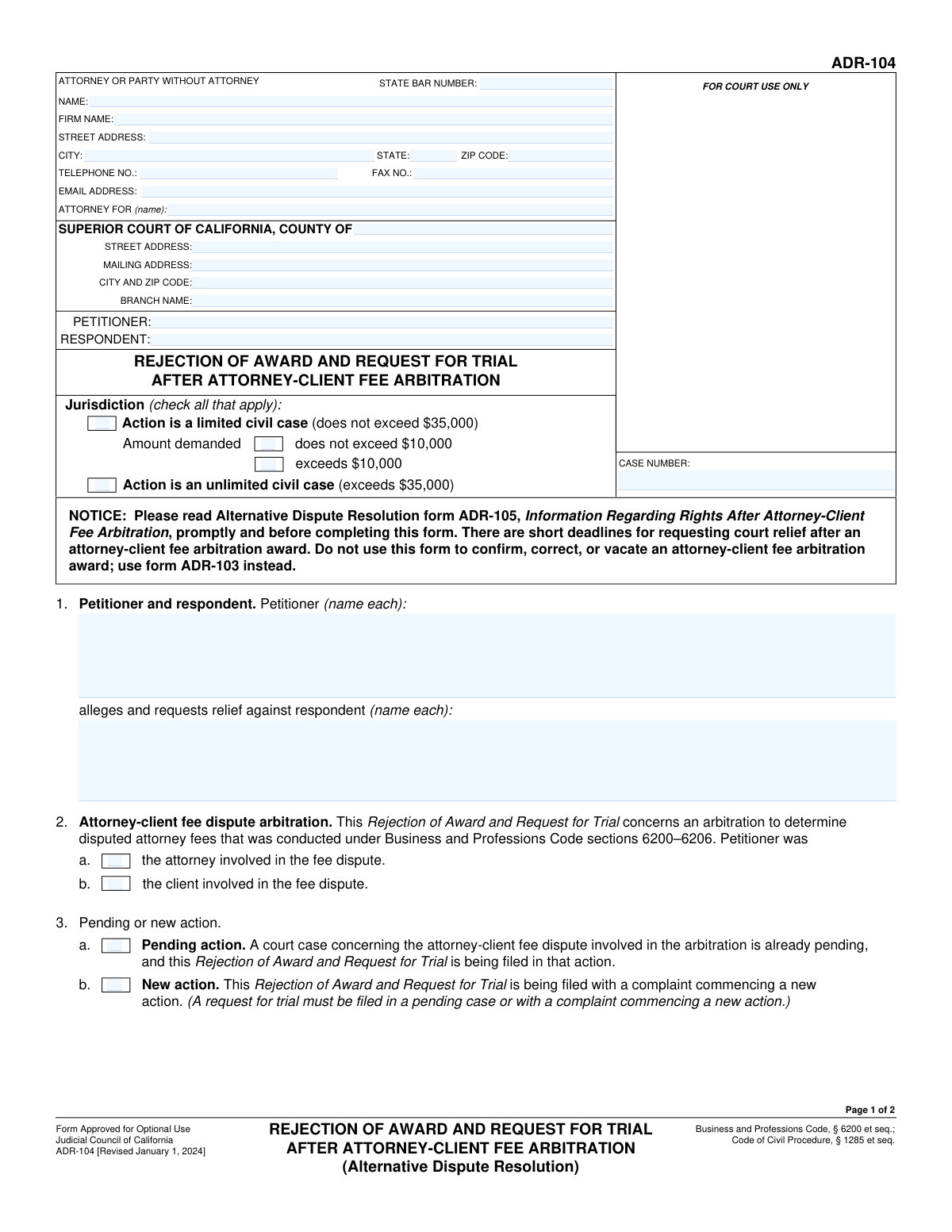
Yes! You can use AI to fill out Form ADR-104, Rejection of Award and Request for Trial After Attorney-Client Fee Arbitration
Form ADR-104, Rejection of Award and Request for Trial, is a legal document filed in the Superior Court of California by a party dissatisfied with the outcome of a mandatory attorney-client fee arbitration. Filing this form is the official procedure to challenge the arbitrator's decision and request a new trial (a trial de novo) in court, effectively moving the dispute from arbitration to the judicial system. Today, this form can be filled out quickly and accurately using AI-powered services like Instafill.ai, which can also convert non-fillable PDF versions into interactive fillable forms.
Our AI automatically handles information lookup, data retrieval, formatting, and form filling.
It takes less than a minute to fill out ADR-104 using our AI form filling.
Securely upload your data. Information is encrypted in transit and deleted immediately after the form is filled out.
Form specifications
| Form name: | Form ADR-104, Rejection of Award and Request for Trial After Attorney-Client Fee Arbitration |
| Number of fields: | 62 |
| Number of pages: | 2 |
| Language: | English |
Instafill Demo: How to fill out PDF forms in seconds with AI
How to Fill Out ADR-104 Online for Free in 2026
Are you looking to fill out a ADR-104 form online quickly and accurately? Instafill.ai offers the #1 AI-powered PDF filling software of 2026, allowing you to complete your ADR-104 form in just 37 seconds or less.
Follow these steps to fill out your ADR-104 form online using Instafill.ai:
- 1 Navigate to Instafill.ai and upload or select Form ADR-104.
- 2 Provide attorney and court information, including the county, court address, and case number.
- 3 Identify the petitioner and respondent, and specify whether the case is a limited or unlimited civil case.
- 4 Enter details about the arbitration hearing, the award date, the amount of the award, and the date the notice of award was mailed.
- 5 Indicate whether this filing is part of a pending action or a new action, and attach a copy of the arbitration award.
- 6 Carefully review all the information you have entered for accuracy and completeness.
- 7 Sign and date the form, then download, print, and file it with the appropriate Superior Court of California.
Our AI-powered system ensures each field is filled out correctly, reducing errors and saving you time.
Why Choose Instafill.ai for Your Fillable ADR-104 Form?
Speed
Complete your ADR-104 in as little as 37 seconds.
Up-to-Date
Always use the latest 2026 ADR-104 form version.
Cost-effective
No need to hire expensive lawyers.
Accuracy
Our AI performs 10 compliance checks to ensure your form is error-free.
Security
Your personal information is protected with bank-level encryption.
Frequently Asked Questions About Form ADR-104
This form is used to reject an arbitration award from an attorney-client fee dispute and request a new trial (a 'trial de novo') in the Superior Court of California.
This form should be completed by either the attorney or the client who participated in the fee arbitration and is not satisfied with the outcome.
You will need your court case number, the full names of the petitioner and respondent, and a copy of the arbitration award. The award notice contains key dates and details required for the form.
A case is 'Limited' if the total amount in dispute is $35,000 or less. If the amount exceeds $35,000, it is an 'Unlimited' civil case.
Check 'Pending action' if a court case regarding the fee dispute already exists. Check 'New action' if you are initiating a new lawsuit by filing this rejection along with a complaint.
Yes, the form has a specific checkbox to confirm that a copy of the arbitration award is attached to your filing. This is a necessary part of the submission.
Yes, but you must check the box for non-appearance and provide a detailed explanation showing your failure to appear was not willful. If the arbitrator found your absence was willful, it may impact your request.
Filing this form initiates a request for a new trial on the fee dispute. The case will then proceed in court as if the arbitration had not occurred.
Yes, there is a strict deadline, which is typically 30 days after the date the notice of arbitration award was mailed. You must enter this mailing date on the form.
In this field, you should enter the total monetary amount of attorney fees and costs that were the subject of the arbitration and are still being contested.
Yes, services like Instafill.ai use AI to accurately auto-fill form fields with your saved information, which saves time and helps reduce errors.
You can upload the form to the Instafill.ai platform, where its AI will make the fields interactive. You can then fill it out on your computer, review the information, and download the completed document.
If you have a non-fillable PDF, you can use a service like Instafill.ai. It can convert flat PDFs into interactive, fillable forms that you can easily complete online.
If you are representing yourself (in 'pro per'), you should enter your own name in the 'Attorney For' field, as you are acting as your own legal representative.
Compliance ADR-104
Validation Checks by Instafill.ai
1
Jurisdiction Exclusivity Check
This validation ensures that the user selects either 'Limited Civil Case' or 'Unlimited Civil Case,' but not both. These options are mutually exclusive as a case's jurisdiction cannot be simultaneously limited and unlimited. If both are selected, the form submission should be blocked with an error message prompting the user to choose only one jurisdictional type.
2
Limited Case Amount Dependency
This check verifies that if 'Limited Civil Case' is selected, the user must also select one of the corresponding amount demanded options ('Does Not Exceed $10,000' or 'Exceeds $10,000'). This ensures completeness for limited civil cases, which are defined by the amount in dispute. A failure would prompt the user to specify the amount range for their limited case filing.
3
Mutually Exclusive Limited Case Amounts
This validation confirms that for a 'Limited Civil Case,' only one of the two amount demanded options ('Does Not Exceed $10,000' or 'Exceeds $10,000') is checked. Selecting both is a logical contradiction that would make the filing ambiguous. This check prevents inconsistent data entry and ensures the case is categorized correctly for court processing.
4
Chronological Date Integrity
This validation checks the logical sequence of key dates, ensuring that the 'Arbitration Date' occurs on or before the 'Award Date', which must occur on or before the 'Notice of Award Mail Date'. This maintains the integrity of the case timeline and prevents nonsensical date entries. A failure would require the user to correct the dates to reflect a valid chronological order.
5
Conditional Case Number Requirement
This rule ensures that if the 'Pending action' checkbox is selected, the 'Case Number' field must be filled out. The case number is a critical identifier for an existing legal action and is necessary for the court to correctly file the document. If this validation fails, the user will be prompted to provide the case number for the pending action.
6
Exclusive Petitioner Role
This check validates that only one of the petitioner role checkboxes ('Petitioner is the attorney' or 'Petitioner is the client') is selected. A petitioner in a fee dispute must be either the attorney or the client, but cannot be both simultaneously. This prevents ambiguous or contradictory information about the parties involved.
7
Conditional Non-Appearance Explanation
This validation ensures that if the 'Petitioner Did Not Appear' checkbox is selected, the 'Reason for Non-Appearance' text field must be completed. The form requires an explanation to justify that the non-appearance was not willful, which is a critical legal point. Failure to provide this explanation would result in an incomplete and potentially invalid filing.
8
Conditional Award Amount Entry
This rule verifies that if the 'Award Requires Payment' checkbox is selected, the 'Award Amount' field must contain a valid, positive numerical value. This ensures that when a monetary award is indicated, the specific amount is also provided for clarity and enforcement. An error would occur if the amount is missing or non-numeric when payment is required.
9
State Abbreviation Format
This check validates that the 'State' field in the attorney/party contact information contains a valid two-letter state abbreviation. Using a standardized format is crucial for accurate mail delivery and proper record-keeping within the court system. An invalid entry would trigger an error, prompting the user to enter a recognized state code (e.g., 'CA' for California).
10
Email Address Format Validation
This validation ensures that the value entered into the 'Email Address' field follows the standard format for an email address (e.g., [email protected]). This is important for ensuring that electronic communications and service from the court or other parties are deliverable. A submission with an invalid format would be rejected until a correctly formatted email is provided.
11
Mutually Exclusive Award Payment Status
This check ensures that the user selects either 'Award Requires Payment' or 'No Payment Required,' but not both. The outcome of the arbitration must be one or the other, as an award cannot simultaneously require a payment and require no payment. This validation prevents a logical contradiction in the award details.
12
Signature Date Validity
This validation confirms that the 'Date of Signature' is not a future date and is on or after the 'Award Date'. The signature date attests to when the document was executed, so it must be the current date or a past date that logically follows the award. Allowing future dates or dates before the award would compromise the legal validity of the document.
13
Zip Code Format Validation
This check ensures that the 'Zip Code' field for both the attorney and court addresses contains a valid 5-digit or 9-digit (ZIP+4) numeric format. Correctly formatted zip codes are essential for the mailability of legal documents and for accurate location data. An invalid format would prompt the user for correction to prevent delivery failures.
Common Mistakes in Completing ADR-104
Filers frequently get confused between 'Limited Civil' (under $35,000) and 'Unlimited Civil' (over $35,000) cases, or they check 'Limited Civil' but fail to specify if the amount is over or under $10,000. This is a critical error that can lead to the case being rejected for improper filing or assigned to the wrong judicial track, causing significant delays. Always double-check the total amount in dispute against the jurisdictional thresholds before making a selection.
Users often misunderstand the difference between filing this rejection in a 'Pending action' versus commencing a 'New action.' Choosing the wrong option can result in a defective filing, failure to properly link the rejection to an existing case, or the unnecessary creation of a new case file. If a lawsuit about the fees is already underway, select 'Pending action'; otherwise, you are likely starting a 'New action' and must file a complaint concurrently.
The form requires several crucial dates, such as the arbitration date, award date, and the date the notice of award was mailed, which are essential for establishing timeliness. Omitting these dates or entering them incorrectly can result in the court finding the rejection untimely and therefore invalid, as there are strict deadlines. Carefully review the arbitration award and mailing notice to ensure all dates are entered accurately.
It is a very common oversight to check the box indicating that a copy of the arbitration award is attached ('Attachment 5(e)') but then forget to physically or digitally include the document with the submission. The court cannot process the rejection without the award it pertains to, leading to an immediate rejection of the filing. Always create a checklist and double-check that all indicated attachments are included before submitting the form.
When a petitioner checks the box for 'Petitioner Did Not Appear,' they often provide a vague or incomplete reason in the explanation field, or forget to fill it out entirely. The form requires a detailed explanation showing the non-appearance was not willful, and failing to provide one can lead the court to disregard the rejection. Be specific about the circumstances (e.g., medical emergency, documented travel disruption) that prevented attendance.
Filers may check 'Award Requires Payment' but then fail to specify whether the 'Attorney Pays' or 'Client Pays,' or they might enter an 'Award Amount' while also checking 'No Payment Required.' Such contradictions create confusion and can halt the processing of the form until clarification is provided. Ensure that only one logical path is followed: if payment is required, specify who pays and the amount; if not, check only the 'No Payment Required' box.
In the context of a fee dispute, the roles can become confusing. A person might incorrectly identify who the petitioner is (the one filing this rejection) versus the respondent, or misidentify whether the petitioner was the attorney or the client in the original dispute. This can cause fundamental confusion in the legal filing, potentially leading to dismissal. Carefully read each field and confirm you are entering the correct party's name for each specified role.
People often confuse the court's mailing address with its physical street address or forget to specify the correct branch name for the Superior Court. This can lead to the document being filed in the wrong courthouse or delayed in processing. To avoid this, verify the exact address and branch for the specific department handling your case on the court's official website before filling out the form.
The form asks for Petitioner and Respondent names in multiple sections, and filers sometimes use abbreviations, omit middle names, or make typos in one section but not another. This inconsistency can create ambiguity and processing delays for the court clerk. To prevent this, enter the full, official legal name for each party consistently in every field where it is required.
When an attorney fills out the top section, they sometimes forget to specify which party they are representing in the 'Attorney For Name' field. This is crucial information for the court clerk and opposing counsel to understand who is being represented. Leaving it blank can cause confusion and may require an amended filing. Always clearly state the full name of the client (e.g., 'Petitioner, Jane Doe') in this field.
Often, court forms are only available as flat, non-fillable PDFs, leading people to print and fill them out by hand, which can result in illegible handwriting and errors. Others might use basic PDF editors that misalign text, making the form look unprofessional and difficult to process. To avoid this, use a tool like Instafill.ai, which can convert non-fillable PDFs into smart, fillable forms, ensuring all entries are clean, aligned, and legible.
Saved over 80 hours a year
“I was never sure if my IRS forms like W-9 were filled correctly. Now, I can complete the forms accurately without any external help.”
Kevin Martin Green
Your data stays secure with advanced protection from Instafill and our subprocessors

Robust compliance program
Transparent business model
You’re not the product. You always know where your data is and what it is processed for.
ISO 27001, HIPAA, and GDPR
Our subprocesses adhere to multiple compliance standards, including but not limited to ISO 27001, HIPAA, and GDPR.
Security & privacy by design
We consider security and privacy from the initial design phase of any new service or functionality. It’s not an afterthought, it’s built-in, including support for two-factor authentication (2FA) to further protect your account.
Fill out ADR-104 with Instafill.ai
Worried about filling PDFs wrong? Instafill securely fills form-adr-104-rejection-of-award-and-request-for-trial-after-attorney-client-fee-arbitration forms, ensuring each field is accurate.