Yes! You can use AI to fill out Form POS-040, Proof of Service—Civil
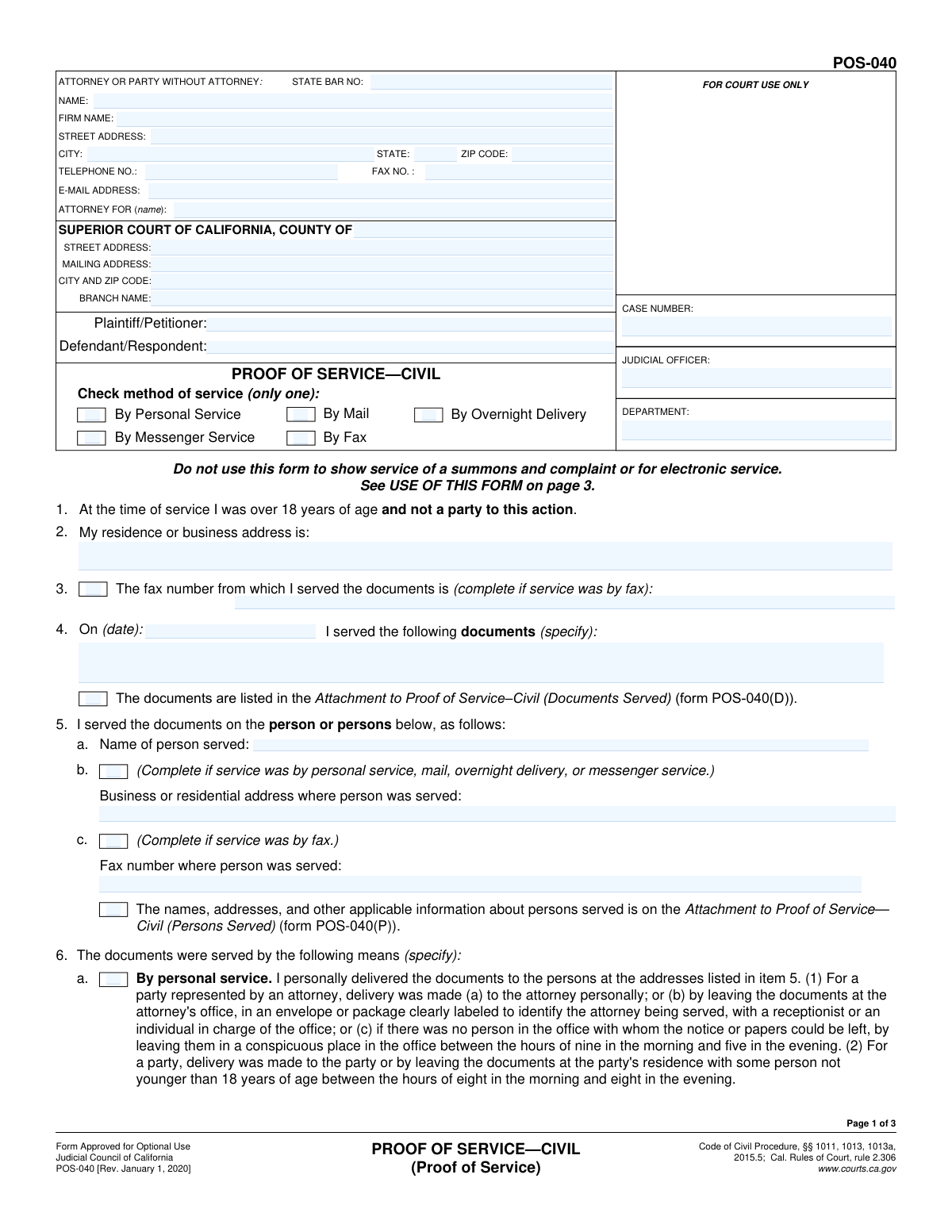
Form POS-040, Proof of Service—Civil, is a mandatory legal document filed with a California Superior Court to provide official proof that court documents have been delivered (served) to all required parties in a lawsuit. This form is crucial as it establishes the court's jurisdiction over the parties and ensures that due process has been followed by giving everyone proper notice of the legal proceedings. Today, this form can be filled out quickly and accurately using AI-powered services like Instafill.ai, which can also convert non-fillable PDF versions into interactive fillable forms.
Our AI automatically handles information lookup, data retrieval, formatting, and form filling.
It takes less than a minute to fill out POS-040 using our AI form filling.
Securely upload your data. Information is encrypted in transit and deleted immediately after the form is filled out.
Form specifications
| Form name: | Form POS-040, Proof of Service—Civil |
| Number of pages: | 3 |
| Language: | English |
| Categories: | civil service forms |
Instafill Demo: How to fill out PDF forms in seconds with AI
How to Fill Out POS-040 Online for Free in 2026
Are you looking to fill out a POS-040 form online quickly and accurately? Instafill.ai offers the #1 AI-powered PDF filling software of 2026, allowing you to complete your POS-040 form in just 37 seconds or less.
Follow these steps to fill out your POS-040 form online using Instafill.ai:
- 1 Navigate to Instafill.ai and upload your POS-040 form, or select it from their library of official court documents.
- 2 Use the AI assistant to automatically fill in the court information, including the county, branch name, and full address.
- 3 Enter the case details, such as the Plaintiff/Petitioner and Defendant/Respondent names, and the case number.
- 4 Provide the server's information and list the specific documents that were served, along with the date of service.
- 5 Detail who was served by entering their name and the address where service occurred.
- 6 Select the method of service (e.g., Personal, Mail, Overnight Delivery, Fax) and complete the corresponding declaration section.
- 7 Review the entire form for accuracy, then have the server date and sign the declaration before filing the completed POS-040 with the court.
Our AI-powered system ensures each field is filled out correctly, reducing errors and saving you time.
Why Choose Instafill.ai for Your Fillable POS-040 Form?
Speed
Complete your POS-040 in as little as 37 seconds.
Up-to-Date
Always use the latest 2026 POS-040 form version.
Cost-effective
No need to hire expensive lawyers.
Accuracy
Our AI performs 10 compliance checks to ensure your form is error-free.
Security
Your personal information is protected with bank-level encryption.
Frequently Asked Questions About Form POS-040
This form, a Proof of Service, is a legal document used to prove to the court that you have formally delivered case documents to another party involved in the lawsuit.
The form must be completed and signed by the 'server' — the person who actually delivered the documents. The server must be at least 18 years old and cannot be a party (like the plaintiff or defendant) in the case.
No, you cannot. The form requires the server to declare they are not a party to the action, so you must have a neutral third party over the age of 18 serve the documents and complete this form.
You will need the full case name, case number, court information, the names of the documents served, and the date, time, and address where the service occurred.
You can either list each document by its title in the 'Documents served' field or, for a long list, check the box for 'Attachment to Proof of Service—Civil (POS-040(D))' and attach that separate form.
The 'Server residence or business address' is the address of the person who delivered the papers. The 'Address where person was served' is the location where the recipient actually received the documents.
List the first person served in the main section, then check the box for 'Attachment to Proof of Service—Persons Served provided' and use the separate POS-040(P) form to list the additional individuals.
You must select only one box that accurately describes how the documents were delivered. The main options are personal delivery, U.S. mail, overnight delivery, messenger service, or fax.
This section is only used if you hired a professional messenger service. The messenger who made the delivery must complete and sign this part of the form to confirm the service details.
After the server signs the Proof of Service, it must be filed with the court to become part of the official case record. You should also retain a copy for your own files.
Yes, services like Instafill.ai use AI to auto-fill form fields accurately using your case information, which can save significant time and help reduce errors.
You can use a service like Instafill.ai to upload the form and fill it out using an interactive online interface. This makes it easy to enter all the required information digitally.
If your PDF is not fillable, you can use a tool like Instafill.ai. It can convert flat, non-interactive PDFs into fillable forms that you can complete online.
Compliance POS-040
Validation Checks by Instafill.ai
1
Ensures Service Date is a valid and logical date
This check verifies that the 'Service date' is a real calendar date in a recognized format (e.g., MM/DD/YYYY) and is not set in the future. It is legally crucial that service is documented as having occurred on or before the date the proof is signed. An invalid or future date would render the proof of service defective and could lead to case delays or rejection of the filing.
2
Verifies that only one primary method of service is selected
The form provides several mutually exclusive checkboxes for the method of service (e.g., 'By Personal Service', 'By Mail', 'By Fax'). This validation ensures that the user has selected exactly one of these primary methods. Selecting multiple or no methods creates ambiguity and makes the proof of service legally insufficient, requiring correction and re-filing.
3
Requires fax details when service by fax is selected
This check enforces a dependency rule: if the '6.e By fax transmission' checkbox is selected, then the 'Fax number where person was served' field must be completed. This is essential for creating a complete and verifiable record of service as required by court rules. Failure to provide the corresponding fax number would make the proof of service incomplete and invalid for that service method.
4
Requires mailing details when service by mail is selected
If the '6.b By United States mail' checkbox is selected, this validation ensures the user also selects a sub-option ('deposited with...' or 'placed for collection...') and fills in the '6.b City and state (mailing location)'. These details are required by court rules to properly document the time and place of mailing. An incomplete mail service section can invalidate the service attempt.
5
Validates the format and presence of the Case Number
This check ensures the 'Case number' field is not empty and conforms to expected court formats, which often include letters, numbers, and dashes. A correct case number is critical for the court clerk to file the document in the correct case file. An incorrect or missing case number will result in the document being rejected or misfiled, causing significant delays.
6
Ensures the Declarant's signature date is on or after the Service Date
This validation performs a logical comparison between the 'Service date' and the 'Declaration - Date Signed'. The date the declarant signs the form cannot be before the date the service was actually performed. This chronological consistency is fundamental to the integrity of the declaration, and a violation would call the entire document's validity into question.
7
Validates presence of attachment when attachment checkbox is marked
This check verifies that if a box like 'Documents listed in Attachment to Proof of Service—Civil (POS-040(D))' is checked, an actual file attachment is included with the submission. The checkbox indicates that essential information is contained in a separate document. Submitting the form without the referenced attachment makes the filing incomplete and legally deficient.
8
Ensures service address is provided when indicated
If the checkbox 'Business or residential address provided (item b)' is checked, this validation confirms that the 'Address where person was served' field is not empty. This ensures that the location of service is properly documented as declared by the server. Failure to provide the address when indicated makes the proof of service incomplete and potentially invalid.
9
Verifies all required court location fields are filled
This check ensures that the 'County name', 'Street address', and 'City and ZIP code' for the court are all provided. This information is essential for identifying the correct courthouse where the case is being heard. Missing any of these details could lead to the document being sent to the wrong location or rejected by the court clerk.
10
Ensures both Plaintiff/Petitioner and Defendant/Respondent names are provided
This validation confirms that the 'Plaintiff/Petitioner Name' and 'Defendant/Respondent Name' fields are not left blank. These names are fundamental identifiers for the case and are required on all legal filings. Omitting either party's name would make the document unidentifiable and result in its immediate rejection by the court.
11
Validates the format of the E-mail Address
This check verifies that the value entered in the 'E-mail Address' field follows the standard '[email protected]' format. This is important for ensuring that electronic communications and official notices from the court or other parties are deliverable. An invalid email format could lead to missed deadlines and critical case updates.
12
Verifies the server is not a party to the action
This validation checks that the name of the server (derived from 'Declarant name' or 'Attorney Name') does not match the 'Plaintiff/Petitioner Name' or 'Defendant/Respondent Name'. The form states the server must not be a party to the action, which is a critical legal requirement for valid service. A match would indicate a conflict of interest and invalidate the service, requiring it to be redone by a neutral third party.
13
Validates the format of all ZIP Code fields
This check ensures that any ZIP code field (e.g., 'Mailing ZIP Code', 'City and ZIP code' for the court) contains a valid 5-digit or 9-digit (ZIP+4) numeric value. Correct ZIP codes are essential for mail delivery and proper location identification. An invalid format can lead to returned mail or incorrect data entry in the court's system.
14
Requires messenger declaration details when service by messenger is selected
If the '6.d By messenger service' checkbox is selected, the system must validate that the 'DECLARATION OF MESSENGER' section is completed, including 'Declarant Name' and 'Declaration - Date Signed'. This separate declaration is a legal requirement for this service method. Without it, the proof of service is incomplete and will be deemed invalid by the court.
Common Mistakes in Completing POS-040
Users often select a primary method of service, like '6.b By United States mail', but fail to check the mandatory sub-option, such as '6.b(1) deposited with the United States Postal Service'. This section has conditional logic that is easy to miss, rendering the proof of service defective. To avoid this, carefully read the entire section for your chosen method and ensure all related checkboxes and fields, like the city and state of mailing, are completed.
People frequently mistype the case number or omit critical parts like letters, dashes, or leading zeros. An incorrect case number can cause the court clerk to reject the document or file it in the wrong case, leading to significant delays. Always double-check the case number against the most recent official court filing and enter it exactly as it appears.
In the 'Documents served (specify)' field, users often write generic terms like 'court papers' or 'discovery'. This is insufficient and can lead to legal challenges about what was actually served. You must list the exact title of every document, such as 'Summons on Complaint', 'First Amended Complaint', and 'Exhibit A to Complaint', to create a clear and defensible record.
A frequent error is entering a 'Service date' that occurs after the 'Date (declarant signed)'. The declaration is a sworn statement that an action has already taken place, so it must be signed on or after the date of service. This logical error will invalidate the proof of service, requiring you to file a corrected version. Always verify that the signature date is the same day as or later than the service date.
When filling out the 'Server residence or business address' or the 'Address where person was served', filers often forget to include an apartment, suite, or unit number. Omitting this detail can make the service legally invalid, as it may not be considered reasonably calculated to give notice. Always provide the full, complete address to ensure the location of the server and service is unambiguous.
Users sometimes mistakenly enter the attorney's information in the 'Server residence or business address' field. The 'server' is the specific individual (who must be over 18 and not a party to the case) who physically performed the service, and it is their address that is required. This mistake can invalidate the service if the true server's information is not provided. Ensure you list the details of the actual person who delivered the documents.
Filers may check a box indicating an attachment is included, such as 'Attachment to Proof of Service—Civil (POS-040(D))', but then forget to physically attach the corresponding form to their filing. This results in an incomplete submission that will be rejected or questioned. Only check these boxes if you have fully completed the specified attachment form and are including it with your Proof of Service.
This form has many fields that only become required after a checkbox is selected, such as entering a fax number after checking 'Fax number provided (item c)'. People often check the box but then overlook the associated data entry field, leaving the form incomplete. To prevent this, review your selections and ensure every corresponding field is filled. AI-powered tools like Instafill.ai can automatically highlight these dependent fields to ensure they are not missed.
Typographical errors in the names of the Plaintiff, Defendant, or the attorney they represent are common and can create significant clerical issues. A misspelled name may cause the document to be misindexed or even rejected by the court. To avoid this, carefully transcribe all names from the official case caption on the Summons or Complaint. If the form is a non-fillable PDF, a tool like Instafill.ai can convert it to a fillable version, reducing the chance of manual typos.
When using a messenger service (item 6.d), it is critical that the messenger completes their own declaration, which is often at the bottom of the form. Filers may check the box for messenger service but fail to have the messenger fill out and sign the 'DECLARATION OF MESSENGER' section. This omission invalidates this method of service. Ensure the messenger provides their name, signature, and the date of service and signing as required.
Saved over 80 hours a year
“I was never sure if my IRS forms like W-9 were filled correctly. Now, I can complete the forms accurately without any external help.”
Kevin Martin Green
Your data stays secure with advanced protection from Instafill and our subprocessors

Robust compliance program
Transparent business model
You’re not the product. You always know where your data is and what it is processed for.
ISO 27001, HIPAA, and GDPR
Our subprocesses adhere to multiple compliance standards, including but not limited to ISO 27001, HIPAA, and GDPR.
Security & privacy by design
We consider security and privacy from the initial design phase of any new service or functionality. It’s not an afterthought, it’s built-in, including support for two-factor authentication (2FA) to further protect your account.
Fill out POS-040 with Instafill.ai
Worried about filling PDFs wrong? Instafill securely fills form-pos-040-proof-of-servicecivil forms, ensuring each field is accurate.