Yes! You can use AI to fill out Declaration of Marriage for Court Proceeding (California Family Law)
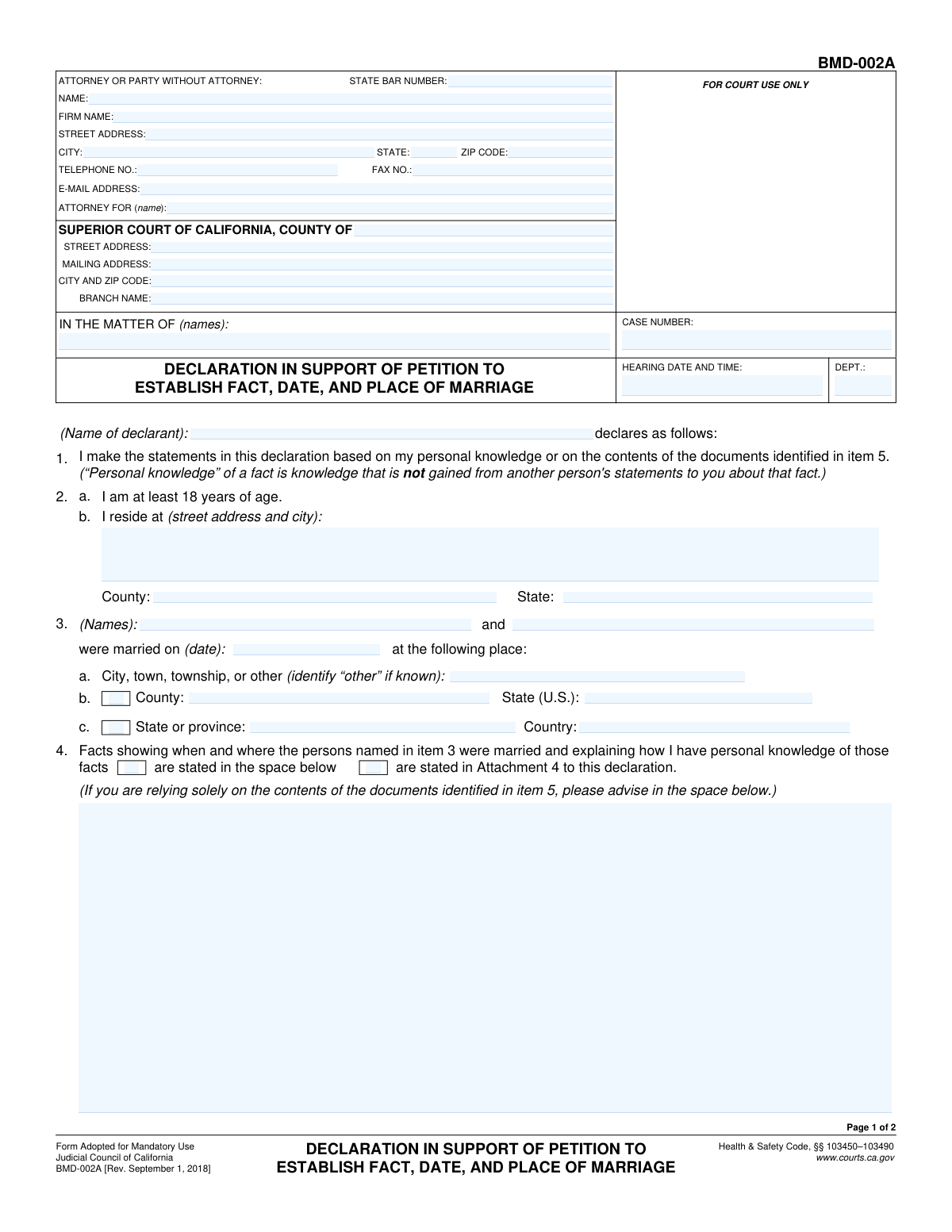
This form is a sworn statement, or declaration, submitted to a California Superior Court to formally attest to the facts of a marriage, including the parties involved, and the date and place of the ceremony. It is used in legal proceedings where proving the existence or details of a marriage is necessary, and the declarant must state the basis of their personal knowledge. Today, this form can be filled out quickly and accurately using AI-powered services like Instafill.ai, which can also convert non-fillable PDF versions into interactive fillable forms.
CA Declaration of Marriage is part of the
California court forms, court forms, family court forms, family law forms, marriage forms and UK court forms categories on Instafill.
Our AI automatically handles information lookup, data retrieval, formatting, and form filling.
It takes less than a minute to fill out CA Declaration of Marriage using our AI form filling.
Securely upload your data. Information is encrypted in transit and deleted immediately after the form is filled out.
Form specifications
| Form name: | Declaration of Marriage for Court Proceeding (California Family Law) |
| Number of fields: | 59 |
| Number of pages: | 2 |
| Language: | English |
Instafill Demo: How to fill out PDF forms in seconds with AI
How to Fill Out CA Declaration of Marriage Online for Free in 2026
Are you looking to fill out a CA DECLARATION OF MARRIAGE form online quickly and accurately? Instafill.ai offers the #1 AI-powered PDF filling software of 2026, allowing you to complete your CA DECLARATION OF MARRIAGE form in just 37 seconds or less.
Follow these steps to fill out your CA DECLARATION OF MARRIAGE form online using Instafill.ai:
- 1 Navigate to Instafill.ai and upload your Declaration of Marriage form, or select it from their template library.
- 2 Provide the case information, including the case number, court details, and attorney information, in the designated fields.
- 3 Enter the declarant's personal information and the full names of the parties to the marriage.
- 4 Detail the date and location of the marriage, and clearly state the facts you have personal knowledge of regarding the event in the space provided or as an attachment.
- 5 Indicate whether you are attaching supporting documents, such as a marriage license or witness statements, and describe them as required.
- 6 Specify if the marriage is relevant to a pending court case and provide details of the proceeding if necessary.
- 7 Review all entered information for accuracy, then use the platform to e-sign and date the declaration before downloading or printing for submission to the court.
Our AI-powered system ensures each field is filled out correctly, reducing errors and saving you time.
Why Choose Instafill.ai for Your Fillable CA Declaration of Marriage Form?
Speed
Complete your CA Declaration of Marriage in as little as 37 seconds.
Up-to-Date
Always use the latest 2026 CA Declaration of Marriage form version.
Cost-effective
No need to hire expensive lawyers.
Accuracy
Our AI performs 10 compliance checks to ensure your form is error-free.
Security
Your personal information is protected with bank-level encryption.
Frequently Asked Questions About Form CA Declaration of Marriage
This form is a legal declaration used to provide sworn testimony about the facts of a marriage, such as the date and location, for a pending court case in the Superior Court of California.
The 'Declarant' is the person signing the form who has personal knowledge of the marriage. This individual is making a sworn statement of facts to the court and must provide their personal information.
You will need the court case number, hearing details, information about the married couple, the specific date and location of the marriage, and any supporting documents like a marriage license.
No, if you are representing yourself, you can fill out this section as a 'Party Without Attorney'. Simply enter your own name, address, and contact information.
Check 'Facts Stated Below' if you are writing your detailed explanation directly on the form in the provided space. Check 'Facts Stated in Attachment 4' if you are providing your statement on a separate, attached page.
You can attach true and correct copies of a marriage license, a statement from the person who officiated the wedding, witness statements, or other relevant documents that help prove the marriage.
The form includes fields specifically for marriages that occurred outside the U.S. You can enter the city, state/province, and country where the marriage took place in the designated fields.
Check this box if the fact of the marriage, or its date or place, is a key issue in the court case you are involved in. You will then need to provide details about that pending court proceeding.
If you are a party to the case and do not have an attorney, you would typically write 'In Pro Per' or 'Self-Represented' in the 'Attorney For' field.
Yes, the form asks for both the physical street address of the court branch and its mailing address. Be sure to fill in both if they are different to ensure proper delivery and filing.
In this section, you must explain when and where the marriage occurred and, most importantly, how you have personal knowledge of these facts, for example, if you were present at the wedding.
Yes, services like Instafill.ai use AI to accurately auto-fill form fields from your saved information, which can save you significant time and help reduce errors.
Simply upload the PDF form to the Instafill.ai platform. The AI will identify the fields, and you can then fill them out online or have the system auto-fill them with your saved data before downloading the completed document.
You can use a service like Instafill.ai, which can convert flat, non-fillable PDFs into interactive, fillable forms that you can easily complete on your computer.
Compliance CA Declaration of Marriage
Validation Checks by Instafill.ai
1
Hearing Date and Time is in the Future
This validation ensures that the 'Hearing Date and Time' entered is a future date and time, not a past one. This is critical for scheduling and preventing data entry errors for upcoming legal proceedings. If a past date is entered, the system should reject the entry and prompt the user to provide a valid, future date.
2
State Abbreviation Format
This check verifies that the 'State' field in the Attorney or Party Information section contains a valid two-letter postal abbreviation (e.g., CA, NY, TX). This ensures data consistency and compatibility with other systems that rely on standardized state codes for addressing and mailing. An invalid entry would trigger an error message requesting the correct format.
3
Zip Code Format Validation
This validation ensures the 'Zip Code' field contains either a five-digit or a nine-digit (ZIP+4) format (e.g., 90210 or 90210-1234). Correct formatting is essential for accurate mail delivery to the attorney or the court. The system should flag any entry that does not conform to these numeric patterns.
4
Mutually Exclusive Fact Source Selection
This check ensures that a user selects either 'Facts Stated Below' or 'Facts Stated in Attachment 4', but not both. These options are mutually exclusive ways to provide the same information, and selecting both would create ambiguity. If both are checked, the form should display an error and require the user to choose only one option.
5
Conditional Requirement for Statement of Facts
This validation rule mandates that the 'Statement of Facts' text area must be filled if the 'Facts Stated Below' checkbox is selected. This ensures that the user provides the necessary details when they indicate the facts are contained within the form itself. If the box is checked but the text area is empty, the submission should be blocked until the information is provided.
6
Conditional Requirement for Attachment Dates
This check verifies that if a checkbox for an attachment type (e.g., 'Marriage license dated', 'Officiating person's statement dated') is selected, the corresponding date field must be filled. This ensures that the record includes the date for every document the user claims to be attaching. Failure to provide the date would result in an error, preventing submission until the date is entered.
7
Logical Date Order: Marriage License vs. Marriage Date
This validation compares the 'Marriage License Date' with the 'Marriage Date' to ensure the license was issued on or before the marriage occurred. A marriage cannot legally take place before a license is issued, so this check prevents logically impossible data. If the license date is after the marriage date, an error should be displayed.
8
Logical Date Order: Declaration vs. Event Dates
This check ensures the 'Declaration Date' is on or after the 'Marriage Date' and any attached document dates. The declaration is a statement about past events, so it cannot be dated before those events occurred. This maintains the logical and legal integrity of the declaration. An invalid date would block submission and require correction.
9
Mutually Exclusive Court Proceeding Importance
This validation ensures that only one of the checkboxes, 'Marriage is not important' or 'Marriage is important', can be selected. These two options are contradictory, and selecting both would make the form's intent unclear. The system should prevent the user from checking both boxes simultaneously.
10
Conditional Requirement for Court Proceeding Details
This rule requires the 'Court Proceeding Details' text area to be filled out if the 'Marriage is important' checkbox is selected. This is crucial for providing context to the court about why the marriage details are relevant to a pending case. If the box is checked but the details are missing, the form submission should fail.
11
Numeric Validation for Pages Attached Count
This check validates that the 'Pages Attached Count' field contains a non-negative integer (0 or greater). The number of pages cannot be a negative number, a fraction, or text. This ensures data integrity and provides an accurate count of supplemental documents for court records. An invalid entry should trigger an error.
12
Conditional Requirement for Place of Marriage Details
This validation ensures that if the 'County' checkbox is checked, the 'County of Marriage' field must be filled. Similarly, if the 'State or province' checkbox is checked, the 'State/Province of Marriage (Non-US)' field must be completed. This logic prevents users from indicating a location type without providing the specific location name, which would result in incomplete data.
13
Completeness of Declarant Information
This check verifies that all fields related to the declarant's identity and location ('Declarant Name', 'Declarant Street Address and City', 'Declarant County', 'Declarant State') are completed. This information is legally required to identify the person making the declaration and establish jurisdiction. An incomplete declarant section would render the document invalid and should prevent submission.
14
Consistency of Case and Matter Names
This validation checks for consistency between the 'Case Number' and 'Matter Name' fields, which appear twice on the form. The values entered for these fields should be identical in both the 'Case Information' and subsequent sections. This prevents discrepancies within the same document, which could cause confusion or processing errors.
Common Mistakes in Completing CA Declaration of Marriage
The form requires the 'Case Number' to be entered in multiple locations. A common mistake is to type the number correctly in one field but make a typo in another, leading to an inconsistency. This can cause the document to be rejected by the court clerk or misfiled, delaying the legal proceedings. Always double-check that the case number is identical in every field where it is required.
This field asks for the name of the party the attorney is representing, but attorneys or their staff sometimes mistakenly enter the attorney's own name or the firm's name. This creates confusion about who is being represented and can lead to filing errors. To avoid this, carefully read the field label and enter the full name of the client party.
The form has several sections where you check a box to indicate an attachment (e.g., 'Marriage license dated') and then must fill in a corresponding detail field (e.g., 'Marriage License Date'). People often check the box but forget to provide the required date or description, or vice versa. This renders the information incomplete and may cause the court to disregard the attached evidence, weakening your case.
The form contains mutually exclusive options, such as 'Facts Stated Below' vs. 'Facts Stated in Attachment 4', or 'Marriage is important' vs. 'Marriage is not important'. A frequent error is checking both boxes, which creates ambiguity and forces the court to guess the filer's intent. This will likely result in the form being returned for correction, causing unnecessary delays.
When opting to state facts on the form, users must provide a detailed explanation of their personal knowledge regarding the marriage. A common mistake is providing a vague or conclusory statement like 'I know they were married on this date.' This is legally insufficient and can invalidate the declaration; you must explain *how* you know, for example, by stating 'I was a guest at their wedding ceremony held at [Venue] on [Date].'
The form has separate, specific fields for the county, U.S. state, non-U.S. state/province, and country of marriage. Filers often get confused and enter information in the wrong field, such as putting a U.S. state in the 'State/Province of Marriage (Non-US)' field. This can create jurisdictional confusion and requires amendment. Carefully select the correct field that corresponds to the geographic location of the marriage.
The 'Declaration Date' is a critical legal component, as it establishes when the declarant made their statement under penalty of perjury. It is a very common oversight to leave this field blank, especially when rushing to sign and file. An missing date can render the entire declaration invalid, leading to its rejection by the court.
The 'Pages Attached Count' field is frequently overlooked or filled out incorrectly. Filers may forget to update the count after adding or removing attachments, or simply miscount the pages. An incorrect number can lead court staff to believe documents are missing, halting the processing of the filing until the discrepancy is resolved.
The form explicitly requests a 'two-letter abbreviation for the state' in address fields, but people often write out the full state name out of habit. While seemingly minor, this non-standard formatting can cause data entry errors in the court's electronic case management system. To prevent this, always use the official two-letter postal code. AI-powered tools like Instafill.ai can help by automatically formatting addresses correctly.
The declarant's name appears multiple times, including at the beginning and again near the signature line at the end. It's common for people to fill it out at the top but forget to re-enter it on the final page where the declaration is dated and signed. Omitting the name on the signature page can create ambiguity about who is making the declaration, potentially invalidating the document.
Saved over 80 hours a year
“I was never sure if my IRS forms like W-9 were filled correctly. Now, I can complete the forms accurately without any external help.”
Kevin Martin Green
Your data stays secure with advanced protection from Instafill and our subprocessors




Robust compliance program
Transparent business model
You’re not the product. You always know where your data is and what it is processed for.
ISO 27001, HIPAA, and GDPR
Our subprocesses adhere to multiple compliance standards, including but not limited to ISO 27001, HIPAA, and GDPR.
Security & privacy by design
We consider security and privacy from the initial design phase of any new service or functionality. It’s not an afterthought, it’s built-in, including support for two-factor authentication (2FA) to further protect your account.
Fill out CA Declaration of Marriage with Instafill.ai
Worried about filling PDFs wrong? Instafill securely fills declaration-of-marriage-for-court-proceeding-california-family-law forms, ensuring each field is accurate.
