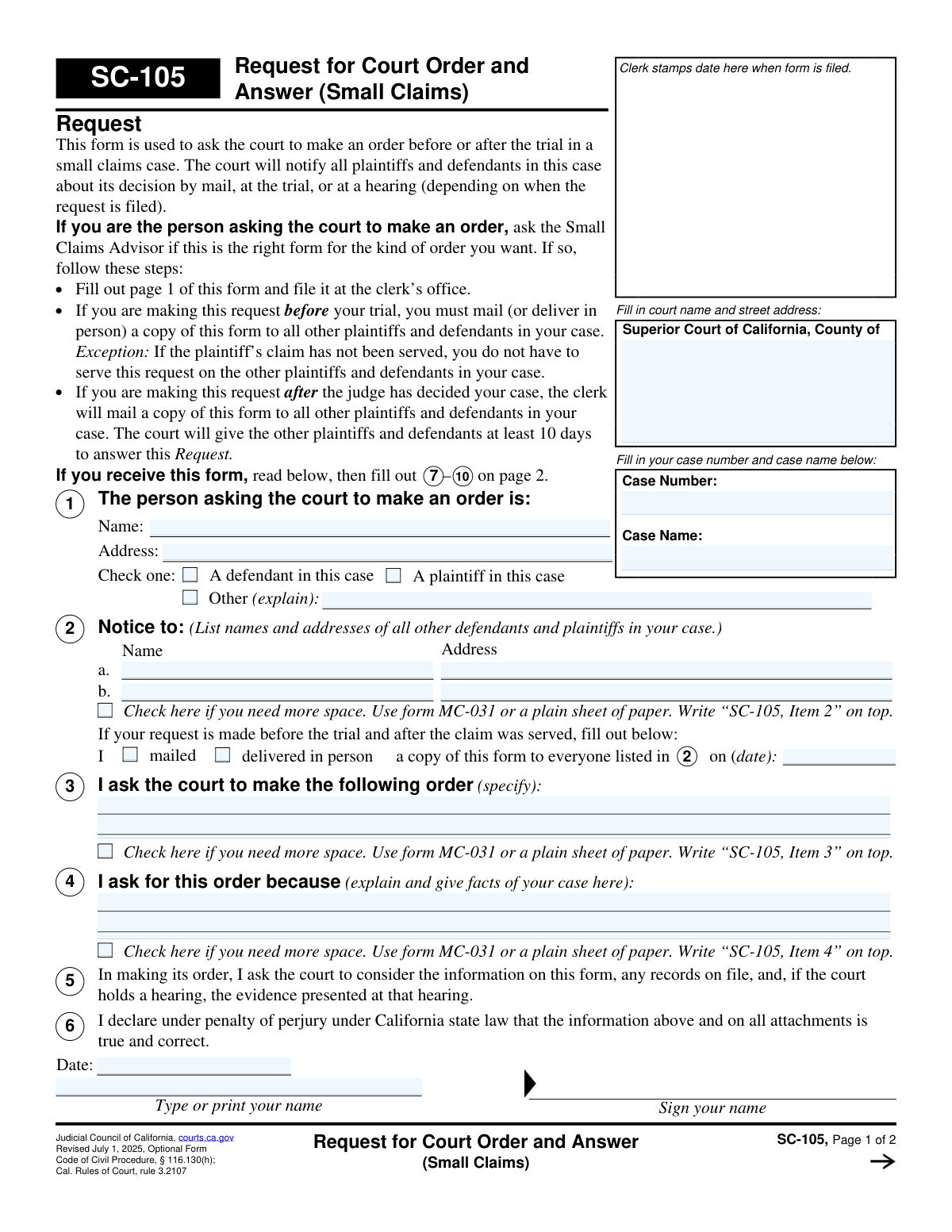
Yes! You can use AI to fill out SC-105, Request for Court Order and Answer (Small Claims)
SC-105 is an optional California Judicial Council small claims form used when a plaintiff, defendant, or other party asks the court to issue an order in a small claims case either before trial or after the judge’s decision. It provides a structured way to explain what order is requested, the facts supporting it, and to declare the information is true under penalty of perjury. The same form also contains an “Answer” section so other parties can agree, oppose, or request a hearing. Using the form helps ensure proper notice to all parties and gives the court the information it needs to rule.
Our AI automatically handles information lookup, data retrieval, formatting, and form filling.
It takes less than a minute to fill out SC-105 using our AI form filling.
Securely upload your data. Information is encrypted in transit and deleted immediately after the form is filled out.
Form specifications
| Form name: | SC-105, Request for Court Order and Answer (Small Claims) |
| Number of pages: | 2 |
| Filled form examples: | Form SC-105 Examples |
| Language: | English |
Instafill Demo: filling out a legal form in seconds
How to Fill Out SC-105 Online for Free in 2026
Are you looking to fill out a SC-105 form online quickly and accurately? Instafill.ai offers the #1 AI-powered PDF filling software of 2026, allowing you to complete your SC-105 form in just 37 seconds or less.
Follow these steps to fill out your SC-105 form online using Instafill.ai:
- 1 Enter the court information (Superior Court county and address), case number, and case name at the top of the form.
- 2 Complete Item 1 (requesting party details): provide your name, address, and indicate whether you are a plaintiff, defendant, or other (with explanation).
- 3 Complete Item 2 (notice list): list the names and addresses of all other plaintiffs and defendants; attach MC-031 or a separate sheet labeled with the item number if more space is needed.
- 4 If the request is made before trial and after the claim was served, complete Item 3 service statement by indicating whether you mailed or personally delivered a copy and the date of service.
- 5 Complete Items 3–6 (the request): specify the exact order you want, explain the reasons and supporting facts, and sign/date the declaration under penalty of perjury; attach additional pages if needed and label them (e.g., “SC-105, Item 3/4”).
- 6 File page 1 (the Request) with the small claims clerk; if required, serve copies on all other parties as instructed (or if after decision, note the clerk will mail and parties have time to answer).
- 7 If you are responding (Answer section), complete Items 7–10: identify yourself, state whether you agree/oppose/request a hearing, mail the completed answer to the court and copies to all listed parties, then sign/date the declaration.
Our AI-powered system ensures each field is filled out correctly, reducing errors and saving you time.
Why Choose Instafill.ai for Your Fillable SC-105 Form?
Speed
Complete your SC-105 in as little as 37 seconds.
Up-to-Date
Always use the latest 2026 SC-105 form version.
Cost-effective
No need to hire expensive lawyers.
Accuracy
Our AI performs 10 compliance checks to ensure your form is error-free.
Security
Your personal information is protected with bank-level encryption.
Frequently Asked Questions About Form SC-105
SC-105 is used in a California small claims case to ask the court to make an order either before trial or after the judge has decided the case. The court will notify all parties of its decision by mail, at trial, or at a hearing, depending on when the request is filed.
The person asking the court to make an order files page 1—this can be a plaintiff, a defendant, or another person (explained in item 1). If you’re unsure whether this is the right form for your situation, the form recommends contacting the Small Claims Advisor.
Any other plaintiff(s) or defendant(s) who receive the request should complete items 7–10 on page 2. If you do nothing, the court may make the requested order without hearing from you.
Yes, if you file the request before trial and after the claim was served, you must mail or personally deliver a copy to all other plaintiffs and defendants listed in item 2. Exception: if the plaintiff’s claim has not been served, you do not have to serve this request on the other parties.
If the request is made after the judge has decided the case, the clerk will mail a copy of the form to the other parties. The court will give the other plaintiffs and defendants at least 10 days to file an answer.
You must provide the court name and address, the case number and case name, your name and address, and whether you are a plaintiff or defendant (item 1). You also must list all other parties and their addresses in item 2, describe the order you want (item 3), and explain the facts supporting your request (item 4).
List the names and addresses of all other plaintiffs and defendants in item 2. If you need more space, check the box and attach form MC-031 or a plain sheet of paper labeled “SC-105, Item 2” at the top.
State exactly what you want the judge to order, as clearly and specifically as possible. If you need more room, attach MC-031 or a plain sheet labeled “SC-105, Item 3.”
Explain the reasons for your request and include the key facts of your case that support the order you want. If you need more space, attach MC-031 or a plain sheet labeled “SC-105, Item 4.”
File the completed page 1 (Request) with the small claims clerk at the Superior Court listed on the form. The court will notify all parties of its decision by mail, at the trial, or at a hearing, depending on timing and whether a hearing is set.
Complete page 2, items 7–10, and in item 8 check that you do not agree with the order requested in item 3. You can explain your position in the space provided and attach MC-031 or a plain sheet labeled “SC-105, Item 8” if needed.
Yes. On page 2, item 8(c), you can request a hearing so the court can decide the matter after hearing from the parties.
Yes. After completing items 7–10, you must mail your completed Answer to the court and mail a copy to each plaintiff and defendant listed in items 1 and 2 on page 1, then fill in the mailing date in item 9.
Yes. Both the Request (item 6) and the Answer (item 10) require a declaration under penalty of perjury under California law, along with the date, your printed name, and your signature.
The form directs you to contact your county’s Small Claims Advisor for free help. You can also visit selfhelp.courts.ca.gov/small-claims-advisor for guidance.
Compliance SC-105
Validation Checks by Instafill.ai
1
Court County and Court Address Presence (Header Completeness)
Validates that the filing court is identified by completing the “Superior Court of California, County of” field and the court street address section. This is essential for routing the request/answer to the correct court location and for proper docketing. If missing or incomplete, the submission should be rejected or flagged for clerk review because it may be filed in the wrong venue or be unprocessable.
2
Case Number Format and Required Entry
Ensures the Case Number field is present and matches the expected small claims case number pattern used by the county (e.g., alphanumeric with separators, no illegal characters). The case number is the primary key for associating the request/answer with an existing case. If invalid or blank, the system should block submission or require correction because the court cannot reliably attach the filing to the correct case.
3
Case Name Required and Consistent with Case Number (Cross-Field Consistency)
Checks that the Case Name is provided and is plausibly consistent with the case number (e.g., not empty, not obviously unrelated text, and optionally matches the case caption on record if the system can query it). This reduces misfilings and helps clerks and parties identify the matter. If inconsistent or missing, the submission should be flagged for manual review or rejected depending on court policy.
4
Requesting Party Identity Completeness (Item 1)
Validates that the person asking for the order (Item 1) includes a full name and a complete mailing address (street, city, state, ZIP if collected). The court and other parties must be able to identify and serve/notify the requester. If incomplete, the system should require completion because notices and orders may not be deliverable and the filing may be defective.
5
Requesting Party Role Selection (Item 1 Check-One Enforcement)
Ensures exactly one role is selected for the requester: defendant, plaintiff, or “Other (explain).” If “Other” is selected, an explanation must be provided; if not selected, the filing is ambiguous. If the check-one rule is violated (none or multiple), the system should block submission until corrected to prevent role confusion and improper service expectations.
6
Notice List Completeness for Other Parties (Item 2)
Checks that Item 2 includes the names and addresses of all other plaintiffs and defendants, or that an attachment indicator is selected and an attachment is actually provided. Proper notice is fundamental to due process and required for pre-trial requests (and for accurate clerk mailing post-decision). If parties are missing without an attachment, the system should flag the filing as incomplete and require correction.
7
Attachment Reference and Presence Validation (MC-031 / Plain Sheet)
When the filer checks “need more space” for Items 2, 3, 4, or 8, validates that an attachment is included and labeled correctly (e.g., “SC-105, Item 2/3/4/8” at the top). This ensures the court can associate supplemental pages with the correct item and prevents lost or misapplied information. If the attachment is missing or unlabeled, the system should reject or prompt the filer to upload/label the attachment.
8
Pre-Trial Service Declaration Completeness (Item 3 Service Line)
If the request is indicated as made before trial and after the claim was served (as implied by completing the service line), validates that the filer selected a service method (mailed or delivered in person) and provided a service date. This supports compliance with service requirements and provides a record for the court. If method/date are missing while the service line is used, the system should require completion or instruct the filer to leave it blank if not applicable.
9
Service Date Format and Logical Validity (Items 3 and 9)
Validates that any service date entered (Item 3 for the request; Item 9 for the answer) is a valid calendar date in an acceptable format (e.g., MM/DD/YYYY) and is not impossible (e.g., 02/30). Optionally checks that the date is not unreasonably in the future relative to submission time. If invalid, the system should block submission because an incorrect service date undermines proof of notice and can affect deadlines.
10
Requested Order Statement Required (Item 3)
Ensures Item 3 contains a specific description of the order being requested (or a properly attached continuation page). The court cannot rule on a vague or blank request, and other parties must understand what relief is sought. If empty or only contains non-substantive text (e.g., “see attached” without an attachment), the system should require correction.
11
Factual Basis/Reason Required (Item 4)
Validates that Item 4 includes an explanation and facts supporting the request (or an attached continuation). This is necessary for the judge to evaluate the request and for the opposing parties to respond meaningfully. If missing or purely conclusory (e.g., “because I want it”), the system should flag for insufficiency and require additional detail per court filing standards.
12
Perjury Declaration Completion for Request (Item 6)
Checks that the request section includes a date, typed/printed name, and a signature for the declaration under penalty of perjury. This declaration is a legal attestation and is typically required for the court to consider the filing. If any element is missing, the system should reject the request submission as unsigned/undated.
13
Answering Party Identity and Role Completeness (Item 7)
For the Answer portion, validates that the answering party provides a full name, complete address, and selects exactly one role (plaintiff or defendant). This ensures the court can identify who is responding and can send notices to the correct address. If incomplete or multiple roles are selected, the system should block submission until corrected.
14
Answer Position Selection and Explanation Requirement (Item 8)
Ensures at least one option is selected in Item 8 (agree, do not agree, and/or request a hearing). If the filer selects “I agree,” validates that an explanation is provided in the space below (or via attachment) as the form prompts. If no option is selected or required explanation is missing, the system should require correction because the court cannot determine the respondent’s position.
15
Answer Service Certification Required (Item 9) When Answer Is Filed
Validates that the answering party certifies mailing a copy to everyone listed in Items 1 and 2 by providing a service date in Item 9. This supports due process and ensures all parties receive the response. If Item 9 is blank, the system should block or warn prominently because the answer may be procedurally defective without proof of service.
16
Perjury Declaration Completion for Answer (Item 10)
Checks that the answer section includes a date, typed/printed name, and signature under penalty of perjury. This is required to treat the response as a formal court filing and to hold the signer accountable for truthfulness. If missing, the system should reject the answer as incomplete/unsigned.
Common Mistakes in Completing SC-105
People often forget to fill in the “Superior Court of California, County of” line and the street address, or they copy the address from a different courthouse. This can cause the clerk to reject the filing or delay routing the request to the correct small claims division. Use the same court location shown on your original small claims filing (or the notice you received) and confirm the courthouse address for that county before submitting.
A very common error is leaving the Case Number/Case Name blank, transposing digits, or using a different case’s caption. Without the correct identifiers, the court may not be able to match your request/answer to the right file, which can lead to rejection, misfiling, or missed deadlines. Copy the case number and case name exactly as they appear on your SC-100/SC-120 or court notices, including punctuation and party order.
Filers sometimes check “plaintiff” when they are a defendant (or vice versa), or they select “Other” without explaining. This creates confusion about who is requesting relief and can affect how the court and other parties interpret the request and service requirements. Verify your role from the original claim and check only the correct box; if “Other” applies (e.g., a guardian/representative), clearly explain your relationship and authority.
People frequently list only one opposing party, omit co-plaintiffs/co-defendants, or provide incomplete addresses. The consequence is improper notice/service, which can result in the court refusing to act on the request, continuing a hearing, or issuing an order that later gets challenged. Use the party list from the case file and include every plaintiff and defendant with a complete mailing address; attach MC-031 labeled “SC-105, Item 2” if needed.
A common mistake is assuming the clerk will serve the request in all situations, or serving when the exception applies (before the claim is served) and not documenting it. If the request is made before trial and after the claim was served, failing to mail/deliver a copy to all parties (and failing to fill in the date) can lead to denial or delay because the court cannot confirm proper notice. Carefully follow the timing rules on page 1 and complete the “I mailed/delivered…” line with the correct date and method when required.
Many filers describe what they want in general terms (e.g., “I want more time” or “dismiss the case”) without specifying the exact order the court should make. Vague requests make it hard for the judge to grant relief and can result in denial or an order that doesn’t address the real issue. State the precise action you want (what, who, and by when), and attach MC-031 labeled “SC-105, Item 3” if you need to lay it out clearly.
People often use Item 4 to argue feelings or legal conclusions (e.g., “they’re lying,” “it’s unfair”) without giving dates, events, documents, and specific facts. The court may deny the request because it lacks a factual basis or because the judge cannot evaluate the request without details. Explain the timeline, what happened, what you did to resolve it, and include key facts that support why the order is necessary; reference attachments if you include them.
When filers run out of space, they sometimes attach extra pages but don’t use MC-031, don’t label the attachment with the item number, or don’t include the case number on the attachment. This can cause the court to overlook the additional information or separate it from the file, weakening the request/answer. Use MC-031 (or a plain sheet) and write “SC-105, Item [2/3/4/8]” at the top, and include the case number and party names on every attachment page.
Respondents sometimes leave Item 8 blank, check conflicting boxes, or check “agree”/“do not agree” without any explanation when one is needed. If the court cannot tell your position, it may grant the request without considering your side or may set a hearing unnecessarily. Check all applicable boxes, provide a short, specific explanation (especially if you agree only in part), and request a hearing in Item 8(c) if you need to present evidence or clarify disputes.
A frequent mistake is sending the Answer only to the court (or only to one party) and forgetting to complete the “I mailed a copy…” date. This can lead to the court disregarding the response, delaying a decision, or proceeding without your input because other parties were not properly notified. Mail a copy to everyone listed in Items 1 and 2 and record the exact mailing date in Item 9; keep proof of mailing for your records.
People often type their name but forget to sign, forget the date, or sign with a nickname that doesn’t match the printed name and party name in the case. Unsigned or undated declarations can be rejected by the clerk or given little weight by the judge because they are not properly verified. Print/type your name, sign in ink (or as allowed by the court’s filing method), date it, and use the same legal name that appears on the case caption.
Saved over 80 hours a year
“I was never sure if my IRS forms like W-9 were filled correctly. Now, I can complete the forms accurately without any external help.”
Kevin Martin Green
Your data stays secure with advanced protection from Instafill and our subprocessors
Robust compliance program
Transparent business model
You’re not the product. You always know where your data is and what it is processed for.
ISO 27001, HIPAA, and GDPR
Our subprocesses adhere to multiple compliance standards, including but not limited to ISO 27001, HIPAA, and GDPR.
Security & privacy by design
We consider security and privacy from the initial design phase of any new service or functionality. It’s not an afterthought, it’s built-in, including support for two-factor authentication (2FA) to further protect your account.
Fill out SC-105 with Instafill.ai
Worried about filling PDFs wrong? Instafill securely fills sc-105-request-for-court-order-and-answer-small-cl forms, ensuring each field is accurate.