Yes! You can use AI to fill out Illinois Supreme Court Approved Form E-O 3500.3, Eviction Order
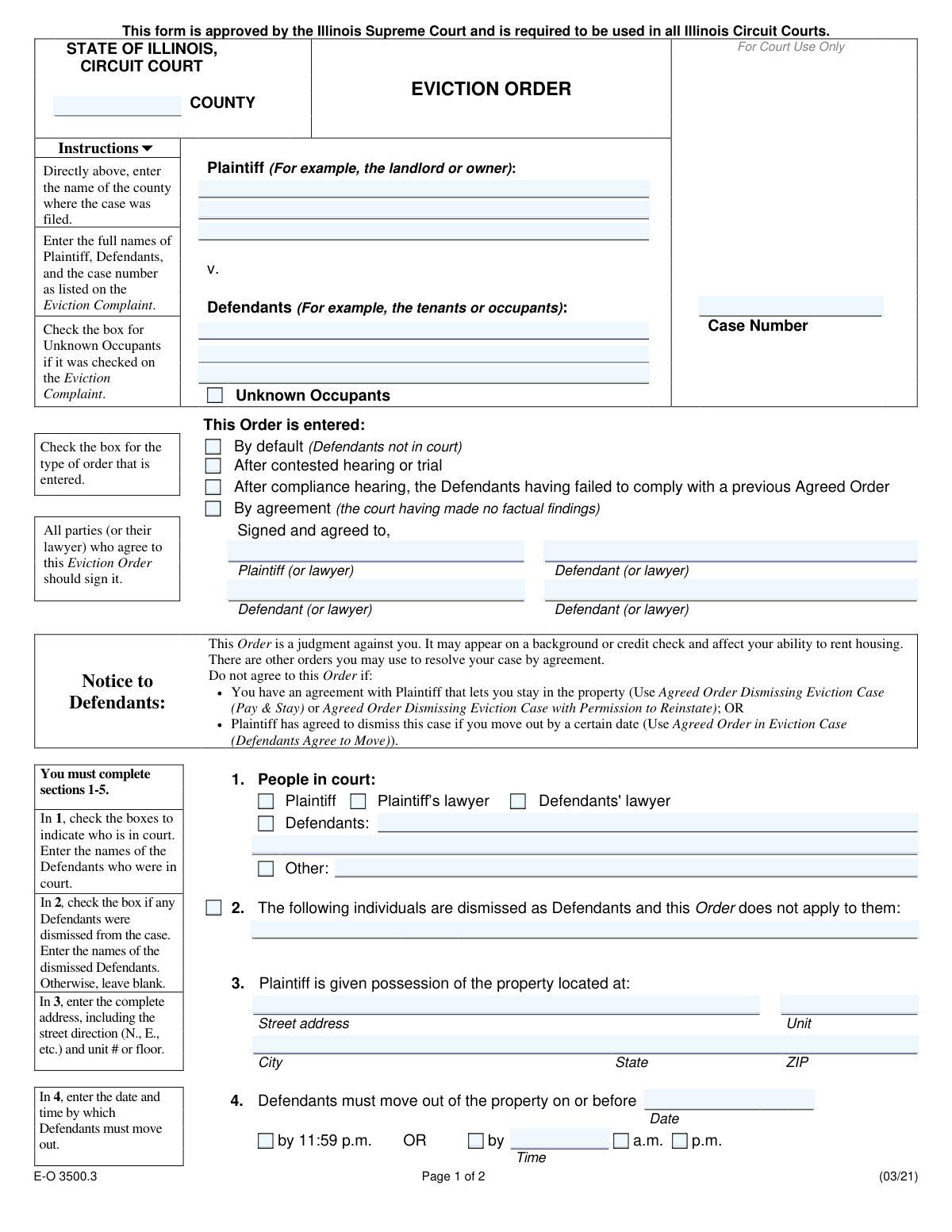
The Illinois Eviction Order (form E-O 3500.3) is an Illinois Supreme Court-approved order that Illinois Circuit Courts use to finalize an eviction case by granting possession to the plaintiff (often a landlord), setting a move-out deadline, and authorizing the sheriff to evict if the defendants do not leave. The form also includes sections to address whether any defendants are dismissed, whether the order was entered by default, after trial, after a compliance hearing, or by agreement, and it can include money judgments (rent, costs, attorneyâs fees) or association assessments depending on the plaintiff type. Because it is a judgment, it can affect defendantsâ housing and credit history and must match the case details from the Eviction Complaint. Today, this form can be filled out quickly and accurately using AI-powered services like Instafill.ai, which can also convert non-fillable PDF versions into interactive fillable forms.
Our AI automatically handles information lookup, data retrieval, formatting, and form filling.
It takes less than a minute to fill out E-O 3500.3 using our AI form filling.
Securely upload your data. Information is encrypted in transit and deleted immediately after the form is filled out.
Form specifications
| Form name: | Illinois Supreme Court Approved Form E-O 3500.3, Eviction Order |
| Number of pages: | 2 |
| Filled form examples: | Form E-O 3500.3 Examples |
| Language: | English |
| Categories: | court forms |
Instafill Demo: filling out a legal form in seconds
How to Fill Out E-O 3500.3 Online for Free in 2026
Are you looking to fill out a E-O 3500.3 form online quickly and accurately? Instafill.ai offers the #1 AI-powered PDF filling software of 2026, allowing you to complete your E-O 3500.3 form in just 37 seconds or less.
Follow these steps to fill out your E-O 3500.3 form online using Instafill.ai:
- 1 Go to Instafill.ai and upload the Illinois Eviction Order form (E-O 3500.3) or select it from the form library.
- 2 Enter the case caption details exactly as shown on the Eviction Complaint: county, plaintiff name, defendant names (and check “Unknown Occupants” if applicable), and the case number.
- 3 Choose how the order is entered (by default, after contested hearing/trial, after compliance hearing, or by agreement) and provide any required signatures/party agreement information if the order is by agreement.
- 4 Complete Sections 1–5: identify who is in court, list any dismissed defendants (if any), provide the full property address, and set the move-out date and time (11:59 p.m. or a custom time with a.m./p.m.).
- 5 Complete enforcement details in Section 5 by listing the defendants to be evicted and checking “Unknown Occupants” if it was checked on the complaint.
- 6 Complete the money-claim section that applies: Section 6 for landlords (rent/costs/fees, total judgment, or continuation details) or Section 7 for condominium/homeowner associations (in rem option, assessments/costs/fees, total judgment, or continuation details), and complete Section 8 only if it is an Emergency Housing Proceeding and the applicable statute is known.
- 7 Add the preparer/completer contact information, review for consistency with the court file, then download/print the completed form for filing and judge entry (leaving judge-entered fields for the court as instructed).
Our AI-powered system ensures each field is filled out correctly, reducing errors and saving you time.
Why Choose Instafill.ai for Your Fillable E-O 3500.3 Form?
Speed
Complete your E-O 3500.3 in as little as 37 seconds.
Up-to-Date
Always use the latest 2026 E-O 3500.3 form version.
Cost-effective
No need to hire expensive lawyers.
Accuracy
Our AI performs 10 compliance checks to ensure your form is error-free.
Security
Your personal information is protected with bank-level encryption.
Frequently Asked Questions About Form E-O 3500.3
This is the courtâs official order that awards possession of the property to the Plaintiff and can authorize the sheriff to evict the Defendants if they do not move out by the deadline. It may also address money claims (rent, costs, fees) depending on what the court orders.
This form is approved by the Illinois Supreme Court and is required in all Illinois Circuit Courts for eviction cases. It is typically prepared by the Plaintiff/landlord (or their attorney) for the judge to enter, but it applies to all parties listed in the case.
Youâll need the county, case number, and the full legal names of the Plaintiff and all Defendants exactly as they appear on the Eviction Complaint. Youâll also need the complete property address (including unit number) and the move-out date/time ordered by the court.
Use the Eviction Complaint (and other court filings) as your source. The form instructions say to enter the names and case number exactly as listed on the Eviction Complaint.
Check âUnknown Occupantsâ only if it was checked on the Eviction Complaint. If it was not included in the complaint, do not add it on the Eviction Order.
Check the option that matches what happened in court: default if Defendants were not in court, contested hearing/trial if the judge decided after a dispute, compliance hearing if Defendants failed to follow a prior agreed order, or by agreement if the parties agreed and the court made no factual findings. If youâre unsure, ask the clerk or your attorney because the selection should match the court record.
Check the boxes for who appeared (Plaintiff, Plaintiffâs lawyer, Defendants, Defendantsâ lawyer, and/or Other). If Defendants or âOtherâ are checked, list the names of the people who were present.
A dismissed Defendant is removed from the case, and the Eviction Order does not apply to them. Only check Section 2 if the court dismissed someone and list the dismissed personâs name(s); otherwise leave it blank.
Enter the full address of the property, including street direction (N., S., E., W.), unit number or floor, city, state, and ZIP code. This should match the address used in the eviction case paperwork.
Enter the date the Defendants must move out by, then choose either âby 11:59 p.m.â or a custom time. If you use a custom time, enter the time and check a.m. or p.m.
Section 5 allows the Plaintiff to give the sheriff a copy of the Eviction Order, and the sheriff is ordered to evict the listed Defendants if they have not moved out by the deadline. Only the sheriff (or lawfully deputized officers) carries out the eviction under the order.
Section 6 is for landlords, and Section 7 is for condominium or homeowner associations suing an owner. Complete only the section that applies to the Plaintiff type in your case.
In Section 6 or 7, you can check the option that the court is not yet ruling on the money claim and enter the continued court date, time (a.m./p.m.), whether itâs for status or hearing, and the courtroom. This lets the eviction order proceed while the money issues are scheduled for later, if the court allows.
If the order is âby agreement,â all parties (or their lawyers) who agree should sign where indicated. If it is not by agreement (for example, after trial or by default), signatures may not be required in the same way, but the judgeâs entry controlsâfollow the courtâs instructions.
Yesâtools like Instafill.ai can use AI to auto-fill form fields accurately from the information you provide, saving time and reducing missed fields. Upload the PDF to Instafill.ai, answer the guided questions (case number, party names, address, move-out deadline, money section), review the filled form for accuracy, then download to file according to your courtâs submission rules.
If the form is a flat/non-fillable PDF, Instafill.ai can convert it into an interactive fillable form so you can type into the fields. After conversion, you can complete it online, download it, and print or e-file as required by your county.
Compliance E-O 3500.3
Validation Checks by Instafill.ai
1
County name is present and matches an Illinois county
Validates that the County field is not blank and matches a known Illinois county name (case-insensitive, allowing common spacing/punctuation). This is important because Illinois Circuit Court venue and filing location are county-specific and the order must reflect the correct jurisdiction. If validation fails, block submission and prompt the filer to select/enter a valid Illinois county.
2
Case number format and presence validation
Ensures the Case Number is provided and conforms to the expected local Illinois circuit court case numbering pattern (e.g., year + case type + sequence), while allowing county-specific variations. A valid case number is essential to associate the order with the correct court file and avoid misfiling. If validation fails, require correction and optionally provide an example format for the selected county.
3
Plaintiff and Defendant names completeness and non-placeholder check
Checks that Plaintiff Name and at least one Defendant Name are provided, contain alphabetic characters, and are not placeholders like "N/A" or "Unknown" (unless using the dedicated Unknown Occupants checkbox). Full legal names are required to ensure the order is enforceable and correctly identifies parties. If validation fails, prevent submission and highlight missing/invalid party name fields.
4
Unknown Occupants checkbox consistency with defendant list
Validates that if the Unknown Occupants box is checked, the defendants section still includes at least one named defendant (if required by the case) and that the 'Unknown Occupants (Defendants To Be Evicted)' selection is consistent with the top-level Unknown Occupants selection. This prevents contradictory party identification and ensures the sheriffâs enforcement instructions match the complaint. If validation fails, require the user to reconcile the checkbox selections and defendant entries.
5
Exactly one 'This Order is entered' option is selected
Ensures only one of the four order-entry basis checkboxes is selected (default, contested hearing/trial, compliance hearing failure, or by agreement). The legal basis affects downstream requirements (e.g., signatures and findings) and must be unambiguous. If validation fails, block submission and require the user to select exactly one option.
6
Agreement signatures required when 'By agreement' is selected
If 'Order entered by agreement (court made no factual findings)' is selected, validates that signature name fields for the agreeing parties are completed (at minimum Plaintiff or lawyer and at least one Defendant or lawyer, with additional defendant signature lines completed if multiple defendants are parties to the agreement). This is important because an agreed order should reflect consent and reduce disputes about enforceability. If validation fails, require missing signature names or require changing the order basis if it is not an agreed order.
7
People-in-court selections require corresponding names
Validates that if 'Defendants in court' is checked, the 'Defendants in Court Names' field is populated with at least one defendant name; similarly, if 'Other people in court' is checked, 'Other People in Court Names' must be completed. This ensures the record accurately reflects appearances and supports later challenges or enforcement. If validation fails, prompt for the missing names or require unchecking the appearance box.
8
Dismissed defendants section completeness and cross-check
If 'Individuals dismissed as Defendants' is checked, requires 'Dismissed Defendants Names' to be completed and verifies those names appear in the original defendant list (Defendant Name 1-3 or otherwise captured). This prevents accidentally dismissing non-parties or leaving the dismissal ambiguous. If validation fails, require valid dismissed names and/or correction to match listed defendants.
9
Property address completeness and Illinois location validation
Ensures Property Street Address and City are present, State is provided and equals 'IL' (or 'Illinois'), and ZIP is present and matches a 5-digit (or ZIP+4) format. A complete, correct address is critical for possession and sheriff enforcement, and reduces risk of evicting from the wrong unit. If validation fails, block submission and identify the missing/invalid address components.
10
Unit number requirement when address indicates multi-unit property
Checks that Property Unit Number is provided when the street address suggests a multi-unit location (e.g., contains 'Apt', '#', 'Unit', 'Floor') or when the filer indicates a unit-based property. This reduces ambiguity for enforcement and prevents executing the order against the wrong dwelling. If validation fails, require a unit/floor entry or confirmation that the property is single-family with no unit designation.
11
Move-out date is valid and move-out time selection is consistent
Validates that Move Out Date is a real calendar date and that exactly one time option is selected: either 'by 11:59 p.m.' or 'by custom time'. If custom time is selected, Move Out Time must be present and accompanied by exactly one of AM/PM. If validation fails, require correction to date/time fields and prevent submission due to enforceability concerns.
12
Move-out time format and range validation
When a custom move-out time is used, ensures the time is in a valid format (e.g., HH:MM) and within 1:00â12:59 for 12-hour time, with minutes 00â59. This prevents unclear deadlines that could cause enforcement disputes or incorrect scheduling. If validation fails, prompt the user to enter a valid time and select AM or PM.
13
Defendants to be evicted must be specified and must not include dismissed defendants
Validates that at least one defendant is listed in the 'Defendants To Be Evicted' fields and/or 'Unknown Occupants' is checked in that section, and cross-checks that none of the listed evictees are included in 'Dismissed Defendants Names'. This is important because the sheriffâs authority must be directed at the correct individuals and cannot include dismissed parties. If validation fails, require the evictee list to be corrected before submission.
14
Mutually exclusive landlord money-claim status selection (Section 6)
Ensures that only one of the landlord money-claim status options is selected: no money claimed, dismissed (may seek), dismissed (may not seek), plaintiff is owed, or not yet ruling/continued. Multiple selections create contradictory judgments and can invalidate the monetary portion of the order. If validation fails, require the filer to choose a single, consistent status.
15
Money amounts are numeric, non-negative, and total equals sum of components (when applicable)
When 'Plaintiff is owed' is selected (landlord or association), validates that each entered amount is a valid currency number (two decimals allowed), is not negative, and that the Total Judgment Amount equals the sum of the checked component amounts (rent/assessments + costs + fees) within a small rounding tolerance. This prevents arithmetic errors that can lead to incorrect judgments and enforcement problems. If validation fails, require correction of the component amounts and/or total before submission.
16
Continuation (money claim not yet ruled on) requires complete scheduling details
If 'Money claim not ruled on yet / case continued' is checked (landlord or association), requires Continuation Date, Continuation Time, exactly one AM/PM selection, a selection of 'status' or 'hearing', and a courtroom identifier. This ensures the continued proceeding is properly calendared and communicated. If validation fails, block submission until all scheduling fields are completed.
Common Mistakes in Completing E-O 3500.3
People often type shortened names (e.g., âBob Smithâ instead of âRobert J. Smithâ), misspell a party, or use a different case number than the one on the filed Eviction Complaint. This can cause the clerk/judge to reject the order, create enforcement problems for the sheriff, or result in an order that doesnât clearly apply to the correct parties. Always copy the Plaintiff/Defendant names and the case number exactly as they appear on the Eviction Complaint (including middle initials, suffixes, and punctuation). AI-powered tools like Instafill.ai can reduce these mismatches by pulling consistent party data across documents and validating formatting.
Because the form header looks âstandard,â filers sometimes forget to enter the county where the case was filed or mistakenly enter the propertyâs county instead. The wrong county can lead to filing delays, confusion in the court record, or rejection because the order must correspond to the correct circuit court case. Confirm the county from the court filing stamp/case caption and enter it exactly. Instafill.ai can help by prompting for missing jurisdiction fields and flagging inconsistencies.
A common mistake is checking 'Unknown Occupants' on the Eviction Order even though it was not checked on the Eviction Complaint, or forgetting to check it when it was included in the complaint. This can create due process/enforcement issues and may prevent the sheriff from evicting unnamed occupants if the paperwork is inconsistent. Only check 'Unknown Occupants' if it was checked on the Eviction Complaint and keep the caption consistent across all filings. Instafill.ai can help prevent this by carrying forward the same checkbox selections from the complaint and warning when they conflict.
People often misunderstand the difference between a default order, an order after contested hearing/trial, an order after compliance hearing, and an order by agreement. Checking the wrong box can misrepresent what happened in court, trigger judicial pushback, or require re-entry of the order. Confirm what occurred procedurally (e.g., defendants absent = default; parties stipulate = by agreement; compliance hearing failure = compliance option) before selecting one. Instafill.ai can help by guiding users through a short logic check and preventing incompatible selections.
The form explicitly requires completing Sections 1â5, but filers frequently skip names of defendants who appeared, omit âOtherâ attendees, or forget to list the defendants the sheriff is ordered to evict. Missing or vague entries can delay entry of the order or create enforcement ambiguity for the sheriff. Carefully check all applicable boxes in Section 1 and list the specific defendants in Section 5 (and 'Unknown Occupants' only if applicable). Instafill.ai can automatically detect required sections and flag missing names before submission.
When some defendants are dismissed, people often forget to check the dismissal box in Section 2 or fail to write the dismissed defendantsâ names. This can accidentally subject dismissed parties to the eviction order or create confusion about who the order applies to. If anyone is dismissed, check the box and list each dismissed defendant exactly as named in the case caption; otherwise leave it blank. Instafill.ai can help by ensuring the dismissal checkbox and the dismissed-names field are completed together.
Filers commonly omit the unit/floor, street direction (N/E/S/W), or use a mailing address instead of the premises address. An incomplete address can make the order difficult to enforce and may lead to eviction at the wrong unit or require the court to correct and reissue the order. Enter the full premises address exactly (street number, street name, direction, unit/floor, city, state, ZIP). Instafill.ai can help by standardizing addresses and prompting for missing components like unit numbers.
A frequent issue is entering a date but not selecting 11:59 p.m. or a custom time, or entering a custom time without checking AM/PM. Ambiguous deadlines can cause disputes, delay enforcement, or require the judge to correct the order. Use either the 11:59 p.m. option or the custom time option (not both), and if custom, enter a clear time and mark AM or PM. Instafill.ai can validate that the time fields and checkboxes are consistent and complete.
People often fill out both sections or complete Section 6 when the plaintiff is a condominium/homeowner association (or Section 7 when the plaintiff is a landlord). Using the wrong section can lead to incorrect judgment language and may require re-entry of the order. Determine the plaintiff type first: landlords use Section 6; condominium/homeowner associations suing an owner use Section 7. Instafill.ai can help by routing users to the correct section and preventing conflicting entries.
Common errors include totals that donât equal rent + costs + fees, leaving dollar fields blank while checking âPlaintiff is owed,â or listing the wrong defendants as responsible for payment. These mistakes can create an inaccurate judgment, complicate collection, and prompt the court to reject or amend the order. Double-check arithmetic, enter amounts in dollars consistently, and list only the defendants the court ordered to pay. Instafill.ai can automatically calculate totals, enforce currency formatting, and ensure the âdefendants ordered to payâ list is not missing.
Filers sometimes complete the âENTERED: Date / Judgeâ area even though the form says the judge will complete it, or they mark âBy agreementâ but fail to obtain signatures from all parties (or their lawyers) who agree. This can invalidate the agreement presentation, delay entry, or require re-submission. Leave judge-only fields blank and, if the order is by agreement, ensure all required party/attorney signature lines are completed. Instafill.ai can lock or warn on judge-only fields and track missing signatures before you file.
Saved over 80 hours a year
âI was never sure if my IRS forms like W-9 were filled correctly. Now, I can complete the forms accurately without any external help.â
Kevin Martin Green
Your data stays secure with advanced protection from Instafill and our subprocessors

Robust compliance program
Transparent business model
Youâre not the product. You always know where your data is and what it is processed for.
ISO 27001, HIPAA, and GDPR
Our subprocesses adhere to multiple compliance standards, including but not limited to ISO 27001, HIPAA, and GDPR.
Security & privacy by design
We consider security and privacy from the initial design phase of any new service or functionality. Itâs not an afterthought, itâs built-in, including support for two-factor authentication (2FA) to further protect your account.
Fill out E-O 3500.3 with Instafill.ai
Worried about filling PDFs wrong? Instafill securely fills illinois-supreme-court-approved-form-e-o-35003-eviction-order forms, ensuring each field is accurate.



