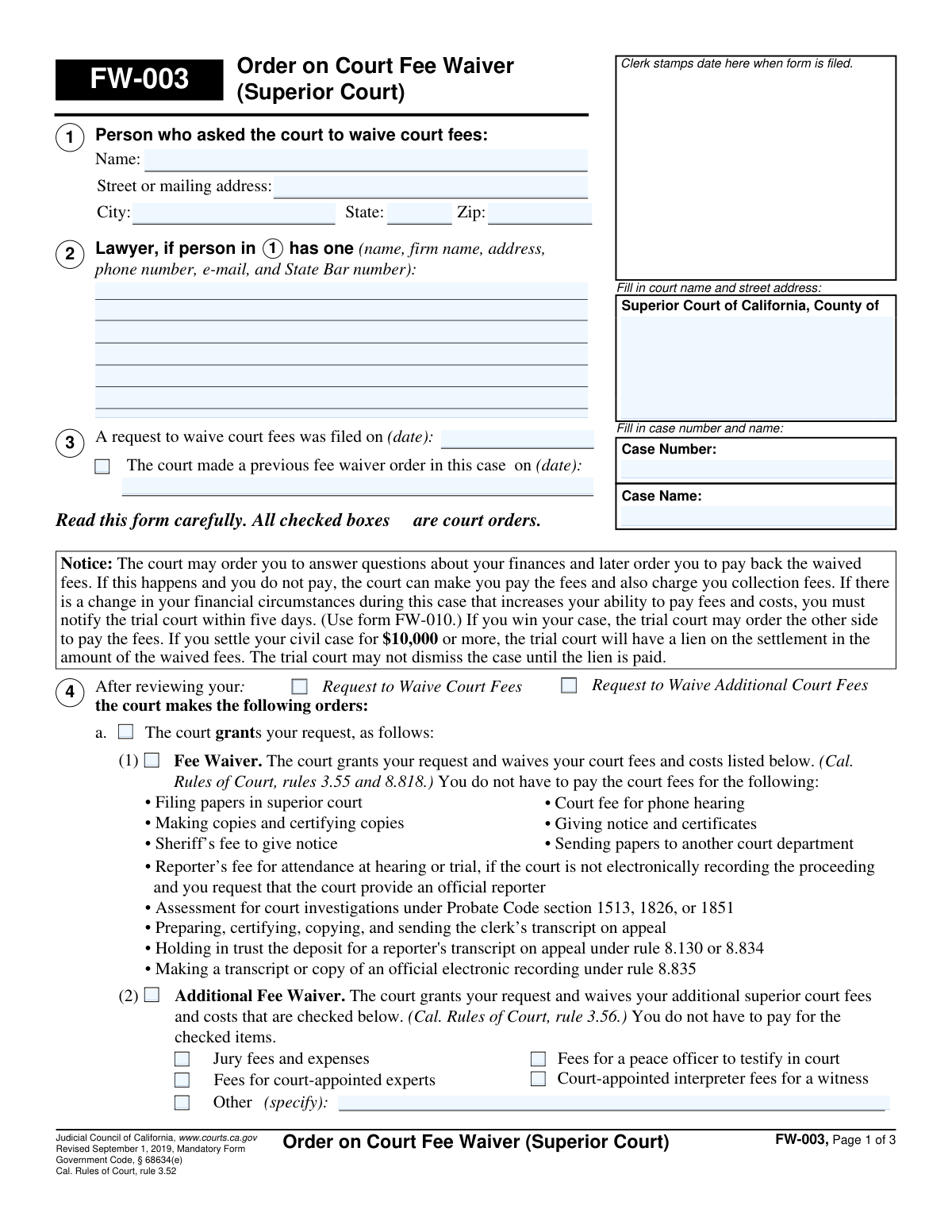
Yes! You can use AI to fill out FW-003, Order on Court Fee Waiver (Superior Court)
Form FW-003 (Order on Court Fee WaiverâSuperior Court) is a Judicial Council of California court order that documents the courtâs decision on a partyâs request to waive court fees and costs, including whether the waiver is granted, denied, or requires a hearing and additional proof. It lists which fees are waived (and any additional items), provides deadlines and warnings if the request is incomplete or denied, and includes service/certificate sections used by the clerk. This form is important because it controls whether filing and related court costs must be paid and sets next steps that can affect case processing or an appeal. Today, this form can be filled out quickly and accurately using AI-powered services like Instafill.ai, which can also convert non-fillable PDF versions into interactive fillable forms.
Our AI automatically handles information lookup, data retrieval, formatting, and form filling.
It takes less than a minute to fill out FW-003 using our AI form filling.
Securely upload your data. Information is encrypted in transit and deleted immediately after the form is filled out.
Form specifications
| Form name: | FW-003, Order on Court Fee Waiver (Superior Court) |
| Number of pages: | 3 |
| Language: | English |
| Categories: | court forms, California court forms, legal forms, fee waiver forms, superior court forms |
Instafill Demo: filling out a legal form in seconds
How to Fill Out FW-003 Online for Free in 2026
Are you looking to fill out a FW-003 form online quickly and accurately? Instafill.ai offers the #1 AI-powered PDF filling software of 2026, allowing you to complete your FW-003 form in just 37 seconds or less.
Follow these steps to fill out your FW-003 form online using Instafill.ai:
- 1 Go to Instafill.ai and upload the FW-003 PDF (or search/select “FW-003 Order on Court Fee Waiver (Superior Court)”).
- 2 Let the AI detect fields and then enter the court and case information (county, court address, case number, case name).
- 3 Provide the applicant/party information (name and mailing address) and the filing date of the fee waiver request, including any prior fee waiver order date if applicable.
- 4 Select the court’s order outcome section as shown on the form (grant fee waiver, grant additional fee waiver items, deny, or request hearing/more information) and check the specific fee items that apply (e.g., jury fees, interpreter, experts, other).
- 5 If a hearing is required, fill in the hearing details (date, time, department, room) and add any eligibility questions and required proof items listed by the court (including attachments if referenced).
- 6 Complete signature/authority fields (judicial officer or clerk/deputy) and, if needed, the Clerk’s Certificate of Service method, mailing city, and service date.
- 7 Review for completeness, have Instafill.ai run validation for missing required fields/checkbox conflicts, then download, print/e-file as required, and save a copy for your records.
Our AI-powered system ensures each field is filled out correctly, reducing errors and saving you time.
Why Choose Instafill.ai for Your Fillable FW-003 Form?
Speed
Complete your FW-003 in as little as 37 seconds.
Up-to-Date
Always use the latest 2026 FW-003 form version.
Cost-effective
No need to hire expensive lawyers.
Accuracy
Our AI performs 10 compliance checks to ensure your form is error-free.
Security
Your personal information is protected with bank-level encryption.
Frequently Asked Questions About Form FW-003
FW-003 is the courtâs order that says whether your request to waive court fees was granted, denied, or needs more information. It lists which fees are waived and may include deadlines or a hearing date.
Usually noâFW-003 is completed and signed by the court (judicial officer or clerk) after reviewing your fee waiver request. You should read it carefully because checked boxes are court orders.
If granted, the order can waive common superior court fees such as filing fees, copy/certification fees, and sheriffâs fees to give notice. It can also waive additional items if checked, like jury fees, certain interpreter/expert fees, and reporter-related costs in specific situations.
The âFee Waiverâ covers the standard court fees and costs listed in the order. The âAdditional Fee Waiverâ covers extra superior court fees and costs, but only for the specific items that are checked.
Look for the checked boxes under the sections that say the court âgrants your requestâ and the list of waived items. Only the fees and costs listed and/or checked on the order are waived.
The order states you have 10 days after the clerk gives notice (see the service date) to submit a revised request with the missing items. If you miss the deadline, the court may not process the papers you filed with the original request.
The order will indicate the denial and may list the reasons. It may also tell you your options, such as paying the fees or requesting a hearing (using form FW-006) within the stated deadline.
FW-006 is the âRequest for Hearing About Court Fee Waiver Order.â You use it if the order says you can ask for a hearing to provide more information or challenge a denial, and you must file it within the deadline listed (often 10 days after notice).
Bring the âitems of proofâ listed on the order (or on the referenced attachment), if reasonably available. These typically relate to your finances and eligibility for a fee waiver.
If the order warns that attendance is required and you do not appear, the judge may deny your request. The order may then give you a short deadline (often 10 days) to pay fees, and missing that can affect your filings (including a possible appeal dismissal).
Yes. The notice on the form explains the court may later question your finances and order you to repay waived fees, and collection fees may be added if you do not pay.
You must notify the trial court within five days if your financial circumstances change and you can pay more. The form references using FW-010 to report the change.
Possibly. The order explains the court may order the other side to pay fees if you win, and in some civil settlements of $10,000 or more the court may place a lien for the amount of waived fees until it is paid.
Yes. AI tools can help you organize the case details (court, case number/name, dates, and contact information) and reduce errors when preparing related filings. Services like Instafill.ai can auto-fill form fields accurately and save time.
Upload the FW-003 PDF to Instafill.ai, then provide your case details (court, case number, names, addresses, and relevant dates). Instafill.ai maps your information to the correct fields and generates a completed version you can review, download, and print or e-file as allowed.
Instafill.ai can convert flat, non-fillable PDFs into interactive fillable forms so you can type directly into the fields. After conversion, you can auto-fill and export a clean, legible completed form.
Compliance FW-003
Validation Checks by Instafill.ai
1
Validates Request Filing Date is present and in an acceptable date format
Checks that the "Request Filing Date" is provided and matches an allowed date format (e.g., MM/DD/YYYY) and represents a real calendar date. This is important because the filing date drives deadlines, service timing, and case chronology. If the date is missing or invalid, the submission should be rejected or flagged for clerk review and the filer prompted to correct the date.
2
Ensures Previous Fee Waiver Order Date is provided only when the Previous Order checkbox is checked
If "Previous Fee Waiver Order" is checked, the "Previous Order Date" must be completed and valid; if it is not checked, the date field should be blank. This prevents contradictory records about whether a prior order exists in the case. If the dependency is violated, the system should block submission or require the user to reconcile the checkbox and date.
3
Validates chronological consistency between Previous Order Date and Request Filing Date
When both dates are present, verifies the "Previous Order Date" is not after the "Request Filing Date" (a prior order cannot occur in the future relative to the filing being acted on). This protects the integrity of the case timeline and reduces downstream confusion in docketing. If the dates are inconsistent, the system should flag the record and require correction or clerk override.
4
Requires Court Name/County and Address to be complete and non-placeholder
Checks that the "Superior Court of California, County of" field includes a county name and that the court street address is provided (not left blank or as template text). Correct court identification is essential for routing, filing, and enforcement of the order. If incomplete, the submission should be rejected or routed to an exception queue for manual completion.
5
Validates Case Number format and presence
Ensures the "Case Number" is present and matches the courtâs expected pattern (e.g., alphanumeric with separators) and is not obviously invalid (too short, all zeros, or contains prohibited characters). The case number is the primary key for associating the order with the correct matter. If invalid or missing, the system should prevent filing or require clerk verification before acceptance.
6
Ensures Case Name is provided and appears to be a full case caption
Checks that "Case Name" is not blank and meets minimum content rules (e.g., contains at least two words or includes "v."/"vs" when applicable) and is not just a placeholder. A complete caption helps match the order to the correct parties and reduces misfiling risk. If it fails validation, the system should request correction or flag for manual review.
7
Validates applicant (Person 1) identity fields are complete
Requires "Person 1 Name" and mailing address components (street, city, state, zip) to be present when the order is granting/denying a request for a specific person. This is important because the order must clearly identify who receives the waiver decision and where notices are sent. If any required identity/address fields are missing, the submission should be blocked or marked incomplete.
8
Validates State is a valid US state/territory abbreviation and Zip Code format
Checks that "Person 1 State" is a valid two-letter abbreviation (e.g., CA) and that "Person 1 Zip Code" is either 5 digits or ZIP+4 (#####-####). Proper formatting supports reliable mailing and reduces returned notices. If invalid, the system should prompt for correction and prevent final submission until fixed.
9
Enforces mutually exclusive outcome selection (Grant vs Deny vs Needs More Information/Hearing path)
Validates that the form does not simultaneously indicate conflicting outcomes, such as selecting "The court grants your request" while also selecting "The court denies your fee waiver request because" or populating denial-only fields. This is critical because FW-003 is a court order and must reflect a single coherent disposition. If conflicting selections are detected, the system should require the user to choose one outcome path and clear incompatible sections.
10
Validates request type selection aligns with waiver sections used
Checks that at least one of "Request to Waive Court Fees" or "Request to Waive Additional Court Fees" is selected, and that the selected request type matches the sections completed (e.g., additional-fee checkboxes should not be used if the additional request type is not selected). This ensures the order corresponds to what was reviewed and ordered. If misaligned, the system should prompt to select the correct request type(s) or remove inconsistent selections.
11
Requires at least one waived item when Additional Fee Waiver is granted
If "Additional Fee Waiver" is checked as granted, verifies that at least one specific additional fee item (e.g., jury fees, peace officer testimony, interpreter, experts) is checked or that "Other" is checked with a specification. This prevents issuing an âadditional waiverâ order with no actual waived items, which is ambiguous and unenforceable. If none are selected, the system should block submission and request selection/specification.
12
Validates 'Other Waived Additional Fees' requires a non-empty specification
If "Other Waived Additional Fees" is checked, the "Waived Additional Fees Other Specify" field must be populated with a meaningful description (not just whitespace or 'N/A'). This is important because the court order must clearly identify what additional costs are waived. If missing, the system should require entry of the specific fee/cost description before acceptance.
13
Validates Lawyer Information completeness and formatting when provided
If any lawyer field is entered, requires a minimally complete set (attorney name and State Bar number at minimum) and validates formats for phone number and email address if present. This ensures proper service, contact, and attorney identification for the case record. If partial or malformed, the system should prompt to complete/correct the attorney block or allow the user to clear it entirely.
14
Validates signature block: exactly one signer role selected and Signature Date is valid
Checks that exactly one of "Judicial Officer" or "Clerk, Deputy" is selected and that "Signature Date" is present and a valid date. This is essential because the orderâs authority depends on who signed/issued it and when it was issued. If both/neither roles are selected or the date is invalid, the system should prevent finalization and require correction.
15
Validates hearing details are complete when a hearing is scheduled/required
If the form indicates a hearing is required (e.g., the court needs more information / hearing section is used), verifies "Hearing Date," "Hearing Time," and location fields (room and/or department) are provided and valid. This prevents defective notices that could deprive parties of due process or cause missed appearances. If incomplete, the system should block issuance or route to clerk correction before service.
16
Validates Clerk’s Certificate of Service method selection and dependent fields
Ensures exactly one service method is selected: "Handed Copy at Court" or "Mailed First Class" (not both), and requires dependent fields accordingly (date of service always; city of mailing and optional certificate-of-mailing attachment indicator when mailed). Proper service documentation is required to start deadlines (e.g., the 10-day period referenced in the order). If the method is missing/ambiguous or required fields are blank, the system should flag the certificate as invalid and prevent completion.
Common Mistakes in Completing FW-003
People often assume every blank or checkbox must be completed and mistakenly check boxes under âThe court grants/deniesâŠâ or fill in hearing details, clerk service, or judicial signature areas. This can confuse the clerk, delay processing, or result in the form being rejected because it appears altered. Only complete the applicant-identifying fields (name/address/case info) unless the court specifically instructs you otherwise; leave court order, hearing, and clerk certificate sections blank. AI-powered tools like Instafill.ai can help by locking or flagging court-only fields so you donât accidentally complete them.
A common error is entering the date you signed the request, the date you printed it, or the hearing date instead of the actual filing date stamped/accepted by the clerk. Incorrect dates can create timeline issues, especially if deadlines (like the 10-day period to request a hearing) are calculated from service/filing events. Use the clerk-stamped filing date if available, or the exact date you submitted it to the court for filing. Instafill.ai can validate date formats and prompt you to confirm the correct event date.
Applicants frequently leave the case number blank, use an old case number, or enter a nickname/shortened case name that doesnât match the courtâs caption. This can cause misfiling, delays, or the order being associated with the wrong case. Copy the case number and case name exactly as shown on your complaint/petition or prior court notices, including punctuation and party order. Instafill.ai can auto-populate these fields consistently across forms to prevent mismatches.
People often omit apartment/unit numbers, use an outdated address, or provide an address where they cannot reliably receive mail. Because the clerk may mail notices and orders, a bad address can lead to missed deadlines (including the 10-day deadline to respond to an incomplete/denied request). Provide your full legal name and a stable mailing address with all components (street, unit, city, state, ZIP). Instafill.ai can standardize addresses and catch missing components like ZIP+4 or unit numbers.
A frequent mistake is checking that a previous fee waiver order exists but leaving the date blank, or entering a date without checking the box. This creates ambiguity about whether the court should treat the request as new, renewed, or related to an earlier order, which can slow review. If there was a prior fee waiver in the same case, check the box and enter the exact order date from the prior FW-003 or court notice; otherwise leave both blank. Instafill.ai can enforce conditional logic so the date is required only when the box is checked.
Applicants sometimes check additional fee items (jury fees, interpreter fees, experts, reporter fees, transcripts) without actually needing them, or they assume checking them guarantees those services automatically. Incorrect selections can lead to confusion at hearings, disputes about what is covered, or later bills if a fee is not actually waived/authorized. Only request waivers for fees you reasonably expect to incur in your case, and confirm whether the court requires a separate request for services like an official reporter or interpreter. Instafill.ai can guide selections with prompts based on case type and common fee scenarios.
When people check âOtherâ (or intend to request an unlisted fee waiver) they often leave the âspecifyâ line blank or write something vague like âall fees.â The court may treat this as incomplete and issue an order requiring a revised request, costing time and risking missed filing deadlines. If you select âOther,â name the exact fee/cost (e.g., âmotion filing fee,â âcertified copy fee,â âsheriff service feeâ) and include any relevant code/amount if known. Instafill.ai can prompt for required details whenever âOtherâ is selected and format the entry clearly.
If represented, people often omit the State Bar number, provide an outdated firm address, or list a lawyer who is not counsel of record. This can cause service/notice problems and delays because the court may need accurate attorney contact information for official communications. Use the attorney information exactly as it appears on the most recent filed pleading (name, firm, address, phone, email, State Bar number). Instafill.ai can store and reuse verified attorney profiles to prevent typos and missing fields.
Many applicants donât realize the form warns about strict deadlines (often 10 days after notice of the order) to file a revised request, pay fees, or request a hearing (FW-006). Missing the deadline can mean the court wonât process your filings, and in appeal situations the appeal may be dismissed. Carefully read the warning sections and calendar deadlines from the date of service shown on the order; file FW-006 or a corrected request immediately if required. Instafill.ai can help by generating reminders and ensuring the correct follow-up form is prepared with consistent case information.
When the court requests more information, people often fail to include the referenced attachments (e.g., âAttachment 4b(1), 4b(2), 4c(1), 4c(2)â) or they donât bring the proof documents listed for the hearing. This can result in denial of the fee waiver or additional continuances and delays. If the order references an attachment, include it and label it exactly; if a hearing is set, bring the requested proof (income, benefits, expenses) as listed. Instafill.ai can package attachments, label them correctly, and reduce the chance of missing required supporting documents.
Saved over 80 hours a year
âI was never sure if my IRS forms like W-9 were filled correctly. Now, I can complete the forms accurately without any external help.â
Kevin Martin Green
Your data stays secure with advanced protection from Instafill and our subprocessors

Robust compliance program
Transparent business model
Youâre not the product. You always know where your data is and what it is processed for.
ISO 27001, HIPAA, and GDPR
Our subprocesses adhere to multiple compliance standards, including but not limited to ISO 27001, HIPAA, and GDPR.
Security & privacy by design
We consider security and privacy from the initial design phase of any new service or functionality. Itâs not an afterthought, itâs built-in, including support for two-factor authentication (2FA) to further protect your account.
Fill out FW-003 with Instafill.ai
Worried about filling PDFs wrong? Instafill securely fills fw-003-order-on-court-fee-waiver-superior-court-1 forms, ensuring each field is accurate.