
Instafill.ai
7 days free
AI form filling · 109 fields · 4 pages · done in seconds

Yes! You can use AI to fill out Diocese of Raleigh Information For Automated Marriage Forms and Application for Dispensations/Permissions

Don't type 109 fields by hand. Tell our AI about yourself, or upload a document you already have, and it fills every field in seconds. You check it, then download, print or sign.
7 days free, then $19.99/month · Cancel anytime
AI fills it, no typingEncrypted, never used to train AICancel in two clicks
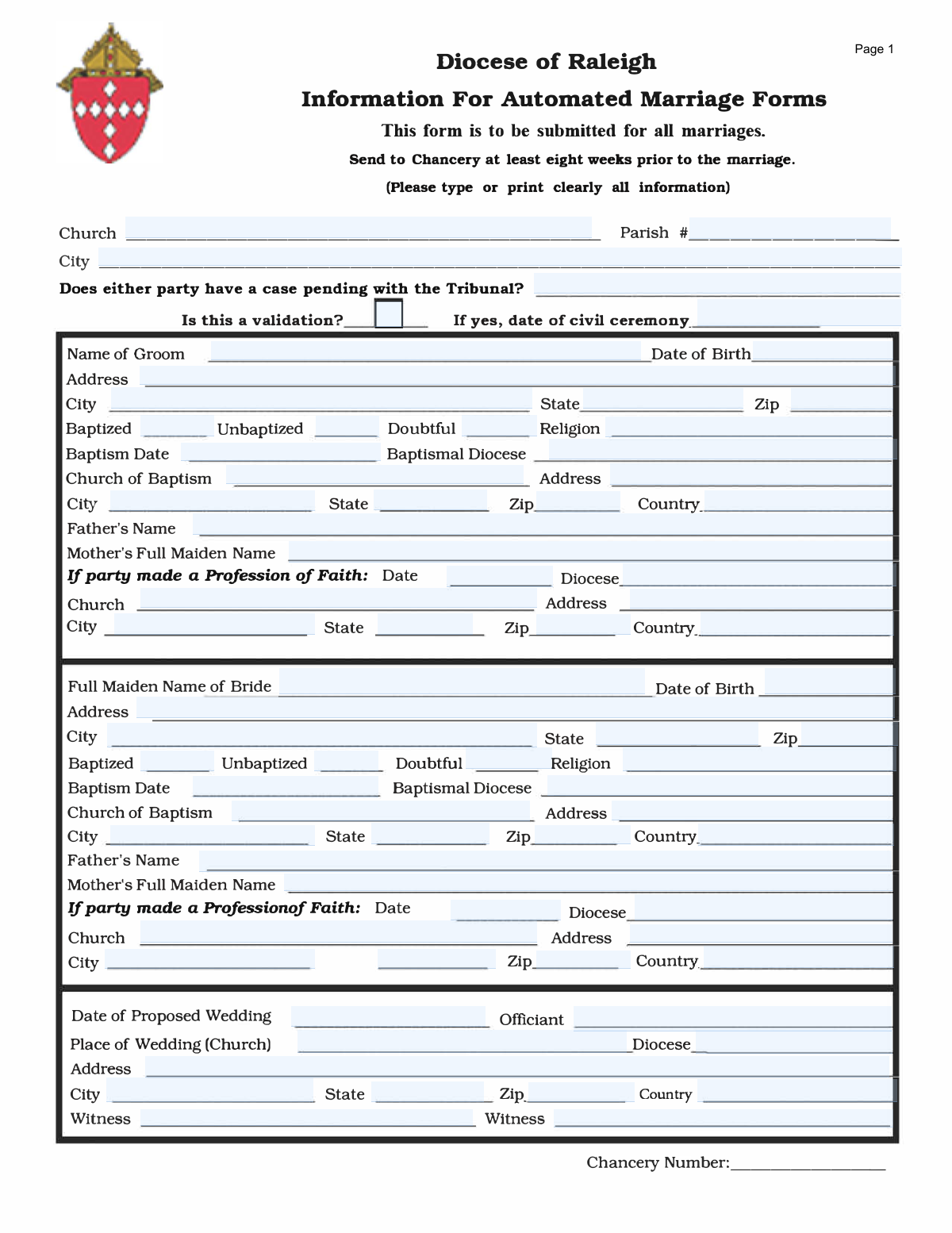
Diocese of Raleigh Information For Automated Marriage Forms and Application for Dispensations/Permissions, page 1
Moderate · 62/100Form Complexity Index

The AI does the filling. You just check it.

No typing into boxes, nothing to install.

Tell the AI about youAnswer a few questions in plain words, or upload a document you already have. That is all the typing there is.
AI fills every field in secondsIt puts each answer in the right box on every page, tables and checkboxes included.
Check it and downloadReview every field, change anything, then download, print or sign the PDF.

What this form asks for

The AI fills all of it, from your answers or your documents.

The Diocese of Raleigh Information For Automated Marriage Forms is a comprehensive document used to gather essential personal, religious, and baptismal details for couples intending to marry within the Catholic Church. It also serves as an application for any necessary canonical dispensations or permissions, such as for a mixed-religion marriage. Today, this form can be filled out quickly and accurately using AI-powered services like Instafill.ai, which can also convert non-fillable PDF versions into interactive fillable forms.
Fillable fields109
Pages4
Sections23
Tables and lists1
Questions that depend on earlier answers26
Form Complexity IndexModerate, 62/100

The AI checks your answers before you download

14 checks built for this form, so a wrong date or a missing answer is caught before anyone else sees it.

Ensures Proposed Wedding Date is in the Future

This check validates that the 'Date of Proposed Wedding' is a future date relative to the submission date. This is critical because the form is an application for a future event, not a record of a past one. If the date is in the past, the submission is invalid and must be corrected, as it likely represents a data entry error or a misunderstanding of the form's purpose.

Validates Conditional Requirement for Civil Ceremony Date

This check ensures that if the 'Is this a validation?' field is marked 'Yes', the 'Date of civil ceremony' field must be populated with a valid date. This is important for convalidations, where a prior civil union is being regularized in the Church. Failure to provide this date when required will result in an incomplete application and prevent proper processing of the validation.

Enforces Chronological Order for Validation Ceremony

This validation confirms that the 'Date of civil ceremony' occurs before the 'Date of Proposed Wedding'. This logical sequence is mandatory for a validation, as the Church ceremony must follow the civil one it intends to validate. An incorrect order indicates a significant data error that would make the canonical paperwork invalid.

Verifies Exclusive Selection of Baptismal Status

For both the groom and bride, this check ensures that only one of the three baptismal status options ('Baptized', 'Unbaptized', 'Doubtful') is selected. Providing multiple statuses for one person is contradictory and makes it impossible to determine the correct canonical permissions needed. The form must be rejected until a single, clear status is indicated for each party.

Checks for Required Baptismal Details

If a party is marked as 'Baptized', this validation ensures that the corresponding fields for 'Baptism Date', 'Church of Baptism', and 'Baptismal Diocese' are completed. This information is essential for verifying the sacrament and establishing the party's canonical status. An omission of these details will halt the process, as a recent, annotated baptismal certificate is a cornerstone of the prenuptial investigation.

Confirms Dispensation Request for Unbaptized Party

This check verifies that if one party is Catholic and the other is 'Unbaptized', the 'Disparity of Cult' dispensation box is checked. This dispensation is a canonical necessity for the validity of a marriage between a Catholic and an unbaptized person. If the dispensation is not requested, the marriage would be invalid, so the form must be returned for correction.

And 8 more checks
  • Confirms Permission Request for Mixed Marriage
  • Verifies Minimum Age for Marriage
  • Validates Chronological Integrity of Personal Dates
  • Ensures Completeness of Core Information
  • Validates Mother's Name is a Maiden Name
  • Checks for Nuptial Mass Restriction
  • Verifies Timely Submission
  • Validates ZIP Code Format

Let AI fill out your Diocese of Raleigh Marriage Form

No typing. Every field filled in seconds, checked, ready to sign.

7 days free, then $19.99/month · Cancel anytime

How to Fill Out Diocese of Raleigh Marriage Form Online for Free in 2026

What the AI walks you through.

  1. Navigate to Instafill.ai and upload or select the Diocese of Raleigh Marriage Form.
  2. Use the AI assistant to accurately fill in the personal, contact, and baptismal information for both the groom and the bride.
  3. Provide details about the parents of both the groom and the bride as requested.
  4. Enter the information for the proposed wedding, including the date, location, officiant, and witnesses.
  5. Carefully complete the 'Application for Dispensations/Permissions' section by checking the appropriate boxes if any special circumstances apply to the marriage.
  6. Review all the information entered for accuracy, then proceed to the signature sections, such as the 'Mixed Marriage Promise', and sign electronically.
  7. Download the completed and signed form to submit to the Chancery at least eight weeks prior to the marriage.

Common Mistakes in Completing Diocese of Raleigh Marriage Form

The ones the AI is built to catch.

Using Mother's Married Name Instead of Maiden Name
Applicants often mistakenly enter the mother's current married last name instead of her full maiden name as required. This happens due to habit or misunderstanding the term 'maiden name'. Incorrect information can lead to delays as the chancery must request a correction, and it can cause inconsistencies in the permanent sacramental record. To avoid this, carefully read the field label and enter the mother's birth surname.
Providing Incomplete or Inaccurate Baptismal Information
The form requires specific details about baptism, including the date, church, and diocese, which can be difficult to recall or locate. People may leave fields blank, guess, or provide partial information, which halts the application process until a recently-issued baptismal certificate is provided. Before filling out the form, obtain an official copy of the baptismal certificate (issued within the last six months) to ensure all details are entered correctly.
Misunderstanding Dispensations and Permissions
Page 2 distinguishes between 'Dispensations' (for impediments like marrying an unbaptized person) and 'Permissions' (for situations like marrying a baptized non-Catholic). Applicants frequently confuse these canonical terms and check boxes in the wrong section. This error can lead to the wrong canonical permissions being granted, requiring the entire form to be resubmitted. It is crucial to consult with the parish priest or deacon to determine which specific dispensations or permissions are necessary for your situation.
Forgetting the Required Accompanying Letter
On page 2, several options for permission are marked with asterisks, indicating that 'particular circumstances motivating this request must be elaborated in an accompanying letter.' It is a very common mistake to check one of these boxes but fail to submit the required explanatory letter. This omission will cause the application to be considered incomplete and will delay its approval until the letter is received by the Chancery.
Incorrectly Filling the 'Dispensation from Canonical Form' Section
Page 4 is only for the specific and less common situation where a Catholic is marrying outside a Catholic church with a non-Catholic officiant. Many people mistakenly fill this out if their wedding is simply in a location other than a church, even with a priest or deacon officiating. This creates confusion and requires clarification, delaying the process. This section should only be completed after explicit direction from the parish priest.
Omitting the Parish Seal
The form requires an official Parish Seal in two separate locations (pages 3) to validate the priest/deacon's signature and the Mixed Marriage Promise. Since this is a physical stamp, it is often forgotten, especially if the priest or deacon signs the form away from the parish office. An absent seal invalidates the signature and promise, forcing the form to be returned for proper completion and causing significant delays.
Failing to Specify 'Other' Reasons
Several sections on pages 2 and 4 provide an 'Other [specify]' checkbox, requiring the applicant to write in a reason. A frequent error is to check the 'Other' box but neglect to provide the written explanation in the corresponding blank space. This leaves the request vague and unsupported, preventing the Bishop's office from making an informed decision and resulting in the form being sent back for clarification.
Confusing the Baptismal Status Checkboxes
The form asks for the baptismal status of each party with three options: 'Baptized,' 'Unbaptized,' and 'Doubtful.' People are often unsure what 'Doubtful' means and may select it incorrectly, or they may check 'Baptized' without having the necessary proof. A 'Doubtful' baptism has specific canonical implications and should only be checked after consulting with the priest. This error can lead to applying for the wrong dispensations.
Entering Informal Names Instead of Full Legal Names
Applicants sometimes use nicknames, shortened names, or omit middle names for themselves, their parents, or witnesses. The form requires full legal names as they would appear on official documents to ensure the sacramental record is accurate and legally sound. Using informal names can create discrepancies with other legal documents and may require a formal correction to the record later. AI-powered tools like Instafill.ai can help prevent this by cross-referencing with other data to ensure consistency.
Illegible Handwriting on Printed Forms
The form explicitly requests to 'Please type or print clearly,' but submissions are often filled out with illegible handwriting. This leads to data entry errors at the Chancery, potentially misspelling names, dates, or addresses on the official record. Such errors can cause serious issues later and require a formal process to correct. Using a tool like Instafill.ai to convert the PDF into a fillable version and type the information ensures perfect clarity and avoids these problems.

Frequently Asked Questions About Diocese of Raleigh Marriage Form


Is it really free for 7 days?
Yes. You pay $0 today. Cancel before Nov 4 and you are never charged. Keep it, and it is $19.99 a month for 5 fills of your Diocese of Raleigh Marriage Form.
Can I fill other forms too?
This plan is for your Diocese of Raleigh Marriage Form: your own AI agent fills it as often as 5 times a month. To fill other forms and upload your own, choose a Professional plan from your account.
How do I cancel?
From your account, in two clicks, any time. No email, no call.
How does the AI fill out Diocese of Raleigh Marriage Form?
You answer a few questions in plain words, or upload a document you already have. The AI reads what you give it and puts each answer into the right field of Diocese of Raleigh Marriage Form, on every page, in seconds. It checks the answers against the form's own rules, and you review and change anything before you download, print or sign.
What happens to my information?
It is encrypted in transit and at rest, and it is never used to train AI.
How complex is Diocese of Raleigh Marriage Form to fill out?
Diocese of Raleigh Marriage Form has a Form Complexity Index of 62 out of 100, in the moderate tier: 109 fillable fields across 4 pages. Instafill.ai's AI fills it in under a minute, with every field there for you to review before you download.
What is the purpose of the 'Information For Automated Marriage Forms'?
This form is used by the Diocese of Raleigh to collect essential information for couples preparing for marriage in the Catholic Church. It also serves as the application for any necessary permissions or dispensations required for the marriage to proceed.
Who needs to fill out and submit this form?
The couple provides the personal details, but the form is typically completed and submitted by the priest, deacon, or pastoral minister handling their marriage preparation. It is required for all marriages within the Diocese of Raleigh.
What is the deadline for submitting this marriage form?
The form must be completed and sent to the Chancery at least eight weeks prior to the proposed wedding date. This allows sufficient time for review and processing of any requested dispensations or permissions.
What information is required for the bride and groom?
You must provide full names, current addresses, dates of birth, parents' full names, and religion for both individuals. Additionally, detailed baptismal information, including the date, church name, and diocese, is required for each baptized party.
What is a 'validation' of a marriage?
A validation, also known as a convalidation, is the ceremony that makes a civil marriage valid in the eyes of the Catholic Church. If you are already married civilly, you would indicate 'yes' for validation and provide the date of your civil ceremony.
What does it mean to request a 'Disparity of Cult' dispensation?
A 'Disparity of Cult' dispensation is required when a Catholic person intends to marry a person who has not been baptized. This form is used to formally petition the Bishop for this necessary dispensation.
My partner is a baptized non-Catholic. What do we need to do on the form?
You must request 'Permission for marriage' for a Catholic to marry a baptized non-Catholic. The Catholic party will also be required to make the 'Mixed Marriage Promise' to do all in their power to raise the children in the Catholic faith.
Can we get married in a location that is not a Catholic church?
Yes, but this requires special permission from the Bishop. You must check the box for 'Ceremony in a place other than a Catholic church' and may need a 'Dispensation from Canonical Form' if a Catholic cleric is not officiating.
What is the 'Mixed Marriage Promise' mentioned on the form?
The 'Mixed Marriage Promise' is a formal declaration made by the Catholic party, affirming their faith and promising to do everything in their power to have their children baptized and raised as Catholics. The non-Catholic party must be made aware of this promise.
Where is the completed form sent?
Your parish priest or deacon will send the completed form and all supporting documentation to the Chancery office at: Diocese of Raleigh, 7200 Stonehenge Drive, Raleigh, NC 27613.
Can AI tools help me fill out this form?
Yes, services like Instafill.ai use AI to accurately auto-fill form fields, which can save time and reduce errors. This is particularly helpful for entering detailed information like names, dates, and addresses required on this form.
How can I fill this form out online if it's a PDF?
You can use a service like Instafill.ai to easily complete the form online. Simply upload the PDF document, and the platform will make all the fields interactive so you can type in your information, then save or print the completed form.
The PDF I have isn't fillable. What can I do?
If you have a non-fillable or 'flat' PDF, tools like Instafill.ai can convert it into an interactive, fillable form. This allows you to type your answers directly into the fields on your computer, ensuring the information is clear and legible.
Encrypted in transit and at restNever used to train AIDelete your forms any time

Get your Diocese of Raleigh Marriage Form filled out by AI

$0 today. Cancel before Nov 4 and you pay nothing.

Other forms like this one

marriage forms: Form 12.901(a), Petition for Simplified Dissolution of Marriage, Form 12.901(b)(2), Petition for Dissolution of Marriage, Form 12.901(b)(1), Petition for Dissolution of Marriage, Form 12.901(b)(3), Petition for Dissolution of Marriage, Florida Supreme Court Approved Family Law Form 12.901(b)(3), Petition for Dissolution of Marriage with No Dependent or Minor Child(ren) or Property (02/18), Form FL-107, Petition—Marriage/Domestic Partnership, Form FL-100, Petition—Marriage/Domestic Partnership (Family Law), Official Certificate of Marriage, Section 50(1)(b) of the Marriage Act 1961 (Cth), form-nc-120-petition-to-establish-fact-date-and-place-of-marriage, declaration-of-marriage-for-court-proceeding-california-family-law, Form FL-120, Response—Marriage/Domestic Partnership (Family Law), Supreme Court of Ohio Uniform Domestic Relations Form 17, Petition for Dissolution of Marriage and Waiver of Service of Summons

ERM forms: REQUEST FOR OWNERSHIP INFORMATION—ERM-14 FORM, Form I-90, Application to Replace Permanent Resident Card, Form I-485, Application to Register Permanent Residence, Form SS-8, Determination of Worker Status, Form CMS-1763, Request for Termination of Medicare Coverage, Form I-212, Application for Permission to Reapply, Form I-192, Application for Advance Permission to Enter as a Nonimmigrant, Form W-8IMY (Rev. October 2021), Certificate of Foreign Intermediary, Foreign Flow-Through Entity, or Certain U.S. Branches for United States Tax Withholding and Reporting, County of Louisa Department of Community Development – New Non-Residential Building Permit Package, Application Schedule 1: Designer Information (City of Toronto Building Permit Application), HR-Pol-Rec&Res-04 Employment Application Form (Recruitment of Permanent Employees), Fauquier County Department of Community Development – Building Trades Permit or Amendment to Existing Permit Application (Residential or Commercial), Belastingdienst VPB 075 – Verzoek fiscale eenheid Vennootschapsbelasting (Deel A – Gegevens moedermaatschappij), ROTC Cadet Academic Plan / Degree and Credit Hour Worksheet (Student Identification, Term-by-Term Courses, GPA Summary, and Completion Certification), Health Assessment – Ontario Health atHome (Fixing Long-Term Care Act, 2021) (Form 4768-69E), Health Assessment - Ontario Health atHome (Fixing Long-Term Care Act, 2021) — Form 4768-69E, Washington Single-Family Property Term Lease & Security Deposit Receipt (WA Single-Family Lease) | Revised 10/08/2025, Application for Mechanical Permit, Pennsylvania Department of State — Certificate of Termination (Domestic Limited Liability Company) (15 Pa.C.S. § 8872(f)) (DSCB:15-8872(f)), Document Checklist for a Study Permit (IMM 5483)

7 days free, then $19.99/month · Cancel anytime