
Yes! You can use AI to fill out Form N161, Appellant's Notice (All appeals except small claims track appeals and appeals to the Family Division of the High Court)
Don't type 146 fields by hand. Tell our AI about yourself, or upload a document you already have, and it fills every field in seconds. You check it, then download, print or sign.
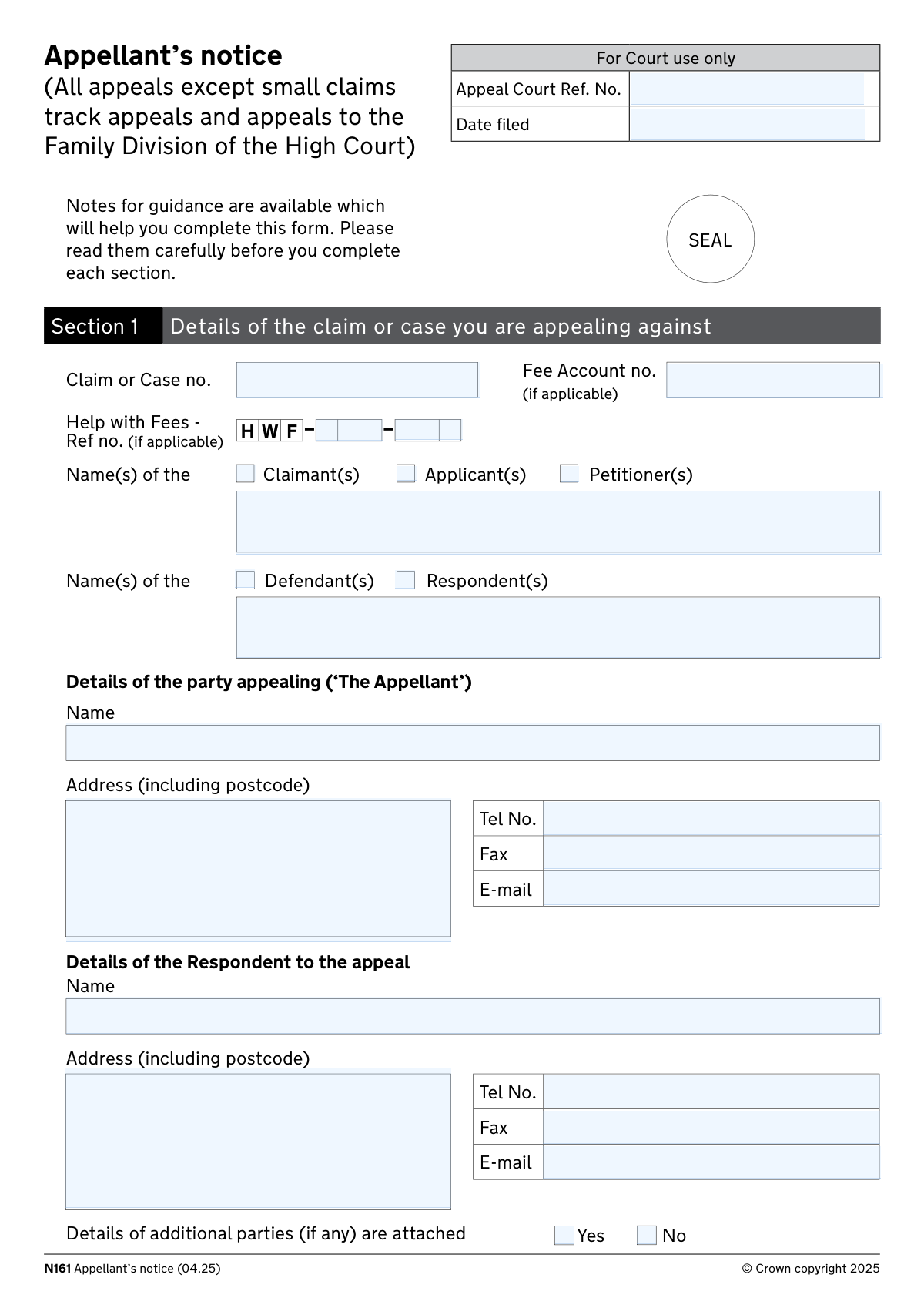
The AI does the filling. You just check it.
No typing into boxes, nothing to install.
What this form asks for
The AI fills all of it, from your answers or your documents.
The AI checks your answers before you download
16 checks built for this form, so a wrong date or a missing answer is caught before anyone else sees it.
This check verifies that both the Appellant Name and Appellant Address fields in Section 1 are completed with non-empty values, and that the address includes a valid UK postcode in the standard format (e.g., SW1A 1AA). The appellant's identity and contact details are fundamental to the appeal process, as the court must be able to identify the party bringing the appeal and correspond with them. If either field is missing or the postcode is malformed, the form should be rejected as incomplete and the appellant prompted to supply the missing information.
This check validates that the 'Date of Decision' field in Section 2 contains a properly formatted date (DD/MM/YYYY) and that the date is not in the future, since an appellant can only appeal against a decision that has already been made. The date is also critical for calculating whether the appeal has been lodged within the permitted time limits under CPR rules. If the date is absent, incorrectly formatted, or falls in the future, the form must be flagged for correction before processing.
This check confirms that the 'Judge's Name' field is populated and that exactly one of the Judge's Status checkboxes (District Judge or Deputy, Circuit Judge or Recorder, Tribunal Judge, Master or Deputy, High Court Judge or Deputy, or Justice(s) of the Peace) has been selected in Section 2. Both pieces of information are required to correctly route the appeal and determine the appropriate appeal court. If the judge's name is blank or no status checkbox is selected, the form is incomplete and cannot be processed.
This check verifies that exactly one court origin option has been selected in Section 2 (County Court, Family Court, High Court with a division, or Other), and that where a specific location or name is required (e.g., 'The County Court at' or 'Other, please specify'), the corresponding text field is not left blank. Identifying the originating court is essential for determining jurisdiction and the correct appellate pathway. If no court is selected or a required location field is empty, the form should be returned to the appellant for completion.
This check validates the logical relationship between the 'Need Permission to Appeal' and 'Permission to Appeal Granted' fields in Section 4: if 'Need Permission' is 'No', then the permission-granted fields and Box A details should not be required; if 'Need Permission' is 'Yes' and 'Permission Granted' is 'Yes', then Box A (date of order and judge's name granting permission) must be completed. Inconsistent combinations — such as indicating permission has been granted without providing the granting judge's name or order date — would create ambiguity in the court record. Any logical mismatch or incomplete Box A when permission has been granted should trigger a validation error.
When Box A is applicable (i.e., permission to appeal has already been granted), this check verifies that the 'Date of Order' field contains a valid date in DD/MM/YYYY format and that the date precedes the date of filing. A future or malformed date for the permission order would be logically impossible and could indicate a data entry error. If Box A is required but the date is missing, incorrectly formatted, or in the future, the form should be flagged for correction.
And 10 more checks
- Ensures Legal Representation Details are Complete When Legally Represented
- Ensures Appellant Email Address is in a Valid Format
- Ensures Appellant Telephone Number is in a Valid UK Format
- Ensures the Grounds of Appeal Attachment is Confirmed
- Ensures the Order Being Appealed is Described
- Ensures the Timely Lodging Confirmation is Answered and Consistent with Extension Application
- Ensures the Statement of Truth is Properly Completed When Section 11 Evidence is Provided
- Ensures the Aarhus Convention Claim Grounds are Provided When the Claim is Identified as an Aarhus Claim
- Ensures the Appeal Court Request Section Contains at Least One Selection
- Ensures Missing Document Reasons Include an Expected Supply Date
Let AI fill out your N161
No typing. Every field filled in seconds, checked, ready to sign.
How to Fill Out N161 Online for Free in 2026
What the AI walks you through.
- Navigate to Instafill.ai and search for or upload Form N161 (Appellant's Notice) to begin filling it out online.
- Complete Section 1 by entering the claim or case number, fee account details, and the names of the claimant(s)/applicant(s)/petitioner(s) and defendant(s)/respondent(s), then provide the appellant's and respondent's full contact details.
- Fill in Section 2 with details of the appeal, including the originating court, the name and status of the judge whose decision you are appealing, the date of the decision, and whether it was a previous appeal decision.
- Complete Sections 3 and 4 by indicating your legal representation status and your representative's details, confirming whether you hold a Civil Legal Aid Certificate, and addressing permission to appeal requirements including any granted or refused permissions.
- Complete Sections 5 through 8 by specifying the order you wish to appeal, attaching or confirming the grounds of appeal and skeleton arguments, and indicating whether the claim involves an Aarhus Convention matter.
- Fill in Sections 9 through 12 by stating what you are asking the Appeal Court to do, making any additional applications (stay of execution, extension of time, etc.), providing supporting evidence and reasons, and completing the vulnerability declaration.
- Review and finalise the form by completing the Statement of Truth in Section 13, signing and dating the notice in Section 14, and ticking the checklist of supporting documents to be filed with the notice before submitting to the court.
Common Mistakes in Completing N161
The ones the AI is built to catch.
Missing or incorrect claim/case number
Failing to attach or confirm the Grounds of Appeal
Missing the appeal time limit without applying for an extension
Incorrectly completing the permission to appeal section
Omitting the postcode from addresses
Failing to identify the correct judge status
Not providing the skeleton argument or confirming its status
Incomplete or missing supporting documents checklist
Failing to complete the Statement of Truth in Section 13 when applying for a stay or extension
Confusing the appellant's role designation (Claimant/Applicant/Petitioner)
Not completing Section 9 (What are you asking the Appeal Court to do?)
Overlooking the vulnerability section
Frequently Asked Questions About N161
Is it really free for 7 days?
Can I fill other forms too?
How do I cancel?
How does the AI fill out N161?
What happens to my information?
How complex is N161 to fill out?
What is Form N161 (Appellant's Notice) and who needs to complete it?
Do I need permission to appeal before filing this form?
What is the deadline for filing the Appellant's Notice?
What documents do I need to submit along with the Appellant's Notice?
What are 'Grounds of Appeal' and how do I complete them?
Do I need to include a Skeleton Argument with my appeal?
What can I ask the Appeal Court to do?
Can I apply for a stay of execution while my appeal is pending?
What should I do if I or a witness is vulnerable?
What is the Statement of Truth and who should sign it?
What is an Aarhus Convention Claim and does it affect my appeal?
What if I cannot supply all the required documents at the time of filing?
Can I use AI tools like Instafill.ai to help fill out Form N161?
How do I fill in Form N161 online using Instafill.ai?
Where do I submit the completed Appellant's Notice and how many copies do I need?
Get your N161 filled out by AI
$0 today. Cancel before Oct 31 and you pay nothing.
Other forms like this one
court forms: Form Summons, Supreme Court of New York, Form SC-100, Plaintiff's Claim and ORDER to Go to Small Claims Court, Form AO 240, Application to Proceed in District Court Without Prepaying Fees or Costs, Form AO 239, Application to Proceed in District Court Without Prepaying Fees or Costs, Affidavit for Service by Publication/Posting (Circuit Court of Cook County, Illinois) (CCG 0013 A/B), Petition for Leave to Proceed In Forma Pauperis (Court of Common Pleas of Lehigh County, Pennsylvania, Civil Division), In Forma Pauperis Affidavit/Petition (AOPC 622A) – Pennsylvania Magisterial District Court, Judicial Council of California Form SC-105, Request for Court Order and Answer (Small Claims), SC-120, Defendant’s Claim and ORDER to Go to Small Claims Court (Small Claims), SC-105, Request for Court Order and Answer (Small Claims), Judicial Council of California Form SC-120, Defendant’s Claim and ORDER to Go to Small Claims Court (Small Claims), In Forma Pauperis Affidavit Petition (AOPC 622A) — Pennsylvania Magisterial District Court, Florida Supreme Court Approved Family Law Form 12.901(b)(3), Petition for Dissolution of Marriage with No Dependent or Minor Child(ren) or Property (02/18), Illinois Supreme Court Approved Form E-O 3500.3, Eviction Order, Form P3 (Rule 25-3(2)) — Affidavit of Applicant for Grant of Probate or Grant of Administration with Will Annexed (Short Form) (Supreme Court of British Columbia), Form SC-100, Plaintiff’s Claim and ORDER to Go to Small Claims Court, Designation of Record on Appeal (Civil) (Maricopa County Justice Courts, Arizona) (Form APP 8150-702), FW-003, Order on Court Fee Waiver (Superior Court), Judicial Council of California Form SER-001, Request for Sheriff to Serve Court Papers, FW-003, Order on Court Fee Waiver (Superior Court)
small claims forms: Form SC-100, Plaintiff's Claim and ORDER to Go to Small Claims Court, Judicial Council of California Form SC-104, Proof of Service (Small Claims), SC-108, Request to Correct or Cancel Judgment and Answer (Small Claims), Judicial Council of California Form SC-105, Request for Court Order and Answer (Small Claims), SC-120, Defendant’s Claim and ORDER to Go to Small Claims Court (Small Claims), Judicial Council of California Form SC-104, Proof of Service (Small Claims), Judicial Council of California Form SC-108, Request to Correct or Cancel Judgment and Answer (Small Claims), SC-105, Request for Court Order and Answer (Small Claims), Judicial Council of California Form SC-120, Defendant’s Claim and ORDER to Go to Small Claims Court (Small Claims), Form SC-100, Plaintiff’s Claim and ORDER to Go to Small Claims Court, Form N161, Appellant’s notice (All appeals except small claims track appeals and appeals to the Family Division of the High Court), Plaintiff's Claim and ORDER to Go to Small Claims Court (SC-100), Form SC-100A, Other Plaintiffs or Defendants (Attachment to Plaintiff's Claim and ORDER to Go to Small Claims Court), Form A, Claim Form, European Small Claims Procedure, Form EJ-001, Abstract of Judgment—Civil and Small Claims, Form SC-109, Authorization to Appear (Small Claims), Form SC-112A, Proof of Service by Mail (Small Claims), Form SC-114, Request to Amend Party Name Before Hearing (Small Claims), Form SC-132, Attorney-Client Fee Dispute (Attachment to Notice of Entry of Judgment), Form SC-152, Order on Request to Postpone Trial (Small Claims)
VA claim forms: Form OWCP-915, Claim for Medical Reimbursement, Form 8862, Information To Claim Certain Credits, Form CA-7, Claim for Compensation, Form CA-5, Claim for Compensation, Form SC-100, Plaintiff's Claim and ORDER to Go to Small Claims Court, Form 20-0995, Decision Review Request: Supplemental Claim, Form 104, List of Creditors 20 Largest Unsecured Claims, Form 941-X (Rev. April 2023), Adjusted Employer’s QUARTERLY Federal Tax Return or Claim for Refund, Judicial Council of California Form SC-104, Proof of Service (Small Claims), Immigration and Refugee Board of Canada (IRB) – Refugee Protection Division (RPD) Basis of Claim Form (for persons claiming refugee protection in Canada) (RPD.02.01), SC-108, Request to Correct or Cancel Judgment and Answer (Small Claims), Judicial Council of California Form SC-105, Request for Court Order and Answer (Small Claims), SC-120, Defendant’s Claim and ORDER to Go to Small Claims Court (Small Claims), Judicial Council of California Form SC-104, Proof of Service (Small Claims), Continental American Insurance Company (CAIC) / Aflac Group Critical Illness Claim Form (with Attending Physician’s Statement, HIPAA Authorization to Obtain Information, and Electronic Funds Transaction Authorization), Judicial Council of California Form SC-108, Request to Correct or Cancel Judgment and Answer (Small Claims), SC-105, Request for Court Order and Answer (Small Claims), Judicial Council of California Form SC-120, Defendant’s Claim and ORDER to Go to Small Claims Court (Small Claims), Small Claim and Notice of Small Claim (ORS 46.425) (OJD Official) (Jan 2026), VA Form 21-4138, Statement in Support of Claim
court appeal forms: Designation of Record on Appeal (Civil) (Maricopa County Justice Courts, Arizona) (Form APP 8150-702), Form N161, Appellant’s notice (All appeals except small claims track appeals and appeals to the Family Division of the High Court), Declaration for Court of Appeal Proceedings, Form MC 55, Claim of Appeal, Form MC 56, Bond on Appeal, Form MC 57, Certificate of Records Transmitted for Appeal and Notice to Parties, Form MC 60, Notice of Record Return from Circuit Court/Court of Appeals, Form MC 501, Reporter/Recorder Certificate of Ordering Transcript on Appeal, Form MC 503, Motion to Change Time for Filing Transcript on Appeal, Civil Appeal Case Information Statement, Form APP-014, Appellant's Proposed Statement on Appeal (Unlimited Civil Case), Form CR-125, Notice of Appeal—Commitment (Penal Code or Welfare and Institutions Code), Form CR-134, Notice Regarding Record on Appeal (Misdemeanor), Form CR-135, Proposed Statement on Appeal (Misdemeanor), Form CR-136, Order Concerning Appellant's Proposed Statement on Appeal (Misdemeanor), Form CR-137, Abandonment of Appeal (Misdemeanor), Form CR-142, Notice of Appeal and Record on Appeal (Infraction), Form CR-143, Proposed Statement on Appeal (Infraction), Form CR-105, Defendant's Financial Statement on Eligibility for Appointment of Counsel and Reimbursement and Record on Appeal at Public Expense, Form CR-133, Request for Court-Appointed Lawyer in Misdemeanor Appeal
UK court forms: Form Summons, Supreme Court of New York, Form SC-100, Plaintiff's Claim and ORDER to Go to Small Claims Court, Form AO 240, Application to Proceed in District Court Without Prepaying Fees or Costs, Form AO 239, Application to Proceed in District Court Without Prepaying Fees or Costs, Affidavit for Service by Publication/Posting (Circuit Court of Cook County, Illinois) (CCG 0013 A/B), Petition for Leave to Proceed In Forma Pauperis (Court of Common Pleas of Lehigh County, Pennsylvania, Civil Division), In Forma Pauperis Affidavit/Petition (AOPC 622A) – Pennsylvania Magisterial District Court, Judicial Council of California Form SC-105, Request for Court Order and Answer (Small Claims), SC-120, Defendant’s Claim and ORDER to Go to Small Claims Court (Small Claims), SC-105, Request for Court Order and Answer (Small Claims), Judicial Council of California Form SC-120, Defendant’s Claim and ORDER to Go to Small Claims Court (Small Claims), In Forma Pauperis Affidavit Petition (AOPC 622A) — Pennsylvania Magisterial District Court, Florida Supreme Court Approved Family Law Form 12.901(b)(3), Petition for Dissolution of Marriage with No Dependent or Minor Child(ren) or Property (02/18), Illinois Supreme Court Approved Form E-O 3500.3, Eviction Order, Form P3 (Rule 25-3(2)) — Affidavit of Applicant for Grant of Probate or Grant of Administration with Will Annexed (Short Form) (Supreme Court of British Columbia), Form SC-100, Plaintiff’s Claim and ORDER to Go to Small Claims Court, Designation of Record on Appeal (Civil) (Maricopa County Justice Courts, Arizona) (Form APP 8150-702), FW-003, Order on Court Fee Waiver (Superior Court), Judicial Council of California Form SER-001, Request for Sheriff to Serve Court Papers, FW-003, Order on Court Fee Waiver (Superior Court)
appellant forms: Form N161, Appellant’s notice (All appeals except small claims track appeals and appeals to the Family Division of the High Court), Form APP-014, Appellant's Proposed Statement on Appeal (Unlimited Civil Case), form-app-015-respondents-proposed-corrections-toadditions-to-appellants-proposed-settled-statement-unlimited-civil-case, Form APP-103, Appellant's Notice Designating Record on Appeal (Unlimited Civil Case), Form APP-014, Appellant's Proposed Statement on Appeal (Limited Civil Case), Form APP-104, Appellant's Proposed Statement on Appeal (Limited Civil Case), form-app-011-appellants-reply-brief-limited-civil-case
court claim forms: Form SC-100, Plaintiff's Claim and ORDER to Go to Small Claims Court, Judicial Council of California Form SC-105, Request for Court Order and Answer (Small Claims), SC-120, Defendant’s Claim and ORDER to Go to Small Claims Court (Small Claims), SC-105, Request for Court Order and Answer (Small Claims), Judicial Council of California Form SC-120, Defendant’s Claim and ORDER to Go to Small Claims Court (Small Claims), Form SC-100, Plaintiff’s Claim and ORDER to Go to Small Claims Court, Certificate of Service (Civil Court Claim), Form N161, Appellant’s notice (All appeals except small claims track appeals and appeals to the Family Division of the High Court), Plaintiff's Claim and ORDER to Go to Small Claims Court (SC-100), Form SC-100A, Other Plaintiffs or Defendants (Attachment to Plaintiff's Claim and ORDER to Go to Small Claims Court), Form N461: Claim for judicial review, Statement of Small Claim and Notice, Trial Court of Massachusetts, State of Michigan, Form MC 25, Notice of Intent to Escheat Unclaimed Personal Property, Form MC 35, Complaint, Claim and Delivery, Form MC 36, Motion for Possession Pending Judgment, Claim and Delivery, Order of Possession Pending Judgment, Claim and Delivery, Form MC 38, Bond, Claim and Delivery, Form MC 39, Judgment, Claim and Delivery, Form MC 55, Claim of Appeal, Form MC 67, Claim of Interest on Vehicle Seized for Forfeiture
family court forms: Form 12.995(c), Safety-Focused Parenting Plan, Florida Supreme Court Approved Family Law Form 12.901(b)(3), Petition for Dissolution of Marriage with No Dependent or Minor Child(ren) or Property (02/18), Form N161, Appellant’s notice (All appeals except small claims track appeals and appeals to the Family Division of the High Court), declaration-of-marriage-for-court-proceeding-california-family-law, Florida Supreme Court Approved Family Law Form 12.902(d), Uniform Child Custody Jurisdiction and Enforcement Act (UCCJEA) Affidavit, Florida Supreme Court Approved Family Law Form 12.941(a), Petition for Enforcement of Out-of-State Custody Decree and for Order to Pick Up Minor Child(ren), Florida Supreme Court Approved Family Law Form 12.970(a), Petition for Temporary Custody by Extended Family, Adoption Request (Stepparent), Florida Family Law Rules of Procedure Form 12.900(b), Notice of and Consent to Limited Appearance, Florida Family Law Rules of Procedure Form 12.900(d), Termination of Limited Appearance, Florida Family Law Rules of Procedure Form 12.900(e), Acknowledgment of Assistance by Attorney, Florida Family Law Rules of Procedure Form 12.900(g), Agreement Limiting Representation, Florida Family Law Rules of Procedure Form 12.900(h), Notice of Related Cases, Florida Family Law Rules of Procedure Form 12.901(a), Joint Petition for Simplified Dissolution of Marriage, Form 12.902(b), Family Law Financial Affidavit (Short Form), Florida Family Law Rules of Procedure Form 12.902(c), Family Law Financial Affidavit (Long Form), Florida Family Law Rules of Procedure Form 12.902(e), Child Support Guidelines Worksheet, Florida Supreme Court Approved Family Law Form 12.902(f)(1), Marital Settlement Agreement for Dissolution of Marriage with Dependent or Minor Child(ren), Florida Supreme Court Approved Family Law Form 12.902(f)(2), Marital Settlement Agreement for Dissolution of Marriage with Property but No Dependent or Minor Child(ren), Florida Supreme Court Approved Family Law Form 12.902(i), Affidavit of Corroborating Witness
Let AI fill out your N161
Your trial starts once a card is added. You pay nothing before Oct 31.
Our AI already knows this form, all 146 fields of it. Skip the typing: tell it about yourself, or upload what you have, and it fills the whole form in seconds.
- AI fills every field on all 11 pages, checkboxes included
- No typing into boxes: answer a few questions, or upload a document you already have, an old copy of this form, a photo of a document
- The AI checks the answers; you review and change anything before you download
- Download the finished PDF, print it, or sign it online
- Encrypted, and never used to train AI
Cancel before Oct 31 and you pay nothing.
A card is needed to start the trial. Cancel in two clicks from your account.
Terms · Privacy