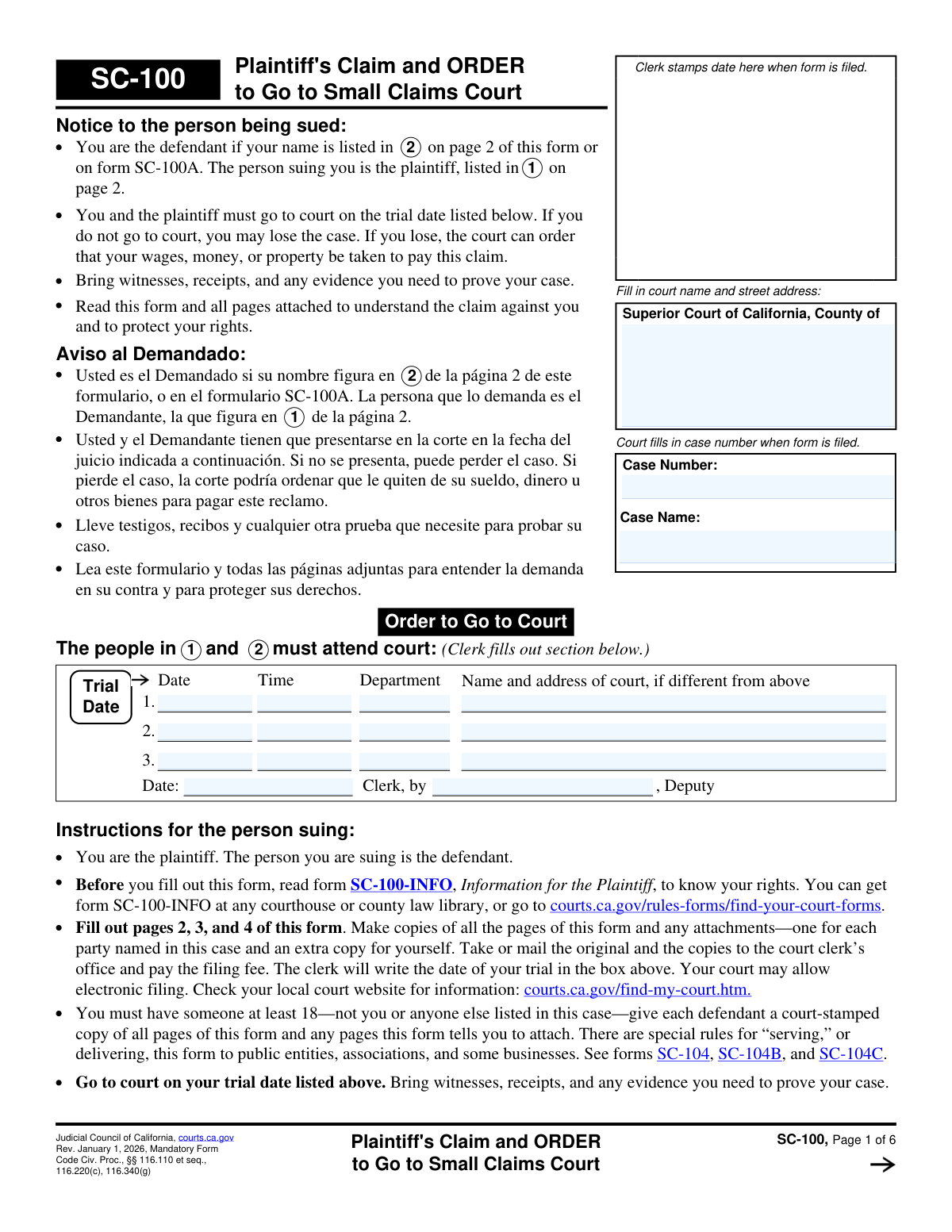
Yes! You can use AI to fill out Form SC-100, Plaintiff’s Claim and ORDER to Go to Small Claims Court

Form SC-100 (Plaintiff’s Claim and ORDER to Go to Small Claims Court) is the primary California Judicial Council form used by a plaintiff to file a small claims lawsuit and request a court date. It captures the court location, case details, parties’ names and contact information, the amount claimed, the reason for the claim, and key eligibility/venue checkboxes (such as public entity claims, military status, and filing limits). Filing it correctly is important because it initiates the case and provides the information the court uses to set hearings and issue the order to appear. Today, this form can be filled out quickly and accurately using AI-powered services like Instafill.ai, which can also convert non-fillable PDF versions into interactive fillable forms.
Our AI automatically handles information lookup, data retrieval, formatting, and form filling.
It takes less than a minute to fill out SC-100 using our AI form filling.
Securely upload your data. Information is encrypted in transit and deleted immediately after the form is filled out.

Form specifications

Form name: Form SC-100, Plaintiff’s Claim and ORDER to Go to Small Claims Court
Number of pages: 6
Filled form examples: Form SC-100 Examples
Language: English
Categories: court forms
main-image

Instafill Demo: filling out a legal form in seconds

How to Fill Out SC-100 Online for Free in 2026

Are you looking to fill out a SC-100 form online quickly and accurately? Instafill.ai offers the #1 AI-powered PDF filling software of 2026, allowing you to complete your SC-100 form in just 37 seconds or less.
Follow these steps to fill out your SC-100 form online using Instafill.ai:
  1. 1 Go to Instafill.ai and upload the SC-100 PDF (or select SC-100 from the form library) to start an AI-guided interview.
  2. 2 Enter the Superior Court county, court name, and full street address, then add the case name and case number (if already assigned).
  3. 3 Provide trial/hearing scheduling details if applicable (dates, times, departments, and alternate court addresses) and any clerk/date information shown on your notice.
  4. 4 Add plaintiff information (one or two plaintiffs), including phone, address, mailing address (if different), email, and check boxes for additional plaintiffs (SC-100A) or fictitious business name (SC-103) when needed.
  5. 5 Add defendant information (name, contact details, addresses) and, if the defendant is an entity, enter the agent for service of process; check boxes for multiple defendants (SC-100A) and active military duty if applicable.
  6. 6 Enter the claim amount and a clear explanation of why money is owed, include relevant dates and how you calculated the amount, and attach extra pages (e.g., MC-031) if you need more space.
  7. 7 Review the AI validation checks, confirm venue/eligibility and required checkboxes (e.g., demand made before suing, public entity/client-fee dispute/filing limits), then e-sign/print and download the finalized SC-100 for filing with the court.

Our AI-powered system ensures each field is filled out correctly, reducing errors and saving you time.

Why Choose Instafill.ai for Your Fillable SC-100 Form?

Speed

Complete your SC-100 in as little as 37 seconds.

Up-to-Date

Always use the latest 2026 SC-100 form version.

Cost-effective

No need to hire expensive lawyers.

Accuracy

Our AI performs 10 compliance checks to ensure your form is error-free.

Security

Your personal information is protected with bank-level encryption.

Frequently Asked Questions About Form SC-100

This form is used to start (or manage key details of) a California small claims case by listing the court, case information, parties, claim amount, and the reason for the claim. It also captures venue (where the case should be filed) and certain required checkboxes and attachments.

The plaintiff (the person or business suing) fills it out, and it may also include information for a second plaintiff. If you are suing someone in small claims court, you generally complete this form to present your claim and identify the defendant.

Enter the full name of the Superior Court and its complete street address (county, court name, street, city, state, ZIP) where the case is filed. If your hearing/trial location is different, list that separately in the trial row fields that ask for a different court address.

Use the case number assigned by the court and the case name exactly as it appears on court notices (typically “Plaintiff v. Defendant”). Copy it carefully, including any letters, dashes, or spacing used by the court.

Enter the date, start time, and department/courtroom for each scheduled hearing or trial listed on your court notice. Only fill in the “Court Name and Address” in a trial row if it is different from the main Superior Court address at the top.

Fill in the first scheduled date/time/department you have and leave the second and third trial rows blank if they do not apply. You can update or provide additional dates later if the court schedules more hearings.

You generally need each party’s full legal name plus contact information and address (street, city, state, ZIP), and mailing address if different. Providing phone and email helps with communication, but follow the form’s prompts for what is available and applicable.

Check the box indicating multiple parties and attach form SC-100A to list the additional plaintiffs and/or defendants. Make sure the names on SC-100A match how you want them to appear on the court record.

Complete the agent name, title, and address only if the defendant is a corporation, LLC, or public entity. This is the person authorized to accept legal papers for that organization, and using the correct agent/address helps ensure proper service.

Briefly explain what happened, when it happened, and why the defendant owes you money, including key dates and amounts. When calculating the money owed, do not include court costs or service fees in that calculation (the form specifically says to exclude them).

Yes—this form indicates you must ask the defendant to pay (in person, in writing, or by phone) before filing, unless you have a valid reason you could not. Check the appropriate box and explain if you did not ask.

Check the option that best matches why this court location is proper—for example, where the defendant lives/does business, where damage or injury occurred, or where a contract was made/performed/broken. If you know it, list the ZIP code for the place you selected.

If it’s a client-fee dispute, check the appropriate box and, if you had arbitration, attach form SC-101 as instructed. If you are suing a public entity, check that box—public entity claims often have additional notice/claim requirements, so be sure you’ve met them before filing.

These checkboxes ask about filing frequency and claim size because California small claims rules can limit how often certain plaintiffs can file and may affect procedures for higher amounts. Answer truthfully based on your filings in California in the last 12 months and whether your claim exceeds $2,500.

Yes—AI tools like Instafill.ai can help auto-fill form fields accurately from your provided information and save time. If your PDF is flat/non-fillable, Instafill.ai can convert it into an interactive fillable form and then populate the fields for you.

Compliance SC-100
Validation Checks by Instafill.ai

1
Validates Superior Court address completeness and postal format
Ensures the Superior Court name and street address includes county, court name, street, city, state, and ZIP, and that the state is a valid US state (two-letter or full name) and ZIP is 5-digit or ZIP+4. This is critical to route the filing to the correct court location and avoid rejected or misdirected submissions. If any required address component is missing or malformed, the submission should be flagged and the user prompted to correct the court address before acceptance.
2
Ensures Case Number is present, consistently entered, and matches allowed pattern
Checks that the case number is provided wherever requested and that repeated “Case Number” fields match exactly (no transposed characters or extra spaces). Also validates the case number against a configurable pattern (e.g., alphanumeric with dashes/slashes) appropriate for the jurisdiction to catch obvious entry errors. If the case numbers differ or fail the pattern check, the system should block submission or require confirmation/correction because mismatched case numbers can cause misfiling.
3
Validates Case Name format includes both parties (Plaintiff v. Defendant) and aligns with entered party names
Verifies the case name is not blank and contains an expected separator such as "v." or "vs" indicating plaintiff versus defendant, and that it reasonably corresponds to the provided plaintiff/defendant names (e.g., contains at least one plaintiff name token and the defendant name token). This reduces the risk of docketing errors and ensures the caption matches court records. If the case name is missing the required structure or conflicts with party fields, the system should require correction or an explicit override with justification.
4
Validates trial/hearing dates are real calendar dates and in logical order
Checks that each entered trial date (First/Second/Third and clerk-set Trial Date) is a valid date (e.g., not 02/30) and uses an accepted format (MM/DD/YYYY or ISO). If multiple trial dates are provided, validates chronological consistency (e.g., Second Trial Date cannot be earlier than First Trial Date; Third cannot be earlier than Second). If invalid or out of order, the system should flag the specific row and prevent submission because incorrect dates can cause missed appearances and defective notice.
5
Validates trial/hearing times use a consistent time format and are within valid ranges
Ensures each trial time is in a recognized format (e.g., HH:MM with AM/PM or 24-hour time) and that hours/minutes are within valid ranges. Optionally enforces court-hour plausibility (e.g., not 2:00 AM) as a warning-level check. If time format is invalid, the system should require correction; if implausible, it should warn and request confirmation to reduce scheduling errors.
6
Requires department/courtroom identifier when a trial date is provided
For each trial row, if a date (and/or time) is entered, validates that the corresponding Department/Division/Courtroom field is also completed. This ensures the appearance location is actionable and prevents incomplete hearing notices. If missing, the system should block submission for that row or require the user to either complete the department or remove the partial trial entry.
7
Enforces conditional entry of alternate court location for trial rows
Validates that “Trial Court Name and Address” fields are only filled when the trial location differs from the Superior Court address, and that they are not left blank when the user indicates or implies a different location. This prevents contradictory location information and ensures the correct courthouse is identified for each hearing. If an alternate court address is provided but identical to the Superior Court address (or if it’s required but missing), the system should prompt the user to correct or confirm the intended location.
8
Validates plaintiff primary contact information completeness and formatting
Ensures the primary plaintiff name and primary address (street, city, state, ZIP) are present and properly formatted, and validates phone number format (10 digits with optional country code and extension) and email format if provided. Accurate contact information is necessary for notices, service, and court communications. If required address/name fields are missing or phone/email formats are invalid, the system should block submission or require correction; optional fields should be flagged as warnings only.
9
Validates conditional mailing address fields for plaintiff and second plaintiff
Checks that mailing address fields are left blank when the mailing address is the same as the street address, and if any mailing address component is entered, requires the full set (mailing street, city, state, ZIP). This prevents partial mailing addresses that cannot be used for correspondence and reduces duplicate/conflicting address data. If partial mailing information is provided, the system should require completion of all mailing components or clearing the mailing section.
10
Validates second plaintiff section completeness when any second plaintiff data is entered
If the second plaintiff name (or any second plaintiff field) is provided, requires the minimum complete set for that party: name plus address (street, city, state, ZIP), and validates phone/email formats if present. This avoids having an incomplete additional party that could affect judgment enforcement and notice requirements. If the second plaintiff section is partially filled, the system should prompt the user to either complete it or remove the second plaintiff entries.
11
Validates defendant contact information completeness and formatting
Ensures defendant name and defendant address (street, city, state, ZIP) are present and that phone number format is valid if provided. Defendant identification and address accuracy are essential for service of process and jurisdiction/venue determinations. If defendant name/address is missing or ZIP/state formats are invalid, the system should block submission because the case cannot proceed without a serviceable defendant address.
12
Enforces conditional defendant mailing address completeness
If any defendant mailing address field is entered, requires all mailing components (street, city, state, ZIP) and validates ZIP/state formats. This prevents unusable mailing addresses and ensures consistent correspondence routing. If incomplete, the system should require completion or clearing of the mailing address fields before submission.
13
Requires Agent for Service of Process details when defendant is an organization/public entity
When the defendant appears to be a corporation/LLC/public entity (e.g., contains “Inc.”, “LLC”, “City of”, “County of”, “Department”, or the user indicates public entity), validates that agent name and agent service address (street, city, state, ZIP) are provided; job title is optional but should be validated for reasonable length if present. This is important because service rules differ for entities and missing agent information can lead to improper service and dismissal. If the condition is met but agent fields are missing or incomplete, the system should block submission and request the required agent details.
14
Validates claim amount is numeric, non-negative, and consistent with threshold checkboxes
Ensures the claim amount is a valid currency number (no letters, proper decimal handling), greater than 0, and within configured small-claims limits if the system has jurisdictional rules. Also checks logical consistency with the “claim is for more than $2,500” checkbox (if amount > 2500, that box should be checked; if amount <= 2500, it should not). If the amount is invalid or inconsistent with the checkbox, the system should require correction because it affects eligibility, fees, and required disclosures.
15
Requires a substantive reason/explanation for the claim and validates date range fields
Validates that the “Reason for claim / Explanation” and “How did you calculate the money owed” fields are not empty and meet a minimum content threshold (e.g., minimum character count) to avoid blank or non-informative entries. For “When did this happen? Date” and “Date started through,” checks valid date formats and that the end date is not earlier than the start date. If explanation is insufficient or dates are invalid/inconsistent, the system should block submission or require additional detail because the court and defendant need a clear basis and timeline for the claim.

Common Mistakes in Completing SC-100

Using the wrong Superior Court location or incomplete court address

People often enter only the county name or a courthouse nickname and forget the full street address (court name, street, city, state, ZIP). This can cause the filing to be routed to the wrong location or rejected, and it can delay hearing notices. Copy the court’s official name and address exactly from the court’s website or your prior court paperwork. AI-powered tools like Instafill.ai can help by validating address completeness and formatting it consistently.

Case number entered incorrectly or inconsistently across repeated fields

This form repeats “Case Number” in multiple places, and a common error is leaving one blank, transposing digits, or using a different format (e.g., missing leading zeros or suffixes). An incorrect case number can prevent the clerk from matching your filing to the correct case and may lead to processing delays. Always copy/paste the case number from the court notice and ensure every “Case Number” field matches exactly. Instafill.ai can reduce this risk by reusing the same verified value across all duplicate fields.

Case name not matching the court’s exact caption (Plaintiff v. Defendant)

Filers frequently shorten names, omit business designations (Inc., LLC), or reverse the order of parties, especially when multiple plaintiffs/defendants exist. If the caption doesn’t match court records, the clerk may require corrections and service documents may not align with the case. Use the exact legal names as shown on the complaint or court docket, including punctuation and entity suffixes. Instafill.ai can help standardize party names and keep them consistent throughout the form.

Trial/hearing dates and times entered in the wrong format or swapped

A very common mistake is mixing up date and time fields, using ambiguous numeric dates (e.g., 03/04/26), or forgetting AM/PM. Incorrect scheduling information can cause missed appearances or confusion about when and where to show up. Enter dates in a clear format (e.g., MM/DD/YYYY as used by the court) and times with AM/PM exactly as on the notice. Instafill.ai can automatically format dates/times and flag missing AM/PM.

Leaving Department/Courtroom blank or entering the wrong department

People often assume the courthouse address is enough and skip the department/division/courtroom number, or they enter a department from a prior notice. This can lead to appearing in the wrong courtroom and missing the call, which may result in adverse outcomes. Always copy the department/courtroom exactly from the most recent court notice for each scheduled trial/hearing row. Instafill.ai can prompt for required department fields when a date/time is provided.

Filling the “Court Name and Address (if different)” fields when it is the same court (or not filling when it is different)

The form includes conditional fields for first/second/third trial court addresses only if different from the main Superior Court address, and users often misunderstand this instruction. Duplicating the same address can clutter the record, while failing to list a different location can send parties to the wrong courthouse. Only complete those fields when the hearing location differs from the main court listed at the top, and include full details (street, city, ZIP, and room/floor if applicable). Instafill.ai can apply conditional logic so these fields are only filled when needed.

Mailing address sections completed incorrectly (not different, partially filled, or missing ZIP)

Many filers either fill mailing address fields even when the mailing address is the same, or they provide only part of the mailing address (e.g., street but no city/state/ZIP). Incomplete or incorrect mailing information can cause returned mail and missed court notices. If the mailing address is different, complete all mailing fields; if it’s the same, leave the mailing section blank as instructed. Instafill.ai can detect when addresses match and prevent unnecessary or incomplete mailing entries.

Not attaching required add-on forms (SC-100A, SC-103, SC-101) when boxes are checked

Users often check boxes like “More than two plaintiffs,” “Multiple defendants,” “DBA/fictitious name,” or “client-fee dispute arbitration” but forget to attach the referenced forms (SC-100A, SC-103, SC-101). Missing attachments can lead to rejection, continuances, or the court treating the filing as incomplete. Only check these boxes if you are actually including the required attachment, and confirm the attachment is labeled as instructed (e.g., “SC-100, Item 3” for extra explanation pages). Instafill.ai can generate a checklist of required attachments based on the boxes selected.

Service of process agent information missing for corporations/LLCs/public entities

When the defendant is a corporation, LLC, or public entity, people frequently leave the “Agent for Service of Process” fields blank or incorrectly list the business address instead of the authorized agent’s address. This can cause service to fail, delaying the case and potentially leading to dismissal if service deadlines are missed. Identify the correct agent (e.g., registered agent) and provide the full service address, including suite/unit and ZIP+4 if available. Instafill.ai can help by formatting the agent address correctly and reminding you to complete these fields when the defendant type requires it.

Claim amount includes court costs/fees or doesn’t match the explanation/calculation

A frequent error is adding filing fees, service costs, or other court costs into the “How did you calculate the money owed” section even though the form says not to include them, or listing a total that doesn’t match the itemized math. Inconsistencies can undermine credibility and may require amendments or clarification at the hearing. Keep the calculation limited to the underlying damages and ensure the total equals the claim amount field. Instafill.ai can help by validating that itemized amounts sum to the stated total and by flagging prohibited cost categories.

Vague or incomplete “Reason for claim” and missing date range (“When did this happen? from
through
”)

People often write a one-line reason (e.g., “They owe me money”) and forget key facts like dates, what agreement existed, what was delivered, and the time period covered by the claim. A vague narrative can make it harder for the court to understand the dispute and for the defendant to respond, increasing the chance of delays or an unfavorable outcome. Provide a concise timeline with the start date, end date, key events, and how each amount arose, and attach one extra sheet (or MC-031) when needed with the required header (“SC-100, Item 3”). Instafill.ai can help structure the narrative and ensure required date fields and attachments are not missed.
Saved over 80 hours a year

“I was never sure if my IRS forms like W-9 were filled correctly. Now, I can complete the forms accurately without any external help.”

Kevin Martin Green

Your data stays secure with advanced protection from Instafill and our subprocessors

Robust compliance program

Transparent business model

You’re not the product. You always know where your data is and what it is processed for.

ISO 27001, HIPAA, and GDPR

Our subprocesses adhere to multiple compliance standards, including but not limited to ISO 27001, HIPAA, and GDPR.

Security & privacy by design

We consider security and privacy from the initial design phase of any new service or functionality. It’s not an afterthought, it’s built-in, including support for two-factor authentication (2FA) to further protect your account.

Fill out SC-100 with Instafill.ai

Worried about filling PDFs wrong? Instafill securely fills form-sc-100-plaintiffs-claim-and-order-to-go-to-small-claims-court forms, ensuring each field is accurate.