
Yes! You can use AI to fill out Adoption and Safe Families Act (ASFA) Survey
Don't type 113 fields by hand. Tell our AI about yourself, or upload a document you already have, and it fills every field in seconds. You check it, then download, print or sign.
The AI does the filling. You just check it.
No typing into boxes, nothing to install.
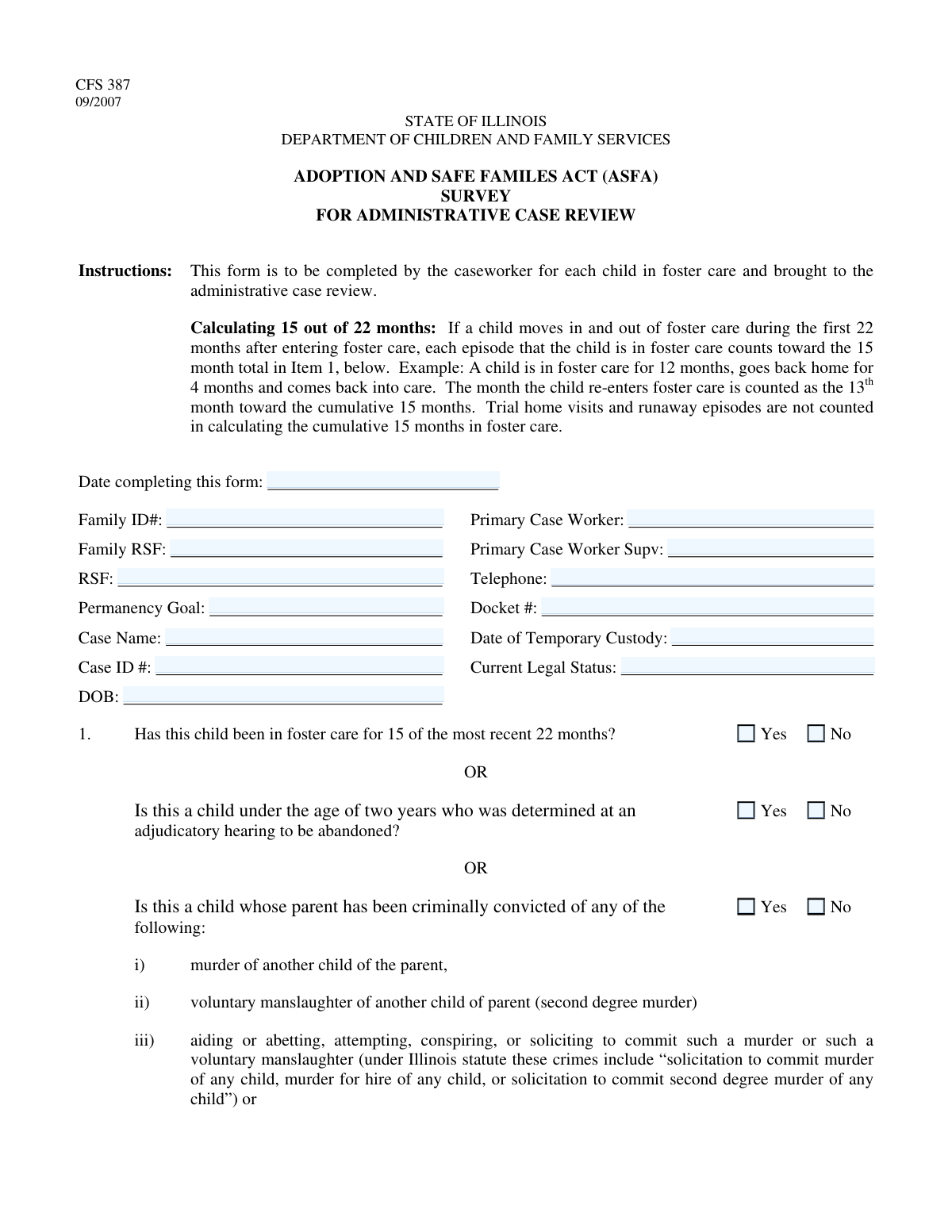
What this form asks for
The AI fills all of it, from your answers or your documents.
The AI checks your answers before you download
14 checks built for this form, so a wrong date or a missing answer is caught before anyone else sees it.
Checks that the 'Date of Temporary Custody' is on or after the individual's 'Date of Birth'. This is a fundamental chronological validation to ensure the data is logical, as custody cannot be established before a person is born. If this check fails, the system should flag an error requiring the user to correct one or both dates.
Ensures the 'Form Completion Date' is a validly formatted date and is not a date in the future. This prevents users from accidentally entering future dates, which would be illogical for a record of a completed action. A failed validation should prompt the user to enter a date that is today or in the past.
Validates that only one of the two checkboxes, 'In foster care for 15 of 22 months - Yes' or 'In foster care for 15 of 22 months - No', is selected. These options are mutually exclusive, and selecting both would create contradictory data. The system should prevent the submission or clear the opposing selection if one is checked.
Verifies that if the 'Screened for TPR - No' checkbox is selected, the 'Explanation for Not Screening' text field is not empty. This is crucial for accountability and case documentation, ensuring that a reason is always provided when a standard procedure is skipped. A failed validation should prevent form submission until an explanation is entered.
Checks that if 'Child Listed with AICI - Yes' is selected, the 'AICI Confirmation Number' field is populated. This validation ensures that a claim of listing with the Adoption and Child Information Center (AICI) is substantiated with a reference number. If the number is missing, the form should be considered incomplete for that section.
Confirms that if the 'AGE' checkbox (indicating the child is 18 or over) is checked, the age calculated using the 'Date of Birth' and 'Form Completion Date' is 18 years or greater. This cross-field check prevents logical inconsistencies between stated age status and the birth date on record. An error should be displayed if the calculated age is less than 18.
And 8 more checks
- Standard Telephone Number Format
- Mandatory Case ID Number
- Conditional Enablement of Reason Codes
- Hierarchical Goal Selection for 'Return Home'
- Mutually Exclusive TPR Screening Status
- Required TPR Petition Filing Date
- Chronological Consistency of Custody and Completion Dates
- Cross-Section Case ID Consistency
Let AI fill out your ASFA Survey
No typing. Every field filled in seconds, checked, ready to sign.
How to Fill Out ASFA Survey Online for Free in 2026
What the AI walks you through.
- Navigate to Instafill.ai and upload or select the Adoption and Safe Families Act (ASFA) Survey form.
- Allow the AI to scan and process the form, identifying all fields for case identification, caseworker details, and legal status.
- Enter the core case details, such as the Case ID, child's name, date of birth, and caseworker information, into the designated fields.
- Answer the series of yes/no questions regarding the child's time in foster care, parental history, and other conditions stipulated by the ASFA.
- Based on your answers, the AI will guide you to the relevant sections, such as providing explanations for not screening for TPR or detailing efforts to find an adoptive home.
- Complete the sections for supporting comments, recommendations, and any additional tasks or documents required for the case review.
- Review all the entered information for accuracy and completeness before finalizing and downloading the completed ASFA Survey for your records or submission.
Common Mistakes in Completing ASFA Survey
The ones the AI is built to catch.
Mixing Up Case, Family, and RSF Identifiers
Ignoring Conditional Question Logic
Entering Inconsistent or Invalid Date Formats
Providing Incomplete or Missing Explanations
Misinterpreting Legal and Agency-Specific Acronyms
Incorrectly Calculating the '15 of 22 Months' Rule
Failing to Complete Dependent Fields
Making Contradictory Selections in Yes/No Pairs
Confusing Regional Screening Dates
Omitting Critical Case Status Information
Frequently Asked Questions About ASFA Survey
Is it really free for 7 days?
Can I fill other forms too?
How do I cancel?
How does the AI fill out ASFA Survey?
What happens to my information?
How complex is ASFA Survey to fill out?
What is the purpose of this form?
Who is responsible for completing this form?
What does the 'In foster care for 15 of 22 months' question mean?
What are the reason codes like 'HMR', 'RET', and 'SGH'?
What is the difference between the 'Pre-screening Date (Cook)' and 'Screening Date (Downstate)'?
What is AICI and when do I need a confirmation number?
What information is needed if a TPR petition has already been filed?
Who fills out the 'Case Reviewer Notes' section at the end of the form?
What documents should I have ready when completing this form?
What qualifies as an 'other compelling reason' (OTH) to not file for TPR?
Can I use an AI tool to help fill out this form?
How can I fill this form online using Instafill.ai?
My PDF form isn't fillable. What can I do?
What is the difference between the 'Family ID Number' and the 'Case ID Number'?
Get your ASFA Survey filled out by AI
$0 today. Cancel before Nov 10 and you pay nothing.
Other forms like this one
family law forms: Form 12.902(b), Family Law Financial Affidavit (Short Form), Florida Supreme Court Approved Family Law Form 12.901(b)(3), Petition for Dissolution of Marriage with No Dependent or Minor Child(ren) or Property (02/18), Form FL-170, Declaration for Default or Uncontested Dissolution or Legal Separation (Family Law), Form FL-100, Petition—Marriage/Domestic Partnership (Family Law), declaration-of-marriage-for-court-proceeding-california-family-law, Florida Supreme Court Approved Family Law Form 12.902(d), Uniform Child Custody Jurisdiction and Enforcement Act (UCCJEA) Affidavit, Florida Family Law Rules of Procedure Form 12.910(a), Summons: Personal Service on an Individual, Florida Supreme Court Approved Family Law Form 12.941(a), Petition for Enforcement of Out-of-State Custody Decree and for Order to Pick Up Minor Child(ren), Florida Supreme Court Approved Family Law Form 12.970(a), Petition for Temporary Custody by Extended Family, Form FL-110, Summons (Family Law), Form FL-120, Response—Marriage/Domestic Partnership (Family Law), ADOPT-200, Adoption Request, ADOPT-200, Stepparent Adoption Request, ADOPT-210, Adoption Agreement, ADOPT-310, Contact After Adoption Agreement, Adoption Assistance Program Nonrecurring Adoption Expense Agreement and Claim, Adoption Request (Stepparent), Florida Family Law Rules of Procedure Form 12.900(b), Notice of and Consent to Limited Appearance, Florida Family Law Rules of Procedure Form 12.900(d), Termination of Limited Appearance, Florida Family Law Rules of Procedure Form 12.900(e), Acknowledgment of Assistance by Attorney
AFE forms: Form 79, Law Enforcement Officers Safety Act Application, State of Florida Department of Highway Safety and Motor Vehicles (FLHSMV) Form HSMV 82993, Separate Odometer Disclosure Statement and Acknowledgment, Form F11645, Public Safety Officer Distribution Request, Maryland Department of Public Safety and Correctional Services Application for Pardon, Form 12.995(c), Safety-Focused Parenting Plan, RFA 03, Resource Family Home Health and Safety Assessment Checklist, Pharmaceutical Benefits Scheme (PBS) Safety Net application and amendment for a PBS Safety Net card form
adoption forms: Judicial Council of California Form ADOPT-210, Adoption Agreement, Judicial Council of California Form ADOPT-210, Adoption Agreement, Vanguard Direct Rollover IRA Adoption Agreement, Voya Investment Management Traditional, Roth, Rollover, and SEP Individual Retirement Account (IRA) Application and Adoption Agreement, ICPC 100B, Interstate Compact on the Placement of Children Report on Child’s Placement Status, AAP 2, Reassessment Information - Adoption Assistance Program, Adoption Assistance Program Nonrecurring Adoption Expense Agreement and Claim, Statement of Acknowledgment - Adoption Implications, Form AAP 3, Adoption Assistance Program (AAP) Notice of Action, Adoption Assistance Program (AAP) - Request for Benefits, Form AAP 3, Adoption Assistance Program (AAP) Negotiation Agreement, Adoption Assistance Program (AAP) Eligibility Certification, Consent to Adoption by Parent, Adoption Request (Stepparent), Petition for Stepparent Adoption, Consent to Stepparent Adoption by Parent in Military, Adoption Assistance Program (AAP) Rate Questionnaire, ADOPT-210, Adoption Agreement, Declaration Confirming Parentage in Stepparent Adoption: Gestational Surrogacy, Form ADOPT-215, Adoption Order
foster care forms: Level of Care (LOC) Assessment for Children in Foster Care, Adoption Assistance Program (AAP) Rate Questionnaire
child welfare forms: ICPC 100B, Interstate Compact on the Placement of Children Report on Child’s Placement Status, Form ICWA-005-INFO, Inquiry and Notice Under the Indian Child Welfare Act (ICWA), CFS 718, Application for Child Welfare Employee Licensure, AAP 2, Reassessment Information - Adoption Assistance Program, Adoption Assistance Program (AAP) - Request for Benefits, Adoption Assistance Program (AAP) Eligibility Certification, Adoption Assistance Program (AAP) Rate Questionnaire, Form ICWA-030, Notice of Child Custody Proceeding for Indian Child (Indian Child Welfare Act), Form ICWA-010(A), Indian Child Inquiry Attachment, Child Welfare Mediation Confidentiality Agreement – Form (CN: 10743-English), New Jersey Judiciary Child Welfare Mediation Referral, Child Welfare Mediation Case Status Report
Let AI fill out your ASFA Survey
Your trial starts once a card is added. You pay nothing before Nov 10.
Our AI already knows this form, all 113 fields of it. Skip the typing: tell it about yourself, or upload what you have, and it fills the whole form in seconds.
- AI fills every field on all 5 pages, tables and checkboxes included
- No typing into boxes: answer a few questions, or upload a document you already have, an old copy of this form, a photo of a document
- The AI checks the answers; you review and change anything before you download
- Download the finished PDF, print it, or sign it online
- Encrypted, and never used to train AI
Cancel before Nov 10 and you pay nothing.
A card is needed to start the trial. Cancel in two clicks from your account.
Terms · Privacy