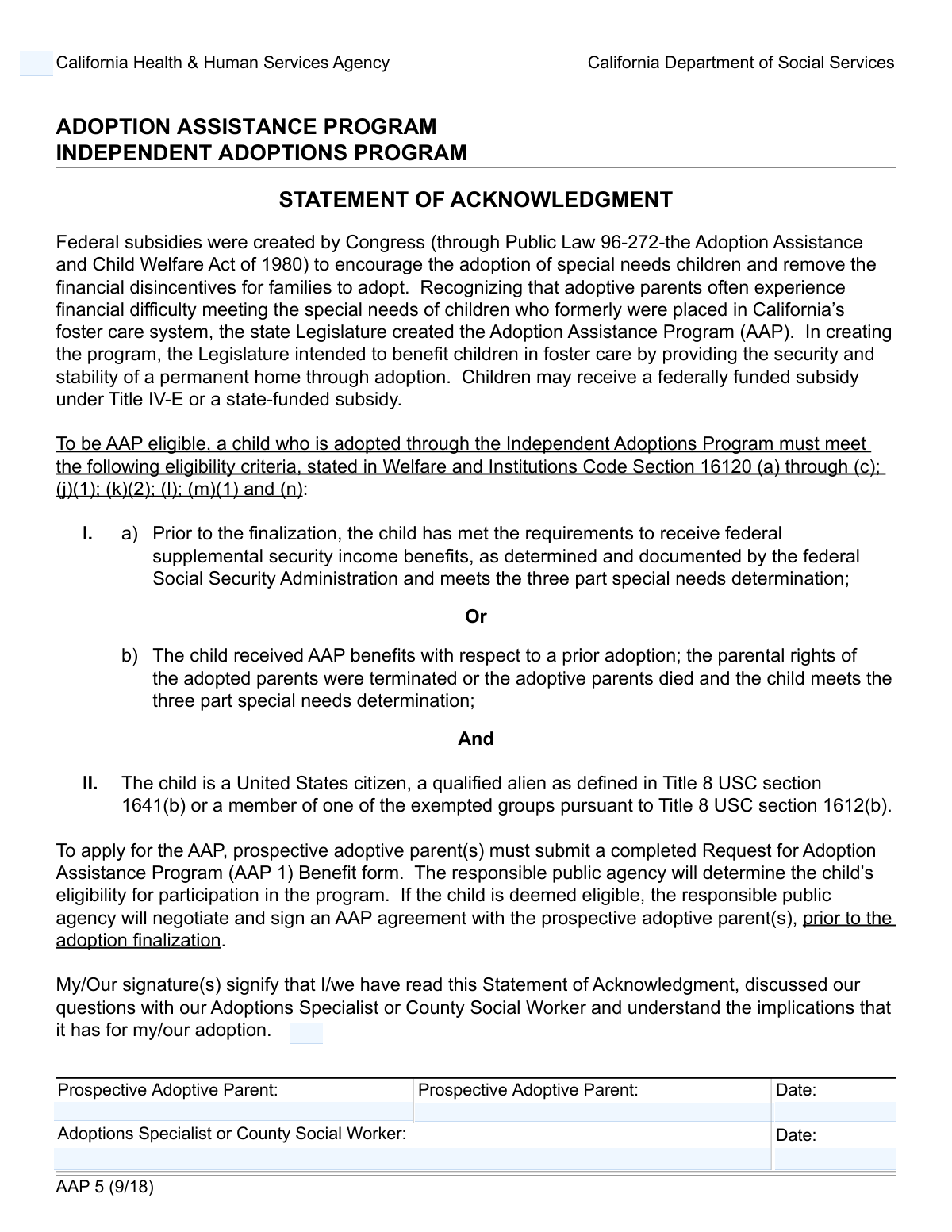
Yes! You can use AI to fill out Statement of Acknowledgment - Adoption Implications

This form serves as a formal declaration by prospective adoptive parents that they have been counseled by an Adoptions Specialist or County Social Worker and fully comprehend the legal, social, and emotional implications of an adoption. It is a critical step in the adoption process to ensure all parties are making a well-informed decision. Today, this form can be filled out quickly and accurately using AI-powered services like Instafill.ai, which can also convert non-fillable PDF versions into interactive fillable forms.
Our AI automatically handles information lookup, data retrieval, formatting, and form filling.
It takes less than a minute to fill out Adoption Implications Acknowledgment using our AI form filling.
Securely upload your data. Information is encrypted in transit and deleted immediately after the form is filled out.

Form specifications

Form name: Statement of Acknowledgment - Adoption Implications
Number of fields: 7
Number of pages: 1
Language: English
Categories: adoption forms, NJ state forms, PA state forms
main-image

Instafill Demo: How to fill out PDF forms in seconds with AI

How to Fill Out Adoption Implications Acknowledgment Online for Free in 2026

Are you looking to fill out a ADOPTION IMPLICATIONS ACKNOWLEDGMENT form online quickly and accurately? Instafill.ai offers the #1 AI-powered PDF filling software of 2026, allowing you to complete your ADOPTION IMPLICATIONS ACKNOWLEDGMENT form in just 37 seconds or less.
Follow these steps to fill out your ADOPTION IMPLICATIONS ACKNOWLEDGMENT form online using Instafill.ai:
  1. 1 Navigate to Instafill.ai and upload or select the 'Statement of Acknowledgment - Adoption Implications' form.
  2. 2 Enter your full legal name to acknowledge you have read and understood the statement's implications.
  3. 3 Provide the full name of the first prospective adoptive parent to serve as their electronic signature, along with the date.
  4. 4 If applicable, enter the full name and signature date for the second prospective adoptive parent.
  5. 5 The form will then be ready for the Adoptions Specialist or County Social Worker to provide their signature and date.
  6. 6 Review all entered information for accuracy and completeness before finalizing the document.
  7. 7 Securely download, print, or share the completed acknowledgment form as required by your adoption agency.

Our AI-powered system ensures each field is filled out correctly, reducing errors and saving you time.

Why Choose Instafill.ai for Your Fillable Adoption Implications Acknowledgment Form?

Speed

Complete your Adoption Implications Acknowledgment in as little as 37 seconds.

Up-to-Date

Always use the latest 2026 Adoption Implications Acknowledgment form version.

Cost-effective

No need to hire expensive lawyers.

Accuracy

Our AI performs 10 compliance checks to ensure your form is error-free.

Security

Your personal information is protected with bank-level encryption.

Frequently Asked Questions About Form Adoption Implications Acknowledgment

This form is used to officially document that you, as a prospective adoptive parent, have read, understood, and discussed the significant implications of adoption with a qualified professional.

Prospective adoptive parents are required to complete this form. This applies whether you are adopting as a single parent or as a couple.

You should enter your full legal name in this field. This action confirms that you have read the statement and understand its contents.

No, if you are a single adoptive parent, you should leave the 'Second Prospective Adoptive Parent Signature' and its corresponding date field blank. These fields are only for joint adoptions.

This is the official adoption professional who has been guiding you through the process and discussed the adoption implications with you. They will complete their own signature section.

You should only sign this form after you have had a detailed discussion with your Adoptions Specialist or Social Worker and feel you completely understand all the information provided.

You are acknowledging your understanding of the legal, emotional, and lifelong responsibilities and rights associated with becoming an adoptive parent. Your social worker should explain these implications to you in detail before you sign.

The form is designed for accessibility, and using the tab key ensures you navigate between fields in the correct order. This helps prevent accidentally skipping a required field.

Yes, services like Instafill.ai use AI to auto-fill form fields accurately and save time. However, you are still responsible for reading and understanding the document's content before signing.

You can upload the form to the Instafill.ai platform. The AI will make the fields interactive, allowing you to type your information, add your signature, and download the completed document.

Services like Instafill.ai can convert flat, non-fillable PDFs into interactive forms. Simply upload your file, and the platform will make it possible to fill out and sign digitally.

The instructions indicate you should enter your full name to serve as a signature. This is a valid digital signature, but you should confirm with your agency if they require a physical 'wet' signature.

Do not sign the form if you are uncertain about anything. Contact your Adoptions Specialist or County Social Worker to get clarification on all of your questions first.

Compliance Adoption Implications Acknowledgment
Validation Checks by Instafill.ai

1
Acknowledgment Parent Name Presence
Checks that the 'Acknowledging Parent Name' field is not empty. This acknowledgment is a critical legal step confirming the parent has read and understood the adoption implications. If this field is left blank, the form submission is considered incomplete and cannot be processed, as there is no confirmation of understanding.
2
Acknowledgment Name Matches a Parent Signature
Verifies that the name in the 'Acknowledging Parent Name' field exactly matches the name in either the 'First Prospective Adoptive Parent Signature' or 'Second Prospective Adoptive Parent Signature' field. This is a crucial integrity check to ensure the person acknowledging the document is one of the legal applicants. A mismatch would halt submission and prompt the user to correct the names, preventing potential identity discrepancies.
3
First Parent Signature Presence
Ensures the 'First Prospective Adoptive Parent Signature Name' field is filled. As the primary applicant, this signature is mandatory for the form to have any legal standing. A missing signature renders the application invalid and will prevent the form from being submitted.
4
Full Legal Name Format for All Signatories
Validates that all name fields ('Acknowledging Parent Name', 'First Prospective Adoptive Parent Signature Name', 'Second Prospective Adoptive Parent Signature', 'Adoptions Specialist or County Social Worker') contain at least two words and consist of alphabetic characters. This helps ensure a full legal name is provided, not an initial or an invalid entry. An invalid format would trigger an error, requiring the user to correct the name before submission.
5
Second Parent Signature Uniqueness
Checks that if the 'Second Prospective Adoptive Parent Signature' field is filled, its value is different from the 'First Prospective Adoptive Parent Signature Name'. This prevents a single parent from being listed twice, ensuring that if two parents are part of the adoption, they are distinct individuals. A validation failure would indicate a data entry error that must be corrected.
6
Conditional Requirement for Second Parent's Signature Date
This rule enforces that the 'Second Prospective Adoptive Parent Signature Date' must be provided if the 'Second Prospective Adoptive Parent Signature' name is entered. A signature is legally incomplete without a corresponding date. If the name is present but the date is missing, the form will be flagged as incomplete, and the user will be required to enter the date.
7
Conditional Absence of Second Parent's Signature Date
This validation ensures that if the 'Second Prospective Adoptive Parent Signature' field is empty (for a single-parent adoption), the 'Second Prospective Adoptive Parent Signature Date' field must also be empty. This prevents stray, irrelevant data from being submitted, which could cause confusion during processing. An error would be shown if a date is present without a corresponding signature name.
8
Valid Date Format for All Date Fields
Validates that all entered dates ('Second Prospective Adoptive Parent Signature Date', 'Date' for Social Worker) are in a recognized date format (e.g., MM/DD/YYYY). This is crucial for maintaining data consistency and ensuring the legal document has a clear, unambiguous date of signature. An invalid format would prevent submission and prompt the user for correction.
9
Signature Dates Are Not in the Future
Checks that any signature date entered on the form is not a future date. A signature date must be in the past or present to be legally valid, as one cannot legally sign a document on a future date. If a future date is entered, the system will reject it and require the user to provide a valid date.
10
Social Worker Signature Presence
Ensures the 'Adoptions Specialist or County Social Worker' signature name field is not empty. This signature is required to officially witness and validate the parents' acknowledgment and signatures, making it a critical component for the form's completion. The form cannot be officially processed without this attestation.
11
Conditional Requirement for Social Worker's Signature Date
Verifies that if the 'Adoptions Specialist or County Social Worker' name is provided, the corresponding 'Date' field is also filled. Similar to the parent's signature, the official's signature is incomplete and legally invalid without a date. A missing date will trigger a validation error, blocking the submission until the date is provided.
12
Social Worker Signature Date Chronology
This check ensures the 'Date' of the Social Worker's signature is on or after the dates of the parent signatures. A social worker cannot legally witness or sign off on a document before the applicants themselves have signed it. This logical check prevents chronological impossibilities and ensures the legal process is followed correctly, flagging an error if the dates are out of order.

Common Mistakes in Completing Adoption Implications Acknowledgment

Using an Informal or Incomplete Name

Applicants often use a nickname, an initial, or omit their middle name instead of providing their 'full legal name' as required. This occurs because people are used to using informal names in daily life. On a legal document like an adoption acknowledgment, this can lead to rejection or processing delays as the signature may not be considered valid. To avoid this, always enter your name exactly as it appears on official government identification like a driver's license or passport. AI-powered tools like Instafill.ai can help by storing and auto-filling your full legal name correctly every time.

Omitting Second Parent's Information in a Joint Adoption

In joint adoptions, it's common for one parent to fill out the form and accidentally overlook the fields for the second parent's signature and date. This results in an incomplete application that cannot be processed, causing significant delays in the adoption process. To prevent this, both parents should review the form before submission to ensure all required signature and date fields are completed. Using a form-filling tool can help highlight all required fields, reducing the chance of such an omission.

Applicant Incorrectly Fills Official's Section

Prospective parents sometimes mistakenly fill in the signature and date fields reserved for the 'Adoptions Specialist or County Social Worker'. This usually happens when they are trying to be thorough but misunderstand who is responsible for which section. This error invalidates the document, as it requires the official's direct signature, and the form must be redone. Applicants should only fill sections designated for them and leave all official-use sections blank.

Forgetting to Date a Signature

An applicant may type their name to serve as a signature but forget to enter the corresponding date. A signature on a legal document is often invalid without a date, as it establishes the timeline of when the agreement was acknowledged. This oversight requires the form to be returned for correction, delaying the process. Always double-check that every signature field has a corresponding date filled in. Smart form fillers like Instafill.ai can often flag an empty date field that is associated with a signature.

Using an Ambiguous Date Format

The form does not specify a date format, leading applicants to use formats like MM/DD/YYYY or DD/MM/YYYY. Using a purely numerical format like '03/04/2024' can create ambiguity (March 4th or April 3rd?), which is problematic for legal records. To avoid this, it is best practice to use a clear, unambiguous format such as 'Month Day, YYYY' (e.g., 'April 3, 2024'). AI form-filling tools can be configured to use a consistent, clear date format, preventing this type of error.

Inconsistent Name Entry Across Fields

Applicants may enter their name slightly differently in the 'Acknowledging Parent Name' field versus the 'First Prospective Adoptive Parent Signature' field (e.g., 'John Fitzgerald Doe' vs. 'John F. Doe'). While seemingly minor, inconsistencies on a legal form can raise questions about the signer's identity and intent, potentially causing delays. It is crucial to use the exact same full legal name in all fields where it is required. Tools like Instafill.ai help ensure consistency by auto-filling from a single, verified source profile.

Misunderstanding the 'Typed Name as Signature' Concept

Some individuals may not realize that typing their full name into the signature field constitutes a legally binding electronic signature. They might treat it as a simple data entry field and not give it the legal weight it carries, potentially leading to disputes later. It's critical to understand that by typing your name, you are affirming the document's contents as if you had physically signed it. The form instructions should be read carefully to understand the implications of this action.

Incorrectly Filling Conditional Fields

The form specifies that the date for the second parent and the social worker should only be filled if the corresponding signature is present. Applicants might pre-fill a date field or fill it by mistake without the signature, violating the form's logic. This creates a confusing and technically incorrect record. To avoid this, carefully follow the instructions for each field and only provide information when the prerequisite conditions are met. Advanced form fillers can help by enforcing these rules automatically.

Single Applicant Fills Joint Adoption Fields

A single prospective parent might mistakenly enter information into the 'Second Prospective Adoptive Parent' signature and date fields. This can happen out of confusion or by tabbing through fields too quickly. This error creates an inaccurate record, suggesting a joint adoption where there is none, and will require correction. Single applicants must be careful to leave these specific fields completely blank. If the form is a non-fillable PDF, tools like Instafill.ai can convert it to a smart, fillable version that can help guide the user based on their single-applicant status.

Ignoring Form Navigation Instructions

The form explicitly instructs users to navigate with the 'tab key' and not the 'F key,' likely for accessibility and screen reader compatibility. Users accustomed to other navigation methods might ignore this, which can cause them to miss important instructional text or break the form's intended flow for assistive technologies. This can lead to an incorrectly filled form or a frustrating user experience for those relying on accessibility features. Always read and follow any specific navigation or technical instructions provided at the beginning of a form.
Saved over 80 hours a year

“I was never sure if my IRS forms like W-9 were filled correctly. Now, I can complete the forms accurately without any external help.”

Kevin Martin Green

Your data stays secure with advanced protection from Instafill and our subprocessors

Robust compliance program

Transparent business model

You’re not the product. You always know where your data is and what it is processed for.

ISO 27001, HIPAA, and GDPR

Our subprocesses adhere to multiple compliance standards, including but not limited to ISO 27001, HIPAA, and GDPR.

Security & privacy by design

We consider security and privacy from the initial design phase of any new service or functionality. It’s not an afterthought, it’s built-in, including support for two-factor authentication (2FA) to further protect your account.

Fill out Adoption Implications Acknowledgment with Instafill.ai

Worried about filling PDFs wrong? Instafill securely fills statement-of-acknowledgment-adoption-implications forms, ensuring each field is accurate.