
Instafill.ai
7 days free
AI form filling · 34 fields · 3 pages · done in seconds

Yes! You can use AI to fill out Form 1098-T, Tuition Statement

Don't type 34 fields by hand. Tell our AI about yourself, or upload a document you already have, and it fills every field in seconds. You check it, then download, print or sign.
7 days free, then $19.99/month · Cancel anytime
AI fills it, no typingEncrypted, never used to train AICancel in two clicks
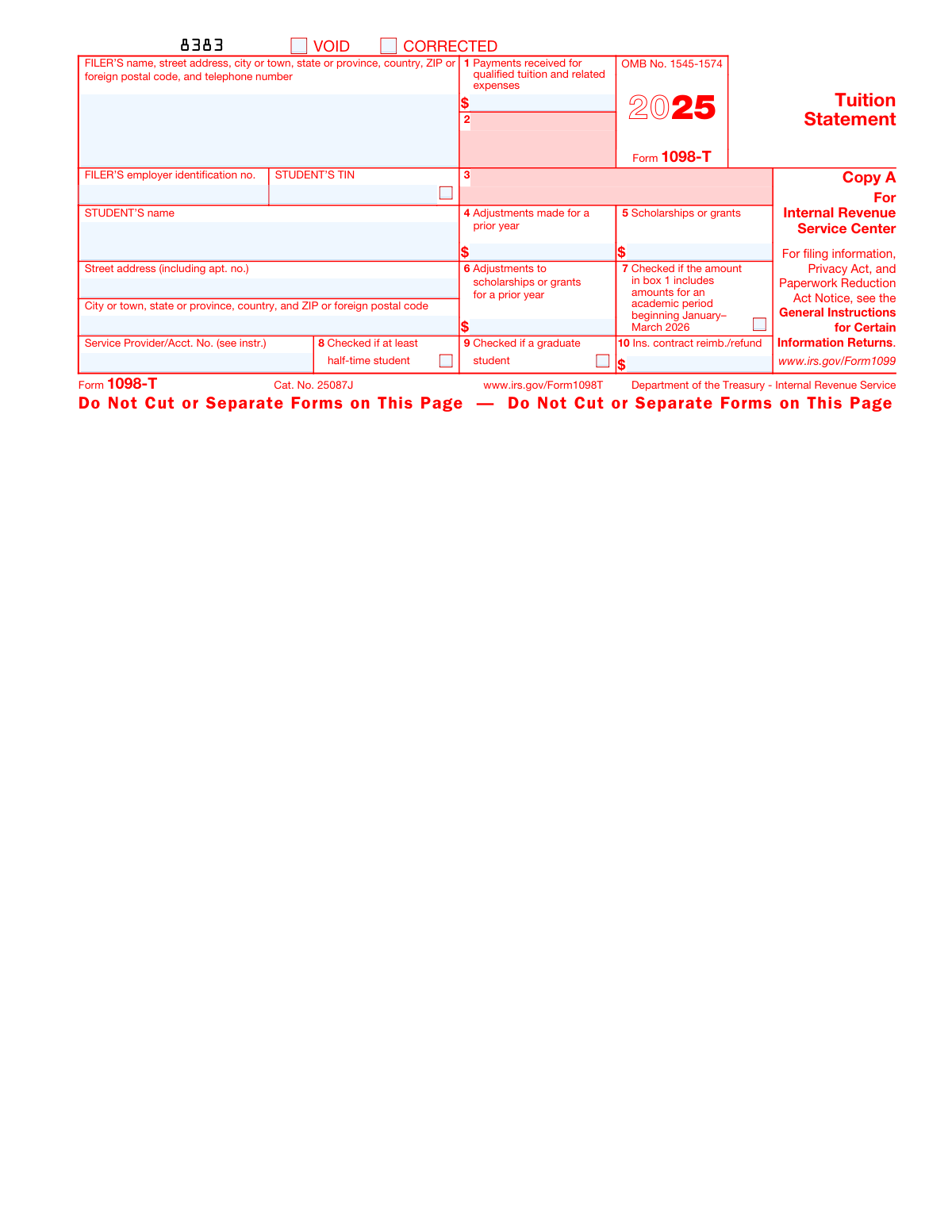
Form 1098-T, Tuition Statement, page 1
Basic · 40/100Form Complexity Index

The AI does the filling. You just check it.

No typing into boxes, nothing to install.

Tell the AI about youAnswer a few questions in plain words, or upload a document you already have. That is all the typing there is.
AI fills every field in secondsIt puts each answer in the right box on every page, checkboxes included.
Check it and downloadReview every field, change anything, then download, print or sign the PDF.

What this form asks for

The AI fills all of it, from your answers or your documents.

Form 1098-T, also known as the Tuition Statement, is a tax form used by educational institutions to report payments received for qualified tuition and related expenses. It is important for students or their parents to claim education credits on their tax returns.
Fillable fields34
Pages3
Sections11
Form Complexity IndexBasic, 40/100

The AI checks your answers before you download

15 checks built for this form, so a wrong date or a missing answer is caught before anyone else sees it.

Ensures that the correct copy of Form 1098-T is used for filing purposes, with Copy A for the IRS and Copy B for the student.

The validation process ensures that the correct copy of Form 1098-T is utilized for the appropriate purpose. It distinguishes between Copy A, which is designated for the Internal Revenue Service (IRS), and Copy B, which is intended for the student's records. This check prevents the submission of incorrect copies to the wrong entities, thereby maintaining compliance with filing requirements. It also helps to avoid potential confusion or delays in processing the form.

Confirms that the scannable Copy A is not filed with the IRS if downloaded from the website, and that official IRS information returns are ordered if necessary.

This validation check confirms that if Copy A of Form 1098-T is downloaded from the website, it is not scannable and therefore should not be filed with the IRS. The check ensures that users are aware of the need to order official IRS information returns, which are scannable, for submission. This step is crucial to prevent the rejection of the form due to scanning issues and to ensure that the filing process adheres to IRS guidelines.

Verifies that the educational institution's or filer's information is complete, including name, address, EIN, and telephone number.

The verification process checks the completeness of the educational institution's or filer's information on Form 1098-T. It ensures that the name, address, Employer Identification Number (EIN), and telephone number are accurately provided. This information is essential for the IRS to identify the filing institution and for potential follow-up communication. Incomplete or incorrect information can lead to processing delays or misidentification.

Checks that the student's Taxpayer Identification Number (TIN) is correctly entered and that it is a valid SSN, ITIN, ATIN, or EIN.

This check involves verifying the accuracy and validity of the student's Taxpayer Identification Number (TIN) on Form 1098-T. It ensures that the TIN provided is correctly formatted and is a valid Social Security Number (SSN), Individual Taxpayer Identification Number (ITIN), Adoption Taxpayer Identification Number (ATIN), or Employer Identification Number (EIN). This validation is critical for the IRS to correctly attribute the tuition statement to the right taxpayer.

Validates the student's full name and address, ensuring the inclusion of apartment number, city, state, country, and ZIP or foreign postal code.

The validation process ensures that the student's full name and address are accurately captured on Form 1098-T. It checks for the inclusion of all necessary details such as the apartment number, city, state, country, and ZIP or foreign postal code. This comprehensive validation is important for ensuring that the form is correctly associated with the student and that any correspondence or tax documents reach the student without delay.

Confirms the entry of the service provider's information or the student's account number, if applicable.

This validation check ensures that the service provider's information or the student's account number is accurately entered on Form 1098-T. It confirms that all necessary fields related to the service provider or student account number are filled out correctly. The check is crucial for the proper identification of the taxpayer's account and to maintain the integrity of the information reported to the IRS. If applicable, it also cross-references the provided information with existing records to ensure consistency and accuracy.

And 9 more checks
  • Verifies that the total payments received for qualified tuition and related expenses in Box 1 are accurately reported and that any reimbursements or refunds are subtracted.
  • Checks for any adjustments made for a prior year in Box 4 regarding qualified tuition and related expenses.
  • Ensures that the total of all scholarships or grants administered and processed by the educational institution is correctly entered in Box 5.
  • Verifies any adjustments to scholarships or grants for a prior year in Box 6.
  • Confirms that Box 7 is checked if the amount in Box 1 includes amounts for an academic period beginning in the first three months of the following year.
  • Checks that Box 8 is checked if the student is carrying at least one-half the normal full-time workload for their course of study.
  • Ensures that Box 9 is checked if the student is enrolled in a program leading to a graduate degree or certificate.
  • Verifies the total amount of reimbursements or refunds of qualified tuition and related expenses made by an insurer in Box 10.
  • Confirms that Copy B is retained for the student's records and provided to the student or the person who can claim the student as a dependent.

Let AI fill out your Form 1098-T

No typing. Every field filled in seconds, checked, ready to sign.

7 days free, then $19.99/month · Cancel anytime

How to Fill Out Form 1098-T Online for Free in 2026

What the AI walks you through.

  1. Visit instafill.ai site and select Form 1098-T
  2. Enter filer's information
  3. Input student's TIN and name
  4. Provide student's address details
  5. Fill in tuition and expenses payments
  6. Report scholarships or grants received
  7. Indicate adjustments for prior years
  8. Check student status (half-time, graduate)
  9. Sign and date the form electronically
  10. Check for accuracy and submit form

Common Mistakes in Completing Form 1098-T

The ones the AI is built to catch.

Using scannable Copy A for IRS filing
Copy A of Form 1098-T is scannable by the IRS for processing but should not be used for filing with the IRS by the filer. Filers should use the appropriate version of the form, which is generally provided by the IRS or an authorized provider. To avoid this mistake, filers should ensure they are using the correct non-scannable version of the form for electronic or mail submission to the IRS. It is important to read the instructions provided with the form carefully to determine the correct copy to be used for filing.
Failing to order official IRS information returns
Filers sometimes neglect to order official IRS information returns, which can lead to using incorrect or outdated forms. It is crucial to use the most current version of Form 1098-T to ensure compliance with the IRS requirements. Filers can order official forms from the IRS website or by calling the IRS to avoid this mistake. Additionally, using electronic filing methods through IRS-approved software can help ensure that the correct forms are used.
Incorrectly entering the filer's EIN
Entering the Employer Identification Number (EIN) incorrectly on Form 1098-T can lead to processing delays and potential issues with the IRS. Filers must double-check the EIN to ensure it matches the number assigned by the IRS. To avoid this mistake, filers should verify the EIN against official documents or previous tax filings before entering it on the form. If there is any uncertainty about the correct EIN, contacting the IRS or a tax professional for verification is recommended.
Omitting the student's TIN or using the wrong type
The student's Taxpayer Identification Number (TIN) is a critical piece of information on Form 1098-T. Omitting the TIN or using an incorrect type, such as a Social Security Number (SSN) instead of an Individual Taxpayer Identification Number (ITIN), can result in errors in the student's tax records. To avoid this mistake, filers should request the student's TIN in advance and confirm its accuracy. It is also important to understand the difference between the types of TINs and use the correct one as required.
Leaving out the student's full name or address
The student's full legal name and address are required on Form 1098-T to properly identify the student for tax purposes. Leaving out this information or providing incomplete details can cause complications with the student's tax benefits. Filers should review the student's official records to ensure the full name and address are accurately captured on the form. It is also advisable to confirm these details with the student directly to prevent any discrepancies.
Forgetting to include the service provider's information
The service provider's information is crucial for identifying the educational institution or entity reporting the tuition payments. Neglecting to include this information can lead to processing delays and potential confusion. To avoid this mistake, double-check that all sections of the service provider's information are completed, including the name, address, and federal identification number. It's also advisable to verify the accuracy of this information against official documents or by contacting the institution directly.
Not entering total payments received in Box 1
Box 1 of Form 1098-T should reflect the total payments received for qualified tuition and related expenses. Failing to enter the correct amount can result in incorrect tax benefits calculations. To prevent this error, carefully compile all tuition payments made during the tax year before filling out the form. Ensure that the total amount entered in Box 1 matches your financial records and includes all payments received but not necessarily billed within the tax year.
Entering reimbursements in Box 1 without subtracting them
Reimbursements or refunds of qualified tuition and related expenses should not be included in the total payments reported in Box 1. Including these amounts without subtracting them can lead to an overstated figure. To avoid this, subtract any reimbursements or refunds received during the tax year from the total payments before entering the net amount in Box 1. Keep detailed records of all transactions to ensure accuracy and ease of reference when completing the form.
Failing to report adjustments for prior year in Box 4
Box 4 is designated for reporting any adjustments made for a prior year's qualified tuition and related expenses. Omitting this information can affect the taxpayer's eligibility for certain tax credits or deductions. To prevent this oversight, review the previous year's financial records for any adjustments or refunds that apply to the prior year's expenses. Accurately report these amounts in Box 4 to ensure the taxpayer's return reflects the correct information.
Incorrectly entering scholarships or grants in Box 5
Box 5 of Form 1098-T is intended for reporting scholarships or grants that the student received. Incorrectly reporting these amounts can lead to an inaccurate calculation of education credits or deductions. To avoid this error, confirm the total amount of scholarships or grants received during the tax year and enter this figure in Box 5. It is important to distinguish between taxable and non-taxable portions of scholarships and grants, as this can impact the tax treatment of these amounts.
Omitting adjustments to scholarships or grants in Box 6
Failing to report adjustments to scholarships or grants from a prior year in Box 6 can lead to an inaccurate tax return, which may affect eligibility for education credits. To avoid this mistake, carefully review any adjustments made to scholarships or grants that were reported on a prior year's Form 1098-T. Ensure that these adjustments are accurately reflected in Box 6. Double-check records and consult with the educational institution if there is any uncertainty regarding the amounts to be reported.
Not checking Box 7 when including next year's amounts
When Box 7 is left unchecked while reporting amounts for an academic period beginning in the first three months of the next year, it can cause confusion and potentially lead to an incorrect tax filing. To prevent this error, verify if any amounts reported in Box 1 or Box 2 pertain to the academic period starting in the next calendar year. If so, ensure that Box 7 is checked to indicate this. This helps maintain the accuracy of the tax year to which the tuition payments apply.
Incorrectly checking Box 8 for part-time workload
Box 8 should only be checked if the student is enrolled at least half-time for one academic period during the calendar year. Incorrectly checking this box for students with a part-time workload can misrepresent their enrollment status. To avoid this, confirm the student's enrollment status with the educational institution's records before marking Box 8. It is important to understand the institution's definition of half-time enrollment to ensure accurate reporting.
Misidentifying graduate program enrollment in Box 9
Incorrectly indicating graduate program enrollment in Box 9 when the student is not enrolled in a program leading to a graduate-level degree, certificate, or other recognized graduate-level educational credential can lead to improper tax treatment. To avoid this mistake, verify the student's enrollment status and the level of the program they are enrolled in. Only check Box 9 if the student is indeed enrolled in a graduate program. Consult with the educational institution if there is any doubt about the program level.
Neglecting to enter insurer reimbursements in Box 10
Omitting to report any reimbursements or refunds of qualified tuition and related expenses made by an insurer in Box 10 can result in an incorrect tax return. To prevent this oversight, review any insurance reimbursements received for the tax year and ensure they are accurately reported in Box 10. Keep detailed records of all such transactions and cross-reference them with the Form 1098-T to maintain accurate and complete reporting of financial information.
Not retaining Copy B for the student's records
Students or parents often discard Copy B of Form 1098-T, which is meant for the student's records. This copy is crucial for preparing tax returns and substantiating claims for education credits. To avoid this mistake, it is recommended that students keep all tax documents, including Form 1098-T, in a secure place and maintain their records for at least three years from the date they file their tax return. Having a designated folder for tax documents can help ensure that important forms are not misplaced or discarded.
Instructing students to contact filer for credit info
Filers sometimes mistakenly advise students to contact them for information regarding education credits. However, filers are not responsible for providing tax credit advice. Students should be directed to consult a tax professional or refer to official IRS publications for guidance on education credits. Filers can help by providing the correct IRS publications or directing students to the IRS website for accurate information. This ensures that students receive reliable advice for their specific tax situations.
Not referring to IRS publications for education credits
Filers and students often overlook the importance of referring to IRS publications for information on education credits. This can lead to misunderstandings about eligibility and the proper way to claim credits. To prevent this, it is essential to review IRS Publication 970, 'Tax Benefits for Education,' which provides detailed information on education-related tax benefits. Keeping up-to-date with the latest IRS guidelines can help ensure that credits are claimed correctly and that students take full advantage of the tax benefits available to them.
Ignoring IRS website for updates on Form 1098-T
There is a tendency to ignore the IRS website for the most current updates on Form 1098-T, which can result in using outdated information when filing taxes. The IRS regularly updates its forms and instructions, so it is crucial to check the IRS website for the latest version of Form 1098-T and its instructions before filing. This proactive approach helps to avoid errors and ensures compliance with the most recent tax laws and regulations. Filers and students should make it a habit to verify the form's version they are using each tax season.

Frequently Asked Questions About Form 1098-T


Is it really free for 7 days?
Yes. You pay $0 today. Cancel before Nov 1 and you are never charged. Keep it, and it is $19.99 a month for 5 fills of your Form 1098-T.
Can I fill other forms too?
This plan is for your Form 1098-T: your own AI agent fills it as often as 5 times a month. To fill other forms and upload your own, choose a Professional plan from your account.
How do I cancel?
From your account, in two clicks, any time. No email, no call.
How does the AI fill out Form 1098-T?
You answer a few questions in plain words, or upload a document you already have. The AI reads what you give it and puts each answer into the right field of Form 1098-T, on every page, in seconds. It checks the answers against the form's own rules, and you review and change anything before you download, print or sign.
What happens to my information?
It is encrypted in transit and at rest, and it is never used to train AI.
How complex is Form 1098-T to fill out?
Form 1098-T has a Form Complexity Index of 40 out of 100, in the basic tier: 34 fillable fields across 3 pages. Instafill.ai's AI fills it in under a minute, with every field there for you to review before you download.
What is Form 1098-T, Tuition Statement?
Form 1098-T, Tuition Statement, is a tax form filed by educational institutions to report payments received and amounts billed for qualified tuition and related expenses, as well as scholarships and grants, for each student enrolled for any academic period. This form is used by students or their parents to claim education credits like the American Opportunity Credit or Lifetime Learning Credit on their federal income tax returns.
Who should receive Form 1098-T?
Form 1098-T should be received by students who are enrolled at a college, university, or eligible educational institution and have incurred qualified educational expenses during the tax year. The form is typically provided to students who are paying for their own education or whose education expenses are being paid by a third party. It is not provided to students whose tuition and related expenses are entirely covered by scholarships or grants.
What is the purpose of Form 1098-T?
The purpose of Form 1098-T is to provide students with information that may help them determine their eligibility for education-related tax credits and deductions. The form reports the amount of qualified tuition and related expenses paid by or billed to the student during the tax year, as well as any scholarships or grants received. This information is used to calculate the amount of education credits, such as the American Opportunity Credit or Lifetime Learning Credit, that the student or their parents may claim on their tax return.
Can I print and file Copy A of Form 1098-T from the IRS website?
No, you cannot print and file Copy A of Form 1098-T from the IRS website. Copy A of the form is a scannable document that must be ordered from the IRS and filed with the IRS by the educational institution. Students and their parents should use Copy B of the form, which can be printed from the IRS website or received from the educational institution, for their tax records and when preparing their tax returns.
What are the penalties for filing a scannable Form 1098-T that can't be scanned by the IRS?
If an educational institution files a scannable Form 1098-T that cannot be scanned by the IRS due to improper formatting or other issues, the institution may be subject to penalties. These penalties can include fines for each form that does not meet the IRS's scanning standards. The exact amount of the penalties can vary based on the severity of the issue and the number of forms affected. Educational institutions are responsible for ensuring that the forms they file are scannable and comply with IRS requirements.
Where can I find the General Instructions for Certain Information Returns?
The General Instructions for Certain Information Returns can be found on the IRS website. You can navigate to the 'Forms and Instructions' section and search for the instructions related to information returns. These instructions provide guidelines for filing forms such as Form 1098-T, including deadlines, filing requirements, and procedures.
Is it mandatory to e-file Form 1098-T if I have 10 or more information returns?
Yes, it is mandatory to e-file Form 1098-T if you are required to file 10 or more information returns during the calendar year. The IRS requires electronic filing to improve processing efficiency and accuracy. However, if you have fewer than 250 returns, you may have the option to file on paper, but electronic filing is still encouraged.
How can I order official IRS information returns that include a scannable Copy A?
To order official IRS information returns, including a scannable Copy A for Form 1098-T, you can visit the IRS website or call the IRS order line. The IRS provides these forms free of charge, and they will be mailed to you. It's important to use the official IRS forms to ensure that the scannable Copy A is correctly processed by the IRS scanning systems.
What publications provide more information about printing Form 1098-T?
Publications that provide more information about printing Form 1098-T include the General Instructions for Certain Information Returns and the specific instructions for Form 1098-T. These publications can be found on the IRS website and contain detailed information on the requirements for printing and formatting the forms to ensure they meet IRS standards.
What should I do with Copy B of Form 1098-T?
Copy B of Form 1098-T is intended for the student or the person who can claim the student as a dependent. You should furnish Copy B to the student by the end of January following the tax year in which the payments were made or amounts billed. The student or their guardian uses this copy for information when filing their tax return, particularly for claiming education credits or deductions.
How is Form 1098-T used to claim education credits?
Form 1098-T, Tuition Statement, is used by eligible educational institutions to report information about their students to the IRS as required by the Taxpayer Relief Act of 1997. This form helps students and their families determine eligibility for education credits such as the American Opportunity Credit and the Lifetime Learning Credit. The information on Form 1098-T includes amounts paid for qualified tuition and related expenses, as well as scholarships and grants received, which are necessary to calculate the allowable education credit. Taxpayers use the information from Form 1098-T to complete IRS Form 8863, Education Credits (American Opportunity and Lifetime Learning Credits), and to claim the credits on their federal income tax return.
What should I do if my Student's Taxpayer Identification Number (TIN) is not shown on Form 1098-T?
If the student's Taxpayer Identification Number (TIN) is not shown on Form 1098-T, the student should contact the educational institution that issued the form to request a corrected Form 1098-T. The TIN is necessary for the IRS to match the form with the student's tax return and for the student to claim education credits. If the TIN is missing or incorrect, it could lead to delays or denials of the education credit. It's important to address this issue promptly to ensure that the education credits can be claimed accurately.
What does Box 1 on Form 1098-T represent?
Box 1 on Form 1098-T represents the total amount of payments received by an eligible educational institution in the calendar year from any source for qualified tuition and related expenses less any reimbursements or refunds made during the calendar year that relate to those payments received during the calendar year. It does not include amounts paid for room and board, insurance, medical expenses (including student health fees), transportation, or similar personal, living, or family expenses. The amount reported in Box 1 is used to determine the amount of education credits a taxpayer may be eligible to claim.
What does Box 4 on Form 1098-T indicate?
Box 4 on Form 1098-T indicates any adjustments made by the educational institution for a prior year to qualified tuition and related expenses that were reported on a prior year Form 1098-T. This could include reductions in charges for tuition, fees, or other related expenses that were previously reported. The amount in Box 4 is important because it may affect the calculation of education credits that the taxpayer claimed in a previous year. If there are adjustments reported in Box 4, the taxpayer may need to file an amended tax return for the prior year.
How do scholarships or grants reported in Box 5 affect my education credit?
Scholarships or grants reported in Box 5 of Form 1098-T represent the total amount of any scholarships or grants that the educational institution administered and processed for the payment of the student's costs of attendance. These amounts reduce the qualified tuition and related expenses that a taxpayer may consider when calculating an education credit. Essentially, the amount of the education credit is based on the net cost of qualified education expenses paid out-of-pocket after subtracting any scholarships, grants, and other tax-free educational assistance. If the amount in Box 5 exceeds the amount of qualified tuition and related expenses in Box 1, the excess must be reported as taxable income by the student.
What is the significance of Box 7 on Form 1098-T?
Box 7 on Form 1098-T indicates whether the amount in Box 1 includes amounts for an academic period beginning in January through March of the next year. Essentially, if Box 7 is checked, it means that the reported payments for qualified tuition and related expenses include amounts for an academic period that begins in the first three months of the following year. This is important for taxpayers to know because it can affect their eligibility for certain education credits or deductions in the current tax year.
What does Box 8 indicate on Form 1098-T?
Box 8 on Form 1098-T indicates whether the student is considered to be at least a half-time student for one academic period that began during the tax year. The educational institution checks this box if the student was enrolled at least half-time in a program leading to a degree, certificate, or other recognized educational credential. This information is relevant for taxpayers as it may determine eligibility for certain education tax benefits, such as the American Opportunity Tax Credit.
What does Box 9 indicate on Form 1098-T?
Box 9 on Form 1098-T indicates whether the student is enrolled in a program leading to a graduate degree, graduate-level certificate, or other recognized graduate-level educational credential. If this box is checked, it means the student is considered a graduate student for the tax year, which can impact the type of education credits or deductions they may be eligible for, such as the Lifetime Learning Credit.
How do reimbursements or refunds reported in Box 10 affect my education credit?
Reimbursements or refunds reported in Box 10 of Form 1098-T represent the amounts refunded to the student for qualified tuition and related expenses that were reported in a prior year. These amounts may reduce any allowable education credit that you claimed for the prior year (such as the American Opportunity Tax Credit or the Lifetime Learning Credit). This may require you to recalculate the credit for the year in which the reimbursement or refund was received and possibly amend your tax return for the prior year if the recalculated credit is different from the credit you originally claimed.
Where can I find the latest information about developments related to Form 1098-T?
The latest information about developments related to Form 1098-T can be found on the IRS website (www.irs.gov). You can search for Form 1098-T or its instructions to find any updates, changes in the law, or additional guidance that may affect the form. Additionally, you can check for any recent tax law changes that may impact education credits and deductions. It's important to review the most current information to ensure compliance with tax laws and to maximize potential education tax benefits.
Encrypted in transit and at restNever used to train AIDelete your forms any time

Get your Form 1098-T filled out by AI

$0 today. Cancel before Nov 1 and you pay nothing.

Other forms like this one

PA state forms: Form 1095-A, Health Insurance Marketplace Statement, Form W-2, Wage and Tax Statement, Form 593, Real Estate Withholding, Form 8938, Statement of Specified Foreign Financial Assets, Form CMS-2567, Statement of Deficiencies, Form 1098, Mortgage Interest Statement, Form 1099-S, Proceeds From Real Estate Transactions, Form 1098-E, Student Loan Interest Statement, Form DS-3053, Statement of Consent, Form DS-86, Statement of Non-Receipt of a U.S. Passport, Form DS-86, Statement of Non-Receipt of a U.S. Passport, Form 108, Statement of Intention, Form 107, Statement of Financial Affairs, Form 121, Statement About Your SSNs, Form 122A-1, Chapter 7 Statement of Current Monthly Income, Center for Infertility & Reproductive Surgery – New Patient Questionnaire and Patient/Guarantor Statement (Brigham and Women’s Hospital, Department of Obstetrics and Gynecology), Adult Travel Document Application for Stateless and Protected Persons in Canada (16 years of age or over) (PPTC 190), Form W-8IMY (Rev. October 2021), Certificate of Foreign Intermediary, Foreign Flow-Through Entity, or Certain U.S. Branches for United States Tax Withholding and Reporting, Form W-2, Wage and Tax Statement (2025), State of New Mexico Workers’ Compensation Administration — Workers' Compensation Complaint (Rev. 8/22) (11.4.4.9 NMAC)

NJ state forms: Form 1095-A, Health Insurance Marketplace Statement, Form W-2, Wage and Tax Statement, Form 593, Real Estate Withholding, Form 8938, Statement of Specified Foreign Financial Assets, Form CMS-2567, Statement of Deficiencies, Form 1098, Mortgage Interest Statement, Form 1099-S, Proceeds From Real Estate Transactions, Form 1098-E, Student Loan Interest Statement, Form DS-3053, Statement of Consent, Form DS-86, Statement of Non-Receipt of a U.S. Passport, Form DS-86, Statement of Non-Receipt of a U.S. Passport, Form 108, Statement of Intention, Form 107, Statement of Financial Affairs, Form 121, Statement About Your SSNs, Form 122A-1, Chapter 7 Statement of Current Monthly Income, Center for Infertility & Reproductive Surgery – New Patient Questionnaire and Patient/Guarantor Statement (Brigham and Women’s Hospital, Department of Obstetrics and Gynecology), Adult Travel Document Application for Stateless and Protected Persons in Canada (16 years of age or over) (PPTC 190), Form W-8IMY (Rev. October 2021), Certificate of Foreign Intermediary, Foreign Flow-Through Entity, or Certain U.S. Branches for United States Tax Withholding and Reporting, Form W-2, Wage and Tax Statement (2025), State of New Mexico Workers’ Compensation Administration — Workers' Compensation Complaint (Rev. 8/22) (11.4.4.9 NMAC)

state ID forms: Application for Renewal or Duplicate of Alabama Driver License or ID card, Form 1095-A, Health Insurance Marketplace Statement, Form W-2, Wage and Tax Statement, Form 593, Real Estate Withholding, Form 8938, Statement of Specified Foreign Financial Assets, Form CMS-2567, Statement of Deficiencies, Form 1098, Mortgage Interest Statement, Form 1099-S, Proceeds From Real Estate Transactions, Form 1098-E, Student Loan Interest Statement, Form DS-3053, Statement of Consent, Form DS-86, Statement of Non-Receipt of a U.S. Passport, Form 108, Statement of Intention, Form 107, Statement of Financial Affairs, Form 121, Statement About Your SSNs, Form 122A-1, Chapter 7 Statement of Current Monthly Income, Center for Infertility & Reproductive Surgery – New Patient Questionnaire and Patient/Guarantor Statement (Brigham and Women’s Hospital, Department of Obstetrics and Gynecology), Adult Travel Document Application for Stateless and Protected Persons in Canada (16 years of age or over) (PPTC 190), Form W-8IMY (Rev. October 2021), Certificate of Foreign Intermediary, Foreign Flow-Through Entity, or Certain U.S. Branches for United States Tax Withholding and Reporting, Form W-2, Wage and Tax Statement (2025), State of New Mexico Workers’ Compensation Administration — Workers' Compensation Complaint (Rev. 8/22) (11.4.4.9 NMAC)

7 days free, then $19.99/month · Cancel anytime