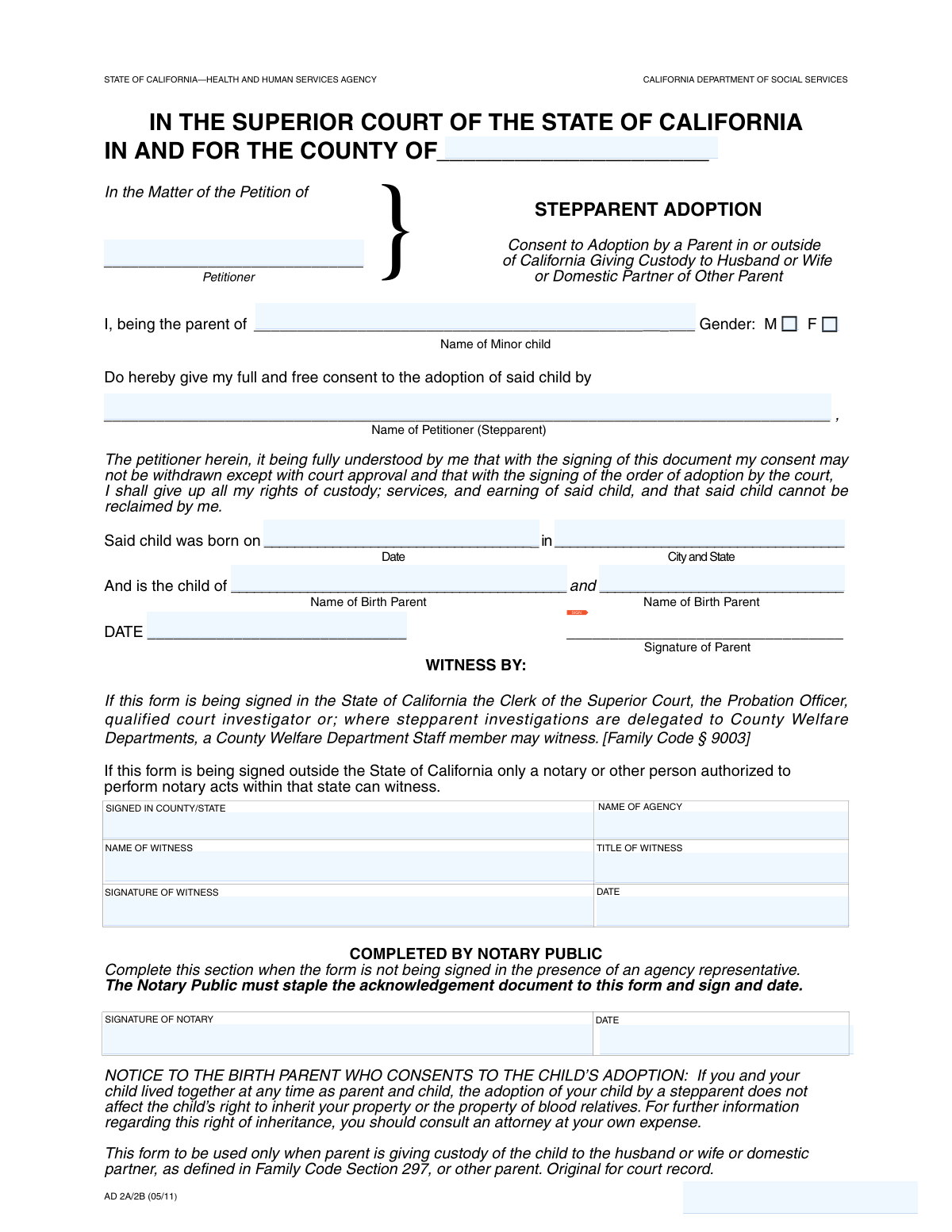
Yes! You can use AI to fill out Adoption Request (Stepparent)
The Stepparent Adoption Request is a formal petition submitted to a superior court to legally establish a parent-child relationship between a stepparent and their stepchild. This crucial document gathers essential information about the child, the petitioning stepparent, and the birth parents, serving as the first step in the legal adoption process. Today, this form can be filled out quickly and accurately using AI-powered services like Instafill.ai, which can also convert non-fillable PDF versions into interactive fillable forms.
Our AI automatically handles information lookup, data retrieval, formatting, and form filling.
It takes less than a minute to fill out Stepparent Adoption Petition using our AI form filling.
Securely upload your data. Information is encrypted in transit and deleted immediately after the form is filled out.
Form specifications
| Form name: | Adoption Request (Stepparent) |
| Number of fields: | 21 |
| Number of pages: | 1 |
| Language: | English |
| Categories: | adoption forms |
Instafill Demo: How to fill out PDF forms in seconds with AI
How to Fill Out Stepparent Adoption Petition Online for Free in 2026
Are you looking to fill out a STEPPARENT ADOPTION PETITION form online quickly and accurately? Instafill.ai offers the #1 AI-powered PDF filling software of 2026, allowing you to complete your STEPPARENT ADOPTION PETITION form in just 37 seconds or less.
Follow these steps to fill out your STEPPARENT ADOPTION PETITION form online using Instafill.ai:
- 1 Navigate to Instafill.ai and upload your Stepparent Adoption Request form, or select it from a library of templates.
- 2 Use the AI assistant to automatically fill in key details such as the petitioner's name, the minor child's information, and court county by answering simple questions.
- 3 Carefully review all the information pre-filled by the AI, including the child's birth details and the names of the birth parents, making any necessary corrections.
- 4 Digitally sign the document in the designated parent signature field. The platform will guide you on how to handle witness and notary requirements.
- 5 Enter the details for the witness and Notary Public, including names, titles, and dates of signature.
- 6 Once all sections are complete and verified, finalize the form and download the completed document, ready for filing with the superior court.
Our AI-powered system ensures each field is filled out correctly, reducing errors and saving you time.
Why Choose Instafill.ai for Your Fillable Stepparent Adoption Petition Form?
Speed
Complete your Stepparent Adoption Petition in as little as 37 seconds.
Up-to-Date
Always use the latest 2026 Stepparent Adoption Petition form version.
Cost-effective
No need to hire expensive lawyers.
Accuracy
Our AI performs 10 compliance checks to ensure your form is error-free.
Security
Your personal information is protected with bank-level encryption.
Frequently Asked Questions About Form Stepparent Adoption Petition
This form is used to formally document the details for a stepparent adoption proceeding in a superior court. It gathers essential information about the minor child, the petitioning stepparent, and the birth parents.
The 'Stepparent Petitioner' is the stepparent who is seeking to legally adopt the child. The other 'Petitioner' is typically their spouse, who is one of the child's original legal parents.
You will need the child's full legal name, date and place of birth, and the full legal names of both birth parents. You will also need the name of the county where you are filing the petition.
Providing the complete and accurate legal names of the birth parents is critical for legal proceedings. If this information is unknown, you should consult with a legal professional for guidance on how to proceed.
Yes, the form includes a dedicated section for a Notary Public's signature and date. This means the document must be signed in the presence of a Notary Public to be legally valid.
The form requires the witness's name, title, and agency, suggesting an official capacity may be required, such as a social worker or court-appointed representative. Check your local court's rules to confirm who is an acceptable witness.
The Form Identifier is a unique code for the document, which is typically found at the bottom of the page. This code helps the court system track and manage the specific form being submitted.
Once the form is completed, signed, and notarized, it should be filed with the Superior Court of the county you listed at the very top of the document.
Legal forms often require the sex as stated on the child's official birth certificate. It is generally recommended to fill this section out according to that document.
Yes, services like Instafill.ai use AI to accurately auto-fill form fields with your saved information, which can save time and help prevent common errors.
You can upload the PDF of the form to the Instafill.ai platform. The AI will make the fields interactive, allowing you to type your information directly or use the auto-fill feature to complete it quickly.
If you have a flat or non-fillable PDF, you can use a tool like Instafill.ai. It can convert the document into an interactive, fillable form that you can easily complete on your computer.
The 'Parent's Signature Date' is the date the parent signs the document. The 'Date Signed' in the witness section is the date the witness signs, which may or may not be the same day but must be done according to legal procedure.
Compliance Stepparent Adoption Petition
Validation Checks by Instafill.ai
1
Child's Age Verification
This check validates that the 'Child's Birth Date' indicates the child is legally a minor (typically under 18 years of age) as of the 'Signature Date'. This is fundamental for a minor adoption petition, as different legal standards apply to adult adoptions. If the child is not a minor, the form submission should be rejected as it is the incorrect legal process.
2
Gender Selection Exclusivity
Ensures that only one of the gender checkboxes ('Male' or 'Female') is selected for the minor child. A submission should not allow for both or neither to be selected, as gender is a required piece of identifying information on legal documents. This prevents ambiguous or incomplete data entry.
3
Date Chronology Integrity
Verifies the logical sequence of all dates on the form, ensuring the 'Child's Birth Date' is the earliest, followed by the 'Parent's Signature Date', which must be on or before the witness's 'Date Signed', which in turn must be on or before the 'Notary Date'. This is critical for establishing a legally sound timeline of events. An incorrect sequence can invalidate the entire document.
4
Witness Name and Signature Consistency
This validation confirms that the printed name entered in the 'Witness Signature (Text)' field exactly matches the name in the 'Name of Witness' field. This check ensures the person identified as the witness is the same person attesting with their signature. A mismatch could suggest a clerical error or potential fraud, compromising the witness testimony.
5
Future Date Prevention
Checks that all event dates ('Signature Date', 'Date Signed', 'Notary Date') are not set to a future date. Legal documents must reflect actions that have already occurred. Allowing future dates would invalidate the attestations and signatures, so the system must reject any date later than the current day.
6
Petitioner and Child Name Completeness
Verifies that the 'Petitioner's Name', 'Stepparent Petitioner's Name', and 'Minor Child's Name' fields are not empty. These names are the primary subjects of the legal action and are absolutely essential for the document to be valid. An incomplete submission would be legally void and cannot be processed by the court.
7
Date Format Validation
Ensures all date fields ('Child's Birth Date', 'Signature Date', 'Date Signed', 'Notary Date') adhere to a standard, unambiguous format (e.g., MM/DD/YYYY). Inconsistent or invalid date formats can lead to misinterpretation by court systems or clerks. This validation enforces data consistency and prevents processing errors.
8
Birth Parent Name Uniqueness
This check ensures that the names entered for 'First Birth Parent's Name' and 'Second Birth Parent's Name' are not identical. While one field may be left blank if a parent is unknown, providing the same name for both is a logical error. This validation prevents data entry mistakes that would confuse the child's legal parentage records.
9
Location Format Plausibility
Validates that location fields like 'Child's Birth City and State' and 'Signed County/State' contain at least two distinct parts, suggesting both a locality and a state/region are present. This is a simple structural check to catch incomplete address information. Incomplete location data can create jurisdictional confusion and processing delays.
10
Digital Signature Presence
Verifies that a signature has been provided in the 'digital signature of parent' field, which may be a file upload or a captured digital signature. The parent's signature is a non-negotiable requirement that signifies their consent and intent. The form is invalid and cannot be submitted without it.
11
Form Identifier Presence
This check ensures the 'Form Identifier' field is filled out, as it is used for document tracking, routing, and version control within the legal system. The identifier helps ensure the correct and most current version of a form is being used. A missing identifier can cause the document to be misfiled or rejected.
12
Petitioner Name Distinction
Validates that the 'Petitioner's Name' (the existing parent) and the 'Stepparent Petitioner's Name' are not identical. In a stepparent adoption, these two fields must represent two different individuals: the spouse of the stepparent and the stepparent themselves. This check prevents a logical error in defining the parties involved in the adoption.
13
Full Name Format Check
This validation checks that name fields like 'Petitioner's Name' and 'Minor Child's Name' contain at least two words, indicating a first and last name. Legal documents require full legal names, not initials or single names. This check helps enforce data quality and reduces the chance of rejection due to incomplete identifying information.
14
Court County Completeness
Ensures the 'County' field, which specifies the court's location, is not left empty. This information is critical for filing the petition in the correct legal jurisdiction. Failure to provide the county would make it impossible to route the document to the appropriate superior court for processing.
15
Witness Information Completeness
This is a conditional check that ensures if the 'Name of Witness' field is filled, then the associated 'Title of Witness' and 'Date Signed' fields are also completed. A partial witness entry is invalid and provides no legal value. This rule ensures that any witness attestation provided is whole and internally consistent.
Common Mistakes in Completing Stepparent Adoption Petition
People often enter nicknames, initials, or omit middle names in fields like 'Petitioner's Name' or 'Minor Child's Name.' This happens out of habit, but legal documents require the full legal name as it appears on official records like birth certificates. Using an incomplete name can lead to the rejection of the petition, create identity verification issues, and cause significant delays. To avoid this, always use the full, unabbreviated legal name for every individual mentioned on the form.
The form asks for the 'County (Court County),' which must be the county where the superior court handling the case is located. A common error is to enter the county where the petitioner resides, which may be different. This mistake can result in the filing being rejected or misrouted to the wrong jurisdiction, halting the adoption proceedings. To avoid this, confirm the correct court venue for your case before filling out the form.
The form contains multiple date fields: 'Signature Date (Parent's),' 'Date Signed (Witness),' and 'Notary Date.' These dates must be chronologically logical; for example, the witness and notary dates cannot be on or after the parent's signature date. This error often occurs due to carelessness and can invalidate the entire document. To prevent this, carefully review all dates before submission, ensuring they reflect the actual sequence of signing events. AI-powered form filling tools like Instafill.ai can help flag such inconsistencies.
The field 'digital signature of parent. Enter browse mode' requires uploading a digital signature file, not typing a name. People frequently misunderstand this and try to type their name or leave it blank, assuming a physical signature elsewhere is sufficient. This can render the submission incomplete or non-compliant with electronic filing standards. To prevent this, prepare a valid digital signature image file beforehand and use the 'browse' function to upload it as instructed.
The field 'Witness Signature (Text)' is intended for the witness's typed or printed name for legibility, accompanying their actual signature. A frequent mistake is to try to create a cursive-style font, leave it blank, or re-enter a signature, defeating the purpose of the field. This can cause the document to be returned for correction. Always type the full, clear name of the person signing in this field for maximum clarity.
The 'Form Identifier' is a crucial piece of metadata, often found in the footer, that courts use to track form versions. Filers often overlook this field, assuming it's for administrative use only. Submitting a form without the correct identifier, or with an outdated one, can lead to immediate rejection. Always locate the identifier (e.g., 'ADOPT-200 Rev. 1/23') and enter it exactly as it appears. If the form is a flat PDF, tools like Instafill.ai can make it fillable, ensuring no field is missed.
When filling out 'First Birth Parent's Name' and 'Second Birth Parent's Name,' petitioners may not know the full legal name of a birth parent and leave the field blank. A blank field is ambiguous and can halt the process, as the court needs to know if a parent's rights need to be addressed. Instead of leaving it blank, you should research the proper way to denote an unknown or deceased parent for your jurisdiction (e.g., by writing 'Unknown').
The 'Notary Public Signature' and 'Notary Date' fields must be completed exclusively by a licensed Notary Public. Petitioners sometimes mistakenly fill in their own name or the date they signed the document, which invalidates the notarization. This section serves as a third-party verification of identity, and any unauthorized entry will cause the form to be rejected. Always leave this entire section blank and bring the unsigned document to a Notary Public.
The 'Signed County/State (Witness Information)' field must reflect the physical location where the witness actually signed the document. People sometimes mistakenly enter the witness's home county or the court's county instead. This discrepancy can raise legal questions about the validity of the witnessing process. Ensure the witness provides the county and state where they are physically located at the moment of signing.
Fields like 'Child's Birth Date' can be filled out with inconsistent or incorrect date formats (e.g., DD-MM-YY instead of MM/DD/YYYY). This can cause data entry errors on the court's end and may require clarification, delaying the process. Always use the standard MM/DD/YYYY format unless the form explicitly instructs otherwise. Using an intelligent form filler like Instafill.ai can help by automatically formatting dates correctly, preventing these common errors.
Saved over 80 hours a year
“I was never sure if my IRS forms like W-9 were filled correctly. Now, I can complete the forms accurately without any external help.”
Kevin Martin Green
Your data stays secure with advanced protection from Instafill and our subprocessors

Robust compliance program
Transparent business model
You’re not the product. You always know where your data is and what it is processed for.
ISO 27001, HIPAA, and GDPR
Our subprocesses adhere to multiple compliance standards, including but not limited to ISO 27001, HIPAA, and GDPR.
Security & privacy by design
We consider security and privacy from the initial design phase of any new service or functionality. It’s not an afterthought, it’s built-in, including support for two-factor authentication (2FA) to further protect your account.
Fill out Stepparent Adoption Petition with Instafill.ai
Worried about filling PDFs wrong? Instafill securely fills adoption-request-stepparent forms, ensuring each field is accurate.