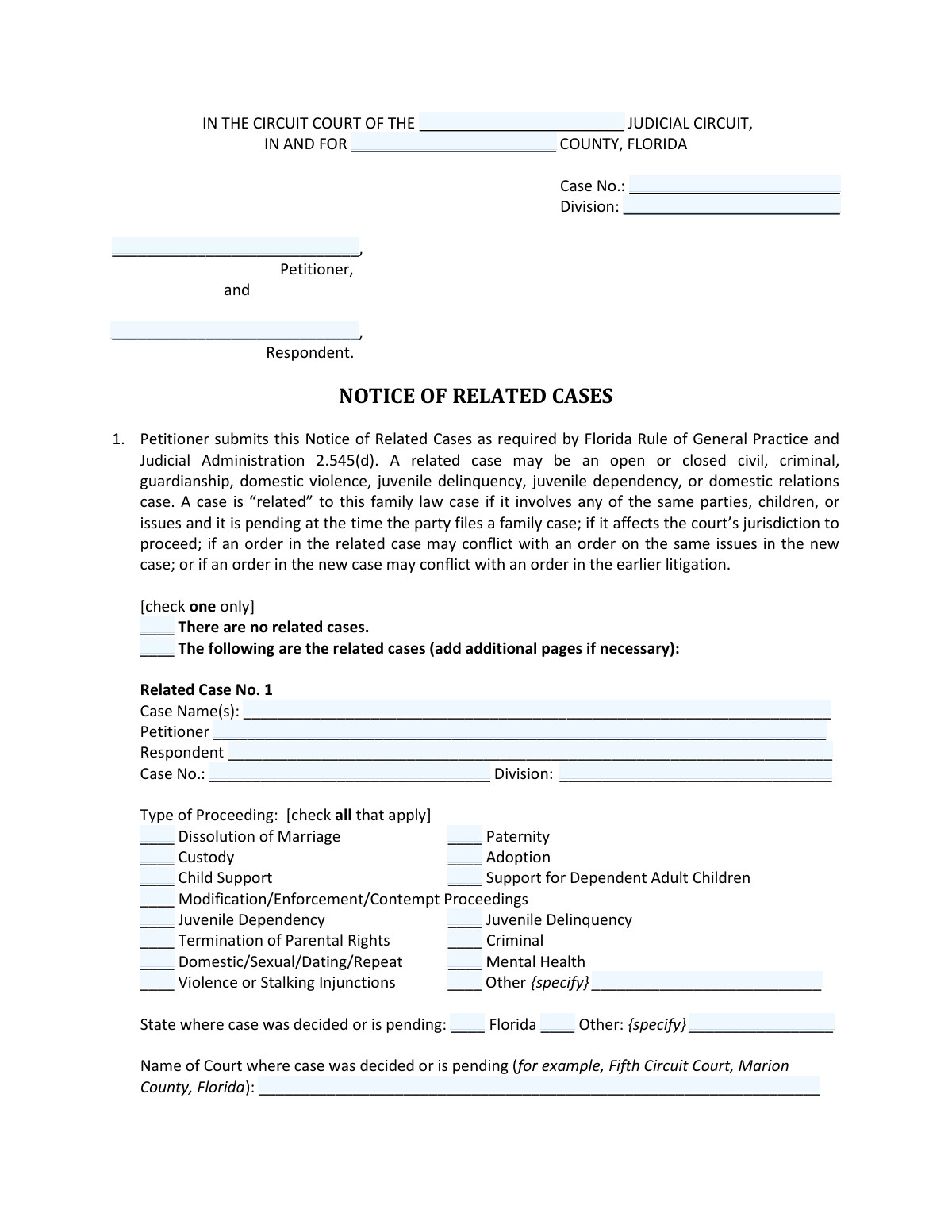
Yes! You can use AI to fill out Florida Family Law Rules of Procedure Form 12.900(h), Notice of Related Cases
Florida Family Law Form 12.900(h), Notice of Related Cases, is a required document filed by the petitioner in a family law case to inform the court of any other related legal proceedings. This notice is crucial for judicial administration as it helps prevent conflicting court orders and ensures efficient case management by identifying cases involving the same parties, children, or legal issues. Today, this form can be filled out quickly and accurately using AI-powered services like Instafill.ai, which can also convert non-fillable PDF versions into interactive fillable forms.
Form 12.900(h) is part of the
family court forms, family law forms and divorce forms categories on Instafill.
Our AI automatically handles information lookup, data retrieval, formatting, and form filling.
It takes less than a minute to fill out Form 12.900(h) using our AI form filling.
Securely upload your data. Information is encrypted in transit and deleted immediately after the form is filled out.
Form specifications
| Form name: | Florida Family Law Rules of Procedure Form 12.900(h), Notice of Related Cases |
| Number of fields: | 151 |
| Number of pages: | 1 |
| Language: | English |
Instafill Demo: How to fill out PDF forms in seconds with AI
How to Fill Out Form 12.900(h) Online for Free in 2026
Are you looking to fill out a FORM 12.900(H) form online quickly and accurately? Instafill.ai offers the #1 AI-powered PDF filling software of 2026, allowing you to complete your FORM 12.900(H) form in just 37 seconds or less.
Follow these steps to fill out your FORM 12.900(H) form online using Instafill.ai:
- 1 Navigate to Instafill.ai and upload the Florida Form 12.900(h) or select it from the template library.
- 2 Provide your case information, including the court, county, case number, and your details as the Petitioner.
- 3 Indicate whether there are any related cases by checking the appropriate box as prompted by the AI assistant.
- 4 If you have related cases, follow the guided prompts to input the details for each case, such as case name, number, court, and the nature of its relationship to the new case.
- 5 Specify whether you are requesting coordination of the cases and provide a reason if applicable.
- 6 Carefully review all the information auto-filled and entered on the form, then provide your digital signature and the date.
- 7 Complete the Certificate of Service section, then download the final document to file with the clerk of the circuit court and serve to all required parties.
Our AI-powered system ensures each field is filled out correctly, reducing errors and saving you time.
Why Choose Instafill.ai for Your Fillable Form 12.900(h) Form?
Speed
Complete your Form 12.900(h) in as little as 37 seconds.
Up-to-Date
Always use the latest 2026 Form 12.900(h) form version.
Cost-effective
No need to hire expensive lawyers.
Accuracy
Our AI performs 10 compliance checks to ensure your form is error-free.
Security
Your personal information is protected with bank-level encryption.
Frequently Asked Questions About Form Form 12.900(h)
This form is used to notify the court about any other open or closed legal cases that are related to your current family law case, as required by Florida court rules.
The petitioner in a Florida family law case is required to file this form with the court when they start their case.
A case is considered related if it involves the same parties, children, or issues; if it could affect the court's jurisdiction; or if orders in the cases could potentially conflict with each other.
Yes, you may still need to file it. You should check the box that says 'There are no related cases' because your specific circuit court may require the form to be filed regardless.
This form must be filed with the clerk of the circuit court at the same time you file your initial pleading, which is the first document that starts your family law case.
You will need the case name, case number, court name and location, type of proceeding, and the title and date of the last court order, if any.
You must file the original with the clerk of court and serve copies on the presiding judge and all parties involved in both the new case and any related cases you listed.
The form instructions state that you can 'add additional pages if necessary' to list all of your related cases.
This is a request to the court to have one judge handle the related cases, which can help conserve judicial resources and lead to a more efficient resolution.
The Certificate of Service is your sworn statement certifying that you have delivered a copy of the form to all the required people, such as the respondent, the judge, and other parties.
Yes, services like Instafill.ai use AI to help you accurately auto-fill form fields, which can save you time and reduce errors.
You can use a service like Instafill.ai to upload the PDF, which will make it an interactive, fillable form that you can complete and download from your browser.
Services like Instafill.ai can convert flat, non-fillable PDFs into interactive forms online, allowing you to easily type your information into the fields.
If a nonlawyer assists you, they must provide you with a 'Disclosure from Nonlawyer' form and must write their name, address, and phone number at the bottom of this form.
Compliance Form 12.900(h)
Validation Checks by Instafill.ai
1
Mutually Exclusive Related Case Declaration
This check ensures the user selects either 'There are no related cases' or 'The following are the related cases' in Section 1, but not both. This is critical for determining which part of the form is relevant and prevents contradictory information. If validation fails, the user is prompted to select only one of the two options.
2
Conditional Requirement for Related Case Details
Validates that if the user checks 'The following are the related cases', at least one of the 'Related Case No. 1/2/3' sections is filled out with details. This prevents the submission of a form that indicates related cases exist but provides no information about them. A failure would require the user to either provide case details or declare that there are no related cases.
3
Completeness of Individual Related Case Sections
For each 'Related Case' section that is initiated (e.g., a Case No. is entered), this check verifies that all mandatory sub-fields are completed. This includes Case Name, Case No., Type of Proceeding, State, Name of Court, and at least one Relationship checkbox. This ensures each reported case has sufficient information for the court to identify and review it.
4
Specification for 'Other' Checkboxes
This validation ensures that whenever an 'Other {specify}' checkbox is selected (for 'Type of Proceeding' or 'State'), the adjacent text field is not empty. This is important to capture specific information not covered by the standard options. A failure would prompt the user to either provide the specific detail or select a different option.
5
Valid Date Format and Plausibility
Verifies that all date fields on the form ('Date of Court Order/Judgment', 'Dated', 'date' of service) are entered in a valid format, such as MM/DD/YYYY. It also checks that the entered date is not in the future. This maintains data integrity and ensures the chronological accuracy of legal filings.
6
Conditional Coordination Justification
If the user checks 'I do request coordination of the following cases' in Section 2, this validation ensures that the text field specifying the cases is filled. Furthermore, it checks that at least one option in Section 3 is selected to justify the request. This logic prevents incomplete or unsubstantiated requests for case coordination.
7
Petitioner Contact Information Completeness
Ensures all fields in the petitioner's signature block are filled, including Printed Name, Address, City/State/Zip, Telephone Number, and E-mail Address. Complete contact information is legally required and essential for the court and other parties to communicate with the petitioner. A failure would block submission until all required fields are completed.
8
Email and Phone Number Format Validation
This check validates that the 'Telephone Number' and 'E-mail Address(es)' fields conform to standard formats (e.g., (XXX) XXX-XXXX for phone, [email protected] for email). Correctly formatted contact information is crucial for successful communication and service of documents. An invalid format would trigger an error message asking the user to correct the entry.
9
Certificate of Service Completeness
Validates that the 'Certificate of Service' section is properly filled out. This includes specifying the County, selecting at least one method of service (e-mail, mail, hand delivery), providing the recipient's name, checking their role, and entering the date of service. A complete certificate is required to prove that all relevant parties have been legally notified.
10
Conditional Validation of Nonlawyer Assistance Section
This check is triggered if any information is entered into the 'Nonlawyer' assistance section. It then validates that all fields in that section are completed, including the nonlawyer's name, business, address, phone number, and who they assisted. This is a legal requirement in Florida to ensure transparency and accountability for nonlawyer assistance.
11
Header Information Requirement
This validation ensures that the essential case identification information at the top of the form is complete. It checks that the Judicial Circuit, County, Case Number, and Division fields are all filled in. This information is fundamental for the clerk to file the document correctly in the court's system.
12
Relationship of Cases Selection
For every related case section that is filled out, this check ensures that at least one checkbox under 'Relationship of cases' is selected. This information is critical as it explains to the court why the case is considered related (e.g., involves same parties, may conflict). Without this context, the notice is incomplete and less useful to the judge.
13
Justification for Conserving Judicial Resources
If the checkbox 'Coordination of existing cases will conserve judicial resources...' is selected in Section 3, this validation ensures the corresponding text area explaining why is not empty. This prevents users from making a claim without providing the required supporting statement. A failure would prompt the user to provide a justification or uncheck the box.
Common Mistakes in Completing Form 12.900(h)
Filers often narrowly interpret what constitutes a 'related case,' checking 'There are no related cases' when prior domestic violence, juvenile, or even closed divorce cases exist. This happens due to not reading the detailed definition provided in Section 1. The consequence is providing inaccurate information to the court, which can delay proceedings or require filing an amended notice. To avoid this, carefully read the four criteria for a related case and consider any past or present legal matter involving the same parties or children.
People frequently enter partial case numbers or omit the 'Division' for related cases, often because they are working from memory or incomplete records. An incorrect or incomplete case number makes it impossible for the clerk and judge to locate the related file, defeating the purpose of the form and causing administrative delays. To avoid this, always have the official documents for the related cases in front of you to copy the exact case number and division. AI-powered tools like Instafill.ai can help by validating formats and flagging potentially incomplete entries.
The form asks for the specific court where a case is pending, providing 'Fifth Circuit Court, Marion County, Florida' as an example. Filers often write something generic like 'Marion County Courthouse' or just the state. This ambiguity forces court staff to do extra research, potentially leading them to the wrong case or causing delays. To prevent this, copy the full, official name of the court from a previous order or pleading in that case.
The fields for 'Title of last Court Order/Judgment' and 'Date of Court Order/Judgment' are often left blank when filers don't have their case files readily available. Omitting these details makes it harder for the judge to quickly understand the status and history of the related case, which may slow down decision-making. Before filling out the form, gather all relevant documents and locate the most recent final judgment or significant order to accurately record its title and date.
The Certificate of Service is a legally critical section that is frequently filled out incorrectly or incompletely. Filers may forget to check the method of service, fail to list all required parties (including the judge and parties in the related cases), or omit the date of service. An improper Certificate of Service can invalidate the notice, leading to procedural challenges and significant delays. It is crucial to understand that you must notify all individuals listed and accurately record how and when you did so.
In the 'Type of Proceeding' and 'Relationship of cases' sections, filers often select only the most obvious option instead of all that apply. For example, a case might involve both 'Paternity' and 'Child Support,' but only one is checked, providing an incomplete picture to the court. This mistake can limit the judge's understanding of the full scope of the legal history between the parties. Carefully review each checkbox option and select every one that accurately describes the related case.
Forgetting to sign or date the form is a simple but very common error. An unsigned document is legally invalid and will be rejected by the clerk of court, halting the progress of your case until a properly signed form is submitted. Always double-check the petitioner’s signature line and the 'Dated' field before filing. If the form is a non-fillable PDF, tools like Instafill.ai can convert it into a fillable version, making it easier to navigate and complete all required fields, including the signature.
When listing a related case, individuals sometimes misremember or reverse who was the 'Petitioner' and who was the 'Respondent' in that prior case. This can create confusion for the court when trying to understand the history and context of the parties' legal interactions. This error can be avoided by referring directly to the official documents from the related case to confirm the correct roles for each party.
If a nonlawyer helps a person fill out the form, Florida rules require that person's name, business, and contact information to be listed at the bottom. This section is frequently left blank, either because the filer or the assistant is unaware of the rule. Failure to comply can have consequences for the nonlawyer assistant and may raise questions about the form's preparation. If you receive help from a nonlawyer, you must ensure they complete this section fully as required by law.
Saved over 80 hours a year
“I was never sure if my IRS forms like W-9 were filled correctly. Now, I can complete the forms accurately without any external help.”
Kevin Martin Green
Your data stays secure with advanced protection from Instafill and our subprocessors

Robust compliance program
Transparent business model
You’re not the product. You always know where your data is and what it is processed for.
ISO 27001, HIPAA, and GDPR
Our subprocesses adhere to multiple compliance standards, including but not limited to ISO 27001, HIPAA, and GDPR.
Security & privacy by design
We consider security and privacy from the initial design phase of any new service or functionality. It’s not an afterthought, it’s built-in, including support for two-factor authentication (2FA) to further protect your account.
Fill out Form 12.900(h) with Instafill.ai
Worried about filling PDFs wrong? Instafill securely fills florida-family-law-rules-of-procedure-form-12900h-notice-of-related-cases forms, ensuring each field is accurate.