Yes! You can use AI to fill out Form FL-110, Summons (Family Law)
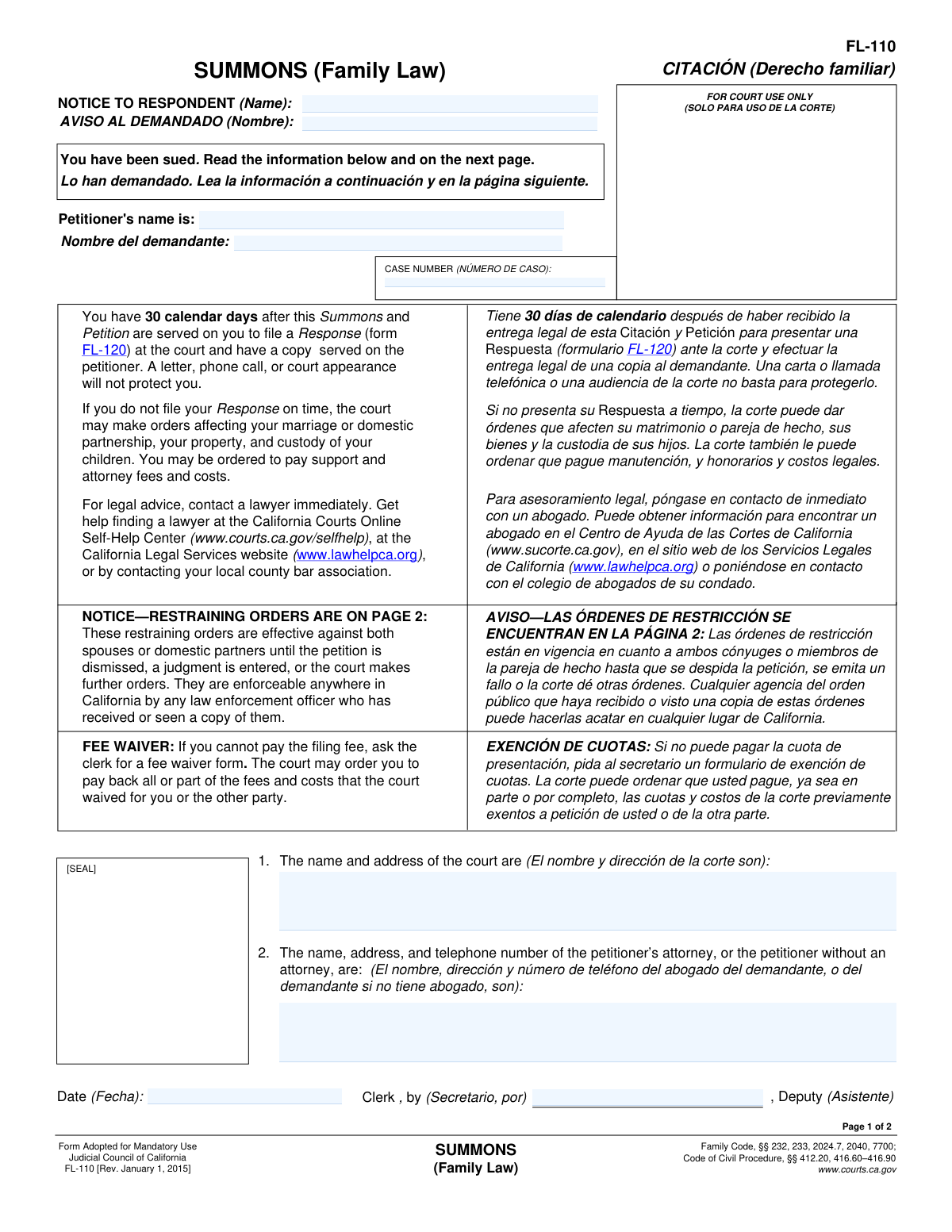
Form FL-110, Summons (Family Law), is a legal document used in California courts to formally notify a person that a family law case has been initiated against them. It informs the respondent of the lawsuit, outlines the automatic temporary restraining orders that apply to both parties, and specifies the 30-day deadline to file a response to avoid a default judgment. Today, this form can be filled out quickly and accurately using AI-powered services like Instafill.ai, which can also convert non-fillable PDF versions into interactive fillable forms.
FL-110 is part of the
family law forms category on Instafill.
Rather not fill this in by hand? Instafill is an online form filler that completes PDF forms automatically — upload the blank form, answer a few questions, and the AI fills every field.
Form specifications
| Form name: | Form FL-110, Summons (Family Law) |
| Number of pages: | 1 |
| Field instructions: | FL-110 Instructions |
| Filled form examples: | FL-110 Examples |
| Language: | English |
Our AI automatically handles information lookup, data retrieval, formatting, and form filling.
It takes less than a minute to fill out FL-110 using our AI form filling.
Securely upload your data. Information is encrypted in transit and deleted immediately after the form is filled out.
Instafill Demo: How to fill out PDF forms in seconds with AI
How to Fill Out FL-110 Online for Free in 2026
Are you looking to fill out a FL-110 form online quickly and accurately? Instafill.ai offers the #1 AI-powered PDF filling software of 2026, allowing you to complete your FL-110 form in just 37 seconds or less.
Follow these steps to fill out your FL-110 form online using Instafill.ai:
- 1 Navigate to an AI-powered service like Instafill.ai and upload or select Form FL-110.
- 2 Enter the name and address of the court where the case is filed.
- 3 Provide the full name of the petitioner (the person who filed the case) and the respondent (the person being sued).
- 4 Input the contact information for the petitioner's attorney, or the petitioner's own information if they are self-represented.
- 5 Once the court clerk issues the summons, the case number, date, and clerk's signature will be added.
- 6 Review the standard restraining orders on page 2, as they are automatically effective for both parties upon service.
- 7 Use the AI tool to verify all information is correct, then download the completed form to be filed with the court and served on the respondent.
Our AI-powered system ensures each field is filled out correctly, reducing errors and saving you time.
Why Choose Instafill.ai for Your Fillable FL-110 Form?
Speed
Complete your FL-110 in as little as 37 seconds.
Up-to-Date
Always use the latest 2026 FL-110 form version.
Cost-effective
No need to hire expensive lawyers.
Accuracy
Our AI performs 10 compliance checks to ensure your form is error-free.
Security
Your personal information is protected with bank-level encryption.
Frequently Asked Questions About FL-110
This form is an official notice that a family law case (like a divorce or separation) has been filed against you. It informs you that you have been sued and explains the immediate steps you must take to respond.
No, you do not fill out the Summons (FL-110) itself. It is served on you to provide official notice; your next step is to file a separate form called a Response (FL-120).
You have 30 calendar days to file a Response (Form FL-120) with the court and serve a copy on the petitioner. A letter or phone call to the court is not sufficient and will not protect your rights.
If you do not file a Response on time, the court can proceed without your input. This may result in orders being made about your property, finances, and child custody that you disagree with.
These are automatic orders that apply to both you and the petitioner as soon as the case is filed. They prevent either party from removing children from the state, changing insurance policies, or disposing of property without a court order or written consent.
No, the automatic restraining orders prohibit you from transferring or disposing of any property, real or personal, without the other party's written consent or a court order, except for necessities of life or to pay for legal fees.
The form states that you can ask the court clerk for a fee waiver form. If you meet the requirements, the court may waive the fees for filing your documents.
You can obtain Form FL-120 from the court clerk's office or download it from the California Courts website. You can also use an online form-filling service to access and complete it.
The form strongly recommends contacting a lawyer immediately for legal advice. Family law matters can be very complex, and an attorney can help you understand your rights and obligations.
Yes, while you don't fill out the Summons, AI-powered services like Instafill.ai can help you accurately complete your Response (Form FL-120). These tools auto-fill form fields based on your information, saving time and helping to prevent errors.
You can upload the Response (Form FL-120) PDF to the Instafill.ai website. The AI platform will make the form interactive, and you can answer simple questions to have your information filled in automatically.
Services like Instafill.ai can convert flat, non-fillable PDFs into interactive forms. Simply upload the document, and the platform will make it easy to fill out on your computer.
No, the Standard Family Law Restraining Orders are effective against both parties—the Petitioner and the Respondent—as soon as the case begins. They remain in effect until a judgment is entered or the court makes a different order.
Compliance FL-110
Validation Checks by Instafill.ai
1
Validates Case Number Format
Checks that the 'CASE NUMBER' field adheres to the specific format required by the California court system. This is crucial for correctly identifying and tracking the case within the judicial system. A malformed case number will cause the document to be rejected or misfiled, leading to significant delays.
2
Ensures Court Identification is Complete
Verifies that 'The name and address of the court are' field is fully populated with both the name of the court and its complete physical address. This information is essential for the respondent to know where to file their response and appear for hearings. Incomplete information could invalidate the summons and cause the filing to be rejected.
3
Requires Respondent's Full Name
This validation ensures that the 'NOTICE TO RESPONDENT (Name)' field is not empty. The summons is legally invalid without identifying the specific individual being sued. Failure to provide the respondent's name makes the document unenforceable and legally meaningless.
4
Requires Petitioner's Full Name
This check confirms that the 'Petitioner's name is' field contains a value. The respondent has a right to know who is suing them. Omitting the petitioner's name would make it impossible for the respondent to prepare a defense and would lead to the court rejecting the filing.
5
Verifies Petitioner and Respondent are Different
This logical check compares the 'Petitioner's name' and 'Respondent's name' fields to ensure they are not identical. A person cannot legally sue themselves in this context. A match indicates a fundamental data entry error that must be corrected before the form can be processed.
6
Validates Petitioner or Attorney Contact Information
Ensures the section for 'The name, address, and telephone number of the petitioner’s attorney, or the petitioner without an attorney' is complete. This contact information is legally required so the respondent or their attorney knows whom to serve with a response. Missing this information would halt the legal process and likely cause the filing to be rejected.
7
Validates Telephone Number Format
This check verifies that the telephone number provided for the petitioner or their attorney follows a standard format (e.g., (XXX) XXX-XXXX or XXX-XXX-XXXX). An invalid phone number prevents the opposing party from making contact, which is a critical part of the legal process. The system should flag numbers with incorrect digit counts or invalid characters.
8
Validates Address for Service
This validation parses the address provided for the petitioner or their attorney to ensure it contains essential components like a street, city, state, and ZIP code. A valid address is mandatory for the legal service of documents from the respondent. An incomplete or invalid address would prevent proper legal communication and could lead to case dismissal.
9
Ensures Valid Issuance Date
Verifies that the 'Date' field next to the Clerk's signature line is filled with a valid date in a recognized format (e.g., MM/DD/YYYY). The issuance date is legally significant as it marks the official start of the summons. An invalid or missing date can create ambiguity about legal deadlines.
10
Prevents Future Issuance Date
This check ensures the 'Date' of issuance is not a future date. A summons cannot be legally issued on a day that has not yet occurred. This validation prevents logical errors and potential fraud, ensuring the document reflects an action that has already taken place.
11
Requires Clerk or Deputy Name
Validates that the 'Clerk, by' field contains the name of the court clerk or deputy who issued the summons. This signature authenticates the document as an official court issuance. A missing name could call the document's authenticity into question and lead to its rejection.
12
Verifies Current Form Version
This check confirms that the form being submitted is the correct version, identified as 'FL-110 [Rev. January 1, 2015]'. Courts often require the use of the most current form, and submitting an outdated version can result in automatic rejection of the filing. This validation prevents wasted time and filing fees due to using obsolete paperwork.
Common Mistakes in Completing FL-110
The summons clearly states that the Respondent has 30 calendar days to file a formal Response (Form FL-120). Many people mistakenly believe a phone call or informal letter is sufficient, or they simply miss the deadline. Failure to respond on time can result in a default judgment, allowing the court to make orders about property, support, and custody without the Respondent's input.
Upon service of the summons, both parties are automatically bound by the restraining orders on page 2, which restrict actions like selling property, changing insurance beneficiaries, or taking children out of state. People often overlook this section or misunderstand its immediate effect, leading to unintentional violations. Such actions can result in severe legal and financial penalties from the court.
The petitioner or their attorney must provide a complete and correct name, address, and telephone number. An incorrect address can prevent the respondent from properly serving their response, and incorrect contact details can hinder communication from the court, leading to missed hearings or notices. This can cause significant delays or even jeopardize the case.
The petitioner must specify the correct Superior Court and its full address for the county with proper jurisdiction over the case. Filing in the wrong court district or county can lead to the case being rejected, dismissed, or requiring a transfer. This mistake causes significant delays and may result in additional filing fees and legal costs.
The petitioner must use the respondent's full, legal name, not a nickname or abbreviation. An incorrect or misspelled name can create grounds for the respondent to challenge the validity of the service of the summons. This can force the petitioner to restart the service process, delaying the legal proceedings.
The petitioner is legally prohibited from personally delivering (serving) the summons to the respondent. The documents must be served by a neutral third party who is over 18 years old. Failing to follow the strict rules of legal service can invalidate the process and require the petitioner to have the documents served all over again.
This form is often a non-fillable PDF, leading people to fill it out by hand, which can result in illegible handwriting or accidentally skipped fields. An unreadable or incomplete form can be rejected by the court clerk, delaying the case. AI-powered tools like Instafill.ai can convert flat PDFs into fillable versions, ensuring all entries are typed, legible, and validated for completeness before printing.
After the Respondent files their Response (Form FL-120) with the court, they must also arrange for a copy to be formally served on the Petitioner at the address listed on the summons. Simply filing the response with the court is not sufficient. This oversight means the petitioner is not legally notified of the response, which can delay negotiations and court proceedings.
Court forms are periodically updated, and the revision date is noted in the footer (e.g., 'Rev. January 1, 2015'). Using an obsolete version of the form can lead to its rejection by the court clerk, as it may lack required legal language or fields. To avoid this, always obtain the most current version from the official court website. Services like Instafill.ai can help by providing access to the latest, compliant versions of legal forms.
The 'CASE NUMBER' box at the top of the form is reserved for the court clerk, who assigns a number when the case is first filed. Petitioners should leave this box empty on their initial filing. Mistakenly writing information in this box, or using an incorrect case number on subsequent documents, can cause filings to be rejected, lost, or misfiled by the court.
Saved over 80 hours a year
“I was never sure if my IRS forms like W-9 were filled correctly. Now, I can complete the forms accurately without any external help.”
Kevin Martin Green
Your data stays secure with advanced protection from Instafill and our subprocessors




Robust compliance program
Transparent business model
You’re not the product. You always know where your data is and what it is processed for.
ISO 27001, HIPAA, and GDPR
Our subprocesses adhere to multiple compliance standards, including but not limited to ISO 27001, HIPAA, and GDPR.
Security & privacy by design
We consider security and privacy from the initial design phase of any new service or functionality. It’s not an afterthought, it’s built-in, including support for two-factor authentication (2FA) to further protect your account.
Fill out FL-110 with Instafill.ai
Worried about filling PDFs wrong? Instafill securely fills form-fl-110-summons-family-law forms, ensuring each field is accurate.
