Yes! You can use AI to fill out Florida Family Law Rules of Procedure Form 12.900(b), Notice of and Consent to Limited Appearance

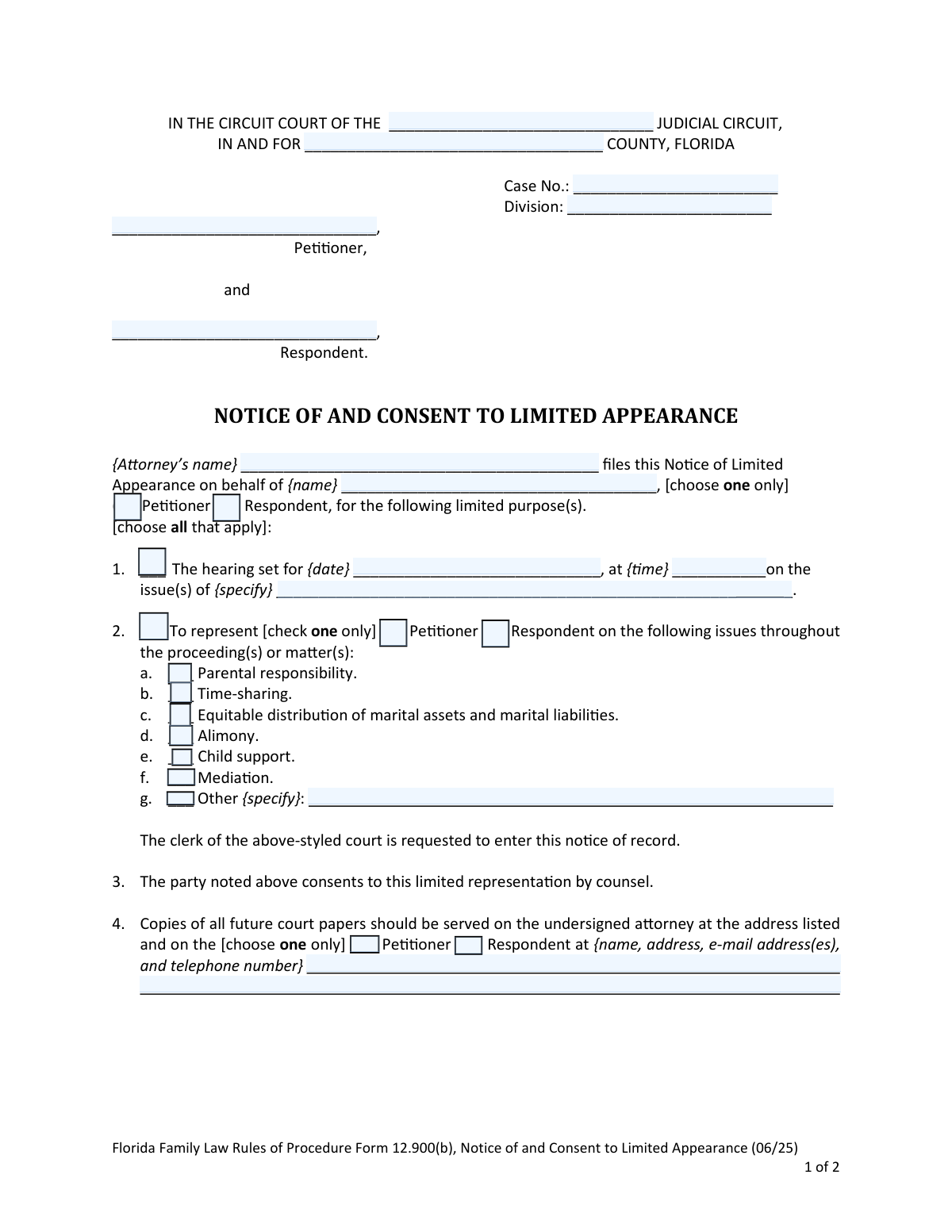
This form, officially titled 'Notice of and Consent to Limited Appearance,' is a legal document filed in Florida circuit courts for family law proceedings. It is used when an attorney represents a client for only a specific part of their case, such as a single hearing or certain issues like child support, rather than the entire litigation. This notice formally defines the scope of the attorney's involvement for the court and all parties involved. Today, this form can be filled out quickly and accurately using AI-powered services like Instafill.ai, which can also convert non-fillable PDF versions into interactive fillable forms.
Form 12.900(b) is part of the family court forms, family law forms and divorce forms categories on Instafill.
Our AI automatically handles information lookup, data retrieval, formatting, and form filling.
It takes less than a minute to fill out Form 12.900(b) using our AI form filling.
Securely upload your data. Information is encrypted in transit and deleted immediately after the form is filled out.

Form specifications

Form name: Florida Family Law Rules of Procedure Form 12.900(b), Notice of and Consent to Limited Appearance
Number of fields: 51
Number of pages: 1
Language: English
main-image

Instafill Demo: How to fill out PDF forms in seconds with AI

How to Fill Out Form 12.900(b) Online for Free in 2026

Are you looking to fill out a FORM 12.900(B) form online quickly and accurately? Instafill.ai offers the #1 AI-powered PDF filling software of 2026, allowing you to complete your FORM 12.900(B) form in just 37 seconds or less.
Follow these steps to fill out your FORM 12.900(B) form online using Instafill.ai:
  1. 1 Navigate to Instafill.ai and upload or select the Florida Form 12.900(b).
  2. 2 Provide the court and case information, including the judicial circuit, county, case number, and division.
  3. 3 Enter the attorney's name and the client's name, and check the box indicating whether the client is the Petitioner or Respondent.
  4. 4 Clearly define the scope of the limited appearance by checking the applicable boxes, such as a specific hearing date or particular legal issues like alimony or time-sharing.
  5. 5 Input the names and addresses for the attorney and the party for the service of future court documents.
  6. 6 Review all entered information for accuracy, then obtain the required signatures from both the attorney and the party.
  7. 7 Download the completed form and follow the instructions for filing with the clerk of court and serving a copy on the opposing party.

Our AI-powered system ensures each field is filled out correctly, reducing errors and saving you time.

Why Choose Instafill.ai for Your Fillable Form 12.900(b) Form?

Speed

Complete your Form 12.900(b) in as little as 37 seconds.

Up-to-Date

Always use the latest 2026 Form 12.900(b) form version.

Cost-effective

No need to hire expensive lawyers.

Accuracy

Our AI performs 10 compliance checks to ensure your form is error-free.

Security

Your personal information is protected with bank-level encryption.

Frequently Asked Questions About Form Form 12.900(b)

This form is used by an attorney to notify the court and the other party that they are representing a client for only specific, limited parts of a Florida family law case, as permitted by Rule 12.040(e).

The attorney making the limited appearance completes the form, and both the attorney and the party (the client) they are representing must sign it to show consent.

A limited appearance means an attorney will represent you for only specific, pre-determined parts of your case, such as a single hearing or on issues like child support, rather than handling the entire legal matter from start to finish.

Yes, the form has a specific option to indicate that the attorney's appearance is limited to a single hearing on a specific date and for particular issues.

You must file the completed and signed form with the clerk of the circuit court in the county where your family law case is pending.

Yes, a copy of the form must be served on the other party or their attorney. This can be done by e-mail, mail, or hand delivery on the same day you file it with the court.

Attorneys are generally required to e-file documents, but self-represented litigants are not required to do so, although they have the option.

The Certificate of Service is your official declaration that you have sent a copy of the form to the other party. You must specify the date and method of delivery (e-mail, mail, or hand delivery).

The form allows for representation on issues such as parental responsibility, time-sharing, equitable distribution, alimony, child support, mediation, or other specific matters you define.

Yes, services like Instafill.ai use AI to accurately auto-fill form fields, which can save you time and help prevent errors.

You can use a service like Instafill.ai to upload and fill out the form online. The platform guides you through the fields to ensure all necessary information is entered correctly before you print or e-file.

If you have a flat, non-fillable PDF, you can use Instafill.ai to convert it into an interactive, fillable form, making it easy to complete on your computer.

Once the specified tasks are complete, the attorney's representation typically ends. You would then continue as a self-represented litigant unless you hire them for additional services.

Compliance Form 12.900(b)
Validation Checks by Instafill.ai

1
Ensures Case Number is Present and Formatted
This check verifies that the 'Case No.' field is not empty and ideally conforms to the standard format for the specified judicial circuit. A valid case number is crucial for the clerk to correctly file the document with the existing case record. Submissions with invalid or missing case numbers will be rejected by the clerk's office as they cannot be docketed.
2
Ensures Exclusive Client Role Selection
This validation confirms that for the client being represented, either the 'Petitioner' or 'Respondent' checkbox is selected, but not both. This is critical for clearly and unambiguously identifying which party the attorney is appearing for. If neither or both are selected, the notice is legally insufficient and will be rejected for ambiguity.
3
Validates Completeness of Hearing Information
This check is triggered if the first limited purpose checkbox ('The hearing set for...') is selected. It ensures that the corresponding 'date', 'time', and 'issue(s)' fields are all filled. Failing to provide these details makes the notice for the hearing purpose incomplete and meaningless, preventing other parties and the court from knowing the scope of the appearance.
4
Verifies Hearing Date and Time are in the Future
This validation ensures the 'date' and 'time' entered for a hearing are in a valid format and represent a point in the future. An appearance cannot be filed for a hearing that has already passed. This check prevents typographical errors and ensures the notice is relevant for an upcoming court event.
5
Requires Specification for 'Other' Issues
If the 'Other' checkbox is selected under the list of representation issues in section 2, this validation ensures the adjacent text field is not empty. This is necessary to clearly define the scope of the attorney's limited appearance beyond the pre-listed options. An empty 'Other' field creates ambiguity and could lead to disputes over the scope of representation.
6
Ensures At Least One Limited Purpose is Defined
This check verifies that the attorney has selected at least one of the main options for limited appearance (either checkbox #1 for a specific hearing or checkbox #2 for ongoing issues). The entire purpose of the form is to define the scope of the appearance. A form submitted without any purpose selected is invalid and will be rejected as it serves no legal function.
7
Requires Sub-Issue Selection for Ongoing Representation
If checkbox #2 ('To represent... on the following issues') is selected, this validation ensures that at least one of the sub-issues (a through g) is also checked. Simply stating an intent to represent on 'issues' is not specific enough. This check enforces the 'limited' nature of the appearance by requiring the attorney to define the exact scope of their involvement.
8
Validates Florida Bar Number Format
This check ensures the 'Florida Bar Number' field contains a valid, numeric identifier. A correct bar number is essential for verifying the attorney's credentials and good standing with the Florida Bar. An incorrect or missing number can delay filing and call the attorney's authority to appear into question.
9
Confirms Certificate of Service Details are Complete
This validation ensures that at least one method of service ('e-mailed', 'mailed', 'hand delivered') is checked and that the date of service is filled in. This certification is a legal requirement to prove that the other party was properly notified. An incomplete certificate can invalidate the service and render the notice ineffective.
10
Ensures Service Date is Not in the Future
This check verifies that the date entered in the Certificate of Service is the current date or a past date. An attorney cannot certify that a document will be served on a future date. This check prevents post-dating and ensures the integrity of the service certification process.
11
Verifies Attorney and Party Information is Complete
This check confirms that the printed name, address, and signature fields for both the attorney and the party are filled out. This information is legally required for identification, contact, and to confirm the party's consent to the limited representation. Missing information will cause the document to be rejected for filing.
12
Validates Court Circuit and County are Specified
This check ensures the 'Judicial Circuit' and 'County' fields at the top of the form are filled in. This information is fundamental for identifying the specific court where the case is filed. Without it, the clerk's office cannot process or file the document in the correct location.
13
Validates Format of All Email Address Fields
This check inspects all email address fields on the form to ensure they follow a standard format (e.g., '[email protected]'). Given the emphasis on e-filing and e-service, a valid email address is critical for official communication and service of documents. An invalid format could lead to missed notifications and procedural errors.
14
Validates Format of Telephone Number Fields
This validation ensures all telephone number fields contain a standard number of digits and a recognizable format, such as (XXX) XXX-XXXX. Correct phone numbers are essential for communication between parties, attorneys, and the court. This check helps prevent data entry errors that could hinder communication.

Common Mistakes in Completing Form 12.900(b)

Incorrect or Incomplete Case Information

Users often mistype the Case Number, forget the Division, or misidentify the Judicial Circuit or County. This happens due to carelessness or working from outdated documents. An incorrect Case Number can lead to the document being rejected by the clerk or filed in the wrong case, causing significant delays and potentially missed deadlines. To avoid this, always double-check the case information against the most recent court filing or the court's online docket.

Failing to Clearly Identify the Client's Role

The form requires the attorney to state who they are representing and check a box for either 'Petitioner' or 'Respondent.' A common mistake is to write the client's name but forget to check the corresponding box, or to check the wrong box. This ambiguity can confuse the court and the opposing party about who the attorney is appearing for, potentially leading to rejection of the filing. Always verify the client's role in the case and ensure the correct box is checked.

Ambiguous Scope of Representation

When selecting the scope of representation, users sometimes make conflicting choices, such as checking a box for a specific hearing in Section 1 and also checking boxes for general issues in Section 2. This creates confusion about whether the appearance is for a single event or for the entire issue throughout the case. You should select options in either Section 1 OR Section 2, but not both, to clearly define the limits of the appearance.

Using Vague Language for 'Other' Specified Issues

When the limited appearance doesn't fit the pre-listed categories, the 'Other {specify}' field must be used. A frequent error is using vague terms like 'handle the case' or 'negotiations,' which defeats the purpose of a limited appearance and can lead to disputes over the attorney's duties. The description should be precise and concrete, such as 'To prepare and attend the deposition of Jane Doe on {date},' to clearly define the attorney's responsibilities.

Omitting Specific Details for a Limited Hearing Appearance

When selecting Section 1 for a specific hearing, users must provide the date, time, and the specific issues to be addressed. People often forget to fill in the time or provide a vague description of the issues, such as 'motion hearing.' This lack of detail can cause confusion for the court and opposing counsel. It is crucial to list the exact date, time, and the title or subject of the motion to ensure all parties are properly notified.

Failing to Obtain the Party's Consenting Signature

The form is a 'Notice of and Consent to Limited Appearance,' meaning the client's consent is a required element. A critical mistake is filing the form with only the attorney's signature, without the party's signature indicating their consent. This can invalidate the notice, as the court cannot verify the client agreed to the limited scope. Always ensure the client signs and dates the form before it is filed.

Errors or Omissions in the Certificate of Service

The Certificate of Service is proof that the opposing party was notified. Common mistakes include entering the wrong date, failing to check the method of delivery (e-mailed, mailed, hand-delivered), or providing incomplete contact information for the other party. An incorrect Certificate of Service can lead to motions to strike the notice or claims of improper service, delaying the proceedings. It is vital to accurately record the date and method of service and verify the opposing party's current service address.

Forgetting to Serve Both Attorney and Party

Section 4 of the form specifies that future court papers should be served on both the attorney and the party they are representing. Attorneys sometimes mistakenly believe that once they appear, service only needs to go to them. This can result in the party not receiving crucial documents, potentially violating their due process rights. It is essential to list the party's full contact information and understand that both attorney and party must be served for the duration of the limited appearance.

Omitting the Attorney's Florida Bar Number

The attorney's signature block requires their Florida Bar Number, a unique identifier crucial for the court clerk to verify the attorney's standing. Forgetting to include the Bar Number is a simple but common oversight that can lead to the filing being rejected or delayed while the clerk's office attempts to verify the attorney's identity. This field should be treated as mandatory and always be filled in correctly.

Improperly Using E-mail Service Without Formal Designation

The instructions emphasize that serving documents by e-mail requires strict compliance with Florida rules, including filing a 'Designation of Current Mailing and E-mail Address' (Form 12.915). A frequent error is checking the 'e-mailed' box on the Certificate of Service without having a formal e-service designation on file. This can render the service invalid. Before using e-mail for service, ensure all parties have formally consented and designated their e-mail addresses as required by the rules.

Submitting a Poorly Scanned or Handwritten Form

Often, parties find a flat, non-fillable PDF of the form online and print it to fill out by hand. This can result in illegible handwriting, misaligned text, and an unprofessional appearance that may be difficult for the clerk to process, especially with e-filing systems. The instructions state the form should be typed or printed. AI-powered tools like Instafill.ai can convert a non-fillable PDF into an interactive, fillable form, ensuring a clean, typed, and legible submission.
Saved over 80 hours a year

“I was never sure if my IRS forms like W-9 were filled correctly. Now, I can complete the forms accurately without any external help.”

Kevin Martin Green

Your data stays secure with advanced protection from Instafill and our subprocessors

Robust compliance program

Transparent business model

You’re not the product. You always know where your data is and what it is processed for.

ISO 27001, HIPAA, and GDPR

Our subprocesses adhere to multiple compliance standards, including but not limited to ISO 27001, HIPAA, and GDPR.

Security & privacy by design

We consider security and privacy from the initial design phase of any new service or functionality. It’s not an afterthought, it’s built-in, including support for two-factor authentication (2FA) to further protect your account.

Fill out Form 12.900(b) with Instafill.ai

Worried about filling PDFs wrong? Instafill securely fills florida-family-law-rules-of-procedure-form-12900b-notice-of-and-consent-to-limited-appearance forms, ensuring each field is accurate.

Related forms by category

family court forms Form 12.995(c), Safety-Focused Parenting Plan, Florida Supreme Court Approved Family Law Form 12.901(b)(3), Petition for Dissolution of Marriage with No Dependent or Minor Child(ren) or Property (02/18), Form N161, Appellant’s notice (All appeals except small claims track appeals and appeals to the Family Division of the High Court), Form N161, Appellant's Notice (All appeals except small claims track appeals and appeals to the Family Division of the High Court), Florida Supreme Court Approved Family Law Form 12.915, Designation of Current Mailing and E-mail Address, Declaration of Marriage for Court Proceeding (California Family Law), Florida Supreme Court Approved Family Law Form 12.902(d), Uniform Child Custody Jurisdiction and Enforcement Act (UCCJEA) Affidavit, Florida Supreme Court Approved Family Law Form 12.941(a), Petition for Enforcement of Out-of-State Custody Decree and for Order to Pick Up Minor Child(ren), Florida Supreme Court Approved Family Law Form 12.970(a), Petition for Temporary Custody by Extended Family, Adoption Request (Stepparent), florida-family-law-rules-of-procedure-form-12900d-termination-of-limited-appearance, florida-family-law-rules-of-procedure-form-12900e-acknowledgment-of-assistance-by-attorney, florida-family-law-rules-of-procedure-form-12900g-agreement-limiting-representation, florida-family-law-rules-of-procedure-form-12900h-notice-of-related-cases, florida-family-law-rules-of-procedure-form-12901a-joint-petition-for-simplified-dissolution-of-marriage, Form 12.902(b), Family Law Financial Affidavit (Short Form), florida-family-law-rules-of-procedure-form-12902c-family-law-financial-affidavit-long-form, florida-family-law-rules-of-procedure-form-12902e-child-support-guidelines-worksheet, florida-supreme-court-approved-family-law-form-12902f1-marital-settlement-agreement-for-dissolution-of-marriage-with, florida-supreme-court-approved-family-law-form-12902f2-marital-settlement-agreement-for-dissolution-of-marriage-with · + 19 more →
family law forms Form 12.902(b), Family Law Financial Affidavit (Short Form), Florida Supreme Court Approved Family Law Form 12.901(b)(3), Petition for Dissolution of Marriage with No Dependent or Minor Child(ren) or Property (02/18), Form FL-170, Declaration for Default or Uncontested Dissolution or Legal Separation (Family Law), Form FL-100, Petition—Marriage/Domestic Partnership (Family Law), Florida Supreme Court Approved Family Law Form 12.915, Designation of Current Mailing and E-mail Address, Declaration of Marriage for Court Proceeding (California Family Law), Florida Supreme Court Approved Family Law Form 12.902(d), Uniform Child Custody Jurisdiction and Enforcement Act (UCCJEA) Affidavit, Florida Family Law Rules of Procedure Form 12.910(a), Summons: Personal Service on an Individual, Florida Supreme Court Approved Family Law Form 12.941(a), Petition for Enforcement of Out-of-State Custody Decree and for Order to Pick Up Minor Child(ren), Florida Supreme Court Approved Family Law Form 12.970(a), Petition for Temporary Custody by Extended Family, Form FL-110, Summons (Family Law), Form FL-120, Response—Marriage/Domestic Partnership (Family Law), ADOPT-200, Adoption Request, ADOPT-200, Stepparent Adoption Request, ADOPT-210, Adoption Agreement, ADOPT-310, Contact After Adoption Agreement, Adoption Assistance Program Nonrecurring Adoption Expense Agreement and Claim, Adoption Request (Stepparent), Adoption and Safe Families Act (ASFA) Survey, florida-family-law-rules-of-procedure-form-12900d-termination-of-limited-appearance · + 26 more →
divorce forms Form 12.995(c), Safety-Focused Parenting Plan, Florida Supreme Court Approved Family Law Form 12.901(b)(3), Petition for Dissolution of Marriage with No Dependent or Minor Child(ren) or Property (02/18), Florida Supreme Court Approved Family Law Form 12.915, Designation of Current Mailing and E-mail Address, Florida Supreme Court Approved Family Law Form 12.902(d), Uniform Child Custody Jurisdiction and Enforcement Act (UCCJEA) Affidavit, Florida Supreme Court Approved Family Law Form 12.941(a), Petition for Enforcement of Out-of-State Custody Decree and for Order to Pick Up Minor Child(ren), Florida Supreme Court Approved Family Law Form 12.970(a), Petition for Temporary Custody by Extended Family, florida-family-law-rules-of-procedure-form-12900d-termination-of-limited-appearance, florida-family-law-rules-of-procedure-form-12900e-acknowledgment-of-assistance-by-attorney, florida-family-law-rules-of-procedure-form-12900a-disclosure-from-nonlawyer, Florida Family Law Rules of Procedure Form 12.910(a), Summons: Personal Service on an Individual, Form 12.902(b), Family Law Financial Affidavit (Short Form), florida-supreme-court-approved-family-law-form-12902f1-marital-settlement-agreement-for-dissolution-of-marriage-with, florida-supreme-court-approved-family-law-form-12903c1-answer-to-petition-and-counterpetition-for-dissolution-of, florida-supreme-court-approved-family-law-form-12902l-affidavit-of-income-for-child-support, florida-supreme-court-approved-family-law-form-12903b-answer-to-petition-for-dissolution-of-marriage, florida-supreme-court-approved-family-law-form-12902i-affidavit-of-corroborating-witness, florida-supreme-court-approved-family-law-form-12902f2-marital-settlement-agreement-for-dissolution-of-marriage-with, florida-family-law-rules-of-procedure-form-12902c-family-law-financial-affidavit-long-form, florida-family-law-rules-of-procedure-form-12902e-child-support-guidelines-worksheet, florida-family-law-rules-of-procedure-form-12900h-notice-of-related-cases · + 20 more →