Yes! You can use AI to fill out ADOPT-210, Adoption Agreement
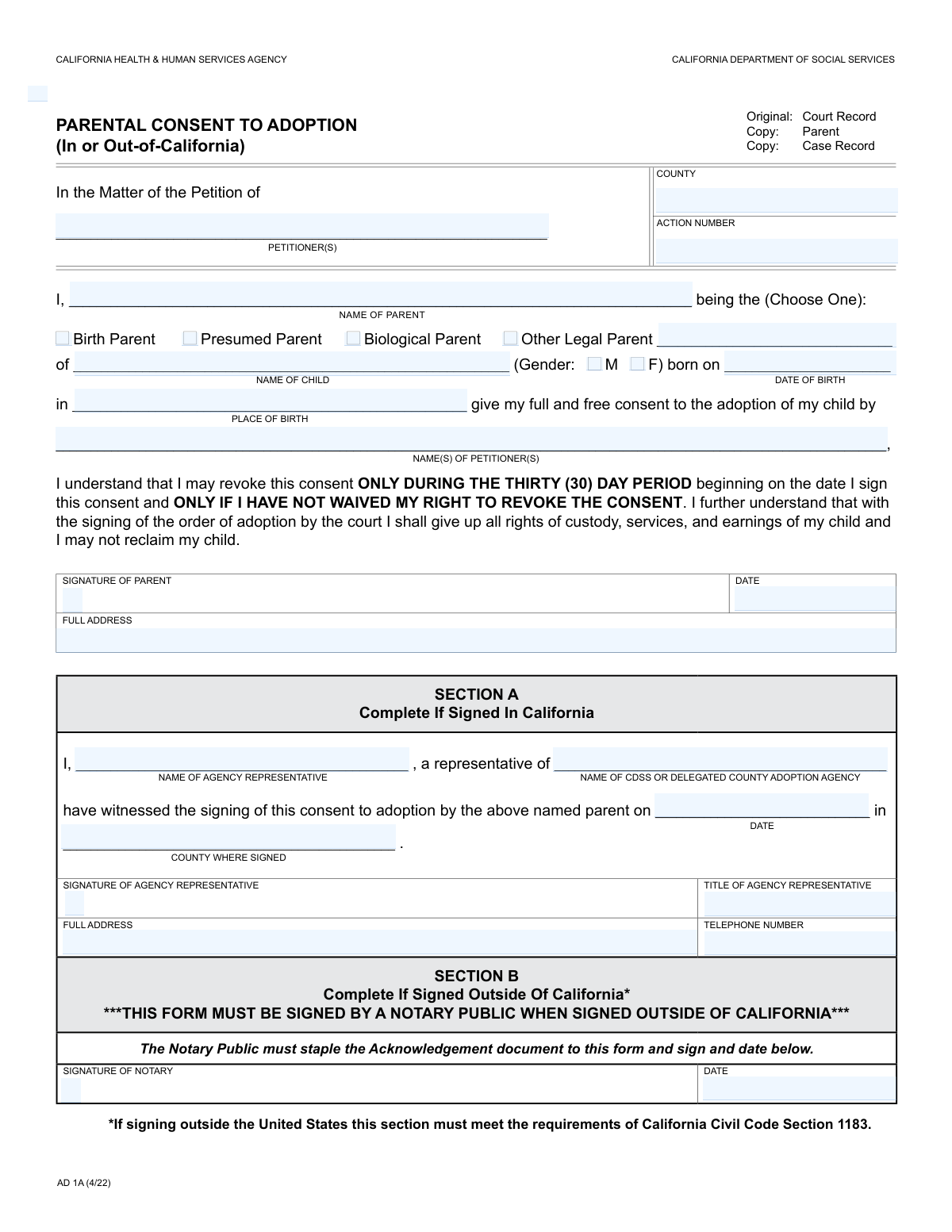
Form ADOPT-210, Adoption Agreement, is a critical legal document used in California courts to formalize a birth parent's consent for their child's adoption by the named petitioners. Executing this form is a significant step, as it typically becomes irrevocable after a certain period, making the child legally available for adoption by the prospective parents. It ensures that the consent is given knowingly and voluntarily, protecting the rights of all parties involved. Today, this form can be filled out quickly and accurately using AI-powered services like Instafill.ai, which can also convert non-fillable PDF versions into interactive fillable forms.
Our AI automatically handles information lookup, data retrieval, formatting, and form filling.
It takes less than a minute to fill out ADOPT-210 using our AI form filling.
Securely upload your data. Information is encrypted in transit and deleted immediately after the form is filled out.
Form specifications
| Form name: | ADOPT-210, Adoption Agreement |
| Number of fields: | 29 |
| Number of pages: | 1 |
| Language: | English |
| Categories: | adoption forms |
Instafill Demo: How to fill out PDF forms in seconds with AI
How to Fill Out ADOPT-210 Online for Free in 2026
Are you looking to fill out a ADOPT-210 form online quickly and accurately? Instafill.ai offers the #1 AI-powered PDF filling software of 2026, allowing you to complete your ADOPT-210 form in just 37 seconds or less.
Follow these steps to fill out your ADOPT-210 form online using Instafill.ai:
- 1 Navigate to Instafill.ai and upload or select the ADOPT-210 form.
- 2 Use the AI assistant to automatically fill in the case identifiers, such as the county and action number.
- 3 Provide the full names and information for the petitioners (prospective adoptive parents), the consenting parent(s), and the child.
- 4 Carefully review the consent statements and confirm the names of the petitioners to whom consent is being granted.
- 5 The consenting parent must sign the form in the presence of either a delegated county adoption agency representative (Section A) or a notary public (Section B).
- 6 Ensure the agency representative or notary properly completes their respective section, including their signature, date, and official details.
- 7 Download, save, and print the completed form for filing with the appropriate court as part of the adoption petition.
Our AI-powered system ensures each field is filled out correctly, reducing errors and saving you time.
Why Choose Instafill.ai for Your Fillable ADOPT-210 Form?
Speed
Complete your ADOPT-210 in as little as 37 seconds.
Up-to-Date
Always use the latest 2026 ADOPT-210 form version.
Cost-effective
No need to hire expensive lawyers.
Accuracy
Our AI performs 10 compliance checks to ensure your form is error-free.
Security
Your personal information is protected with bank-level encryption.
Frequently Asked Questions About Form ADOPT-210
This form is a legal document used by a parent to formally give their consent for the adoption of their child by the named petitioner(s).
The parent giving consent for the adoption must complete their section and sign it. The signing must be witnessed and signed by either an authorized agency representative or a notary public.
The 'Action Number' is the unique case number assigned by the court to this specific adoption proceeding. You can find this number on other legal documents related to your case.
A 'birth parent' is the mother who gave birth, a 'biological parent' is a genetic parent, and a 'presumed parent' is someone legally recognized as a parent (e.g., through marriage). Check the box that best describes your legal relationship to the child.
You should check the 'Other Legal Parent' box. This category is for legal parents not covered by the other specific options, and you will need to provide your date of birth.
You must provide the child's full name, gender (Male or Female), date of birth, and place of birth.
The Agency Representative is an official from the CDSS or a delegated county adoption agency who witnesses your consent. This section is filled out by them if they are present for the signing.
Yes, your signature must be witnessed. It can be witnessed by an authorized agency representative (who fills out Section A) or a Notary Public (who fills out Section B).
The petitioners are the individual(s) who have filed a petition with the court to adopt your child. You must enter their full names in the designated field.
This form provides limited options for gender. You should follow any specific instructions from the court or your legal advisor on how to proceed if neither option is appropriate.
Yes, services like Instafill.ai use AI to accurately auto-fill form fields from your saved information, which can save you time and help prevent errors.
Simply upload the form's PDF to the Instafill.ai platform. Their AI will identify all the fields, allowing you to quickly fill them out online using your securely stored information.
You can use a service like Instafill.ai, which can convert flat, non-fillable PDFs into interactive, fillable forms. This allows you to type your information directly into the fields before printing.
Compliance ADOPT-210
Validation Checks by Instafill.ai
1
Parent Type Selection Required
This check ensures that at least one parent type checkbox ('Birth Parent', 'Presumed Parent', 'Biological Parent', 'Other Legal Parent') is selected. This information is critical for establishing the legal standing of the consenting parent. If no box is checked, the form submission should be rejected with an error message prompting the user to specify the parent's legal status.
2
Conditional Requirement for Parent's Date of Birth
This validation enforces that the 'Parent Date of Birth' field is filled out if and only if the 'Other Legal Parent' checkbox is selected. This rule ensures that specific data is collected for less common legal parent types, while not unnecessarily burdening other users. A failure would occur if 'Other Legal Parent' is checked but the date of birth is missing.
3
Mutually Exclusive Child Gender Selection
This check verifies that exactly one of the child's gender checkboxes ('M' or 'F') is selected. It prevents submissions with no gender selected or with both selected, which would create data ambiguity. An invalid submission would prompt the user to select one and only one option for the child's gender.
4
Standard Date Format Validation
This validation ensures that all date fields ('Parent Date of Birth', 'Child's Date of Birth', 'Signature Date', 'Date of Signing', 'Date Signed') adhere to a consistent and valid format, such as MM/DD/YYYY. This is crucial for data integrity and to prevent processing errors in the legal system. Submissions with improperly formatted dates will be rejected.
5
Chronological Integrity of Dates
This check verifies the logical sequence of dates across the form. Specifically, it ensures the 'Child's Date of Birth' is before the parent's 'Signature Date', and the 'Signature Date' is on or before the agency's 'Date of Signing' and the notary's 'Date Signed'. This validation is critical to confirm the legal timeline of events. A failure indicates a logical impossibility, such as a consent being signed before a child was born.
6
Parent Name Consistency Across Sections
This validation confirms that the 'Parent's Signature Name' in the consent section exactly matches the 'Parent Name' provided in the parent information section. This is a crucial identity verification step to ensure the person granting consent is the same individual identified at the beginning of the form. A mismatch would halt the submission and require correction to prevent potential fraud.
7
Agency Representative Name Consistency
This check ensures that the 'Agency Representative Signature (Typed)' field matches the 'Agency Representative Name' field. This serves as a confirmation of the representative's identity and their attestation. If the names do not match, the form would be considered invalid, as the signature does not correspond to the identified representative.
8
Child's Birth Date Must Be in the Past
This validation ensures that the 'Child's Date of Birth' is a date that has already occurred and is not a future date. This is a fundamental logic check, as a consent for adoption cannot be processed for a child who has not yet been born. An entry with a future date would be flagged as an error and require immediate correction.
9
Parent's Minimum Age Verification
This check calculates the parent's age based on the 'Parent Date of Birth' to ensure they are of legal age to provide consent (e.g., 18 years or older). This is a critical legal requirement for the validity of the consent document. If the calculated age is below the legal threshold, the submission will be blocked.
10
Agency Representative Telephone Number Format
This validation checks that the 'Agency Representative Telephone Number' is entered in a standard, valid format (e.g., (XXX) XXX-XXXX or XXXXXXXXXX). Proper formatting ensures the contact information is usable and can be correctly stored in the system. An invalid format would trigger an error message asking the user to re-enter the number correctly.
11
Case Identifier Completeness
This check verifies that both the 'County' and 'Action Number' fields in the Case Identifiers section are filled out. These fields are essential for correctly filing the document with the appropriate court and associating it with the correct legal case. A submission missing this information would be incomplete and could not be processed.
12
Required Name Fields Completion
This validation ensures that essential name fields, including 'Petitioners', 'Parent Name', and 'Child's Name', are not left blank. These names are fundamental to identifying the key parties involved in the adoption proceeding. The form cannot be submitted if any of these core identity fields are empty.
13
Address Field Completeness
This check validates that address fields like 'Parent's Full Address' and 'Agency Representative Full Address' are not empty and contain plausible address information. Complete and accurate addresses are required for legal notifications and record-keeping. A submission with a missing address would be flagged as incomplete.
Common Mistakes in Completing ADOPT-210
Applicants often enter a shortened name, nickname, or just initials for the petitioner, parent, or child. Legal documents like this require the full legal name as it appears on official identification, such as a birth certificate or driver's license. Using an incorrect name can cause a mismatch with other legal records, leading to significant delays or rejection of the petition.
The form requires the parent to select their legal relationship to the child (Birth, Presumed, Biological, Other Legal Parent). People often get confused by these legal terms and may check the wrong box or multiple boxes. This is a critical error as it defines the legal basis for the consent, and an incorrect selection can invalidate the entire document, requiring it to be re-executed.
The form states to only enter the 'Parent Date of Birth' if 'Other Legal Parent' is checked. It's common for users to either miss this instruction and fill the date of birth for all parent types, or to check 'Other Legal Parent' and forget to provide the required date of birth. This results in an incomplete or incorrectly filled form, causing processing exceptions and delays.
A frequent error is having a name spelled differently in various fields, such as the 'Parent Name' at the top of the form not exactly matching the 'Parent's Signature Name' in the consent section. This can happen due to typos or carelessness and raises red flags about the identity of the person signing. To avoid this, proofread carefully or use a tool like Instafill.ai that can ensure consistency across related fields.
The 'Parent's Signature Name' field explicitly asks for the parent's printed name for legibility, but many people mistakenly sign their name there instead. A cursive signature in a field meant for a typed or printed name can make the form difficult to process and may require correction. The actual signature is typically done with a pen in a dedicated signature box or electronically, not in a field for a printed name.
The 'Action Number' and 'County' are essential for linking the consent form to the correct legal case. People may leave these blank if they don't have the information handy, or they might miscopy the complex action number. An incorrect or missing action number means the document cannot be filed correctly with the court, halting the entire legal process until it's rectified.
When filling out the 'Parent's Full Address', applicants sometimes omit key details like an apartment or unit number, or the ZIP code. A partial address can prevent official legal notices and correspondence from being delivered successfully. This can lead to missed deadlines and significant delays in the adoption proceedings.
For the 'Child's Place of Birth', users may enter just a hospital name or a city without a state. This information needs to be precise and match the child's birth certificate for verification purposes. An ambiguous entry requires clarification, slowing down the process. The best practice is to enter the full location as 'City, State'.
The form contains multiple date fields ('Child's Date of Birth', 'Signature Date', etc.), and users often enter them in different formats (e.g., MM-DD-YY vs. MM/DD/YYYY). This inconsistency can lead to data entry errors and ambiguity, especially in a legal context where dates are critical. Using an AI-powered tool like Instafill.ai can help by automatically standardizing dates into the required format.
Sections A ('Agency Representative Information') and B ('Notary Information') are reserved for the designated officials who witness and notarize the document. A common mistake is for the parent to attempt to fill out these sections themselves. This invalidates the required legal witnessing step and will cause the form to be rejected immediately, as these sections must be completed by the authorized third parties.
If the form is a non-fillable PDF, individuals often print it and complete it by hand. Poor or illegible handwriting can make names, dates, and addresses impossible to read, leading to data entry errors by clerks and likely rejection of the form. To prevent this, use a service like Instafill.ai which can convert a flat PDF into a digitally fillable version, ensuring all entries are typed and perfectly legible.
Saved over 80 hours a year
“I was never sure if my IRS forms like W-9 were filled correctly. Now, I can complete the forms accurately without any external help.”
Kevin Martin Green
Your data stays secure with advanced protection from Instafill and our subprocessors

Robust compliance program
Transparent business model
You’re not the product. You always know where your data is and what it is processed for.
ISO 27001, HIPAA, and GDPR
Our subprocesses adhere to multiple compliance standards, including but not limited to ISO 27001, HIPAA, and GDPR.
Security & privacy by design
We consider security and privacy from the initial design phase of any new service or functionality. It’s not an afterthought, it’s built-in, including support for two-factor authentication (2FA) to further protect your account.
Fill out ADOPT-210 with Instafill.ai
Worried about filling PDFs wrong? Instafill securely fills adopt-210-adoption-agreement forms, ensuring each field is accurate.