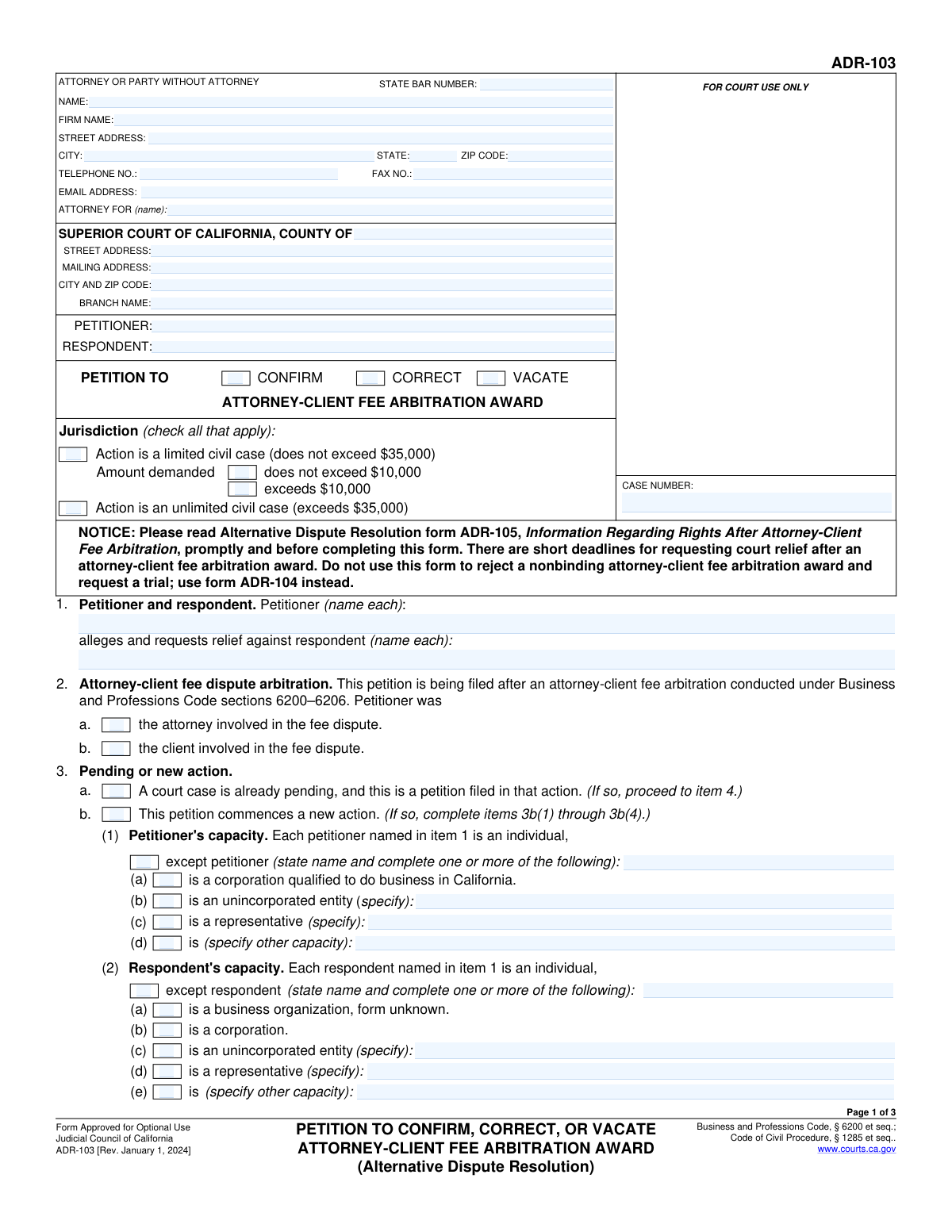
Yes! You can use AI to fill out Form ADR-103, Petition to Confirm, Correct, or Vacate Attorney-Client Fee Arbitration Award

Form ADR-103 is a legal document used in California to formally request a court's intervention after an attorney-client fee arbitration. The petitioner, who can be either the attorney or the client, uses this form to ask the court to either enforce (confirm), change (correct), or cancel (vacate) the arbitrator's decision. This petition is a critical step for making an arbitration award legally binding or for challenging its outcome based on specific legal grounds. Today, this form can be filled out quickly and accurately using AI-powered services like Instafill.ai, which can also convert non-fillable PDF versions into interactive fillable forms.
Our AI automatically handles information lookup, data retrieval, formatting, and form filling.
It takes less than a minute to fill out ADR-103 using our AI form filling.
Securely upload your data. Information is encrypted in transit and deleted immediately after the form is filled out.

Form specifications

Form name: Form ADR-103, Petition to Confirm, Correct, or Vacate Attorney-Client Fee Arbitration Award
Number of fields: 131
Number of pages: 3
Language: English
main-image

Instafill Demo: How to fill out PDF forms in seconds with AI

How to Fill Out ADR-103 Online for Free in 2026

Are you looking to fill out a ADR-103 form online quickly and accurately? Instafill.ai offers the #1 AI-powered PDF filling software of 2026, allowing you to complete your ADR-103 form in just 37 seconds or less.
Follow these steps to fill out your ADR-103 form online using Instafill.ai:
  1. 1 Navigate to Instafill.ai and upload or select Form ADR-103.
  2. 2 Enter the court information, including the county and branch, along with the case number if applicable.
  3. 3 Identify the petitioner and respondent, specifying their roles in the original dispute and their legal capacity (e.g., individual, corporation).
  4. 4 Select the primary purpose of the petition: to confirm, correct, or vacate the arbitration award.
  5. 5 Provide details about the arbitration, including the date of the award, the terms, and the specific grounds for your request (e.g., reasons for correction or vacation).
  6. 6 Specify any additional requests, such as interest on the award, court costs, or attorney's fees.
  7. 7 Review all the information you've entered for accuracy, then date and provide your name before downloading the completed form for filing.

Our AI-powered system ensures each field is filled out correctly, reducing errors and saving you time.

Why Choose Instafill.ai for Your Fillable ADR-103 Form?

Speed

Complete your ADR-103 in as little as 37 seconds.

Up-to-Date

Always use the latest 2026 ADR-103 form version.

Cost-effective

No need to hire expensive lawyers.

Accuracy

Our AI performs 10 compliance checks to ensure your form is error-free.

Security

Your personal information is protected with bank-level encryption.

Frequently Asked Questions About Form ADR-103

This form is a petition filed in Superior Court after an attorney-client fee arbitration. It asks the court to either confirm (make legally binding), correct (fix errors in), or vacate (cancel) the arbitration award.

Either the attorney or the client who was a party to the fee arbitration can fill out this form. The person filing the form is the 'Petitioner,' and the other party is the 'Respondent'.

Choosing 'Confirm' asks the court to approve the award and turn it into an enforceable judgment. 'Correct' asks to fix specific errors like a calculation mistake. 'Vacate' asks the court to completely cancel the award due to serious issues like fraud or arbitrator misconduct.

A case is 'Limited Civil' if the amount in controversy does not exceed $35,000. If the amount is more than $35,000, it is an 'Unlimited Civil Case'.

If there is no pre-existing court case between you and the other party, you must check this box to start a new legal action. If this petition relates to an already active court case, you would file it within that existing action instead.

You will need the court and case information (if applicable), details about the petitioner and respondent, a copy of the arbitration award, and the dates the arbitration occurred and the award was mailed.

The form lists specific legal grounds, such as the award being obtained by corruption or fraud, arbitrator misconduct, or an arbitrator exceeding their authority. You must select the appropriate reason and provide supporting facts.

You must file this petition with the Superior Court in the correct county, which is determined by venue rules. This is often the county where the arbitration was held or where the original attorney-client agreement was made.

The form provides a section under 'Respondent Capacity' to specify if the party is not an individual. You can select options such as 'corporation,' 'unincorporated entity,' or 'business organization, form unknown'.

Yes, the form has a section where you can request that the court award interest on the principal amount of the award. You can specify the date from which interest should begin and whether it's at the statutory rate or a different rate.

Yes, services like Instafill.ai use AI to auto-fill form fields accurately and save time. This can help you complete complex legal forms more efficiently and with fewer errors.

You can upload the PDF of the form to the Instafill.ai platform. The service will make the form fillable online, allowing you to type your information directly into the fields, save your progress, and print the completed document.

If your PDF is a 'flat' or non-fillable scan, you can use a service like Instafill.ai. It can convert the non-interactive document into a smart, fillable form that you can complete on your computer.

Compliance ADR-103
Validation Checks by Instafill.ai

1
Exclusive Petition Type Selection
This check ensures that only one of the three petition type checkboxes ('Confirm', 'Correct', 'Vacate') is selected. These options are mutually exclusive as a petition can only serve one primary purpose. If more than one or none are selected, the form submission should be rejected to force the user to clarify the single, specific legal action they are requesting from the court.
2
Mutually Exclusive Jurisdiction Selection
Validates that either 'Limited Civil Case' or 'Unlimited Civil Case' is selected, but not both. These two options define the fundamental jurisdiction of the court based on the amount in controversy and are mutually exclusive. An invalid selection would make it impossible to route the case correctly, so the submission must be blocked until a single, valid choice is made.
3
Conditional and Exclusive Limited Case Amount
This check is triggered if 'Limited Civil Case' is selected. It verifies that exactly one of the two amount-related checkboxes ('Amount Demanded Does Not Exceed $10,000' or 'Amount Demanded Exceeds $10,000') is also selected. This sub-categorization is mandatory for limited civil cases and the options are mutually exclusive. Failure to comply would result in an incomplete or contradictory filing.
4
Mutually Exclusive Action Status
Ensures that the user selects either 'Pending Court Case' or 'Commences New Action', but not both. A petition can either be filed within an existing legal action or it can be the start of a brand new one. Selecting both creates a logical impossibility for case processing, so the form must be rejected until a single, clear status is indicated.
5
Consistent Petitioner and Respondent Naming
This validation cross-references the petitioner and respondent names across all sections where they appear (e.g., 'Case Parties', 'Petitioner and Respondent Names', 'Case Information'). It ensures the names are identical in every instance to prevent ambiguity and legal errors. Inconsistent names can lead to confusion, incorrect party service, and potential dismissal of the case, so consistency is critical.
6
State Bar Number Format Validation
Verifies that the 'State Bar Number' field contains only numeric characters and conforms to the expected length for a valid state bar number. This is crucial for correctly identifying the attorney of record within the state's official database. An invalid format could prevent the court from verifying the attorney's standing and communicating with them, so the submission should fail if the format is incorrect.
7
Logical Date Sequence
This check ensures the dates provided follow a logical chronological order: 'Arbitration Date' must be on or before the 'Date of Award', and the 'Date of Award' must be on or before the 'Date Mailed to Petitioner'. This maintains the integrity of the case timeline. A failure indicates a data entry error that could undermine the petition's factual basis and must be corrected before submission.
8
Conditional Case Number for Pending Actions
Validates that if the 'Pending Court Case' checkbox is selected, the 'Case Number' field must be filled out. Conversely, if 'Commences New Action' is selected, the 'Case Number' field should be empty as one would not have been assigned yet. This ensures that petitions filed in existing actions are correctly linked and new actions are not erroneously associated with a pre-existing case number.
9
Required Justification for Correction or Vacation
Ensures that if a user requests to correct or vacate an award (i.e., checks 'Correct Award Request' or 'Vacate (cancel) the award'), they must provide a justification. This means either the corresponding 'Facts Supporting...' text area must be filled, or the checkbox for providing facts in an attachment must be selected. Without this justification, the request is legally insufficient and the form should not be accepted.
10
Exclusive New Hearing Request
This check validates that if the user is requesting to vacate an award, they must select either 'Petitioner requests new hearing' or 'Petitioner does not request new hearing', but not both. This is a critical and mutually exclusive choice that informs the court of the petitioner's desired next step if the vacation is granted. The form should be rejected if this choice is not made clearly.
11
Conditional Interest Rate Specification
Verifies that if the 'At Specified Rate' checkbox is selected, the 'Interest Rate' field must contain a valid numerical percentage. If 'At Statutory Rate' is checked, the 'Interest Rate' field should be empty or disabled. This prevents contradictory or incomplete information regarding the requested interest, ensuring the court understands the precise financial relief being sought.
12
Conditional Venue Justification for New Action
If 'Commences New Action' is checked, this validation ensures that at least one of the 'Venue Justification' options is selected. Proper venue is a jurisdictional requirement, and the petitioner must state the legal reason why they are filing in this specific county court. Failure to provide this justification would result in the rejection of the new case filing.
13
Mutually Exclusive Petitioner Role in Dispute
This check ensures that only one of the two checkboxes under 'Petitioner Role in Dispute' ('Petitioner was the attorney' or 'Petitioner was the client') is selected. A petitioner can only have one of these roles in the context of the fee dispute. Selecting both or neither creates ambiguity about the parties' relationship, which is fundamental to the case, and should block submission.
14
Conditional Specification for Non-Individual Capacity
This validation ensures that if a checkbox indicating a specific non-individual capacity is checked (e.g., 'Unincorporated entity' for Petitioner, 'Is a representative' for Respondent), the corresponding specification text field must be filled out. This prevents the user from indicating a special capacity without providing the required details. The form should be considered incomplete if the specification is missing.

Common Mistakes in Completing ADR-103

Inconsistent Party Name Entries

This mistake occurs when the petitioner or respondent names are spelled differently or abbreviated inconsistently across the various sections of the form. This often happens due to manual re-typing of information in multiple fields. Such inconsistencies can create confusion in court records, lead to problems with serving notices, and may result in the filing being rejected by the clerk. To avoid this, carefully proofread all name fields for exact consistency or use a tool like Instafill.ai, which auto-populates recurring information to ensure uniformity.

Conflicting Jurisdiction Selection

Users often make errors in the 'Jurisdiction' section by checking mutually exclusive boxes, such as both 'Limited Civil Case' and 'Unlimited Civil Case'. Another common error is selecting 'Limited Civil Case' but failing to specify whether the amount demanded is above or below $10,000. These mistakes happen when filers are rushed or misunderstand the options. The consequence is an immediate rejection of the form, as the court cannot determine its jurisdiction, causing delays in the legal process.

Failing to Justify Correction or Vacation Requests

A frequent error is checking a box to request the correction or vacation of an award (e.g., 'Arbitrator exceeded authority') but then leaving the corresponding 'Facts Supporting...' text field blank. Filers may mistakenly believe that checking the box is sufficient on its own. Without a stated factual basis, the request is legally unsubstantiated and will likely be denied by the court, rendering the petition ineffective. Always provide a clear and concise explanation in the designated field for any grounds you allege.

Incomplete Conditional Field Entries

This form contains many fields that are only required if a specific checkbox is selected, such as providing a description after checking 'Other capacity'. People often check the box but overlook the dependent field that appears or becomes relevant. This results in an incomplete application that the court clerk will reject, delaying the case until a corrected form is submitted. AI-powered tools like Instafill.ai can help prevent this by highlighting required fields based on your selections and validating that all necessary information is provided.

Mismatch Between Action Status and Case Number

Filers frequently create a logical contradiction by checking 'Commences New Action' while also providing a case number, or by checking 'Pending Court Case' and failing to provide the mandatory case number. A new action does not have a case number yet, while a petition in a pending case requires one for proper filing. This error leads to confusion and rejection at the clerk's office. Double-check that your selection matches whether a case number exists and is provided.

Omitting the Court Branch Name

When filling out the court's address, people often provide the county and main courthouse address but neglect to enter the specific 'Court Branch Name'. Many superior courts have multiple branches, and filing at the wrong location can cause significant delays, misrouting of documents, or outright rejection. To avoid this, verify the correct branch for your case type and location before filling out the form. If the form is a non-fillable PDF, a tool like Instafill.ai can convert it into an interactive, fillable version to make entering this data easier.

Ambiguous Petition Type Selection

A critical error is either selecting more than one petition type ('Confirm', 'Correct', 'Vacate') or selecting none at all. These options are mutually exclusive primary requests, and choosing more than one creates ambiguity about the relief being sought. This will cause the court to reject the filing or issue a deficiency notice, halting progress on the case. You must decide on the single primary goal of your petition before filing.

Forgetting to Attach Required Documents

Users often check boxes indicating that a document is attached, such as 'Attachment of Award' or an attachment for additional facts, but then forget to include the physical or digital document with their submission. This is a common oversight during the final assembly of the filing package. A filing without its required attachments is incomplete and will be rejected, as the court cannot evaluate the petition without the supporting evidence, especially the arbitration award itself.

Incorrectly Justifying the Court's Venue

The 'Venue Justification' section is complex and conditional, often leading to errors. For example, a filer might check 'This petition commences a new action' but then fail to select one of the required reasons establishing why that specific county is the correct venue. This failure to establish a legal basis for the venue can lead to the case being rejected or challenged for being filed in the wrong court. Carefully follow the form's logic to ensure you provide a complete and valid justification.
Saved over 80 hours a year

“I was never sure if my IRS forms like W-9 were filled correctly. Now, I can complete the forms accurately without any external help.”

Kevin Martin Green

Your data stays secure with advanced protection from Instafill and our subprocessors

Robust compliance program

Transparent business model

You’re not the product. You always know where your data is and what it is processed for.

ISO 27001, HIPAA, and GDPR

Our subprocesses adhere to multiple compliance standards, including but not limited to ISO 27001, HIPAA, and GDPR.

Security & privacy by design

We consider security and privacy from the initial design phase of any new service or functionality. It’s not an afterthought, it’s built-in, including support for two-factor authentication (2FA) to further protect your account.

Fill out ADR-103 with Instafill.ai

Worried about filling PDFs wrong? Instafill securely fills form-adr-103-petition-to-confirm-correct-or-vacate-attorney-client-fee-arbitration-award forms, ensuring each field is accurate.