
Yes! You can use AI to fill out Declaration of Facts of Death (California Superior Court)
Don't type 61 fields by hand. Tell our AI about yourself, or upload a document you already have, and it fills every field in seconds. You check it, then download, print or sign.
The AI does the filling. You just check it.
No typing into boxes, nothing to install.
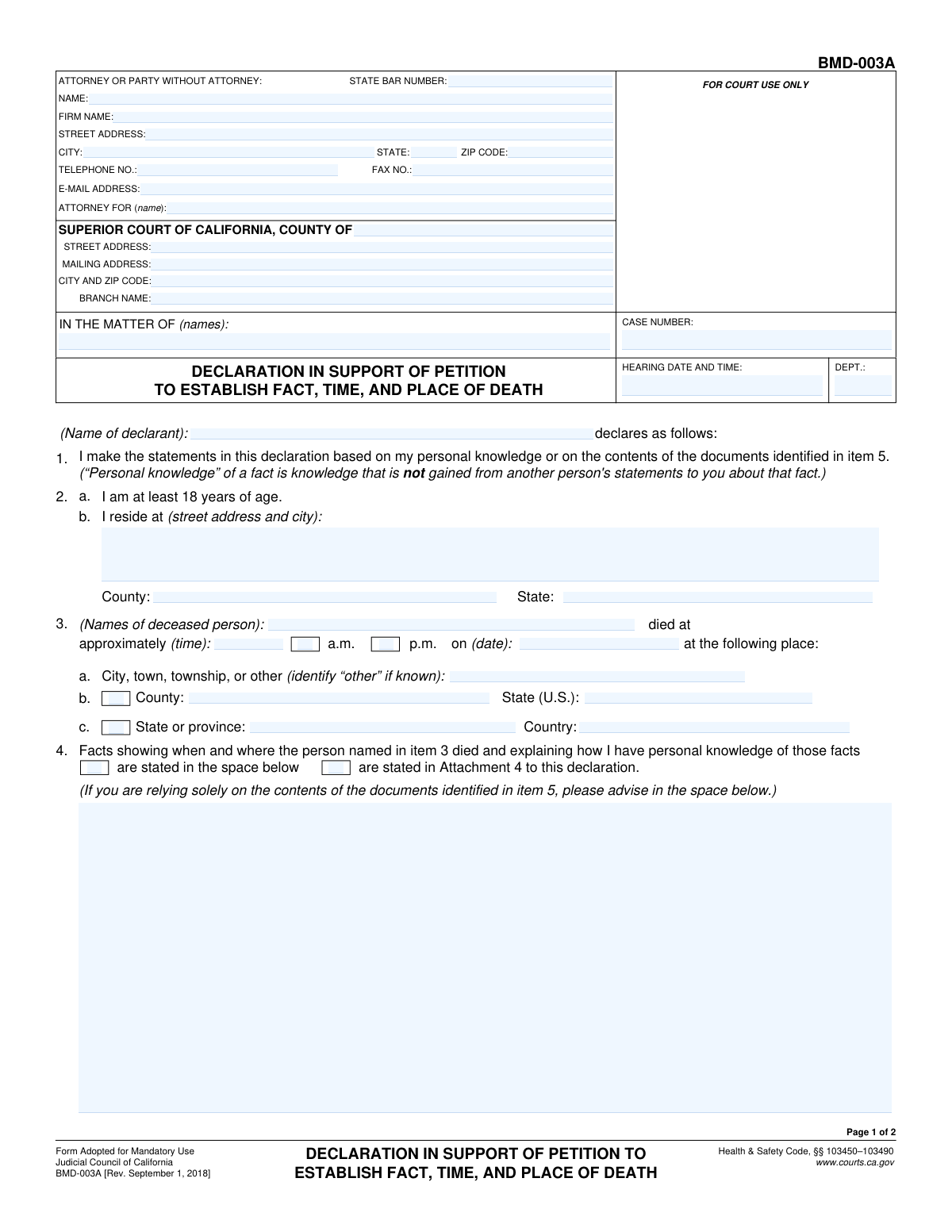
What this form asks for
The AI fills all of it, from your answers or your documents.
The AI checks your answers before you download
15 checks built for this form, so a wrong date or a missing answer is caught before anyone else sees it.
This check verifies that the 'Hearing Date and Time' is a date and time that has not yet passed. Scheduling a hearing for a past date is a logical impossibility and indicates a data entry error. If the validation fails, the user should be prompted to correct the date before the form can be submitted.
This validation ensures that the 'Date of Death' entered is on or before the current date. A future date of death is logically impossible and represents a significant data entry error. This check is crucial for maintaining the integrity and credibility of the legal document, and failure will require the user to correct the date.
This check ensures that for the 'Approximate Time of Death', the user can select either the 'a.m.' checkbox or the 'p.m.' checkbox, but not both simultaneously. Selecting both would create ambiguity about the time of death. If both are selected, the form should display an error and require the user to choose only one.
This validation confirms that the value entered in the 'State' field under 'Attorney or Party Information' is a valid two-letter U.S. state or territory abbreviation. This ensures address accuracy for mailing and record-keeping. An invalid entry would prevent proper address validation and could lead to returned mail, so the user must correct it.
This check validates that the 'Zip Code' for the attorney or party's address is in a standard 5-digit (NNNNN) or 9-digit (NNNNN-NNNN) format. Correctly formatted zip codes are essential for mail delivery and data standardization. The system should reject any entry that does not conform to this structure and prompt for correction.
This validation rule checks if the 'Email Address' field contains a string that follows the standard email format (e.g., [email protected]). This is critical for ensuring that electronic communications and notifications can be successfully delivered to the attorney or party. An invalid format would block submission and require the user to provide a correctly formatted email address.
And 9 more checks
- Conditional Requirement for Attachment Dates
- Conditional Requirement for Other Documents Description
- Mutually Exclusive Selection for Statement of Facts Location
- Mutually Exclusive Selection for Death Information Importance
- Conditional Requirement for Court Proceeding Description
- Validates Case Number Format
- Logical Check Between Date of Death and Hearing Date
- Ensures Number of Attached Pages is a Non-Negative Integer
- Completeness Check for Declarant Name and Date
Let AI fill out your CA Declaration of Facts of Death
No typing. Every field filled in seconds, checked, ready to sign.
How to Fill Out CA Declaration of Facts of Death Online for Free in 2026
What the AI walks you through.
- Navigate to Instafill.ai and upload the Declaration of Facts of Death form, or select it from their library of templates.
- Use the AI assistant to accurately fill in the Case Details and Court Information sections, including the case number, court address, and department.
- Input your information as the declarant and, if applicable, the details for your attorney, including name, address, and State Bar number.
- Provide the full name of the deceased person and specify the date, approximate time, and location of their death in the designated fields.
- Write your statement of facts or check the appropriate boxes to indicate where the facts are detailed, and use the tool to check off and describe attached evidence like police or coroner's reports.
- Carefully review all entered information for accuracy, then electronically sign and date the declaration.
- Download the completed, signed form and file it with the appropriate Superior Court of California as required for your case.
Common Mistakes in Completing CA Declaration of Facts of Death
The ones the AI is built to catch.
Inconsistent or Incorrect Case Number
Missing State Bar Number for Attorney
Ambiguous Time of Death
Conflicting Statement of Facts Selection
Forgetting Dates for Attached Reports
Vague 'Other Documents' Description
Incomplete Court Proceeding Details
Incorrect Total for 'Number of Attached Pages'
Using Full State Names Instead of Abbreviations
Confusing Declarant and Deceased Person's Information
Failing to Check Attachment Indicator Boxes
Leaving 'Attorney For' Field Blank
Frequently Asked Questions About CA Declaration of Facts of Death
Is it really free for 7 days?
Can I fill other forms too?
How do I cancel?
How does the AI fill out CA Declaration of Facts of Death?
What happens to my information?
How complex is CA Declaration of Facts of Death to fill out?
What is the purpose of this form?
Who needs to fill out this form?
What information do I need before I start?
How do I complete the 'Statement of Facts' section?
What if I don't know the exact time of death?
Do I have to attach documents like a police or coroner's report?
What is the difference between 'Facts in space below' and 'Facts in Attachment 4'?
What does the 'Death Information Is Important' checkbox mean?
Where do I file this form after completing it?
Can AI tools help me fill out this form?
How can I fill this form out online using Instafill.ai?
What should I do if my PDF version of the form is not fillable?
What do I enter in the 'Attorney For' field if I am representing myself?
Get your CA Declaration of Facts of Death filled out by AI
$0 today. Cancel before Oct 31 and you pay nothing.
Other forms like this one
court forms: Form Summons, Supreme Court of New York, Form SC-100, Plaintiff's Claim and ORDER to Go to Small Claims Court, Form AO 240, Application to Proceed in District Court Without Prepaying Fees or Costs, Form AO 239, Application to Proceed in District Court Without Prepaying Fees or Costs, Affidavit for Service by Publication/Posting (Circuit Court of Cook County, Illinois) (CCG 0013 A/B), Petition for Leave to Proceed In Forma Pauperis (Court of Common Pleas of Lehigh County, Pennsylvania, Civil Division), In Forma Pauperis Affidavit/Petition (AOPC 622A) – Pennsylvania Magisterial District Court, Judicial Council of California Form SC-105, Request for Court Order and Answer (Small Claims), SC-120, Defendant’s Claim and ORDER to Go to Small Claims Court (Small Claims), SC-105, Request for Court Order and Answer (Small Claims), Judicial Council of California Form SC-120, Defendant’s Claim and ORDER to Go to Small Claims Court (Small Claims), In Forma Pauperis Affidavit Petition (AOPC 622A) — Pennsylvania Magisterial District Court, Florida Supreme Court Approved Family Law Form 12.901(b)(3), Petition for Dissolution of Marriage with No Dependent or Minor Child(ren) or Property (02/18), Illinois Supreme Court Approved Form E-O 3500.3, Eviction Order, Form P3 (Rule 25-3(2)) — Affidavit of Applicant for Grant of Probate or Grant of Administration with Will Annexed (Short Form) (Supreme Court of British Columbia), Form SC-100, Plaintiff’s Claim and ORDER to Go to Small Claims Court, Designation of Record on Appeal (Civil) (Maricopa County Justice Courts, Arizona) (Form APP 8150-702), FW-003, Order on Court Fee Waiver (Superior Court), Judicial Council of California Form SER-001, Request for Sheriff to Serve Court Papers, FW-003, Order on Court Fee Waiver (Superior Court)
California court forms: Judicial Council of California Form SC-105, Request for Court Order and Answer (Small Claims), Judicial Council of California Form SC-120, Defendant’s Claim and ORDER to Go to Small Claims Court (Small Claims), Judicial Council of California Form SER-001, Request for Sheriff to Serve Court Papers, Judicial Council of California Form SER-001, Request for Sheriff to Serve Court Papers, Affidavit for Collection of Personal Property California Probate Code Section 13100, Form POS-040, Proof of Service—Civil, declaration-of-marriage-for-court-proceeding-california-family-law, ADOPT-200, Adoption Request, ADOPT-200, Stepparent Adoption Request, ADOPT-210, Adoption Agreement, ADOPT-310, Contact After Adoption Agreement, Judicial Council of California Form ADOPT-200, Adoption Request, Form ADR-107, Mediation Attendance Sheet, Form ADR-110, Order Appointing Referee, Form ADR-109, Stipulation or Motion for Order Appointing Referee, Form ADR-102, Request for Trial De Novo After Judicial Arbitration, Form ADR-108, Referee's Report (Code Civ. Proc., §§ 638, 639), Form ADR-106, Petition to Confirm, Correct, or Vacate Contractual Arbitration Award, Form ADR-104, Rejection of Award and Request for Trial After Attorney-Client Fee Arbitration, Form ADR-103, Petition to Confirm, Correct, or Vacate Attorney-Client Fee Arbitration Award
superior court forms: FW-003, Order on Court Fee Waiver (Superior Court), FW-003, Order on Court Fee Waiver (Superior Court), Form FW-003, Order on Court Fee Waiver (Superior Court), Form FW-003-GC, Order on Court Fee Waiver (Superior Court) (Ward or Conservatee), Superior Court of Chatham County, Georgia, Hearing Request Form, Form FW-006, Request for Hearing About Court Fee Waiver Order (Superior Court), Form FW-002, Request to Waive Additional Court Fees (Superior Court), Form FW-008, Order on Court Fee Waiver After Hearing (Superior Court), Form FW-002-GC, Request to Waive Additional Court Fees (Superior Court) (Ward or Conservatee), Form REC-001(N), Notice of Intent to Destroy Superior Court Records; Offer to Transfer Possession, Form REC-001(R), Request for Transfer or Extension of Time for Retention of Superior Court Records, Notice of Hearing on Request for Transfer or Extension of Time for Retention of Superior Court Records; Court Order; Release and Receipt of Superior Court Records, Form REC-002(R), Release and Receipt of Superior Court Records, Superior Court of New Jersey, Application for Appeal and Order, Superior Court of New Jersey Dissolution (FM) Case Management Order, New Jersey Judiciary – Superior Court, Appellate Division Application for Permission to File Emergent Motion, New Jersey Judiciary Superior Court - Appellate Division Civil Case Information Statement, New Jersey Judiciary Superior Court - Appellate Division Criminal Case Information Statement, New Jersey Judiciary Superior Court - Appellate Division Notice of Appeal (CN: 10502), Affidavit of Service (Superior Court of New Jersey)
UK court forms: Form Summons, Supreme Court of New York, Form SC-100, Plaintiff's Claim and ORDER to Go to Small Claims Court, Form AO 240, Application to Proceed in District Court Without Prepaying Fees or Costs, Form AO 239, Application to Proceed in District Court Without Prepaying Fees or Costs, Affidavit for Service by Publication/Posting (Circuit Court of Cook County, Illinois) (CCG 0013 A/B), Petition for Leave to Proceed In Forma Pauperis (Court of Common Pleas of Lehigh County, Pennsylvania, Civil Division), In Forma Pauperis Affidavit/Petition (AOPC 622A) – Pennsylvania Magisterial District Court, Judicial Council of California Form SC-105, Request for Court Order and Answer (Small Claims), SC-120, Defendant’s Claim and ORDER to Go to Small Claims Court (Small Claims), SC-105, Request for Court Order and Answer (Small Claims), Judicial Council of California Form SC-120, Defendant’s Claim and ORDER to Go to Small Claims Court (Small Claims), In Forma Pauperis Affidavit Petition (AOPC 622A) — Pennsylvania Magisterial District Court, Florida Supreme Court Approved Family Law Form 12.901(b)(3), Petition for Dissolution of Marriage with No Dependent or Minor Child(ren) or Property (02/18), Illinois Supreme Court Approved Form E-O 3500.3, Eviction Order, Form P3 (Rule 25-3(2)) — Affidavit of Applicant for Grant of Probate or Grant of Administration with Will Annexed (Short Form) (Supreme Court of British Columbia), Form SC-100, Plaintiff’s Claim and ORDER to Go to Small Claims Court, Designation of Record on Appeal (Civil) (Maricopa County Justice Courts, Arizona) (Form APP 8150-702), FW-003, Order on Court Fee Waiver (Superior Court), Judicial Council of California Form SER-001, Request for Sheriff to Serve Court Papers, FW-003, Order on Court Fee Waiver (Superior Court)
Let AI fill out your CA Declaration of Facts of Death
Your trial starts once a card is added. You pay nothing before Oct 31.
Our AI already knows this form, all 61 fields of it. Skip the typing: tell it about yourself, or upload what you have, and it fills the whole form in seconds.
- AI fills every field on both pages, checkboxes included
- No typing into boxes: answer a few questions, or upload a document you already have, an old copy of this form, a photo of a document
- The AI checks the answers; you review and change anything before you download
- Download the finished PDF, print it, or sign it online
- Encrypted, and never used to train AI
Cancel before Oct 31 and you pay nothing.
A card is needed to start the trial. Cancel in two clicks from your account.
Terms · Privacy