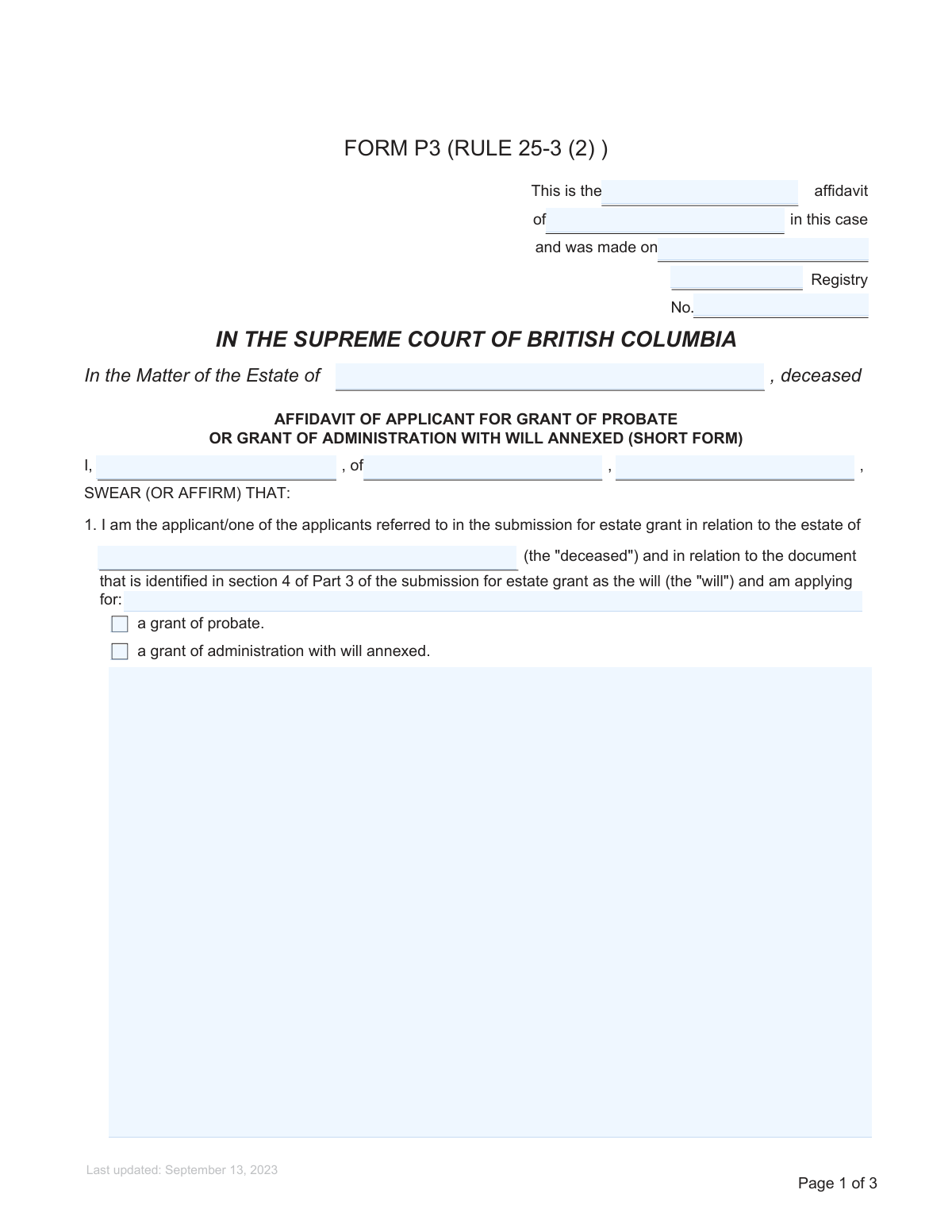
Yes! You can use AI to fill out Form P3 (Rule 25-3(2)) — Affidavit of Applicant for Grant of Probate or Grant of Administration with Will Annexed (Short Form) (Supreme Court of British Columbia)
Form P3 (Rule 25-3(2)) is a sworn/affirmed affidavit filed in the Supreme Court of British Columbia as part of a submission for an estate grant, where the applicant confirms their authority to apply, the status of executors, and key statements about the will (e.g., diligent search, last will, compliance, and supporting documents). It is important because it provides the court with evidence supporting the issuance of a grant of probate or a grant of administration with will annexed and helps ensure the estate is administered by the proper personal representative. The affidavit also includes confirmations about notice obligations (e.g., delivery to the Public Guardian and Trustee where required) and the absence of other grants or applications. Today, this form can be filled out quickly and accurately using AI-powered services like Instafill.ai, which can also convert non-fillable PDF versions into interactive fillable forms.
Our AI automatically handles information lookup, data retrieval, formatting, and form filling.
It takes less than a minute to fill out BC Form P3 using our AI form filling.
Securely upload your data. Information is encrypted in transit and deleted immediately after the form is filled out.
Form specifications
| Form name: | Form P3 (Rule 25-3(2)) — Affidavit of Applicant for Grant of Probate or Grant of Administration with Will Annexed (Short Form) (Supreme Court of British Columbia) |
| Number of pages: | 3 |
| Filled form examples: | Form BC Form P3 Examples |
| Language: | English |
| Categories: | court forms |
Instafill Demo: filling out a legal form in seconds
How to Fill Out BC Form P3 Online for Free in 2026
Are you looking to fill out a BC FORM P3 form online quickly and accurately? Instafill.ai offers the #1 AI-powered PDF filling software of 2026, allowing you to complete your BC FORM P3 form in just 37 seconds or less.
Follow these steps to fill out your BC FORM P3 form online using Instafill.ai:
- 1 Go to Instafill.ai and upload the Form P3 PDF (or search/select “BC Form P3” from the form library).
- 2 Enter case and court details: registry name, registry file number, affidavit ordinal/identifier, and the date the affidavit is made.
- 3 Provide estate and applicant information: deceased’s full legal name, estate name, applicant/affiant full name, and the applicant’s address (street, city, province/state).
- 4 Select the type of grant requested (grant of probate or grant of administration with will annexed) and complete the executor/authority section by choosing the applicable checkbox options and filling in any required names, roles/designations, and section 131 paragraph references (if applicable).
- 5 Complete the remaining affidavit statements (diligent search, last will, validity/alterations, filing of original will, wills notice search certificate, attachments, accuracy of submission, administration undertaking, and no other grants).
- 6 Answer the Rule 25-3(11) Public Guardian and Trustee delivery question and, if required, add delivery details (date/recipient/notes).
- 7 Use Instafill.ai to validate required fields, generate a clean final PDF for printing/signing, then arrange commissioning (sworn/affirmed before a commissioner) and file the completed affidavit with the court as part of the submission for estate grant.
Our AI-powered system ensures each field is filled out correctly, reducing errors and saving you time.
Why Choose Instafill.ai for Your Fillable BC Form P3 Form?
Speed
Complete your BC Form P3 in as little as 37 seconds.
Up-to-Date
Always use the latest 2026 BC Form P3 form version.
Cost-effective
No need to hire expensive lawyers.
Accuracy
Our AI performs 10 compliance checks to ensure your form is error-free.
Security
Your personal information is protected with bank-level encryption.
Frequently Asked Questions About Form BC Form P3
Form P3 is an affidavit filed in the Supreme Court of British Columbia to support an application for an estate grant when there is a will. It confirms key facts about the deceased, the will, the executor/applicantâs authority, and that required searches and documents are being provided.
The applicant(s) for the estate grantâtypically the executor named in the willâmust complete it. If more than one applicant is applying, each may need to swear/affirm an affidavit, depending on how the application is prepared.
A grant of probate is usually requested when the applicant is the executor named in the will. A grant of administration with will annexed is generally used when there is a will but no executor is able or willing to act, so another eligible person applies to administer the estate.
Youâll need the deceasedâs full legal name, the court registry name and file number, your full name and address, and the date the affidavit will be sworn/affirmed. Youâll also need details from the will (executor names/roles) and your relationship to the deceased.
Yesâthis short form affidavit includes a statement that an originally signed version of the will is being filed with the submission for estate grant. If you do not have the original will, you may need legal advice because additional steps or evidence may be required.
Itâs the Wills Notice search certificate showing the results of a search for wills notices filed for the deceased. This form states that the certificate is filed and indicates no later-dated testamentary document was found.
Select the option that matches your situation: you are named as executor/alternate executor, another person is named and youâre swearing on their behalf with authorization, or you are not named and are applying under section 131 of WESA. If other executors are named but not applying, list them and check the reason (renounced, deceased, or âotherâ with a brief explanation).
It means you are not appointed as executor in the will, but you may still be eligible to apply for the estate grant under one of the categories listed in section 131 of WESA. You must identify the applicable paragraph number and provide the required relationship/authority details in the form.
State your relationship in plain terms (for example, spouse, adult child, sibling, or beneficiary). If you are swearing on behalf of another applicant, include that personâs relationship to the deceased in the relevant âother personâ section.
Sometimesâthis depends on the circumstances of the estate and the rules that apply to your application. If you are required, check the âobligedâ box and include any delivery details; if not, check the ânot obligedâ box.
You are swearing that you searched places where a will or related documents would reasonably be found, including physical and electronic locations where the deceased kept important records. The affidavit also states that no later-dated testamentary document was found.
Noâthis is a sworn/affirmed affidavit and must be signed in front of a commissioner for taking affidavits for British Columbia (or other authorized official). The commissioner completes the âSWORN (OR AFFIRMED) BEFORE MEâ section, including location and date.
Processing times vary by registry workload and whether the filing is complete and accurate. Delays commonly occur if required documents (like the original will or Wills Notice search certificate) are missing or if executor/authority details are unclear.
YesâAI tools can help organize your information and auto-fill form fields to reduce errors and save time. Services like Instafill.ai use AI to auto-fill form fields accurately based on the details you provide.
You can upload the form to Instafill.ai, answer a guided set of questions, and have the fields auto-populated for review before downloading. If the PDF is flat/non-fillable, Instafill.ai can convert it into an interactive fillable form so you can complete it electronically.
Compliance BC Form P3
Validation Checks by Instafill.ai
1
Validates required court/estate identifiers are present (Registry name, Registry file number, Deceased/Estate name)
Checks that the Registry name, Registry file number, and the deceasedâs full legal name (estate name) are all provided and not left blank. These identifiers are essential to correctly associate the affidavit with the correct Supreme Court of British Columbia file and the correct estate. If any are missing, the submission should be rejected or flagged as incomplete because it may be impossible to file or match to the correct proceeding.
2
Ensures deceased name consistency across all deceased/estate name fields
Verifies that values entered for âEstate name of deceasedâ and âDeceasedâs full nameâ match exactly (allowing for minor formatting differences like extra spaces) and do not conflict. This prevents creating ambiguity about which estate the affidavit supports and reduces registry processing errors. If the names differ materially, the system should block submission and require correction or an explicit explanation/attachment workflow.
3
Validates applicant identity and address completeness (full name, street, city/province)
Confirms the applicantâs full legal name, street/mailing address, and city plus province/state are all completed and meet minimum structure requirements (e.g., street contains a number and street name; city and province are not empty). This information is required for the affidavitâs caption and for service/contact purposes. If incomplete, the form should fail validation and prompt the user to provide the missing address components.
4
Validates affiant name is present and logically consistent with applicant/representation selections
Checks that the âAffiant nameâ is provided and that it aligns with the scenario selected: if the affidavit is sworn by the applicant, affiant should match applicant; if sworn on behalf of another applicant, affiant should be the person authorized to swear. This reduces the risk of an affidavit being sworn by the wrong person, which can invalidate the filing. If inconsistent, the system should require the user to correct the affiant/applicant relationship or complete the authorization fields.
5
Validates affidavit date format and plausibility (Date affidavit made)
Ensures the affidavit date is entered in an accepted date format (e.g., YYYY-MM-DD or the systemâs configured format) and represents a real calendar date. Also checks plausibility rules such as not being far in the future relative to submission time (unless explicitly allowed). If the date is invalid or implausible, the submission should be blocked because the commissioning/swearing date is a core affidavit element.
6
Validates affidavit ordinal/identifier is present and standardized (First/Second/Amended)
Checks that the affidavit ordinal is provided and matches an allowed set or pattern (e.g., âFirstâ, âSecondâ, âThirdâ, âAmendedâ, or a controlled vocabulary). This helps registries and parties distinguish between multiple affidavits in the same matter and prevents ambiguous identifiers. If the ordinal is missing or not recognized, the system should prompt for a valid standardized value.
7
Enforces exactly one grant type selection (Probate vs Administration with Will Annexed)
Validates that the user selects oneâand only oneâof: âa grant of probateâ or âa grant of administration with will annexed.â Selecting both or neither creates a legal and procedural ambiguity about the relief sought. If the rule is violated, the system should prevent submission and require the user to choose the correct single grant type.
8
Validates conditional grant type text field completion and alignment with checkbox selection
If the form includes a free-text âType of grant requestedâ field, checks that it is completed only when required by the form logic and that its content matches the selected checkbox (e.g., text must correspond to âgrant of probateâ when probate is selected). This prevents contradictory grant requests within the same affidavit. If mismatch occurs, the system should require the user to reconcile the checkbox selection and the text value.
9
Validates Rule 25-3(11) delivery obligation selection is mutually exclusive and complete
Ensures the user selects either âobliged to deliverâ or ânot obliged to deliverâ to the Public Guardian and Trustee, but not both. This is important because it drives downstream filing/service steps and may require proof/details of delivery. If both/neither are selected, the system should block submission and require a single clear selection.
10
Requires Rule 25-3 delivery details when obligation is selected
When âI am obliged under Rule 25-3(11)âŠâ is checked, validates that âRule 25-3 delivery detailsâ are provided (e.g., date delivered, recipient office, and any reference information) and that any included date is valid. This supports compliance tracking and reduces back-and-forth with the registry. If details are missing, the system should fail validation and request completion before submission.
11
Enforces a single, coherent executor status pathway in Section 2
Validates that the userâs selections in Section 2 do not conflict (e.g., cannot select both âNo other persons are named in the will as executorâ and âOther persons are named in the will as executorâ). It also ensures that at least one executor-status pathway is chosen (named executor, other named executor represented, or not named as executor under s.131). If conflicting or missing, the system should block submission and require the user to select one consistent scenario.
12
Validates executor designation fields when applicant is named as executor/alternate executor
If âOption I: I am named as an executor or alternate executor asâ is selected, checks that âExecutor designationâ is completed and contains an expected value (e.g., executor, alternate executor) or a reasonable free-text designation. This ensures the affidavit accurately reflects the willâs appointment language and supports registry review. If missing, the system should require completion because the statement is incomplete without the designation.
13
Validates represented executor/applicant details and authorization when swearing on another’s behalf (Option 1)
When âOption 1 â Named as an executor or alternate executor (details & authorization)â is checked, requires completion of the referenced personâs name fields (field 1/field 2/field 6 as applicable), the designation in the will (field 7), the authorizing personâs name (field 3), and the applicant name on whose behalf the affidavit is sworn (field 4). This prevents an affidavit from asserting representation without identifying who is represented and who authorized it. If any required names/roles are missing, the system should block submission and prompt for the missing identity/authority information.
14
Validates 'Other persons named as executor but not applicants' list and reason logic
If âOther persons are named in the will as executorâ is selected, checks that at least one non-applicant executor name is provided (primary and/or additional) and that a reason is selected for each (renounced, deceased, or other). If âotherâ is selected, requires a brief reason summary text. If names are missing or reasons are not provided, the system should fail validation because the affidavitâs explanation for non-joining executors is incomplete.
15
Validates Section 131 paragraph reference and related fields when not named as executor
When âI am not named as an executor or alternate executor in the willâ or the âNot named as an executor â beneficiary/nominee under section 131â pathway is selected, requires a valid Section 131 paragraph reference (numeric/lettered as applicable) and completion of the associated identity fields (beneficiary/nominee name, person not named as executor, related personâs name, and relationship). This is important because eligibility to apply depends on the correct statutory category. If the paragraph reference is missing/invalid or required identities are absent, the system should block submission as the legal basis for applying is not properly stated.
16
Validates relationship-to-deceased entries are present and structured when selected
If âMy relationship to the deceasedâ is selected, checks that the relationship text is provided (e.g., spouse/child/sibling) and that any âRelationship item numberâ is a positive integer when used. If the âOther personâs relationship to the deceasedâ section is selected, requires the other personâs full name, relationship, and any authorization/representation fields tied to that section. If relationship details are missing or the item number is not numeric, the system should fail validation because the affidavitâs standing/role statements are incomplete.
Common Mistakes in Completing BC Form P3
People often enter a nickname, omit middle names, or use a name that differs from the death certificate or the will (e.g., married vs. maiden name). This can cause the registry to question identity, require corrections, or delay issuance of the grant. Always copy the deceasedâs full legal name exactly as it appears on the death certificate and the will, and keep it identical everywhere the form asks for the deceasedâs name. AI-powered tools like Instafill.ai can help by reusing the same validated name across all fields to prevent mismatches.
This form has multiple name roles (affiant, applicant, other executor/beneficiary, and the person on whose behalf the affidavit is sworn), and filers frequently put the same name in every blank or swap them. The consequence is an affidavit that does not clearly identify who is swearing, who is applying, and who is being represented, which can lead to rejection or a request for a corrected affidavit. Before filling, map each role to a real person and ensure each name field matches that role and the willâs wording. Instafill.ai can reduce this error by prompting for each role separately and validating that the same person isnât accidentally entered into incompatible fields.
Applicants often check both boxes or choose probate when they are not the named executor, or choose administration with will annexed when they are the executor. This can result in the wrong application type, additional requisitions, and delays while the court clarifies authority. Confirm whether you are named as executor/alternate executor in the will; if not, you may need administration with will annexed and the appropriate section 131 basis. Instafill.ai can help by asking conditional questions and only enabling the correct grant option based on your answers.
Section 2 contains multiple mutually exclusive pathways (no other executors, other executors who are applicants, other executors not applying with reasons, or not named as executor). People commonly check contradictory boxes (e.g., âNo other persons are namedâ and âOther persons are namedâ) or leave the required names/reasons blank. This creates an unclear record of who has authority and why others are not applying, which can trigger court requisitions. Choose only the pathway that matches the will, then fully complete the associated blanks (names, designations, and reasons).
When âOther persons are named in the will as executorâ is selected, filers often forget to list the non-applicant executor(s) or they check âotherâ but provide no brief explanation. The court needs a clear, specific reason (e.g., renunciation filed, executor deceased, lacks capacity, cannot be located) to understand why the named executor is not applying. Provide the executorâs full legal name exactly as in the will and a concise reason that matches the checkbox selection, attaching supporting documents where required by the broader application. Instafill.ai can flag missing reason text when âotherâ is selected and ensure each listed executor has a corresponding reason.
Applicants who are not named as executor often overlook the requirement to identify the specific paragraph of section 131 of the Wills, Estates and Succession Act that authorizes them to apply. Missing or incorrect paragraph references can undermine the stated legal basis for the application and lead to rejection or a request for amendment. Verify which section 131 paragraph applies to your situation (often with legal advice) and enter the exact paragraph number in the designated field. Instafill.ai can help by enforcing conditional completion (only showing the paragraph field when that pathway is chosen) and reminding you to supply the required reference.
People frequently enter only a street name, omit apartment/unit numbers, or forget the city and province/state, especially when copying from informal sources. Incomplete addresses can cause service/notice issues and may require follow-up from the registry or counsel, delaying processing. Enter a complete mailing address: unit (if any), street number and name, city/town, and province/state (and postal code if used in your filing package). Instafill.ai can standardize and format addresses consistently and catch missing components before submission.
Filers sometimes enter the wrong registry location (e.g., Vancouver vs. Victoria) or use an old/incorrect file number from another matter. This can misdirect the filing, create administrative confusion, or result in the affidavit not matching the court record. Confirm the registry name exactly as used by the Supreme Court of British Columbia and copy the registry file number from the existing court file or the submission for estate grant. Instafill.ai can help by validating file-number formats and ensuring the registry details are consistent across documents.
A common mistake is filling âDate affidavit madeâ with the date you drafted the document rather than the date it is actually sworn/affirmed, or leaving the âat ___, British Columbiaâ commissioning location blank. If the sworn date/location is missing or inconsistent, the affidavit may be invalid or require re-swearing, causing significant delays. Only insert the date once you are swearing/affirming before a commissioner, and ensure the location and commissionerâs printed name/stamp are completed at the same time. Instafill.ai can help by keeping draft dates separate and prompting you to finalize commissioning fields only at signing.
The affidavit states that the original will is filed, the Vital Statistics wills notice search certificate is filed, and all documents referred to in the will are attachedâpeople often swear these statements without actually including the documents. This can lead to requisitions, adjournments, or the need to file supplemental materials, and it may raise credibility issues if statements are inaccurate. Before swearing, cross-check your filing package to ensure the original will, the wills notice search certificate, and any referenced attachments are included and correctly labeled. Instafill.ai can help by generating a checklist from the affidavitâs assertions and warning you when a required supporting document is missing.
Saved over 80 hours a year
âI was never sure if my IRS forms like W-9 were filled correctly. Now, I can complete the forms accurately without any external help.â
Kevin Martin Green
Your data stays secure with advanced protection from Instafill and our subprocessors

Robust compliance program
Transparent business model
Youâre not the product. You always know where your data is and what it is processed for.
ISO 27001, HIPAA, and GDPR
Our subprocesses adhere to multiple compliance standards, including but not limited to ISO 27001, HIPAA, and GDPR.
Security & privacy by design
We consider security and privacy from the initial design phase of any new service or functionality. Itâs not an afterthought, itâs built-in, including support for two-factor authentication (2FA) to further protect your account.
Fill out BC Form P3 with Instafill.ai
Worried about filling PDFs wrong? Instafill securely fills form-p3-rule-25-32-affidavit-of-applicant-for-grant-of-probate-or-grant-of-administration-with-will-annexed-short-form forms, ensuring each field is accurate.



