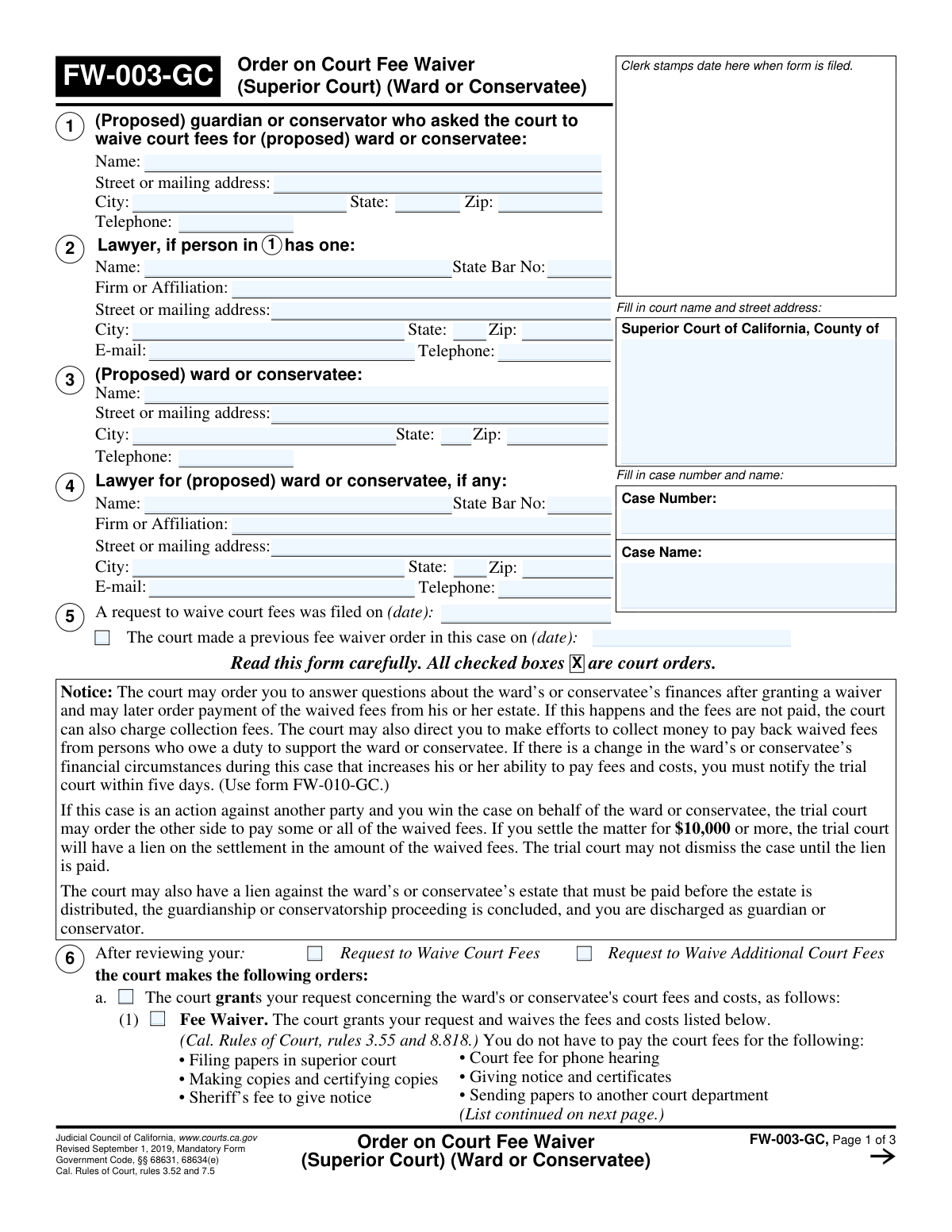
Yes! You can use AI to fill out Form FW-003-GC, Order on Court Fee Waiver (Superior Court) (Ward or Conservatee)

Form FW-003-GC, Order on Court Fee Waiver (Superior Court) (Ward or Conservatee), is a mandatory California Judicial Council form used by a Superior Court to grant, deny, or request more information on a fee waiver application for a ward or conservatee. This official order communicates the court's decision regarding the payment of court fees and costs, outlining any further actions required by the petitioner. Today, this form can be filled out quickly and accurately using AI-powered services like Instafill.ai, which can also convert non-fillable PDF versions into interactive fillable forms.
FW-003-GC is part of the court forms, fee waiver forms, superior court forms and UK court forms categories on Instafill.
Our AI automatically handles information lookup, data retrieval, formatting, and form filling.
It takes less than a minute to fill out FW-003-GC using our AI form filling.
Securely upload your data. Information is encrypted in transit and deleted immediately after the form is filled out.

Form specifications

Form name: Form FW-003-GC, Order on Court Fee Waiver (Superior Court) (Ward or Conservatee)
Number of fields: 86
Number of pages: 3
Language: English
main-image

Instafill Demo: How to fill out PDF forms in seconds with AI

How to Fill Out FW-003-GC Online for Free in 2026

Are you looking to fill out a FW-003-GC form online quickly and accurately? Instafill.ai offers the #1 AI-powered PDF filling software of 2026, allowing you to complete your FW-003-GC form in just 37 seconds or less.
Follow these steps to fill out your FW-003-GC form online using Instafill.ai:
  1. 1 Navigate to Instafill.ai and upload or select the FW-003-GC form to begin.
  2. 2 Enter the Superior Court name, county, and the specific case name and number in the top right section.
  3. 3 Input the full name and contact information for the proposed guardian or conservator (petitioner) and the proposed ward or conservatee.
  4. 4 If attorneys are representing any party, provide their complete contact details, including their State Bar number.
  5. 5 As the court, mark the appropriate boxes in Section 6 to indicate whether the fee waiver request is granted, denied, or if a hearing is required for more information.
  6. 6 If the request is denied or a hearing is set, provide the specific reasons or list the information/proof required, using attachments if necessary.
  7. 7 Review all information for accuracy, then have the judicial officer or clerk date and sign the order before saving, printing, and serving the completed form.

Our AI-powered system ensures each field is filled out correctly, reducing errors and saving you time.

Why Choose Instafill.ai for Your Fillable FW-003-GC Form?

Speed

Complete your FW-003-GC in as little as 37 seconds.

Up-to-Date

Always use the latest 2026 FW-003-GC form version.

Cost-effective

No need to hire expensive lawyers.

Accuracy

Our AI performs 10 compliance checks to ensure your form is error-free.

Security

Your personal information is protected with bank-level encryption.

Frequently Asked Questions About Form FW-003-GC

This form, the 'Order on Court Fee Waiver,' is the court's official decision regarding a request to waive court fees for a ward or conservatee. It informs you whether the request was approved, denied, or if more information is needed.

No, you do not fill out this form. The FW-003-GC is an order that the court completes and sends to you after reviewing the fee waiver request that was previously filed.

If box 6a is checked, it means the court has granted the request. You do not have to pay for the specific court fees and costs that are listed on the form.

You have 10 days from the date of the order to either pay the fees, file a corrected request with the missing information, or ask for a hearing using form FW-006-GC. The order should specify what information was missing.

If the request was denied for ineligibility, you have 10 days to either pay the court fees or request a hearing to provide more information to the judge. It is critical to act within this timeframe to prevent your case from being dismissed.

This means the judge needs more information before deciding on the fee waiver request. You must attend the hearing on the specified date and bring any documents the court has requested to prove the ward's or conservatee's eligibility.

Yes, the court can order the waived fees to be paid later from the ward's or conservatee's estate or from any settlement money received. You must also notify the court within five days if the ward's or conservatee's financial situation improves.

A standard fee waiver can cover costs like filing papers, making copies, and sheriff's fees for giving notice. An additional fee waiver can cover other costs like jury fees, court reporter fees, and fees for court-appointed experts.

The 10-day deadline is extremely important. If you miss it, the court cannot process your documents, and your underlying case, including a notice of appeal, could be dismissed.

Yes, AI-powered services like Instafill.ai can help you accurately auto-fill other related court forms, such as the initial fee waiver request. This saves time and helps reduce errors across your documents.

You can upload your case documents to a platform like Instafill.ai, which uses AI to extract key information. The service then uses this data to automatically and accurately populate the fields on new, blank forms for your case.

Services like Instafill.ai can convert non-fillable, 'flat' PDFs into interactive, fillable forms. This allows you to easily type your information into the correct fields online before printing.

If you fail to pay the fees after a denial and do not request a hearing, the court cannot process your case documents. This can stop your guardianship or conservatorship proceeding from moving forward.

Compliance FW-003-GC
Validation Checks by Instafill.ai

1
Case Number Consistency Across Pages
This check ensures that the 'Case Number' entered in the header on page 1 is identical to the 'Case Number' fields on pages 2 and 3. This is critical for document integrity and to ensure all pages are correctly associated with the same legal case. If the numbers mismatch, the filing could be rejected or cause confusion in court records.
2
Conditional Previous Order Date
Validates that the 'Date of previous court fee waiver order' field is only filled if the corresponding checkbox 'The court made a previous fee waiver order in this case' is checked. Furthermore, it ensures the entered date is a valid past date and precedes the current request's filing date. This prevents illogical or incomplete data entry regarding case history.
3
State Bar Number Format Validation
This check verifies that the 'State Bar No.' field for any lawyer listed contains only numbers and conforms to the expected format for a California Bar license. Since this number is a unique official identifier, its accuracy is crucial for correctly identifying legal counsel. An invalid format would prevent proper verification of the attorney's credentials.
4
Mutually Exclusive Court Order Selection
Ensures that only one of the primary outcomes in section 6 is selected: 'a. The court grants...', 'b. The court denies...', or 'c. The court needs more information...'. A court order cannot simultaneously grant and deny a request. This validation prevents the creation of a legally contradictory and invalid document.
5
Conditional 'Other' Fee Specification
This validation requires that the text field 'Other fee or cost (specify)' must contain a description if the 'Other (specify)' checkbox is checked under the 'Additional Fee Waiver' section. This prevents an ambiguous request where a waiver for an 'other' fee is selected but the specific fee is not identified. Failure means the court cannot act on the unspecified request.
6
Denial Reason Location Specification
If the court denies the request because it is incomplete (checkbox 6b(1) is checked), this rule ensures that one of the location specifiers ('Below' or 'On Attachment 6b(1)') is also checked. This is necessary to direct the applicant to the exact location of the list of missing items. Without this, the applicant would not know where to find the information needed to correct their request.
7
Address Block Completeness
For any address block on the form (for the guardian, ward, or lawyers), this check verifies that if a street address is provided, the corresponding 'City', 'State', and 'ZIP' fields are also filled. This ensures a complete and mailable address is on file for legal notices and correspondence. An incomplete address could lead to missed deadlines and communications.
8
ZIP Code Format
Verifies that all ZIP code fields contain a valid 5-digit or 9-digit (XXXXX or XXXXX-XXXX) US postal code. Correct formatting is essential for mail delivery systems to process court correspondence accurately. An invalid ZIP code could result in returned mail and significant delays.
9
Hearing Details Completeness
If the checkbox 'The court needs more information' (6c) is checked, this validation mandates that the 'Hearing Date', 'Time', 'Dept.', and 'Room' fields on page 3 are all filled. This is critical to ensure the applicant has all necessary information to attend the scheduled hearing. Missing details would make it impossible for the party to appear as ordered.
10
Mutually Exclusive Clerk Service Method
In the 'Clerk's Certificate of Service' section, this check ensures that the checkboxes for 'Handed a copy...' and 'Order mailed first class...' are mutually exclusive. A document can either be served in person or by mail at a single point in time, but not both simultaneously in this context. This prevents ambiguity in the record of service.
11
Conditional Mailing Information Requirement
This validation rule ensures that if the 'Order mailed first class' checkbox is selected, the 'City of Mailing' and 'Certificate Mailing Date' fields must be completed. This information is legally required to create a valid proof of service by mail. Failure to provide these details would invalidate the certificate of service.
12
Ward/Conservatee Name Consistency
This check confirms that the name entered in the '(Proposed) ward or conservatee: Name' field in section 3 on page 1 exactly matches the name entered in the designated fields on pages 2 and 3. Consistent naming is vital for legal document accuracy and to prevent any ambiguity about the subject of the court order. Discrepancies could lead to the form being rejected.
13
Hierarchical Checkbox Dependency
Ensures that a child checkbox can only be selected if its parent checkbox is also selected. For example, the 'Fee Waiver' checkbox (6a(1)) can only be checked if its parent, 'The court grants your request...' (6a), is checked. This enforces the logical flow of the form and prevents nonsensical selections.
14
Valid Telephone Number Format
This check validates that all telephone number fields contain a 10-digit number, accommodating common formats like (XXX) XXX-XXXX or XXX-XXX-XXXX. This is important to ensure that court staff or other parties can successfully contact the individuals listed. An improperly formatted number could be unusable, hindering communication.
15
Conditional Lawyer Information Requirement
Verifies that if a lawyer's name is entered in section 2 or 4, then the 'State Bar No.' and a complete mailing address are also provided. A lawyer's entry is incomplete and unusable without their official identifier and a valid address for service. This rule ensures that if counsel is listed, they are properly and fully identified.

Common Mistakes in Completing FW-003-GC

Confusing an 'Order' Form with a 'Request' Form

Users often mistake this 'Order' form (FW-003-GC) for the form used to 'Request' a fee waiver. This form is used to document the court's decision, not to make the initial request. Filing this form to start the process will lead to immediate rejection by the court clerk, delaying the fee waiver and potentially the entire case. To avoid this, always use the correct initial form, such as FW-001-GC 'Request to Waive Court Fees', and only use this FW-003-GC form if you are submitting a 'Proposed Order' for the judge to sign.

Entering Incorrect or Inconsistent Case Information

Filers frequently mistype the Case Number or misstate the official Case Name in the top-right section of the form. A single incorrect digit or word can cause the document to be rejected or misfiled in the court's system. This leads to significant delays and requires refiling. To prevent this, carefully copy the exact Case Number and Name from a previous official court document. AI-powered tools like Instafill.ai can help by storing this information and auto-filling it consistently across all related case forms.

Confusing the Guardian/Conservator with the Ward/Conservatee

A critical error is mixing up the information for the 'proposed guardian or conservator' (Section 1) and the 'proposed ward or conservatee' (Section 3). People may enter their own information in the wrong section or duplicate it. This makes the legal filing nonsensical and will result in its rejection, as the court cannot determine who the parties are. Always double-check that Section 1 contains the information of the person seeking authority, and Section 3 contains the information of the person who is the subject of the proceeding.

Omitting Mandatory Lawyer Information

When a party is represented by an attorney, all of the attorney's information, including their State Bar Number, must be provided in the appropriate section (Section 2 or 4). Filers often forget to include this or don't have the information handy. This is a violation of court rules that can lead to the form being rejected, and it prevents the court from properly serving notices to the legal representative. Always confirm your attorney's details, including their bar number, before filling out the form.

Incorrectly Checking Boxes in Section 6

Section 6 is where the court's order is detailed, and it is a common point of confusion for self-represented litigants submitting a 'Proposed Order'. They might check contradictory boxes, such as checking both 'The court grants your request' and 'The court denies your request'. This makes the proposed order unusable for the judge. To avoid this, only check the boxes that reflect the single outcome you are requesting, for example, checking 6a and 6a(1) to request that the waiver be granted.

Ignoring Deadlines and Instructions on a Denial Order

If the court denies the request (Section 6b), the form states the filer has only 10 days to either pay the fees or request a hearing using form FW-006-GC. Many people overlook this critical instruction and deadline in the dense text. Missing this 10-day window can cause the entire case to stall or an appeal to be dismissed, as the court will stop processing filings until fees are paid. Carefully read any order you receive from the court and immediately calendar all deadlines.

Leaving the Court and Party Header Information Blank

Filers often leave the top sections of the form blank, including the court name and address, party names, and case number, assuming the clerk will fill them in. However, the filer is responsible for providing all this identifying information. An incomplete header will cause the clerk to reject the document at the filing window, forcing the filer to correct it and start the filing process over. Ensure every field in the header is filled out completely before submission.

Improperly Handling Attachments

The form allows the court to specify details on an attachment (e.g., 'On Attachment 6b(1)'). When preparing a proposed order or responding to a court's request, a filer might check a box indicating an attachment but then fail to label and include the actual document. This renders the filing incomplete and causes delays. If you check a box referencing an attachment, ensure you create a separate page, label it clearly with the corresponding attachment number and case name, and staple it to the main form before filing.

Failing to Clear Sensitive Data from Public Computers

The form is a fillable PDF with a 'Clear This Form' button, accompanied by a privacy warning. When using a public computer at a courthouse or library, people often print the form and forget to clear their data. This leaves highly sensitive personal information, such as names, addresses, and case details, vulnerable to the next user. To protect your privacy and prevent identity theft, always use the 'Clear This Form' button after printing and saving your document on any shared device.
Saved over 80 hours a year

“I was never sure if my IRS forms like W-9 were filled correctly. Now, I can complete the forms accurately without any external help.”

Kevin Martin Green

Your data stays secure with advanced protection from Instafill and our subprocessors

Robust compliance program

Transparent business model

You’re not the product. You always know where your data is and what it is processed for.

ISO 27001, HIPAA, and GDPR

Our subprocesses adhere to multiple compliance standards, including but not limited to ISO 27001, HIPAA, and GDPR.

Security & privacy by design

We consider security and privacy from the initial design phase of any new service or functionality. It’s not an afterthought, it’s built-in, including support for two-factor authentication (2FA) to further protect your account.

Fill out FW-003-GC with Instafill.ai

Worried about filling PDFs wrong? Instafill securely fills form-fw-003-gc-order-on-court-fee-waiver-superior-court-ward-or-conservatee forms, ensuring each field is accurate.