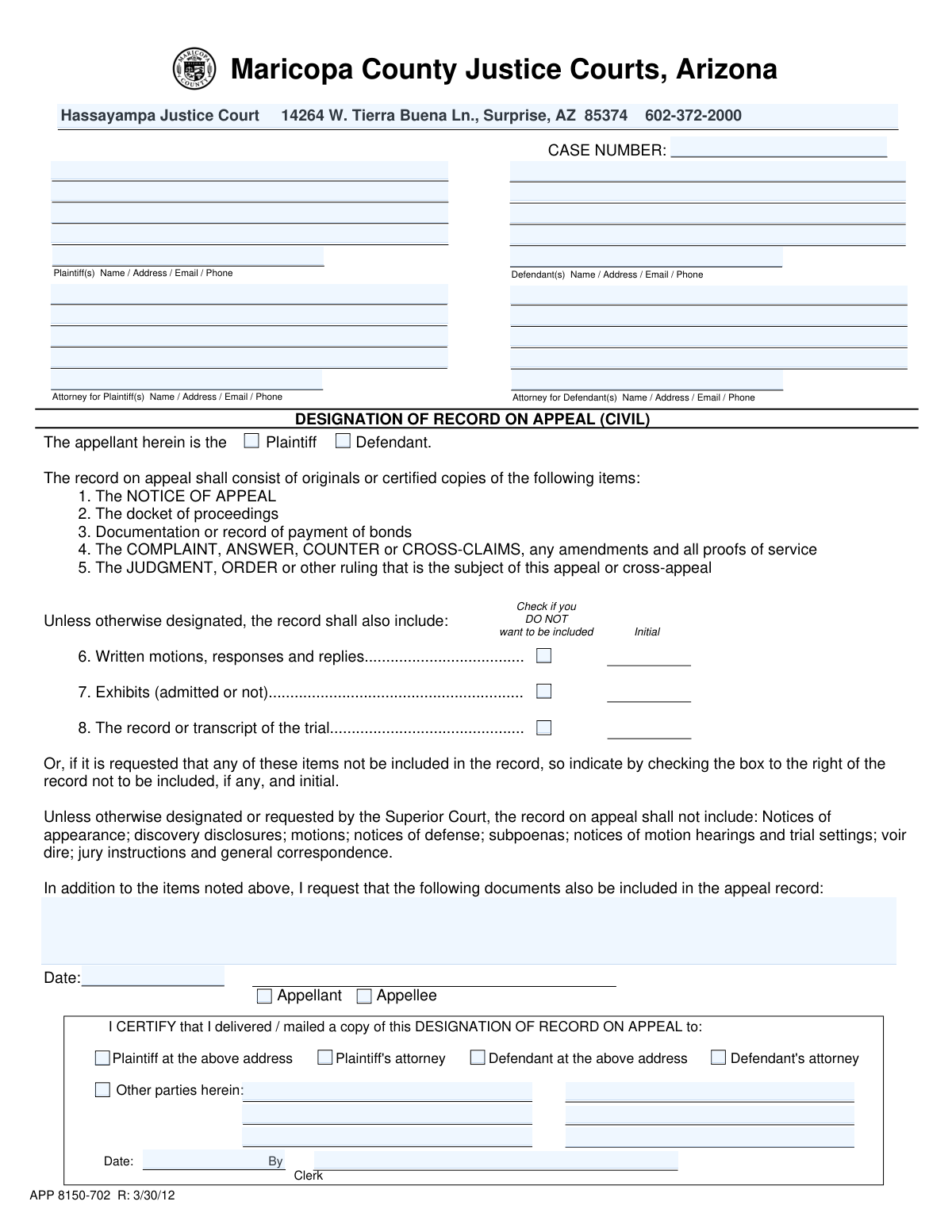
Yes! You can use AI to fill out Designation of Record on Appeal (Civil) (Maricopa County Justice Courts, Arizona) (Form APP 8150-702)

The Designation of Record on Appeal (Civil) is a court form filed in connection with a civil appeal to identify the specific pleadings, orders, transcripts, exhibits, and other documents that will make up the appellate record. It helps ensure the reviewing court receives the correct materials needed to evaluate the issues on appeal and prevents omissions or unnecessary inclusions. The form also includes a certificate of delivery/mailing to show that other parties were served with the designation. Today, this form can be filled out quickly and accurately using AI-powered services like Instafill.ai, which can also convert non-fillable PDF versions into interactive fillable forms.
Our AI automatically handles information lookup, data retrieval, formatting, and form filling.
It takes less than a minute to fill out APP 8150-702 using our AI form filling.
Securely upload your data. Information is encrypted in transit and deleted immediately after the form is filled out.

Form specifications

Form name: Designation of Record on Appeal (Civil) (Maricopa County Justice Courts, Arizona) (Form APP 8150-702)
Number of pages: 1
Filled form examples: Form APP 8150-702 Examples
Language: English
Categories: court forms
main-image

Instafill Demo: filling out a legal form in seconds

How to Fill Out APP 8150-702 Online for Free in 2026

Are you looking to fill out a APP 8150-702 form online quickly and accurately? Instafill.ai offers the #1 AI-powered PDF filling software of 2026, allowing you to complete your APP 8150-702 form in just 37 seconds or less.
Follow these steps to fill out your APP 8150-702 form online using Instafill.ai:
  1. 1 Go to Instafill.ai and upload the “Designation of Record on Appeal (Civil)” form (APP 8150-702) or select it from the form library.
  2. 2 Enter the case caption details, including the case number, plaintiff and defendant names, and contact information (addresses, emails, and phone numbers), plus attorney information if applicable.
  3. 3 Indicate who the appellant is by checking Plaintiff or Defendant, and confirm whether you are completing the form as the Appellant or Appellee.
  4. 4 Review the default record items (Notice of Appeal, docket, bond payment documentation, pleadings, and the judgment/order being appealed) and decide whether to exclude items 6–8 by checking the “DO NOT want included” boxes and adding initials where required.
  5. 5 List any additional documents you want included in the appellate record (titles, dates, and identifying details) in the additional documents section.
  6. 6 Complete the certificate of delivery/mailing by selecting all recipients served (plaintiff/defendant and/or their attorneys, and any other parties) and entering the service date and other party details as needed.
  7. 7 Use Instafill.ai to validate required fields, generate a clean final PDF for signature/filing, and download/print for submission to the court and service on the other parties.

Our AI-powered system ensures each field is filled out correctly, reducing errors and saving you time.

Why Choose Instafill.ai for Your Fillable APP 8150-702 Form?

Speed

Complete your APP 8150-702 in as little as 37 seconds.

Up-to-Date

Always use the latest 2026 APP 8150-702 form version.

Cost-effective

No need to hire expensive lawyers.

Accuracy

Our AI performs 10 compliance checks to ensure your form is error-free.

Security

Your personal information is protected with bank-level encryption.

Frequently Asked Questions About Form APP 8150-702

This form tells the court which documents and materials from the Justice Court case should be included in the official record sent up for a civil appeal. It helps ensure the appellate court receives the items needed to review the issues on appeal.

Typically, the appellant (the party filing the appeal) completes it to designate what should be in the record. The form also includes a checkbox to indicate whether the person completing it is the Appellant or the Appellee.

Check the box that matches the appellant’s role in the original case: “Plaintiff” if the party who filed the lawsuit is appealing, or “Defendant” if the responding party is appealing.

You must enter the case number exactly as it appears on court paperwork and list the parties’ names and contact information (address, email, phone) in the caption/contact fields. Use the additional plaintiff/defendant contact lines if there are multiple parties.

Items 1–5 are listed as part of the record (e.g., Notice of Appeal, docket, bond payment documentation, pleadings and proofs of service, and the judgment/order being appealed). Items 6–8 are included unless you specifically check a box to exclude them.

For items 6–8, check the box next to the item you do NOT want included (written motions/responses/replies; exhibits; trial record/transcript). The form also indicates you should initial next to any item you are excluding.

The form states the record usually will not include items like notices of appearance, discovery disclosures, subpoenas, notices of hearings/trial settings, voir dire, jury instructions, and general correspondence. If you believe something from that list is necessary, you can request it in the “additional documents” section.

List the document title and a brief description in the “Additional Documents Requested” field (for example, the document name, filing date, and any identifying details like exhibit numbers). Be as specific as possible so the clerk can locate the correct item.

The form indicates the record will consist of originals or certified copies of the listed items, which are typically compiled from the court file. You usually do not attach everything yourself, but you should follow local court instructions if they require you to provide any copies or transcript requests.

This section is where you certify that you delivered or mailed a copy of the designation to the other party (or their attorney) and any other parties. Check the appropriate recipient boxes and provide the date; the clerk portion is completed by the clerk.

This is a Maricopa County Justice Courts form (example court listed: Hassayampa Justice Court), so it is generally filed with the Justice Court handling the case. If you are unsure of the correct filing method (in person, mail, or e-filing), contact the specific court location for instructions.

Processing time can vary depending on the court’s workload and whether transcripts are needed. If you requested a trial transcript, it may take longer because transcript preparation can add significant time.

Use the additional “Plaintiff Contact” and “Defendant Contact” lines to list each party’s name and contact information. If space is limited, include the most essential identifying information and add remaining parties in the “Other parties herein” section.

Yes—AI tools can help by extracting party information from your case documents and placing it into the correct fields, reducing typos and saving time. Services like Instafill.ai use AI to auto-fill form fields accurately and help you complete forms faster.

You can upload the form to Instafill.ai, then upload or connect your case documents so the AI can map names, addresses, case number, and checkboxes into the right fields for review before you download. If the PDF is flat/non-fillable, Instafill.ai can convert it into an interactive fillable form so you can complete and sign it more easily.

Compliance APP 8150-702
Validation Checks by Instafill.ai

1
Case Number required and matches court case-number format
Validates that the Case Number field is not blank and conforms to the court’s expected pattern (e.g., includes required digits, possible leading zeros, and any letters/dashes exactly as issued). This is critical to correctly associate the designation with the correct case and avoid misfiling. If the value is missing or fails the format check, the submission should be rejected and the filer prompted to correct the case number.
2
Appellant party selection is exactly one of Plaintiff or Defendant
Ensures the 'The appellant herein is the Plaintiff/Defendant' checkbox group has exactly one selection (not both, not neither). This determines who is designating the record and affects downstream routing and captioning. If invalid, block submission and require the filer to select only one appellant designation.
3
Signer role selection is exactly one of Appellant or Appellee
Validates that exactly one of the 'Appellant' or 'Appellee' boxes near the signature date is checked. This identifies whether the submitting party is filing the designation as the appealing party or responding party and is used for docketing and service expectations. If both or neither are selected, the form should fail validation and require correction.
4
Consistency between appellant designation and signer role
Checks logical consistency between the appellant designation (Plaintiff vs Defendant) and the signer role (Appellant vs Appellee). If the filer marks 'Plaintiff' as appellant but also marks themselves as 'Appellee' (or vice versa), the submission is ambiguous and may cause incorrect docket entries. On failure, require the filer to confirm/correct the party role selections before acceptance.
5
Plaintiff name present and appears to be a full legal name/business name
Validates that Plaintiff - Name (Line 1) is populated and is not an obviously incomplete entry (e.g., initials only, single character, or placeholder text like 'N/A'). The caption must identify the party accurately for the appellate record and service. If invalid, reject submission and require a complete plaintiff name as it should appear on the caption.
6
Defendant identification present in case caption right lines
Ensures at least one of the Case Caption Right lines contains a defendant name (not only an address/phone/email) and is not blank. The right-side caption is used to identify the opposing party and is necessary for a complete caption. If missing or clearly not a name, fail validation and prompt for the defendant’s name in the caption.
7
Mailing address completeness for at least one plaintiff contact entry
Checks that the plaintiff address fields (street, city/state/ZIP) are complete for the primary plaintiff entry, or that at least one of the Plaintiff Contact lines includes a complete mailing address. A complete address is required for service and court correspondence. If incomplete, the system should flag the missing components (street or city/state/ZIP) and prevent submission until corrected.
8
City/State/ZIP field format validation (US/Arizona compatible)
Validates that the 'City, State, ZIP' entry contains a recognizable state abbreviation (e.g., two letters such as 'AZ') and a 5-digit ZIP code (optionally ZIP+4). This reduces returned mail and ensures standardized address data. If the format is invalid (missing state, non-numeric ZIP, wrong length), require correction before submission.
9
Email address format validation for provided email fields
Validates that any entered email (Plaintiff email, and any emails embedded in contact lines) matches a basic email format (local@domain) and does not contain spaces or invalid characters. Email is often used for contact/service and incorrect addresses can cause missed deadlines. If an email is present but invalid, block submission or require the user to fix/remove the malformed email.
10
Phone number format validation for provided phone fields
Validates that any entered phone number (Plaintiff phone and any phones embedded in contact lines) contains a valid 10-digit US number (allowing common punctuation like parentheses/dashes/spaces) and is not obviously incomplete. Correct phone numbers support time-sensitive communications about the record. If a phone is present but invalid, require correction or removal of the malformed number.
11
Record exclusion items (6–8) require initials when checked
If Item 6, Item 7, or Item 8 is checked to exclude that component from the record, the form instructs the filer to initial the exclusion. This validation ensures an initials field (or equivalent initials capture) is present and populated for each excluded item to confirm intent. If an exclusion is checked without initials, fail validation and require initials to proceed.
12
Additional Document request must be non-empty and specific when used
If Additional Document 1 is provided, validate it contains a meaningful document title/description (e.g., not just 'documents' or 'see attached') and meets a minimum length/structure requirement. Specificity is important so the clerk can identify and compile the correct materials for the appellate record. If too vague or empty, prompt the filer to provide identifying details such as document name and date.
13
Designation Date is required and is a valid calendar date
Validates that the 'Date' for the designation is present and follows an accepted date format (e.g., MM/DD/YYYY) and represents a real date. The signing/submission date is used for timeliness and recordkeeping. If missing or invalid (e.g., 02/30/2026), reject submission and request a corrected date.
14
Certificate of service recipients: at least one recipient selected
Ensures at least one certificate recipient checkbox is selected (Plaintiff, Plaintiff’s attorney, Defendant, Defendant’s attorney, and/or Other parties). Service is required so parties receive notice of the designation, and a blank certificate undermines due process. If none are selected, fail validation and require the filer to indicate who was served.
15
Other parties details required when 'Other parties herein' is checked
If the 'Other parties herein' checkbox is selected, validate that at least one corresponding Other Party entry line is populated with a name and some identifying information. This prevents a certificate that claims service on other parties without identifying who they are. If checked but no party details are provided, block submission and require completion of at least one other-party entry.
16
Clerk certification fields completeness when clerk section is used
If the clerk certification section is being completed (i.e., Clerk Name or Certificate Date is present), validate that both Clerk Name and Certificate Date are provided and the date is valid. Partial clerk certification can create an unreliable record of service and filing. If incomplete or invalid, require the missing clerk field(s) or leave the entire clerk section blank for clerk-only completion.

Common Mistakes in Completing APP 8150-702

Entering an incorrect or incomplete case number

People often copy the case number from memory or from the wrong document and accidentally omit letters, dashes, or leading zeros. An incorrect case number can cause the filing to be misrouted, rejected, or not associated with the correct appeal. Always copy the case number exactly as it appears on the court’s notice/order (including prefixes/suffixes and formatting). AI-powered form filling tools like Instafill.ai can help by validating the case number format and reducing transcription errors.

Misidentifying the appellant (checking Plaintiff vs. Defendant incorrectly)

Filers sometimes check the box for the party they “support” rather than the party who actually filed the appeal. This can create confusion about who is designating the record and may lead to clerk questions, delays, or the need to refile a corrected form. Confirm who filed the Notice of Appeal and check only the correct appellant designation. Instafill.ai can flag inconsistent selections when the party role conflicts with the case caption or other fields.

Mixing up the case caption left/right fields (plaintiff vs. defendant information)

Because the form splits caption information across left and right lines, people frequently place defendant details in plaintiff fields (or vice versa), especially when there are multiple parties. Incorrect captions can cause service issues and may require amended filings to correct the record. Use the original complaint/judgment caption as the source and keep plaintiff information on the plaintiff lines and defendant information on the defendant lines. Instafill.ai can auto-map party data into the correct caption positions and keep formatting consistent.

Providing incomplete contact information (missing email, phone, or full mailing address)

Filers often enter only a name and street address and forget city/state/ZIP, email, or a daytime phone number. Missing contact details can prevent proper notice, delay communications from the court, and complicate service. Enter a complete mailing address (street/unit, city, state, ZIP) plus a working email and phone number for each listed party. Instafill.ai can prompt for missing required components and standardize address formatting.

Not listing all parties or attorneys (especially in multi-party cases)

In cases with multiple plaintiffs/defendants or represented parties, people frequently list only the primary party and omit additional parties or counsel. Omissions can lead to incomplete service, disputes about notice, and delays while the court requests corrections. Review the docket/caption and include every party and, if applicable, the attorney for each side in the designated contact lines. Instafill.ai can help by importing party lists and ensuring no party is accidentally left out.

Misunderstanding the 'DO NOT want included' checkboxes for items 6–8

A very common error is checking items 6–8 thinking it means “include,” when the form states the boxes are for items you do NOT want included. Excluding motions, exhibits, or transcripts unintentionally can severely weaken the appeal record and may limit what the appellate court can review. Only check a box if you truly want that category excluded, and double-check the wording next to the checkbox. Instafill.ai can highlight inverted checkbox logic and warn when exclusions are likely unintended.

Failing to initial next to excluded record items

The form instructs that if you request an item not be included, you must check the box and initial. People often check the box but forget the initials, which can cause the clerk to treat the request as incomplete or require resubmission. If you exclude any of items 6–8, add your initials exactly where indicated on the form. Instafill.ai can remind you to initial whenever an exclusion checkbox is selected.

Requesting additional documents without enough identifying detail

When listing “additional documents,” filers often write vague entries like “all motions” or “emails,” without titles, dates, or docket identifiers. Vague requests can lead to the wrong documents being included, missing key items, or follow-up requests from the clerk. Specify the document title, filing date, and any identifying details (e.g., docket entry number, exhibit number, or hearing date). Instafill.ai can help format these entries and prompt for the key identifiers needed to locate the documents.

Leaving the Date and Appellant/Appellee selection blank or inconsistent

People sometimes sign/submit without entering the date, or they check Appellee when they are actually the Appellant filing the designation. Missing or inconsistent signature-date/role information can delay acceptance and create confusion about who is making the designation. Enter the submission date and check the correct role (Appellant if you are filing the appeal; Appellee if responding). Instafill.ai can cross-check role selections against the earlier appellant designation to catch inconsistencies.

Incomplete or incorrect certificate of delivery/mailing (service) section

Filers frequently forget to check who received a copy, omit “other parties,” or fail to list the names of additional recipients. Service defects can result in objections, court orders to cure service, or delays in processing the appeal record. Check every recipient you actually served (plaintiff/defendant and/or their attorneys) and clearly list any other parties served with identifying information. Instafill.ai can guide the service checklist and ensure the certificate matches the parties listed in the caption.

Filling in clerk-only fields (Certificate Date / Clerk Name) or leaving them in a confusing state

Some filers mistakenly type their own name into the Clerk Name field or enter a date in the clerk certification area, not realizing it is typically completed by the court. This can create confusion, lead to the form being rejected, or require clarification from the clerk’s office. Leave clerk certification fields blank unless the court specifically instructs you to complete them. If you’re using a flat, non-fillable PDF version, Instafill.ai can convert it into a fillable version and clearly separate filer fields from clerk-only fields to prevent accidental entries.
Saved over 80 hours a year

“I was never sure if my IRS forms like W-9 were filled correctly. Now, I can complete the forms accurately without any external help.”

Kevin Martin Green

Your data stays secure with advanced protection from Instafill and our subprocessors

Robust compliance program

Transparent business model

You’re not the product. You always know where your data is and what it is processed for.

ISO 27001, HIPAA, and GDPR

Our subprocesses adhere to multiple compliance standards, including but not limited to ISO 27001, HIPAA, and GDPR.

Security & privacy by design

We consider security and privacy from the initial design phase of any new service or functionality. It’s not an afterthought, it’s built-in, including support for two-factor authentication (2FA) to further protect your account.

Fill out APP 8150-702 with Instafill.ai

Worried about filling PDFs wrong? Instafill securely fills designation-of-record-on-appeal-civil-maricopa-county-justice-courts-arizona-form-app-8150-702 forms, ensuring each field is accurate.