Yes! You can use AI to fill out FW-003, Order on Court Fee Waiver (Superior Court)
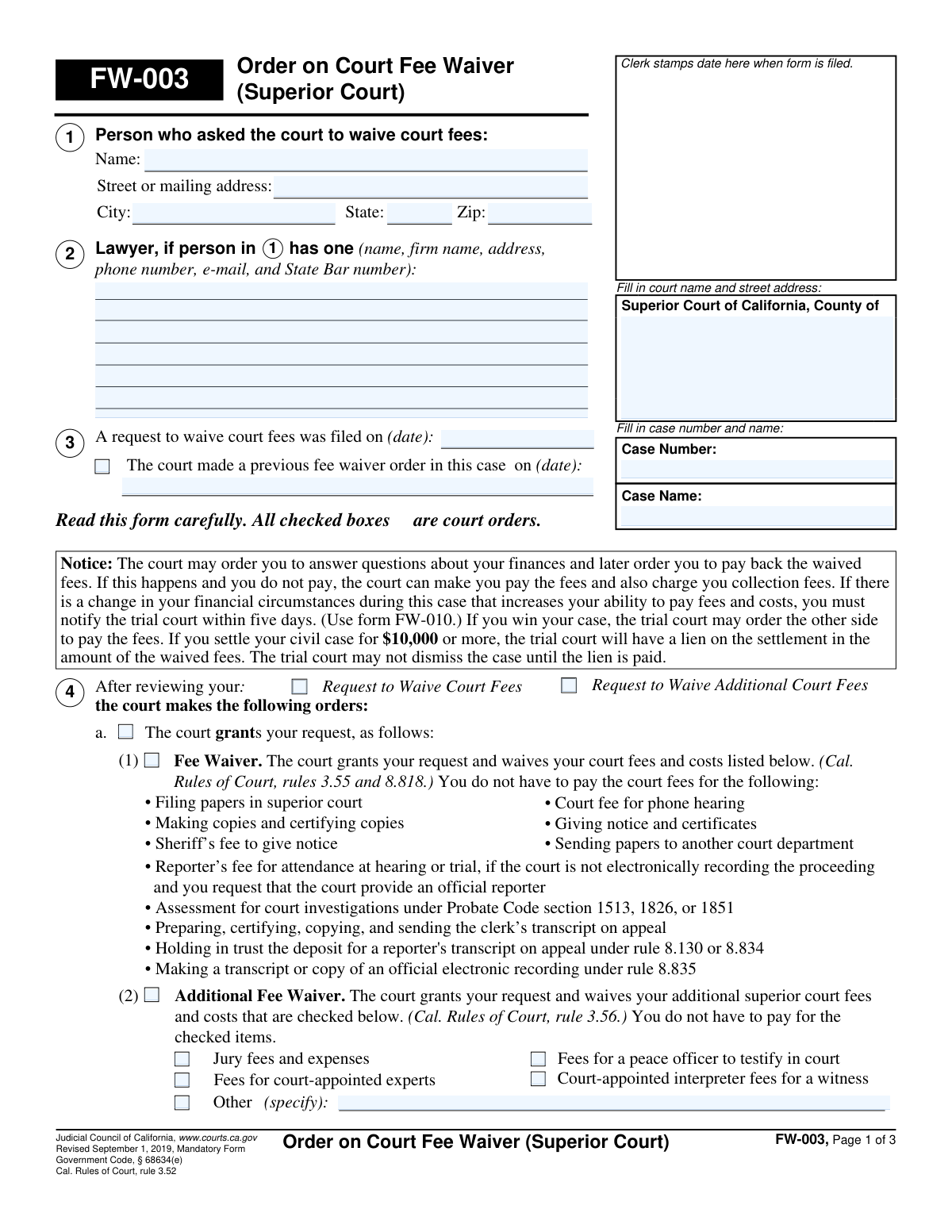
Form FW-003 (Order on Court Fee WaiverâSuperior Court) is a mandatory California Judicial Council court order that tells the parties whether the court grants a fee waiver, grants additional fee waivers (such as jury fees or reporter-related costs), denies the request, or requires a hearing and supporting proof. It is important because it determines which court fees you do not have to pay, sets deadlines if the request is incomplete or denied, and may schedule a hearing with required documents to bring. The order can also affect later repayment, liens on certain civil settlements, and obligations to report changes in financial circumstances (often referencing FW-010). Today, this form can be filled out quickly and accurately using AI-powered services like Instafill.ai, which can also convert non-fillable PDF versions into interactive fillable forms.
Our AI automatically handles information lookup, data retrieval, formatting, and form filling.
It takes less than a minute to fill out FW-003 using our AI form filling.
Securely upload your data. Information is encrypted in transit and deleted immediately after the form is filled out.
Form specifications
| Form name: | FW-003, Order on Court Fee Waiver (Superior Court) |
| Number of pages: | 3 |
| Filled form examples: | Form FW-003 Examples |
| Language: | English |
| Categories: | fee waiver forms, superior court forms |
Instafill Demo: filling out a legal form in seconds
How to Fill Out FW-003 Online for Free in 2026
Are you looking to fill out a FW-003 form online quickly and accurately? Instafill.ai offers the #1 AI-powered PDF filling software of 2026, allowing you to complete your FW-003 form in just 37 seconds or less.
Follow these steps to fill out your FW-003 form online using Instafill.ai:
- 1 Go to Instafill.ai and upload the FW-003 PDF (or select FW-003 from the form library).
- 2 Let the AI detect and map the form fields (court information, case name/number, applicant details, and the order sections).
- 3 Enter the applicant/party information and case details (name, address, court county/address, case number, and case name).
- 4 Complete the order outcomes by selecting the applicable sections (grant fee waiver, additional fee waivers and specific items, or denial/incomplete request details).
- 5 If a hearing is required, fill in the hearing logistics (date, time, department, room, and any listed eligibility questions and proof items to bring).
- 6 Review the generated form for accuracy, consistency with the court’s order language, and required attachments/checkboxes (including service/certificate of mailing if applicable).
- 7 Download the completed form, e-sign if permitted for your workflow, and file/serve it according to the court’s instructions and deadlines.
Our AI-powered system ensures each field is filled out correctly, reducing errors and saving you time.
Why Choose Instafill.ai for Your Fillable FW-003 Form?
Speed
Complete your FW-003 in as little as 37 seconds.
Up-to-Date
Always use the latest 2026 FW-003 form version.
Cost-effective
No need to hire expensive lawyers.
Accuracy
Our AI performs 10 compliance checks to ensure your form is error-free.
Security
Your personal information is protected with bank-level encryption.
Frequently Asked Questions About Form FW-003
FW-003 is the courtâs order that says whether your request to waive court fees was granted, denied, or needs more information. Any checked boxes on this form are court orders that control what fees you must pay and what deadlines apply.
FW-003 is primarily completed and signed by the court (a judicial officer or clerk) after reviewing your fee waiver request. You should review it carefully for the decision, waived items, hearing date (if any), and deadlines.
If item (1) âFee Waiverâ is granted, you do not have to pay the court fees and costs listed in that section (such as filing fees and certain copy/certification costs). The exact coverage depends on which boxes are checked on your order.
âAdditional Fee Waiverâ means the court is also waiving extra superior court fees beyond basic filing fees. This can include items like phone hearing fees, sheriffâs fees to give notice, reporter fees (in certain situations), transcripts on appeal, and other checked items.
It can, but only if those specific boxes are checked under the âAdditional Fee Waiverâ section. For example, jury fees/expenses, court-appointed interpreter fees for a witness, and court-appointed expert fees are only waived if the order checks them.
If the order says your request is incomplete, you generally have 10 days after the clerk gives notice of the order (see the service date) to submit a revised request with the missing items. The form may list missing items âBelowâ or on an attachment (Attachment 4b(1)).
If the court finds you are not eligible, the order will state the reasons either on the form or on Attachment 4b(2). You may be able to request a hearing using form FW-006 within the stated deadline to present more information.
It means the court cannot decide based on the paperwork alone and requires you to appear on the hearing date listed (date/time/room/department). The order may list the eligibility questions to be addressed âBelowâ or on Attachment 4c(1).
Bring the proof items the court lists in section c(2), either written on the form or on Attachment 4c(2). Typical examples can include pay stubs, benefit award letters, bank statements, or other documents supporting your financial situation (bring what is reasonably available).
If you miss the deadline, the court may not process your hearing request or the papers you filed with your original fee waiver request. If a hearing is ordered and you do not appear, the judge may deny the waiver and you may have only 10 days to pay required feesâan appeal can be dismissed if the missed papers were a notice of appeal.
Yesâif your financial circumstances change and you can better afford fees, you must notify the trial court within five days using form FW-010. The court can also later ask questions about your finances and may order repayment of waived fees.
Yes, the notice on the form explains the court may later order you to repay waived fees, and collection fees may apply if you do not pay. In certain civil settlements of $10,000 or more, the court may place a lien for the amount of waived fees until it is paid.
The deadline is based on the date the clerk gives notice of the order, which is shown in the Clerkâs Certificate of Service section (service or mailing date). Use that service dateânot the date you received itâto calculate the 10 days unless the court states otherwise.
YesâAI tools can help you accurately enter names, addresses, case details, and ensure fields are complete. Services like Instafill.ai use AI to auto-fill form fields accurately and save time, especially when you have multiple court forms to complete.
You can upload the FW-003 PDF to Instafill.ai, answer a guided set of questions, and let the AI map your answers into the correct fields for a clean, consistent result. If your PDF is flat/non-fillable, Instafill.ai can convert it into an interactive fillable form before auto-filling so you can type directly into the fields.
Compliance FW-003
Validation Checks by Instafill.ai
1
Validates Request Filed Date is present and in an acceptable date format
Checks that the 'A request to waive court fees was filed on (date)' field is not blank and matches an allowed date format (e.g., MM/DD/YYYY) and represents a real calendar date. This is important because the filing date can affect deadlines, processing order, and later calculations tied to service and hearing timelines. If validation fails, the submission should be rejected or flagged for correction because the court order record would be incomplete or ambiguous.
2
Enforces mutual exclusivity of outcome: Grant vs Deny vs Needs More Information
Validates that only one primary outcome path is selected: (a) the court grants the request, (b) the court denies the request, or (c) the court needs more information and sets a hearing. These outcomes are logically incompatible and selecting more than one creates conflicting court orders. If multiple outcomes are selected (or none are selected), the form should fail validation and require the user/clerk to choose exactly one.
3
Requires applicant identity and address completeness when an order is issued
Checks that Applicant's name, street/mailing address, city, state, and ZIP are all provided when the form is being used as an order (i.e., any of grant/deny/hearing paths is selected). This information is necessary for proper identification, mailing, and enforcement of the order and related notices. If any required identity/address element is missing, the submission should be blocked or routed to manual review because service and record matching may fail.
4
Validates State and ZIP code formats for the applicant address
Ensures the applicant state is a valid US state/territory abbreviation (e.g., 'CA') or an allowed jurisdiction value, and ZIP is either 5 digits or ZIP+4 (##### or #####-####). Correct formatting supports reliable mailing and reduces returned mail and service issues. If the state/ZIP format is invalid, the system should prompt for correction and prevent finalization.
5
Validates Case Number presence and allowed character pattern
Checks that the case number is present and matches the courtâs expected pattern (commonly alphanumeric with dashes/slashes, no illegal characters, and within a reasonable length). The case number is the primary key for docketing and associating the order with the correct case. If invalid or missing, the submission should fail because it cannot be reliably filed or matched to the correct case.
6
Validates Case Name is present and not placeholder text
Ensures the case name field is completed with meaningful party/case caption text and does not contain placeholders like 'N/A', 'unknown', or only whitespace. The case name is used for human verification, indexing, and preventing misfiling when case numbers are mistyped. If validation fails, the form should be flagged for correction to avoid misassociation with the wrong matter.
7
Validates Previous Fee Waiver Order date dependency and chronology
If 'The court made a previous fee waiver order in this case' is checked, this validation requires the previous order date to be provided and to be a valid date. It also checks logical chronology: the previous order date should not be after the current request filed date (and should not be in the future). If the dependency or chronology fails, the system should reject or flag the record because it indicates inconsistent case history.
8
Validates 'Additional Fee Waiver' selections require at least one item or 'Other (specify)' detail
When the Additional Fee Waiver section is indicated as granted/selected, the system verifies that at least one additional fee item checkbox is selected (e.g., jury fees, peace officer testimony, interpreter, experts) or 'Other (specify)' is selected with a non-empty description. This prevents issuing an order that claims additional fees are waived without identifying what is actually waived. If no items are selected (or 'Other' is selected without text), validation fails and the user must correct the selection.
9
Requires 'Other (specify)' text when 'Other (specify)' checkbox is checked
Checks that the 'Additional Fee Waiver â Other (specify)' description field is populated with a clear fee name/purpose when the 'Other (specify)' checkbox is checked. This is important because 'Other' without details is unenforceable and cannot be implemented by clerks or financial systems. If missing or too short/blank, the submission should be blocked until a meaningful description is provided.
10
Validates Denial reason path requires a specific reason and supporting details/attachment selection
If the denial box is checked, the system requires at least one denial basis to be selected (e.g., incomplete request b(1) and/or not eligible b(2)). It also enforces that the corresponding details are provided either 'Below' (with text entered) or via the appropriate attachment option. If the denial path lacks a reason or lacks the required detail/attachment indicator, validation fails because the order would not provide legally sufficient notice.
11
Validates Incomplete Request (b(1)) detail entry or attachment selection
When b(1) 'Your request is incomplete' is selected, the system checks that exactly one location is chosen for the missing-items list: 'Below' or 'On Attachment 4b(1)'. If 'Below' is selected, the missing items/details text must be non-empty; if attachment is selected, the system should require an attachment reference/flag. If these conditions are not met, the submission should be rejected because the applicant would not know what to correct within the 10-day window.
12
Validates Not Eligible (b(2)) reason entry or attachment selection
When b(2) 'not eligible' is selected, the system requires the reasons to be provided either 'Below' (with non-empty reasons text) or 'On Attachment 4b(2)'. This ensures the order contains the factual/legal basis for denial and supports due process. If neither text nor attachment selection is present (or text is blank), validation fails and the order should not be finalized.
13
Validates Hearing scheduling fields when 'Court needs more information' is selected
If the court indicates it needs more information and schedules a hearing, the system requires Hearing Date, Time, Room, and Dept to be completed and valid (date is real and not in the past relative to the order date, time is in a valid format). These fields are essential for notice and to avoid missed hearings due to incomplete scheduling information. If any are missing/invalid, the submission should be blocked or flagged for urgent correction.
14
Validates Hearing issues/questions (c(1)) are provided via 'Below' text or Attachment 4c(1)
When the hearing path is selected, the system enforces that the eligibility questions/issues to be addressed are specified either by selecting 'Below' and entering text, or by selecting 'On Attachment 4c(1)'. This is important because the applicant must know what information the court is seeking and what will be discussed at the hearing. If neither is provided (or 'Below' is selected with blank text), validation fails due to insufficient notice.
15
Validates Proof items requirement (c(2)) is consistent and includes a list or attachment when checked
If the form indicates the applicant must bring items of proof (c(2)), the system requires that the proof items are specified either 'Below' with a non-empty list or 'On Attachment 4c(2)'. This prevents an order that demands proof without identifying what documents are needed, which can lead to unfair denials for noncompliance. If c(2) is checked but no list/attachment is provided, the submission should fail validation.
16
Validates signature role selection and required signer/date fields for the order
Checks that exactly one signer role is selected (Judicial Officer or Clerk/Deputy, as represented by the signer radio list) and that the order date is present and valid. A court order must be attributable to an authorized signer and dated to be enforceable and to calculate deadlines. If signer selection is missing/ambiguous or the date is missing/invalid, the system should prevent finalization and require correction.
Common Mistakes in Completing FW-003
People often confuse the ârequest to waive court fees was filed onâ date with the hearing date, the date they signed their request, or the clerkâs service date. An incorrect or missing filed date can create confusion in the court record and may delay processing or make it harder to track deadlines tied to the order. Use the exact filing date shown on the clerkâs stamp or filing receipt, and keep the format consistent (e.g., MM/DD/YYYY). AI-powered form filling tools like Instafill.ai can help by validating date formats and pulling the correct filing date from your case documents.
This form includes both âRequest to WaiveâŠâ items and âThe court grants/deniesâŠâ order language, and filers sometimes check boxes that are meant to be completed by the court. Checking the wrong section can make the submission look inconsistent (e.g., you âgrantâ your own request) and may cause the clerk to reject it or require correction. Only complete the fields intended for the applicant and leave court-order determinations to the judge/clerk unless your court specifically instructs otherwise. Instafill.ai can reduce this error by mapping which fields are applicant-entered vs. court-entered and warning when you select court-only options.
Applicants frequently request a fee waiver but forget to indicate whether they also need âadditional superior court fees and costsâ waived (e.g., reporter fees, transcripts, certified copies). If you donât request the additional items, you may still be responsible for paying those costs later, even if the basic filing fees are waived. Review the list of additional items and check only what you actually need for your case (and what the court can waive). Instafill.ai can prompt you with common add-on fees based on your case type and ensure the selections are consistent.
When people check âOther (specify),â they often leave the description blank or write something too vague (e.g., âcourt costsâ). Vague entries can lead to denial of that portion of the request or follow-up questions because the court cannot tell what specific fee you want waived. Name the exact fee/service and context (e.g., âcertified copy fee for judgment,â âservice by sheriff fee,â âclerkâs transcript on appealâ). Instafill.ai can help by suggesting standardized fee descriptions and ensuring the âOtherâ text is not left empty when the box is checked.
This form repeats âYour nameâ in multiple places, and people sometimes use nicknames, omit middle names, or switch name order compared to the case caption. Name mismatches can cause filing delays, mis-indexing in the courtâs system, or confusion about who the order applies to. Use your full legal name exactly as it appears on the case (and on your original fee waiver request). Instafill.ai can auto-fill the same standardized name everywhere to prevent inconsistencies.
Applicants often forget apartment/unit numbers, use an old address, or omit city/state/ZIPâespecially when they expect email communication. The court relies on mailing addresses for notices and service; an incomplete address can cause you to miss deadlines (including the 10-day window mentioned in the order). Enter a complete, current mailing address (or a reliable P.O. box) and double-check ZIP code accuracy. Instafill.ai can validate address formatting and flag missing components before you submit.
If there was a prior fee waiver order in the same case, people sometimes check the box but forget to enter the date, or they enter the date they requested it rather than the date the court made the order. Missing or incorrect prior-order information can slow review and may lead to confusion about what fees were already waived. Only check this if a prior order exists, and use the date on the prior FW-003 (or the courtâs order date). Instafill.ai can help by extracting the prior order date from uploaded court documents and inserting it consistently.
Case numbers often include letters, leading zeros, dashes, or spaces, and people frequently drop characters or use a filing receipt number instead. An incorrect case number can result in the form being filed in the wrong case or rejected, and it can delay time-sensitive filings (like appeals). Copy the case number exactly as it appears on the courtâs caption or docket, including punctuation. Instafill.ai can validate the case number pattern and cross-check it against the case name to catch mismatches.
Filers sometimes write a courthouse they plan to visit rather than the correct âSuperior Court of California, County of ___â for the case, or they omit the county entirely. This can cause misfiling, routing delays, or rejection if the form doesnât match the case venue. Use the exact court name and the street address associated with the case filing location shown on your case documents. Instafill.ai can auto-populate the correct court information based on the county and case metadata.
When the order indicates the request is incomplete or denied, people often miss the 10-day deadline to file a revised request or request a hearing (FW-006), or they donât realize the deadline runs from the clerkâs date of service. Missing these deadlines can mean the court wonât process the papers you filed with the request, and in appeal situations it can lead to dismissal. Carefully read the service date and immediately calendar the 10-day window, then file the corrected items or FW-006 on time. Instafill.ai can help by highlighting deadline-triggering fields and generating a checklist of next steps based on which boxes are selected.
Sections like âSignature of (Judicial Officer/Clerk, Deputy),â âClerkâs Certificate of Service,â and hearing scheduling fields (date/time/room/dept) are commonly filled in by applicants who think every blank must be completed. Completing court-only fields can invalidate the form, create confusion, or require refiling because it appears altered. Leave these areas blank unless the court specifically instructs you to complete them. If youâre working from a flat, non-fillable PDF, Instafill.ai can convert it into a fillable version and lock or guide court-only fields to reduce accidental edits.
Saved over 80 hours a year
âI was never sure if my IRS forms like W-9 were filled correctly. Now, I can complete the forms accurately without any external help.â
Kevin Martin Green
Your data stays secure with advanced protection from Instafill and our subprocessors

Robust compliance program
Transparent business model
Youâre not the product. You always know where your data is and what it is processed for.
ISO 27001, HIPAA, and GDPR
Our subprocesses adhere to multiple compliance standards, including but not limited to ISO 27001, HIPAA, and GDPR.
Security & privacy by design
We consider security and privacy from the initial design phase of any new service or functionality. Itâs not an afterthought, itâs built-in, including support for two-factor authentication (2FA) to further protect your account.
Fill out FW-003 with Instafill.ai
Worried about filling PDFs wrong? Instafill securely fills fw-003-order-on-court-fee-waiver-superior-court forms, ensuring each field is accurate.



