
Yes! You can use AI to fill out In Forma Pauperis Affidavit Petition (AOPC 622A) — Pennsylvania Magisterial District Court
Don't type 299 fields by hand. Tell our AI about yourself, or upload a document you already have, and it fills every field in seconds. You check it, then download, print or sign.
The AI does the filling. You just check it.
No typing into boxes, nothing to install.
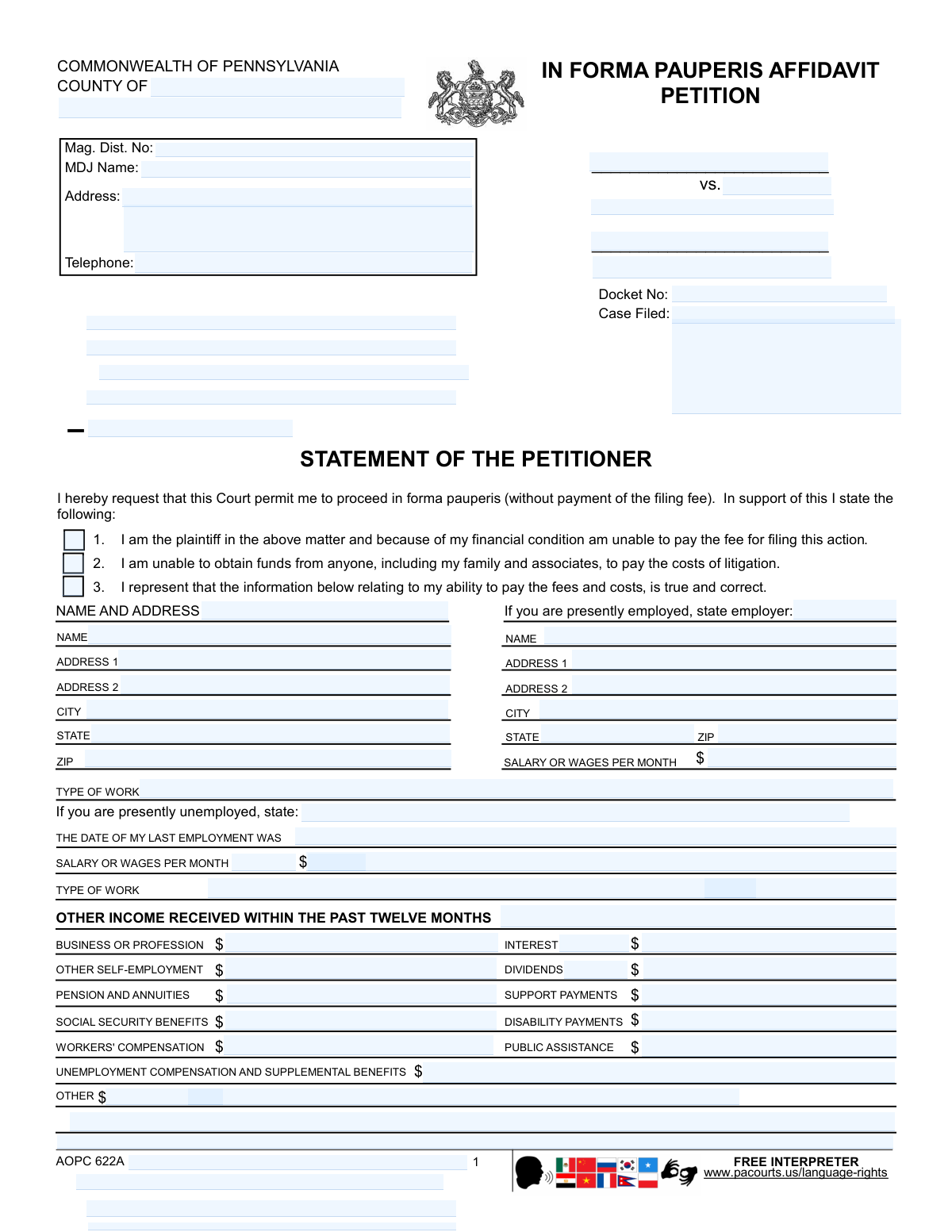
What this form asks for
The AI fills all of it, from your answers or your documents.
The AI checks your answers before you download
16 checks built for this form, so a wrong date or a missing answer is caught before anyone else sees it.
Checks that the County, Magisterial District Number (Mag. Dist. No.), and MDJ Name fields are completed when the In Forma Pauperis (IFP) petition is filed in a Magisterial District Court context. Validates that the Magisterial District Number follows the expected Pennsylvania MDJ format (commonly a numeric pattern such as ##-#-##) and that the county is a recognized Pennsylvania county name. If missing or malformed, the submission should be rejected or routed for clerk review because the court cannot properly docket or assign the filing.
Verifies that required case identifiers are provided for the specific filing type: Docket No. for MDJ filings, and Case No. and OTN # for criminal Common Pleas appeal/transcript/service forms. Also checks that the same Case No./OTN # values match across the Notice of Appeal, Request for Transcript, and Proof of Service when submitted as a packet. If identifiers are missing or inconsistent, the system should block submission or flag it because documents may be misfiled to the wrong case.
Checks that the caption contains both parties (e.g., plaintiff and defendant for civil/MDJ matters, or Commonwealth of Pennsylvania vs. Defendant for criminal matters) and that the defendant name is not blank. Ensures the party role selection on the Notice of Appeal (Commonwealth/Defendant) is explicitly indicated and consistent with the caption. If incomplete, the filing should fail validation because the court cannot determine who is appealing or who the adverse party is for service and docketing.
Confirms that the IFP petition includes the petitioner’s signature and date, and that the Notice of Appeal, Request for Transcript, and Proof of Service include the filer’s signature (typically attorney or self-represented party). Also validates that the “Attorney for” field is completed when an attorney is indicated, or that the pro se indicator is used where applicable. If signatures are missing, the submission should be rejected because unsworn/unsigned filings may be legally ineffective.
Checks that all dates are in an acceptable format (e.g., MM/DD/YYYY or a clearly parseable date) and are not impossible (e.g., 02/30/2026). Applies logical rules: the order date being appealed should not be in the future; the Proof of Service date should not precede the Notice of Appeal date; last employment date should not be after today. If invalid, the system should prompt correction because date errors can affect timeliness, jurisdiction, and compliance with appellate rules.
Ensures telephone numbers (MDJ telephone, attorney/filer telephone) contain a valid 10-digit US number (optionally with country code +1) and acceptable punctuation. Prevents entry of non-numeric placeholders or too-short/too-long values. If validation fails, the system should require correction because courts rely on accurate contact information for notices, scheduling, and deficiency communications.
And 10 more checks
- Ensures Employment Status Branching Is Completed (Employed vs. Unemployed Sections)
- Validates Monetary Fields Are Numeric, Non-Negative, and Currency-Formatted (Income, Assets, Debts, Costs)
- Checks Financial Completeness for IFP Determination (Income, Assets, Debts, Dependents)
- Validates Spouse/Household Contribution Logic (Spouse Employed, Spouse Name/Employer, Contribution Amounts)
- Validates Dependent Information Consistency (Names/Relationships/Ages of Minor Children)
- Validates Notice of Appeal Court Selection and Order Information (Supreme/Superior/Commonwealth Court; Order Date)
- Validates Attachment/Payment Checklist Consistency for Notice of Appeal Packet
- Validates Request for Transcript Details and Cost Arithmetic (Pages, Cost/Page, Total Estimated Cost, Deposit Check)
- Validates Proof of Service Completeness (Persons Served, Methods, Addresses/Phones, Rule 906 Coverage)
- Validates Civil Cover Sheet Selections (Primary Case Category, Commencement Type, Damages/Class Action/MDJ Appeal, Dollar Amount Range)
Let AI fill out your AOPC 622A (IFP Petition)
No typing. Every field filled in seconds, checked, ready to sign.
How to Fill Out AOPC 622A (IFP Petition) Online for Free in 2026
What the AI walks you through.
- Enter the case caption and court details (county, magisterial district number, MDJ name/address/phone, parties, docket number, and filing date if known).
- Complete your personal information section (name and address) and provide current employment details (type of work, monthly wages, employer name and address) or unemployment details (last employment date and prior wages/type of work).
- List all other income received in the past 12 months (e.g., self-employment, public assistance, Social Security, unemployment, disability, support, interest/dividends, and any other sources) with amounts.
- Provide household support information (spouse employment and wages, spouse name/employer, and contributions from children/parents/others).
- Disclose assets and property owned (cash, checking/savings, CDs, real estate, vehicles with year/make, cost and amount owed, and any stocks/bonds) and list debts/obligations (rent, mortgage, loans, and other liabilities).
- List all persons dependent on you for support (names, relationships, and ages of minor children) and review the continuing duty to report improved finances.
- Sign and date the verification and confidentiality certification, then submit the petition to the appropriate court/MDJ for review and judge action (seal/date as applicable).
Common Mistakes in Completing AOPC 622A (IFP Petition)
The ones the AI is built to catch.
Leaving court/venue identifiers blank (County, Magisterial District No., MDJ name, docket/case numbers)
Mixing up party roles and captions (plaintiff vs. defendant; Commonwealth vs. Defendant)
Providing incomplete employment information or using the wrong section (employed vs. unemployed)
Entering income in the wrong time period or format (monthly vs. annual; gross vs. net)
Omitting “other income” categories or writing “N/A” without confirming all sources
Failing to disclose spouse/household contributions and dependents accurately
Underreporting assets or leaving property fields blank (cash, bank accounts, vehicles, real estate)
Not listing debts and obligations completely or clearly (mortgage, rent, loans, other)
Missing signatures, dates, or verification language (unsworn falsification warning)
Not attaching required appeal materials or checks, or making checks payable incorrectly
Incomplete transcript request details (hearing date, proceeding description, page/cost estimates, deposit)
Defective proof of service (missing recipients, method, or contact information; not serving required parties)
Frequently Asked Questions About AOPC 622A (IFP Petition)
Is it really free for 7 days?
Can I fill other forms too?
How do I cancel?
How does the AI fill out AOPC 622A (IFP Petition)?
What happens to my information?
How complex is AOPC 622A (IFP Petition) to fill out?
What is an In Forma Pauperis (IFP) Petition/Affidavit and what does it do?
Who should file the In Forma Pauperis Petition?
Do I have to list my spouse’s income and household contributions on the IFP form?
What if I’m unemployed—how do I complete the employment section?
What types of income do I need to report on the IFP Petition?
What property, cash, and debts do I need to disclose on the IFP Petition?
What does it mean that I have a “continuing obligation” to inform the court of improved finances?
Are there penalties if I lie or leave out information on the IFP Petition?
What is the “Case Records Public Access Policy” certification on the IFP form?
What is the Northampton County Criminal “Notice of Appeal” form used for?
What attachments are required with the Notice of Appeal filing?
What is the “Request for Transcript” (or Pa.R.A.P. 904(c) statement) and when do I file it?
How do I handle transcript costs and deposits on the Request for Transcript form?
What is the Proof of Service form and who must be served in an appeal?
What is the Pennsylvania Civil Cover Sheet and when is it required?
Get your AOPC 622A (IFP Petition) filled out by AI
$0 today. Cancel before Nov 1 and you pay nothing.
Other forms like this one
court forms: Form Summons, Supreme Court of New York, Form SC-100, Plaintiff's Claim and ORDER to Go to Small Claims Court, Form AO 240, Application to Proceed in District Court Without Prepaying Fees or Costs, Form AO 239, Application to Proceed in District Court Without Prepaying Fees or Costs, Affidavit for Service by Publication/Posting (Circuit Court of Cook County, Illinois) (CCG 0013 A/B), Petition for Leave to Proceed In Forma Pauperis (Court of Common Pleas of Lehigh County, Pennsylvania, Civil Division), In Forma Pauperis Affidavit/Petition (AOPC 622A) – Pennsylvania Magisterial District Court, Judicial Council of California Form SC-105, Request for Court Order and Answer (Small Claims), SC-120, Defendant’s Claim and ORDER to Go to Small Claims Court (Small Claims), SC-105, Request for Court Order and Answer (Small Claims), Judicial Council of California Form SC-120, Defendant’s Claim and ORDER to Go to Small Claims Court (Small Claims), Florida Supreme Court Approved Family Law Form 12.901(b)(3), Petition for Dissolution of Marriage with No Dependent or Minor Child(ren) or Property (02/18), Illinois Supreme Court Approved Form E-O 3500.3, Eviction Order, Form P3 (Rule 25-3(2)) — Affidavit of Applicant for Grant of Probate or Grant of Administration with Will Annexed (Short Form) (Supreme Court of British Columbia), Form SC-100, Plaintiff’s Claim and ORDER to Go to Small Claims Court, Designation of Record on Appeal (Civil) (Maricopa County Justice Courts, Arizona) (Form APP 8150-702), FW-003, Order on Court Fee Waiver (Superior Court), Judicial Council of California Form SER-001, Request for Sheriff to Serve Court Papers, FW-003, Order on Court Fee Waiver (Superior Court), Judicial Council of California Form SER-001, Request for Sheriff to Serve Court Papers
District court forms: Form AO 240, Application to Proceed in District Court Without Prepaying Fees or Costs, Form AO 239, Application to Proceed in District Court Without Prepaying Fees or Costs, In Forma Pauperis Affidavit/Petition (AOPC 622A) – Pennsylvania Magisterial District Court, Form CR-417, Response by District Attorney to Petition to Terminate Sex Offender Registration, Taxing District Complaint (Local Property Tax), Supreme Court of New Jersey Disciplinary Review Board Notice of Appeal From a District Fee Arbitration Committee Determination
UK court forms: Form Summons, Supreme Court of New York, Form SC-100, Plaintiff's Claim and ORDER to Go to Small Claims Court, Form AO 240, Application to Proceed in District Court Without Prepaying Fees or Costs, Form AO 239, Application to Proceed in District Court Without Prepaying Fees or Costs, Affidavit for Service by Publication/Posting (Circuit Court of Cook County, Illinois) (CCG 0013 A/B), Petition for Leave to Proceed In Forma Pauperis (Court of Common Pleas of Lehigh County, Pennsylvania, Civil Division), In Forma Pauperis Affidavit/Petition (AOPC 622A) – Pennsylvania Magisterial District Court, Judicial Council of California Form SC-105, Request for Court Order and Answer (Small Claims), SC-120, Defendant’s Claim and ORDER to Go to Small Claims Court (Small Claims), SC-105, Request for Court Order and Answer (Small Claims), Judicial Council of California Form SC-120, Defendant’s Claim and ORDER to Go to Small Claims Court (Small Claims), Florida Supreme Court Approved Family Law Form 12.901(b)(3), Petition for Dissolution of Marriage with No Dependent or Minor Child(ren) or Property (02/18), Illinois Supreme Court Approved Form E-O 3500.3, Eviction Order, Form P3 (Rule 25-3(2)) — Affidavit of Applicant for Grant of Probate or Grant of Administration with Will Annexed (Short Form) (Supreme Court of British Columbia), Form SC-100, Plaintiff’s Claim and ORDER to Go to Small Claims Court, Designation of Record on Appeal (Civil) (Maricopa County Justice Courts, Arizona) (Form APP 8150-702), FW-003, Order on Court Fee Waiver (Superior Court), Judicial Council of California Form SER-001, Request for Sheriff to Serve Court Papers, FW-003, Order on Court Fee Waiver (Superior Court), Judicial Council of California Form SER-001, Request for Sheriff to Serve Court Papers
AOPC forms: AOPC 308A, Civil Complaint, In Forma Pauperis Affidavit/Petition (AOPC 622A) – Pennsylvania Magisterial District Court
Pennsylvania court forms: AOPC 308A, Civil Complaint, Petition for Leave to Proceed In Forma Pauperis (Court of Common Pleas of Lehigh County, Pennsylvania, Civil Division), In Forma Pauperis Affidavit/Petition (AOPC 622A) – Pennsylvania Magisterial District Court
affidavit forms: Affidavit for Collection of Personal Property California Probate Code Section 13100, Form I-864, Affidavit of Support Under INA, Form DS-5507, Affidavit of Physical Presence, Form 12.902(b), Family Law Financial Affidavit (Short Form), Form E, Affidavit of Personal Service, Form I-361, Affidavit of Financial Support, Form EX550, Affidavit (Order to attend for questioning/suspended committal order), Form CJA-23, Financial Affidavit, Affidavit and Representations Regarding Next of Kin (Preference Beneficiary Affidavit) (The Hartford) – Form LC-7086-17, Affidavit for Service by Publication/Posting (Circuit Court of Cook County, Illinois) (CCG 0013 A/B), In Forma Pauperis Affidavit/Petition (AOPC 622A) – Pennsylvania Magisterial District Court, Form P3 (Rule 25-3(2)) — Affidavit of Applicant for Grant of Probate or Grant of Administration with Will Annexed (Short Form) (Supreme Court of British Columbia), Uniform Domestic Relations Form – Affidavit 1 AFFIDAVIT OF BASIC INFORMATION, INCOME, AND EXPENSES, TIAA Brokerage Durable Power Of Attorney Affidavit Of Full Force And Effect, Form L-4260, Property Transfer Affidavit, Affidavit - Supporting Documents Not Attached to Eviction Complaint, Missouri Motion and Affidavit in Support of Request to Proceed As a Poor Person, Form AOC-SP-300, Petition And Affidavit/Affirmation For Involuntary Commitment, Florida Supreme Court Approved Family Law Form 12.902(d), Uniform Child Custody Jurisdiction and Enforcement Act (UCCJEA) Affidavit, Form 35.1A: Affidavit (child protection information)
Let AI fill out your AOPC 622A (IFP Petition)
Your trial starts once a card is added. You pay nothing before Nov 1.
Our AI already knows this form, all 299 fields of it. Skip the typing: tell it about yourself, or upload what you have, and it fills the whole form in seconds.
- AI fills every field on all 7 pages, tables and checkboxes included
- No typing into boxes: answer a few questions, or upload a document you already have, an old copy of this form, a photo of a document
- The AI checks the answers; you review and change anything before you download
- Download the finished PDF, print it, or sign it online
- Encrypted, and never used to train AI
Cancel before Nov 1 and you pay nothing.
A card is needed to start the trial. Cancel in two clicks from your account.
Terms · Privacy