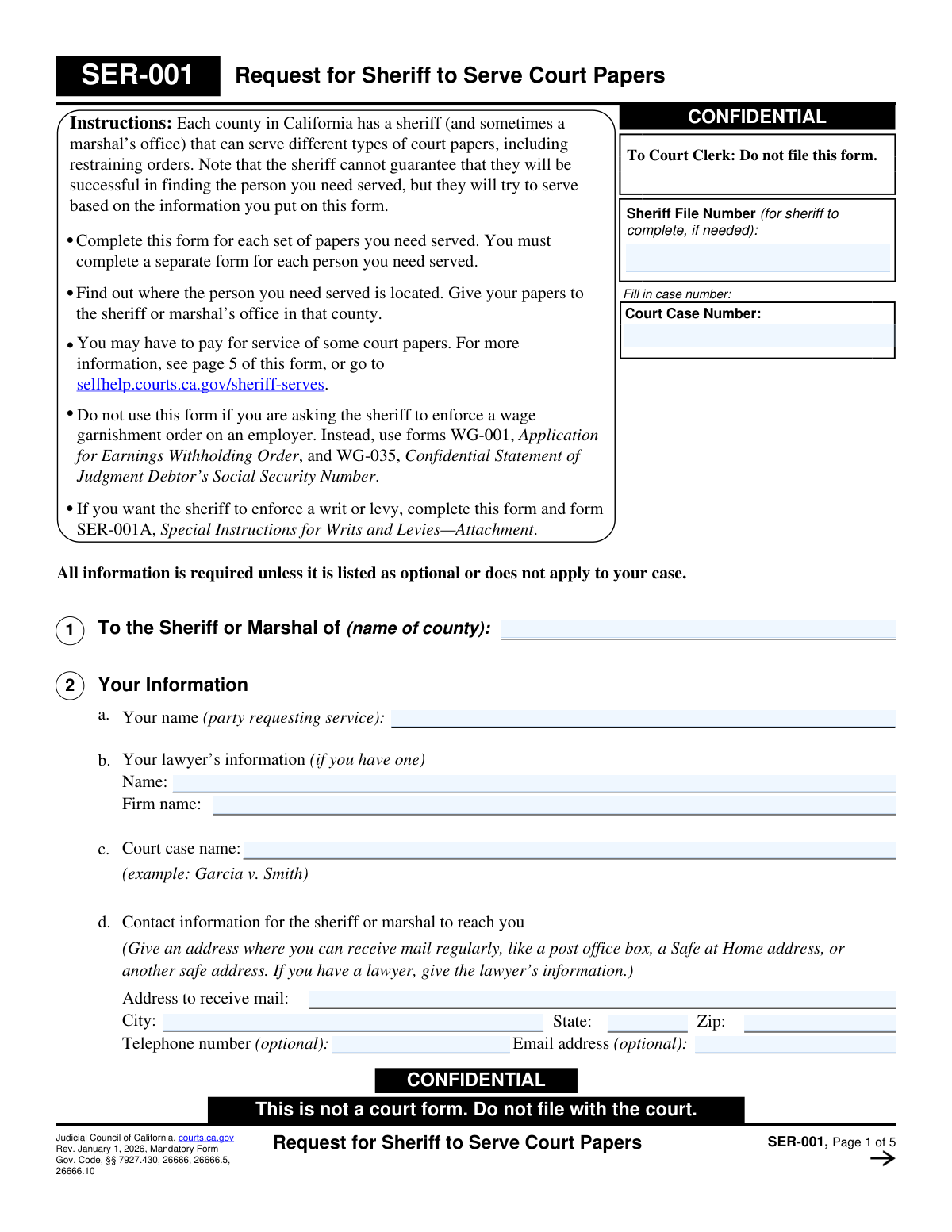
Yes! You can use AI to fill out Judicial Council of California Form SER-001, Request for Sheriff to Serve Court Papers

SER-001 is a confidential Judicial Council of California form used to request that a county sheriff or marshal serve specified court papers on a particular person or entity, based on the service address and identifying details you provide. It helps law enforcement process servers attempt lawful service and document whether service was successful, which is often required before a case can proceed or orders can be enforced. The form also captures safety/accessibility concerns and key timing information (best time to serve, hearing dates, deadlines) to improve the chance of successful service. Today, this form can be filled out quickly and accurately using AI-powered services like Instafill.ai, which can also convert non-fillable PDF versions into interactive fillable forms.
Our AI automatically handles information lookup, data retrieval, formatting, and form filling.
It takes less than a minute to fill out SER-001 using our AI form filling.
Securely upload your data. Information is encrypted in transit and deleted immediately after the form is filled out.

Form specifications

Form name: Judicial Council of California Form SER-001, Request for Sheriff to Serve Court Papers
Number of pages: 5
Filled form examples: Form SER-001 Examples
Language: English
Categories: California court forms, Judicial Council forms, California judicial forms
main-image

Instafill Demo: filling out a legal form in seconds

How to Fill Out SER-001 Online for Free in 2026

Are you looking to fill out a SER-001 form online quickly and accurately? Instafill.ai offers the #1 AI-powered PDF filling software of 2026, allowing you to complete your SER-001 form in just 37 seconds or less.
Follow these steps to fill out your SER-001 form online using Instafill.ai:
  1. 1 Go to Instafill.ai and upload the SER-001 PDF (or select “SER-001 Request for Sheriff to Serve Court Papers” from the form library).
  2. 2 Enter the court and case identification details, including the court case number and the county sheriff/marshal who will perform service (and sheriff file number if available).
  3. 3 Provide requester information (your name, mailing address, and optional phone/email) and add attorney and firm details if you are represented.
  4. 4 Specify who will be served by choosing either a person or an entity, then enter the name and any available identifying details (aliases, physical description, vehicle info, and any safety/accessibility issues).
  5. 5 Enter the primary service address (home/business, city/state/ZIP), gate codes or special instructions, and the best time window for service; add an alternate address if applicable.
  6. 6 Describe what documents are being served (type of papers and optional list of form numbers/titles) and indicate whether there is a hearing date, service deadline, or an order allowing an alternative method of service.
  7. 7 Review for completeness and accuracy, e-sign if supported, then download/print and deliver the completed SER-001 with copies of the papers to the appropriate sheriff/marshal office (and include any fee waiver documentation if applicable).

Our AI-powered system ensures each field is filled out correctly, reducing errors and saving you time.

Why Choose Instafill.ai for Your Fillable SER-001 Form?

Speed

Complete your SER-001 in as little as 37 seconds.

Up-to-Date

Always use the latest 2026 SER-001 form version.

Cost-effective

No need to hire expensive lawyers.

Accuracy

Our AI performs 10 compliance checks to ensure your form is error-free.

Security

Your personal information is protected with bank-level encryption.

Frequently Asked Questions About Form SER-001

SER-001 is used to ask a California county sheriff (or marshal, where available) to serve court papers on a person or an entity. It provides the sheriff with the case details, what documents to serve, and where/when to attempt service.

No. The form is marked confidential and says, “Do not file this form.” You give it directly to the sheriff or marshal’s office along with the papers to be served.

The party requesting service (or their lawyer) completes SER-001 when they want the sheriff/marshal to serve court documents. You must complete a separate SER-001 for each person (or entity) you want served and for each set of papers.

You send it to the sheriff (or marshal) in the county where the person or entity to be served is located. If the person is in another county, you generally need to submit the request to that other county’s sheriff.

At minimum, provide the person’s name and a service address in the correct county. Any extra details—aliases, physical description, vehicle info, best times to serve, and a photo—can improve the chances of successful service.

Check the box for serving an entity and provide the entity’s name/type, and (if known) the specific person to serve or the agent for service of process. Include any safety or access issues that could affect service at that location.

List the full address where the sheriff should attempt service and mark whether it is a home or business. Add gate codes, special instructions, and the best time window to serve; you may also add an alternate address (often only if it’s in the same county).

Yes. Check the box indicating the person is in jail or prison and provide the name of the facility so the sheriff knows where to attempt service.

Provide SER-001 plus a copy of all court papers you want served, and include a copy of any fee waiver order if you have one. If the court allowed an alternative method of service, include a copy of that court order as well.

Section 5(b) is optional, but it’s strongly helpful because it identifies exactly what should be served (by form number or document title). Listing everything reduces the risk that a document is missed or not included on the proof of service.

You may have to pay a service fee, depending on the type of papers and your situation. Service is often free if you have a court-approved fee waiver, or for certain restraining orders (including domestic violence, elder abuse, and gun violence restraining orders, and some credible-threat/stalking-based restraining orders).

Timing varies by county and workload, so you should check with the sheriff’s office for current processing times. The sheriff will attempt service based on the information you provide, but they cannot guarantee they will find the person.

If service is successful, you should receive a proof of service to file with the court (unless it’s already court-stamped as filed). If service is unsuccessful, you may receive a declaration of due diligence (or similar document) describing the attempts made and the outcome.

Do not use SER-001 to ask the sheriff to enforce a wage garnishment (earnings withholding) order—use WG-001 and WG-035 instead. If you want the sheriff to enforce a writ or levy, you use SER-001 but must also complete SER-001A (Special Instructions for Writs and Levies—Attachment).

Yes—AI tools like Instafill.ai can help auto-fill form fields accurately from the information you provide, saving time and reducing missed fields. Typically you upload the SER-001 PDF to Instafill.ai, answer a guided set of questions (case number, service address, person/entity details, documents to serve), and then download a completed form to submit to the sheriff.

If the PDF isn’t fillable, you can still complete it using a service like Instafill.ai, which can convert flat, non-fillable PDFs into interactive fillable forms. After conversion, you can type directly into the fields and export a clean, completed PDF for submission.

Compliance SER-001
Validation Checks by Instafill.ai

1
Validates County to Serve is Present and a Real California County
Checks that the 'To the Sheriff or Marshal of (name of county)' field is completed and matches a recognized California county name (e.g., San Diego, Los Angeles). This is critical because the request must be routed to the correct sheriff/marshal jurisdiction and many offices will not act outside their county. If validation fails, the submission should be rejected or flagged for correction because service attempts may be misdirected or refused.
2
Ensures Court Case Number is Provided and Uses Acceptable Case-Number Characters
Verifies that the Court Case Number is not blank and contains only expected characters (letters, numbers, dashes, slashes) and reasonable length, preserving leading zeros. The sheriff may be required to decline service if a case number is not listed on the order/summons/notice, and the case number is essential for tracking and proof of service. If validation fails, block submission and prompt the user to enter the case number exactly as it appears on court documents.
3
Checks Requester Identity Completeness (Requester Name Required)
Confirms the requester/party requesting service name is present and appears to be a full name (at minimum, two tokens or a clearly identified entity/party name). The sheriff needs a clear requesting party for contact, billing/fee-waiver handling, and recordkeeping. If validation fails, require correction before acceptance because the request cannot be reliably associated with a responsible party.
4
Validates Mailing Address Block Completeness and Format
If a mailing address is provided (it is required unless a lawyer address is used), checks that Address, City, State, and ZIP are all present and that State is a valid US state/territory abbreviation or full name and ZIP is 5 digits (or ZIP+4). This ensures the sheriff can send updates, invoices, and proofs/returns of service to a deliverable address. If validation fails, prompt for missing components or invalid ZIP/state and prevent submission until corrected.
5
Validates Optional Requester Phone Number Format
If a requester telephone number is entered, validates it as a plausible US phone number (10 digits with optional punctuation, optional extension). Accurate phone formatting reduces failed contact attempts when the sheriff needs clarifications quickly (e.g., gate codes, best times, safety issues). If validation fails, do not block the entire form, but flag the field and request correction or removal.
6
Validates Optional Requester Email Address Format
If an email address is entered, checks it matches standard email syntax (local@domain) and is within reasonable length. Email is often used for rapid communication and electronic document exchange, so malformed addresses cause missed time-sensitive notices. If validation fails, flag the email field and require correction if email is the chosen primary contact method.
7
Enforces Mutual Exclusivity: Serve a Person vs Serve an Entity
Ensures exactly one of the two options is selected: 'I ask the sheriff to serve a person' OR 'I ask the sheriff to serve an entity.' The downstream required fields differ substantially (person name/description vs entity name/agent), and selecting both or neither creates ambiguity about who must be served. If validation fails, block submission and require the user to choose one option.
8
Requires Target Name Based on Selection (Person Name or Entity Name/Type)
If serving a person, validates that the Person’s Full Name is provided; if serving an entity, validates that Entity name and type is provided. The sheriff cannot attempt service without a clearly identified target, and incorrect target identification can invalidate service. If validation fails, block submission and prompt for the missing target identification.
9
Validates Person Description Section Consistency (No Info vs Yes Info)
If 'No — I do not have any information about the person’s description' is checked, ensures no descriptive fields (gender/height/weight/hair/eyes/DOB/race/etc.) are filled; if 'Yes' is checked, ensures at least one descriptive attribute is provided and that gender selection is not contradictory (e.g., multiple genders selected unless the form explicitly allows it). This prevents conflicting data that can mislead deputies and reduces failed service attempts. If validation fails, require the user to reconcile the selection and the entered description fields.
10
Validates Height and Weight Are Plausible and Standardized
If height/weight are provided, checks they are numeric and within plausible human ranges (e.g., height 3'0"–7'6" or 90–230 cm; weight 50–600 lb or 23–272 kg) and normalizes common formats (5'7", 5 ft 7 in, 170 cm). Plausible, standardized physical descriptors improve identification and reduce mistaken identity risk. If validation fails, flag the field and require correction to an accepted format/range.
11
Validates Date of Birth or Age Field Format and Reasonableness
If DOB is provided, validates a real calendar date (MM/DD/YYYY or similar accepted format) and ensures it is not in the future; if age is provided instead, validates it is a reasonable integer (e.g., 0–120) and not contradictory with a provided DOB. Accurate DOB/age helps distinguish individuals with similar names and supports safer, more effective service. If validation fails, prompt for correction and prevent submission if the field is required by the user’s 'Yes, I have description info' selection.
12
Validates Safety/Accessibility Section Logic and Required Details
Ensures the user selects either 'No' or 'Yes' for safety/accessibility issues (not both), and if 'Yes' is selected, requires at least one issue checkbox or narrative detail; additionally, if 'Does not speak English' is checked, requires a language value. This information directly affects deputy safety planning and accommodations (e.g., interpreter needs, hearing impairment). If validation fails, block submission until the selection and required details are consistent and complete.
13
Validates Primary Service Address Completeness and Deliverability
Checks that the primary service Address, City, State, and ZIP are completed, and that the state/ZIP are valid; also requires the user to indicate Home or Business (or otherwise specify address type if the system supports it). The sheriff cannot attempt service without a complete location, and incomplete addresses are a leading cause of unsuccessful service. If validation fails, block submission and request a complete, properly formatted address.
14
Validates Jail/Prison Indicator Requires Facility Name and Suppresses Street Address Conflicts
If 'person is in jail or prison' is checked, requires the facility name and (optionally) facility address, and flags conflicts where a residential street address is simultaneously presented as the primary location without clarification. Serving an incarcerated person typically requires facility-specific procedures and routing, and missing facility details can make service impossible. If validation fails, require the facility name and prompt the user to clarify the correct service location.
15
Validates Hearing Date and Service Deadline Formats and Logical Order
If 'Yes' is selected for court hearing date, validates the hearing date is a real date; if 'Yes' is selected for service deadline, validates the deadline date is a real date. Additionally, if both are provided, checks the service deadline is on or before the hearing date (or flags if it is after), since service typically must occur before the hearing. If validation fails, block submission and require corrected dates or an explicit override reason if the system allows exceptions.
16
Validates Writ/Levy Selection Requires SER-001A Attachment and Consistent Intent
If the request indicates enforcement of a writ or levy (or the user selects that the sheriff should act as levying officer), requires confirmation that SER-001A is included and that the user’s selection between 'both serve and levy' vs 'only levy' is not contradictory with the stated papers to be served. Writ/levy actions have additional statutory and operational requirements, and missing SER-001A can prevent the sheriff from processing the request. If validation fails, block submission and require the attachment and consistent selections.

Common Mistakes in Completing SER-001

Filing SER-001 with the court (instead of giving it to the sheriff)

People often assume every Judicial Council form must be filed, but SER-001 clearly says “Do not file this form” and is intended for the sheriff/marshal. Filing it can delay service because the sheriff never receives the instructions and the court clerk may reject or discard it. To avoid this, deliver SER-001 (and copies of the papers to be served) directly to the correct sheriff/marshal office and keep a copy for your records. AI-powered tools like Instafill.ai can flag “do not file” forms and help route the completed packet to the right destination.

Leaving the Court Case Number blank or entering the wrong format

A very common error is forgetting the case number, copying it incorrectly, or omitting letters/dashes/leading zeros that appear on court documents. The sheriff may refuse or be unable to proceed because the form and the documents must match a valid case number, and the instructions note service may not be attempted if a case number is not listed on the order/summons/notice. To avoid this, copy the case number exactly as it appears on the filed/stamped paperwork and ensure it is consistent across all pages. Instafill.ai can auto-extract the case number from your court documents and validate formatting consistency.

Using the wrong county (serving county vs. court county confusion)

Many people enter the county where the case was filed rather than the county where the person/entity is physically located for service. This leads to submitting the request to the wrong sheriff’s office, causing delays, rejections, or the need to re-submit in the correct county. To avoid this, confirm the address where service will occur and put that county in “To the Sheriff or Marshal of (name of county).” Instafill.ai can help by checking the service address and prompting you to confirm the correct county jurisdiction.

Not completing a separate SER-001 for each person or each set of papers

The form instructions require a separate form for each set of papers and a separate form for each person to be served, but people often list multiple individuals on one request. This can cause the sheriff to treat the request as incomplete or only attempt service for one person, leaving others unserved and risking missed court deadlines. To avoid this, prepare one SER-001 per individual (and per distinct packet of documents) and label each packet clearly. Instafill.ai can duplicate and re-map the form for multiple recipients while keeping each request clean and compliant.

Mixing up “serve a person” vs. “serve an entity” (and missing agent details)

Applicants sometimes check the wrong box (person vs. entity) or fail to provide the required entity service details (specific person or agent for service of process). Serving an entity incorrectly can result in invalid service, meaning the court may not recognize it and you may have to re-serve—wasting time and fees. To avoid this, confirm whether the target is an individual or an organization and, for businesses/agencies, identify the registered agent or correct person authorized to accept service. Instafill.ai can prompt for entity-specific requirements and help format agent information correctly.

Providing an incomplete or unusable service address

A frequent mistake is listing an address without apartment/unit number, city/ZIP, or giving a vague location (or an address outside the county) that the sheriff cannot act on. Incomplete addresses often lead to unsuccessful attempts and a “due diligence”/non-service return, which can jeopardize hearing timelines. To avoid this, provide a full deliverable address, indicate Home/Business, include gate codes, and add an alternate address if available (in the same county, if the sheriff allows). Instafill.ai can validate address completeness (ZIP/city/state) and standardize formatting to reduce failed service attempts.

Entering “best time to serve” outside normal business hours without confirming sheriff policy

People sometimes request evening or late-night service (e.g., “under cover of darkness”) even though the form notes service is typically during normal business hours and each sheriff has specific service windows. This can lead to unrealistic instructions, fewer attempts, or the request being treated as impractical, delaying service. To avoid this, call or check the sheriff’s service hours and provide realistic time ranges (e.g., weekday mornings) that match when the person is likely present. Instafill.ai can remind you of typical service-hour constraints and prompt you to confirm local office rules.

Skipping the document list or failing to include all required papers to be served

Because section 5(b) is marked optional, people often leave it blank and also forget to include one or more required documents in the packet (or fail to match what the court ordered). Missing documents can result in incomplete service, court continuances, or the need to re-serve everything, especially in restraining order matters where specific forms must be served together. To avoid this, list every form by form number/title and cross-check against the judge’s order and your filing packet before submitting to the sheriff. Instafill.ai can build a checklist from your case type (e.g., DV-100 and related forms) and help ensure the packet is complete.

Not answering hearing date, service deadline, or alternative service questions (or answering inconsistently)

Applicants often mark “I don’t know” or leave these items blank even when a hearing date or service deadline exists on the paperwork, or they say alternative service is allowed without attaching the court order. This can cause the sheriff to prioritize incorrectly, miss statutory timelines, or refuse to follow a non-personal service method without proof. To avoid this, read the filed documents for the hearing date and any “serve by” deadline, and attach any order authorizing substituted/alternative service if you are requesting it. Instafill.ai can extract dates from your court documents and warn you when an attachment is required.

Omitting safety/accessibility information or providing it in a way that is not actionable

People either leave safety/accessibility blank to avoid “making it a big deal,” or they write narrative instructions without checking the relevant boxes (weapons, violence history, aggressive animals, language needs, hearing impairment). Missing or unclear safety details can put deputies at risk and may reduce the likelihood of a successful, safe service attempt. To avoid this, check all applicable boxes and provide concise, factual details (e.g., known weapons, dogs on property, language spoken, mobility/access issues). Instafill.ai can guide you through structured safety prompts so critical details aren’t buried or forgotten.

Forgetting to sign/date the request or failing to print/type the requester name clearly

Even when everything else is complete, people frequently forget the signature, date, or typed/printed name at the end—especially when working from a scanned or non-fillable PDF. An unsigned request can be rejected by the sheriff’s office or returned for correction, delaying service and risking missed deadlines. To avoid this, complete the signature block last, confirm the date is current, and ensure the requester (or attorney) name is legible and matches the “Your Information” section. If the form is only available as a flat non-fillable PDF, Instafill.ai can convert it into a fillable version and ensure required signature/date fields are not missed.
Saved over 80 hours a year

“I was never sure if my IRS forms like W-9 were filled correctly. Now, I can complete the forms accurately without any external help.”

Kevin Martin Green

Your data stays secure with advanced protection from Instafill and our subprocessors

Robust compliance program

Transparent business model

You’re not the product. You always know where your data is and what it is processed for.

ISO 27001, HIPAA, and GDPR

Our subprocesses adhere to multiple compliance standards, including but not limited to ISO 27001, HIPAA, and GDPR.

Security & privacy by design

We consider security and privacy from the initial design phase of any new service or functionality. It’s not an afterthought, it’s built-in, including support for two-factor authentication (2FA) to further protect your account.

Fill out SER-001 with Instafill.ai

Worried about filling PDFs wrong? Instafill securely fills judicial-council-of-california-form-ser-001-request-for-sheriff-to-serve-court-papers forms, ensuring each field is accurate.