
Yes! You can use AI to fill out ADOPT-200, Adoption Request
Don't type this form by hand. Tell our AI about yourself, or upload a document you already have, and it fills every field in seconds. You check it, then download, print or sign.
The AI does the filling. You just check it.
No typing into boxes, nothing to install.
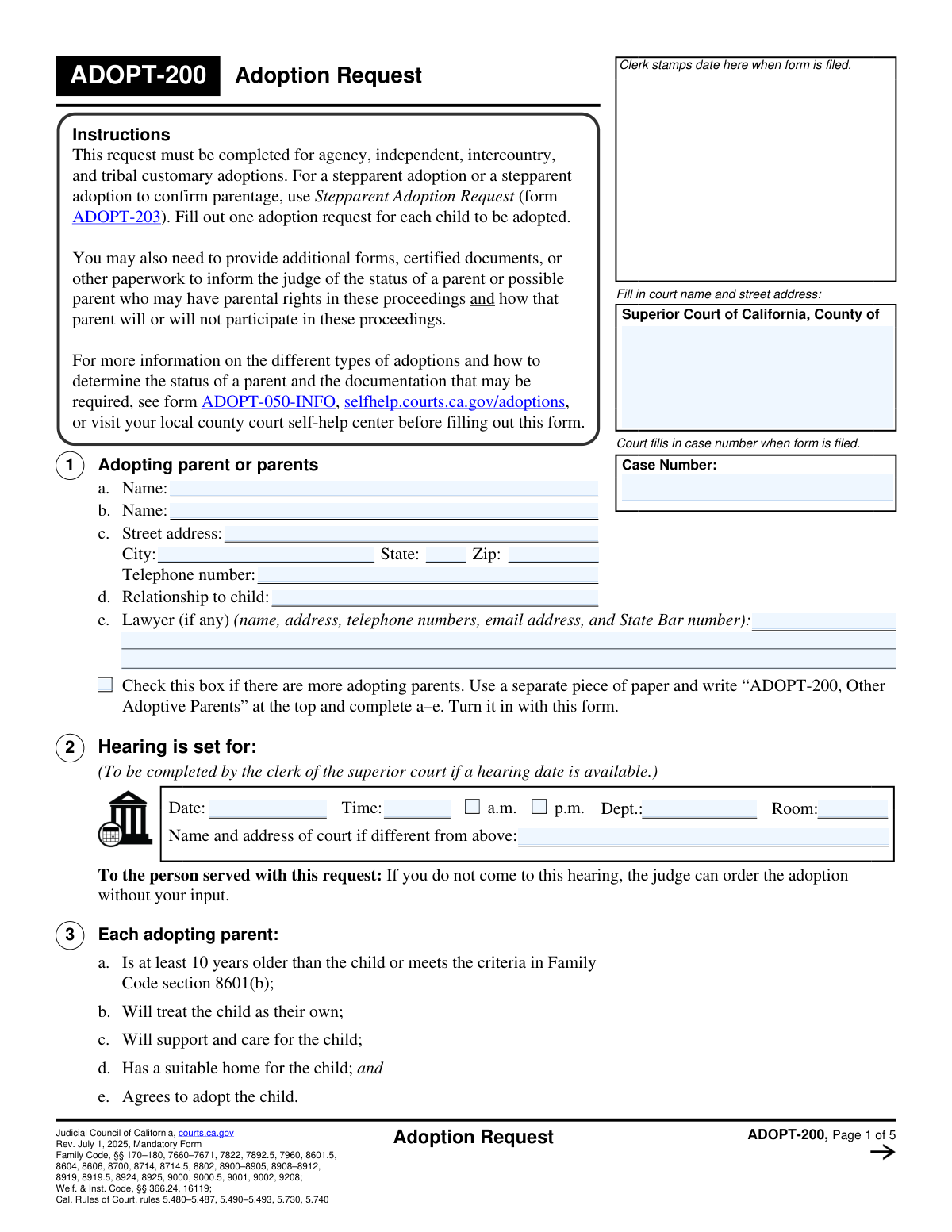
What this form asks for
The AI fills all of it, from your answers or your documents.
The AI checks your answers before you download
12 checks built for this form, so a wrong date or a missing answer is caught before anyone else sees it.
Validates that the user has selected exactly one primary adoption type from Section 5 (Agency, Independent, or Intercountry). This is a critical field that determines which subsequent sections and documents are required. If more than one or zero options are selected, the submission is ambiguous and cannot be processed correctly, leading to rejection.
Checks that if 'Agency' (5a) or 'Intercountry' (5c) is selected as the adoption type, the corresponding agency name field is not empty. This information is essential for the court and other bodies to identify and communicate with the correct placement agency. Failure to provide the name will halt the process until the information is supplied.
Ensures the 'Date child was placed' (6g) is a valid date that occurs on or after the child's 'Date of birth' (6c). Both dates must be in the past. This check prevents logical impossibilities, such as a child being placed before they were born, which would indicate a data entry error and invalidate the timeline of events.
If the child's age, calculated from the 'Date of birth' (6c), is 12 years or older, this validates that question 6f ('does the child agree to the adoption?') has been answered. California law requires the consent of a child 12 or older for their adoption. An unanswered question for an applicable child makes the request incomplete and legally insufficient.
Verifies that if 'Yes' is checked for the child being a dependent of the court (6i), then the 'Juvenile Case No.' and 'County' fields are filled. This information is crucial for linking the adoption case to the separate juvenile court dependency case file. Without it, the court cannot verify the child's legal status and eligibility for adoption.
Ensures at least one checkbox is selected in Section 4 ('County of filing'). This selection provides the legal basis (venue) for why the adoption is being filed in this specific county's court. A submission without this justification lacks legal standing and will be rejected by the court clerk.
And 6 more checks
- Adopting Parent Information Completeness
- ICWA Inquiry Attachment Verification
- Intercountry Re-adoption Date Requirement
- Legal Guardian Details Requirement
- Signature and Date Requirement
- Stepparent Adoption Form Usage Warning
Let AI fill out your ADOPT-200
No typing. Every field filled in seconds, checked, ready to sign.
How to Fill Out ADOPT-200 Online for Free in 2026
What the AI walks you through.
- Navigate to Instafill.ai, upload the ADOPT-200 form, or select it from their template library.
- Provide the full names, contact information, and relationship to the child for all adopting parents in Section 1.
- In Sections 5 and 6, select the type of adoption (e.g., agency, independent) and provide the child's personal details, including name, date of birth, and placement date.
- Complete the sections related to the Indian Child Welfare Act (ICWA) and any existing legal guardianship, attaching required forms like ICWA-010(A) as prompted in Sections 7-9.
- Fill out the information specific to your adoption type, such as agency details (Section 10), independent adoption agreements (Section 11), or intercountry adoption specifics (Section 12).
- Clearly state your requests to the court in Section 14, then use the AI to review the entire form for completeness and accuracy before proceeding.
- Electronically sign the declaration under penalty of perjury in Section 16, then download the completed form for filing with the appropriate Superior Court of California.
Common Mistakes in Completing ADOPT-200
The ones the AI is built to catch.
Using the Incorrect Adoption Form
Selecting the Wrong Court Jurisdiction
Confusing Child's Pre-Adoption and New Name
Failing to Attach Required ICWA Forms
Omitting Required Supporting Documents
Submitting an Unsigned or Undated Form
Omitting Dependency Court Information
Incorrectly Selecting the Adoption Type
Submitting One Form for Multiple Children
Requesting an Impermissible Retroactive Date
Frequently Asked Questions About ADOPT-200
Is it really free for 7 days?
Can I fill other forms too?
How do I cancel?
How does the AI fill out ADOPT-200?
What happens to my information?
What is the ADOPT-200 form used for?
Can I use this form for a stepparent adoption?
I am adopting two siblings. Can I use one form for both of them?
In which county court should I file this form?
What is the difference between the types of adoption listed in Section 5?
The child I am adopting is 12 years old. Do they need to agree to the adoption?
What are the Indian Child Welfare Act (ICWA) requirements in Section 8?
What other documents do I need to submit with the Adoption Request?
What is the 'Contact After Adoption Agreement' mentioned in Section 13?
Do I need a lawyer to fill out and file this form?
Can I use an AI tool to help me fill out the ADOPT-200 form?
How can I fill out the ADOPT-200 form online?
The PDF version of the form I found is not fillable. What can I do?
Get your ADOPT-200 filled out by AI
$0 today. Cancel before Nov 1 and you pay nothing.
Other forms like this one
California court forms: Judicial Council of California Form SC-105, Request for Court Order and Answer (Small Claims), Judicial Council of California Form SC-120, Defendant’s Claim and ORDER to Go to Small Claims Court (Small Claims), Judicial Council of California Form SER-001, Request for Sheriff to Serve Court Papers, Judicial Council of California Form SER-001, Request for Sheriff to Serve Court Papers, Affidavit for Collection of Personal Property California Probate Code Section 13100, Form POS-040, Proof of Service—Civil, Declaration of Facts of Death (California Superior Court), declaration-of-marriage-for-court-proceeding-california-family-law, ADOPT-200, Stepparent Adoption Request, ADOPT-210, Adoption Agreement, ADOPT-310, Contact After Adoption Agreement, Judicial Council of California Form ADOPT-200, Adoption Request, Form ADR-107, Mediation Attendance Sheet, Form ADR-110, Order Appointing Referee, Form ADR-109, Stipulation or Motion for Order Appointing Referee, Form ADR-102, Request for Trial De Novo After Judicial Arbitration, Form ADR-108, Referee's Report (Code Civ. Proc., §§ 638, 639), Form ADR-106, Petition to Confirm, Correct, or Vacate Contractual Arbitration Award, Form ADR-104, Rejection of Award and Request for Trial After Attorney-Client Fee Arbitration, Form ADR-103, Petition to Confirm, Correct, or Vacate Attorney-Client Fee Arbitration Award
Judicial Council forms: Judicial Council of California Form FL-300, Request for Order, Judicial Council of California Form FL-150, Income and Expense Declaration, Judicial Council of California Form SC-104, Proof of Service (Small Claims), Judicial Council of California Form SC-105, Request for Court Order and Answer (Small Claims), Judicial Council of California Form DE-111, Petition for Probate (Probate—Decedents Estates), Judicial Council of California Form SC-104, Proof of Service (Small Claims), Judicial Council of California Form SC-108, Request to Correct or Cancel Judgment and Answer (Small Claims), Judicial Council of California Form SC-120, Defendant’s Claim and ORDER to Go to Small Claims Court (Small Claims), Civil Case Cover Sheet (Judicial Council of California Form CM-010), Civil Case Cover Sheet (Judicial Council of California Form CM-010), Judicial Council of California Form TR-205, Request for Trial by Written Declaration (Trial by Written Declaration—Traffic), Judicial Council of California Form DE-120, Notice of Hearing—Decedent's Estate or Trust, Inventory and Appraisal Attachment (Judicial Council of California Form DE-161, GC-041), CLETS-001, Confidential Information for Law Enforcement (Judicial Council of California), Judicial Council of California Form SER-001, Request for Sheriff to Serve Court Papers, Judicial Council of California Form UD-105, Answer—Unlawful Detainer, CLETS-001, Confidential Information for Law Enforcement (Judicial Council of California), Judicial Council of California Form ADOPT-210, Adoption Agreement, Judicial Council of California Form DE-120, Notice of Hearing—Decedent's Estate or Trust, Inventory and Appraisal (Judicial Council of California) (Form DE-160/GC-040)
family law forms: Form 12.902(b), Family Law Financial Affidavit (Short Form), Florida Supreme Court Approved Family Law Form 12.901(b)(3), Petition for Dissolution of Marriage with No Dependent or Minor Child(ren) or Property (02/18), Form FL-170, Declaration for Default or Uncontested Dissolution or Legal Separation (Family Law), Form FL-100, Petition—Marriage/Domestic Partnership (Family Law), declaration-of-marriage-for-court-proceeding-california-family-law, Florida Supreme Court Approved Family Law Form 12.902(d), Uniform Child Custody Jurisdiction and Enforcement Act (UCCJEA) Affidavit, Florida Family Law Rules of Procedure Form 12.910(a), Summons: Personal Service on an Individual, Florida Supreme Court Approved Family Law Form 12.941(a), Petition for Enforcement of Out-of-State Custody Decree and for Order to Pick Up Minor Child(ren), Florida Supreme Court Approved Family Law Form 12.970(a), Petition for Temporary Custody by Extended Family, Form FL-110, Summons (Family Law), Form FL-120, Response—Marriage/Domestic Partnership (Family Law), ADOPT-200, Stepparent Adoption Request, ADOPT-210, Adoption Agreement, ADOPT-310, Contact After Adoption Agreement, Adoption Assistance Program Nonrecurring Adoption Expense Agreement and Claim, Adoption Request (Stepparent), Adoption and Safe Families Act (ASFA) Survey, Florida Family Law Rules of Procedure Form 12.900(b), Notice of and Consent to Limited Appearance, Florida Family Law Rules of Procedure Form 12.900(d), Termination of Limited Appearance, Florida Family Law Rules of Procedure Form 12.900(e), Acknowledgment of Assistance by Attorney
adoption forms: Judicial Council of California Form ADOPT-210, Adoption Agreement, Judicial Council of California Form ADOPT-210, Adoption Agreement, Vanguard Direct Rollover IRA Adoption Agreement, Voya Investment Management Traditional, Roth, Rollover, and SEP Individual Retirement Account (IRA) Application and Adoption Agreement, ICPC 100B, Interstate Compact on the Placement of Children Report on Child’s Placement Status, AAP 2, Reassessment Information - Adoption Assistance Program, Adoption Assistance Program Nonrecurring Adoption Expense Agreement and Claim, Statement of Acknowledgment - Adoption Implications, Form AAP 3, Adoption Assistance Program (AAP) Notice of Action, Adoption Assistance Program (AAP) - Request for Benefits, Form AAP 3, Adoption Assistance Program (AAP) Negotiation Agreement, Adoption Assistance Program (AAP) Eligibility Certification, Consent to Adoption by Parent, Adoption Request (Stepparent), Petition for Stepparent Adoption, Consent to Stepparent Adoption by Parent in Military, Adoption Assistance Program (AAP) Rate Questionnaire, ADOPT-210, Adoption Agreement, Declaration Confirming Parentage in Stepparent Adoption: Gestational Surrogacy, Form ADOPT-215, Adoption Order
Let AI fill out your ADOPT-200
Your trial starts once a card is added. You pay nothing before Nov 1.
Skip the typing: tell it about yourself, or upload what you have, and it fills the whole form in seconds.
- AI fills every field on the form, checkboxes included
- No typing into boxes: answer a few questions, or upload a document you already have, an old copy of this form, a photo of a document
- The AI checks the answers; you review and change anything before you download
- Download the finished PDF, print it, or sign it online
- Encrypted, and never used to train AI
Cancel before Nov 1 and you pay nothing.
A card is needed to start the trial. Cancel in two clicks from your account.
Terms · Privacy