Yes! You can use AI to fill out Judicial Council of California Form DE-120, Notice of Hearing—Decedent's Estate or Trust
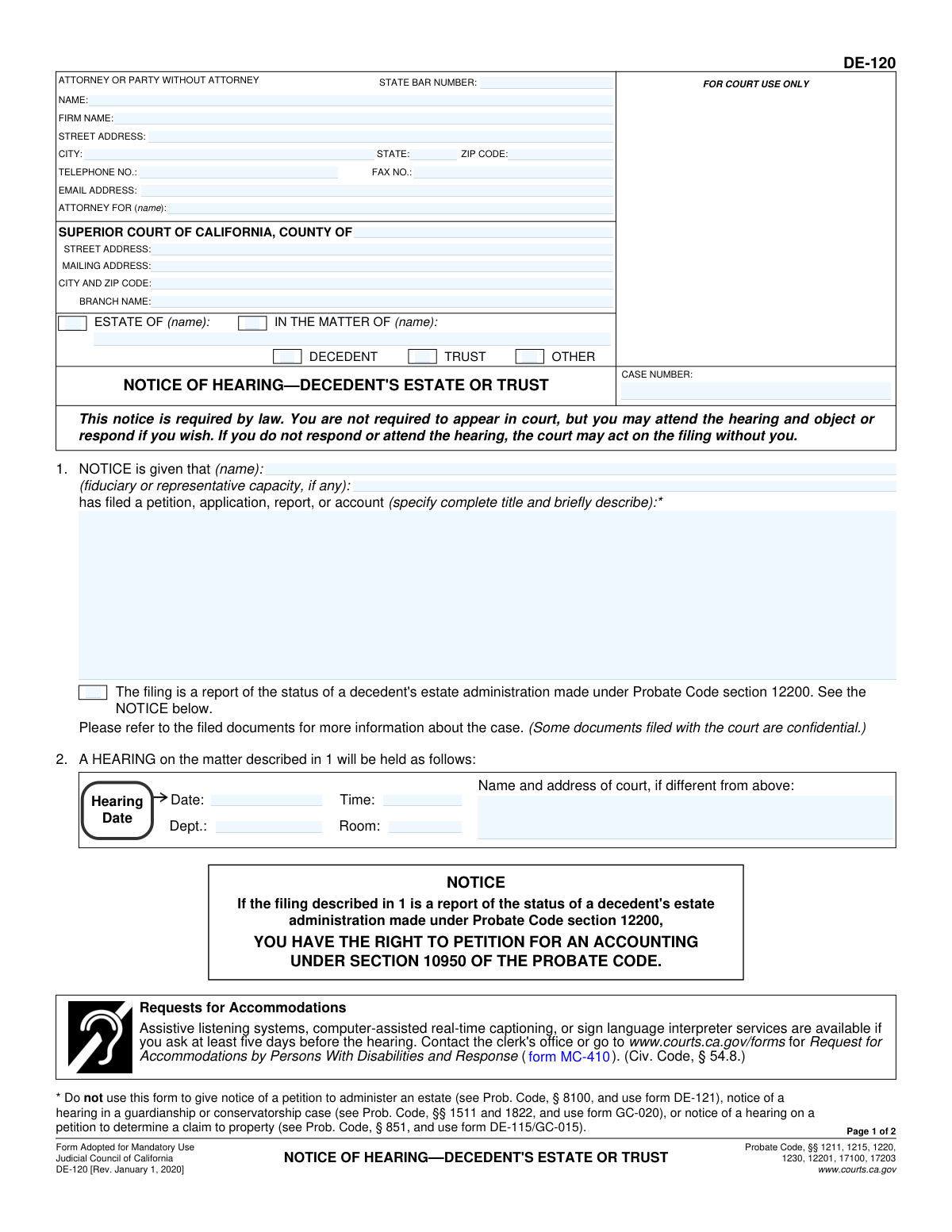
Form DE-120 (Notice of HearingâDecedent's Estate or Trust) is a California probate form used to notify interested persons that a petition, application, report, or account has been filed and that a court hearing has been scheduled. It includes the hearing date/time/location and provides proof sections (e.g., Proof of Service by Mail and a Clerkâs Certificate of Posting) to document that notice was properly given as required by the Probate Code. Proper notice is important because the court may proceed without recipients if they do not appear, and defective notice can delay or jeopardize the requested court orders. Today, this form can be filled out quickly and accurately using AI-powered services like Instafill.ai, which can also convert non-fillable PDF versions into interactive fillable forms.
Our AI automatically handles information lookup, data retrieval, formatting, and form filling.
It takes less than a minute to fill out DE-120 using our AI form filling.
Securely upload your data. Information is encrypted in transit and deleted immediately after the form is filled out.
Form specifications
| Form name: | Judicial Council of California Form DE-120, Notice of Hearing—Decedent's Estate or Trust |
| Number of pages: | 2 |
| Filled form examples: | Form DE-120 Examples |
| Language: | English |
| Categories: | court forms, California state forms |
Instafill Demo: filling out a legal form in seconds
How to Fill Out DE-120 Online for Free in 2026
Are you looking to fill out a DE-120 form online quickly and accurately? Instafill.ai offers the #1 AI-powered PDF filling software of 2026, allowing you to complete your DE-120 form in just 37 seconds or less.
Follow these steps to fill out your DE-120 form online using Instafill.ai:
- 1 Go to Instafill.ai and upload the DE-120 PDF (or select DE-120 from the form library).
- 2 Enter or import the case details: county, court branch/address (if needed), and the probate case number.
- 3 Provide the party/attorney information (name, firm, address, phone/email, State Bar number, and who the attorney represents).
- 4 Complete the notice caption and matter type by selecting DECEDENT, TRUST, or OTHER and entering the estate/matter name and fiduciary capacity (executor/administrator/trustee, etc.).
- 5 Describe the filing being noticed by entering the complete title and a brief description of the petition/application/report/account, and indicate if it is a Probate Code §12200 status report when applicable.
- 6 Fill in the hearing logistics (date, time, department, room, and any different court name/address) and have Instafill.ai validate required fields and formatting.
- 7 Complete service details: generate the Proof of Service by Mail recipient list (names/addresses), select the mailing method, enter date/place mailed, add signature/printed name and date, then download/print the finalized form for filing and service.
Our AI-powered system ensures each field is filled out correctly, reducing errors and saving you time.
Why Choose Instafill.ai for Your Fillable DE-120 Form?
Speed
Complete your DE-120 in as little as 37 seconds.
Up-to-Date
Always use the latest 2026 DE-120 form version.
Cost-effective
No need to hire expensive lawyers.
Accuracy
Our AI performs 10 compliance checks to ensure your form is error-free.
Security
Your personal information is protected with bank-level encryption.
Frequently Asked Questions About Form DE-120
Form DE-120 is a Notice of Hearing for a decedentâs estate, trust, or certain other probate matters in California. It tells interested persons that a petition, report, or account has been filed and provides the hearing date, time, and location.
Typically, the petitioner (or the petitionerâs attorney) prepares the DE-120 and ensures it is served on all required interested persons. The person who mails the notice must complete and sign the Proof of Service by Mail section.
Noâthis notice states you are not required to appear. However, you may attend and object or respond if you wish; if you do nothing, the court may act without your input.
Use DE-120 for hearings in a decedentâs estate or trust matter (or other specified probate matters). Do not use it for a petition to administer an estate (use DE-121), guardianship/conservatorship hearings (use GC-020), or a Probate Code § 851 property claim petition (use DE-115/GC-015).
You must provide the attorney or self-represented partyâs name, address, phone, and (if applicable) State Bar number, plus the name of the person/entity represented. This identifies who is giving notice and how they can be contacted.
Check the box that matches your matter (DECEDENT, TRUST, or OTHER) and use the correct caption line (e.g., âESTATE OF (name)â for a decedentâs estate). Enter the case name exactly as it appears on existing court filings and include the case number.
List the complete title of what was filed and add a brief description (for example, âPetition for approval of first account and report of trusteeâ). This helps recipients understand what the hearing is about.
You must enter the hearing date, time, room, and department (and the court name/address if different from the court listed above). Use the information exactly as scheduled by the court.
If the filing is a âreport of the status of a decedentâs estate administrationâ under Probate Code § 12200, you check that box. The form also warns recipients they may have the right to petition for an accounting under Probate Code § 10950.
Often yesâthere is a checkbox in the Proof of Service section stating you served a copy of the petition or other document referred to in item 1. Follow your courtâs rules and the notice requirements for your specific filing to confirm what must be included.
The server must be over 18 and not a party, list their address, choose the mailing method (USPS deposit or business collection practice), and provide the date and place mailed. Then they sign under penalty of perjury and list each recipientâs name and address (use an attachment if needed).
Check âContinued on an attachmentâ and attach additional pages listing all names and addresses. The form suggests using DE-120(MA)/GC-020(MA) as the attachment for the mailing list.
The Clerkâs Certificate of Posting is generally completed by the court clerk (or deputy) when posting is required. Parties usually do not fill out that section unless the court specifically instructs them to do so.
YesâAI form-filling tools can help reduce errors by extracting case details and placing them into the correct fields. Services like Instafill.ai use AI to auto-fill form fields accurately and save time, but you should still review everything for correctness before filing or serving.
Upload the DE-120 PDF to Instafill.ai, then provide (or import) your case details such as the case number, hearing date/time, court location, and service list. Instafill.ai can auto-populate the fields and let you review, edit, and export a completed PDF for printing/filing.
If the PDF is not fillable, you can still complete it using a tool that converts flat PDFs into fillable forms. Instafill.ai can convert non-fillable PDFs into interactive fillable forms so you can type directly into the fields and generate a clean final copy.
Compliance DE-120
Validation Checks by Instafill.ai
1
Validates required case caption selection and corresponding name field completion
Ensures at least one caption style is selected (e.g., âESTATE OF (name)â or âIN THE MATTER OF (name)â) and that the corresponding name field is populated. This is critical because the court and recipients rely on the caption to identify the matter correctly. If no caption is selected or the name is missing, the submission should be rejected and the user prompted to select the correct caption and enter the matching name.
2
Enforces mutual exclusivity and completeness for case type (DECEDENT/TRUST/OTHER)
Checks that exactly one case type is selected among DECEDENT, TRUST, or OTHER, and if OTHER is selected, the specific type is provided in the designated text field. This prevents ambiguous or conflicting case classification that can misroute the filing or invalidate notice. If multiple types are selected or OTHER lacks a description, validation fails and the user must correct the selection.
3
Validates case number format and presence across all sections
Verifies that the Case Number is present and matches an expected court case-number pattern (e.g., alphanumeric with separators) and is consistent wherever it appears on the form. The case number is the primary identifier for docketing and service tracking. If missing or malformed, the form should not be accepted because it may be filed under the wrong matter or be unsearchable by the court.
4
Validates Superior Court county and court address completeness
Ensures the Superior Court County is provided and that the courtâs street address, mailing address, city/ZIP, and branch name are complete enough to identify the correct court location. Accurate court location details are necessary for proper hearing logistics and for recipients to know where the hearing will occur. If any required court location fields are blank or incomplete, the system should flag the submission for correction.
5
Validates hearing date and time format and logical scheduling
Checks that Hearing Date is a valid date and Hearing Time is a valid time (with AM/PM or 24-hour format per system rules), and that the hearing date/time is not in the past relative to the submission date. This prevents notices that are impossible to comply with or that misinform recipients. If invalid or in the past, validation fails and the user must enter a correct scheduled hearing date/time.
6
Validates hearing location fields (Room and Dept.) formatting and presence
Ensures Room and Department/Dept. are provided and follow expected formatting (e.g., numeric room, alphanumeric department like âDept. 5â). These fields are essential for attendees to locate the correct courtroom and for court calendaring. If missing or containing clearly invalid placeholders, the system should require correction before submission.
7
Conditional validation for alternate court name/address (if different from above)
If the âName and address of court, if different from aboveâ section is used, validates that it includes a complete court name and a full mailing address (street/PO box, city, state, ZIP). This prevents conflicting court location information between the main court block and the hearing block. If partially filled (e.g., only a city), validation fails and the user must either complete it or leave it blank.
8
Validates petition/application/report title and description completeness and appropriateness
Ensures the âcomplete title and briefly describeâ field is not empty and contains sufficient detail (e.g., minimum character count) to identify what was filed. This is required so recipients understand what the hearing concerns and can decide whether to object or respond. If the description is missing or too vague (e.g., âpetitionâ), the system should prompt for a more specific title/summary.
9
Validates attorney/party identity block completeness (name and address)
Checks that the filerâs Name and Street Address, City, State, and ZIP Code are present and plausibly formatted. This information is needed for correspondence, service issues, and accountability for the notice. If key identity/address fields are missing, the submission should be blocked until completed.
10
Validates State Bar Number format when an attorney is indicated
If the filer is an attorney (or a State Bar Number is provided), validates that the State Bar Number is numeric and within an expected length range for California bar numbers. This helps ensure the attorney is correctly identified and reduces misattribution or clerical errors. If the bar number is present but malformed, the system should reject it and request correction; if the filer is a party without attorney, the field should be allowed to be blank.
11
Validates contact fields: telephone, fax (optional), and email format
Ensures Telephone Number is present and matches a valid phone format (including area code), Fax Number (if provided) matches a valid phone format, and Email Address matches standard email syntax. Reliable contact information is necessary for service-related communication and court coordination. If telephone or email is invalid/missing (per configured requirements), validation fails and the user must correct the entries.
12
Validates 'Attorney for (name)' consistency with filer role
If an attorney name is provided, requires the âAttorney For (name)â field to be completed and not identical to the attorneyâs own name unless explicitly allowed (e.g., self-representation). This ensures the represented party is clearly identified for the record and for recipients. If the attorney-for field is missing or inconsistent, the system should prompt the user to clarify representation.
13
Validates Proof of Service by Mail method selection and dependent fields
Ensures exactly one mailing method is selected: either âdepositing the sealed envelopeâ or âplacing the envelope for collection and mailing.â It then requires Date Mailed and Place Mailed (city, state) when a method is selected. If neither or both methods are checked, or if dependent fields are missing, validation fails because service details are legally material.
14
Validates service dates for logical order (posting/mailing/declaration vs hearing)
Checks that Posting Date (if used), Date Mailed, and Declaration Date are valid dates and are not after the Hearing Date, and that Declaration Date is on or after Date Mailed. This supports legal compliance and prevents impossible timelines (e.g., declaring service before mailing). If the date sequence is illogical, the system should block submission and request corrected dates.
15
Validates recipients list completeness and address structure
For each recipient row that has any data, requires both Recipient Name and Recipient Address, and validates the address includes street, city, state, and ZIP (or a configured acceptable postal format). Proper recipient identification is essential to prove notice was mailed to the correct parties. If a recipient entry is partial or the address is incomplete, validation fails and the user must complete or remove that recipient row.
16
Validates attachment indicator vs number of recipients provided
If âContinued on an attachmentâ is checked, requires an attachment reference/indicator in the submission package (or at minimum confirms the checkbox is intentional). If more recipients exist than the form allows and the attachment box is not checked, the system should warn or fail validation depending on policy. This prevents missing service recipients, which can invalidate notice and delay proceedings.
Common Mistakes in Completing DE-120
People often file DE-120 for matters it explicitly excludes (e.g., a petition to administer an estate requiring DE-121, guardianship/conservatorship hearings requiring GC-020, or a Probate Code § 851 property claim requiring DE-115/GC-015). This happens because the case type sounds similar and filers reuse a prior template. The consequence is rejection by the clerk, continuances, or defective notice that can delay the hearing. Avoid this by confirming the petition type and statute before preparing notice; AI-powered tools like Instafill.ai can flag mismatched form selection based on the case type and petition title.
A frequent error is checking the wrong caption boxes (DECEDENT/TRUST/OTHER and ESTATE OF/IN THE MATTER OF) or entering a name that doesnât match the courtâs caption exactly. This usually happens when users copy the decedentâs name into the wrong field or assume âEstate ofâ applies to trust matters. The result can be confusion on the court record, misrouting, or the court treating the notice as defective. To avoid it, copy the caption exactly from the filed petition and ensure only the correct boxes are checked; Instafill.ai can auto-map caption data and prevent incompatible box combinations.
Item 1 requires the complete title and a brief description of what was filed, but many filers write something generic like âpetitionâ or omit the title entirely. This happens because they assume recipients already know what the hearing is about. The consequence is inadequate notice to interested persons, which can lead to objections, continuances, or the need to re-serve notice. Avoid this by using the exact document title from the filed pleading (e.g., âFirst Account and Report of Trustee and Petition for Approvalâ) and a one-sentence summary; Instafill.ai can pull the title from your uploaded petition and format it consistently.
People commonly enter the wrong hearing date/time, omit the department/room, or use a tentative date that later changes. This often occurs when the hearing is rescheduled or when the filer relies on an earlier minute order. The consequence is recipients appearing at the wrong time/place or claiming they were not properly noticed, which can delay the matter. Avoid it by copying the hearing information directly from the courtâs notice or online docket and re-checking before mailing; Instafill.ai can validate date/time formats and prompt you to confirm changes.
Filers sometimes mix the courtâs street address with a different branchâs mailing address, or leave the âName and address of court, if differentâ section blank when it should be completed. This happens in counties with multiple probate locations or when a P.O. Box is used for mail but hearings occur elsewhere. The consequence is confusion for recipients and potential claims of defective notice. Avoid it by using the exact branch handling the hearing and only completing the âif differentâ section when it truly differs; Instafill.ai can standardize court addresses and reduce branch-mismatch errors.
Common mistakes include leaving the State Bar number blank, entering an outdated number, listing the wrong âAttorney forâ party, or providing an email/phone that doesnât match the attorneyâs current contact information. This happens when staff reuse old firm templates or when a self-represented party fills attorney fields incorrectly. The consequence can be service/communication problems and court questions about representation. Avoid it by verifying the State Bar number and ensuring the âAttorney forâ matches the petitioner/representative named in the filing; Instafill.ai can auto-format contact fields and validate common patterns (e.g., bar number length, email format).
A frequent issue is the petitioner/party signing the Proof of Service despite the requirement that the server be over 18 and not a party, or leaving the serverâs address blank. This happens because filers donât realize service must be performed by a non-party and treat it as a simple mailing receipt. The consequence is invalid service, which can force re-service and continuances. Avoid it by using a qualified non-party server, completing the serverâs residence/business address, and ensuring the correct signature and printed name are included; Instafill.ai can prompt eligibility checks and ensure required fields are not skipped.
Item 3 requires choosing either USPS deposit or business collection practices, but many people check neither or check both. This happens when users donât understand the difference or assume itâs optional. The consequence is an incomplete proof of service that may be rejected or challenged. Avoid it by selecting exactly one method that matches how the mail was sent and ensuring postage was prepaid; Instafill.ai can enforce mutually exclusive checkbox logic and prevent submission with neither option selected.
Filers often forget to enter the date mailed, list the wrong city/state, or sign the declaration on a different date than the mailing without explanation. This happens when service is done over multiple days or when the form is prepared before the mailing occurs. The consequence is a questionable proof of service and potential disputes about timeliness of notice. Avoid it by completing the proof only after mailing, using the actual mailing city/state, and ensuring the declaration date matches the signing date; Instafill.ai can flag missing dates and inconsistent timelines.
Item 5 indicates service of a copy of the petition or other document referred to in item 1, but people often forget to include it or forget to check the box confirming it was served. This happens when the filer assumes the notice alone is sufficient or when attachments are separated during mailing. The consequence is incomplete notice, objections from interested persons, and possible re-service orders. Avoid it by assembling each mailing packet with the notice plus the referenced filing and confirming the checkbox accurately; Instafill.ai can generate a service checklist and remind you to include required enclosures.
A common mistake is leaving off required interested persons, using outdated addresses, or squeezing multiple recipients into one line without using the continuation attachment. This happens because address lists are pulled from old correspondence or the filer underestimates who must receive notice. The consequence is defective service that can invalidate the hearing notice and delay court action. Avoid it by cross-checking the service list against the petition, court rules, and the latest address records, and use the DE-120(MA)/GC-020(MA) attachment when the list exceeds the form; Instafill.ai can help maintain a validated recipient database and format addresses to USPS standards.
Saved over 80 hours a year
âI was never sure if my IRS forms like W-9 were filled correctly. Now, I can complete the forms accurately without any external help.â
Kevin Martin Green
Your data stays secure with advanced protection from Instafill and our subprocessors

Robust compliance program
Transparent business model
Youâre not the product. You always know where your data is and what it is processed for.
ISO 27001, HIPAA, and GDPR
Our subprocesses adhere to multiple compliance standards, including but not limited to ISO 27001, HIPAA, and GDPR.
Security & privacy by design
We consider security and privacy from the initial design phase of any new service or functionality. Itâs not an afterthought, itâs built-in, including support for two-factor authentication (2FA) to further protect your account.
Fill out DE-120 with Instafill.ai
Worried about filling PDFs wrong? Instafill securely fills judicial-council-of-california-form-de-120-notice-of-hearingdecedents-estate-or-trust forms, ensuring each field is accurate.



