
Yes! You can use AI to fill out Civil Case Cover Sheet (Judicial Council of California Form CM-010)
Don't type 86 fields by hand. Tell our AI about yourself, or upload a document you already have, and it fills every field in seconds. You check it, then download, print or sign.
The AI does the filling. You just check it.
No typing into boxes, nothing to install.
What this form asks for
The AI fills all of it, from your answers or your documents.
The AI checks your answers before you download
16 checks built for this form, so a wrong date or a missing answer is caught before anyone else sees it.
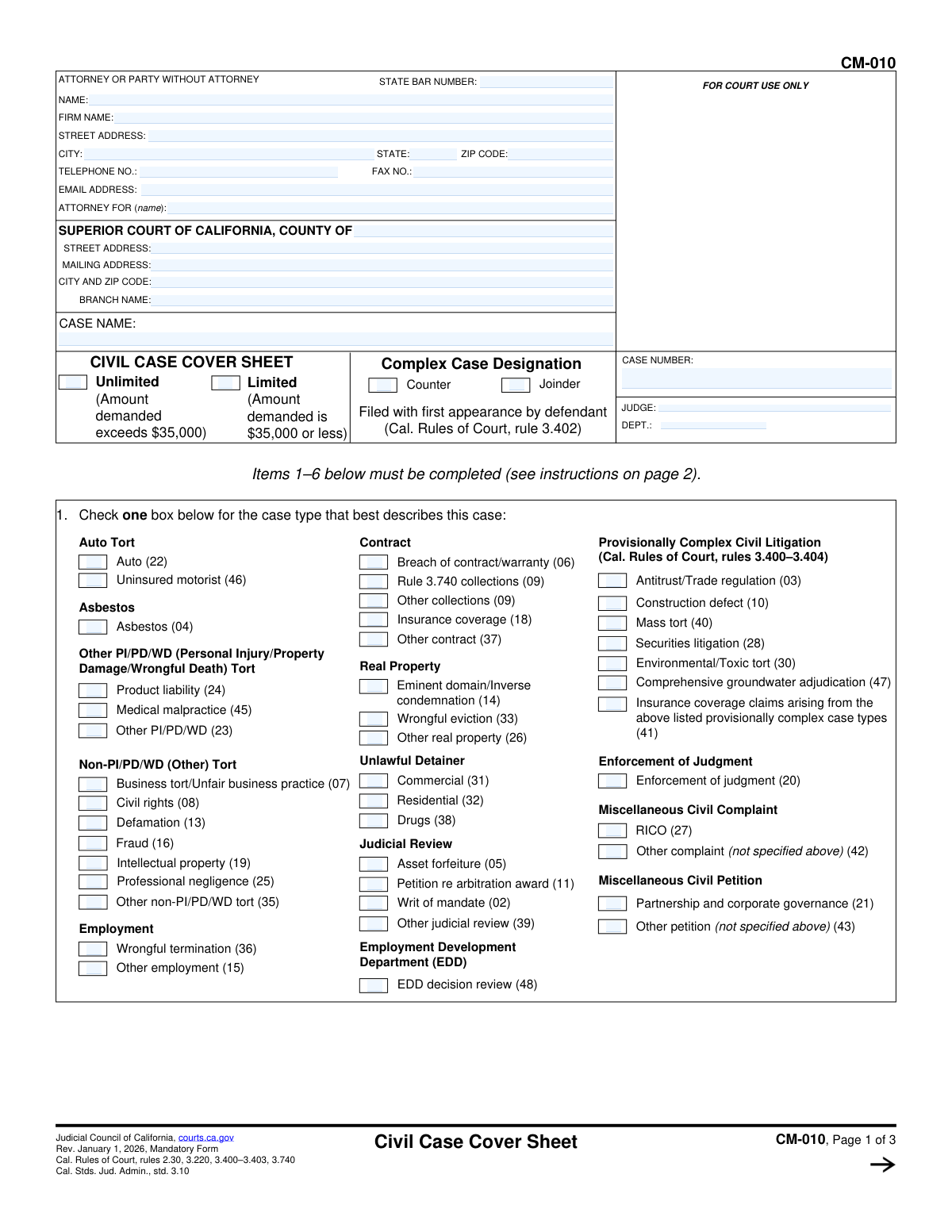
Validates that the filer has provided responses for each of Items 1 through 6, since the form explicitly states these items must be completed. This is critical because the cover sheet is mandatory with the first paper filed (with limited exceptions) and missing required items can trigger rejection or sanctions. If any of Items 1–6 are blank, the submission should be flagged as incomplete and prevented from final submission until corrected.
Checks that exactly one checkbox is selected under Item 1 (case type), because the instructions require selecting the single case type that best describes the case. Multiple selections undermine statistical reporting and can misroute the case for case management purposes. If zero or more than one case type is selected, the system should return an error requiring the filer to choose only one.
Ensures the filer selects either 'Unlimited' or 'Limited' and not both, since these are mutually exclusive jurisdictional designations tied to the amount demanded. This matters because it affects filing fees, court assignment, and procedural rules. If neither or both are selected, the submission should be blocked until a single valid choice is made.
Validates that the filer’s selection aligns with the stated thresholds on the form: Limited is $35,000 or less and Unlimited exceeds $35,000. This logical consistency check helps prevent jurisdictional misclassification that can cause delays, transfers, or fee issues. If the filer provides an amount elsewhere in the filing package (or in integrated systems) that conflicts with the selected tier, the system should flag the inconsistency and require confirmation/correction.
Ensures Item 2 has exactly one of 'Yes' or 'No' selected for whether the case is complex under rule 3.400. If 'No' is selected, none of the complexity factor checkboxes (a–f) should be checked; if 'Yes' is selected, at least one factor should typically be checked to support the designation. If the selection and factors conflict (e.g., 'No' with factors checked), the system should require correction before submission.
Checks that at least one remedy type is selected among monetary, nonmonetary (declaratory/injunctive), and punitive. This is important for statistical reporting and can affect downstream processing and case evaluation. If no remedy is selected, the system should flag the omission and require at least one checkbox.
And 10 more checks
- Validates punitive remedy selection is logically compatible with Rule 3.740 collections designation
- Validates Number of causes of action (Item 4) is present and a positive integer
- Validates Class action response (Item 5) is answered Yes/No
- Validates signature block completion: typed/printed name and signature presence
- Validates Date field format and plausibility
- Validates attorney/party identification completeness (State Bar Number vs. party-without-attorney)
- Validates contact information formats (telephone, fax, email) when provided
- Validates address fields completeness and structure for attorney/party and court location
- Validates court and case identification fields are not blank (County, Case Name, Branch information)
- Validates defendant first-appearance designations (Counter/Joinder) are not both selected
Let AI fill out your CM-010
No typing. Every field filled in seconds, checked, ready to sign.
How to Fill Out CM-010 Online for Free in 2026
What the AI walks you through.
- Enter attorney/party information (name, State Bar number if applicable, firm, address, phone, email) and identify who the attorney represents.
- Fill in the court information (county, branch, addresses) and the case caption (case name); add the case number/judge/department if already assigned.
- Select the jurisdiction designation (Limited vs. Unlimited) and indicate whether the filing is a complex case designation, counter-designation, or joinder (as applicable).
- Complete Item 1 by checking the single case type box that best describes the primary cause of action (choose the most specific category available).
- Complete Item 2 by marking whether the case is complex under rule 3.400 and, if yes, check the applicable complexity factors requiring exceptional judicial management.
- Complete Items 3–6: mark remedies sought (monetary/nonmonetary/punitive), state the number of causes of action, indicate whether it is a class action, and note related cases (and prepare a Notice of Related Case, form CM-015, if needed).
- Date and sign the form (type/print name and signature), then download/print for filing with the first paper; if designated complex, serve a copy on all other parties as required.
Common Mistakes in Completing CM-010
The ones the AI is built to catch.
Leaving attorney/party identification fields blank or inconsistent
Filing in the wrong county/branch or not completing court location fields
Not choosing (or mischoosing) Limited vs. Unlimited jurisdiction
Checking multiple case types in Item 1 or picking a category that doesn’t match the primary claim
Misclassifying a Rule 3.740 collections case
Incorrect complex case designation (Item 2) or missing factor checkboxes
Failing to complete Item 4 (number of causes of action) accurately
Remedies sought (Item 3) checked incorrectly or incompletely
Class action (Item 5) marked incorrectly
Ignoring related case requirements (Item 6) and not filing CM-015 when needed
Missing date, printed name, or signature on the cover sheet
Frequently Asked Questions About CM-010
Is it really free for 7 days?
Can I fill other forms too?
How do I cancel?
How does the AI fill out CM-010?
What happens to my information?
How complex is CM-010 to fill out?
What is the Civil Case Cover Sheet (form CM-010) used for?
Who must file form CM-010, and when do I file it?
Are there cases where I do NOT file a Civil Case Cover Sheet?
What parts of CM-010 are required to be completed?
How do I choose the correct case type in Item 1?
What is the difference between a limited and unlimited civil case on this cover sheet?
What is a Rule 3.740 collections case, and how do I know if my case qualifies?
What does it mean to designate a case as “complex” in Items 1 and 2?
If I designate the case as complex, do I have to serve the cover sheet on the other parties?
Can a defendant disagree with the plaintiff’s complex case designation?
How do I complete Item 3 (Remedies sought)?
What should I put in Item 4 (Number of causes of action)?
How do I answer Item 5 about class actions?
What are “related cases,” and what do I do if there are any?
What happens if I don’t file CM-010 with my first filing?
Get your CM-010 filled out by AI
$0 today. Cancel before Nov 1 and you pay nothing.
Other forms like this one
Judicial Council forms: Judicial Council of California Form FL-300, Request for Order, Judicial Council of California Form FL-150, Income and Expense Declaration, Judicial Council of California Form SC-104, Proof of Service (Small Claims), Judicial Council of California Form SC-105, Request for Court Order and Answer (Small Claims), Judicial Council of California Form DE-111, Petition for Probate (Probate—Decedents Estates), Judicial Council of California Form SC-104, Proof of Service (Small Claims), Judicial Council of California Form SC-108, Request to Correct or Cancel Judgment and Answer (Small Claims), Judicial Council of California Form SC-120, Defendant’s Claim and ORDER to Go to Small Claims Court (Small Claims), Civil Case Cover Sheet (Judicial Council of California Form CM-010), Judicial Council of California Form TR-205, Request for Trial by Written Declaration (Trial by Written Declaration—Traffic), Judicial Council of California Form DE-120, Notice of Hearing—Decedent's Estate or Trust, Inventory and Appraisal Attachment (Judicial Council of California Form DE-161, GC-041), CLETS-001, Confidential Information for Law Enforcement (Judicial Council of California), Judicial Council of California Form SER-001, Request for Sheriff to Serve Court Papers, Judicial Council of California Form UD-105, Answer—Unlawful Detainer, CLETS-001, Confidential Information for Law Enforcement (Judicial Council of California), Judicial Council of California Form ADOPT-210, Adoption Agreement, Judicial Council of California Form DE-120, Notice of Hearing—Decedent's Estate or Trust, Inventory and Appraisal (Judicial Council of California) (Form DE-160/GC-040), Judicial Council of California Form JUD-100, Judgment
California judicial forms: Judicial Council of California Form FL-300, Request for Order, Judicial Council of California Form FL-150, Income and Expense Declaration, Judicial Council of California Form SC-104, Proof of Service (Small Claims), Judicial Council of California Form SC-105, Request for Court Order and Answer (Small Claims), Judicial Council of California Form DE-111, Petition for Probate (Probate—Decedents Estates), Judicial Council of California Form SC-104, Proof of Service (Small Claims), Judicial Council of California Form SC-108, Request to Correct or Cancel Judgment and Answer (Small Claims), Judicial Council of California Form SC-120, Defendant’s Claim and ORDER to Go to Small Claims Court (Small Claims), Civil Case Cover Sheet (Judicial Council of California Form CM-010), Judicial Council of California Form TR-205, Request for Trial by Written Declaration (Trial by Written Declaration—Traffic), Judicial Council of California Form DE-120, Notice of Hearing—Decedent's Estate or Trust, Inventory and Appraisal Attachment (Judicial Council of California Form DE-161, GC-041), CLETS-001, Confidential Information for Law Enforcement (Judicial Council of California), Judicial Council of California Form SER-001, Request for Sheriff to Serve Court Papers, Judicial Council of California Form UD-105, Answer—Unlawful Detainer, CLETS-001, Confidential Information for Law Enforcement (Judicial Council of California), Judicial Council of California Form ADOPT-210, Adoption Agreement, Judicial Council of California Form DE-120, Notice of Hearing—Decedent's Estate or Trust, Inventory and Appraisal (Judicial Council of California) (Form DE-160/GC-040), Judicial Council of California Form JUD-100, Judgment
Let AI fill out your CM-010
Your trial starts once a card is added. You pay nothing before Nov 1.
Our AI already knows this form, all 86 fields of it. Skip the typing: tell it about yourself, or upload what you have, and it fills the whole form in seconds.
- AI fills every field on all 3 pages, checkboxes included
- No typing into boxes: answer a few questions, or upload a document you already have, an old copy of this form, a photo of a document
- The AI checks the answers; you review and change anything before you download
- Download the finished PDF, print it, or sign it online
- Encrypted, and never used to train AI
Cancel before Nov 1 and you pay nothing.
A card is needed to start the trial. Cancel in two clicks from your account.
Terms · Privacy