Yes! You can use AI to fill out CLETS-001, Confidential Information for Law Enforcement (Judicial Council of California)

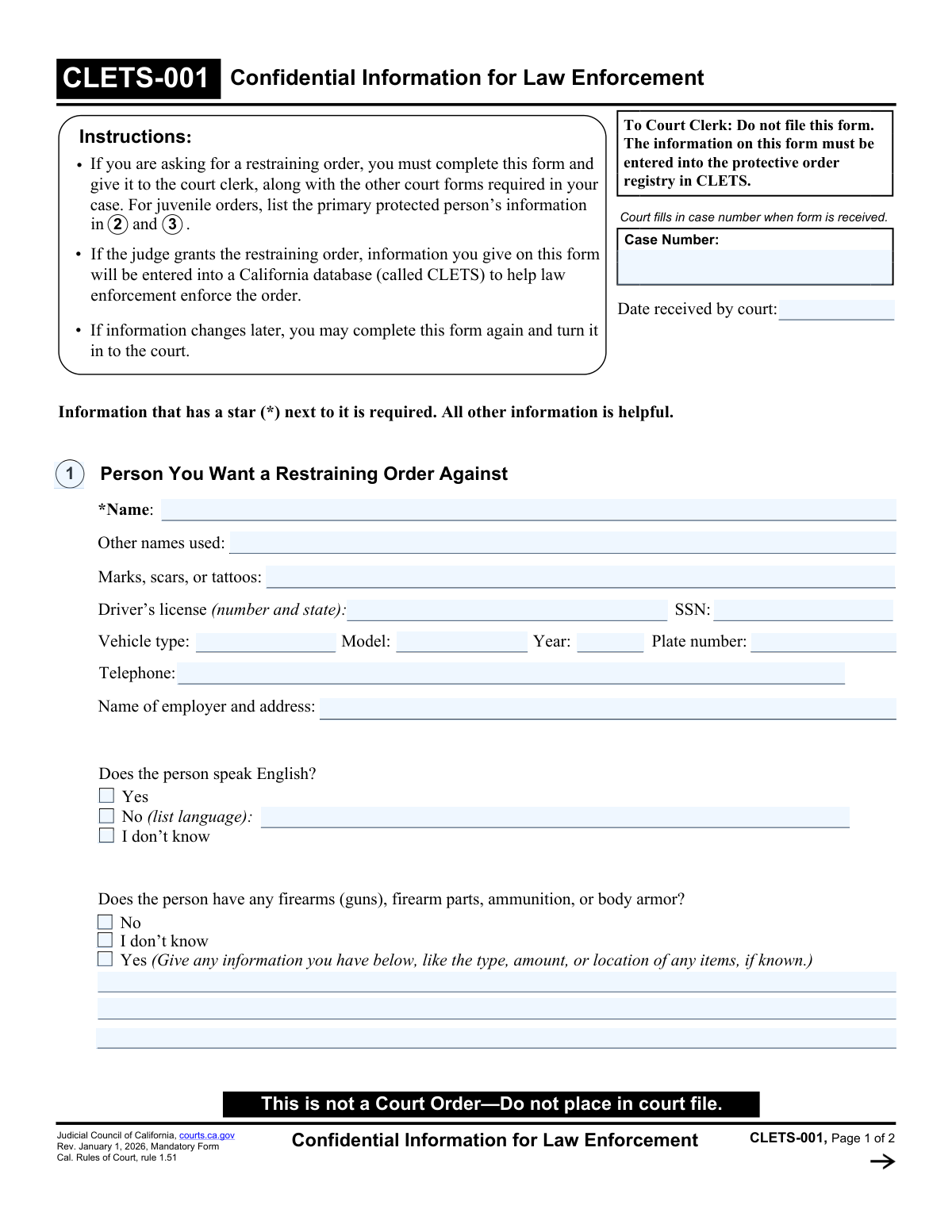
CLETS-001 (Confidential Information for Law Enforcement) is a mandatory California Judicial Council form submitted with restraining order paperwork so the court can enter key identifying details into the California Law Enforcement Telecommunications System (CLETS) protective order registry. This information helps law enforcement accurately identify the restrained person and protected people and enforce the order, including outside California when federal database entry is supported by details like date of birth. The form is confidential and is provided to the clerk for CLETS entry rather than being placed in the public court file. Today, this form can be filled out quickly and accurately using AI-powered services like Instafill.ai, which can also convert non-fillable PDF versions into interactive fillable forms.
Our AI automatically handles information lookup, data retrieval, formatting, and form filling.
It takes less than a minute to fill out CLETS-001 using our AI form filling.
Securely upload your data. Information is encrypted in transit and deleted immediately after the form is filled out.

Form specifications

Form name: CLETS-001, Confidential Information for Law Enforcement (Judicial Council of California)
Number of pages: 2
Language: English
Categories: California court forms, Judicial Council forms, restraining order forms, legal forms, California judicial forms, law enforcement forms
main-image

Instafill Demo: filling out a legal form in seconds

How to Fill Out CLETS-001 Online for Free in 2026

Are you looking to fill out a CLETS-001 form online quickly and accurately? Instafill.ai offers the #1 AI-powered PDF filling software of 2026, allowing you to complete your CLETS-001 form in just 37 seconds or less.
Follow these steps to fill out your CLETS-001 form online using Instafill.ai:
  1. 1 Go to Instafill.ai and upload the CLETS-001 PDF (or select CLETS-001 from the form library).
  2. 2 Let the AI detect and map the form fields, then confirm the case information (case number and date received, if applicable).
  3. 3 Enter the restrained person’s identifying details (name, aliases, physical identifiers, SSN/driver’s license if known, vehicle information, employer, phone, and language).
  4. 4 Complete the firearms/body armor section by selecting the appropriate checkbox (No / I don’t know / Yes) and adding any known details if “Yes.”
  5. 5 Fill in your information (your name, age, date of birth, gender marker, race if desired, phone, and language if you do not speak English).
  6. 6 Add other protected people (names, gender, race, dates of birth) and attach an additional “Item 4” sheet through the platform if more space is needed.
  7. 7 Review for required starred (*) items, run Instafill.ai validation for missing/format errors, then download/print and submit to the court clerk as instructed (do not file in the public court file).

Our AI-powered system ensures each field is filled out correctly, reducing errors and saving you time.

Why Choose Instafill.ai for Your Fillable CLETS-001 Form?

Speed

Complete your CLETS-001 in as little as 37 seconds.

Up-to-Date

Always use the latest 2026 CLETS-001 form version.

Cost-effective

No need to hire expensive lawyers.

Accuracy

Our AI performs 10 compliance checks to ensure your form is error-free.

Security

Your personal information is protected with bank-level encryption.

Frequently Asked Questions About Form CLETS-001

CLETS-001 provides identifying information to law enforcement so a granted restraining order can be entered into the California Law Enforcement Telecommunications System (CLETS) and enforced accurately.

If you are asking for a restraining order in California, you must complete CLETS-001 and submit it with your other required restraining order forms. For juvenile orders, list the primary protected person’s information in items 2 and 3.

No. The form instructs the clerk: “Do not file this form.” The information is entered into the protective order registry in CLETS instead of being placed in the public court file.

Fields marked with a star (*) are required. This includes the restrained person’s name, your name, your age, and the name and gender for each additional protected person you list.

Provide whatever you know and leave unknown items blank. The form notes that non-starred fields are helpful but not required, and partial details (like a vehicle type or a nickname) can still help law enforcement.

List any aliases, nicknames, maiden names, or other names the person is known by, and describe distinctive identifiers (for example, a specific tattoo location or a noticeable scar). These details help officers confirm identity during enforcement.

Check “I don’t know” under the English-language question. If you know they do not speak English, check “No” and write the language (for example, Spanish or Mandarin).

If you are unsure, check “I don’t know.” If you believe the person has firearms, ammunition, firearm parts, or body armor, check “Yes” and provide any details you have (type, amount, serial numbers if known, and likely location).

Your date of birth is not marked as required, but providing it can help the order be entered into the federal law enforcement database, which may make enforcement outside California easier.

Check the box indicating you have more people to list, then attach a separate sheet labeled “Item 4” at the top. Include each person’s name, gender, race (if known), and date of birth.

Not always. The form says to skip certain sections if you are asking for a gun violence restraining order (GV-100) or a retail crime restraining order (RT-100).

Submit it to the court clerk along with the other forms required for your restraining order case. The court will record the date received and enter the information into CLETS if the judge grants the order.

You can complete CLETS-001 again and turn in the updated form to the court. This helps keep the CLETS entry current for enforcement.

Yes. AI form-filling services like Instafill.ai can help auto-fill form fields from the information you provide, reducing manual typing and helping you complete the form faster.

You can upload the CLETS-001 PDF to Instafill.ai, provide your details (or source documents), and have the fields auto-filled for review before downloading. If the PDF is flat/non-fillable, Instafill.ai can convert it into an interactive fillable form so you can complete it electronically.

Compliance CLETS-001
Validation Checks by Instafill.ai

1
Required fields present: restrained person name, protected person name, and protected person gender
Validates that all starred (*) fields are completed, including the person you want a restraining order against (*Name) and at least one protected person in Item 4 (*Name and *Gender). These are the minimum identifiers needed for the court and law enforcement to associate the order with the correct individuals. If any required field is missing, the submission should be rejected or flagged as incomplete and routed for correction before CLETS entry.
2
Case number format and presence (when provided by court)
Checks that the Case Number field is either blank (if not yet assigned) or matches the court’s expected case-number pattern (e.g., allowed characters, length, and separators) and is consistent across all occurrences on the form. This prevents mis-indexing the record in court systems and CLETS. If the case number is present but malformed or inconsistent, the system should block submission or require confirmation/correction.
3
Date received by court is a valid date and not in the future
Validates that 'Date received by court' is a real calendar date in an accepted format (e.g., MM/DD/YYYY) and is not later than today. This date is used for intake tracking and auditability and should reflect when the clerk received the form. If invalid or future-dated, the record should be flagged for clerk review and prevented from being treated as officially received.
4
Date of birth validation for all persons (your DOB and protected persons’ DOBs)
Ensures each Date of Birth field is a valid date and falls within a plausible range (e.g., not in the future, not older than a reasonable maximum such as 120 years). Accurate DOBs improve matching in state and federal law enforcement databases and reduce mistaken identity. If a DOB is invalid, the system should require correction or allow blank only where the form indicates it is optional.
5
Age and date-of-birth consistency (Your Information)
If both Age and Date of Birth are provided for the requester, verifies that the age approximately matches the DOB (allowing for whether the birthday has occurred this year). This catches common data-entry errors (e.g., transposed digits in DOB or incorrect age). If inconsistent beyond an allowed tolerance, the submission should be flagged and the user prompted to correct one of the fields.
6
Telephone number format validation (all telephone fields)
Validates that telephone numbers (restrained person telephone, your telephone) follow acceptable formats (e.g., 10-digit US numbers with optional country code, punctuation, and optional extension). Reliable phone formatting supports contact and reduces downstream system rejections. If the phone number is present but invalid, the system should prompt for correction or strip/normalize formatting where permitted.
7
SSN format and disallowed values
Checks that SSN, if provided, is exactly 9 digits (optionally formatted as XXX-XX-XXXX) and is not an obviously invalid value (e.g., all zeros, 123456789). SSN is a sensitive but high-value identifier for accurate law enforcement matching. If the SSN fails validation, the system should reject the value, avoid storing it, and request re-entry or leave it blank if unknown.
8
Driver’s license number and issuing state validation
Validates that the driver’s license field includes both a license number and a valid issuing state (two-letter US state/territory abbreviation), and that the number uses allowed characters (typically alphanumeric, no illegal symbols). This improves identity resolution and reduces CLETS entry errors. If the state is missing/invalid or the number contains invalid characters, the system should require correction before acceptance.
9
English-language question is mutually exclusive and conditionally requires language
Ensures exactly one option is selected for 'Does the person speak English?' (Yes / No / I don’t know). If 'No' is selected, the 'list language' field must be non-empty and should contain a plausible language name (not a phone number or random characters). If multiple options are selected or language is missing when required, the submission should be blocked until corrected.
10
Firearms question is mutually exclusive and conditionally requires details
Ensures exactly one option is selected for firearms/body armor (No / I don’t know / Yes). If 'Yes' is selected, the details text area must contain some descriptive information (e.g., type, quantity, location) and must not be left blank. If the selection is inconsistent or details are missing when required, the system should flag the record for completion because this information is critical for officer safety and enforcement.
11
Vehicle year is numeric and within a plausible range
Validates that Vehicle Year, if provided, is a 4-digit number within a reasonable range (e.g., 1900 through next calendar year). This prevents invalid vehicle records that can’t be used for identification. If out of range or non-numeric, the system should reject the value and request correction.
12
License plate number format and character set
Checks that the license plate number, if provided, contains only allowed characters (letters, numbers, and limited separators like spaces or hyphens) and is within a reasonable length. This reduces failed lookups and data-entry errors in law enforcement systems. If the plate contains invalid characters or is implausibly long/short, the system should prompt for correction.
13
Employer name and address completeness when provided
If an employer is entered, validates that it includes at least an employer name plus a minimally complete address (street, city, state, ZIP) or clearly indicates unknown components. Partial addresses reduce usefulness for service/enforcement and can cause downstream normalization failures. If the field is present but missing key address components, the system should flag it and request completion or allow the user to mark unknown.
14
Protected persons list integrity and attachment indicator
Validates that each protected person entry is complete as required (Name and Gender) and that there are no duplicate protected-person rows with identical name/DOB unless explicitly intended. If the 'more people to list' checkbox is selected, the submission must include an attached continuation labeled 'Item 4' (or an additional-people text block populated) with at least one additional person. If the checkbox is selected without additional data, the system should flag the submission as incomplete.
15
Gender field values constrained to allowed set for protected persons and requester
Ensures gender selections/entries conform to the form’s allowed markers (M, F, X/nonbinary) or an approved short textual value if the system permits free text. Standardized gender values improve data quality and interoperability with CLETS and related systems. If an invalid value is provided or multiple gender options are selected for the same person, the system should require correction.

Common Mistakes in Completing CLETS-001

Leaving required starred fields blank (especially names and protected-person details)

People often focus on the main restraining-order paperwork and forget that CLETS-001 has required (*) fields that must be complete for law enforcement entry (for example, the restrained person’s name and protected people’s name/gender). Missing required fields can delay entry into CLETS, which can make the order harder to enforce in real time. Before submitting, scan for every starred item and ensure each has a clear value; AI-powered tools like Instafill.ai can flag missing required fields before you print/submit.

Putting this confidential form into the court file or attaching it to publicly filed documents

This form repeatedly states “Do not file this form” and “This is not a Court Order,” but filers sometimes staple it to their petition or include it in the packet to be filed. That can risk improper handling of sensitive identifiers (DOB, SSN, vehicle info) and may require the clerk to separate and re-process documents, causing delays. Submit it exactly as instructed (to the clerk for CLETS entry, not for filing) and keep it separate from publicly filed forms; if you’re using a flat PDF, Instafill.ai can convert it into a fillable version to reduce handling mistakes.

Filling in court-only fields (case number/date received) or using the wrong case number

Applicants sometimes guess the case number, reuse an old case number, or fill in “Date received by court,” even though the form indicates the court fills these in when received. Incorrect case numbers can cause the CLETS entry to be linked to the wrong matter or rejected for mismatch, slowing enforcement. Leave court-only fields blank unless the court specifically instructs otherwise, and copy the case number exactly from current court documents; Instafill.ai can help by pulling the case number consistently across your packet.

Using nicknames or incomplete legal names for the restrained person or protected people

People often enter only a first name, a nickname, or omit middle/last names, especially when they don’t know the full legal name. Incomplete names reduce match accuracy in CLETS and can make it harder for officers to confirm the correct person during enforcement. Enter the full legal name (first, middle, last) whenever possible and list aliases in “Other names used”; Instafill.ai can prompt for missing name parts and keep formatting consistent.

Misusing the “Other names used” field (or leaving out key aliases/maiden names)

Filers sometimes put the protected person’s aliases here, or they skip it even when the restrained person uses multiple names, maiden names, or common misspellings. Missing aliases can prevent law enforcement from quickly identifying the restrained person, especially if IDs or records use a different name. Use “Other names used” only for the person you want restrained and include all known variations; Instafill.ai can remind you to add aliases when you indicate the person is known by other names.

Incorrect driver’s license entry (missing state, wrong order, or mixing with other ID numbers)

A common error is entering only the license number without the issuing state, putting the state in the wrong place, or accidentally entering a different ID (passport, employee ID). This can reduce the usefulness of the record for identification and may require follow-up by the clerk or law enforcement. Enter the driver’s license number and the issuing state abbreviation exactly as requested (number + state); Instafill.ai can validate expected patterns and ensure the state is included.

SSN formatting errors or entering partial/guessed SSNs

People sometimes enter fewer than 9 digits, add extra characters, transpose digits, or guess an SSN because they think it is required. Incorrect SSNs can misidentify someone in databases and create serious enforcement and privacy issues, while guessed data can undermine credibility. Only enter the SSN if you know it from reliable documents and enter all digits exactly; Instafill.ai can format SSNs correctly and warn you about incomplete entries.

Vehicle information entered inconsistently (plate vs. VIN, wrong year/model/type)

Applicants often put a VIN in the license plate field, enter a color instead of model, or guess the year/type (e.g., writing “blue car” as the model). Inaccurate vehicle data makes it harder for officers to identify the correct vehicle during enforcement. Use “Plate number” for the plate exactly as shown, “Year” for the model year, “Model” for the model name (e.g., Camry), and “Type” for body style (e.g., sedan/SUV); Instafill.ai can guide field-by-field entry and reduce mix-ups.

Language section mistakes (checking ‘No’ but not listing the language, or checking multiple boxes)

People sometimes check “No (list language)” but leave the language blank, or they check both “Yes” and “No/I don’t know.” This can lead to incorrect assumptions about communication needs and may delay service or enforcement interactions. Select only one option and, if “No,” clearly write the language (e.g., Spanish, Mandarin); Instafill.ai can enforce single-choice logic and require the language when ‘No’ is selected.

Firearms question answered without details (or details provided without checking ‘Yes’)

Some filers check “Yes” but leave the details area empty, or they write firearm information in the details box while leaving “I don’t know/No” checked. Missing or inconsistent firearm information can reduce officer safety planning and may limit the effectiveness of firearm-related enforcement provisions. If you check “Yes,” add any known type, quantity, make/model, serial numbers, and likely location; Instafill.ai can prompt for details when ‘Yes’ is selected and keep the response consistent.

Not listing additional protected people correctly (forgetting the ‘Item 4’ attachment rules)

When there are more than the provided lines, people often squeeze extra names into margins, forget to check the box indicating more people, or attach a page without labeling it “Item 4.” This can cause protected persons to be omitted from CLETS entry, reducing who is covered in enforcement. Check the “more people” box and attach a separate sheet labeled “Item 4” with each person’s name, gender, race, and DOB; Instafill.ai can generate properly labeled continuation pages for flat PDFs.
Saved over 80 hours a year

“I was never sure if my IRS forms like W-9 were filled correctly. Now, I can complete the forms accurately without any external help.”

Kevin Martin Green

Your data stays secure with advanced protection from Instafill and our subprocessors

Robust compliance program

Transparent business model

You’re not the product. You always know where your data is and what it is processed for.

ISO 27001, HIPAA, and GDPR

Our subprocesses adhere to multiple compliance standards, including but not limited to ISO 27001, HIPAA, and GDPR.

Security & privacy by design

We consider security and privacy from the initial design phase of any new service or functionality. It’s not an afterthought, it’s built-in, including support for two-factor authentication (2FA) to further protect your account.

Fill out CLETS-001 with Instafill.ai

Worried about filling PDFs wrong? Instafill securely fills clets-001-confidential-information-for-law-enforcement-judicial-council-of-california-1 forms, ensuring each field is accurate.