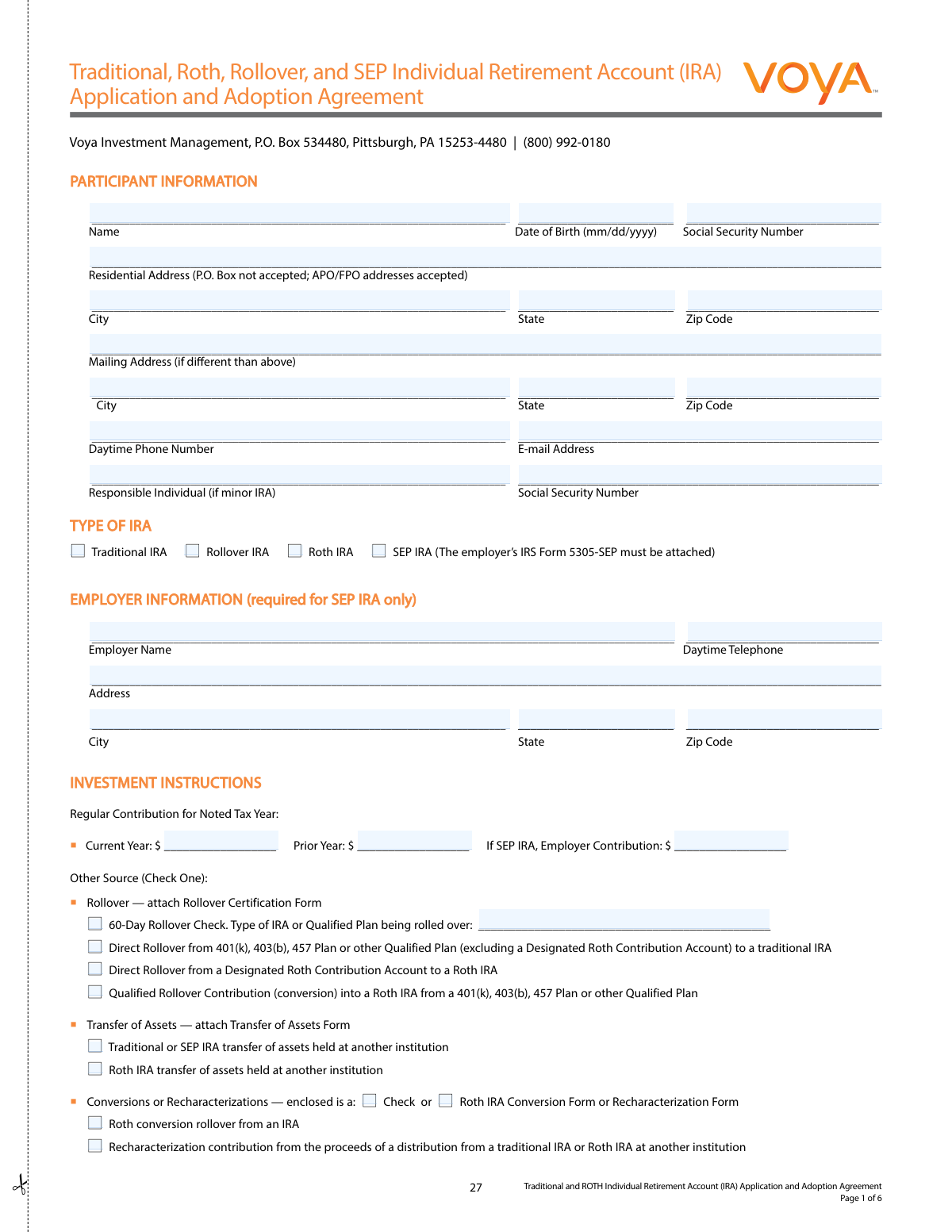
Yes! You can use AI to fill out Voya Investment Management Traditional, Roth, Rollover, and SEP Individual Retirement Account (IRA) Application and Adoption Agreement
This is a comprehensive package for opening an Individual Retirement Account (IRA) with Voya Investment Management, with BNY Mellon Investment Servicing Trust Company acting as the custodian. The document includes the application form, detailed disclosure statements for Traditional and Roth IRAs, custodial agreements, and related forms for transfers or rollovers. It allows individuals to specify the type of IRA, make investment selections, and designate beneficiaries for their retirement savings. Today, this form can be filled out quickly and accurately using AI-powered services like Instafill.ai, which can also convert non-fillable PDF versions into interactive fillable forms.
Our AI automatically handles information lookup, data retrieval, formatting, and form filling.
It takes less than a minute to fill out Voya IRA Application using our AI form filling.
Securely upload your data. Information is encrypted in transit and deleted immediately after the form is filled out.
Form specifications
| Form name: | Voya Investment Management Traditional, Roth, Rollover, and SEP Individual Retirement Account (IRA) Application and Adoption Agreement |
| Number of pages: | 1 |
| Language: | English |
| Categories: | adoption forms, retirement forms, investment forms, investment account forms |
Instafill Demo: How to fill out PDF forms in seconds with AI
How to Fill Out Voya IRA Application Online for Free in 2026
Are you looking to fill out a VOYA IRA APPLICATION form online quickly and accurately? Instafill.ai offers the #1 AI-powered PDF filling software of 2026, allowing you to complete your VOYA IRA APPLICATION form in just 37 seconds or less.
Follow these steps to fill out your VOYA IRA APPLICATION form online using Instafill.ai:
- 1 Navigate to Instafill.ai and upload or select the Voya IRA Application and Adoption Agreement.
- 2 Use the AI assistant to accurately fill in the 'Participant Information' section with your full name, date of birth, Social Security number, and residential address.
- 3 Select the type of IRA you wish to open, such as Traditional, Roth, Rollover, or SEP IRA.
- 4 Complete the 'Investment Instructions' section by specifying your contribution amount, the tax year, and the source of the funds (e.g., regular contribution, rollover, or transfer).
- 5 Designate your primary and contingent beneficiaries in the 'Beneficiary Designation' section, providing their names, birth dates, and the percentage of assets they should receive.
- 6 Review all the information pre-filled by the AI for accuracy, then electronically sign and date the 'Terms and Conditions' section to finalize the agreement.
- 7 Download the completed, signed document and mail it to the Voya Investment Management address provided in the instructions.
Our AI-powered system ensures each field is filled out correctly, reducing errors and saving you time.
Why Choose Instafill.ai for Your Fillable Voya IRA Application Form?
Speed
Complete your Voya IRA Application in as little as 37 seconds.
Up-to-Date
Always use the latest 2026 Voya IRA Application form version.
Cost-effective
No need to hire expensive lawyers.
Accuracy
Our AI performs 10 compliance checks to ensure your form is error-free.
Security
Your personal information is protected with bank-level encryption.
Frequently Asked Questions About Form Voya IRA Application
This package is used to establish a new Individual Retirement Account (IRA) with Voya Investment Management, with BNY Mellon Investment Servicing Trust Company acting as the custodian. It allows you to open a Traditional IRA, Roth IRA, SEP IRA, or Rollover IRA.
For the 2026 tax year, the maximum contribution is the lesser of $7,500 or 100% of your earned income. If you are age 50 or older, you can contribute an additional $1,100 as a catch-up contribution, for a total of $8,600.
The deadline to make contributions for the 2025 tax year is Wednesday, April 15, 2026. When making a contribution between January 1 and April 15, you must specify whether it is for the current or prior year.
You must provide your full legal name, residential address, date of birth, and Social Security Number. To comply with federal law, you may also be asked for a copy of your driver's license or other identifying documents to verify your identity.
Yes, you are only allowed one indirect (60-day) rollover from one IRA to another across all your IRAs in any 12-month period. However, you can make an unlimited number of direct trustee-to-trustee transfers where funds are sent directly between financial institutions.
You must complete the Beneficiary Designation section in the application, providing the name, date of birth, Social Security Number, and relationship for each beneficiary. You must also specify the percentage share for each, ensuring the total for primary beneficiaries equals 100%.
Yes, there is an annual custodial maintenance fee of $12.00 per year for each IRA account. The Custodian may also charge service fees for distributions from your IRA.
You have the right to revoke your IRA within seven days of establishing it by notifying the Custodian in writing. If you do so, you are entitled to a full return of your initial contribution without any adjustments for fees or market fluctuations.
Mail your completed application via First Class Mail to Voya Investment Management, P.O. Box 534480, Pittsburgh, PA 15253-4480. An address for overnight mail is also provided in the application instructions.
Excess contributions are subject to a 6% excise tax for each year they remain in the account. To avoid the tax, you must withdraw the excess contribution and any earnings on it by your tax return due date, including extensions.
Yes, if you are establishing a SEP IRA, you must attach an executed copy of your employer's IRS Form 5305-SEP or SEP prototype adoption agreement to your application. You also need to provide your employer's information in the designated section of the form.
Yes, services like Instafill.ai use AI to accurately auto-fill form fields, which can save you time and help prevent errors. This is especially useful for lengthy forms with repetitive information.
Simply upload the Voya IRA application PDF to the Instafill.ai platform. The AI will analyze the document, identify the fields, and automatically fill in your information, which you can then review, edit if needed, and download.
If you have a non-fillable or "flat" PDF, you can upload it to a service like Instafill.ai. Their technology can convert it into an interactive, fillable form that you can complete easily on your computer.
Compliance Voya IRA Application
Validation Checks by Instafill.ai
1
Validates Social Security Number Format and Presence
This check ensures the Social Security Number field is not empty and follows the standard 9-digit format (XXXXXXXXX or XXX-XX-XXXX). The SSN is mandatory for tax reporting to the IRS (Forms 1099-R and 5498) and for identity verification as required by the USA PATRIOT Act. If the SSN is missing or invalid, the account application will be rejected.
2
Ensures Date of Birth is a Valid and Reasonable Date
This validation confirms that the Date of Birth is a complete and valid date in MM/DD/YYYY format. It is critical for determining eligibility for age-related provisions, such as catch-up contributions (age 50+), qualified distributions, and Required Minimum Distributions (RMDs). An invalid or missing date of birth will prevent the system from applying the correct IRA rules and will halt the application process.
3
Verifies Residential Address is a Physical Location
This check validates that the Residential Address is a complete physical address and not a P.O. Box, as explicitly stated on the form. Federal law requires financial institutions to obtain a physical address to help verify a customer's identity and combat money laundering. An application with a P.O. Box as the residential address will be considered incomplete and rejected.
4
Checks for Mandatory Employer Information for SEP IRA
This is a conditional validation that triggers if 'SEP IRA' is selected as the account type. It ensures that the 'Employer Information' section, including the employer's name and address, is fully completed. This information is essential for associating the account with the correct Simplified Employee Pension plan, and failure to provide it will result in the rejection of the SEP IRA application.
5
Validates Contribution Amount Against IRS Annual Limits
This check compares the entered contribution amount against the allowable IRS limits for the specified tax year, including the additional catch-up amount for individuals age 50 and over (determined by the Date of Birth). This is crucial for preventing excess contributions, which are subject to a 6% penalty tax from the IRS. If the amount exceeds the limit, the form submission should be flagged for correction.
6
Ensures Investment Allocation Percentages Sum to 100%
This validation ensures that the percentages allocated to various funds in the 'INVEST AS FOLLOWS' section sum to exactly 100%. This is critical for ensuring that the entire contribution is invested according to the participant's instructions, leaving no funds unallocated or over-allocated. A mismatch will cause a processing error and require the applicant to correct the allocation.
7
Verifies Beneficiary Share Percentages Sum to 100%
This check confirms that the 'Share %' for all Primary beneficiaries adds up to 100%, and similarly, the 'Share %' for all Contingent beneficiaries adds up to 100%. This rule prevents ambiguity and potential legal disputes during the distribution of assets upon the account owner's death. If the percentages do not sum correctly, the beneficiary designation is considered invalid.
8
Confirms Mandatory Participant Signature and Date
This check ensures that the application has been signed and dated by the participant (or responsible individual for a minor). The signature is a legal requirement that makes the agreement binding, and the date establishes when the agreement was made. An unsigned or undated application is legally invalid and cannot be processed.
9
Links Automatic Investment Plan to Bank Account Information
This validation ensures that if the 'AUTOMATIC INVESTMENT' section is filled out, the 'BANK ACCOUNT INFORMATION' section is also fully and correctly completed. The system cannot set up recurring electronic fund transfers (ACH) without the bank name, account number, and a valid ABA routing number. If bank information is missing, the automatic investment plan cannot be established.
10
Validates ABA Routing Number is a 9-Digit Number
This check verifies that the ABA/Routing Number provided in the 'BANK ACCOUNT INFORMATION' section is exactly 9 digits long. This number is critical for correctly routing electronic fund transfers to the participant's bank. An incorrect routing number will cause the ACH transaction to fail, leading to delays in investment.
11
Verifies Attachment of Rollover or Transfer Form
This check is triggered if the 'Rollover' or 'Transfer of Assets' box is checked under 'INVESTMENT INSTRUCTIONS'. It confirms that the corresponding 'Certification of Rollover Assets' or 'Transfer of Assets/Direct Rollover Form' is included with the application. This ensures the custodian has the legal authorization and necessary details to initiate the movement of assets from another institution.
12
Enforces One-per-Year 60-Day Rollover Rule
When a '60-day Rollover' is certified on the Rollover Certification Form, this check cross-references the participant's history across all their IRAs to ensure another such rollover has not occurred in the last 365 days. This enforces a strict IRS rule mentioned on the form to prevent tax penalties and disqualification of the rollover. A violation would require rejecting the rollover contribution.
13
Requires Responsible Individual for Minor IRA
This validation checks if the applicant's date of birth indicates they are a minor. If so, it ensures the 'Responsible Individual' name and Social Security Number fields are completed. A minor cannot legally enter into a custodial agreement, so a designated adult custodian is required for the account to be valid.
14
Ensures Unambiguous Instructions on Transfer Form
On the 'Transfer of Assets/Direct Rollover Form', this check ensures that for each investment being moved, the instructions are clear and not contradictory. The participant must select either 'Liquidate Entire Account' or provide a 'Partial Dollar Amount' or '# of Shares,' but not a combination. Ambiguous instructions will be rejected by the surrendering custodian, causing the transfer to fail.
Common Mistakes in Completing Voya IRA Application
Applicants often confuse Traditional, Roth, SEP, and Rollover IRAs, or mix up contribution types like 'Regular Contribution,' 'Rollover,' and 'Conversion.' For example, they might select 'Roth IRA' without checking the income eligibility limits detailed in the disclosure, or mark a direct transfer from another IRA as a 'Rollover.' This can lead to excess contributions, tax penalties, or rejected applications. To avoid this, carefully review the eligibility and definition sections for each IRA and contribution type in the disclosure statement before making a selection.
The forms distinguish between a 60-day rollover (where you receive a check) and a trustee-to-trustee transfer (where funds move directly between institutions). A common error is to select '60-Day Rollover' on the Certification form when a direct transfer is being initiated. Furthermore, applicants often forget the strict one-rollover-per-year rule for all their IRAs combined, which can make a second rollover in a 12-month period a taxable distribution. To prevent this, always clarify the transaction type with both financial institutions and opt for a direct trustee-to-trustee transfer whenever possible, as they are unlimited.
The beneficiary section is frequently filled out incorrectly. Common mistakes include not providing a Social Security Number or date of birth for each beneficiary, and failing to ensure the share percentages for all primary beneficiaries (and separately, all contingent beneficiaries) add up to exactly 100%. These errors can cause significant delays and legal complications for heirs. Double-check that all required fields are complete and that the percentage allocations are correct. Intelligent form-filling tools like Instafill.ai can help prevent this by automatically validating that percentages sum to 100% and flagging missing information.
The forms state that individuals of RMD age are responsible for taking their required minimum distribution (RMD) before initiating a transfer or rollover from their existing IRA. People often overlook this, attempting to roll over the entire account balance, including the RMD amount. Since RMDs cannot be rolled over, this causes the transfer to be rejected or processed incorrectly, potentially leading to a missed RMD and a significant tax penalty. Always confirm with your current custodian that your RMD for the year has been satisfied before submitting a transfer request.
When transferring assets, the current custodian often requires a Medallion Signature Guarantee on the transfer form to verify the account owner's identity. Applicants frequently mistake this for a standard notary public stamp, which is not an acceptable substitute. Submitting the form without the correct guarantee will result in an automatic rejection by the outgoing firm, delaying the asset transfer. Before submitting the Transfer of Assets form, confirm with your current custodian if a Medallion Signature Guarantee is needed and obtain one from a qualified financial institution.
The form allows contributions for the 'Prior Year' if made between January 1 and the April 15 tax deadline. A common error is to make a contribution after April 15 and attempt to designate it for the prior tax year, which is not allowed. This can result in an unintended contribution for the current year, potentially causing an excess contribution. Advanced form-filling tools like Instafill.ai can prevent this error by using date-based logic to disable the 'Prior Year' option after the tax deadline has passed.
Federal law requires financial institutions to collect a physical residential address, and the application explicitly states 'P.O. Box not accepted' for this field. Submitting a P.O. Box will lead to the application being rejected or delayed until a valid physical street address is provided. Always enter your full physical address in the 'Residential Address' field and use the separate 'Mailing Address' field if you wish to receive mail at a P.O. Box. AI-powered form fillers like Instafill.ai can automatically detect and flag the use of a P.O. Box in a required physical address field.
In the 'Invest As Follows' section, applicants must specify the exact dollar amount or percentage for each fund, and the total must equal 100%. People often make calculation errors or leave the section blank, which may cause funds to be placed in a default money market account. Carefully list each fund and allocation, ensuring the percentages sum to 100%. If the form is a non-fillable PDF, a tool like Instafill.ai can convert it to a fillable version and perform the calculations for you to ensure the total is correct.
Several transaction types require additional forms. For example, establishing a SEP IRA requires attaching the employer's Form 5305-SEP, and a transfer requires the Transfer of Assets form. Applicants often submit the main application without these crucial attachments. This results in an incomplete application that cannot be processed, halting the account opening or transfer process. Before mailing, create a checklist to ensure all necessary supporting documents are included with your application.
The form's terms and conditions allude to spousal rights, especially in community property states. A frequent oversight is for a married individual to name a non-spouse primary beneficiary (e.g., a child) without obtaining the required spousal consent. This can render the beneficiary designation invalid upon the account holder's death, leading to legal disputes. If you are married and naming someone other than your spouse as the sole primary beneficiary, it is crucial to consult a legal professional to understand and comply with your state's spousal consent laws.
Saved over 80 hours a year
“I was never sure if my IRS forms like W-9 were filled correctly. Now, I can complete the forms accurately without any external help.”
Kevin Martin Green
Your data stays secure with advanced protection from Instafill and our subprocessors

Robust compliance program
Transparent business model
You’re not the product. You always know where your data is and what it is processed for.
ISO 27001, HIPAA, and GDPR
Our subprocesses adhere to multiple compliance standards, including but not limited to ISO 27001, HIPAA, and GDPR.
Security & privacy by design
We consider security and privacy from the initial design phase of any new service or functionality. It’s not an afterthought, it’s built-in, including support for two-factor authentication (2FA) to further protect your account.
Fill out Voya IRA Application with Instafill.ai
Worried about filling PDFs wrong? Instafill securely fills voya-investment-management-traditional-roth-rollover-and-sep-individual-retirement-account-ira-application-and-adoption forms, ensuring each field is accurate.