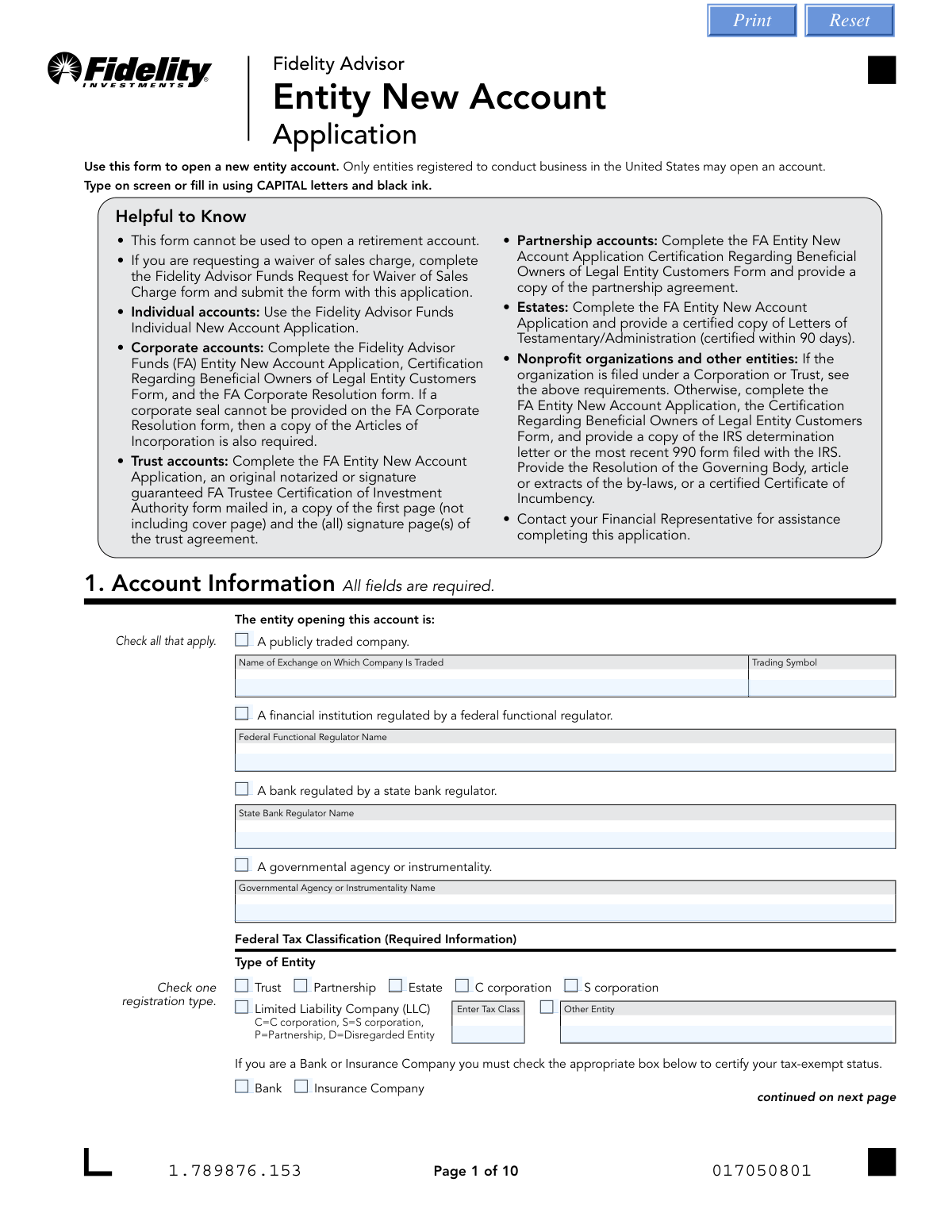
Yes! You can use AI to fill out Fidelity Advisor Entity New Account Application
The Fidelity Advisor Entity New Account Application is a comprehensive form required for legal entities registered in the United States to open a new investment account with Fidelity Advisor. It gathers essential information about the entity, its tax status, authorized signers, and initial investment instructions. Completing this application accurately is crucial for establishing the account correctly and ensuring compliance with federal regulations. Today, this form can be filled out quickly and accurately using AI-powered services like Instafill.ai, which can also convert non-fillable PDF versions into interactive fillable forms.
Our AI automatically handles information lookup, data retrieval, formatting, and form filling.
It takes less than a minute to fill out Fidelity Entity New Account Application using our AI form filling.
Securely upload your data. Information is encrypted in transit and deleted immediately after the form is filled out.
Form specifications
| Form name: | Fidelity Advisor Entity New Account Application |
| Number of pages: | 1 |
| Language: | English |
| Categories: | Fidelity forms |
Instafill Demo: How to fill out PDF forms in seconds with AI
How to Fill Out Fidelity Entity New Account Application Online for Free in 2026
Are you looking to fill out a FIDELITY ENTITY NEW ACCOUNT APPLICATION form online quickly and accurately? Instafill.ai offers the #1 AI-powered PDF filling software of 2026, allowing you to complete your FIDELITY ENTITY NEW ACCOUNT APPLICATION form in just 37 seconds or less.
Follow these steps to fill out your FIDELITY ENTITY NEW ACCOUNT APPLICATION form online using Instafill.ai:
- 1 Navigate to Instafill.ai and upload or select the Fidelity Advisor Entity New Account Application.
- 2 Use the AI assistant to provide the entity's account information, including its legal name, Tax Identification Number (TIN), and federal tax classification.
- 3 Enter the personal details for all trustees or authorized signers, such as names, SSNs, dates of birth, and contact information.
- 4 Specify your investment choices by indicating the fund numbers and the dollar amount or percentage to be allocated to each.
- 5 Select your preferences for dividend and capital gains distributions, and choose a cost basis method for tax reporting.
- 6 Provide bank account details to set up electronic fund transfers via Fidelity Advisor Money Line (ACH) or Bank Wire.
- 7 Carefully review all the information populated by the AI, e-sign the application in the designated sections, and submit it to Fidelity as instructed.
Our AI-powered system ensures each field is filled out correctly, reducing errors and saving you time.
Why Choose Instafill.ai for Your Fillable Fidelity Entity New Account Application Form?
Speed
Complete your Fidelity Entity New Account Application in as little as 37 seconds.
Up-to-Date
Always use the latest 2026 Fidelity Entity New Account Application form version.
Cost-effective
No need to hire expensive lawyers.
Accuracy
Our AI performs 10 compliance checks to ensure your form is error-free.
Security
Your personal information is protected with bank-level encryption.
Frequently Asked Questions About Form Fidelity Entity New Account Application
This form is used by entities registered in the United States, such as corporations, trusts, partnerships, and estates, to open a new Fidelity Advisor investment account. It cannot be used for individual or retirement accounts.
The required documents vary by entity type. For example, corporations need a Corporate Resolution form, while trusts require a Trustee Certification of Investment Authority and a copy of the trust agreement pages.
For a corporate account, you must submit the completed Entity New Account Application, the Certification Regarding Beneficial Owners of Legal Entity Customers Form, and the FA Corporate Resolution form. If a corporate seal isn't on the resolution, you must also include the Articles of Incorporation.
For a trust account, you must complete the Entity New Account Application and mail in an original notarized or signature-guaranteed Trustee Certification of Investment Authority form. You also need to provide a copy of the first page and all signature pages of the trust agreement.
The Money Line feature allows you and your Financial Representative to electronically transfer money between your designated bank account and your Fidelity account. To set it up, you must provide your bank information in Section 8, and attaching a voided check is preferred.
Notarization is required in Section 11 if the bank account you list in Section 8 does not have at least one common owner with the Fidelity account. In this case, all bank account owners must also sign Section 12 and have their signatures notarized.
A signature guarantee is a higher level of fraud protection than a notary and must be obtained from an eligible financial institution. It is required on the Trustee Certification form if a trustee is resigning from their position.
You can upload the form online at accounts.fidelity.com, fax it, or mail it to the address provided on the form. However, if your form requires an original signature guarantee or notary seal, you must submit it by mail.
The cost basis method is used for tax reporting on depleting transactions. If you do not select a method, Fidelity will automatically apply its default method, which is Average Cost (AC) for mutual funds.
If you submit a check without accompanying fund instructions, the money will be invested in the Fidelity Government Money Market Fund, Daily Money Class by default.
Yes, Section 3 of the form requires you to appoint a Financial Representative to act as an agent on your account and execute investment instructions. This section is typically completed by the representative themselves.
Yes, services like Instafill.ai use AI to auto-fill form fields accurately and save time. This can be particularly helpful for complex applications with multiple sections requiring detailed information.
To fill this form online, you can upload the PDF to the Instafill.ai platform. Its AI technology will make the document interactive, allowing you to type your information directly into the fields before downloading the completed PDF.
If you have a non-fillable PDF, you can use a service like Instafill.ai to convert it into an interactive, fillable form. This allows you to easily type your information on a computer, ensuring legibility and avoiding the need to print and fill by hand.
Compliance Fidelity Entity New Account Application
Validation Checks by Instafill.ai
1
Trustee/Authorized Signee Minimum Age
This validation confirms that the date of birth provided for each Trustee or Authorized Signee in Section 1 results in an age of 18 years or older. This is crucial for ensuring that all authorized individuals are legally adults, as required by the form's explicit notation. If an individual is under 18, the application cannot be processed and must be rejected or returned for correction.
2
Investment Allocation Percentage Summation
This check verifies that if percentages are used for investment allocations in Section 4, the sum of all percentages equals exactly 100%. This ensures the client's entire investment is allocated according to their instructions, preventing unallocated funds or processing errors. A failure would trigger an error message requiring the user to adjust the percentages before submission.
3
TIN/EIN and Entity Type Consistency
This validation ensures that the correct type of tax identification number is provided based on the entity type selected in Section 1. For example, entities such as Corporations, Partnerships, Trusts, and Estates must provide a TIN/EIN, not an SSN. This is critical for correct IRS reporting and account setup, and failure to comply would result in a processing halt until the correct number is provided.
4
Conditional U.S. Permanent Address Requirement
This check is triggered if the mailing address provided in Section 1 is a P.O. Box. It validates that the separate 'U.S. Permanent Address' section has been fully completed with a physical street address. Federal regulations require a physical address of record, so this check is essential for compliance; an incomplete submission will be rejected.
5
LLC Tax Classification Specificity
When 'Limited Liability Company (LLC)' is selected as the entity type in Section 1, this validation ensures that the 'Enter Tax Class' field is also completed. The user must specify whether the LLC is to be taxed as a C corporation, S corporation, Partnership, or Disregarded Entity. This information is mandatory for correct tax reporting and account setup, and the form cannot be processed without it.
6
Conditional Notarization for Mismatched Bank Ownership
This is a multi-part logical check that activates if the bank account owners listed in Section 8 are different from the entity account owners in Section 1. It verifies that the Account Owner signatures in Section 11 are notarized AND that the Bank Owner signatures in Section 12 are also present and notarized. This is a critical fraud prevention measure, and failure to provide the required notarizations will cause the rejection of the bank link setup.
7
Systematic Investment Program Prerequisite Check
This validation ensures that if a user fills out Section 14 to establish a Systematic Investment Program, they have also completed Section 8 with their bank information. The program cannot function without a linked bank account to draw funds from. If Section 14 is complete but Section 8 is empty, the submission will be flagged as incomplete and returned to the user.
8
ABA Routing Number Format and Validity
This check validates that the ABA Routing Number provided in Section 8 is exactly nine digits long and conforms to the standard routing number checksum algorithm. This ensures the number is a structurally valid routing number, which is essential for preventing failed electronic fund transfers (ACH). An invalid number will prevent the establishment of the Money Line feature and require correction.
9
Entity-Specific Document Attachment Verification
This validation cross-references the entity type selected in Section 1 with the list of required supplemental documents mentioned in the form's instructions. For example, a 'Corporation' must submit a Corporate Resolution form, and a 'Trust' must submit a Trustee Certification and pages from the trust agreement. The system flags applications missing the required documentation for their specific entity type, preventing incomplete packages from being processed.
10
Account Owner Signature and Date Completeness
This is a mandatory completeness check for Section 11, ensuring that all required account owner signature lines and corresponding date fields are filled. A missing signature or date invalidates the entire application and the legal attestations being made. The form cannot be processed under any circumstances without the required signatures and dates.
11
Corporate Resolution Certification Integrity
For the Corporate Resolution form, this check verifies that the 'Signature of Certifying Officer' in Section 4 is from an officer not listed as an authorized signer in Section 3C. An exception is made only if the 'sole officer' checkbox is checked. This ensures proper corporate governance and separation of duties, preventing a single individual from unilaterally authorizing and certifying their own permissions.
12
Resigning Trustee Signature Guarantee Requirement
On the Trustee Certification form, if Section 3B 'Resignation of Trustee' is completed, this validation confirms the presence of a signature guarantee stamp. It specifically checks that the stamp is a signature guarantee and not a notary public seal, as required by the form. This high level of verification is necessary to securely process a change in fiduciaries, and a missing or incorrect stamp will halt the trustee change request.
13
Trust Date Logical Check
This validation applies when the entity type is a 'Trust' and requires a 'Trust Date' in Section 1. It ensures the date provided is a valid, properly formatted date that is not in the future. An invalid or future date would be a logical impossibility for an existing trust, and the application would be rejected for correction.
14
Investment Allocation Method Exclusivity
This check ensures that for each fund listed in Section 4, the user has entered either a dollar amount or a percentage, but not both. Providing both values for a single fund creates ambiguity and is not permitted. The system should return an error if both fields are populated for any given fund line item, forcing the user to choose one method of allocation.
Common Mistakes in Completing Fidelity Entity New Account Application
This application is part of a larger package, and applicants often fail to include all necessary attachments. For example, a corporation must submit a Corporate Resolution and Articles of Incorporation, while a trust needs a Trustee Certification and pages from the trust agreement. Submitting an incomplete package guarantees rejection and significant delays. To avoid this, carefully review the checklist in the 'Helpful to Know' section for your specific entity type and gather all documents before submission.
Applicants frequently get confused between the general entity type and its specific federal tax classification in Section 1. For instance, an LLC owner might check 'Limited Liability Company' but fail to enter the correct tax class (C Corp, S Corp, Partnership, or Disregarded Entity). This mistake leads to incorrect tax reporting and account setup issues. It is crucial to consult your entity's formation and tax documents to ensure the classification is accurate.
A common error in Section 8 is providing bank account information where the owners do not match the entity opening the Fidelity account. The form explicitly states that if there is no common owner, the signatures in Section 11 and 12 must be notarized. Overlooking this requirement will cause the application to be returned, delaying the ability to fund the account. Always verify ownership and secure notarizations if there is any discrepancy.
The Corporate Resolution form has a specific rule that is easily missed: the certifying officer in Section 4 must be different from the officers authorized to transact in Section 3, unless it is a sole-officer corporation. When an authorized officer also signs as the certifying officer, it invalidates the resolution. This leads to rejection of the entire application package. To prevent this, the corporation must ensure a separate, appropriate officer (like the Corporate Secretary) certifies the document.
This set of forms requires either a notary public stamp or a signature guarantee in different sections, and they are not interchangeable. For example, the Trustee Certification allows for either, but the Resigning Trustee section specifically requires a signature guarantee. Applicants often get a simple notarization when a signature guarantee from a bank or brokerage firm is needed. This error results in the form being mailed back, and you must start the signature process over again.
In Section 4, applicants must specify investment allocations by either dollar amount or percentage, but not both. Common mistakes include providing both, having percentages that do not total 100%, or only writing a fund name without the required fund number. These ambiguities force the processing agent to either default the investment into a money market fund or halt the application, preventing your funds from being invested as intended. Double-check that your allocations are clear, complete, and add up to 100% if using percentages.
When completing the Corporate Resolution form, Section 4 requires the corporate seal to be imprinted. The form notes that if a seal cannot be provided, a copy of the Articles of Incorporation is required instead. Forgetting to include one of these two items is a frequent oversight that renders the resolution incomplete. This will stop the account opening process until the required documentation is provided.
Despite their importance, the most common errors are the most basic: forgetting to sign and date the form in Section 11, or leaving required fields blank, such as a Trustee's Date of Birth or SSN/TIN in Section 1. The form explicitly states it cannot be processed without signatures and dates. An incomplete application is immediately rejected, forcing the applicant to correct and resubmit, which can be especially burdensome if original notarized signatures are required. Using an AI-powered tool like Instafill.ai can help prevent this by flagging missing required fields before submission.
In Section 9, when adding an Authorized Person, you must select their level of authority: Inquiry Only (I), Limited Trading (L), or All (A). If no box is checked, the authority defaults to 'Inquiry Only,' which is the most restrictive level. This often leads to problems later when the authorized person attempts to place a trade or request a distribution and finds they lack the necessary permissions, causing delays and operational friction. Carefully consider and select the appropriate authority level for each individual.
In Section 1, applicants must provide the correct Tax Identification Number (TIN/EIN) for the entity. A frequent mistake, especially for new business owners, is to enter their personal Social Security Number (SSN) instead of the Employer Identification Number (EIN) assigned to the corporation, partnership, or trust. This fundamental error will cause a mismatch with IRS records, leading to account opening failure and potential tax reporting issues. Always use the legal EIN assigned to the entity itself.
Saved over 80 hours a year
“I was never sure if my IRS forms like W-9 were filled correctly. Now, I can complete the forms accurately without any external help.”
Kevin Martin Green
Your data stays secure with advanced protection from Instafill and our subprocessors

Robust compliance program
Transparent business model
You’re not the product. You always know where your data is and what it is processed for.
ISO 27001, HIPAA, and GDPR
Our subprocesses adhere to multiple compliance standards, including but not limited to ISO 27001, HIPAA, and GDPR.
Security & privacy by design
We consider security and privacy from the initial design phase of any new service or functionality. It’s not an afterthought, it’s built-in, including support for two-factor authentication (2FA) to further protect your account.
Fill out Fidelity Entity New Account Application with Instafill.ai
Worried about filling PDFs wrong? Instafill securely fills fidelity-advisor-entity-new-account-application forms, ensuring each field is accurate.