Yes! You can use AI to fill out Fidelity Advisor IRA Application for Automatic Rollover Accounts

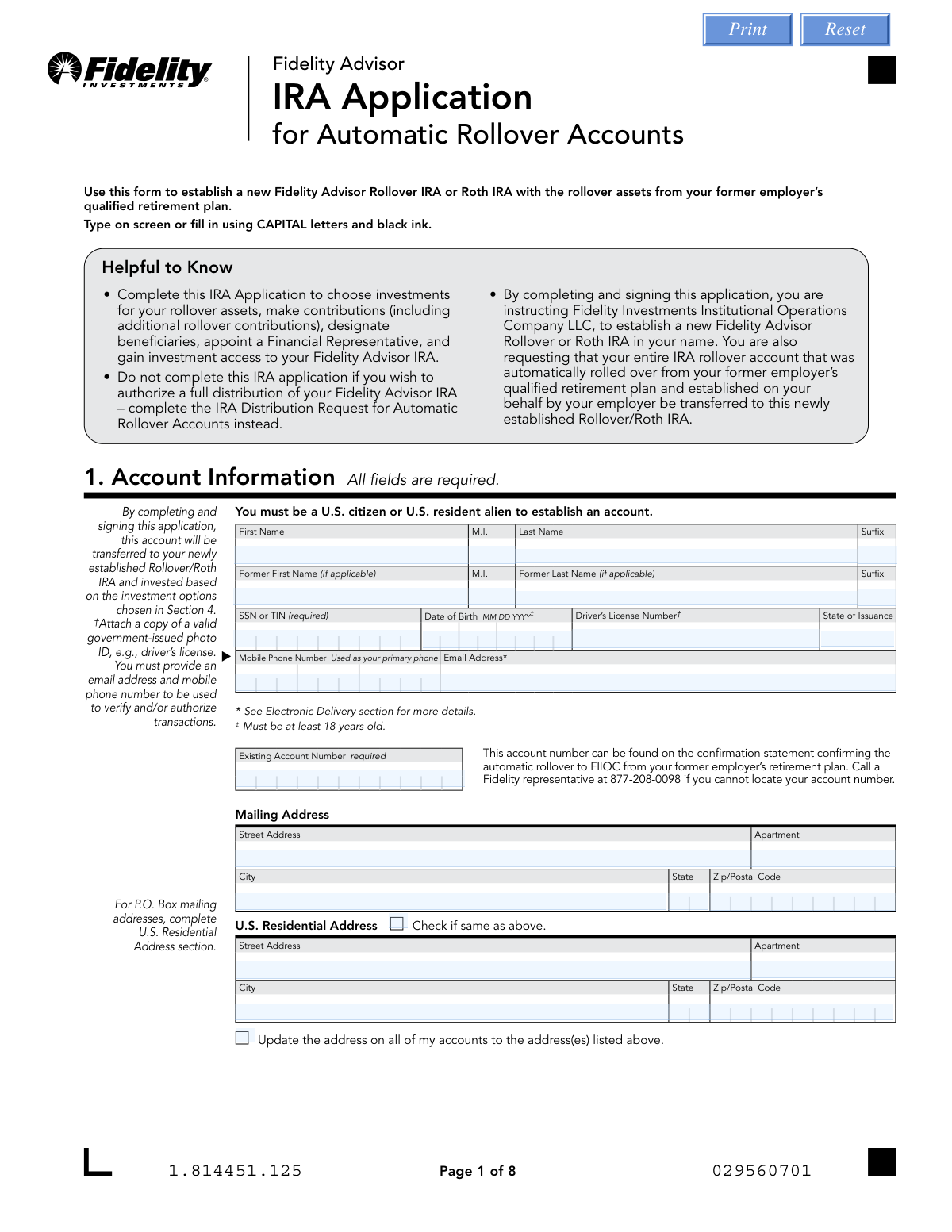
This form is an application to establish a new Fidelity Advisor Rollover IRA or Roth IRA using funds that were automatically rolled over from a former employer's qualified retirement plan. It is crucial for taking control of your retirement assets, allowing you to select specific investments, make additional contributions, and designate beneficiaries for the new account. Today, this form can be filled out quickly and accurately using AI-powered services like Instafill.ai, which can also convert non-fillable PDF versions into interactive fillable forms.
Our AI automatically handles information lookup, data retrieval, formatting, and form filling.
It takes less than a minute to fill out Fidelity Advisor IRA Application using our AI form filling.
Securely upload your data. Information is encrypted in transit and deleted immediately after the form is filled out.

Form specifications

Form name: Fidelity Advisor IRA Application for Automatic Rollover Accounts
Number of pages: 1
Language: English
Categories: rollover forms, IRA forms, Fidelity forms
main-image

Instafill Demo: How to fill out PDF forms in seconds with AI

How to Fill Out Fidelity Advisor IRA Application Online for Free in 2026

Are you looking to fill out a FIDELITY ADVISOR IRA APPLICATION form online quickly and accurately? Instafill.ai offers the #1 AI-powered PDF filling software of 2026, allowing you to complete your FIDELITY ADVISOR IRA APPLICATION form in just 37 seconds or less.
Follow these steps to fill out your FIDELITY ADVISOR IRA APPLICATION form online using Instafill.ai:
  1. 1 Navigate to Instafill.ai and upload the Fidelity Advisor IRA Application PDF or select it from their template library.
  2. 2 Use the AI assistant to accurately fill in your personal details in Section 1: Account Information, including your name, SSN, date of birth, and existing account number.
  3. 3 Complete Section 3: Financial Representative Information by providing the details of your appointed financial advisor.
  4. 4 In Section 4: Investment Options, specify the fund numbers and the dollar amount or percentage you wish to allocate to each investment.
  5. 5 Carefully complete Section 5: Beneficiary Designation for both primary and contingent beneficiaries, ensuring percentages total 100% for each category.
  6. 6 Review optional sections for electronic distributions, systematic investments, and bank information (Sections 6, 8, and 9), and provide necessary details if applicable.
  7. 7 Securely e-sign and date the application in Section 10, then use the platform to submit the completed form directly to Fidelity through their approved channels.

Our AI-powered system ensures each field is filled out correctly, reducing errors and saving you time.

Why Choose Instafill.ai for Your Fillable Fidelity Advisor IRA Application Form?

Speed

Complete your Fidelity Advisor IRA Application in as little as 37 seconds.

Up-to-Date

Always use the latest 2026 Fidelity Advisor IRA Application form version.

Cost-effective

No need to hire expensive lawyers.

Accuracy

Our AI performs 10 compliance checks to ensure your form is error-free.

Security

Your personal information is protected with bank-level encryption.

Frequently Asked Questions About Form Fidelity Advisor IRA Application

This form is used to formally establish and manage a Fidelity Advisor Rollover IRA or Roth IRA after your retirement assets were automatically rolled over from a former employer's plan. It allows you to choose investments, designate beneficiaries, and appoint a financial representative for your new account.

You should complete this form if your retirement savings from a previous job were automatically rolled over into a Fidelity Advisor IRA on your behalf. This application allows you to take control of that account, select investments, and make other important designations.

You must attach a copy of a valid government-issued photo ID, such as a driver's license, with your completed application. If you are setting up electronic transfers to a bank account not in your name, a voided check and notarization may also be required.

Your existing account number is on the confirmation statement you received when the automatic rollover occurred. If you cannot find the statement, you can call a Fidelity representative at 877-208-0098 to locate your account number.

Yes, Section 3 is a required section. You must appoint a Financial Representative as an agent for your Fidelity Advisor IRA to execute investment and other instructions on your behalf.

No, your beneficiary designations from your former employer's plan do not carry over to your new Fidelity Advisor IRA. You must complete Section 5 to designate new primary and contingent beneficiaries for this account.

If you do not designate a beneficiary, your surviving spouse will automatically become your primary beneficiary. If you have no surviving spouse, the assets in your IRA will go to your estate upon your death.

You need to indicate the fund number and the dollar amount or percentage you wish to allocate to each fund. You can find a list of available funds by visiting the Fidelity website mentioned in the form or by speaking with your Financial Representative.

No, this form is for establishing and managing the IRA. To request a full distribution (cash out) of the account, you must complete the 'IRA Distribution Request for Automatic Rollover Accounts' form instead.

You can submit the form by uploading it online through your Fidelity account, faxing it to 888-321-7349, or mailing it to the address provided on the last page. Note that if your form requires a notary or signature guarantee, it must be mailed.

By providing your email and signing the form, you agree to receive all account-related communications, such as statements and prospectuses, electronically. This replaces paper mail and applies to all eligible Fidelity accounts you own.

This is an optional feature that allows you to set up automatic, recurring contributions from your bank account to your IRA on a monthly or quarterly basis. To use this feature, you must also provide your bank information in Section 9.

Yes, services like Instafill.ai use AI to accurately auto-fill form fields, which can save you time and help reduce errors. You simply upload the form, and the AI populates the required information for your review.

To fill this form using Instafill.ai, upload the PDF to their platform. The AI will identify and fill in the fields with your information, and you can then review, edit, and download the completed, fillable form.

If you have a non-fillable or 'flat' PDF, you can use a service like Instafill.ai. It can convert the static PDF into an interactive, fillable form that you can easily complete on your computer.

Compliance Fidelity Advisor IRA Application
Validation Checks by Instafill.ai

1
Verifies Applicant is At Least 18 Years Old
This check validates the 'Date of Birth' provided in Section 1 to confirm the applicant is at least 18 years old, as explicitly required by the form. Establishing an IRA is a legal contract, and individuals must be of legal age to enter into it. If the applicant is found to be under 18, the application will be rejected.
2
Validates Social Security Number (SSN) Format
Ensures the SSN or TIN provided in Section 1 consists of exactly nine digits. This number is a mandatory federal requirement for identity verification (under the USA PATRIOT Act) and for tax reporting purposes by the IRS. An incorrectly formatted SSN will prevent account opening and requires immediate correction.
3
Ensures All Required Account Information Fields are Complete
Verifies that every field in Section 1, 'Account Information', is filled out, as the form states 'All fields are required'. This includes name, SSN, DOB, address, phone, and email. Missing any of this core information makes the application incomplete and legally insufficient to establish an account, so it would be returned to the applicant.
4
Validates Investment Allocation Percentages Sum to 100%
If percentages are used for fund allocation in Section 4, this check confirms that the 'Percentage Total' sums to exactly 100%. This is critical to ensure the entire account balance is invested according to the applicant's wishes, leaving no funds unallocated or misallocated. An incorrect total will cause the application to be flagged for correction before any investments are made.
5
Ensures Primary Beneficiary Percentages Total 100%
This check validates that the sum of the benefit percentages assigned to all 'Primary Beneficiaries' in Section 5 equals exactly 100%. This is a crucial legal check to ensure there is no ambiguity in how assets are to be distributed upon the account holder's death. If the total is not 100%, the beneficiary designation is considered invalid and must be corrected.
6
Ensures Contingent Beneficiary Percentages Total 100%
If 'Contingent Beneficiaries' are designated in Section 5, this check verifies that their assigned benefit percentages also sum to 100%. This provides a clear and legally sound plan for asset distribution if no primary beneficiaries survive the account holder. An incorrect total would create ambiguity and render the contingent designation invalid.
7
Verifies Completeness of Beneficiary Information
Confirms that for every beneficiary listed in Section 5, all fields marked as required (name, DOB/trust date, SSN/TIN, and percentage) are completed. Incomplete beneficiary data can lead to significant legal challenges and delays in distributing assets after the owner's death. The application will be considered incomplete if any required beneficiary information is missing.
8
Confirms Financial Representative Information is Provided
Section 3 states that the applicant is required to appoint a Financial Representative. This check ensures that the necessary fields in this section, such as Firm Name and Representative Name, are completed. Since this is a 'Fidelity Advisor' product, the relationship with an advisor is integral, and its absence would make the application invalid for this specific product type.
9
Validates ABA Routing Number Format
Verifies that the 'ABA Routing Number' in Section 9 is a valid 9-digit number, typically by using a checksum algorithm. This is essential for the successful setup of electronic fund transfers (ACH) via Money Line. An invalid routing number would cause all electronic transactions to fail, so the application cannot be processed with an incorrect number.
10
Verifies Account Owner Signature is Present
Confirms that the application has been signed and dated by the account owner in Section 10. The signature legally binds the applicant to the terms and conditions of the IRA Custodial Agreement. An unsigned application is not legally executable and will be rejected immediately.
11
Validates Notarization for Mismatched Bank Ownership
This check is triggered if the bank account owner(s) in Section 9 do not match the IRA account owner in Section 1. It verifies that the bank owner signatures in Section 11 are present and that the notarization sections for both the account owner (Section 10) and bank owner (Section 11) are completed. This is a critical fraud prevention step; failure to provide the required notarization will prevent the bank link from being established.
12
Ensures Existing Account Number is Provided
Verifies that the 'Existing Account Number' field in Section 1 is filled out, as it is marked 'required'. This number is necessary for Fidelity to identify the specific automatic rollover account that is being converted into this new self-directed IRA. Without this number, the source of funds cannot be located, and the transfer cannot be executed.
13
Confirms At Least One Investment Option is Selected
Validates that at least one fund number has been entered in Section 4, 'Investment Options', as per the form's instructions. This is required to direct how the rollover assets should be invested upon transfer. An application lacking any investment direction would be incomplete, as the primary purpose is to choose investments for the rollover assets.
14
Cross-references Systematic Investment and Bank Information
This check ensures that if the optional 'Systematic Investment Program' in Section 8 is completed, then the 'Bank Information' in Section 9 is also fully and correctly filled out. The systematic investment plan relies on ACH drafts from a bank account. Therefore, completing Section 8 without providing the necessary bank details in Section 9 creates a logical conflict that must be resolved.

Common Mistakes in Completing Fidelity Advisor IRA Application

Incomplete or Incorrect Beneficiary Designation

Applicants often make errors in Section 5, such as leaving beneficiary percentages blank, having percentages that do not total 100%, or omitting required information like a beneficiary's Social Security Number or date of birth. A common misunderstanding is that beneficiaries from a former employer's plan automatically carry over, which they do not. These mistakes can lead to significant delays and legal complications upon the account holder's death, potentially causing assets to be distributed to an unintended party or the estate by default. To avoid this, carefully fill out all fields for each beneficiary and double-check that the percentages sum to exactly 100%.

Missing the Existing Account Number

This form is specifically for automatic rollover accounts, and the 'Existing Account Number' in Section 1 is the primary identifier used by Fidelity to locate the funds being rolled over. Applicants frequently overlook this field, assuming their SSN is sufficient. Without this number, Fidelity cannot link the application to the correct assets, causing the entire process to be halted until the applicant provides the information. To prevent this, locate the account number on the confirmation statement from the initial automatic rollover or call a Fidelity representative as instructed on the form.

Investment Allocation Errors

In Section 4, applicants must select specific funds and allocate their investment by either dollar amount or percentage, with percentages needing to total 100%. Common errors include leaving the section blank, providing both a dollar amount and a percentage for the same fund, or making calculation errors so the percentages do not sum to 100%. If this section is incomplete or incorrect, the entire rollover amount will be invested in a default money market fund, which may not align with the applicant's long-term investment strategy. Always verify your fund choices and ensure your allocation math is correct.

Missing Required Notarization for Bank Information

The form requires notarization in Sections 10 and 11 if the bank account listed in Section 9 for electronic transfers does not share a common owner with the IRA account. This is a complex requirement that is very easy to miss, as it involves multiple sections and requires coordination with all bank account owners. Failure to obtain the necessary notarized signatures will result in the rejection of the electronic transfer setup (Money Line) and can delay the entire application. Carefully review ownership of all accounts and visit a notary if names do not match.

Forgetting to Attach a Copy of a Government-Issued ID

Section 1 explicitly requires the applicant to attach a copy of a valid government-issued photo ID, like a driver's license, to comply with federal identity verification regulations. Forgetting to include this attachment is a frequent oversight that leads to an incomplete application. Fidelity cannot open the account until this documentation is received, causing significant processing delays. To avoid this, gather all necessary documents, including your ID, before you begin filling out the form.

Missing Account Owner Signature and Date

Forgetting to sign and date the application in Section 10 is one of the most common reasons for a form to be rejected. An unsigned application is not legally binding and cannot be processed by Fidelity. This simple oversight brings the entire account opening process to a halt until a properly signed form is submitted. Always perform a final review of the document specifically to check for your signature and the current date. AI-powered form filling tools like Instafill.ai can prevent this by highlighting mandatory signature fields.

Incomplete Financial Representative Information

Section 3, which must be completed by a Financial Representative, is a mandatory part of this application. Applicants sometimes submit the form without having their representative fill out this section, or the representative may omit key details like the Firm Number or an authorized signature. This will cause the application to be rejected, as Fidelity requires a designated representative to be on record for a Fidelity Advisor IRA. Ensure you coordinate with your financial representative to have this section completed accurately before submission.

Incorrect Bank Routing or Account Numbers

When providing bank details in Section 9 for features like the Systematic Investment Program, it is easy to accidentally transpose digits in the ABA routing number or the bank account number. Such data entry errors will cause all electronic fund transfer attempts to fail, leading to missed contributions and funding delays. To prevent this, meticulously cross-reference the numbers with a preprinted check or your bank statement. Using a tool like Instafill.ai can help reduce these errors through data validation and by accurately pulling information from linked accounts.

Using a P.O. Box for the U.S. Residential Address

Federal law requires financial institutions to obtain, verify, and record a physical residential address for all customers. While the form allows a P.O. Box for a 'Mailing Address,' one cannot be used for the 'U.S. Residential Address' in Section 1. Using a P.O. Box in the residential address field will result in the application being returned for correction. To ensure compliance and avoid delays, always provide your full physical street address.

Electing Systematic Investments Without Providing Bank Details

Applicants may choose to set up a Systematic Investment Program in Section 8 to make regular, automatic contributions but then fail to provide the necessary bank account information in Section 9. The form clearly states that bank information is required to establish this program. This oversight means the systematic investment plan cannot be activated, and no automatic contributions will be made. To avoid this, if you complete Section 8, you must also complete Section 9 or attach a voided check. Since this form is a non-fillable PDF, a tool like Instafill.ai can convert it to a fillable version and use conditional logic to remind you to complete Section 9 if you've filled out Section 8.
Saved over 80 hours a year

“I was never sure if my IRS forms like W-9 were filled correctly. Now, I can complete the forms accurately without any external help.”

Kevin Martin Green

Your data stays secure with advanced protection from Instafill and our subprocessors

Robust compliance program

Transparent business model

You’re not the product. You always know where your data is and what it is processed for.

ISO 27001, HIPAA, and GDPR

Our subprocesses adhere to multiple compliance standards, including but not limited to ISO 27001, HIPAA, and GDPR.

Security & privacy by design

We consider security and privacy from the initial design phase of any new service or functionality. It’s not an afterthought, it’s built-in, including support for two-factor authentication (2FA) to further protect your account.

Fill out Fidelity Advisor IRA Application with Instafill.ai

Worried about filling PDFs wrong? Instafill securely fills fidelity-advisor-ira-application-for-automatic-rollover-accounts forms, ensuring each field is accurate.