Yes! You can use AI to fill out Fidelity Advisor IRA Application for Automatic Rollover Accounts

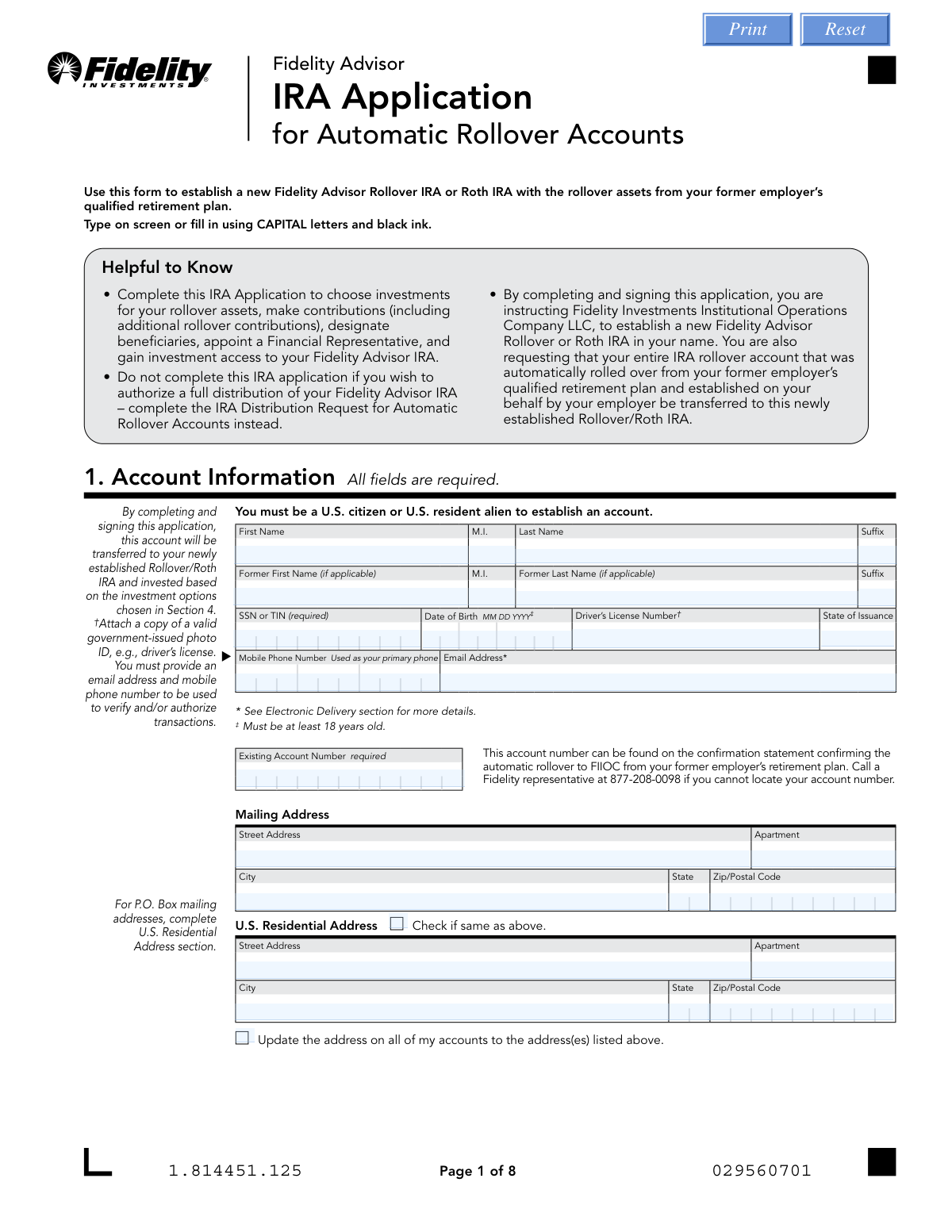
The Fidelity Advisor IRA Application for Automatic Rollover Accounts is a form used to set up a new Fidelity Advisor Rollover IRA or Roth IRA. It allows individuals to transfer assets from a former employer's qualified retirement plan that were automatically rolled over, choose investments, and designate beneficiaries. This is a crucial step for taking control of retirement funds after leaving a job. Today, this form can be filled out quickly and accurately using AI-powered services like Instafill.ai, which can also convert non-fillable PDF versions into interactive fillable forms.
Our AI automatically handles information lookup, data retrieval, formatting, and form filling.
It takes less than a minute to fill out Fidelity Advisor IRA Application using our AI form filling.
Securely upload your data. Information is encrypted in transit and deleted immediately after the form is filled out.

Form specifications

Form name: Fidelity Advisor IRA Application for Automatic Rollover Accounts
Number of pages: 1
Language: English
Categories: rollover forms, IRA forms, Fidelity forms
main-image

Instafill Demo: How to fill out PDF forms in seconds with AI

How to Fill Out Fidelity Advisor IRA Application Online for Free in 2026

Are you looking to fill out a FIDELITY ADVISOR IRA APPLICATION form online quickly and accurately? Instafill.ai offers the #1 AI-powered PDF filling software of 2026, allowing you to complete your FIDELITY ADVISOR IRA APPLICATION form in just 37 seconds or less.
Follow these steps to fill out your FIDELITY ADVISOR IRA APPLICATION form online using Instafill.ai:
  1. 1 Navigate to Instafill.ai and upload the Fidelity Advisor IRA Application form or select it from their template library.
  2. 2 Use the AI assistant to accurately fill in your personal details in Section 1: Account Information, including your SSN, date of birth, and contact information.
  3. 3 Complete Section 3 to appoint a Financial Representative who will manage your account and execute investment instructions on your behalf.
  4. 4 In Section 4: Investment Options, specify the funds and allocation percentages for your rollover assets, ensuring your investment strategy is clearly defined.
  5. 5 Carefully complete Section 5: Beneficiary Designation to name the primary and contingent beneficiaries who will inherit the IRA upon your death.
  6. 6 Review optional sections for electronic distributions, systematic investments, and bank information (Sections 6-9) to set up additional account features.
  7. 7 Electronically or manually sign and date the application in Section 10. Ensure any required notarizations are completed before submitting the form to Fidelity as instructed.

Our AI-powered system ensures each field is filled out correctly, reducing errors and saving you time.

Why Choose Instafill.ai for Your Fillable Fidelity Advisor IRA Application Form?

Speed

Complete your Fidelity Advisor IRA Application in as little as 37 seconds.

Up-to-Date

Always use the latest 2026 Fidelity Advisor IRA Application form version.

Cost-effective

No need to hire expensive lawyers.

Accuracy

Our AI performs 10 compliance checks to ensure your form is error-free.

Security

Your personal information is protected with bank-level encryption.

Frequently Asked Questions About Form Fidelity Advisor IRA Application

This form is used to establish a new Fidelity Advisor Rollover IRA or Roth IRA for assets that were automatically rolled over from your former employer's retirement plan. It allows you to choose investments, designate beneficiaries, and gain full access to your new IRA.

You should fill out this form if your retirement funds from a previous job were automatically rolled into a Fidelity IRA on your behalf and you now want to take control of that account. Do not use this form if you want to take a cash distribution; use the 'IRA Distribution Request' form instead.

You will need your personal information (name, SSN, date of birth, address), your existing automatic rollover account number, and a copy of a valid government-issued photo ID. You must also provide an email address and mobile number for transaction verification.

Your account number is on the confirmation statement you received when the rollover occurred. If you cannot locate it, you can call a Fidelity representative at 877-208-0098 for assistance.

Yes, the form states that you are required to appoint a Financial Representative as an agent for your Fidelity Advisor IRA. You should have your chosen representative complete this section.

You must indicate at least one fund for your initial rollover assets. For any future contributions made without specific investment instructions, the funds will be automatically invested in the Fidelity Government Money Market Fund.

Yes, you must complete Section 5 as beneficiary designations from your former employer's plan do not carry over to your new IRA. If you don't designate a beneficiary, your surviving spouse automatically becomes the primary beneficiary, or your estate if you have no spouse.

You can submit the form by uploading it online via accounts.fidelity.com, faxing it to 888-321-7349, or mailing it to the address provided. If your form requires a notary or an original signature guarantee, you must mail the original document.

Notarization is only required if you are setting up the Money Line feature (Section 9) and the bank account you list does not have at least one owner in common with the Fidelity IRA. In that case, both the IRA owner and all bank account owners must have their signatures notarized.

Householding is a service that combines mailings for all investors at the same address into a single envelope to reduce paper waste. By default, you consent to this, but you can check the box in Section 7 to opt out and receive separate mailings.

This is an optional feature that allows you to set up automatic, recurring contributions from your bank account to your IRA on a monthly or quarterly basis. To use this feature, you must also provide your bank information in Section 9.

Yes, services like Instafill.ai use AI to accurately auto-fill form fields with your information, which can save you time and help reduce errors. This is especially useful for lengthy forms with repetitive data entry.

You can use a service like Instafill.ai to fill the form online. Simply upload the PDF to their platform, and their AI will help you complete the fields quickly and accurately before you print it for signature and submission.

If you have a non-fillable or 'flat' PDF, tools like Instafill.ai can convert it into an interactive, fillable form. This allows you to type your information directly into the fields instead of printing and filling it out by hand.

Compliance Fidelity Advisor IRA Application
Validation Checks by Instafill.ai

1
Verifies Applicant is at Least 18 Years Old
This check calculates the applicant's age based on the 'Date of Birth' provided in Section 1. The form explicitly states that the account owner must be at least 18 years old to establish an account. This is a legal requirement for entering into the custodial agreement. If the applicant is under 18, the application must be rejected and the user notified of the age requirement.
2
Validates Social Security Number (SSN) or Taxpayer Identification Number (TIN) Format
This validation ensures the 'SSN or TIN' in Section 1 conforms to the standard 9-digit format (e.g., XXX-XX-XXXX or XXXXXXXXX). A valid tax identification number is critical for IRS reporting, identity verification under the Patriot Act, and preventing account setup failures. An invalid format would halt processing and require correction from the applicant.
3
Ensures Residential Address is Provided for P.O. Box Mailing Address
This check is triggered if the 'Mailing Address' in Section 1 is identified as a P.O. Box. It then verifies that the 'U.S. Residential Address' section has been completed with a physical street address. Federal regulations require financial institutions to obtain a physical address, making this essential for compliance. Failure to provide a residential address will result in an incomplete application.
4
Confirms Presence of Both Email and Mobile Phone Number
This validation confirms that both the 'Email Address' and 'Mobile Phone Number' fields in Section 1 are filled out. The form states these are required to 'verify and/or authorize transactions,' making them crucial for account security and multi-factor authentication. Missing contact information would prevent the account from being fully operational and secure, so the application would be flagged as incomplete.
5
Checks for Required Financial Representative Information
The form states in Section 3 that the applicant is 'required to appoint a Financial Representative.' This check ensures that key fields within Section 3, such as 'Firm Name,' 'Representative First Name,' and 'Representative Last Name,' are completed. Without this information, the account cannot be properly managed as a Fidelity Advisor IRA, which operates through financial intermediaries. The application would be considered incomplete without this appointment.
6
Validates Investment Allocation Total Equals 100%
If the applicant chooses to allocate investments by percentage in Section 4, this check sums the values entered in the 'Percentage' fields. The total must equal exactly 100%. This validation is critical to ensure that all rolled-over funds are invested according to the owner's wishes, preventing unallocated cash balances or processing errors. A total other than 100% would require the applicant to correct the allocations.
7
Ensures Exclusive Use of Dollar or Percentage for Investment Allocation
This check iterates through each fund listed in Section 4 and verifies that for each fund, either a 'Dollar Amount' or a 'Percentage' is specified, but not both. Ambiguous instructions could lead to incorrect investment amounts or processing delays. If both are filled for a single fund, the application must be returned for clarification.
8
Verifies Primary Beneficiary Percentages Sum to 100%
This validation ensures that the percentages assigned to all 'Primary Beneficiaries' in Section 5 add up to exactly 100%. This is crucial for the legal and unambiguous distribution of assets upon the account owner's death. An incorrect total would create legal uncertainty and prevent the beneficiary designation from being valid, requiring immediate correction.
9
Confirms Contingent Beneficiary Percentages Sum to 100%
If any 'Contingent Beneficiaries' are designated in Section 5, this check verifies that their assigned percentages total 100%. This ensures a clear and legally sound plan for asset distribution if no primary beneficiaries survive the account owner. An invalid total would render the contingent designation void and require correction.
10
Validates ABA Routing Number in Bank Information
If bank information is provided in Section 9, this check ensures the 'ABA Routing Number' is a valid 9-digit number. This can include a format check and a checksum validation to confirm it's a legitimate routing number. An invalid number would cause all electronic fund transfers (ACH), such as for a Systematic Investment Program, to fail, making this check essential for account funding features.
11
Checks for Required Notarization with Mismatched Bank Ownership
This is a conditional check that compares the 'Bank Account Owner Name' in Section 9 with the 'Account Owner' name in Section 1. If there is no common owner, the form requires notarization in Section 10 (for the IRA owner) and Section 11 (for all bank owners). This validation ensures compliance with anti-fraud measures for third-party money movement. Failure to provide the required notarizations under these conditions would block the establishment of electronic payment features.
12
Confirms Account Owner Signature and Date are Present
This check verifies that the 'Account Owner Signature' and 'Date' fields in Section 10 are both completed. The signature legally binds the applicant to the terms of the custodial agreement, and the date establishes when the agreement was signed. An unsigned or undated form is not legally executable and cannot be processed.

Common Mistakes in Completing Fidelity Advisor IRA Application

Omitting the Existing Rollover Account Number

Applicants must provide the account number assigned during the automatic rollover from their former employer's plan in Section 1. This number is often overlooked or difficult to locate on statements, leading to an inability to link the new application to the existing funds. Without this number, Fidelity cannot process the transfer, causing significant delays until the applicant calls to retrieve it. To avoid this, carefully review your rollover confirmation statement before starting the application.

Leaving Financial Representative Information Blank

Section 3 is mandatory and requires details and a signature from the financial representative's firm, as this is a 'Fidelity Advisor' product. Applicants sometimes leave this section blank, assuming it's optional or that they can fill it out themselves, which is incorrect. This is a hard stop in the application process, as a representative is required for this type of IRA. Ensure your chosen financial representative completes and signs this section before you submit the form to prevent immediate rejection.

Errors in Investment Option Allocation

In Section 4, applicants frequently make errors such as providing both a dollar amount and a percentage for the same fund, or having percentage allocations that do not total exactly 100%. These mistakes create ambiguity and result in the entire rollover amount being placed in a default Fidelity Government Money Market Fund, which may not align with the applicant's investment goals. To prevent this, double-check your math and choose either percentages or dollar amounts, not both. AI form-filling tools like Instafill.ai can automatically validate that percentages sum to 100%, preventing such errors.

Failing to Designate New Beneficiaries

A critical error is assuming that beneficiary designations from a former 401(k) automatically transfer to the new Rollover IRA; the form explicitly states in Section 5 that they do not. Forgetting to complete this section means the account will be subject to default rules upon death (typically passing to a spouse, then the estate), which may contradict the account holder's wishes. Always complete this section fully to ensure your assets are distributed as intended.

Incorrect Beneficiary Percentage Totals

When naming multiple primary or contingent beneficiaries in Section 5, the assigned percentages must sum to exactly 100% for each respective group. Applicants often make simple calculation errors, rendering the beneficiary designation invalid and requiring the form to be returned for correction. This delays account setup and leaves the account without a valid designation in the interim. Carefully verify that your primary beneficiary percentages total 100% and your contingent beneficiary percentages also total 100%.

Missing Required Signatures or Notarization

Forgetting to sign and date the application in Section 10 is a common reason for rejection. Furthermore, a notarized signature is required in both Section 10 and 11 if the bank account listed for electronic transfers (Section 9) does not share a common owner with the IRA. Missing this crucial notarization step when required will halt the Money Line setup and can delay the entire application. Since this form is a non-fillable PDF, tools like Instafill.ai can convert it to a fillable version and highlight signature fields to ensure they aren't missed.

Forgetting to Attach Supporting Documents

The application requires several attachments, including a copy of a valid government-issued photo ID (Section 1) and often a preprinted voided check for bank information (Section 9). Applicants can easily forget to include these physical or scanned documents with their submission. This omission leads to processing delays as Fidelity must contact the applicant to request the missing items. Create a checklist before submission to ensure all required documents are included.

Providing a P.O. Box without a Physical Address

Federal regulations require financial institutions to obtain a physical residential address for identity verification. While Section 1 allows for a P.O. Box as a mailing address, it explicitly requires the 'U.S. Residential Address' section to be completed as well in this case. Applicants who only provide a P.O. Box will have their application returned for correction, delaying the account opening. Always provide a full residential street address, even if you prefer to receive mail at a P.O. Box.

Misunderstanding Tax Withholding Elections on Distributions

On the separate IRA Distribution Request form, applicants must make federal and state tax withholding elections. Many people are unaware that if no election is made, Fidelity is required to withhold a default of 10% for federal taxes on non-Roth IRA distributions. Choosing to opt-out of withholding without planning for the tax liability can result in a large, unexpected tax bill later. It is crucial to understand these choices or consult a tax advisor before requesting a distribution.

Providing an Invalid Email or Phone Number

Section 1 explicitly states that a mobile phone number and email address must be provided to verify and authorize transactions. Entering an incorrect or outdated email or phone number can prevent you from receiving critical account alerts, trade confirmations, and security verification codes. This can lock you out of important account functions and delay access to your funds. Advanced form-filling tools like Instafill.ai can help prevent typos by validating data formats as you enter them.
Saved over 80 hours a year

“I was never sure if my IRS forms like W-9 were filled correctly. Now, I can complete the forms accurately without any external help.”

Kevin Martin Green

Your data stays secure with advanced protection from Instafill and our subprocessors

Robust compliance program

Transparent business model

You’re not the product. You always know where your data is and what it is processed for.

ISO 27001, HIPAA, and GDPR

Our subprocesses adhere to multiple compliance standards, including but not limited to ISO 27001, HIPAA, and GDPR.

Security & privacy by design

We consider security and privacy from the initial design phase of any new service or functionality. It’s not an afterthought, it’s built-in, including support for two-factor authentication (2FA) to further protect your account.

Fill out Fidelity Advisor IRA Application with Instafill.ai

Worried about filling PDFs wrong? Instafill securely fills fidelity-advisor-ira-application-for-automatic-rollover-accounts-1 forms, ensuring each field is accurate.